AAL Connector For LACRM
AAL Connector For LACRM
Description
AAL Connector For LACRM connects your WordPress forms to Less Annoying CRM (LACRM). When someone submits a Contact Form 7 or Gravity Forms form, the plugin creates or updates a contact in LACRM—no duplicate contacts when the same email is used.
Features
- Contact Form 7 – Add a “Less Annoying CRM” tab when editing forms. Enable sync and map fields (name, email, phone, company, notes).
- Gravity Forms – Use the LACRM feed add-on under form Settings to sync entries to LACRM.
- API verification – Verify your API key from the settings page before saving.
- Detected form plugins – Settings page shows which form plugins are installed with quick links to manage forms.
- Field mapping – Map form fields to LACRM: First Name, Last Name, Email, Phone, Company, Notes.
- Duplicate handling – Finds existing contacts by email and updates them instead of creating duplicates.
- Optional logging – Log API calls and sync events for debugging.
Requirements
- WordPress 6.0 or higher
- PHP 8.0 or higher
- Contact Form 7 and/or Gravity Forms (install separately)
- A Less Annoying CRM account and API key (Settings Programmer API in LACRM)
Getting your API key
- Log in to Less Annoying CRM.
- Go to Settings Programmer API.
- Create an API key and copy it into Settings AAL Connector For LACRM in WordPress.
External services
This plugin sends form submission data to Less Annoying CRM (LACRM) so that contacts can be created or updated in your CRM. The connection is required for the plugin to work.
What the service is and what it is used for:
Less Annoying CRM is a third-party CRM service. This plugin uses the LACRM API to create or update contacts when someone submits a Contact Form 7 or Gravity Forms form on your site.
What data is sent and when:
When a visitor submits a form that has LACRM sync enabled, the plugin sends to LACRM only the data that you have mapped (for example: first name, last name, email, phone, company, notes). Data is sent at the time of form submission. Your LACRM API key is stored in your WordPress database and is sent with each API request to authenticate your account. No data is sent to LACRM unless a form is submitted and sync is enabled for that form.
Third-party links:
Less Annoying CRM is provided by Less Annoying CRM. Their Terms of Service and Privacy Policy apply to data processed by their service.
Installation
- Install Contact Form 7 and/or Gravity Forms if you haven’t already.
- Upload the plugin folder to
/wp-content/plugins/or install via Plugins Add New and search for “AAL Connector For LACRM”. - Activate AAL Connector For LACRM.
- Go to Settings AAL Connector For LACRM, enter your LACRM API key, and click Verify API to confirm it works.
- Edit your CF7 or Gravity Forms form and enable LACRM sync; map fields and save.
Screenshots
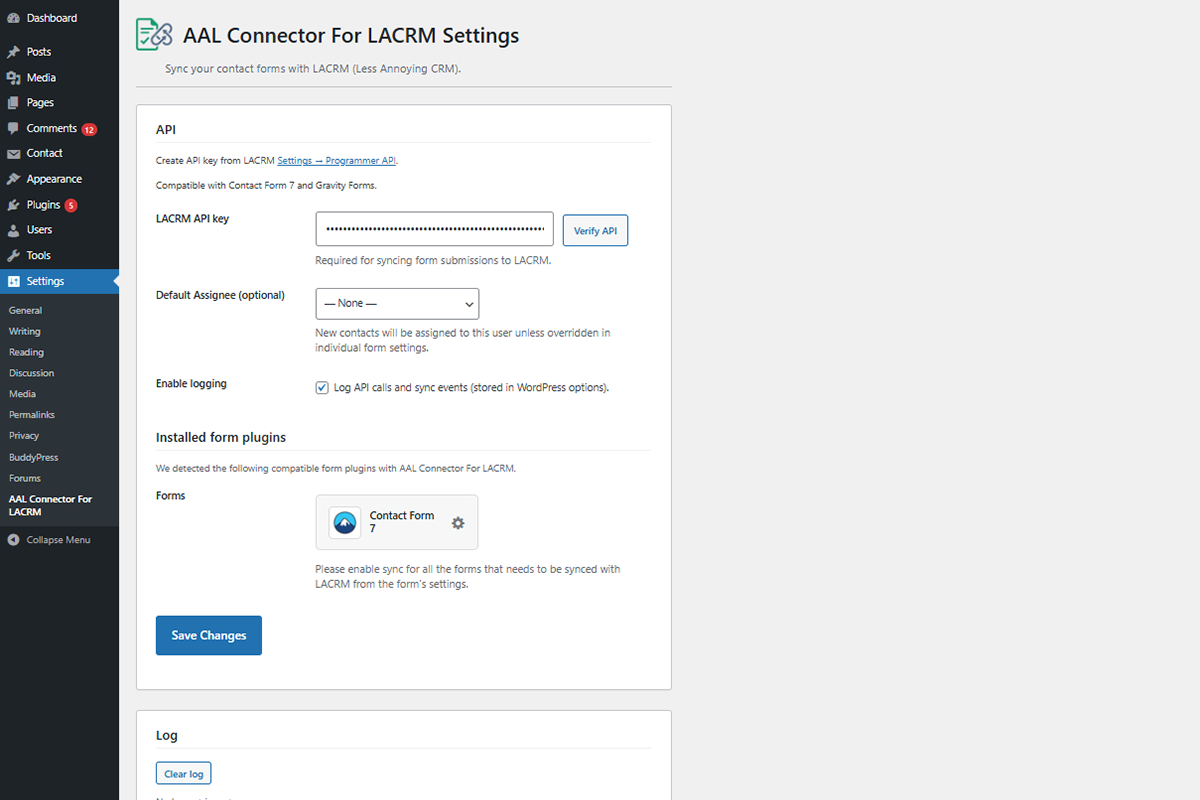
Settings page: API key, verify button, default owner, and detected form plugins with links to forms.
Faq
No. Install only the form plugin you use. AAL Connector For LACRM works with one or both.
The plugin looks up the contact by email in LACRM. If found, it updates that contact and can add a note. If not found, it creates a new contact.
In Less Annoying CRM: Settings Programmer API. Create a key and paste it in Settings AAL Connector For LACRM in WordPress.
Reviews
Changelog
1.0.0
- Initial release.
- Contact Form 7 integration with LACRM tab and field mapping.
- Gravity Forms feed add-on with field mapping.
- API verification via AJAX on settings page.
- Detection of installed form plugins with links to form list pages.
- Optional logging of API and sync events.