ABP RentalForge

ABP RentalForge
Description
RentalForge is a powerful WooCommerce-based WordPress rental and booking plugin designed for property rentals, equipment rentals, vehicle rentals, and other rental businesses. Manage bookings, pricing, inventory, availability, and rental orders from a single dashboard.
Create flexible rental pricing with hourly, daily, monthly, or combined pricing models. Configure booking rules, rental durations, deposits, quantity limits, and availability schedules to match your business requirements.
RentalForge includes advanced property management tools, inventory control, order management, client forms, additional services, FAQs, and global feature controls. Unused modules can be disabled globally to keep both the admin dashboard and frontend clean and lightweight.
Whether you manage vacation rentals, construction equipment, vehicles, offices, event equipment, tools, or any other rentable products, RentalForge provides a fast, flexible, and user-friendly rental management solution powered by WooCommerce.
Built with WordPress coding standards, RentalForge is lightweight, developer-friendly, translation ready, responsive, and easy to customize.
✨ Why Choose RentalForge?
RentalForge is a powerful and flexible WooCommerce rental booking solution designed for businesses of all sizes. Whether you’re renting equipment, vehicles, properties, boats, offices, or event items, RentalForge provides everything you need to manage bookings, inventory, pricing, and customers from one place.
Whether you’re managing a small rental business or a large inventory-based company, RentalForge scales with your business.
🚀 Key Features
- WooCommerce Powered – Fully integrated with WooCommerce for payments, taxes, coupons, and order management.
- Complete Rental Management – Manage unlimited rental properties, equipment, vehicles, and booking resources from a single dashboard.
- Feature Toggle System – Enable or disable any major feature globally. Disabled modules are completely removed from both the admin dashboard and frontend.
- Flexible Pricing Engine – Create hourly, daily, monthly, or combined pricing models with automatic price calculation.
- Advanced Inventory Management – Manage stock, quantity limits, reservations, and rental availability with ease.
- Duplicate & Move Properties – Duplicate complete properties, copy property settings, or move rental configurations between WordPress posts.
- Powerful Order Management – Manage bookings with advanced filters, pagination, customer search, and booking status tracking.
- Rental Order Status Workflow – Track every booking from Waiting to In Rent to Completed, with one-click Mark Delivered and Mark Received actions.
- Automatic Delivery & Return – Optional global switches to automatically move rentals to In Rent and Completed based on their booking period.
- Global Configuration – Control booking settings, client forms, FAQs, additional services, Terms & Conditions, and other options from one place.
- Responsive Property Listings – Display beautiful rental listings with image galleries, sliders, and shortcode support.
- Guest Management – Store customer details and complete booking history.
- Customer My Account Bookings – Logged-in customers get a dedicated “My Bookings” tab inside the WooCommerce My Account page showing their own rentals with dates, items, prices, status and billing details.
- Frontend Customization – Customize layouts with built-in CSS options and flexible slider settings.
- Developer Friendly – Built with WordPress coding standards, hooks, filters, optimized database tables, and translation-ready architecture.
- Multi-Currency Ready – Compatible with WooCommerce multi-currency solutions.
- Fully Responsive – Optimized for desktop, tablet, and mobile devices.
Applications of RentalForge
RentalForge is suitable for almost any rental or booking business, including:
✓ Property & Apartment Rentals
✓ Vacation Homes & Resorts
✓ Office & Coworking Space Rentals
✓ Vehicle Rentals
✓ Car Rentals
✓ Bike & Bicycle Rentals
✓ Motorcycle & Scooter Rentals
✓ Boat & Yacht Rentals
✓ Equipment & Tool Rentals
✓ Construction Equipment Rentals
✓ Party & Event Equipment Rentals
✓ Camera & Photography Equipment Rentals
✓ Audio & DJ Equipment Rentals
✓ Sports & Fitness Equipment Rentals
✓ Dress & Costume Rentals
✓ Furniture Rentals
✓ Camping & Outdoor Gear Rentals
✓ Medical Equipment Rentals
✓ Doctor Appointment Booking
✓ Lawyer Appointment Booking
✓ Studio & Meeting Room Bookings
✓ Generator Rental
✓ Furniture Rental
✓ Camera Rental
✓ Electronics Rental
✓ Party Decoration Rental
✓ Sound System Rental
✓ Tent Rental
✓ Agricultural Equipment Rental
✓ Any Type of Goods, Equipment, or Property Rental Business
Shortcodes
Use the following shortcodes to display rental content anywhere on your website.
[abprf-booking] — Display rental listings with the complete booking system. Supports List, Grid, and Masonry layouts.
[abprf-post] —Display rental posts in List, Grid, or Masonry layouts.
[abprf-property] — Display rental properties in List, Grid, or Masonry layouts.
[abprf-gallery] — Display property or post images in Gallery (Masonry) or Slider layouts.
💰 Flexible Pricing
- Hourly pricing
- Daily pricing
- Monthly pricing
- Combined hourly and daily pricing
- Combined monthly and daily pricing
- Automatic Dynamic Price Calculation
📦 Inventory Management
- Available Stock
- Minimum quantity (optional)
- Maximum quantity (optional)
- Reserved quantity support (optional)
- Inventory Control
📅 Booking & Availability
- Day-wise Availability
- Special Date Configuration
- Booking Time Restrictions
- Availability Override
- Flexible Booking Rules
💳 Advanced Deposit System
- Fixed amount deposit
- Percentage of total price
- Fixed amount per quantity
🛒 Order Management
- Fully Filterable Orders
- Pagination Support
- Booking Status Management
- Customer Information
- Order Tracking
⚙️ Global Feature Management
- Enable or Disable Any Feature Globally
- Remove Disabled Features from the Entire Website
- Global Client Forms
- Global Additional Services
- Global FAQ System
- Global Terms & Conditions
- Global Booking Configuration
- Global Module Management
🎨 Customization
- Custom CSS Configuration
- Slider Configuration
- Responsive Layout
- Shortcode Support
- Easy Frontend Customization
🧠 Smart Booking Rules
- Set minimum and maximum rental duration
- Configure booking time restrictions
- Define flexible rental rules easily
🖥 Frontend Experience
- Dynamic price calculation system
- Simple and user-friendly booking interface
- Shortcode-based property listing system
➕ Additional Services
- Global Additional Services
- Per Property Additional Services
🧾 Client Information Form
- Global Client Form
- Custom per-post form builder system
❓ FAQ & Term Support
- Global FAQ system
- Custom FAQ per post
- Fully editable Terms & Conditions system
✅ Free Features
Everything below is included in the free plugin:
✓ Unlimited rental posts, properties & bookings
✓ WooCommerce Powered – payments, taxes, coupons & orders
✓ Flexible Pricing Engine – hourly, daily, monthly & combined pricing
✓ Automatic Dynamic Price Calculation
✓ Advanced Deposit System – fixed amount, percentage & per-quantity deposits
✓ Smart Booking Rules – min/max duration & time restrictions
✓ Day-wise Availability & Special Date Configuration
✓ Availability Override
✓ Inventory Management – stock, min/max & reserved quantity
✓ Multiple Rental Locations
✓ Location-based Search & Filtering – search properties by location with lat/lng coordinates, service radius & polygon areas
✓ Tax Configuration
✓ Rental Order Status Workflow – Waiting In Rent Completed with Mark Delivered & Mark Received actions
✓ Automatic Delivery & Return – global ON/OFF switches to auto-advance bookings
✓ Delivery & Return Timestamps – records when each order was delivered and received
✓ Security Deposit Auto-Refund – deposit is released and deducted from the total on return
✓ Search & Filter
✓ Responsive Gallery & Slider
✓ Global Feature Toggle System
✓ Global Configuration – booking, client forms, FAQs, services & T&C
✓ Additional Services – global & per-post
✓ Client Information Forms – global & per-post builder
✓ FAQ & Terms & Conditions – global & per-post
✓ Order Management – filters, pagination & status tracking
✓ Customer My Account Bookings – dedicated “My Bookings” tab in WooCommerce My Account
✓ Property Duplication & Move
✓ Shortcodes – [abprf-booking], [abprf-post], [abprf-property], [abprf-gallery]
✓ Responsive Layout
✓ Custom CSS Configuration
✓ Translation Ready
✓ Developer Friendly – hooks, filters & templates
⭐ Pro Features
Everything in Free, plus:
✅ Seasonal Pricing & Discount Rules
✅ Early Bird Pricing & Discount
✅ Location-wise Stock Management – set different stock quantities for each rental location independently
✅ Check-in Management
✅ Partial Payment / Advance Payment Support
✅ Export Orders to PDF
✅ Export Orders to CSV
✅ Professional PDF Invoice Generation
✅ Automatically Send PDF Invoices via Email
✅ Resend Booking Emails with PDF Attachments
✅ Create Bookings Directly from the Admin Dashboard
✅ Advanced Email Notifications
✅ Premium Support
✅ Priority Updates & New Features
Features at a Glance
✓ Unlimited Rental Properties
✓ Unlimited Bookings
✓ WooCommerce Powered
✓ Inventory Management
✓ Availability Management
✓ Multiple Pricing Models
✓ Deposit System
✓ Feature Toggle System
✓ Order Status Workflow
✓ Automatic Delivery & Return
✓ Global Configuration
✓ Property Duplication
✓ Responsive Layout
✓ Translation Ready
✓ Developer Friendly
Need help or have suggestions?
If you need any further assistance or support, do contact us at this 🎫 support form. We are very open to your suggestions. So do feel free to tell us if there is anything we can do to improve the plugin.
🌐 Live Demo
📖 Documentation
💬 Support Forum
🐛 Bug Reports
📧 Email: support@abp-team.com
If you find RentalForge useful, please leave a ⭐⭐⭐⭐⭐ review on WordPress.org — it really helps!
Demo
See rental listings, galleries and the complete booking flow in action.
Documentation
Step-by-step setup guides for pricing, availability, booking rules, client forms, FAQs and global configuration.
Payment Gateways
RentalForge does not include a separate payment system. All payments are fully managed by WooCommerce and its supported payment gateways.
Theme Compatibility
RentalForge is compatible with any well-coded and standards-compliant WordPress theme. It includes responsive frontend templates that adapt to different layouts.
Usage
- Go to RentalForge Settings and complete the initial setup.
- Add your first property under RentalForge Properties Add New.
- Configure title, description, and images.
- Set pricing (at least one pricing type is required).
- Configure rental rules (minimum/maximum duration).
- Set deposit and availability options if needed.
- Use the shortcode below to display listings on any page:
[abprf-post]
[abprf-property]
[abprf-booking]
[abprf-gallery]
Installation
Automatic Installation (Recommended)
- Go to Plugins Add New in your WordPress dashboard.
- Search for “RentalForge”.
- Click Install Now and then Activate.
Manual Installation via Upload
- Upload the abp-rentalforge.zip file to the /wp-content/plugins/ directory.
- Activate the plugin from the Plugins menu in WordPress.
- Access the “RentalForge” menu from the admin sidebar to start configuration.
Installation via FTP
- Download the abp-rentalforge.zip file.
- Extract the abp-rentalforge folder on your computer.
- Upload the folder to /wp-content/plugins/ via FTP.
- Activate the plugin from the WordPress Plugins dashboard.
Screenshots

All Posts (Grid with Booking Form)

All Posts (List with Booking Form)

Properties (Grid)

Properties (List)

Slider

Gallery

Post List

Rental Property Manager

Pricing & Availability

Rental Orders Dashboard

Global Date Configuration

Global Additional Configuration

Global Client Form Configuration

Category Configuration

Location Configuration

Brand Configuration

Feature Configuration

RentalForge Configuration

Feature On/Off Configuration

Slider/Gallery Configuration

Post General Configuration

Post Property and price and rule Configuration

Post Date Configuration

Post Additional Configuration

Post Client Form Configuration

Post Tax, FAQ and Term-Condition Configuration
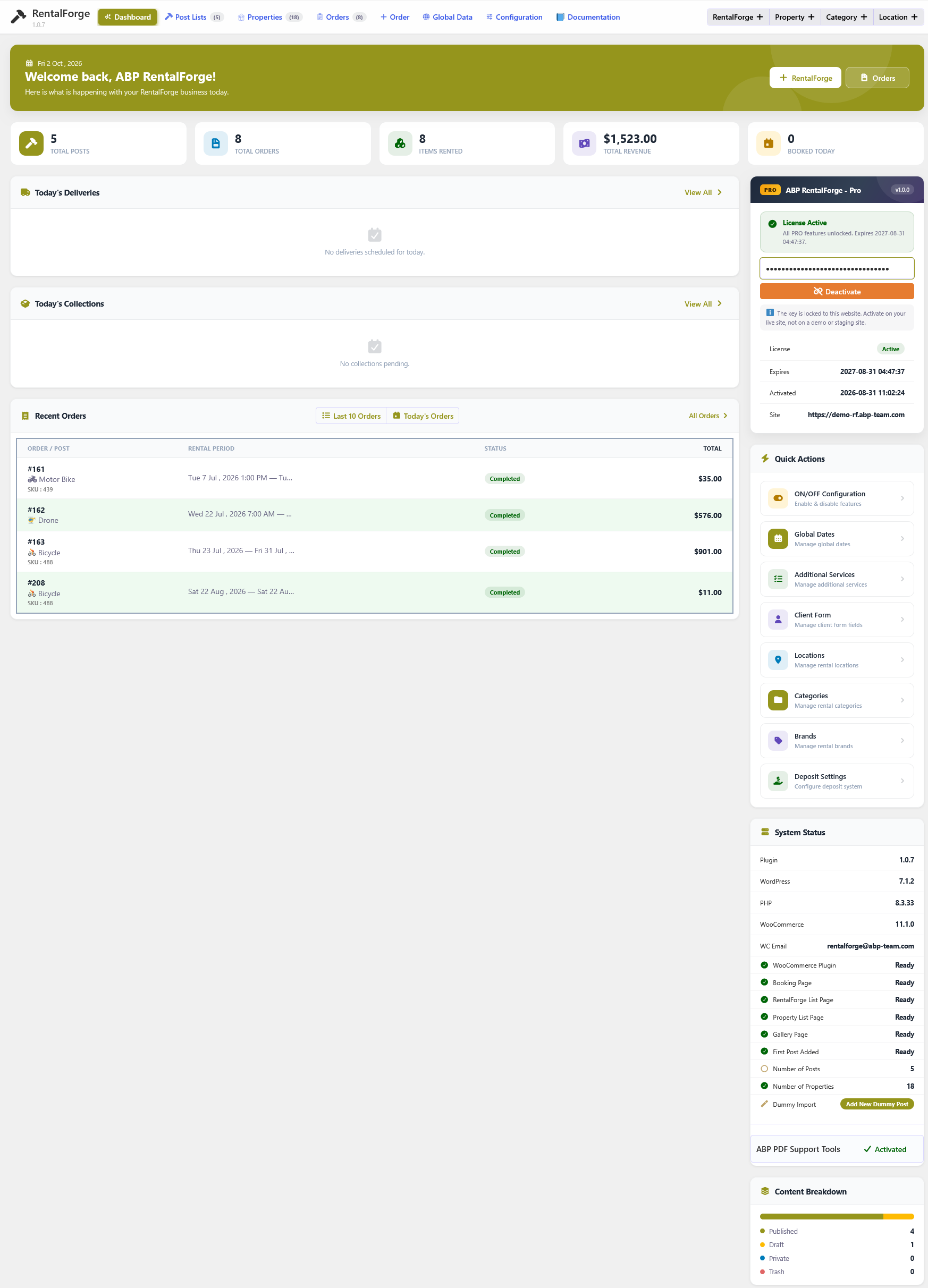
Well come Dashboard View
Faq
Yes. RentalForge lets you duplicate an entire property or copy only its rental settings to another property.
Yes. RentalForge includes a Global Feature Toggle System that allows you to completely disable unused modules from both the admin dashboard and frontend.
Yes. You can enable multiple pricing options, but only one pricing rule can be active per post.
No. Deposit is completely optional.
If not set, the default minimum quantity is 1.
Yes. Special date settings allow you to override default availability rules.
By default, 1 month is calculated as 30 days.
Yes. RentalForge is designed to work with any well-coded WordPress theme and includes responsive frontend templates.
RentalForge uses WooCommerce for payments, so all WooCommerce-supported gateways are available.
Yes. You can create unlimited properties, each with individual pricing, availability, and settings.
Yes. The plugin is fully translation-ready and compatible with standard WordPress localization tools.
Yes. RentalForge works perfectly in local development environments such as XAMPP or LocalWP.
You can ask questions in the WordPress support forum:
https://wordpress.org/support/plugin/abp-rentalforge/
Our team typically responds within 24–48 hours.
This plugin does not collect or transmit any personal data by itself. Any customer or order information is stored within your WordPress and WooCommerce installation.
Reviews
Changelog
1.0.9
- New: rental order status workflow — bookings now move through Waiting In Rent Completed. Admins can deliver or return a rental with one-click “Mark Delivered” and “Mark Received” actions.
- New: global “Auto Delivery” and “Auto Return” switches in the ON/OFF Configuration. When enabled, rentals are automatically moved to In Rent when the booking starts and to Completed when the booking ends.
- New: “Mark Delivered” and “Mark Received” quick actions are now available on the Rental Orders list as well as the Dashboard order sections.
- New: delivery and return timestamps are stored with every order (in the order data) when it is marked delivered or received.
- New: Today’s Deliveries and Today’s Collections dashboard sections now list today’s bookings plus any undelivered or not-collected orders, with clear “Due today”, “Overdue” and “Upcoming” status chips.
- Improved: on “Mark Received” (manual or automatic) the security deposit is released (set to 0) and automatically deducted from the order total.
- New: dedicated “My Bookings” tab on the WooCommerce My Account page. Each logged-in customer can now see their own rental bookings — rental period, duration & rate rule, location, booked items, additional services, client & billing information, rent / additional / deposit / total prices, payment method and rent status.
- New: the “My Bookings” list is paginated and matches the frontend rental design.
- Improved: RentalForge frontend styles & scripts now also load on the WooCommerce My Account page.
Released: October 13, 2026
1.0.8
- Responsive fixes: booking/search popups now fit the viewport on phones and tablets instead of forcing a 500px minimum width.
- Responsive fixes: gallery and slider arrows plus image thumbnails now stay visible on touch devices, where there is no hover state.
- Responsive fixes: notification toasts no longer overflow off the right edge on narrow screens.
- Responsive fixes: single column booking forms no longer create an extra empty column and overflow horizontally.
- Responsive fixes: admin documentation cards and the dashboard booking popup now adapt properly on small screens.
- Fixed the list title style that was silently ignored on mobile because of an invalid selector.
- Updated the plugin screenshots list.
- Updated the live demo and documentation links.
Released: October 02, 2026
1.0.7
- New admin Dashboard tab (now the default screen) with revenue and rental KPIs, recent orders, quick actions, system status and content breakdown.
- New Today’s Deliveries section: per-post booked, available and reserved stock with today’s total rent and deposit, plus a booking popup showing who booked what with full prices.
- New Today’s Collections section: per-order due amounts, deposits and overdue tracking, with one-click Mark Received.
- New rent status quick actions: move bookings from Waiting to In Rent and to Completed directly from the dashboard and popup.
- New Documentation tab with a step-by-step rental setup guide and RentalForge Pro upgrade banner.
- Booking popup stock now reads live property inventory; order data aligned with the rental orders table structure.
- Fixed WooCommerce install flow now reloading the page after successful install and activation.
- Fixed PHP 8.2 deprecated warnings on post and property lists.
- Merged the old Status page into the Dashboard; no-WooCommerce redirect now lands on the Dashboard.
Released: September 20, 2026
1.0.6
- Fixed responsive layout issues across different screen sizes and devices.
- Improved mobile and tablet compatibility for booking related interfaces.
- Fixed minor UI alignment and spacing issues on responsive layouts.
- Improved overall responsive behavior and user interface consistency.
Released: August 29, 2026
1.0.5
- Added WordPress 7.1 compatibility testing.
- Improved plugin UI and overall design.
- Improved user experience and interface consistency.
- Fixed several minor bugs and UI issues.
- Improved overall stability and compatibility.
Released: August 22, 2026
1.0.4
- Security hardening and validation improvements.
- Improved booking integrity checks.
- Strengthened AJAX permission validation.
- Improved template-loading security.
- Additional sanitization and validation improvements.
- Various stability and performance improvements.
Released: August 06, 2026
1.0.3
*Design improvements
*Code optimizations
*screenshot update
Released: July 26, 2026
1.0.2
*Design improvements
*Code optimizations
*read me update
*screenshot update
Released: July 19, 2026
1.0.1
*Design improvements
*Code optimizations
*Query optimization
Released: July 14, 2026
1.0.0
Initial Release