Accordion & FAQs

Accordion & FAQs
Description
Thanks for visit our plugin. Need an awesome accordion FAQ plugin then this is it. Responsive Accordion is has buildup with excellent accordion FAQ builder for wordpress. You can add unlimited accordion and faqs with unlimited color.You can easy manage your accordion using backend. Responsive Accordion is built-in bootstrap.
Accordion & FAQs Features
- Responsive & Mobile ready.
- Lightweight, Fast and Robust.
- Easy admin panel.
- 5 Pre Design Templates
- Multiple Accordions. (Create unlimited accordions into the same page/post)
- Searchable Accordions
- WP Editor(WYSIWYG) for accordion content.
- Multiple Accordions Collapsible or Toggle.
- Add & Delete Accordion item from Back-end.
- Expand & Collapse Icons On/off.
- Multi-site Supported.
- Compatible with any Theme.
- Developer friendly & easy to customize.
- Semantic HTML5 design and CSS3 transitions.
- Cross-browser Supported.
Accordion Box Pro With WooCommerce Addon Features
- Responsive & Mobile ready.
- Lightweight, Fast and Robust.
- Easy admin panel.
- Multiple Accordions. (Create unlimited accordions into the same page/post)
- Add Accordion in WooCommerce Product Page
- Add Accordion in WooCommerce Product Custom Tabs
- Can add image and file upload in each Accordion
- Searchable Accordions
- WP Editor(WYSIWYG) for accordion content.
- Multiple Accordions Collapsible or Toggle.
- Add & Delete Accordion item from Back-end.
- Each Accordion On/Off setting
- Expand & Collapse Icons On/off.
- Multiple Fonts Family for Accordion
- Multiple Color Setting for Accordion
- Multi-site Supported.
- Compatible with any Theme.
- Developer friendly & easy to customize.
- Semantic HTML5 design and CSS3 transitions.
- Cross-browser Supported.
- 12 Design Templates
- Preview Option
- Widget Option
- Limitless accordion anywhere in the theme
- Use via short-codes
- Bootstrap framework based
- Font Awesome Icon Support
- Hide All Accordion on page load or display all
- Add and remove accordion item from backend.
- Upgrade To Pro
- Accordion Box Pro With WooCommerce Addon Demo
Installation
Accordion & FAQs [Installation Guide]
Search for the plugin -> add new dialog and click install, or download and extract the plugin, and copy the the Accordion FAQs plugin folder into your wp-content/plugins directory and activate.
Screenshots

Add Accordion and template setting page

Template Drawer

Insert link into accordion

Accordion Box - THEME A

Accordion Box - THEME B

Accordion Box - THEME B With Search

Accordion Box - THEME C

Accordion Box - THEME D
Accordion Box - THEME E

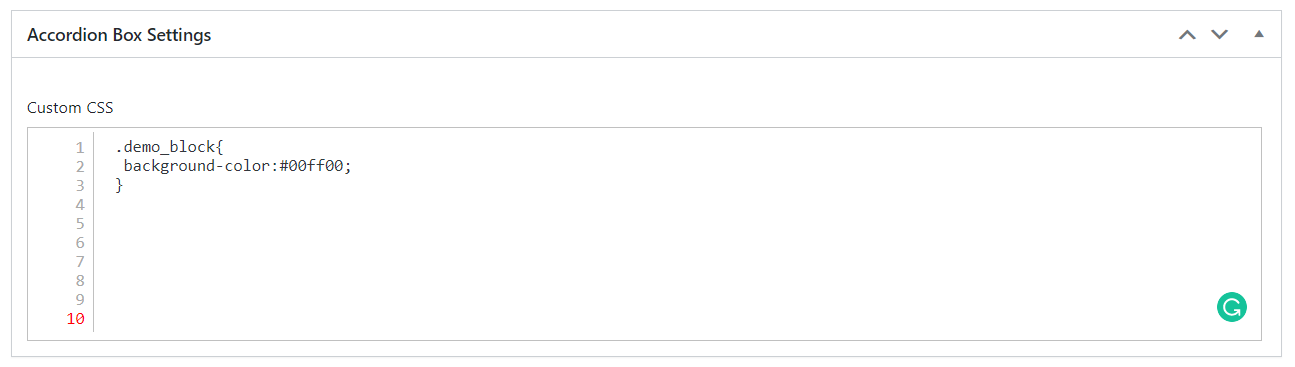
Custom CSS Setting

Setting for allow to open/close accordion specific window

Pro Feature - Accordion Before Add To Cart

Pro Feature - Accordion After Add To Cart

Pro Feature - Accordion After Price

Pro Feature - Accordion in Product Tabs
Faq
- By using shortcode like [CDLZR_ACC_BOX id=”123456″] you can show the accordion in front.
Reviews
Does exactly what I need
By 
This plug in does exactly what I need it to do and isn't complicated to use. Thank you so much for the perfect plugin.
Awesome
By 
Changelog
2.7
Release Date – 25 June 2024
* Updated to WordPress 6.5.5
* Minor Bug Fixed
2.6
Release Date – 28 May 2023
* Updated to WordPress 6.2.2
* New Accordion Editor Not clickable bug fixed
* Custom CSS Editor Width Bug Fixed in admin panel.
* Add Image option in Accordion Classic Editor
* Minor Bug Fixed
2.5
Release Date – 01 May 2022
* Updated to WordPress 5.9.3
* Minor Bug Fixed
2.4
Release Date – 16 April 2022
* Updated to WordPress 5.9.3
* Add New Feature – Setting for allow to open/close accordion specific window