AdBrains Events Calendar & RSVP

AdBrains Events Calendar & RSVP
Description
AdBrains Events Calendar & RSVP is an enterprise-grade events management solution built with modern design principles. It provides everything you need to create, manage, and display events on your site.
Key Features:
- Custom Post Types – Clean separation of Events, Venues, Organizers, and Speakers.
- RSVP & Ticket Registration – Attendee registration form with capacity limits, email confirmation notifications, and admin attendee management.
- Recurring Events – Daily, weekly, monthly, and yearly recurring schedules with end counts or end dates.
- External Event & Ticket URLs – Support for third-party event links (Eventbrite, Zoom, Meetup, Luma, Ticketmaster).
- Sidebar Visibility Controls – Toggle front-end visibility of Date & Time, Timezone, Venue & Map, Organizer, and Export buttons per event.
- Google Maps & Leaflet Interactive Maps – Visual venue coordinate placement and interactive location maps with customizable Google Maps API Key support.
- Responsive Views & Color Schemes – Month Grid, Chronological List, and Day views with custom color palette options.
- iCal & Google Calendar Export – 1-click export to Google Calendar and
.icsfile downloads. - Custom Email Templates – Editable email template subject, heading, and HTML body with dynamic placeholder tags (
{event_title},{attendee_name}, etc.). - Embeddable Shortcodes & Gutenberg Blocks – Unified directory shortcode
[adbrains_events],[adbrains_calendar],[adbrains_upcoming],[adbrains_featured], plus block editor blocks. - REST API & SEO – Full REST API endpoints for Headless CMS and JSON-LD structured schema for search engines.
Shortcodes:
[adbrains_events]– Unified events directory supporting Month, List, and Day tab options.[adbrains_calendar]– Embedded monthly calendar grid.[adbrains_upcoming limit="5"]– Chronological listings of upcoming events.[adbrains_featured id="X"]– High-quality card displaying a featured event.
Gutenberg Blocks:
- Adbrains Event Manager List – Display a configurable list of upcoming events.
- Adbrains Event Manager Calendar – Embed a monthly calendar grid.
- Adbrains Event Manager Featured Event – Highlight a specific event with cover image.
REST API Endpoints:
GET /wp-json/adbrains-events-calendar-rsvp/v1/events– Retrieve paginated lists of published events (public).GET /wp-json/adbrains-events-calendar-rsvp/v1/events/<id>– Detailed published event view. Nested venue/organizer objects are included only when those linked posts are published. Organizer contact/social fields require theedit_postscapability.GET /wp-json/adbrains-events-calendar-rsvp/v1/venues– List of published venues (public). Phone and website fields require theedit_postscapability.GET /wp-json/adbrains-events-calendar-rsvp/v1/organizers– List of organizers including contact and social metadata. Requires theedit_postscapability.
External Services
This plugin can connect to external services to load map resources:
-
Google Maps API: If configured with a Google Maps API Key in the settings, the plugin enqueues the Google Maps API from
maps.googleapis.comto render interactive maps and location pickers. When loaded, it transmits browser metadata (such as IP address, User-Agent, and coordinates) to Google.- Google Maps Platform Terms of Service: https://cloud.google.com/maps-platform/terms
- Google Privacy Policy: https://policies.google.com/privacy
-
OpenStreetMap: If no Google Maps API Key is provided, the plugin defaults to Leaflet maps which fetch map tiles from OpenStreetMap (
{s}.tile.openstreetmap.org). When loaded, it transmits browser metadata (such as IP address and User-Agent) to OpenStreetMap.- OpenStreetMap Foundation Terms of Use: https://wiki.osmfoundation.org/wiki/Terms_of_Use
- OpenStreetMap Foundation Privacy Policy: https://wiki.osmfoundation.org/wiki/Privacy_Policy
Installation
- Upload the
adbrains-events-calendar-rsvpfolder to the/wp-content/plugins/directory. - Activate the plugin through the ‘Plugins’ menu.
- Run
composer installin the plugin directory if not already done. - Configure settings via the ‘AdBrains Events Calendar & RSVP’ settings submenu.
Screenshots
Events archive with month grid view

Events list view with filtering

Single event page with venue map

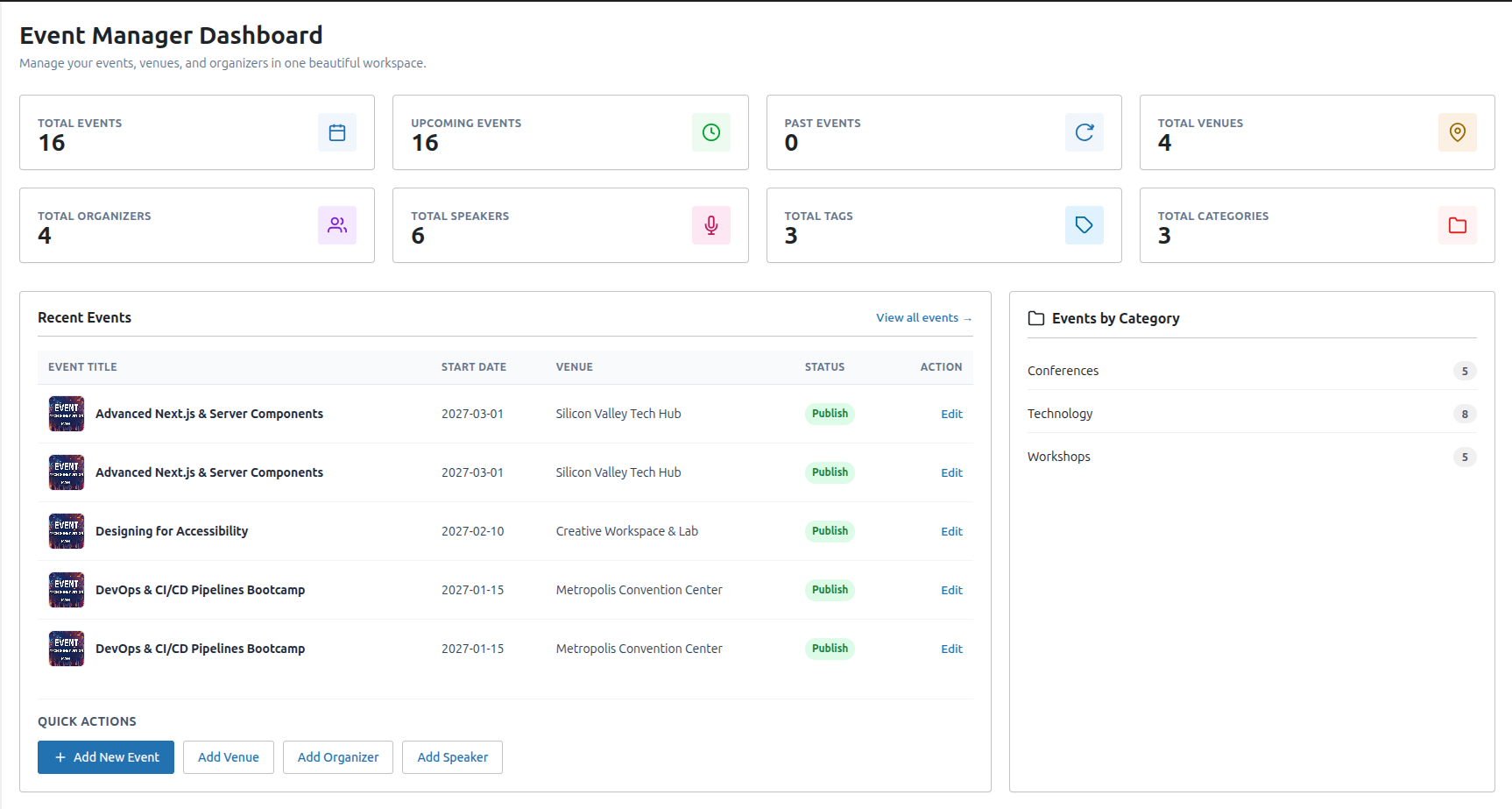
Admin dashboard with statistics

Event editor with custom fields

Venue editor with interactive map picker
Faq
Yes. As described in the External Services section above, this plugin loads interactive maps from Google Maps or OpenStreetMap depending on your settings. All event, venue, and RSVP attendee registration data is stored locally in your database.
Yes. You can override templates by copying them to your theme directory under an adbrains-events-calendar-rsvp/ folder. The plugin will use your theme’s templates instead of the defaults.
Navigate to AdBrains Events Calendar & RSVP > Add New Event in your admin panel. Fill in the event details including title, description, start/end dates and times, venue, and organizer.
Published event and venue list endpoints are publicly readable. Organizer contact/social data and restricted venue contact fields require a user with the edit_posts capability. Nested venue/organizer details on a single event are only returned when those linked posts are published.
AdBrains Events Calendar & RSVP is compatible with Multisite. Each site in the network maintains its own separate event data.
Reviews
Changelog
1.0.1
- Security: Restrict organizers REST endpoint to users with
edit_posts(contact/social meta). - Security: Only nest published venue/organizer records on the public single-event endpoint.
- Security: Omit restricted contact fields from public venue and nested organizer API responses.
1.0.0
- Initial stable release.