Address Autocomplete Anything – Google Address Autocomplete for Any Form

Address Autocomplete Anything – Google Address Autocomplete for Any Form
Description
Address Autocomplete Anything adds Google’s address suggestions to any form on your WordPress site. Someone starts typing their street address, picks the right one from the list, and the rest of the address fills itself in: city, state, ZIP or postal code, and country. Your customers type less, and you get addresses spelled the way the post office spells them.
I first built it for my photography plugin, Sunshine Photo Cart, then realized it could work with anything that has an address field (hence the name). Checkout pages, donation forms, membership sign ups, booking forms and contact forms all work, because it isn’t tied to any one plugin.
See how it works on the Address Autocomplete website
Set it up by clicking your form’s fields
In the settings, choose the page with your form and click “Pick fields”. The plugin opens your form in a new tab, finds the address fields and tags each one as the street address, city, state, ZIP or country. Check the tags, click Done, and the fields show up on the settings page, ready to save. You don’t need to write any code or dig through your page’s HTML.
If your form is in a popup or on the second step of a multi-step form, pause the picker, open the popup or go to that step, then carry on picking. If you’re comfortable with CSS selectors, you can still type them in yourself. How to find your CSS selectors
Addresses that fit your form
- Only the countries you want. Limit suggestions to the countries you ship to or serve. If your form has a country dropdown, the suggestions follow whichever country the customer picks.
- Street format that matches the country. A US address fills in as “2510 Sunny Ridge Ln” and a German one as “Hauptstraße 12”, with nothing for you to set up.
- Full names or short codes. Fill a state field with “California” or “CA”, and a country field with “United States” or “US”, whichever your form expects.
- Several parts in one field. Add text before or after a value, or combine parts of the address into one field, like a single “City, State ZIP” line.
- Backups for missing data. When Google doesn’t return part of an address, choose what to use instead, like the postal town when there’s no city.
- Your language. Show suggestions in the language you choose, or match each visitor’s browser.
- Only where it’s needed. Load it only on the pages with your form, so the rest of your site doesn’t load Google’s script.
What you need
You need a Google Maps API key with the Maps JavaScript API and Places API (New) turned on. A setup wizard walks you through it the first time you turn on the plugin, and the Test key button checks your key with Google. If something is wrong, like billing that isn’t set up or an API that isn’t turned on, it tells you in plain words what to fix.
Google asks for billing details, but every account gets 10,000 free autocomplete requests a month, which is more than most sites will ever use. More on what Google charges
Address Autocomplete Premium
The free version sets up autocomplete on one form. Address Autocomplete Premium adds:
- One-click setup for 11 plugins. Turn it on for WooCommerce (classic and block checkout, billing and shipping), Gravity Forms (the Address field), Easy Digital Downloads (checkout and account page), LifterLMS, Paid Memberships Pro (billing and shipping), MemberPress, GiveWP, Charitable, Paymattic, Tutor LMS and FluentCart, with no fields to pick.
- As many forms as you need. Set it up on your checkout, your donation form and your contact form, each with its own fields and countries.
- More of Google’s data. Fill fields with the street number and street name separately, the business or place name, apartment or unit, neighborhood, sub locality, county, and latitude and longitude for maps.
Learn more about Address Autocomplete Premium
External services
Google Maps Platform. The address suggestions come from Google. On the pages you choose, the plugin loads Google’s Maps JavaScript API with your API key. As a visitor types into the address field, what they type goes to Google, which sends back matching addresses. The Test key button also sends your API key to Google to check it. Google’s terms of service and privacy policy apply.
WP Sunshine email list. The setup wizard offers to sign you up for emails about the plugin. When you click “Sign up and continue”, the plugin sends the first name and email you entered, plus your site’s time zone, to wpsunshine.com. Nothing is sent if you skip that step. See the WP Sunshine privacy policy.
Installation
- Install the plugin from Plugins > Add New by searching for “Address Autocomplete Anything”, or upload the zip file, then activate it.
- The setup wizard opens on its own. Add your Google Maps API key and click Test key to check it.
- Go to Settings > Address Autocomplete, open the Instances tab, choose the page with your form and click “Pick fields”.
- Check the tags on your form, click Done, then save the settings.
- Type the start of an address into your form to see the suggestions.
The setup guide covers each step in more detail.
Screenshots
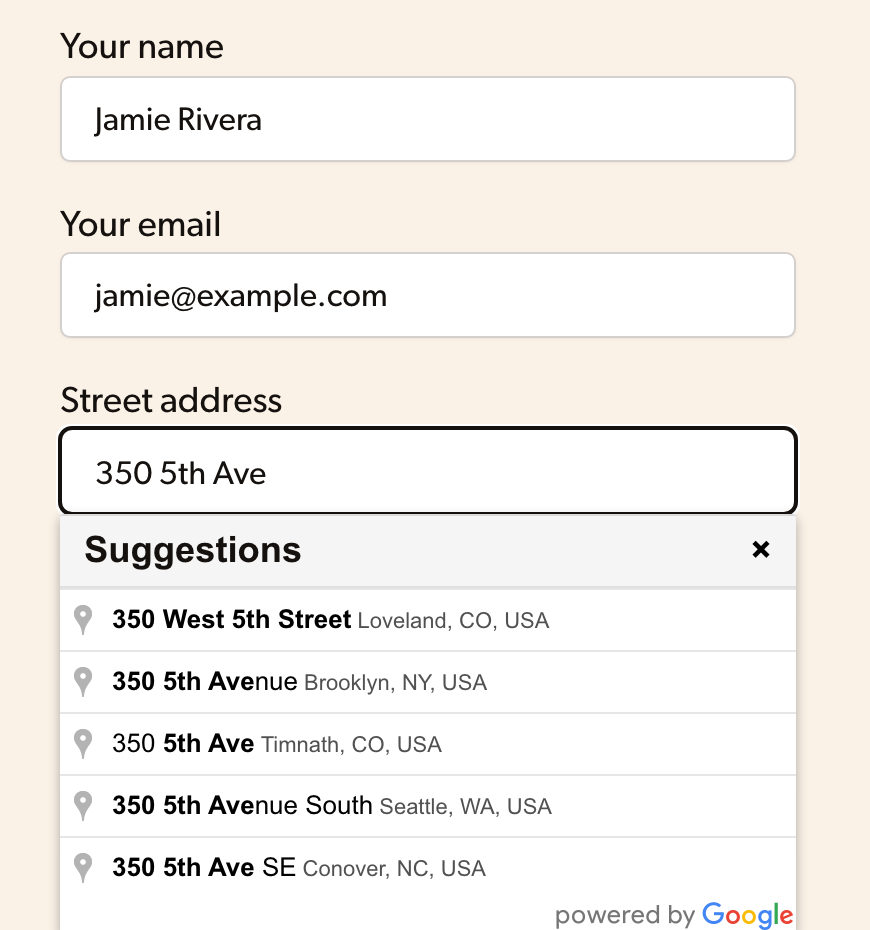
Google address suggestions under the street address field of a contact form.
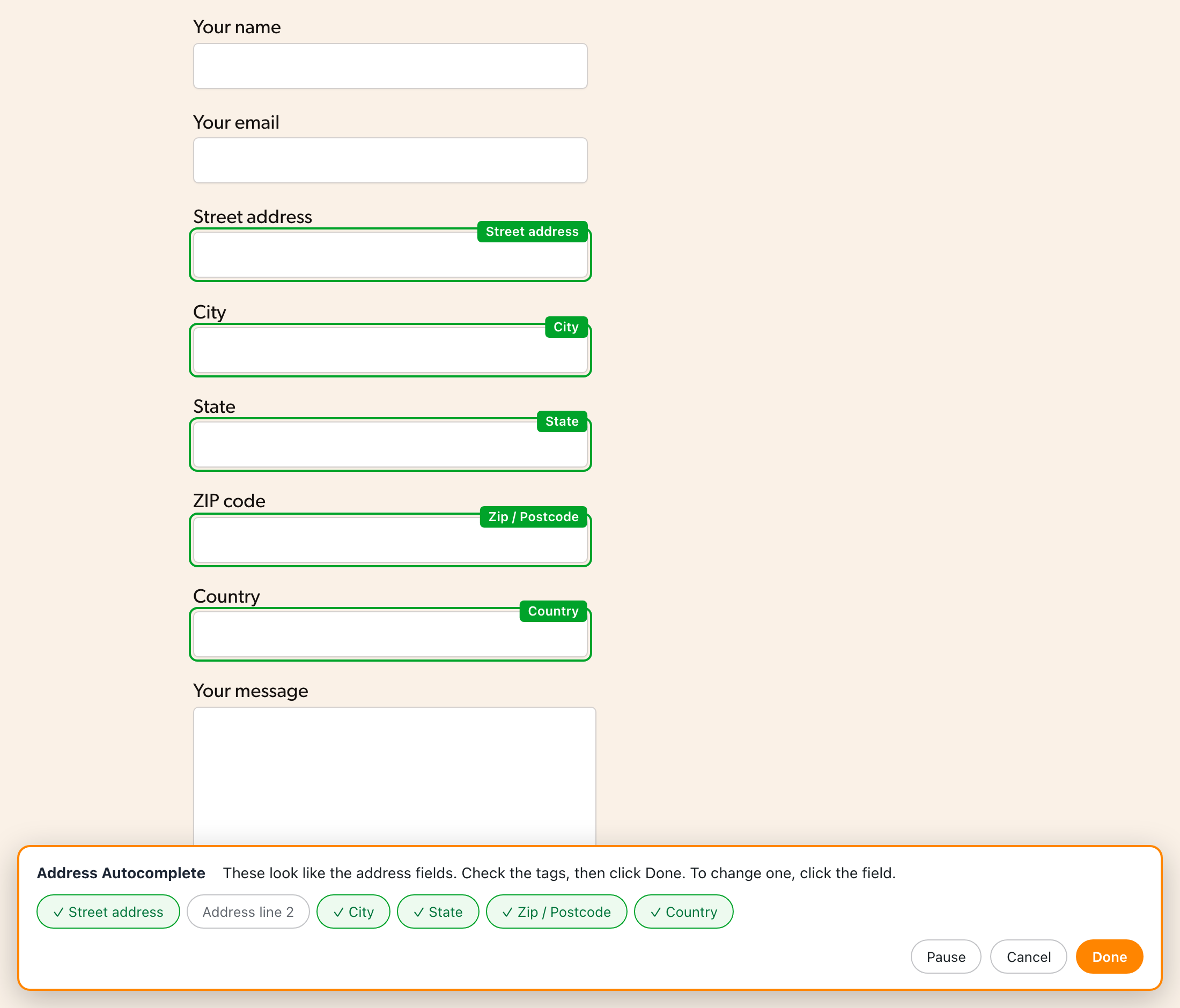
The field picker finds and tags the address fields on your own form. Check the tags and click Done.
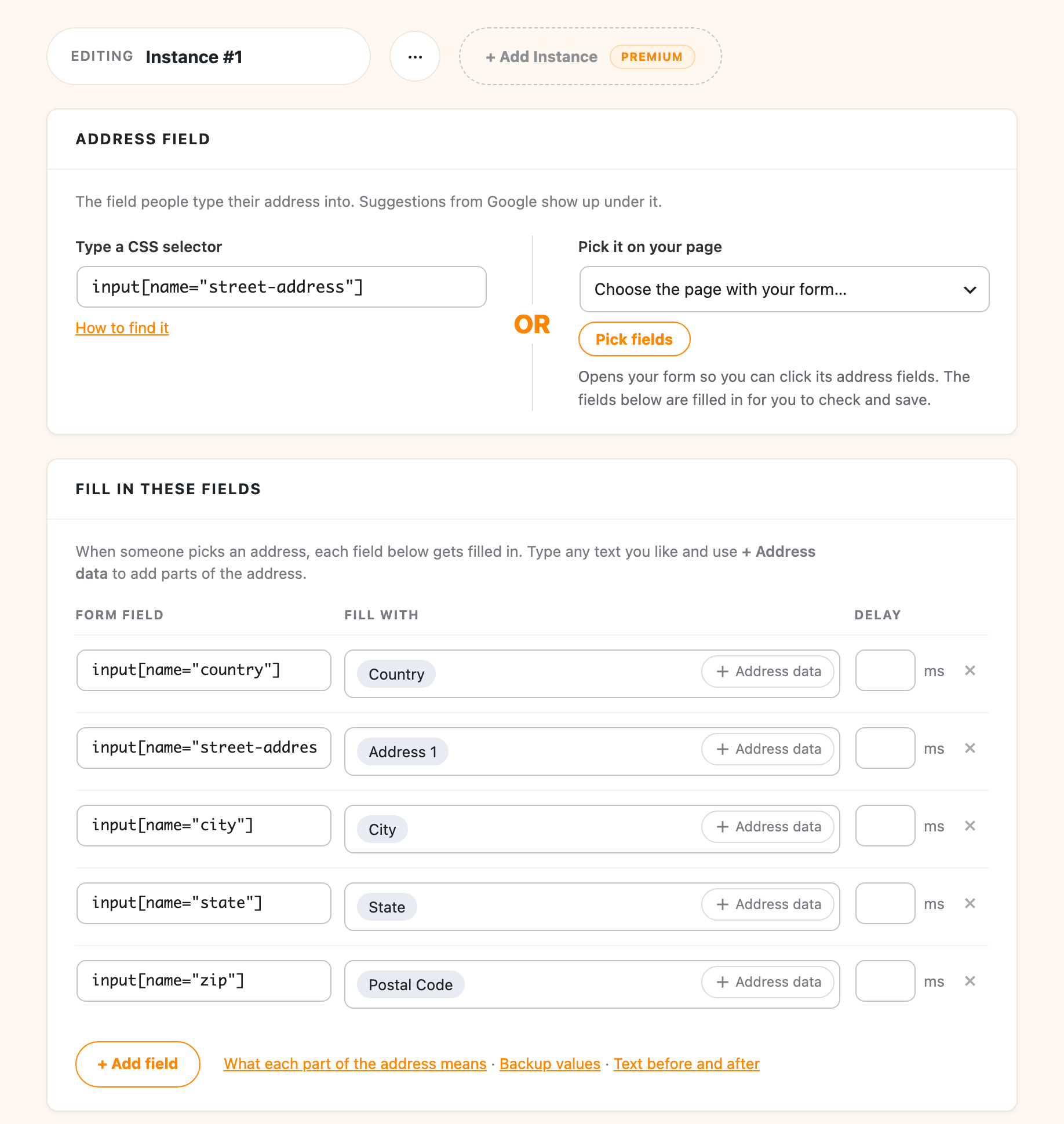
The saved setup: the field people type into, and the part of the address each form field gets.
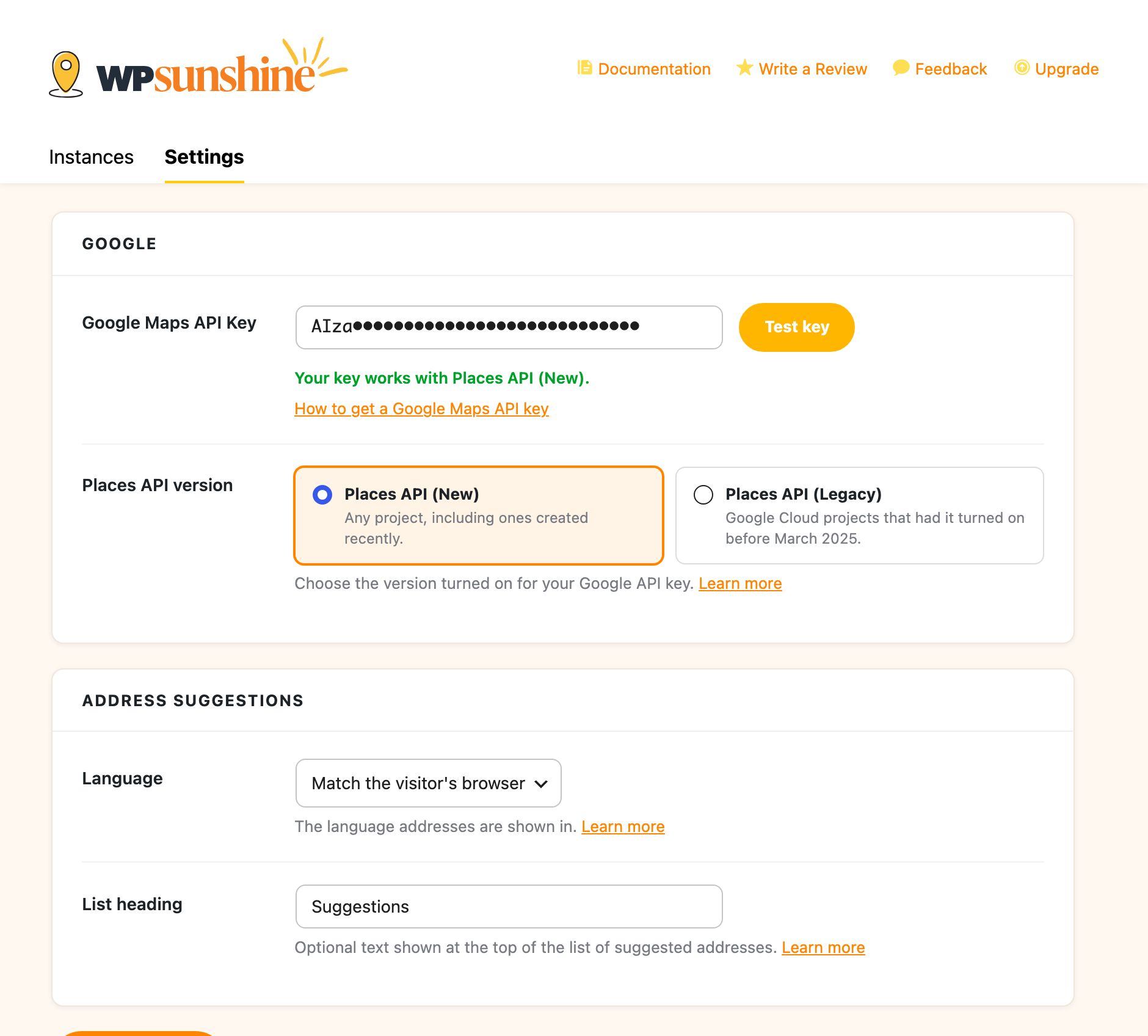
Google settings with the Test key button, which checks your Google Maps API key with Google.
Faq
With the free version, open the Instances tab, choose your checkout page and click “Pick fields” to tag the billing address fields. This works on the classic (shortcode) checkout. The WooCommerce checkout block needs a lot of extra code to fill its fields, so it’s part of Address Autocomplete Premium, which sets up billing and shipping on both checkouts with one click.
Yes. It works with any form that has a text field for the street address, including forms from Gravity Forms, WPForms, Contact Form 7, Ninja Forms, Fluent Forms, Formidable Forms and Elementor. Use “Pick fields” to tag the address fields. Premium adds one-click setup for the Gravity Forms Address field.
The plugin is free, and Google gives every account 10,000 free autocomplete requests a month. Google does ask for billing details when you create your API key, but most sites never go over the free amount.
Turn on Places API (New), along with the Maps JavaScript API. Since March 2025, Google no longer lets new projects turn on the older Places API. If your Google Cloud project already uses the older one, the plugin works with that too. The Test key button tells you which one your key works with. More on the two versions
Yes. Choose one or more countries on the Instances tab and suggestions only come from those countries. If your form has a country dropdown, the suggestions also follow whichever country the customer picks.
Google shows that icon when it can’t load address suggestions, usually because the API key is limited to other websites, an API isn’t turned on, or billing isn’t set up. Click Test key in the settings and it tells you which one. Fixing the exclamation mark
Latitude and longitude are part of Address Autocomplete Premium, along with the county, neighborhood, business name and other details Google sends back. The free version fills the country, both address lines, city, state and postal code.
The free version covers one form. Address Autocomplete Premium lets you set up as many as you need, each with its own fields, countries and pages.
Reviews
Convenient plugin for a nice price
By 
Since starting my Woocommerce webshop I have been looking for ways to improve my website to make the shopping experience more convenient for my customers.
This plugin really helps in getting their address in properly.
The only pitfall is that Google must have indexed the address in order to have it show up, but that is logical. In case that happens people can still manually fill in all the address fields so no functionality lost because of that.
Excellent product, great support.
By 
I bought the paid version after messing around with the free version. It turns out that you need the paid version for it to work with WooCommerce blocks. I missed reading that. I made a suggestion after I got it working to the developer... that it would be nice if the autocomplete, restricted itself to the country you choose, if you choose a country first, and wow.... that fix was put in immediately and released. Excellent code, lightweight, works beautifully
Greate Value for money
By 
Yes, you could code this yourself accessing Google API, and also have to maintain your code.
For $19 a complete solution is provided. So unless you can do the coding in 15 minutes, buy the plugin 🙂
Really an excellent plugin !
By 
Does just what it claims
By 
It gives you accurate and professional autocomplete just like it claims. Download it now!
Invaluable Plug-In
By 
Derek and team have a powerful, yet almost seamless plugin. It's incredibly cost effective as well. Thanks!
The plugin I needed with amazing support!
By 
Address Autocomplete Anything is an absolute gem! It dropped into my WordPress stack without a hiccup and instantly elevated the form on my site—no more fat-fingered addresses or frustrated users.
What sold me, though, was the support team. When Google Maps results were not filling in NYC boroughs (Brooklyn not filling in properly?—come on, Google!), I opened a ticket expecting the usual back-and-forth. Instead, I got thoughtful replies and even a fresh plugin update that bypassed the Google quirk entirely. No manual tweaks on my end—update, activate, and it worked. That’s the kind of creative, reliable problem-solving you rarely see.
If you need rock-solid address autocomplete and lightning-fast support, don’t hesitate—this plugin is the real deal.
Amazing support team
By 
This is a great plugin for using Google Autocomplete API on your WordPress/WooCommerce site, clean and light plugin. Prompt support responses who really listen and assist with issues past the standard. Best autocomplete plugin around from an amazing developer!
Great
By 
It works great , I tried a few others too but found this one to be the best.
Excellent Support and integration with Woocommerce
By 
The WPSunshine team was very quick to respond to my questions. I needed WooCommerce with checkout block support so purchased the premium version. The integration is very slick and it is well worth the price. Highly recommended!
Changelog
2.0.2
- Fix: More state and region dropdowns get filled in when Google names the state differently, like “Wilayah Persekutuan Kuala Lumpur” for Kuala Lumpur or “Pulau Pinang” for Penang in Malaysia, and “County Dublin” for Dublin. When the name could fit more than one state, the field is left for the customer instead of guessing.
- Fix: “Vientiane” in Laos and “Maputo” in Mozambique no longer pick the province of the same name.
2.0.1
- Fix: State and region dropdowns now get filled in when Google’s name is slightly different from the dropdown’s, like “Canterbury Region” for Canterbury.
- Fix: The field picker no longer tags hidden fields inside a closed section.
2.0
- New: Works with Google’s Places API (New). Google no longer lets new Cloud projects turn on the older Places API, so new setups use Places API (New). Sites that already work stay on the older API until you switch.
- New: Field picker. Choose the page with your form, click “Pick fields”, and the plugin finds and tags the address fields for you, with no CSS selectors needed.
- New: A setup wizard opens the first time you turn on the plugin and walks you through adding your Google key.
- New: The Test key button checks your Google Maps API key with Google and tells you in plain words what to fix.
- New: A redesigned settings screen. The fields your form gets now show as easy-to-read tags, and your saved setup stays the same.
- New: The setup wizard offers to sign you up for update emails. Nothing is sent unless you choose to sign up.
1.2.9
- Fix: Address suggestions could not be selected with a mouse click after a recent Google Maps update
1.2.8
- Fix: Address suggestions now update right away when the country field changes on WooCommerce classic checkout and other forms with enhanced (select2) country dropdowns
- Fix: Country changes are still detected after WooCommerce rebuilds the country dropdown when switching countries
- Fix: A saved address is no longer cleared when the page first loads
- Update: Tested up to WordPress 7.1
1.2.7
- Fix: Address suggestions could not be selected with a mouse click on desktop in some setups
- Fix: Prevent duplicate autocomplete initialization on dynamically re-rendered fields
- Fix: UK addresses now fill the city field using postal_town when Google does not return a locality
- Update: Load Google Maps API from the stable weekly channel instead of beta
1.2.6
- Update: Fix fatal errors
1.2.5
- Update: Tested up to WP 6.9
1.2.4
- Add: Info about other plugins
1.2.3
- Fix: Handle when the address component type had “political” as the first value
1.2.2
- Add: New option to set language for returned address results
- Add: Build address2 from premise, floor, subpremise, room values automatically
- Change: More address component fallbacks in case some data is missing from the returned result
- Fix: Handle unique cases like NY burroughs where no locality is returned, use sublocality as fallback
- Fix: Additional countries that use reverse address format
- Fix: Handle unique cases like NY burroughs where no locality is returned, use sublocality as fallback
1.2.1
- Fix: “postal_town” fallback when “locality” is not present
- Fix: Trigger jQuery change event on populated input if jQuery is used on the page just in case
- Enhancement: Look for select option label for possible match as well when setting values
1.2
- Enhancement: Set multiple allowed pages for each instance
1.1.6
- More console logging to help debug
- NL added to list of countries to do reverse street address format
1.1.5
- Fix – Load Google maps with async
1.1.4
- Fix – Handle address1 when there is no street number
1.1.3
- Update – Allows more than just addresses, will now accept establishment names
- Fix – Spaces causing issues in before/after attributes
1.1.2
- Fix – stripslashes on CSS selectors to handle quotes when saving settings
1.1.1
- Fix – Enqueue Google Maps requires callback function
1.1
- Update – Better input replacement method and allow for “before” and “after” attributes
- Add – Minified version of frontend.js for even smaller footprint
1.0.2
- Fix – Handle special case UK city/county things
1.0.1
- Add – “wps_aa_load_scripts” filter to allow disabling loading of JS files as requested by user for GDPR compliance
1.0
- Change – Complete redo of the way selectors and data fields are chosen for population for even more flexibility
0.3
- Update documentation links throughout and link to review
- Release to repo for the first time
0.2
- Fix – More esc_* and sanitization
0.1
- Initial submission to repo