aDirectory – WP Business Directory Plugin and Classified Ads Listings Directory

aDirectory – WP Business Directory Plugin and Classified Ads Listings Directory
Description
Building a directory or classified ad website shouldn’t be complicated. Yet for many, finding a plugin that combines flexibility, ease of use, and powerful monetization options in one place feels impossible.
When managing listings, user submissions, and payment plans — you need a tool that’s simple to start with and scalable as your site grows.
That’s where aDirectory comes in. It’s a complete, modern, and intuitive WordPress directory plugin built for creating professional directory websites and classified ad platforms.
Whether it’s a business directory, property listing, restaurant guide, hotel directory, or classified ads portal — aDirectory offers everything you need to launch and grow with confidence.
Docs | Themes | Addons | Roadmap
Why Choose aDirectory?
Creating a scalable, high-performing WP Directory plugin shouldn’t be complicated or expensive. aDirectory is built for both beginners and developers — offering a robust, WordPress company directory plugin that delivers everything you need to launch and manage a thriving listing site.
From frontend listing submissions, advanced filtering, OpenStreetMap integration, and customizable forms to flexible monetization options — it’s the all-in-one toolkit for building any type of business listing plugin WordPress site or WordPress classifieds plugin.
No coding? No problem. Customizable via Elementor, aDirectory comes packed with drag-and-drop controls, shortcodes, and widgets. Whether you’re creating a WordPress business directory plugin, a job listing plugin WordPress, or a WordPress membership directory plugin, aDirectory adapts to your vision effortlessly.
Be Part of Our Ecosystem
👉 Join aDirectory Facebook Community
👉 Subscribe to Our YouTube Channel
👉 Need Help? Contact Support
Core Features at a Glance
✔️ Multi-CPT Support
Easily create and manage multiple custom post types (CPTs) within a single platform. Each directory type is fully optimized for fast queries, allowing your site to handle large amounts of data efficiently while keeping everything organized.
✔️ Clean Permalinks
Permalinks are structured for clarity, SEO, and user-friendliness. Clean URLs make it easier for visitors to navigate your directories, improve search engine ranking, and enhance the overall user experience.
✔️ Organized Directories
All directories are neatly structured for efficient management and accessibility. You can quickly sort, filter, and organize listings, ensuring your site remains professional and easy to maintain as it grows.
✔️ Dedicated Search Widget
Each directory comes with its own dedicated search widget, providing precise results tailored to that specific directory. Visitors can quickly find what they’re looking for using advanced filters and search options.
✔️ Social Media Link Fields
Display social media links for each listing in a professional and intuitive way. Multiple platforms are supported, allowing your users to connect seamlessly and enhancing the credibility of your directory listings.
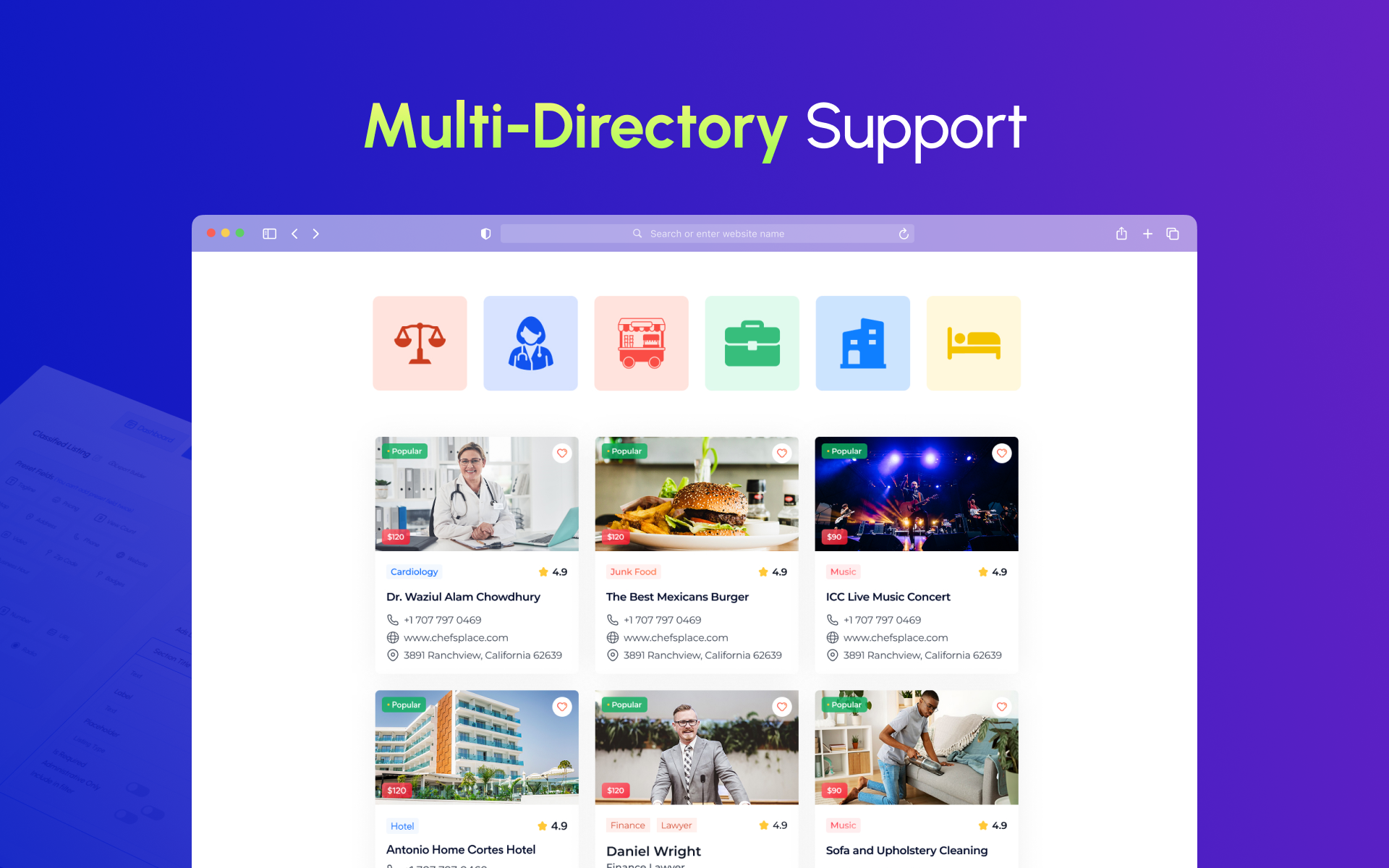
✔️ Multi-Directory Support
Create unlimited directories under one WordPress business listing plugin installation. Run business directories, job boards, property listings, event calendars, and classified ads website builder setups — each with unique custom fields and configurations.
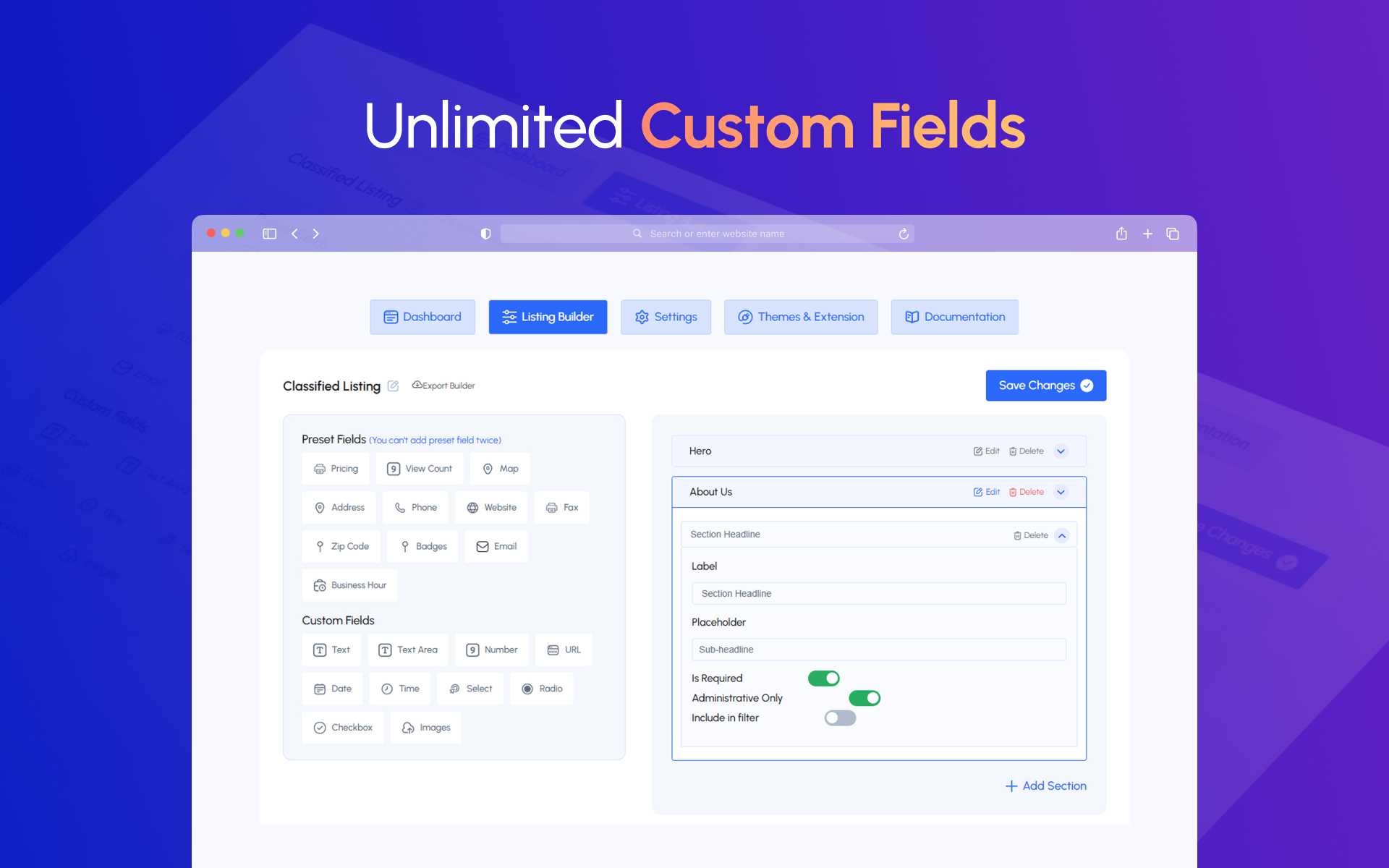
✔️ Unlimited Custom Fields
Easily add text inputs, dropdowns, checkboxes, file uploads, URLs, ratings, and more to your WordPress directory listing plugin forms. Control the data you collect and how it’s displayed with complete freedom.
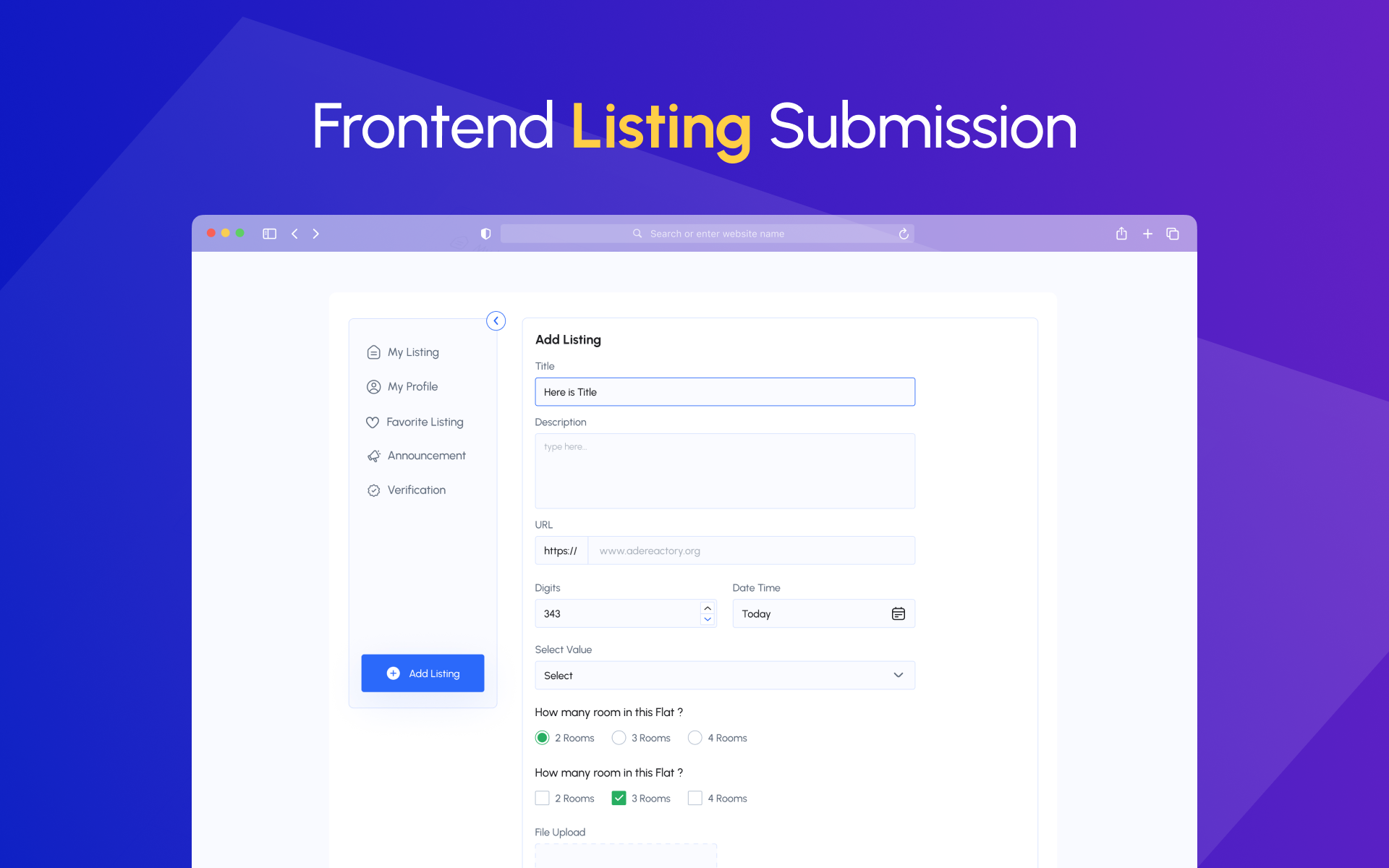
✔️ Frontend Submission & User Dashboard
Let visitors submit and manage listings through a sleek frontend dashboard. Ideal for business directory software platforms where users can track submissions, payments, and renewals without backend access.
✔️ OpenStreetMap
Display listings on built-in OpenStreetMap, enjoy location-based WordPress best directory plugin experiences without extra cost.
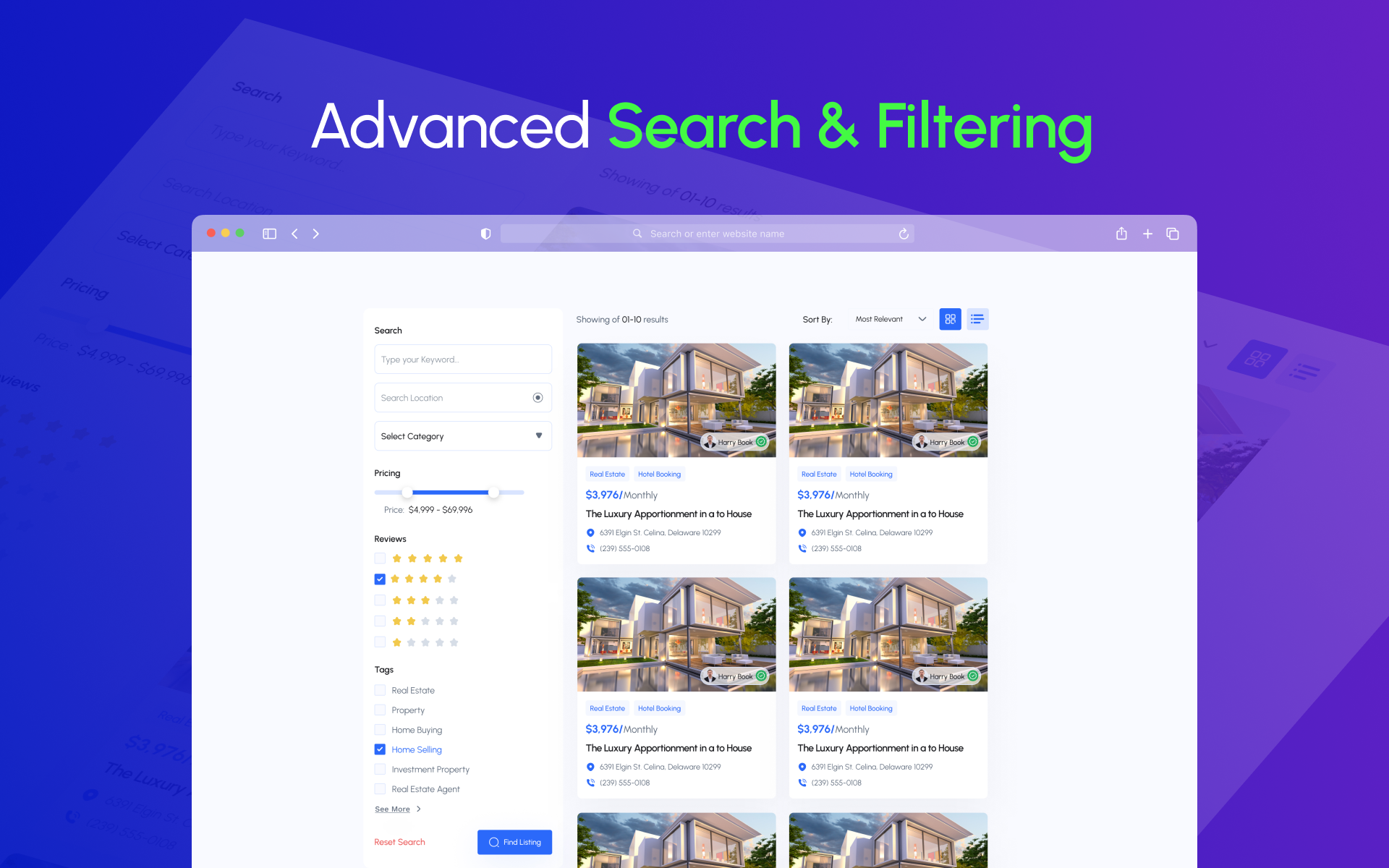
✔️ AJAX-Powered Search & Filters
Deliver instant, dynamic search results using AJAX-based filters by location, category, price, or custom fields — a must-have for any serious directory builder.
✔️ Listing Galleries & Video Listings
Let users showcase image sliders and embed video tours. Perfect for classified ads website builder platforms, and business showcases.
✔️ Email Notifications & Social Sharing
Automatic alerts for submissions, approvals, and expirations — with social share options for Facebook, Twitter, WhatsApp, and more.
✔️ SEO-Optimized & Translation Ready
Fine-tune meta titles and descriptions for every listing. Fully compatible with popular SEO tools and multilingual plugins like WPML and Polylang — making it a top-tier WordPress business directory solution.
Monetization Features
✔️ Paid Listings & Pay Per Submit
Charge users to post listings or submit them individually, monetizing both free and premium WordPress business directory plugin setups.
✔️ Featured Listings & Badges
Promote listings with ‘Featured’, ‘Verified’, and ‘Popular’ badges, boosting visibility in search results on your best directory plugin WordPress-powered website.
✔️ Pricing Plans & Subscriptions (Pro)
Offer flexible plans with one-time or recurring payment options via WooCommerce and Stripe — ideal for WordPress classifieds plugin setups and WP classifieds plugin-powered marketplaces.
✔️ Coupons & Discounts (Pro)
Attract new customers with promotional coupons for listing plans — a great feature for growing any directory plugin, WordPress free or premium installation.
Available Premium Addons
- Stripe Payment Gateway
- WooCommerce Integration
- Pricing Plans & Subscriptions
- Compare Listings
- Business Hours Display
- Social Login Integration
- Mailchimp Integration
- Verification Badge
- aDirectory Coupon
- Claim Listing Addon
- Badges Addon
- Divi Builder Addon
- Currency Switcher Addon
- More on the way
These tools enhance your website builder directory projects, giving you the flexibility to run everything from local business directories to member directory WordPress plugin-powered membership platforms.
Developer-Friendly
✔️ Custom Hooks & Filters
Easily extend the WordPress listing plugin functionality using WordPress action and filter hooks.
✔️ Template Override System
Customize the look and feel of your WordPress directory listing plugin without touching core files.
✔️ WPML Compatible
Build multilingual, location-based directories with ease, supporting business directory WP plugin installations for global audiences.
aDirectory Niche Specific Directory Themes
Get started fast with directory-ready themes designed for aDirectory:
- Fodstar (Free) – Restaurant directory theme for WordPress free
- Fodstar PRO – Premium restaurant directory theme
- Bizlist PRO – Business directory theme
- Aanir PRO – Property listing directory theme
- Hotelsun PRO – Hotel directory theme
- Doclist PRO – WordPress doctor listing directory theme
- Advoco PRO – Lawyer listing theme for WordPress
Seamless Integrations
- Elementor: Full support for drag-and-drop page building with aDirectory widgets.
- OpenStreetMap: Free mapping option for displaying listing locations.
- WooCommerce: Use WooCommerce to process payments for listings and pricing packages.
- Mailchimp: Build and manage your subscriber lists.
- Stripe: Secure payment gateway for listing submissions and subscriptions.
These integrations turn aDirectory into the best WordPress directory plugin for both beginners and advanced users.
Resources
👉 Official Documentation
👉 Directory Themes
👉 Plugin Addons
👉 Product Roadmap
👉 Support Portal
Privacy Policy
aDirectory – Directory Listing WordPress Plugin uses Appsero SDK to collect some telemetry data upon user’s confirmation. This helps us to troubleshoot problems faster & make product improvements.
Appsero SDK does not gather any data by default. The SDK only starts gathering basic telemetry data when a user allows it via the admin notice. We collect the data to ensure a great user experience for all our users.
Integrating Appsero SDK DOES NOT IMMEDIATELY start gathering data, without confirmation from users in any case.
Learn more about how Appsero collects and uses this data.
Installation
-
Download the plugin from WordPress.org or install it directly from your WordPress admin dashboard.
-
Go to Plugins > Add New, search for “aDirectory”, and click Install Now.
-
Activate the plugin through the ‘Plugins’ menu in WordPress.
-
Navigate to aDirectory Settings to configure general options, submission forms, and monetization settings.
-
Create listing categories and locations from aDirectory > Categories and aDirectory > Locations.
-
Use shortcodes or Elementor widgets to display your directories on any page.
Done — your directory site is live and ready to start earning!
Screenshots


Faq
Yes! aDirectory allows you to create unlimited directories under a single WordPress installation — each with its own categories, custom fields, and settings.
No. aDirectory comes with free, built-in OpenStreetMap integration for interactive maps.
Absolutely. aDirectory includes an intuitive frontend submission form so users can easily add, edit, and renew their listings from their personal dashboard.
Yes. aDirectory works seamlessly with Elementor— with dedicated widgets and blocks for listing grids, search forms, categories, and more.
You can charge for listings, offer featured listing positions, and integrate Stripe or WooCommerce payments with the premium add-ons.
Yes. aDirectory is translation-ready and fully compatible with WPML. It also supports right-to-left languages like Arabic, Hebrew, and Persian.
Not at all. aDirectory is beginner-friendly and built for non-coders. You can customize forms, fields, pricing, and layouts with simple visual interfaces and Elementor support.
Reviews
Exactly What I Needed for Multi Post Type Directories
By 
Multi Post Type & Multi-Directory support is exactly what I needed for my project. I’m currently testing the plugin and sharing feedback with the team — and they’re actively improving it with every update. The roadmap looks solid, and I’m excited to see its continuous enhancement!
Effortless Directory Setup
By 
aDirectory makes it remarkably easy to enter the niche of directory websites. The WordPress plugin installs quickly and the setup is straightforward. The support team responds promptly and provides helpful guidance whenever needed.
If you want a smooth way to launch a directory project, this tool is an excellent choice.
Rapidly Improving & Packed with Potential
By 
aDirectory is growing fast with constant updates and real improvements every month. The team listens to user feedback and keeps adding features that actually matter. Excited to see how far this plugin will go!
Ready to use Directory Plugin
By 
I am using several directory softwares to build my directories, and aDirectory is one of the reliable one. I mostly liked the fact that it comes with ready-to-use designs that are top notch. Recent updates made the tool even better.
Finally a Directory Plugin Built With Real Users in Mind
By 
I have tried many directory plugins over the years and aDirectory is the first one that honestly feels enjoyable to use. Everything is smooth, fast, and thoughtfully designed. I did not have to fight with the settings or spend hours figuring things out. It feels like it was built by someone who actually understands how creators and business owners work.
What impressed me the most is how smooth the overall experience is creating listings, managing multiple niches, everything just works without the usual headaches. It’s clear that the developer truly understands what creators and businesses need, and the constant improvements show real commitment to the product.
What also gives me a lot of confidence is the steady stream of updates and enhancements and the clear commitment to keeping the plugin stable and evolving. You can tell this is a project that is actively cared for.
If you want a directory solution that works well and helps you focus on growing your project instead of fixing problems, aDirectory is a great choice. I am truly happy with it.
Highly Recommended
Exciting developments!
By 
I recently started using the aDirectory WordPress plugin, and I see great potential in its development. The plugin has already proven to be quite effective, and I am impressed by how quickly new features and functionalities are being introduced. One standout addition is the Mobile App Package, which enhances the user experience significantly.
I wish the developer continued success in evolving this plugin and providing ongoing support. I look forward to seeing more innovative features in the future!
Most Underrated True Multi-directory Freedom!
By 
What I found in aDirectory is it lets me build multiple independent directories under one site using multi-post types. No more forcing all listings into one structure — it’s clean, scalable, and built for serious creators.
The flexibility is a game-changer — clean architecture, faster load times, and total control over layout and monetization. It’s one of the rare WordPress directory plugins that genuinely feels built for scaling beyond one niche. Highly recommend for anyone serious about building multiple niche directories the smart way.
Revamped Directory Plugin saved me a lot of time
By 
The transformation of this directory listing plugin is really a game changer. specially moving to Multi Post Type from single post type make it scaleable undoubtedly, it helped load site faster and option to explore more options
Growing directory plugin
By 
I am using this directory plugin for a while and i can see the growth. good progress and in every update, I can see improvements. with this plugin now my site is getting better and better. I will keep my eyes on this for sure.
Long waited Multi post type
By 
I am one of the early-stage buyers of this plugin, and I was expecting this kind of improvement. Glad this is now a reality.<gwmw style="display:none;"></gwmw>
Changelog
3.0.5 (2025-12-03)
** Fixed **
– Backend taxonomy metabox style fix
– Svg loding issue fixed
3.0.4 (2025-11-26)
** Fixed **
– Author permission check on userdashboard
3.0.3 (2025-11-24)
** Added **
– Added metabox in Quick Edit for updating listings
– Dynamic video input now supports YouTube, Vimeo, and file-type videos such as mp4, m4v, webm, ogv, wmv
– Added shortcode support in the textarea field
** Fixed **
– Fixed never expire issue on backend listings
– Fixed assigning term with zero ID
– Removed parent selection option for Categories and Locations
– Fixed WP Widgets directory type issues
3.0.2 (2025-11-14)
** Fixed **
– Notice issue fixed for new installation
– Admin dashboard spacing css updated.
3.0.1 (2025-11-12)
** Updated **
– Refine dashboard UI styles and directory type markup
– Template rednering logic updated.
– Post author restriction on add listing edit fixed.
3.0.0 (2025-10-28)
** Added **
– Multi post type based directory system for maximum flexibility (each directory is a post type)
– Shortcode documentation page in WordPresss admin dashboard for easy access aDirectory > Shortcode
– Support for multiple social media links with icons (Facebook, Twitter, Instagram, LinkedIn, YouTube, TikTok, Snapchat, Pinterest, WhatsApp, Telegram)
– Lots of directory related helper functions in inc/functions/directory-functions.php
– 3rd party themes style compatibility
– Dedicated search widget for each directory
– Expired post status for the expired listings
– Several new settings added for enhancement of the frontend and managing backend functions smoothly
– Performance improvement for directory based category and location taxonomy query
** Changed **
– Improved code formatting and spacing throughout codebase
– Directory builder UX improvements
– Improved url rewrite rule flushing system
– Better directory filtering and query optimization
– Improved utility for naming for consistency
– Compatibility updated across all aDirectory extensions
** Fixed **
– Several typos across the plugin
** Removed **
– ADQS_LISTING_POST_TYPE constant has been removed due to multi post type based directory
– Removed unused utility functions
2.8.5 (2025-08-03)
** Changed **
– Translation updated
– Added video in readme
** Fixed **
– Bug fixed
2.8.4 (2025-07-30)
** Changed **
– Readme updated
2.8.3 (2025-07-29)
** Added **
– Divi compatibility added
– Bricks compatibility added
** Changed **
– Search filter updated
– Business hour logic updated
** Fixed **
– Frontend CSS updated
– Filter query fixed
– Slick slider fixed
2.8.2 (2025-06-30)
** Changed **
– Elementor widget control updated
** Fixed **
– Dashboard style fixes
2.8.1 (2025-06-30)
** Changed **
– Readme updated
2.8 (2025-06-30)
** Added **
– Date added on the select plan page
** Fixed **
– Pricing package restriction on field
2.7.5 (2025-06-17)
** Added **
– Users can add tags from the frontend add listing form
– Agent verification email added with three new triggers
– Listing approval email notification
– New settings for email trigger control
** Fixed **
– Native time-related issues in builder and frontend views
– Multiple email deliveries when purchasing a plan
– Email delivery handling reliability
– JavaScript error on the Compare Listing feature
2.7 (2025-04-16)
** Added **
– Claim settings and customization
** Changed **
– Claim listing compatibility
** Fixed **
– Several issues fixed
2.6 (2025-02-25)
** Changed **
– CSS UI/UX updated
– User dashboard agent verification UX improvements
– WooCommerce pricing package compatibility with aDirectory
** Fixed **
– AJAX pagination
– CSV export/import condition
2.5.2 (2025-02-18)
** Fixed **
– CSV export/import condition
2.5 (2025-02-10)
** Added **
– CSV export/import feature introduced
– Directory builder export/import feature
– Multi-directory importing with mapping import
– Import with AJAX with optimization by batches
– Image importing option
– Export listing with each directory
– New Social Share links shortcode and Single Listing Page
– Social share from listing page (WhatsApp, Telegram, Reddit)
– “See More” and “See Less” toggle for default sidebar widget (Categories & Locations)
– User dashboard static text translation option
** Changed **
– Add listing category/location overflow UX improved with AJAX
– Overall UX refinements
– UI/UX enhancements for various sidebar widgets
– Advanced sidebar filter UX
– New currency added in settings (Ghanaian)
– POT file generated
– Advanced search UX improvements
** Fixed **
– Multilingual permalink slug issue
– Carousel display issue
– Sidebar widget title display issues
2.3 (2025-02-02)
** Added **
– Sidebar filter in All Listing
– Add Listing Category/Location search filter
** Changed **
– Filter category and location checkbox UI
– Agents page UI
** Fixed **
– Carousel slider visibility inside the tabs widget
2.2 (2025-01-29)
** Added **
– Sub category in frontend listing form
** Changed **
– Sidebar advanced filter UI/UX
– Search category and location selection
** Fixed **
– Slider image upload issue
– Metabox address field issue
– Redirect after listing publish
2.1 (2025-01-26)
** Added **
– Price field decimal formatting for pricing
– Category and location sub category in frontend listing
– All Listing filter sidebar
– Grid column management
– Expire listing access restriction
** Changed **
– Elementor widget updated
** Fixed **
– Date and time handling
– Hide the listing section settings
1.9.5 (2025-01-22)
** Fixed **
– Date and time handling
– Hide the listing section settings
– Price field decimal formatting for pricing
– Category and location sub category in frontend listing
1.9 (2025-01-20)
** Added **
– Sidebar position changing ability
– Expired listing management functionality
– Guest listing functionality
– “Content None” template
– Expiry notification template
– Option to change Terms & Conditions text
** Changed **
– Templates and code improvements
** Fixed **
– Code updated
1.6.5 (2025-01-16)
** Added **
– Google reCAPTCHA for login and registration
– AJAX advanced filter introduced and enhanced
** Changed **
– AJAX compatibility fixed for Doclist themes
– Order complete email template improved
– Directory type slug change functionality added
** Fixed **
– Code optimized and POT file generated
1.6.1 (2025-01-12)
** Fixed **
– AJAX filter CSS
– Badges overflow CSS on builder
1.6.0 (2025-01-10)
** Added **
– AJAX filter
– Category grid AJAX
– Location grid AJAX
** Changed **
– New sorting added
** Fixed **
– New setting updated
– Code updated and optimized
1.5.0 (2025-01-06)
** Added **
– Builder UI updated
– Builder field draggable functionality
– Builder section draggable functionality
** Changed **
– Code optimized
– Overall templates improved
** Fixed **
– Email templates added
– “Add Listing” select plan issue fixed
– Pricing plan compatibility issue resolved
1.3.4 (2024-12-03)
** Added **
– Guest listing submission
** Changed **
– Form builder functionality enhanced
– Admin dashboard UI updated
** Fixed **
– Email printing log issue fixed
– Code optimized
1.3.4 (2024-11-19)
** Changed **
– Form Builder changed with new feature
– Email issue fixed
– Frontend user dashboard update
** Fixed **
– Code optimized
1.3.3 (2024-10-18)
** Added **
– Add image option on Directory Builder
** Changed **
– Form Builder updated
– POT generated
** Fixed **
– Code optimized
1.3.2 (2024-10-14)
** Added **
– Cookies handling option
** Changed **
– Form Builder updated
– POT generated
** Fixed **
– Code optimized
1.3.1 (2024-10-07)
** Added **
– Blueprints added on wordpress.org
– Themes and extensions overview added
– Appsero added to get client feedback upon user allowing
** Changed **
– Code optimized
– Elementor widget updated
– POT generated
** Fixed **
– Import/Export vulnerability issue fixed
1.3.0 (2024-09-23)
** Added **
– Email template added with various triggers
– Field sortability in form builder added
– View count with page refresh added
** Changed **
– Form builder updated
– Gallery image count and size restriction added
– POT file updated
– UI updated
** Fixed **
– Frontend “add listing” field validation issue
– Default Gravatar on user dashboard
– Dynamic login and logout header (Topmisc)
– Tooltip for favorite list for non-logged-in users
– Agent added on regenerate page
– Escaping and sanitization issues
1.2.0
** Added **
– New advanced settings interface
– Frontend dashboard
– Custom login & registration page shortcode
– Frontend “Add Listing” functionality
– Demo data import and export
– Elementor addons integrated
– Category and location archive feature
– Advanced search filter
– Rating and review system
– Frontend made translatable
** Changed **
– Updated form builder
– Pot file updated
** Fixed **
– Several issues fixed
1.1.0
** Added **
– Import/Export options
** Fixed **
– Initial bug fixing
1.0.0
** Added **
– Initial release