Advanced Custom Order Status for WooCommerce

Advanced Custom Order Status for WooCommerce
Description
Advanced Custom Order Status for WooCommerce gives you complete control over your WooCommerce order statuses. The default WooCommerce statuses (Processing, On Hold, Completed, etc.) rarely fit every store. With this plugin, you can build a fulfillment workflow that mirrors how your business actually operates – whether you ship physical goods, deliver digital products, run a print-on-demand shop, or manage a service-based store.
Add as many custom order statuses as you need, assign distinct colors so your team can scan the orders screen at a glance, and (in Pro) attach action buttons, icons, sales reports, and automatic email notifications to each status.
👉 Plugin Features | Get Support | Upgrade to Pro
Why use Advanced Custom Order Status?
- Match your real workflow – replace generic statuses with ones like “Packed”, “Out for Delivery”, “Awaiting Payment Confirmation”, or anything else your team uses.
- Identify orders faster – color-coded statuses let staff scan the orders list and spot what needs attention without reading every row.
- Customize the defaults too – rename and recolor built-in WooCommerce statuses (everything except the slug) so the whole status system feels consistent.
- Lightweight and clean – no bloat, no settings overload, no impact on store performance.
Free Features
- Create unlimited custom order statuses.
- Edit existing custom statuses at any time.
- Delete custom statuses you no longer need.
- Customize the appearance of default WooCommerce order statuses.
- Assign a unique color to each order status for instant visual recognition.
- Fully compatible with WooCommerce HPOS (High-Performance Order Storage).
- Works with the latest versions of WordPress and WooCommerce.
Premium Features
Upgrade to Advanced Custom Order Status Pro to unlock:
- Status icons – replace text with icons for a cleaner orders screen.
- Order actions – assign any custom status to a one-click action button on the order page.
- Custom positioning – control exactly where each status appears in the order status list.
- Status types – define the type/category of each status to control its behavior.
- Bulk actions – change multiple orders to any custom status at once from the orders list.
- Sales reports – generate sales reports filtered by any custom order status.
- Automated emails – send custom email notifications to customers automatically when an order moves to a specific status, with placeholder variables for dynamic content.
👉 Get Advanced Custom Order Status Pro
Use Cases
- Physical product stores – track orders through Packed, Ready to Ship, Shipped, and Delivered.
- Print-on-demand and made-to-order – add Awaiting Production, In Production, and Quality Check statuses.
- Local delivery and pickup – use Out for Delivery, Ready for Pickup, Picked Up.
- Service businesses – Booked, In Progress, Awaiting Client Approval, Completed.
- Wholesale and B2B – Quote Sent, Awaiting PO, Invoiced, Paid.
Enhance your store with our other plugins
- Variations as Single Product for WooCommerce – Display product variations as individual products on shop, category, and search pages.
- MinMax Quantities for WooCommerce – Set minimum, maximum, and step quantities for products in your store.
Installation
The Plugin installation process in WordPress is very easy and convenient. Simply follow the steps below to get started.
e.g.
- Upload
advanced-custom-order-status-for-woocommerceto the/wp-content/plugins/directory - Activate the plugin through the ‘Plugins’ menu in WordPress
- Click on settings link and enjoy the feature.
Screenshots
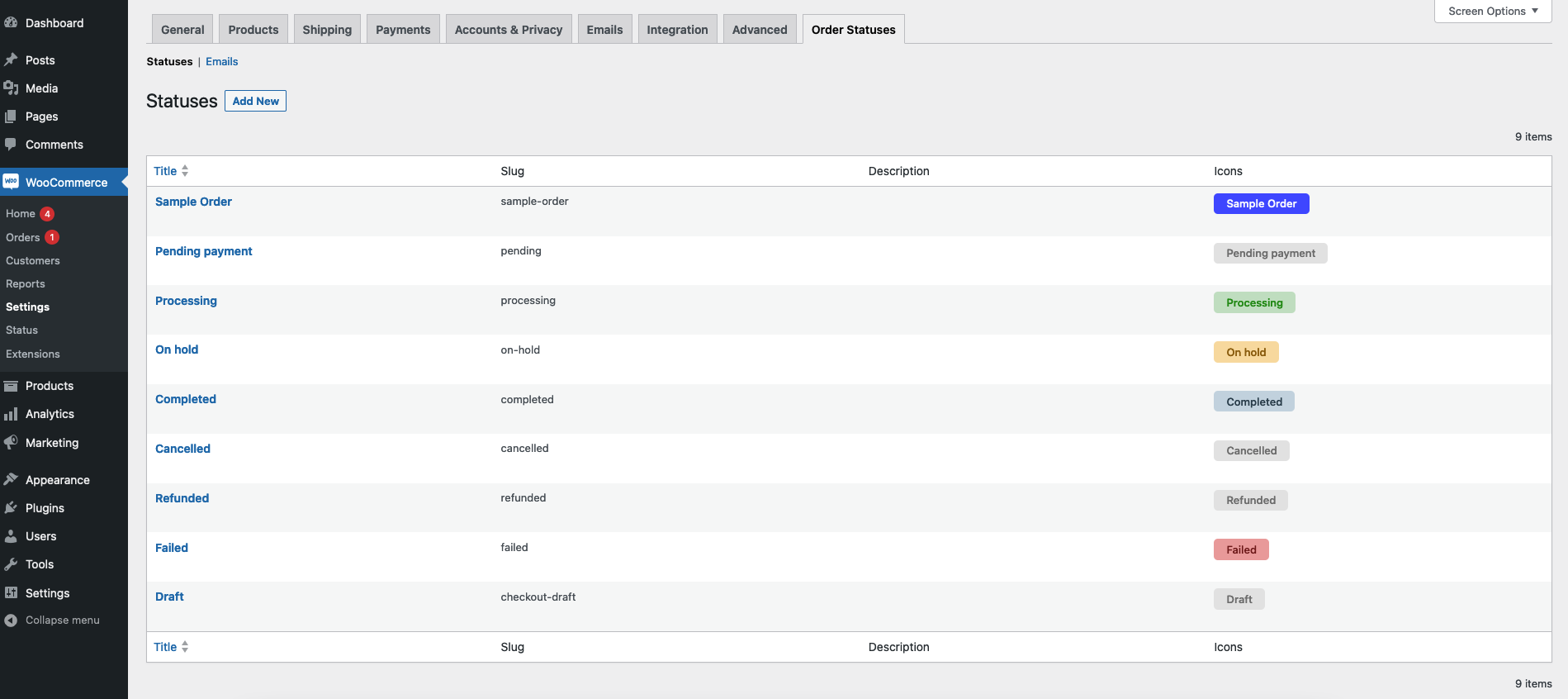
Order Status admin page - manage all your custom statuses in one place.
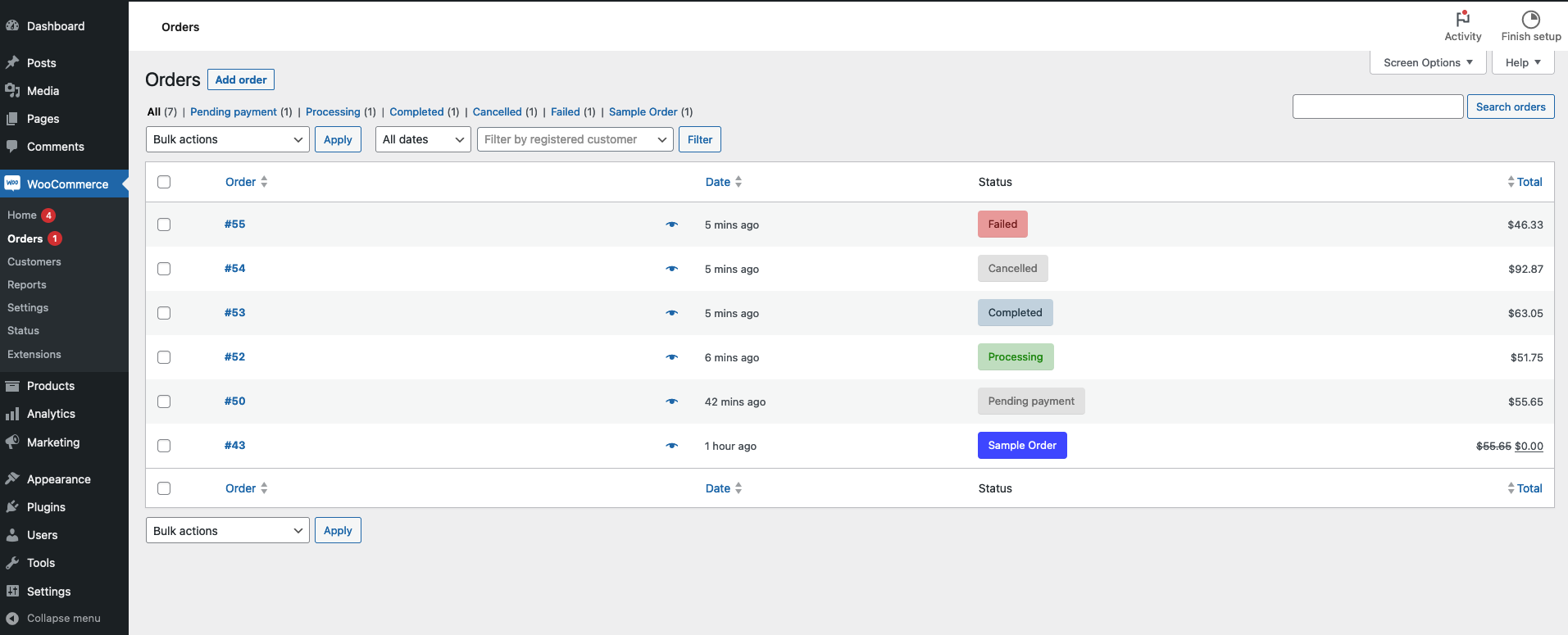
WooCommerce Orders page showing color-coded custom statuses.
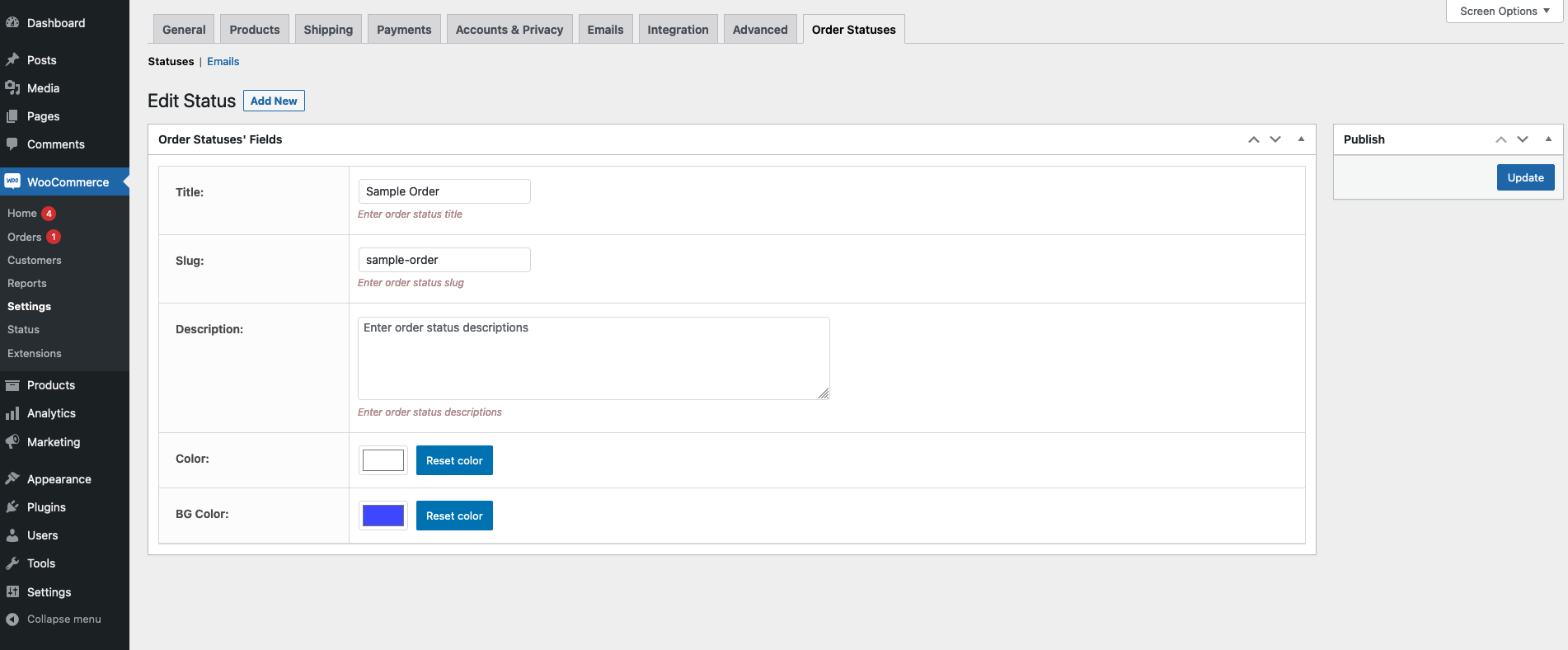
Order Status settings - configure colors and behavior.
Faq
There is no limit. Create as many custom order statuses as your store needs.
Yes. You can rename and recolor any default status. The slug cannot be changed because WooCommerce relies on it internally.
Orders that already have a custom status will keep it stored, but the custom status labels and styling will no longer display until the plugin is reactivated.
Yes, the plugin is fully compatible with WooCommerce HPOS.
Yes. Bulk action support for custom statuses is available in the Pro version.
Yes. Automatic email notifications tied to custom statuses are available in the Pro version, including placeholder variables for dynamic order data.
Yes. The plugin works with any properly coded WooCommerce-compatible theme.
Free support is available through the WordPress.org support forum. Pro users get priority support directly from our team – contact us here.
Reviews
Great plugin, Excellent support
By 
Your new update works very well for us in the shop! We also use the custom email function and it is extremely helpful, because on the one hand we can provide our customers with updates on their orders, but (and this is a great help for us) we can also use the change of status to automatically send certain orders directly to specific employees, who then have to do special things with the order.
Your tool is a great help for us and helps us to keep an overview and to organise the workflow well! Thank you very much for that!
Very helpful plugin to change WooCommerce order status.
By 
Could you guys add the ajax solution for creating the order slug in the plugin?
Changelog
3.0.9
- Other: Compatible with WordPress 7.0.4
- Other: Compatible with WooCommerce 11.0.1
3.0.8
- Other: Compatible with WordPress 7.0.2
- Other: Compatible with WooCommerce 10.9.4
3.0.7
- Other: Compatible with WordPress 7.0
3.0.6
- Other: Compatible with WordPress 6.9.4
- Other: Compatible with WooCommerce 10.7.0
3.0.5
- Other: Compatible with WordPress 6.9.1
- Other: Compatible with WooCommerce 10.5.2
3.0.4
- Updated: Email body placeholder variable added
- Other: Compatible with WooCommerce 10.4.3
3.0.3
- Other: Compatible with WordPress 6.9
- Other: Compatible with WooCommerce 10.4.2
3.0.2
- Other: Compatible with WordPress 6.8.3
- Other: Compatible with WooCommerce 10.3.5
3.0.1
- Other: Compatible with WordPress 6.8.2
- Other: Compatible with WooCommerce 10.0.4
3.0.0
- Update: Performance improvement.
- Update: Added new style.
- Other: Compatible with WordPress 6.8.1
- Other: Compatible with WooCommerce 9.8.3
2.1.0
- Fix: Warning.
2.0.0
- Update: Restructured the plugin.
- Update: Performance improvement.
- Fix: Bulk action issue fixed.
1.4.2
- Fix: Long slug issue fixed.
1.4.1
- Fix: Issue fixed.
1.4.0
- Update: WooCommerce HPOS compatible.
- Fix: CSS issue fixed.
1.3.0
- Enhance: WooCommerce 8.8.3 compatible.
- Fix: CSS issue fixed.
1.2.0
- Fix: Bug.
1.1.0
- Fix: Bug.
1.0
- Initial version.