Advanced H2H for SportsPress

Advanced H2H for SportsPress
Description
This plugin is an extension for SportsPress.
Give your league managers the option to use more advanced Sorting Criteria for your League Tables.
Now is possible to select different Sorting Criteria for each League Table!
How to Use
Step 1: Create Sorting Criteria
- Go to SportsPress -> Teams -> Sorting Criteria in your WordPress admin.
- Click “Add New Criterion”.
- Give your criterion a descriptive name (e.g., “Premier League Style”, “Champions League Rules”).
Step 2: Configure Regular Order
In the “Regular Order” section:
- Drag and drop the columns in the order you want them to be considered for initial sorting.
- Toggle the switch to disable criteria you do not want.
- Set sort direction (Ascending/Descending) for each column.
This determines the primary sorting order when teams have different points.
Important: The Tiebreak Order is only applied between teams that are equal on every column enabled in the Regular Order. If you want the head-to-head rules to decide between teams that are level on points, keep Points as the only column in the Regular Order and move everything else (including overall Goal Difference and Goals For) to the Tiebreak Order. If you leave Goal Difference in the Regular Order, teams that are level on points but have a different Goal Difference are separated before the head-to-head rules can be applied.
Step 3: Configure Tiebreak Order
In the “Tiebreak Order” section:
- Drag and drop columns in the order they should be used for tiebreakers.
- Toggle the switch to disable criteria you do not want.
- Set sort direction for each column.
- Enable the “H2H Only” checkbox for columns that should only consider head-to-head results (matches played between the tied teams). Leave it unchecked for a column that should use full-season stats.
This determines how teams are ranked when they are equal on the Regular Order (for example, when they have the same points).
Step 4: Review the Summary
The “Sorting Criteria Summary” sidebar shows:
- Your configured regular order.
- Your configured tiebreak order.
- A clear overview of your sorting rules.
Step 5: Apply to League Tables
- Go to SportsPress -> Tables.
- Edit an existing league table or create a new one.
- In the sidebar, find the “Advanced Sorting Criteria” meta box.
- Select your custom sorting criterion from the dropdown.
- Save the league table.
Examples
Premier League Style (overall Goal Difference decides before head-to-head):
- Regular Order: Points (DESC), Goal Difference (DESC), Goals For (DESC)
- Tiebreak Order: Points (DESC), Goal Difference (DESC), Goals For (DESC), Goals Away (DESC)
Champions League Style (head-to-head decides before overall Goal Difference):
- Regular Order: Points (DESC)
- Tiebreak Order: Points [H2H Only] (DESC), Goal Difference [H2H Only] (DESC), Goals For [H2H Only] (DESC), Goal Difference (DESC), Goals For (DESC)
Note: for the Champions League style, Points must be the only column in the Regular Order. Overall Goal Difference and Goals For go in the Tiebreak Order (with “H2H Only” unchecked) so they are only used after the head-to-head criteria. Putting Goal Difference in the Regular Order would separate teams that are level on points before the head-to-head rules are applied.
Developer Hooks
The bundled league-table.php template exposes five generic filters so you can extend the output (row/cell highlighting, badges, data-* attributes for JS, inline styles, extra legends, etc.) without editing the template. Defaults produce exactly the same markup as before, so existing sites are unaffected until you hook in.
Note on types: the row data is keyed by team post ID as integers, while get_post_meta( ..., 'sp_team' ) returns strings. Cast before comparing, e.g. in_array( (int) $team_id, array_map( 'intval', $teams ), true ).
sah2h_league_table_rows — ( array $data, int $table_id )
Change the row data just before the loop (reorder, add or remove rows). Keys are team post IDs.
add_filter( 'sah2h_league_table_rows', function ( $data, $table_id ) {
    return $data; // e.g. custom re-ordering
}, 10, 2 );
sah2h_league_table_row_attributes — ( array $attr, int $team_id, array $row, int $table_id )
Add any attribute to the <tr>. $attr['class'] is an array of CSS classes.
add_filter( 'sah2h_league_table_row_attributes', function ( $attr, $team_id, $row, $table_id ) {
    $attr['class'][] = 'highlighted';      // colours the whole row
    $attr['data-team'] = $team_id;          // custom data-* hook for JS
    return $attr;
}, 10, 4 );
sah2h_league_table_cell_attributes — ( array $attr, string $column, int $team_id, array $row, int $table_id )
Add attributes to an individual <td>. $column is 'rank', 'name', or the data key (e.g. 'pts'). $attr['class'] is an array; $attr['data-label'] is the responsive label.
add_filter( 'sah2h_league_table_cell_attributes', function ( $attr, $column, $team_id, $row, $table_id ) {
    if ( 'name' === $column ) {
        $attr['class'][] = 'sp-highlight';
    }
    return $attr;
}, 10, 5 );
sah2h_league_table_row_html — ( string $html, int $team_id, array $row, int $table_id )
Filter the fully assembled <tr>...</tr> markup for a single row.
add_filter( 'sah2h_league_table_row_html', function ( $html, $team_id, $row, $table_id ) {
    return $html; // e.g. append a sub-row or wrap the markup
}, 10, 4 );
sah2h_league_table_html — ( string $output, int $table_id )
Catch-all filter on the complete table markup before it is echoed.
add_filter( 'sah2h_league_table_html', function ( $output, $table_id ) {
    return $output . '<p class="legend">Bold = teams in this match</p>';
}, 10, 2 );
Installation
- Install and activate Advanced H2H for SportsPress plugin.
- Create your own Sorting Criterion at
SportsPress->Teams->Sorting Criteria. - Select your preferred Sorting Criterion for your League Table
- Enjoy!
Credits
Screenshots
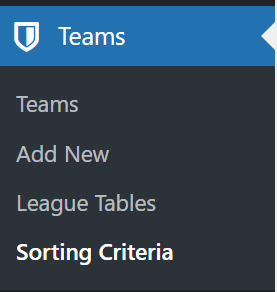
The new CPT Sorting Criteria at SportsPress Teams Menu

"Regular" Order priorities (Pts, GD, F) i.e. Premier League

Tiebreak Order priorities (Pts, Goal Away) i.e. Premier League

Sorting Criteria Summary i.e. Premier League
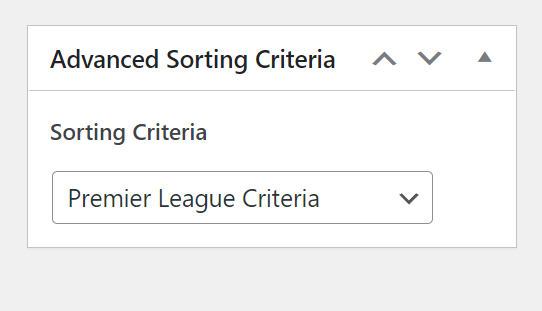
Selection of Sorting Criterion at your League Table Edit Page.
Reviews
Great tool and good support
By 
This is a good tool and my questions were answered quickly when I asked. Recommended
Very nice add-on
By 
Just the extra settings we needed to sort league tables the way we need. Thank you!
Fantastic Sportspress Plugin
By 
This plugin resolved our issue. The league I work for, (United Premier Soccer League) in the United States is a pro-development league for young aspiring amateur players. The league recently converted to Head-To-Head as the first tie breaker for our division tables. Before we implemented the plugin, we only had the option of goal different to sort the teams after points in our Themeboy wp theme. Now we have a lot more flexibility and allows us to accurately reflect the rankings of teams throughout the season. We owe the developer a lot for his work on this plugin-in!
Amazing!
By 
I've been using sportspress for a number of years now and though their current sorting criteria functions - it is really limited. Especially when trying to incorporate head to head and where in your sorting order this would fall under. This plugin completely revitalizes the sorting ability and allows you to set custom sorting orders for each individual league (should you want this).
Great work Savaas!!!
Side Note: beware that this plugin currently does not function out of the box with Dan FIsher's Alchemist theme though can be incorporated very easily by editing the league-table.php sportspress template file found in alchemist/sportspress/ folder.
You would open that file and replace the code below (found on or around line 41)
$table = new SP_League_Table( $id );
With the following
$sah2h_criteria = get_post_meta( $id, 'sah2h_criteria', true );

if ( 'default' !== $sah2h_criteria && '' !== $sah2h_criteria ) {
	$table               = new SAH2H_League_Table( $id );
	$table->h2h_criteria = $sah2h_criteria;
} else {
	$table = new SP_League_Table( $id );
}
That is all I've done to have this advanced h2h plugin function with the Alchemist theme. *Use at your own discretion.
Changelog
2.2.0
- NEW: The league table template now exposes five generic, backward-compatible filters (
sah2h_league_table_rows,sah2h_league_table_row_attributes,sah2h_league_table_cell_attributes,sah2h_league_table_row_html,sah2h_league_table_html) so highlighting, badges, data-* hooks, extra legends, etc. can be added without editing the template. Default output is byte-for-byte unchanged. See “Developer Hooks”.
2.1.3
- FIX: Tiebreak columns without “H2H Only” now correctly fall back to full-season stats instead of the (empty) head-to-head values. Previously, teams that were level on points but had not played each other were sorted alphabetically instead of by the configured tiebreak column (e.g. Goal Difference), because an unchecked “H2H Only” checkbox is not submitted at all and the missing key was not treated as “not H2H only”.
- DOC: Corrected the “Champions League Style” example. Overall Goal Difference must be placed in the Tiebreak Order (not the Regular Order) so the head-to-head criteria are applied first, and clarified that the Tiebreak Order only applies between teams equal on every Regular Order column.
2.1.2
- FIX: Fatal TypeError “Unsupported operand types: int + string” on PHP 8+ when
sp_minutesevent meta is empty or non-numeric.
2.1.1
- FIX: Highlight team feature is not working.
2.1.0
- UPDATE: Update league-table template to latest version.
2.0.2
- FIX: Avoid blank page if SportsPress is not activated.
2.0.1
- FIX: Error if the plugin is loaded before SportsPress.
2.0.0
- NEW: Sorting Criteria Custom Post Type (see screenshots)
- NEW: Ability to choose for each League Table which ordering criteria to use! (see screenshots)
1.0.0
- First Release!