Advanced Pixel Editor
Advanced Pixel Editor
Description
Stop leaving WordPress to edit your images. Advanced Pixel Editor brings Photoshop-grade image processing — powered by ImageMagick — directly into your dashboard. Select any image from your Media Library, fine-tune contrast and sharpness with live preview, and save the result without ever opening a desktop app.
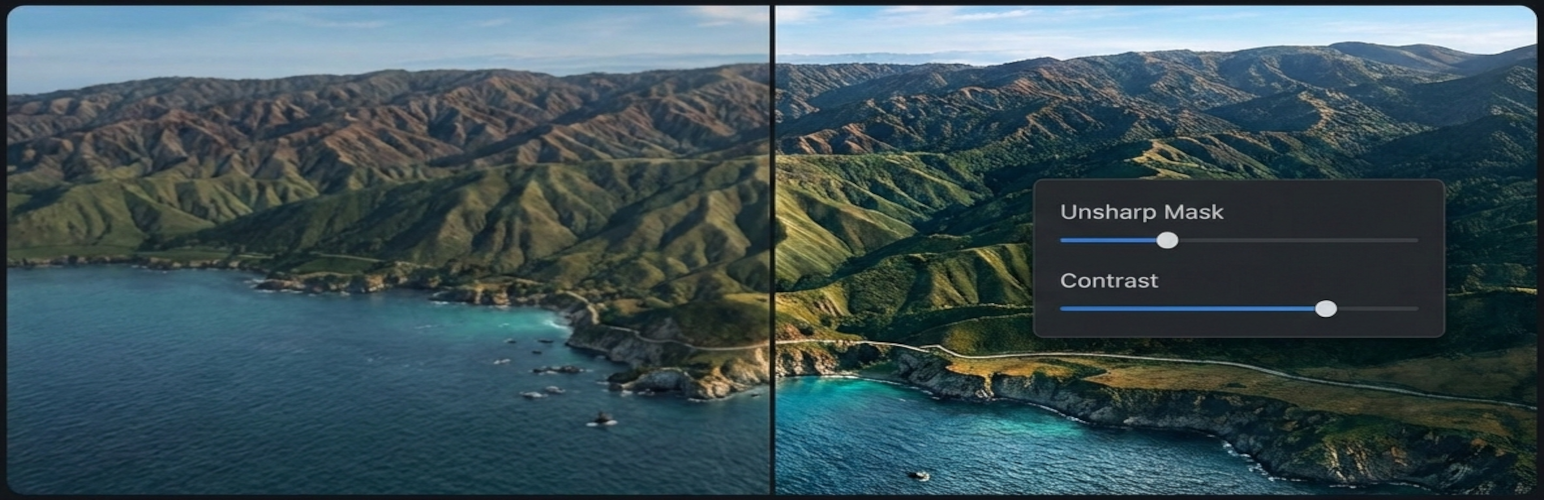
Advanced image editing within WordPress. Sigmoidal contrast adjustment and unsharp masking — the same core algorithms used by Photoshop and Lightroom — with precision sliders that update the preview instantly. Drag the built-in before/after comparison slider to evaluate your edits side-by-side with the original.
Works right where you already are. Open the editor from the Media Library grid view, list view, or attachment edit screen. Your edited image can be saved as a new file or used to replace the original (with automatic backup and one-click restore).
What You Can Do
- Sigmoidal Contrast — The same gradual, tone-preserving contrast curve used by Photoshop and Lightroom
- Unsharp Mask — Professional sharpening with independent amount, radius, and threshold controls — identical to Photoshop’s Filter Sharpen Unsharp Mask
- Real-time Preview — Every slider change renders instantly via ImageMagick on the server
- Before / After Slider — Draggable comparison overlay to evaluate edits at a glance
- Save As New or Replace — Keep the original untouched, or overwrite it with automatic backup
- Restore Original — One click to revert a replaced image
- Deep Media Library Integration — “Advanced Editor” buttons in grid modal, list view, and attachment page
- Fully Responsive — Works on desktop, tablet, and mobile
- Accessible — Full keyboard navigation, ARIA labels, and screen reader support
Upgrade to Pro
Need more than contrast and sharpening? Advanced Pixel Editor Pro adds a full Photoshop-style toolset on top of the free editor:
- Advanced Filters — Photoshop-style Levels and Curves dialogs, plus brightness, saturation, hue, clarity, dehaze, vibrance, highlights/shadows, and artistic effects like sepia, vintage, duotone, and black & white
- Crop & Resize — Interactive crop overlay with aspect ratio presets (free, 1:1, 4:3, 16:9), resize with aspect lock, and DPI controls
- Watermarking — Text watermarks with 50+ Google Fonts or image watermarks with transparency, plus 9-point positioning and tiling
- Batch Processing — Apply filters to 10–100+ images at once with real-time progress, pause/resume, and background processing — like Photoshop’s Actions, but built into WordPress
- Filter Presets — Save and reuse your favorite filter combinations
Plans start at $49/year (1 site) with lifetime options available. 20% of all Pro proceeds are donated to the ImageMagick project — the open-source library that powers this plugin and millions of websites worldwide. View pricing and features
Requirements
This plugin requires the ImageMagick PHP extension (Imagick), which is available on most modern hosting platforms. If your host doesn’t have it enabled, contact them — most providers enable it within hours. Imagick is a worthwhile upgrade that also improves WordPress core image handling.
Support
For support, feature requests, or bug reports, please visit:
* GitHub Repository
* WordPress Support Forums
Contributing
Contributions are welcome! Please see our contributing guidelines on GitHub.
Credits
Developed by Rafael Minuesa and the ProWoos team — GitHub
Installation
- Upload the
advanced-pixel-editorfolder to/wp-content/plugins/(or install directly from the WordPress plugin directory) - Activate the plugin through the Plugins menu
- Go to Media Advanced Pixel Editor to start editing — or click the “Advanced Editor” button on any image in your Media Library
Prerequisite: The ImageMagick PHP extension (Imagick) must be enabled on your server. Most modern hosts have it already. If yours doesn’t, contact your hosting provider — they can usually enable it within hours.
Screenshots

Editor Interface — Select an image and adjust contrast and sharpness with live preview

Before / After Comparison — Drag the slider to compare your edits with the original
Faq
Three ways: go to Media Advanced Pixel Editor, click the “Advanced Editor” button in the Media Library grid/list view, or click it on any attachment edit screen. The image loads automatically.
JPEG, PNG, GIF, and WebP.
By default, images up to 10 MB and 4096 × 4096 pixels are supported for optimal server performance.
Only if you choose “Replace original” — and even then, an automatic backup is created so you can restore the original at any time. The default “Save as new image” mode leaves the original untouched.
Yes. Full keyboard navigation, ARIA labels, and screen reader support are built in.
Yes. The editor is fully responsive and touch-friendly, including the comparison slider.
Advanced Pixel Editor Pro adds advanced filters (brightness, saturation, curves, levels, artistic effects), crop & resize, watermarking, batch processing, and filter presets. It requires this free plugin to be installed.
Yes — the ImageMagick PHP extension (Imagick) must be enabled. Most modern hosts have it already; if not, your provider can usually enable it within hours.
Reviews
Changelog
3.3.2
- Added per-attachment permission checks — prevents users from editing other users’ images on multi-author sites
- Added keyboard focus styles on toolbar and action buttons (WCAG 2.4.7)
- Improved touch event handling to avoid conflicts with other plugins
- Refreshed plugin description and readme for WordPress.org
3.3.1
- Fixed comparison slider: before/after labels now correctly match the image sides
- Fixed comparison slider handle alignment when page is scrolled
- Fixed sharpness sliders: removed invalid negative values, aligned radius maximum with server-side limit (0–5)
- Fixed default slider values: filters start at neutral (no effect) so you see the original image first
- Fixed Home/End keyboard shortcuts on sliders (were reversed)
- Fixed save button loading spinner not visible on green button
- Fixed preview loading spinner not rendering on image element
- Fixed duplicate heading on editor page
- Fixed double preview request when resetting filters
3.3.0
- Improved contrast filter: replaced binary toggle with gradual sigmoidal contrast (Photoshop-style tone-preserving curve)
- Fixed save format: edited images now preserve the original format (PNG transparency, WebP, GIF) instead of converting to JPEG
3.2.0
- Add extensibility hooks for Pro add-on: filterable tabs, contrast controls hook
3.1.1
- Fixed “Advanced Editor” button placement on attachment edit page — now appears next to “Edit Image”
- Added translation template (.pot) file
3.1
- Added “Advanced Editor” button to attachment edit page sidebar
3.0
- Added save mode selection: save as new image or replace original
- Added custom filename input for new image saves
- Added automatic backup when replacing original image (WordPress
_wp_attachment_backup_sizespattern) - Added “Restore Original” option to revert replaced images
- Updated help text to reflect new save options
2.9
- Added “Advanced Editor” button to Media Library grid view modal (next to “Edit Image”)
- Added “Advanced Edit” row action to Media Library list view
- Editor now supports direct image pre-loading via URL parameter from Media Library
2.8
- Added draggable comparison slider handle on the image preview
- Clicking anywhere on preview wrapper now moves the comparison slider
- Added touch support for comparison slider on mobile devices
- Filter controls now support negative values (contrast, sharpness amount, radius, threshold)
2.7
- Changed plugin slug from “advanced-image-editor” to “advanced-pixel-editor” per WordPress.org review
- Updated text domain, class names, and all file references to match new slug
- Renamed main plugin file to advanced-pixel-editor.php
2.6
- Renamed plugin display name from “Advanced Image Editor” to “Advanced Pixel Editor”
2.5
- Fixed plugin URI validation issue
- Changed prefix from ‘aie’ to ‘advaimg’ to meet WordPress.org guidelines (4+ characters)
- Improved base64 image data sanitization with dedicated validation method
- Renamed internal files to match new prefix convention
- Added build script for WordPress.org submission
2.4
- Fixed WordPress.org validation errors
- Improved UI and user experience
2.3
- Added preview toggle checkbox to show/hide image preview
- Added before/after comparison slider with draggable handle
- Redesigned layout with preview at top and compact controls sidebar
- Improved responsive design for mobile devices
- Enhanced user interface with better space utilization
2.2
- Complete plugin rename from “Advanced Image Filters” to “Advanced Image Editor”
- Enhanced security with rate limiting, input validation, and capability checks
- Improved accessibility with ARIA support and keyboard navigation
- Performance optimizations with memory management and dimension limits
- Better user interface with loading states and progress indicators
- Comprehensive internationalization support
- WordPress coding standards compliance
2.1
- Initial release with basic image editing functionality