Affiliate Notice Manager
Affiliate Notice Manager
Description
Most of the affiliate programs suggest marketers to add affiliate disclosure on their website. It’s always best practice, if you can add the Affiliate Notice or Disclosure below the post.
To promote products of UK, US or Canada based companies, you must need to add disclosure on your website. Large affiliate programs like Amazon, Ebay, Trip Advisor and others always suggest to follow FTC(Fedaral Trade Commission) guidelines.
Using this plugin you can easily add affiliate notice on posts. It’s easy and anyone can setup.
Features
Here are some features of this plugin:
- Show Affiliate Notice in Post
- Show Any Notice Below Post
- Display or Turn Off
Installation
To install and setup this plugin, follow below guide.
- Upload
affiliate-notice-manager.phpto the/wp-content/plugins/directory - Activate the plugin through the ‘Plugins’ menu in WordPress
- Visit the settings section of your plugins from the dashboard to setup Affiliate Disclosure.
Screenshots
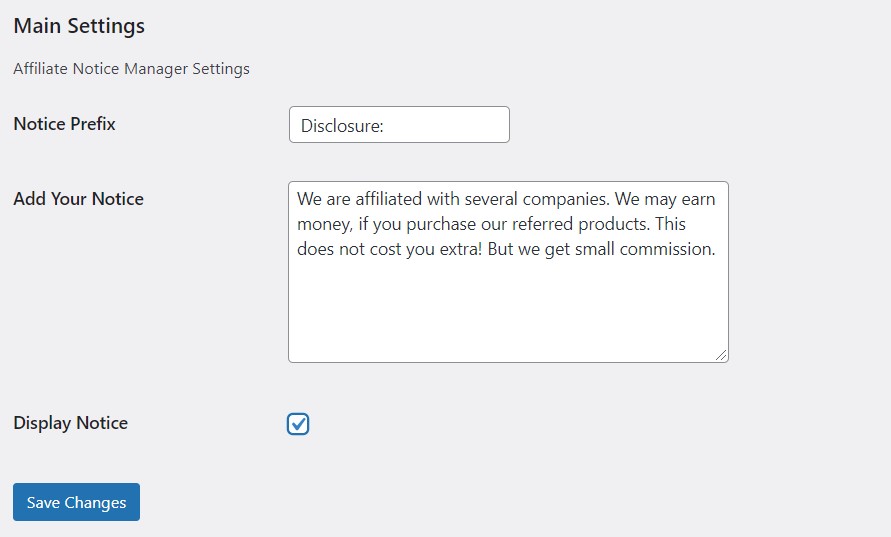
Installing the Plugins

Admin Area View

Frontend View
Faq
You don’t need any coding or programming Knowledge to setup this plugin. Just follow setup guideline from above.
Once you setup the plugin, the affiliate notice will be displayed in the single post section. In every single post, it will be displayed.
Reviews
Excellent
By 
Changelog
1.0.0
- Initial release.