Affiliates for WooCommerce – Affiliate Program, Referral Tracking & Commission Payouts
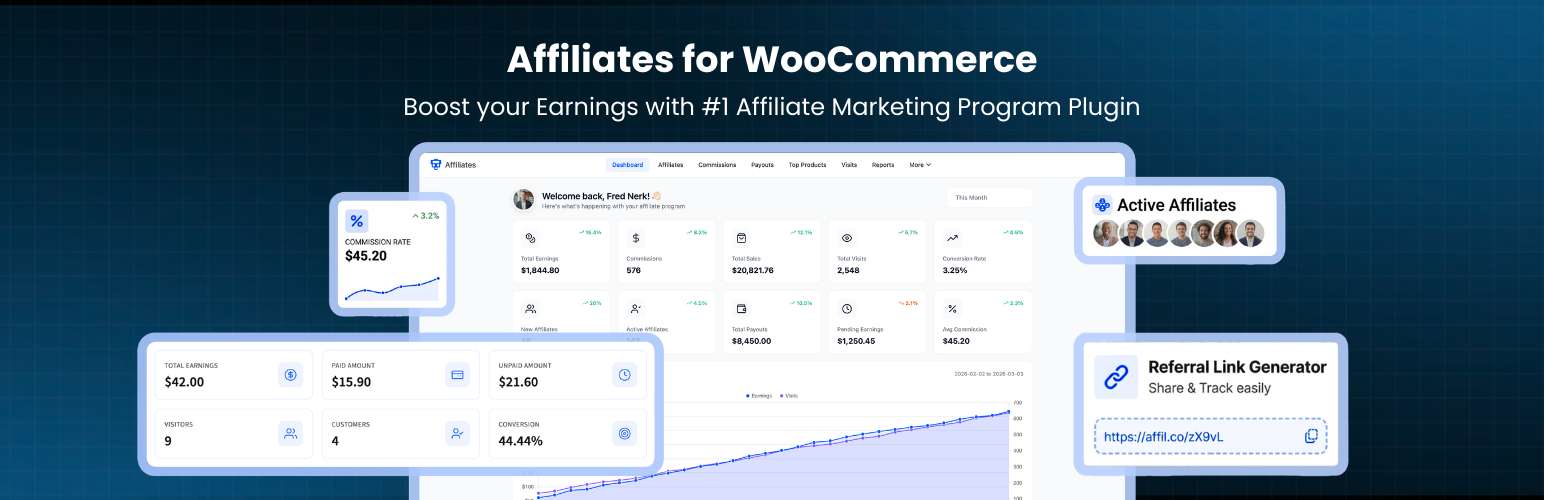
Affiliates for WooCommerce – Affiliate Program, Referral Tracking & Commission Payouts
Description
Affiliates for WooCommerce is a WooCommerce affiliate plugin that turns your store into a self hosted affiliate program. People sign up as affiliates, share a referral link, and earn a commission when someone buys through it. You approve the affiliates, set the rate, and pay them when you are ready.
Everything runs inside WordPress. There is no external affiliate network taking a cut of each sale, and no monthly platform fee on top of what you already pay your affiliates.
Affiliates get their own dashboard inside the WooCommerce My Account page, so they can check earnings, build referral links, and enter payout details without emailing you.
Quick links
How the referral tracking works
- An affiliate registers through your signup form and you approve them.
- They generate a referral link for any page or product on your store.
- A visitor clicks the link and a referral cookie is stored in their browser.
- If that visitor orders before the cookie expires, the commission is recorded against the affiliate.
- You review the commission list and record the payout.
Why run the affiliate program on your own store
Hosted affiliate platforms charge a subscription and usually a percentage of every tracked sale, so you pay twice for the same order. This plugin keeps the affiliate data, the commission rules, and the payout records in your own database.
Commission amounts are calculated from real WooCommerce order totals, so what an affiliate earns matches what the customer actually paid. You decide whether tax and discounts count toward the commission base.
What the free version includes
Affiliate registration and signup form
Affiliates apply through a form you can place on any page.
- An affiliate dashboard page with the login and registration forms is created for you on activation
[ddwcaf_affiliate_registration_form_shortcode]renders the affiliate registration form anywhere on your site[ddwcaf_affiliate_dashboard_shortcode]renders the affiliate dashboard on a page of your choice- Rename either shortcode from Configuration > Shortcodes if you prefer your own tag
- Show the login form next to the signup form, or show the signup form on its own
- Add the affiliate signup fields to the standard WooCommerce registration page
- Choose which WordPress user roles are allowed to become affiliates
- Approve, reject, or ban applications from the affiliates list in your admin
- Add a new affiliate yourself from the admin using the Add New button on the affiliates screen
Referral link tracking
Every click on a referral link is matched to an affiliate through a browser cookie.
- Set the referral cookie lifetime in days
- Rename the referral URL parameter and the cookie name to suit your store
- Turn click logging on or off
- Every logged click stores the destination URL and the time it happened
- Affiliates build their own referral links from the link generator in their dashboard
Commission calculation
Commissions are recorded automatically from WooCommerce orders once an order reaches the status you configure.
- One global commission percentage applies to every affiliate
- Exclude tax from the commission base with the net of tax setting
- Exclude the discounted amount so coupons do not inflate what you pay
- Review every commission in the admin with the order reference, amount, affiliate, and status
- Filter the commission list by status, date, or affiliate
Payout management
- Bank transfer and PayPal are both available as payout methods, and you can switch either one off
- Affiliates save their own bank or PayPal details from their dashboard, so you do not have to collect them by email
- Create payout records from the admin and mark them paid once the money is sent
- Filter payouts by status so you can work through them in batches
- Each payout record keeps the affiliate, amount, method, and date
Affiliate dashboard
Affiliates see their own numbers without any access to your WordPress admin.
- Appears as an Affiliates tab in the WooCommerce My Account page, or on a standalone page through the shortcode
- Total earnings, paid earnings, unpaid earnings, and conversions at the top of the dashboard
- Commission list split by status so affiliates know what is pending and what has been paid
- Payout history with the current status of each request
- Visit log with the destination URL and timestamp of each recorded click
- Top products list showing which of your products earned them the most
- Referral link generator for any page or product
- Payout details form where they choose bank transfer or PayPal
- Optional WordPress sidebar widgets on the dashboard page
Admin reporting
- Affiliates list with a status control and an earnings summary for each affiliate
- Single affiliate screen with the full profile and that affiliate’s commission history
- Commission log across all affiliates with filters
- Visit log across all affiliates showing referral source URLs
- Top products report showing which products drive the most affiliate revenue
Dashboard styling
- Set the brand primary colour used across the affiliate dashboard
- Control background, border, text, and value colours for the summary cards
- Set table header background and text colours
- Show or hide the summary card icons and change the icon size
Built for WooCommerce stores
- Declared compatible with WooCommerce High Performance Order Storage (HPOS)
- Translation ready with a
.potfile, so it works with WPML, Polylang, and Loco Translate - Works with standard WooCommerce compatible themes
- Object oriented codebase with hooks and filters for custom development
- Admin screens adapt to smaller displays with a drawer based navigation
What the Pro version adds
The free version covers a single global commission rate and manual payouts. Pro is for stores that need per product rates, automated payouts, and marketing material for affiliates.
Commission rules
- Commission rates per product, per category, or per user role
- Tiered rates that increase automatically as an affiliate reaches higher lifetime earnings
- A personal commission rate for an individual affiliate that overrides the global rate
- Exclude specific products or categories from earning commission
- A holding period so commissions only become payable after your refund window closes
Coupon based referrals
- Assign WooCommerce coupons to specific affiliates
- Affiliates earn commission when a customer checks out with their coupon, with no referral link needed
- Coupon assignment emails sent to the affiliate
- A coupons tab in the affiliate dashboard
Automated payouts
- Let affiliates request payouts themselves, or run payouts automatically on a chosen day each month
- Set a minimum balance before a payout can be requested or processed
- A step by step payout wizard for processing large batches
- Pay through bank transfer, PayPal, Stripe, or WooCommerce Wallet
Send the money without leaving WordPress
Free payouts are a record keeping exercise: you send the money yourself and mark the record paid. Pro can move the money for you.
- PayPal Payouts sends the commission straight to the PayPal email address on the affiliate’s profile, with nothing extra required from the affiliate
- Stripe Connect transfers to a Stripe Express account the affiliate connects once from their own dashboard, so Stripe collects their identity and bank details instead of you
- Sandbox and live environments for both gateways, with a connection test before you send anything real
- Payouts are sent through whichever gateway matches that affiliate’s chosen withdrawal method
- A retry limit per payout, a per payout audit log, and an email alert to you when a transfer fails
- Keep automatic sending switched off and both gateways still work for one off manual sends
- Stripe keys can live in a
wp-config.phpconstant instead of the database
Lifetime commissions
- Bind a referred customer to the affiliate who first won them, so their later orders keep earning
- The binding is written once and never overwritten, so the affiliate who did the work keeps the customer
- Set a lifetime window in days, or leave it unlimited
- Pay commission on WooCommerce Subscriptions renewals, not only the first order
Public affiliate leaderboard
[ddwcaf_affiliate_leaderboard_shortcode]ranks your top affiliates on any page- Card, compact list, or podium layout with rank badges and medal colours
- Choose how many affiliates are listed and whether the top three are highlighted
- Show or hide earned amounts, referred order counts, and Gravatar avatars
- Anonymise affiliate names if you would rather not publish who is who
- The leaderboard stylesheet only loads on pages that contain the shortcode
Marketing tools for affiliates
- Upload banners and text links as creatives that affiliates copy from their dashboard
- One click sharing to 10+ networks including Facebook, WhatsApp, LinkedIn, X, and email
- Pinterest ready image uploads
- Default share titles and messages so your branding stays consistent
Custom registration fields
- Add your own fields to the affiliate signup form using text, select, radio, checkbox, and textarea inputs
- Choose which profile fields affiliates are allowed to edit
- Require affiliates to accept your program terms during signup
Fraud controls
- Block affiliates from earning commission on their own orders
- Set a debounce time so repeated clicks from the same visitor are not counted as separate visits
- Decide whether a newer referral link overwrites an existing affiliate cookie
- Clear the referral cookie after a purchase
- CAPTCHA on the signup form through the WooCommerce Advanced CAPTCHA plugin by DevDiggers, sold separately
Email notifications
- Automated emails for registration, approval, and commission updates
Advanced reports
- Charts for earnings, visits, and conversions with month on month comparison
- Conversion rate and earnings breakdown at a glance
- Top products report filtered by affiliate
Dashboard endpoints
- Custom URL endpoints and titles for each affiliate dashboard section
- Custom endpoint slug and title for the My Account affiliate tab
Try the Pro demo or see the full comparison
External services
This plugin connects to two services run by DevDiggers. Both are used in the WordPress admin only and neither is involved in referral tracking, commissions, or payouts.
DevDiggers plugin catalogue
The DevDiggers admin screen loads the list of DevDiggers plugins so it can show which of them you already have installed. The request is sent to https://devdiggers.com/wp-json/ddwcs/v1/plugins when that screen is opened. It sends no personal data and no store data, only a standard user agent identifying the plugin framework version.
DevDiggers newsletter signup
If you type an email address into the newsletter box on the DevDiggers admin screen and submit it, that email address, a “newsletter” tag, and your site URL are sent to https://devdiggers.com/. This only happens when you submit the form yourself.
Terms of service: https://devdiggers.com/terms-and-conditions/
Privacy policy: https://devdiggers.com/privacy-policy/
Source code and build tools
The JavaScript and CSS shipped in assets/ are compiled with webpack and Babel from the sources in src/, which is excluded from the distributed zip to keep it small. The full source, including src/, webpack.config.js, babel.config.js, and package.json, is available from the plugin page at devdiggers.com.
To build from source:
npm installnpm run build
Installation
From your WordPress admin
- Go to Plugins > Add New.
- Search for Affiliates for WooCommerce by DevDiggers.
- Click Install Now, then Activate.
Manual upload
- Download the zip from WordPress.org.
- Go to Plugins > Add New > Upload Plugin.
- Upload the zip, click Install Now, then Activate.
You can also unzip the file and upload the folder to /wp-content/plugins/ over FTP, then activate it from the Plugins screen.
First run
- Open DevDiggers Plugins > Affiliates > Configuration > General and turn on the affiliate system.
- Set your commission percentage under Configuration > Commissions.
- Set the referral cookie lifetime under Configuration > Referrals.
- Share the affiliate dashboard page URL and start approving signups.
WooCommerce must be installed and active.
Screenshots
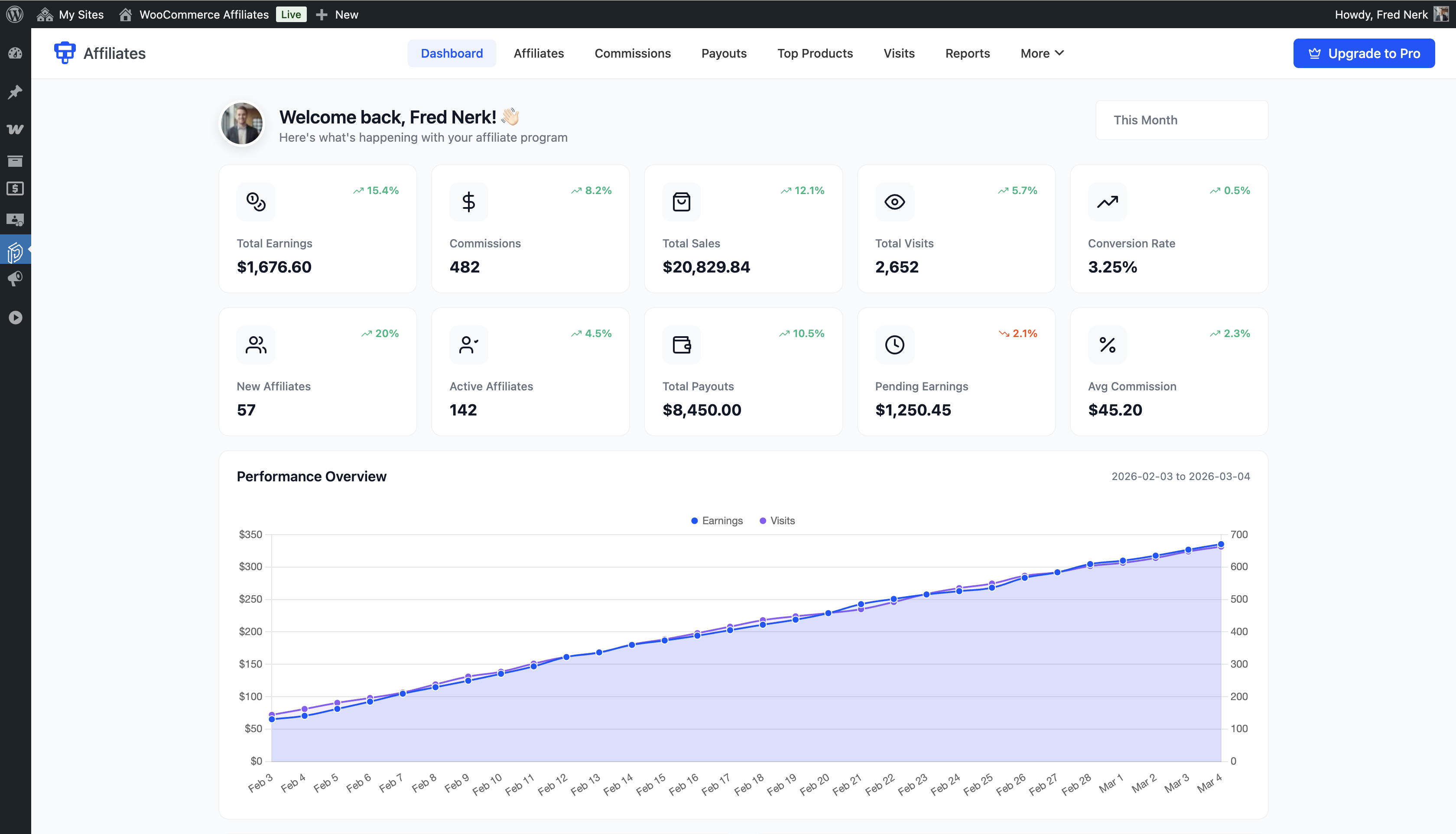
Admin dashboard with total earnings, paid and unpaid earnings, quick stats, and charts

Affiliate dashboard with total earnings, paid earnings, unpaid earnings, and quick stats

Affiliate commission list with amounts, order references, dates, and statuses

Affiliate payout history with the current status of each request

Affiliate visit log with referral source URLs and timestamps

Affiliate top products list showing which products earned the most commission

Referral link generator where affiliates build links for any page or product
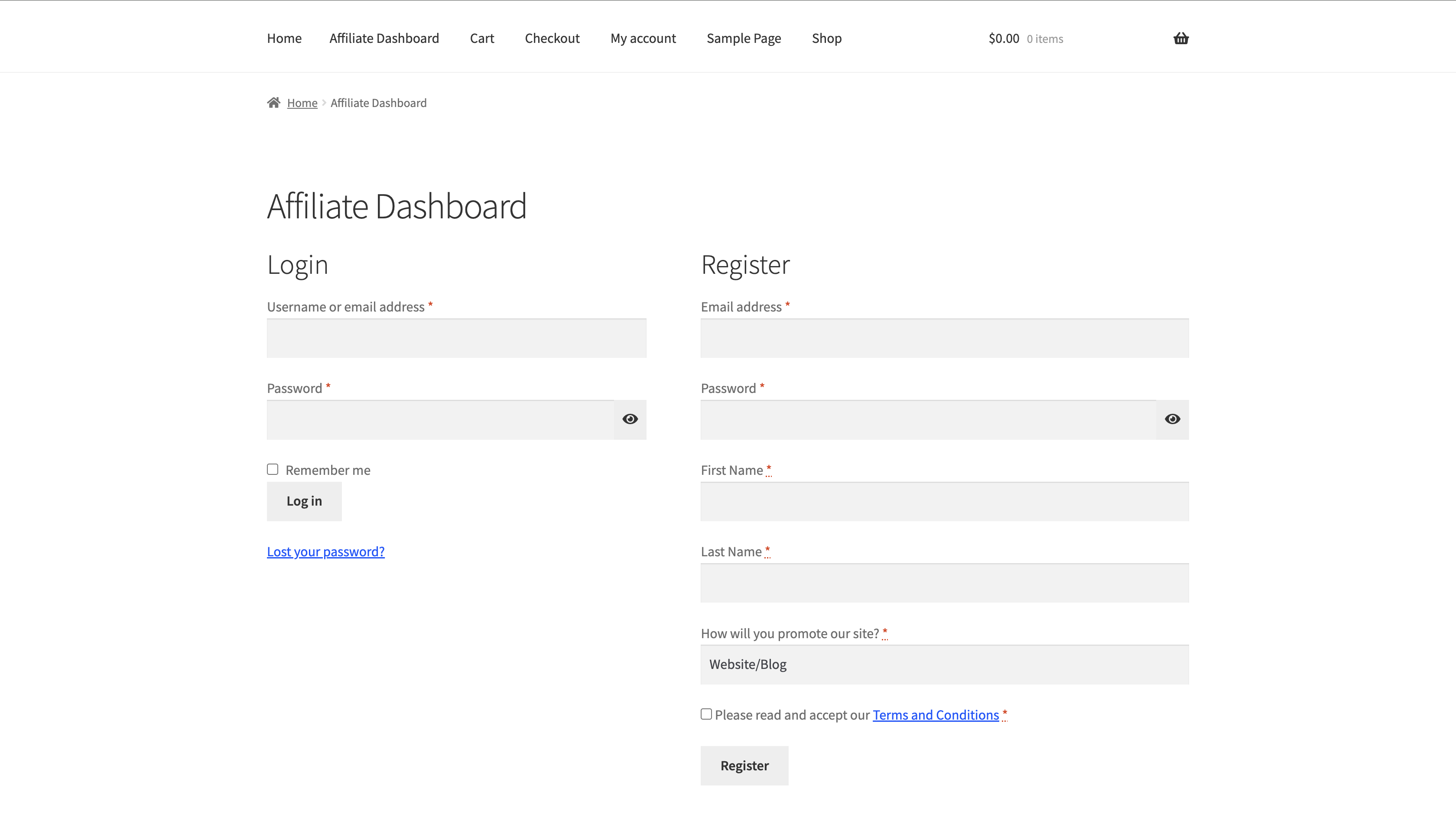
Affiliate registration and login page built with the registration shortcode

Admin affiliates list with status controls and an earnings summary per affiliate

Single affiliate screen with the full profile and commission history
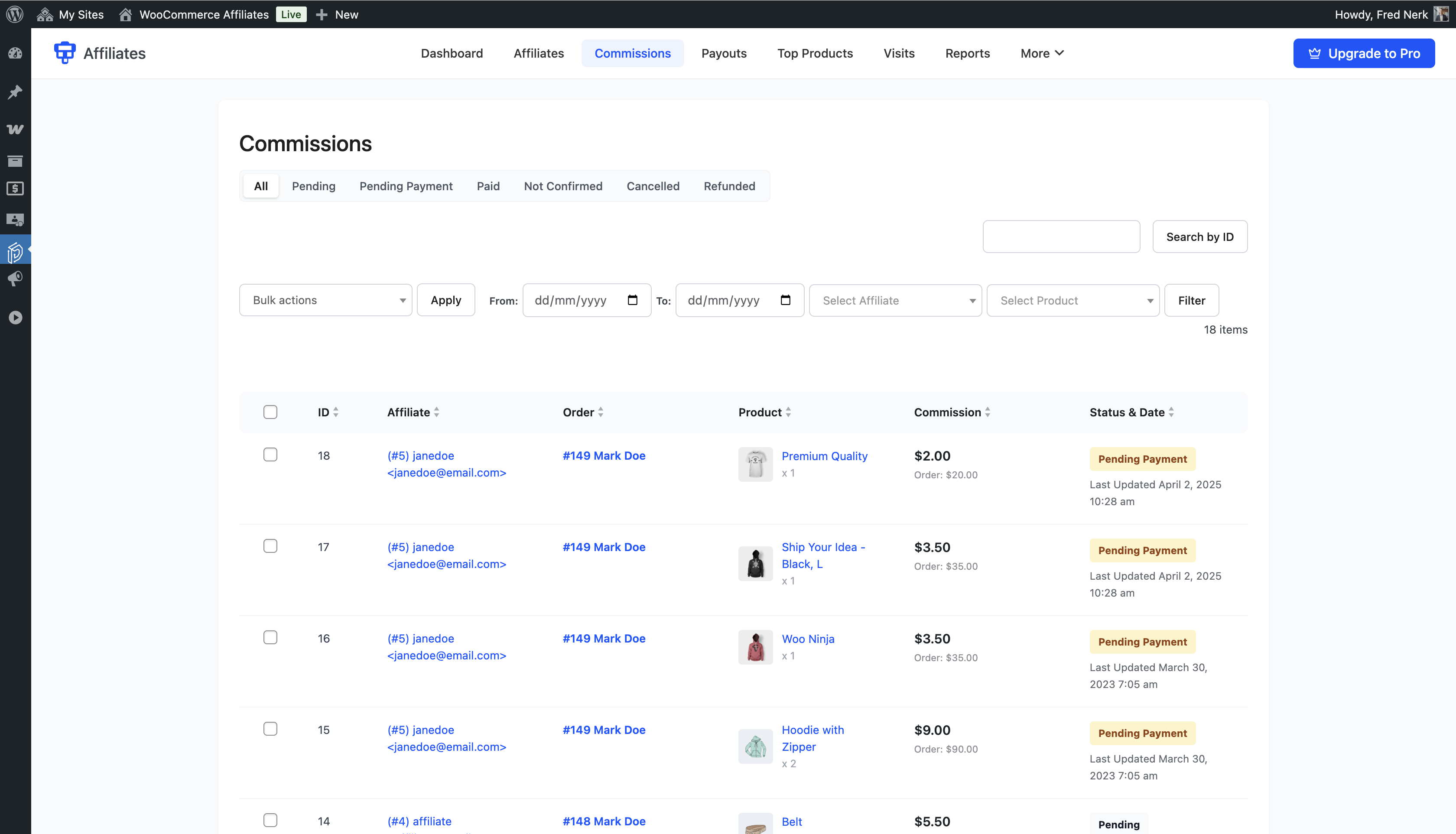
Admin commission list with filters for status, date, and affiliate

Admin payout list with manual payout creation and status controls

Admin top products report across all affiliates
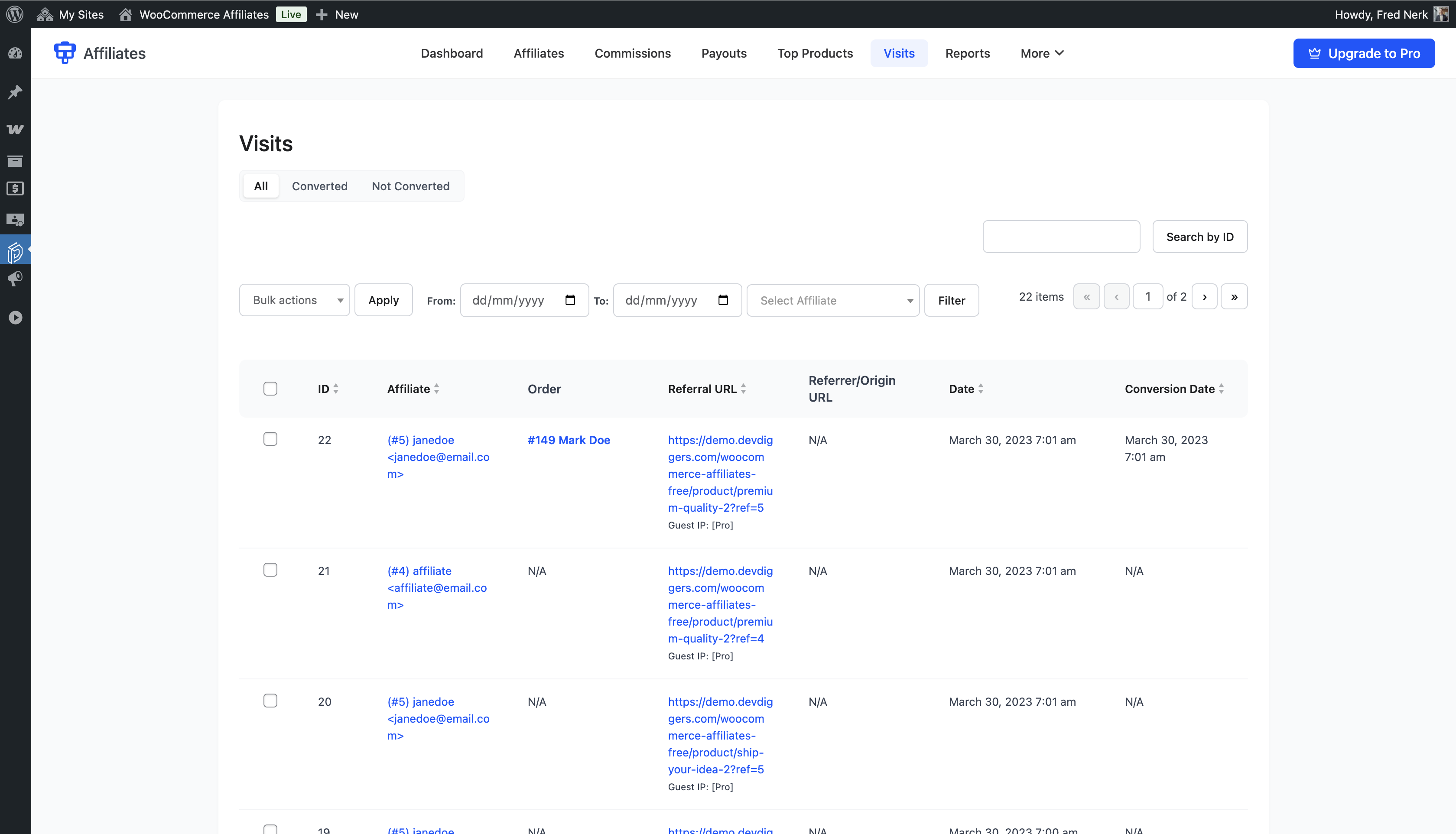
Admin visit log with the affiliate, URL, and timestamp of every referral click

Registration fields configuration screen
Faq
A referral link carries the affiliate’s ID in a URL parameter. When a visitor opens it, the plugin stores a cookie in their browser. If that visitor places an order before the cookie expires, the commission is recorded against that affiliate. You set the cookie lifetime in days under Configuration > Referrals.
There is no limit in the free version. The admin lists are filterable, so you can still find a specific affiliate once the program grows.
The free version uses manual payouts. Affiliates save their bank transfer or PayPal details in their dashboard, you create a payout record from the admin, send the money through your own bank or PayPal account, and mark the record as paid. The plugin does not move money on its own. Pro adds affiliate requested payouts, scheduled monthly payouts, minimum payout thresholds, WooCommerce Wallet, and automatic sending through the PayPal Payouts API or Stripe Connect.
Not in the free version, which uses one global percentage for everyone. Per product, per category, per user role, per affiliate, and tiered rates are Pro features.
Coupon based referral tracking is a Pro feature. In the free version, commission is tracked through referral links and the referral cookie.
Self referral blocking is a Pro feature. The free version records the commission whenever the referral cookie is present at checkout.
Lifetime commissions are a Pro feature. Pro links a referred customer to the affiliate who first won them, so orders placed after the referral cookie has expired still earn, for an unlimited period or a window of days you set. Pro can also pay commission on WooCommerce Subscriptions renewals. The free version pays on orders placed while the referral cookie is still alive.
The affiliate leaderboard shortcode is a Pro feature. It ranks your top affiliates on any page in a card, list, or podium layout, and you decide whether earnings, order counts, and avatars are visible, or whether names are anonymised.
Yes. The plugin declares compatibility with WooCommerce High Performance Order Storage and has been tested with HPOS turned on.
No. The affiliate dashboard sits inside the WooCommerce My Account page, or on any page where you place the dashboard shortcode. Affiliates see only their own earnings, commissions, payouts, visits, top products, and link generator.
[ddwcaf_affiliate_registration_form_shortcode] outputs the affiliate registration form, with the login form next to it if you want. [ddwcaf_affiliate_dashboard_shortcode] outputs the affiliate dashboard. Both tags can be renamed under Configuration > Shortcodes.
That is your choice. Configuration > Commissions has a net of tax setting and a setting that excludes the discounted amount, so a coupon does not increase what you owe the affiliate.
Yes. Under Configuration > General you pick which WordPress user roles can register as affiliates, and every application still needs your approval before it becomes active.
Yes. Configuration > Layout sets the brand colour, card background, border, text, value, and table header colours, plus the icon size on the summary cards.
No. Everything is set through labelled admin fields, and the pages are built with shortcodes. Developers who want to go further will find hooks and filters through the codebase.
Post in the support forum here on WordPress.org for the free version. The full documentation is at docs.devdiggers.com/woocommerce-affiliates. Pro licence holders get direct support from DevDiggers.
Reviews
Nice plugin for affiliate program
By 
While searching for a clean designed and simple to use affiliate plugin, i
found this plugin. The interface is simple but there is everything needed
to start and run an affiliate program. Overall a really nice plugin
to have.
Excellent plugin for running an affiliate program
By 
I was looking for a simple way to start an affiliate program for my WooCommerce store and this plugin worked perfectly. The setup process was straightforward and within a few minutes I was able to create affiliate accounts and generate referral links. The tracking system works very well and affiliates can easily see their clicks, referrals, and commissions from their dashboard.
What I really like is how smoothly it integrates with WooCommerce without affecting site performance. If you're planning to grow your store through affiliate marketing, this plugin is definitely worth trying.
Best plugin in woocommerce for affiliate program
By 
This plugin made setting up an affiliate program for my WooCommerce store really straightforward. The admin panel is well organized, tracking clicks and commissions is easy, and affiliates get their own clean dashboard to manage everything on their end. The flexibility around commission rates, cookie expiration, and payout thresholds is a big plus. Support from the team has been responsive and helpful too. A solid 5 star plugin that does exactly what it promises.
Simple and Effective WooCommerce Affiliate Plugin
By 
Affiliates for WooCommerce is easy to set up and works reliably for tracking referrals and commissions. A great plugin to start or scale an affiliate program on WooCommerce. Highly recommended for store owners who want a simple and effective affiliate solution.
so far so good
By 
so far so good. An amazing plugin with amazing customer support! Highly recommended.
Boost Your Sales with this Outstanding Affiliate Plugin!
By 
I'm excited to share how "Affiliates for WooCommerce" has transformed my online store! Installing it was a breeze, and the user-friendly interface made managing affiliates a joy. The detailed tracking and analytics provide essential insights, and it seamlessly integrates with WooCommerce for a hassle-free experience. With flexible commission options, dependable payouts, and top-notch customer support, this plugin is a 5-star choice for anyone serious about boosting sales through affiliate marketing on WooCommerce. I highly recommend it!
Increase Revenue with Affiliate Marketing
By 
"Affiliates for WooCommerce" is an excellent tool for enhancing online business through affiliate marketing. Its easy integration, user-friendly interface, and extensive customization options make setting up and managing an affiliate program straightforward. The impact on sales is noticeable, with a robust tracking system ensuring transparency. Additionally, the outstanding customer support adds to its appeal. Highly recommended for those looking to boost their digital marketing efforts.
Best Plugin
By 
Devdiggers is Affiliates for WooCommerce plugin is the best plugin so far, I used multiple plugin but the support and functionality they provide is superb. Great 👍 team and very professional. Highly recommended
Changelog
2.3.0
- Upgraded to DevDiggers Framework 1.1.0: admin screens now open instantly without a full page reload, with skeleton placeholders while a screen loads.
- Improved list screens: the title action buttons, search box, bulk actions and pagination now follow one consistent layout.
- Fixed minor PHP warnings and JavaScript errors seen after in-place navigation.
- Bug fixes and stability improvements.
2.2.0
- Added Pro previews across the configuration screens so you can see what the Pro version does before deciding: lifetime commissions, subscription renewal commissions, referral fraud prevention, the affiliate leaderboard, automatic payouts, PayPal Payouts and Stripe Connect.
- Added Stripe Connect to the withdrawal methods list, and noted on the PayPal row that automatic payouts are a Pro feature.
- Moved the affiliate leaderboard settings to the General tab. The Shortcodes tab now only holds the leaderboard shortcode itself, alongside the other shortcodes.
- Made the default “How will you promote our site?” options translatable, along with the confirmation shown when removing a row in the admin.
- Tested with WordPress 7.1 and WooCommerce 11.0.1.
2.1.3
- Fixed a fatal error that could occur when another DevDiggers plugin was active at the same time. Both plugins can now load together without conflict.
- Fixed the Documentation link on the Plugins screen, which pointed at a page that no longer existed.
- Tested with WordPress 7.1 and WooCommerce 11.0.1.
- Rewrote the plugin documentation so the free and Pro feature lists match what each version actually does.
2.1.2
- Fixed a fatal error on the plugin dashboard.
2.1.1
- Updated the framework for better speed and stability.
2.1.0
- Added a setup wizard for first time configuration.
- Updated the framework for better speed and stability.
- General performance improvements and code cleanup.
2.0.4
- Fixed the licence issue introduced in the previous release.
2.0.3
- Fixed a compatibility issue with some themes.
2.0.2
- Fixed a conflict with other DevDiggers plugins.
2.0.1
- Fixed a compatibility issue with Affiliates for WooCommerce Pro below v2.0.0.
- Added compatibility with the latest WordPress and WooCommerce releases.
2.0.0
- Added DevDiggers Framework integration for a single admin experience across DevDiggers plugins.
- Redesigned the affiliate dashboard with a responsive layout.
- Rebuilt the admin dashboard for smaller screens.
- Added drawer based mobile navigation for admin settings.
- Refactored the backend to an object oriented structure.
- Added a new SVG icon set for the affiliate dashboard.
1.1.1
- Added compatibility with the latest WordPress and WooCommerce releases.
- Fixed security issues.
1.1.0
- Added WooCommerce HPOS compatibility.
- Added compatibility with the latest WordPress and WooCommerce releases.
- Fixed security issues.
1.0.1
- Added compatibility with the latest WordPress and WooCommerce releases.
- Fixed security issues.
1.0
- Initial release.