Age Checkbox for-Woocommerce
Age Checkbox for-Woocommerce
Description
This plugin adds an age check to the checkout form. Customers have to tick a box in order to be able to place an order.
You can customise the messages and enable/disable the function from the Woocommerce settings page.
Works like a charm with WordPresss 5.3 and the latest versions of Woocommerce.
Installation
- Upload the unpacked folder to the “/wp-content/plugins/” directory.
- Activate the plugin through the “Plugins” menu in WordPress.
- Go to the settings menu and activate the plugin.
Screenshots
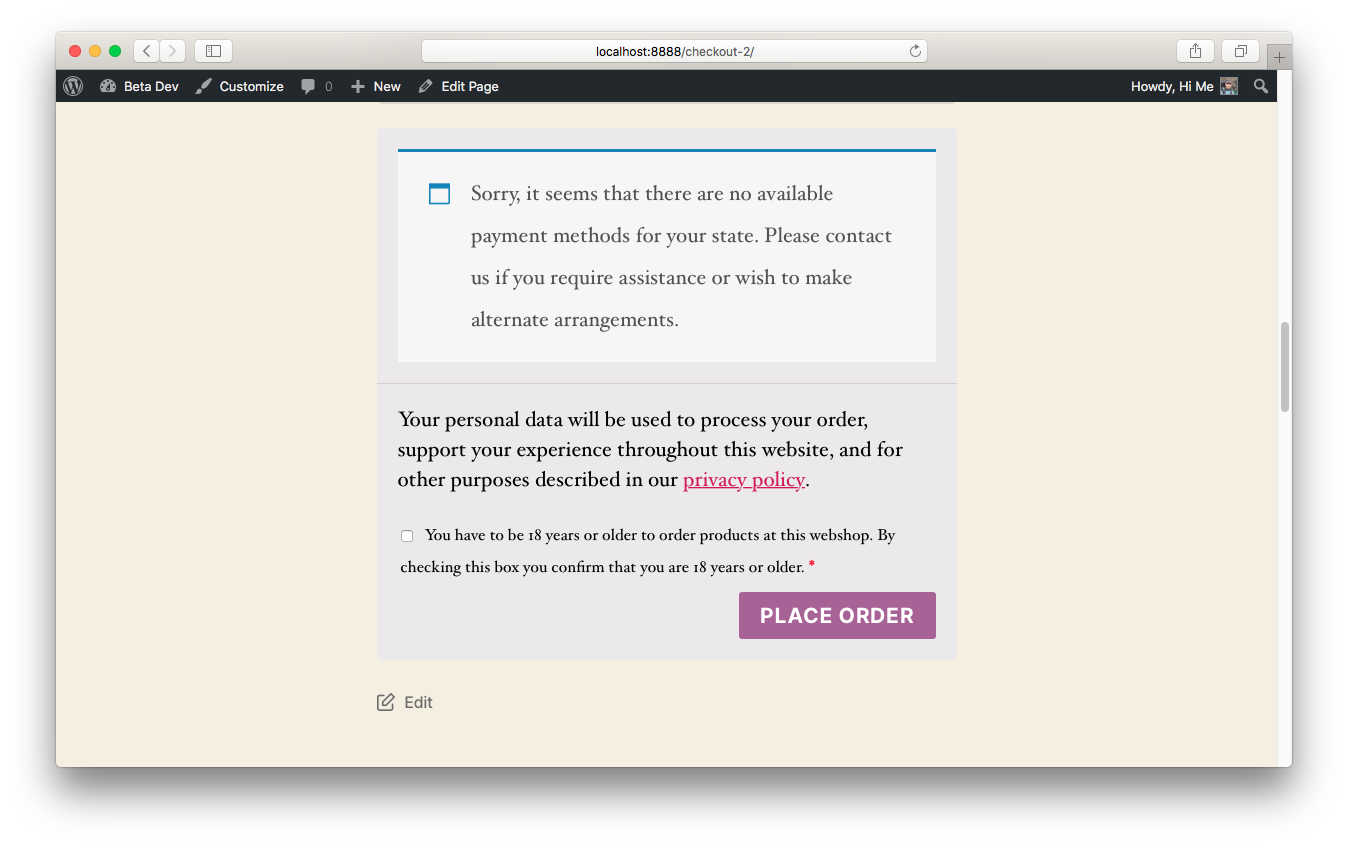
The plugin in action!

The settings page.

Oops! Tick the box!
Faq
Where can I find the settings?
In the wp-admin bar go to Woocommerce > settings and you will find the settings just below coupon settings, in the general settings tab.
Reviews
Thanks!
By 
Just what I was looking for!
Changelog
1.1
- Added functionality that you can also use the translations from the WP repo or a custom message. This will make the plugin more versatile for multilang-websites. Thanks @fasterboy for letting me know!
1.0
- New artwork <3
0.95
- WordPress 5.3 ready and tested
- Final version pulled from an existing website I’ve built and packaged it for the WordPress repo.