Agreement

Agreement
Description
The Agreement plugin helps to create pop-up licence agreement or term to use before download any thing from post or page. It will give freedom to change text in pop-up. After activation of plugin in post/page add file from “Add Media”, then change editor type from Visual to text and give id to that media file. Id will be like this id=”agreement”. Your link will be like ‘id=”agreement” href=”http://yourdomain.com/wp-content/uploads/2016/01/pdf.pdf”‘ or you can use custom HTML block too. Now save post/page.
Example
{a id=”agreement” href=”http://yourdomain.com/wp-content/uploads/2016/01/pdf.pdf”} file name {a}
This plugin works for multiple item in single page.
After activation there is a sub menu in Settings called Agreement. Click on this and there is a option to change license agreement text called “Enter your License Agreement setting text below:”. You can also insert html tag like ul,li, br, hr from agreement option in settings.
Requirements
- WordPress 3.5.1 or greater
- PHP 5.2.6 or greater (5.3 recommended)
- MySQL 4.1.2 or greater (5.x recommended)
Installation
This plugin uses the standard installation procedure: install the plugin’s folder inside of ‘wp-content/plugins’ (make sure the folder is named agreement).
Screenshots

Add id in media file link.

Change pop-up text in admin panel.
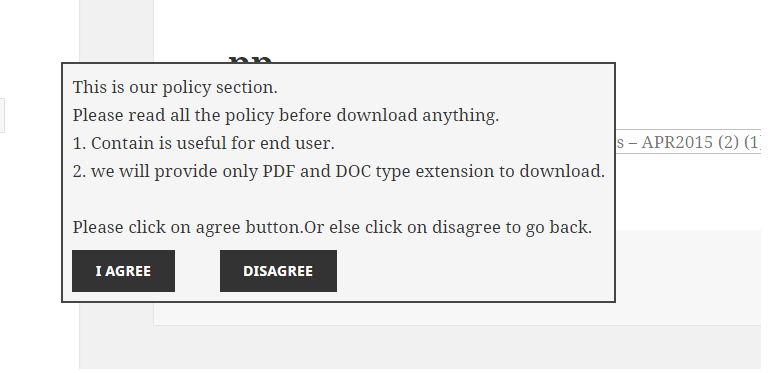
How it looks like in front end. UI may be differ as per your template.
Faq
Is it works for custom content type?
Yes it works.
From where I can change text of pop-up ?
After activation,there is a sub menu in Settings called Agreement. Click on this. New page will open,there is an option to change license agreement text called “Enter your License Agreement setting text below:”.
Reviews
Works as expected
By 
Great
By 
Great plugin
By 
Works perfectly and great support, too
By 
Installation and usage is easy and the plugin works exactly as it should for my purpose. I had one issue that the developer resolved within 24 hours. Great!
Awesome!!!
By 
It worked as shown/said.
Saved me lot of time.
Changelog
Now it works for multiple item in single page.