BridgeHub Testimonial Slider

BridgeHub Testimonial Slider
Description
BridgeHub Testimonial Slider is a lightweight and user-friendly WordPress plugin that helps you create beautiful, responsive testimonial sliders without writing any code. Whether you’re showcasing customer reviews, client feedback, or team recommendations, you can build professional sliders with an intuitive admin interface and display them anywhere on your website using a shortcode.
Originally released as AJ Square Testimonial Slider, the plugin has been redesigned with a modern interface, improved performance, enhanced accessibility, and a more flexible slider management experience while maintaining backward compatibility for existing users.
Key Features:
- Create unlimited testimonial sliders.
- Add multiple testimonial slides to each slider.
- Unique shortcode for every slider.
- Responsive and mobile-friendly design.
- Image upload with customizable dimensions.
- Client name, designation, company, and testimonial content.
- Star rating support.
- Autoplay, navigation arrows, pagination dots, loop, and transition speed controls.
- Per-slider color and styling options.
- Drag-and-drop testimonial ordering.
- Keyboard navigation and ARIA accessibility support.
- Lightweight and optimized asset loading.
- Secure coding following WordPress Coding Standards.
- Backward compatibility with existing installations.
Whether you’re building a business website, agency portfolio, online store, or personal blog, BridgeHub Testimonial Slider provides an easy way to present customer testimonials in a clean, professional, and engaging format.
Customization Options:
- Per-slider: background color, text color, image height, border radius, navigation arrows, bullet indicators, auto-slide, slide interval.
Support & Contact
For any issues, please open a support ticket or visit our support page.
Installation
Minimum Requirements
- WordPress 5.2 or greater
- PHP version 7.2 or greater
Installation Process
-
Automatic Installation (Recommended):
- Log in to your WordPress dashboard.
- Navigate to “Plugins > Add New”.
- Search for “BridgeHub Testimonial Slider”.
- Click “Install Now” and then activate the plugin.
-
Manual Installation:
- Download the plugin ZIP file.
- Upload the
aj-square-testimonial-sliderfolder to/wp-content/plugins/. - Activate the plugin through the ‘Plugins’ menu.
Usage
- Go to BridgeHub Testimonial Sliders > Testimonials and add your testimonials.
- Go to BridgeHub Testimonial Sliders > Add New to create a slider.
- Assign testimonials and configure settings in the slider edit screen.
- Copy the shortcode from the Shortcode metabox and paste it anywhere.
Screenshots
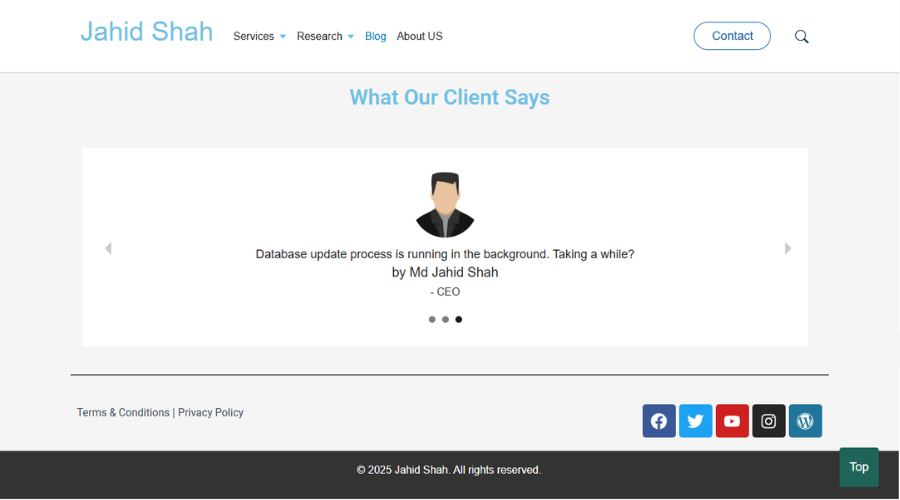
Slider edit screen with metaboxes

Testimonial assignment

Frontend slider output


Faq
Go to BridgeHub Testimonial Sliders Add New, create a slider, add your testimonial slides, configure the slider settings, and publish it.
Each slider has its own shortcode. After publishing the slider, copy the generated shortcode (for example, [bridgehub_testimonial_slider id="123"]) and paste it into any page, post, or widget that supports shortcodes.
Yes. You can create unlimited testimonial sliders, each with its own testimonials, settings, and shortcode.
Yes. Every slider is independent, allowing you to configure colors, autoplay, navigation, pagination, transition speed, image size, and other display options separately.
Yes. All testimonial sliders are fully responsive and optimized for desktop, tablet, and mobile devices.
Yes. The plugin includes keyboard navigation, ARIA attributes, and follows accessibility best practices to improve usability for all visitors.
Yes. Existing data is preserved, and the plugin is designed to maintain backward compatibility with previous versions whenever possible.
Yes. Existing installations using the legacy shortcode can continue to use it for backward compatibility. New sliders should use the automatically generated shortcode displayed on the slider edit screen.
No. The plugin is lightweight and loads frontend assets only when a testimonial slider is displayed, helping keep your website fast.
If you need assistance or want to report an issue, please use the plugin’s support forum on WordPress.org.
Reviews
Changelog
1.0.0
- Initial release.
2.0.0
- Major refactor: multi-slider architecture
- New “Testimonial Sliders” custom post type
- Per-slider settings (colors, dimensions, navigation, auto-slide)
- New shortcode:
[bridgehub_testimonial_slider id="X"] - Modern admin UI with metaboxes and accessibility improvements
- Data migration from legacy format
- Improved security (nonces, escaping, capability checks)
- Assets loaded only when needed
- Legacy shortcode
[ajsqtesl_slider]retained for backward compatibility