AlkaPay Payment Gateway with M-Pesa for WooCommerce

AlkaPay Payment Gateway with M-Pesa for WooCommerce
Description
AlkaPay is a complete M-Pesa payment gateway for WooCommerce that enables Kenyan merchants to accept mobile money payments from their customers through Safaricom’s M-Pesa.
The free version gives you a fully functional manual M-Pesa payment gateway — your Paybill or Buy Goods (Till) number is displayed at checkout, customers pay directly from their phone, enter the M-Pesa transaction code to confirm, and you verify the payment to complete the order.
The Pro version supercharges your store with automated STK Push — the payment prompt is sent directly to the customer’s phone at checkout, and the order is automatically completed the moment they enter their M-Pesa PIN. No manual steps required.
Free Version Features
- Manual M-Pesa Payments — Display your Paybill or Buy Goods (Till) number on the WooCommerce checkout page
- Transaction Code Collection — Customers enter their M-Pesa transaction code after paying to confirm the order
- Manual Payment Verification — Verify M-Pesa payments from your WooCommerce admin and complete orders
- Paybill & Buy Goods Support — Works with both Safaricom Paybill numbers and Buy Goods (Till) numbers
- Configurable Order Status — Choose which status an order takes while a manual payment is awaiting your verification
- Beautiful Admin Dashboard — Modern admin interface to manage your M-Pesa payment settings
- Order Management — View M-Pesa transaction details directly on the WooCommerce order page
- Automatic Updates — Stay up to date with the latest features and security patches
Pro Version Features
- Automated STK Push — Send the M-Pesa payment prompt directly to the customer’s phone at checkout. No more typing Paybill numbers!
- Automatic Order Completion — Orders are automatically marked as “Processing” the instant the customer pays via STK Push. Zero manual intervention
- Advanced Analytics Dashboard — Visual charts and reports showing your M-Pesa revenue, transaction trends, and payment success rates
- Comprehensive Transaction Logging — Detailed logs of every API call, callback, and transaction for troubleshooting and auditing
- Manual Payment Verification (Pro) — Enhanced payment lookup using M-Pesa transaction codes with automatic order matching
- Priority Support — Get help directly from the AlkaPay team
Why AlkaPay?
- Built for Kenya — Purpose-built for the Kenyan market and Safaricom’s M-Pesa ecosystem
- WooCommerce Native — Integrates seamlessly as a WooCommerce payment gateway with full order lifecycle support
- Secure by Design — All API credentials are encrypted, all database queries are prepared against SQL injection, and all outputs are properly escaped
- Lightweight — No bloat, no unnecessary dependencies. Just a clean, fast payment gateway
- Freemius Licensed — Industry-standard licensing with secure updates and account management
Disclaimer
AlkaPay is an independent, third-party product and is not affiliated with, endorsed by, or sponsored by Safaricom PLC or WooCommerce/Automattic. “M-Pesa”, “Safaricom”, and “Daraja” are trademarks of Safaricom PLC, and “WooCommerce” is a trademark of Automattic Inc. These names are used here only to describe the plugin’s compatibility and functionality. To use M-Pesa STK Push you must obtain your own credentials directly from Safaricom’s Daraja portal.
Requirements
- WordPress 6.0 or higher
- WooCommerce 6.0 or higher
- PHP 7.4 or higher
- A Safaricom Paybill or Buy Goods (Till) number
- M-Pesa API credentials from the Safaricom Daraja Portal (required for Pro STK Push)
External services
This plugin connects to the following third-party services. No data is ever sent until you actively configure and use the relevant feature.
Safaricom M-Pesa (Daraja) API
What it is and why it’s used: AlkaPay is an M-Pesa payment gateway. To process payments it communicates with Safaricom’s official M-Pesa Daraja API — to authenticate (OAuth), send STK Push prompts, query payment status, and receive payment confirmation callbacks.
When data is sent: when you click “Test Connection”, when a customer pays with M-Pesa at checkout, when the plugin queries a pending payment’s status, and when Safaricom sends a payment confirmation to your callback URL.
What data is sent: your M-Pesa API credentials (Consumer Key, Consumer Secret, Passkey) for authentication; the business short code / Till number; the customer’s phone number; the payment amount; and an order reference. Data is sent over HTTPS to https://sandbox.safaricom.co.ke (test mode) or https://api.safaricom.co.ke (live mode).
This service is provided by Safaricom PLC. Its use is subject to:
* Daraja API documentation: https://developer.safaricom.co.ke/
* Daraja API terms and conditions, and privacy policy: https://developer.safaricom.co.ke/terms
Freemius (licensing & updates)
What it is and why it’s used: AlkaPay uses Freemius to deliver software updates, manage Pro licenses, and (optionally) collect anonymous usage diagnostics to improve the plugin.
When data is sent: on activation you are asked to opt in. If you decline, no data is sent. License-related calls are made only when you activate, deactivate, or sync a license. Update checks are made periodically by WordPress.
What data is sent (only with your consent): site URL, WordPress and PHP versions, active theme/plugin list, and your administrator email for license correspondence. AlkaPay does NOT send your customers’ data, orders, or M-Pesa transactions to Freemius.
This service is provided by Freemius, Inc. Its use is subject to:
* Freemius terms of service: https://freemius.com/terms/
* Freemius privacy policy: https://freemius.com/privacy/
Bundled library and its source: this plugin bundles the Freemius WordPress SDK v2.13.4 in
vendor/freemius/, licensed GPL-3.0-only (see vendor/freemius/LICENSE.txt), which is compatible
with this plugin’s GPLv2-or-later licence. Some of the SDK’s own CSS and JavaScript assets ship
pre-built rather than as readable source. The complete, unminified source for the bundled version is
published at:
* https://github.com/Freemius/wordpress-sdk (tag 2.13.4)
No other third-party libraries are bundled, and none of AlkaPay’s own CSS or JavaScript is minified —
every file under assets/ is human-readable source.
Installation
Automatic Installation
- Go to your WordPress admin dashboard
- Navigate to Plugins > Add New
- Search for “AlkaPay” or upload the plugin ZIP file
- Click Install Now, then Activate
- Go to M-PESA Gateway > Settings to configure your payment details
Manual Installation
- Download the plugin ZIP file
- Upload the
alkapayfolder to/wp-content/plugins/on your server - Activate the plugin through the Plugins menu in WordPress
- Go to M-PESA Gateway > Settings to configure your Paybill or Buy Goods number
Quick Start (Free Version)
- Go to M-PESA Gateway > Settings
- Select your Transaction Type: Paybill or Buy Goods (Till)
- Enter your Paybill/Till number and Account Reference
- Save your settings — your checkout page will now display M-Pesa payment instructions
- When a customer places an order and enters their M-Pesa transaction code, go to the order in WooCommerce to verify and complete it
Quick Start (Pro Version)
- Activate your Pro license on the M-PESA Gateway > Account page
- Go to M-PESA Gateway > Settings
- Enter your Safaricom Daraja API credentials (Consumer Key, Consumer Secret, Passkey)
- Choose Sandbox to test, or Production when you are ready to take live payments
- Save — your checkout will now send automated STK Push prompts to customers’ phones!
Screenshots
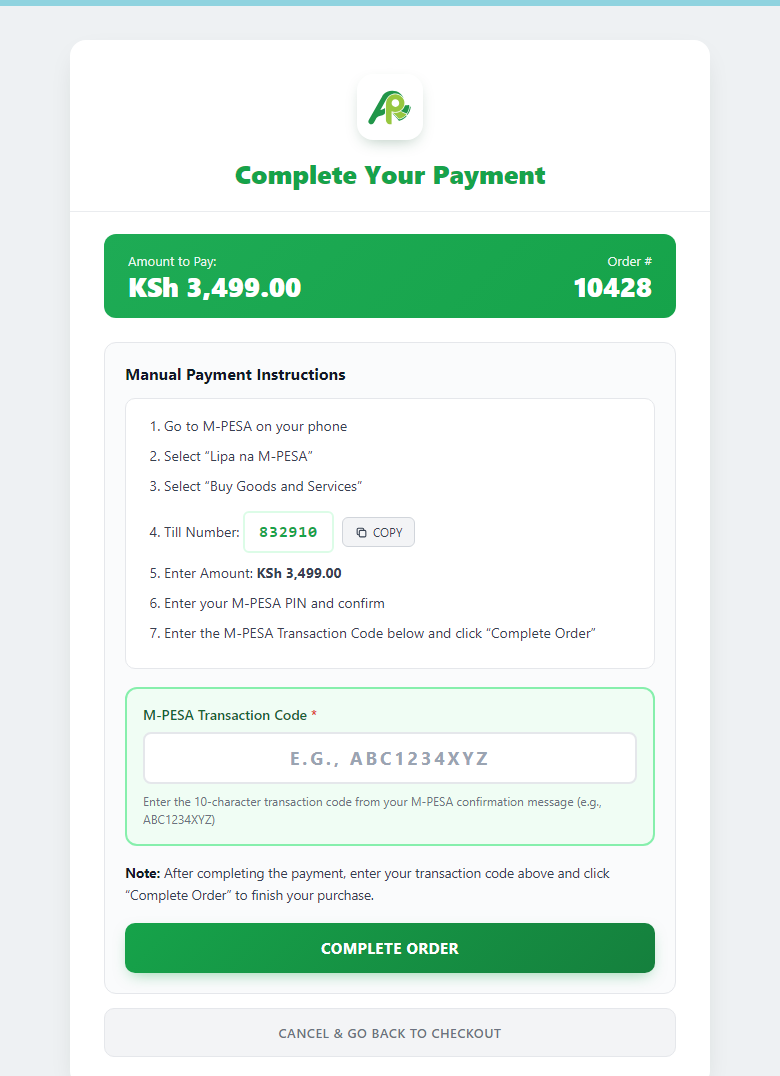
M-Pesa payment page — pay via Paybill or Buy Goods (Till) and enter your transaction code
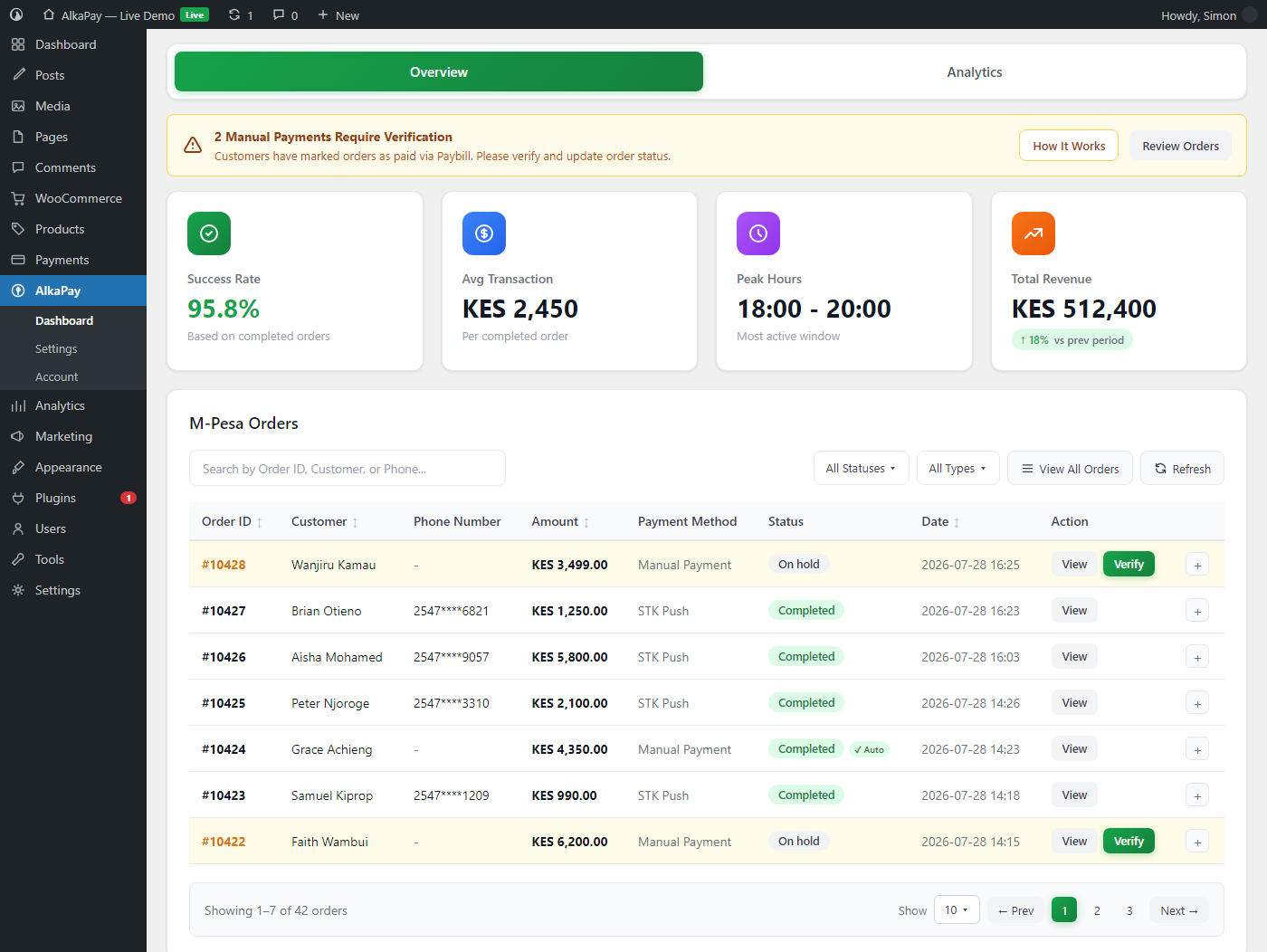
Admin dashboard with M-Pesa payment activity
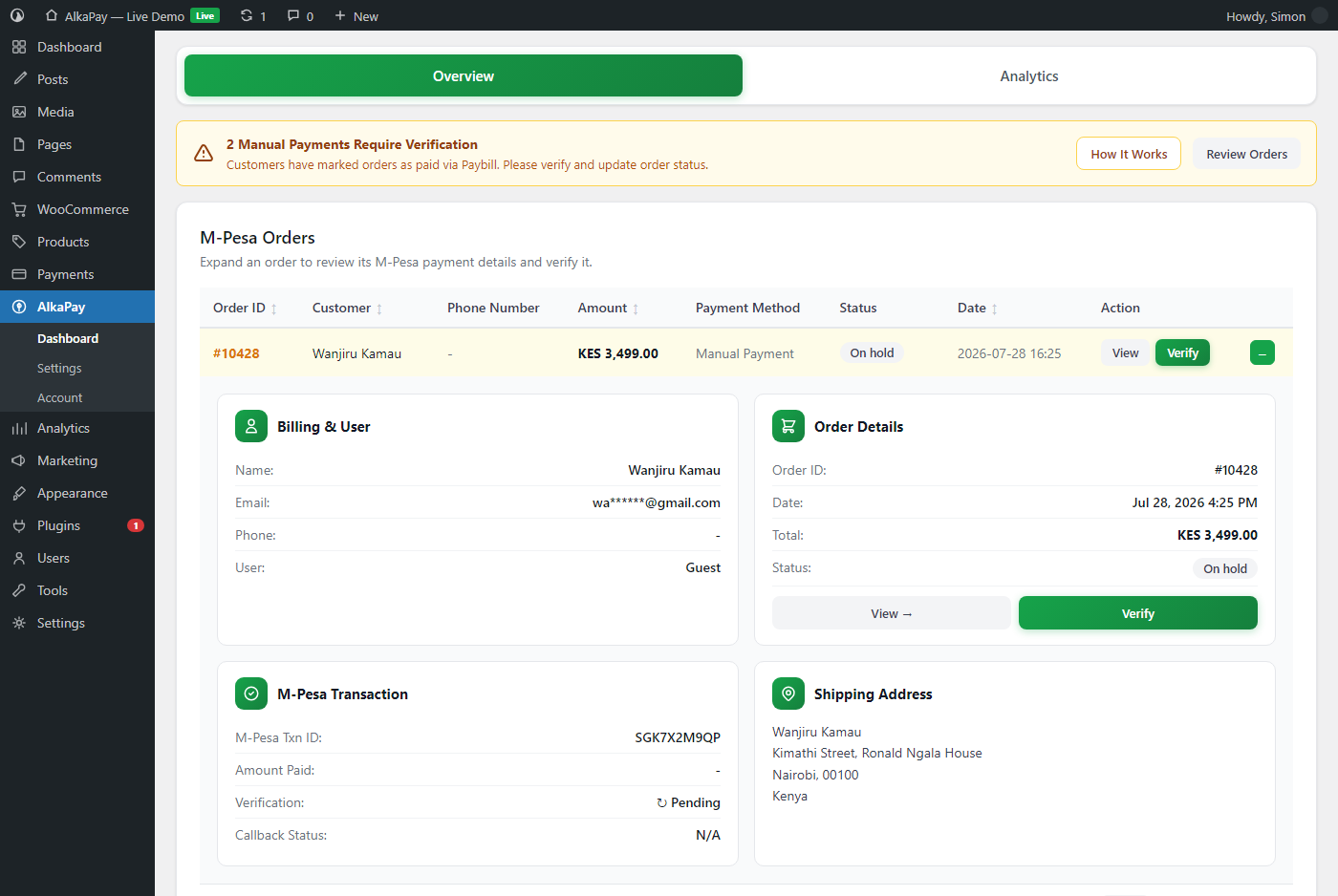
Order details showing M-Pesa transaction information
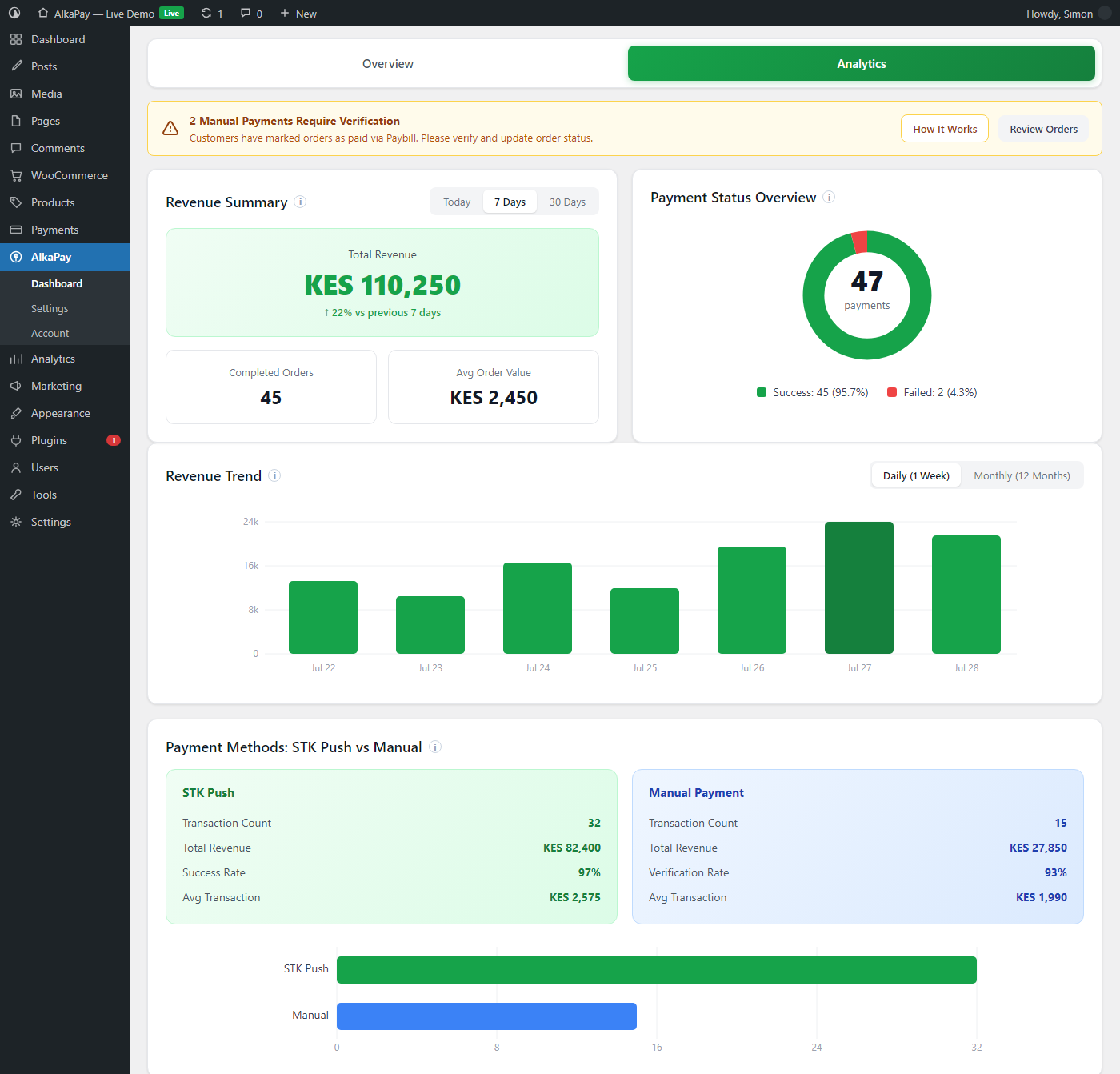
Pro analytics dashboard with revenue charts
Faq
The free version displays your M-Pesa Paybill or Buy Goods (Till) number on the WooCommerce checkout page. Customers pay you directly via M-Pesa, then enter their transaction code on the order confirmation page. You can then verify the payment and complete the order from your WordPress admin.
Pro adds automated STK Push — the M-Pesa payment prompt appears directly on the customer’s phone during checkout. Once they enter their PIN, the order is automatically completed without any manual intervention. Pro also includes an analytics dashboard, detailed transaction logging, and enhanced manual payment verification.
For the free version: No. You only need your Paybill or Buy Goods (Till) number.
For the Pro version: Yes. You need to register on the Safaricom Daraja Developer Portal and create an app to get your Consumer Key, Consumer Secret, and Passkey for live STK Push.
Yes — try it on our live demo store at demo.alkapay.co.ke, which runs the Pro version so you can see the whole STK Push checkout without installing anything.
- Free: Manual payments via Paybill and Buy Goods (Till) with transaction code verification
- Pro: Automated STK Push via Paybill and Buy Goods, plus enhanced manual payment verification
Yes. AlkaPay follows WordPress security best practices including prepared database queries, input sanitization, output escaping, and nonce verification. API credentials are stored securely in the WordPress database.
Visit the M-PESA Gateway > Account page in your WordPress admin and click “Upgrade”. You can also purchase a license at alkapay.co.ke.
Reviews
Changelog
1.2.6
- New: Guided first-run setup. A “Finish setting up AlkaPay” prompt on the dashboard opens a step-by-step screen that sets up M-Pesa in place — pick how you get paid, add your Paybill or Till number, choose how new orders are handled, and switch it on at checkout, without hunting through the settings. (Pro adds guided steps to connect the Daraja API and register your callback URL.)
- Fixed: On some first installs the AlkaPay welcome and licence-activation screens showed a blank left panel, with the logo, intro and feature list missing. They now display correctly.
- Fixed: Admin notices tidied up — the “SSL certificate” warning no longer appears twice, both it and the “configuration required” notice now stay dismissed once you close them, and they only show on AlkaPay’s own screens instead of following you around wp-admin.
- Fixed: The “Enable M-PESA Payment Gateway” checkbox now saves reliably — on the free version, unchecking it previously did nothing. AlkaPay now ships with the gateway switched off by default (turn it on when you’re ready, from the setup guide or Settings); stores that already had it on are unaffected.
- Improved: A refreshed AlkaPay sidebar icon, clearer setup-screen controls (tap-to-choose toggles and rounded buttons), and dependable admin styling after an update (no more occasional stale cached version).
- The way customers pay at checkout is unchanged.
1.2.5
- Improved (Pro): More reliable connection to M-Pesa for STK Push — prevents occasional “connection failed” errors seen on some hosts.
- New (Pro): If a customer mistyped their M-Pesa confirmation code, you can now correct it and re-verify in one click from the dashboard, instead of reconciling by hand.
- Maintenance: M-Pesa API request fields brought within Safaricom’s documented limits.
- Improved (Pro): When a Pro licence lapses, AlkaPay now falls back cleanly to the Free experience — the same simple Payment Setup screen, no leftover credential fields or “test mode” confusion — and keeps all your settings, so re-activating a licence restores everything with nothing to reconfigure.
- The free manual-payment flow is unchanged in this release.
For the changelog of earlier releases, see changelog.txt in the plugin folder.