Altify AI – Auto ALT Text Generator
Altify AI – Auto ALT Text Generator
Description
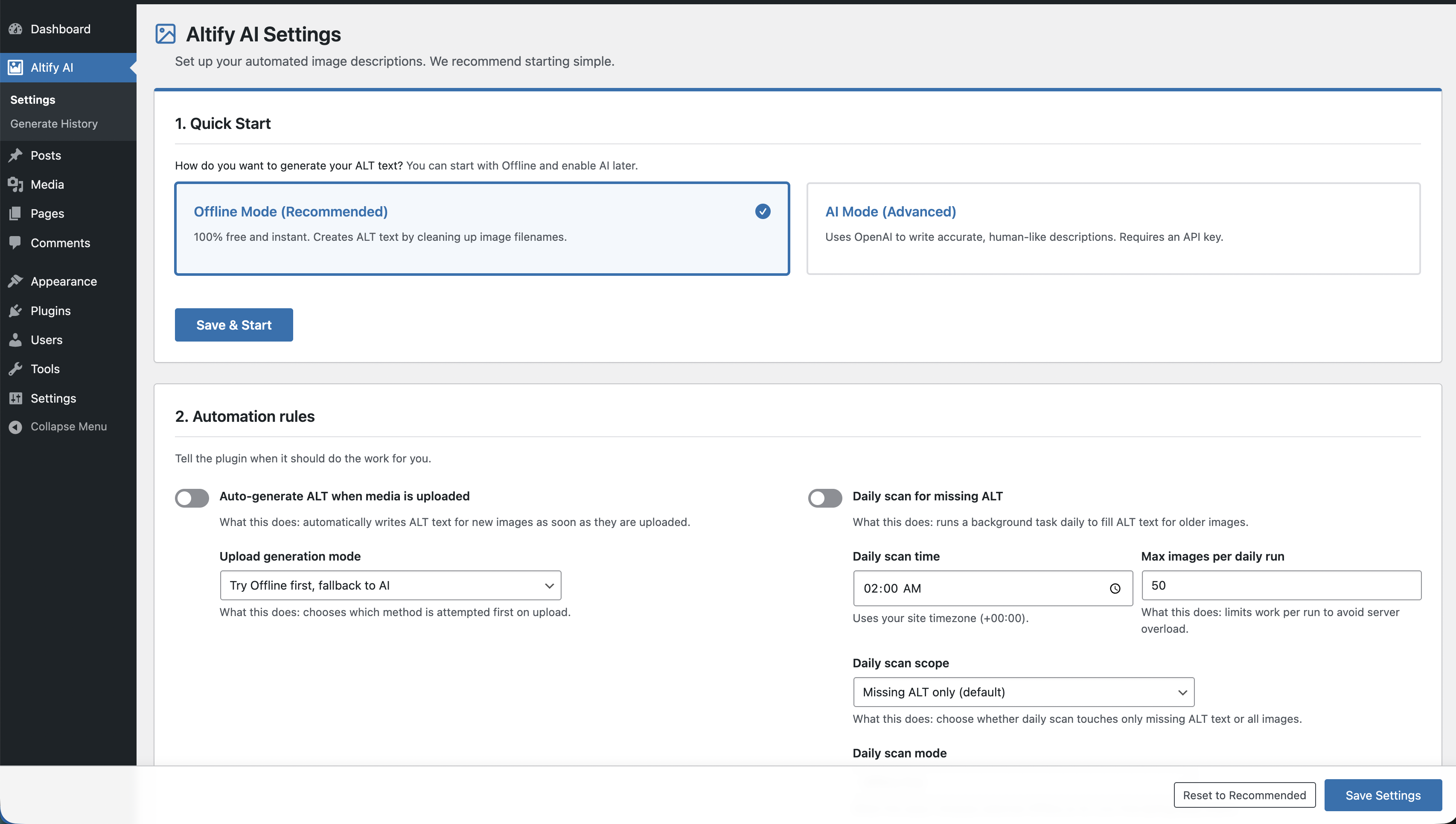
Altify AI is an auto ALT text and AI ALT text plugin for WordPress images. It helps generate descriptive image ALT text for accessibility and image SEO.
Use bulk image ALT text tools for your Media Library, generate featured image ALT text automatically, and scale WooCommerce image ALT updates with AI or offline mode.
Key features:
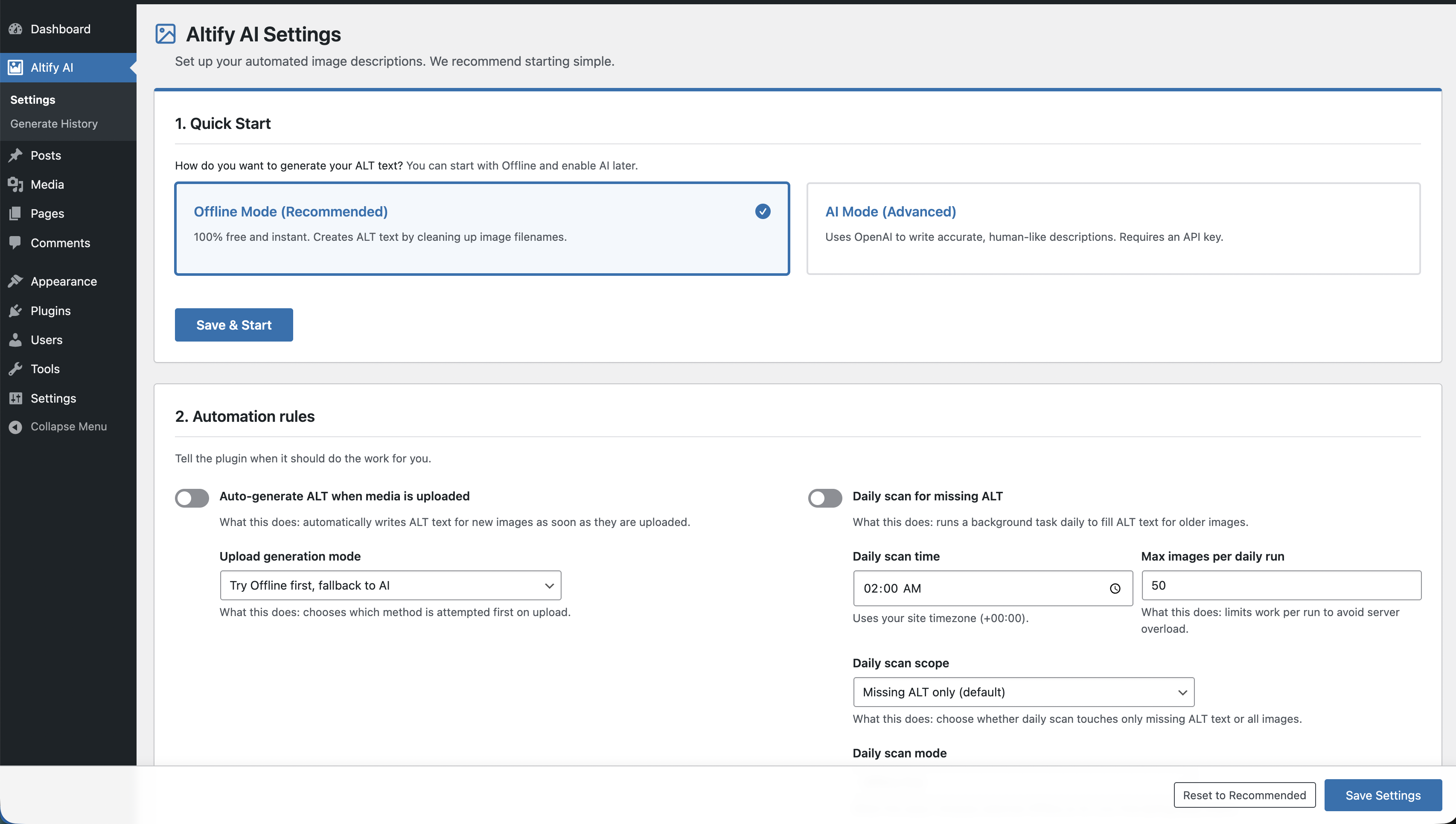
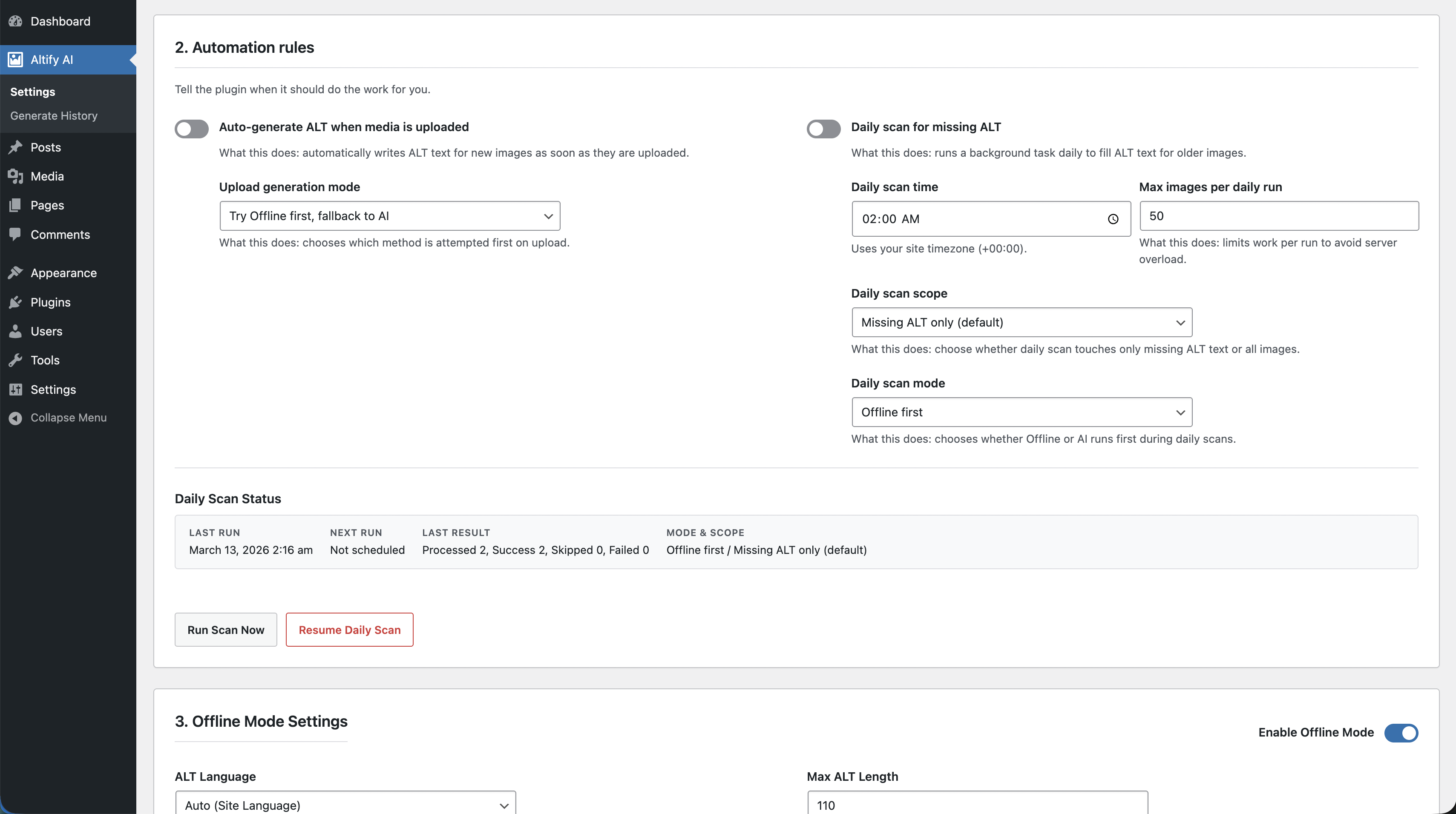
- Beginner-friendly Automation tab with upload toggle, daily schedule, and one-click
Run scan now. - Automatic ALT generation on new image uploads with selectable mode priority (
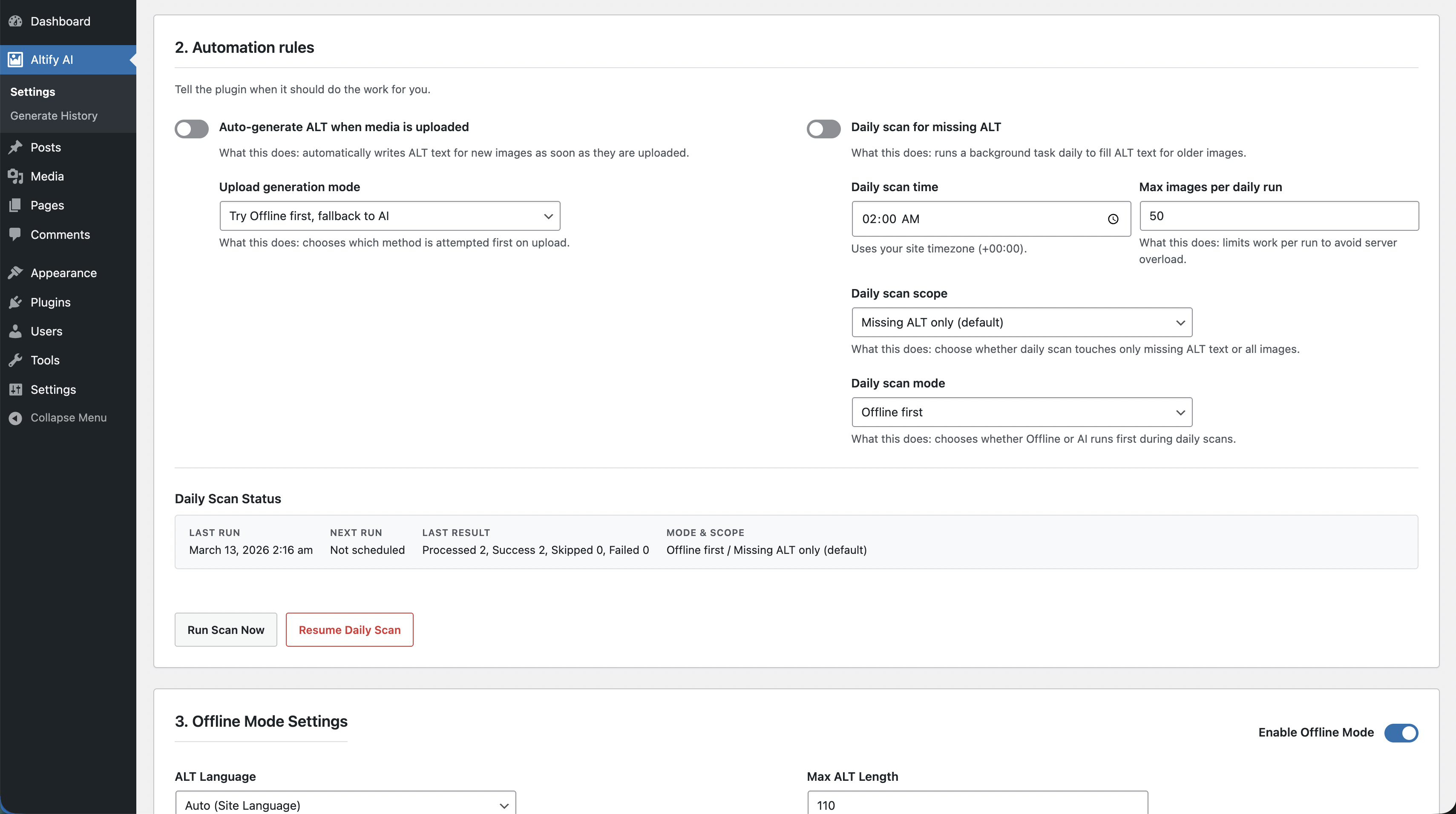
Offline first,AI first,Offline only,AI only). - Daily background scan for missing ALT (or all images) with mode selection, run limit, and status panel.
- Top-level
Altify AIadmin menu (before Posts) with dedicatedSettingsandGenerate Historypages. - AI mode with OpenAI model settings, rate limiting, retry/backoff, and safe fallback behavior.
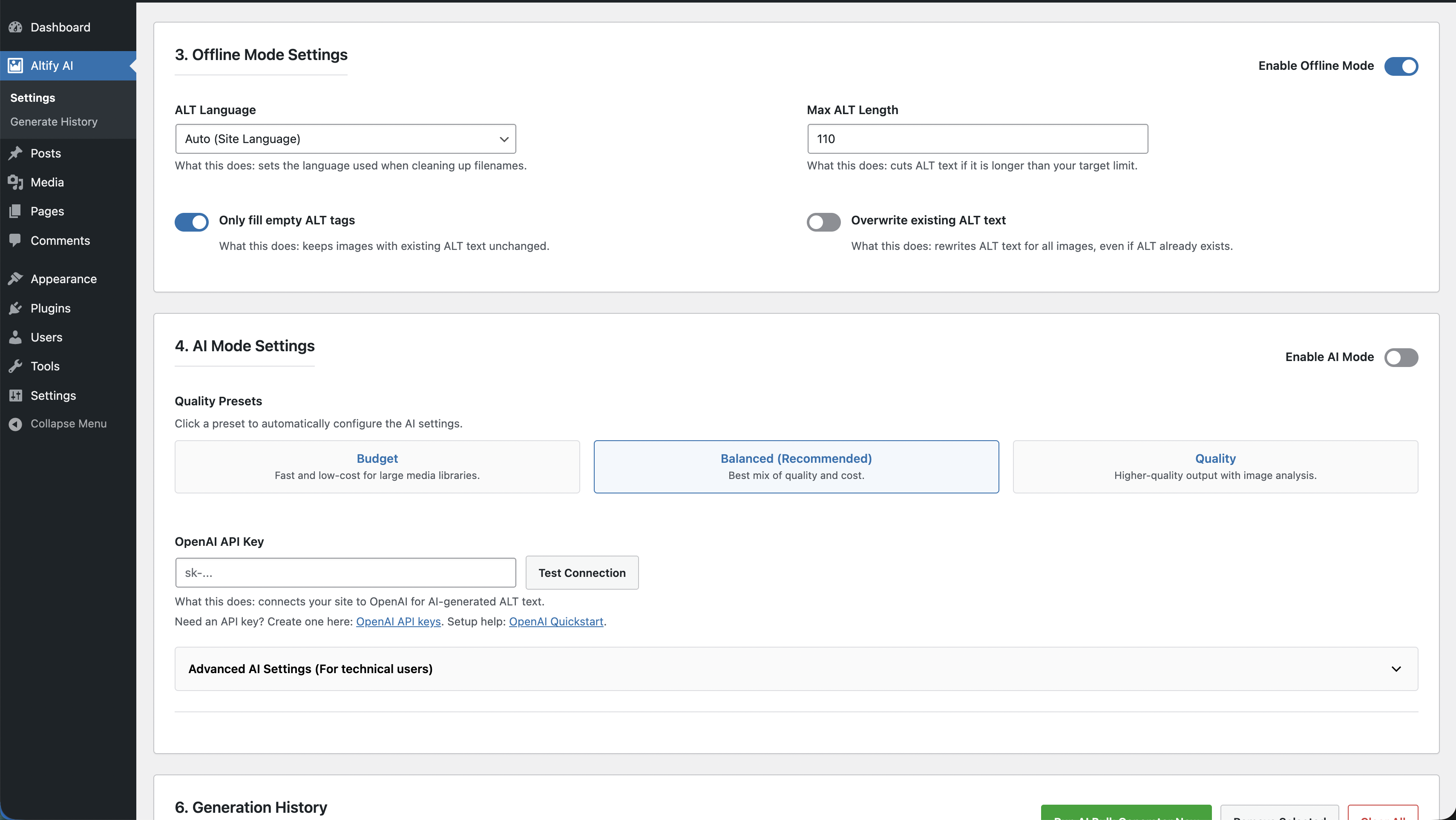
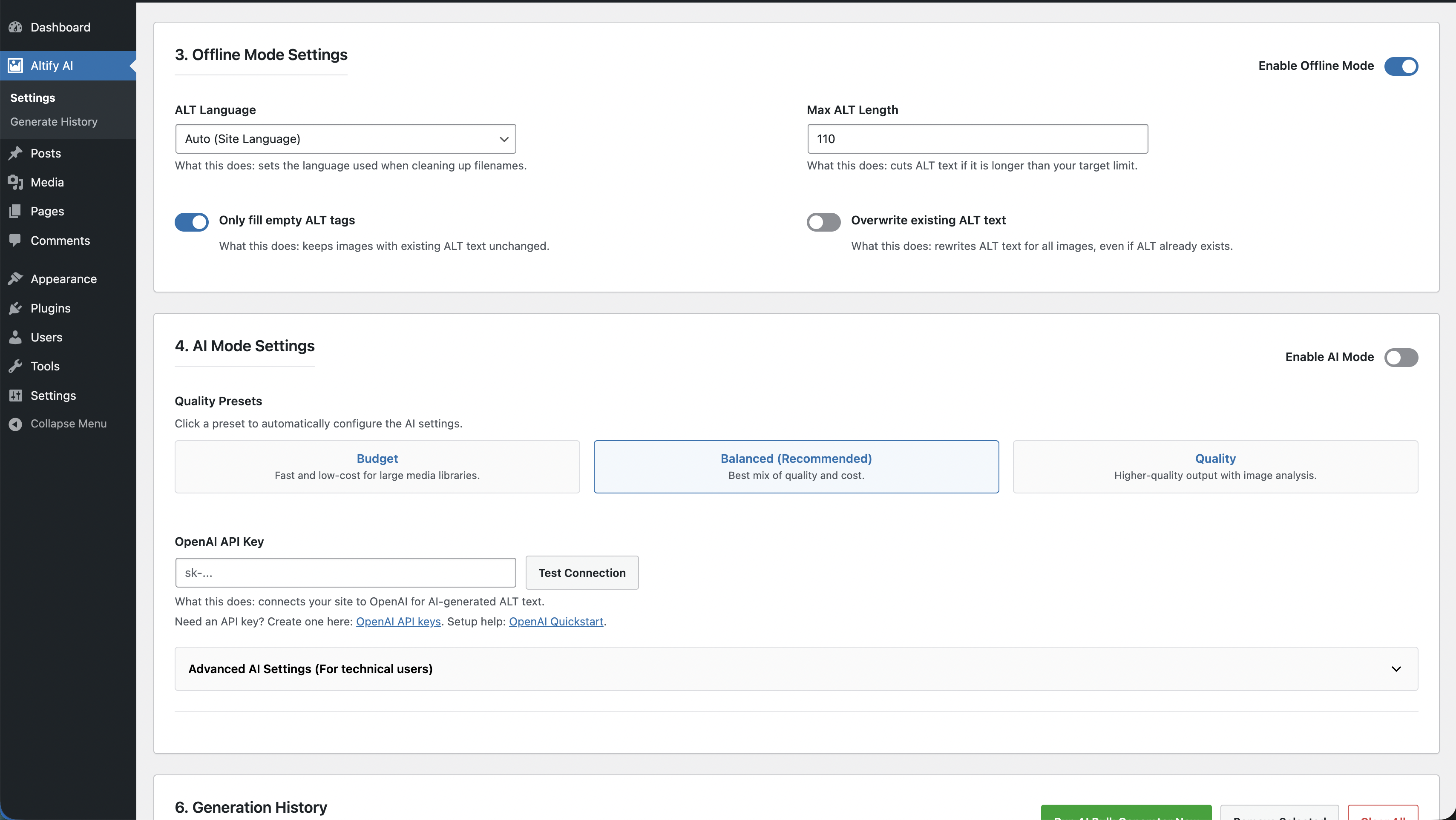
- Offline mode (no API) that generates ALT from title/caption/description/filename.
- Bulk Media Library processing with filters, batching, and pause/resume/stop controls.
- WooCommerce bulk generation for featured and gallery images with category/date filters.
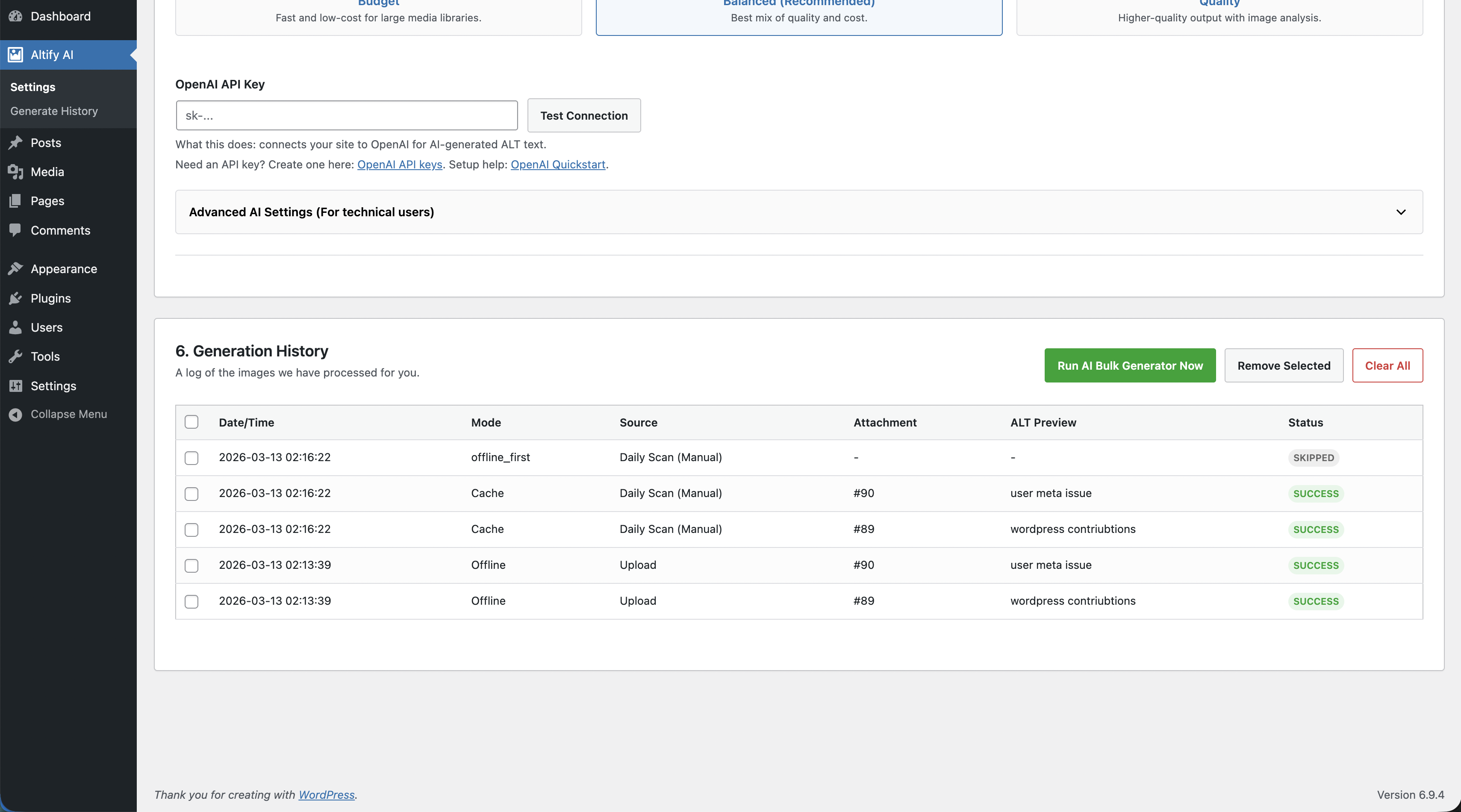
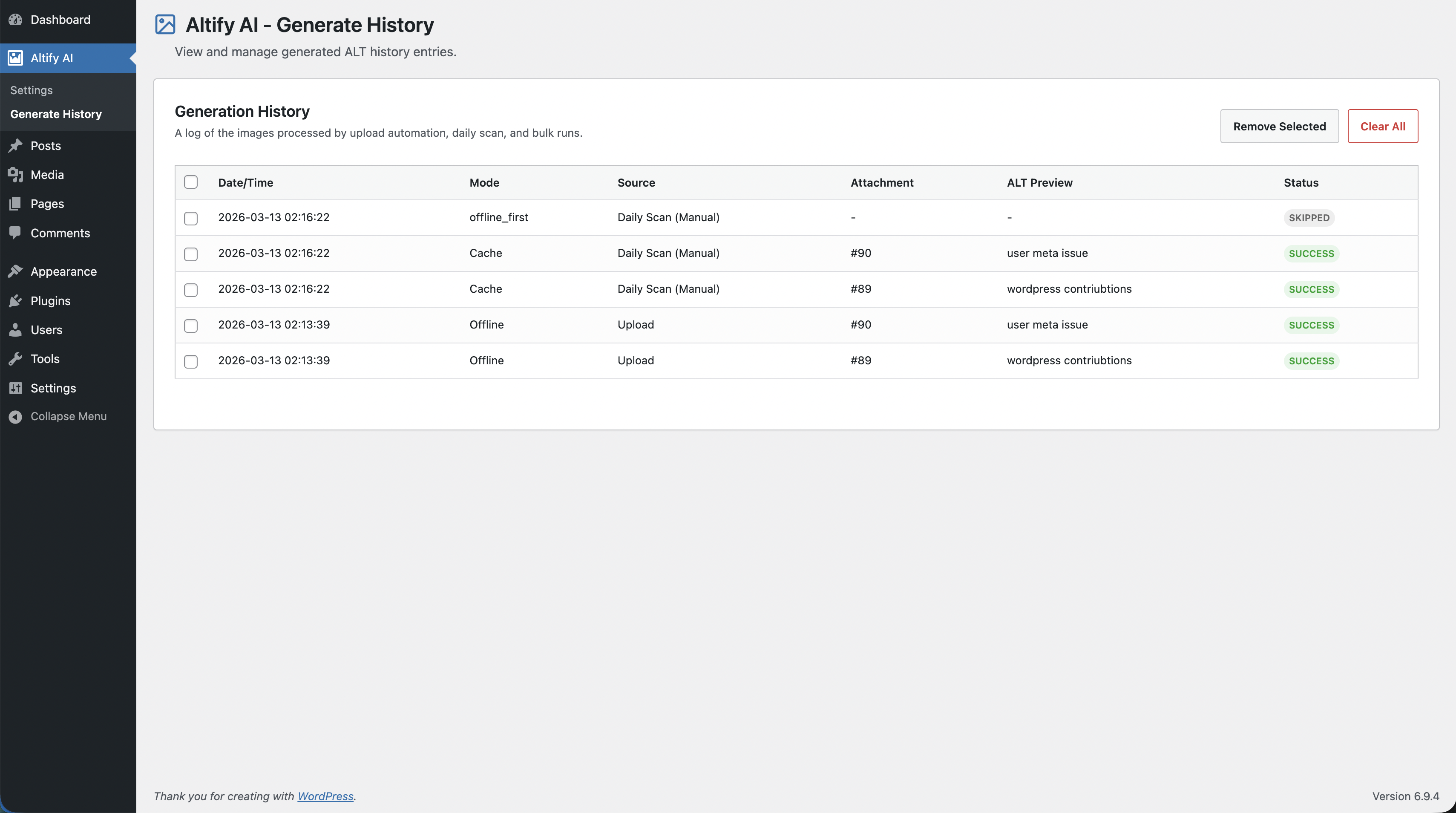
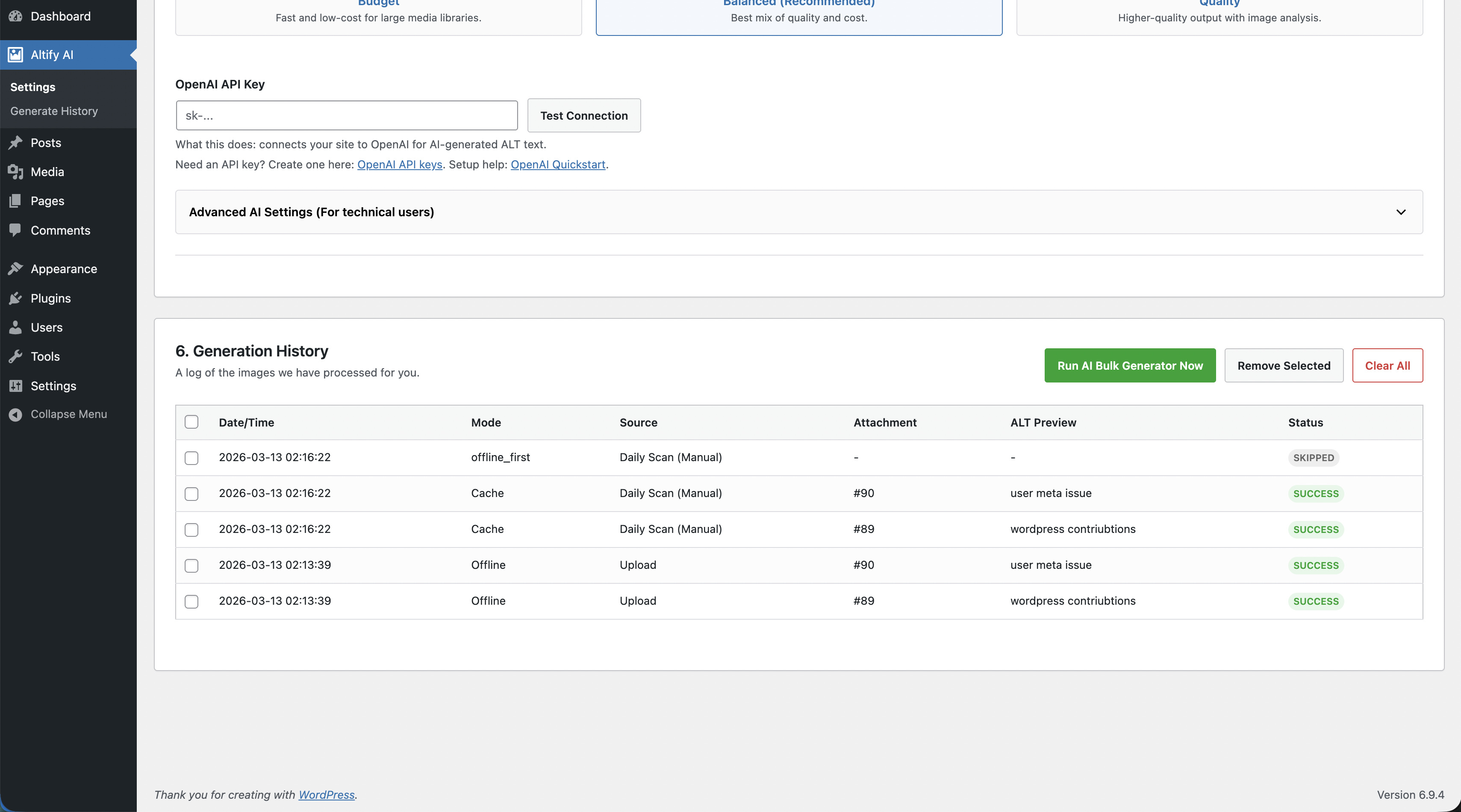
- Generation history table with source, method (AI/Offline/Cache), ALT preview, and row-level delete controls. Settings page shows the latest 10 rows for quick review.
- Multilingual support: Auto (site locale), many built-in languages, and custom language input.
- Optional vision-based analysis for image-aware ALT suggestions.
- Native WordPress ALT field updates (
_wp_attachment_image_alt) for SEO plugin compatibility. - Smart protection for existing ALT text via
Only fill empty ALTandOverwrite existing ALT.
SEO and accessibility benefits:
- Improves image context for screen readers.
- Reduces missing ALT text across large media libraries.
- Keeps ALT text in the native WordPress field (
_wp_attachment_image_alt) for compatibility with SEO plugins. - Avoids duplicate custom ALT fields and vendor lock-in.
- Supports content quality workflows with configurable length and overwrite behavior.
How it works:
- Plugin gathers safe text context from attachment metadata (filename, title, caption, description).
- Optional product context is added for WooCommerce images (product name/category).
- OpenAI returns a concise ALT suggestion.
- Result is sanitized and stored in the standard WordPress ALT field.
- If API fails (or offline mode is used), the plugin writes a clean metadata-based ALT text fallback.
Roadmap
Planned improvements for upcoming releases:
Roadmap items are planned and may change based on user feedback and compatibility requirements.
1.0.1 (Quality + Workflow)
- Better admin insights: per-run summaries and clearer error diagnostics.
- Stronger ALT cleanup rules for edge-case filenames and punctuation.
- Improved WooCommerce bulk UX for large product catalogs.
- Dedicated Offline Mode tab and improved generation history management.
1.1.0 (Performance + Control)
- Optional CLI command for large-scale ALT generation runs.
- Enhanced queue reliability for high-volume media sites.
- More granular include/exclude filters for bulk processing.
1.2.0 (Localization + Integrations)
- Additional language options based on user demand.
- Extended compatibility checks for popular SEO/workflow plugins.
- Optional export/reporting tools for ALT coverage audits.
External services
This plugin connects to the OpenAI API to generate ALT text suggestions for image attachments.
It is required for AI-based ALT text generation features (single upload automation, media bulk generation, and WooCommerce image bulk generation), unless Offline mode is enabled.
Service used:
- OpenAI API (
https://api.openai.com/v1/chat/completions)
Data sent and when:
- Sent only when an admin-triggered or configured ALT generation request is executed.
- Sent data includes metadata/context built from WordPress attachment fields:
- Attachment filename (cleaned)
- Attachment title/caption/description
- Optional WooCommerce product name/categories when available
- Generation settings such as requested language and max length
- If
Analyze actual image (Vision)is enabled, a resized image preview may also be sent. - If
Offline modeis enabled, no OpenAI request is sent.
Service provider legal links:
- Terms of Use: https://openai.com/policies/terms-of-use/
- Privacy Policy: https://openai.com/policies/privacy-policy/
Installation
- Upload the plugin folder to
/wp-content/plugins/altify-ai-auto-alt-text-generator/. - Activate the plugin through the
Pluginsscreen in WordPress. - Go to
Altify AI > Settings. - Add your OpenAI API key and save settings.
- Use
Bulk Generator,Offline Mode, andWooCommercetabs as needed.
Screenshots
Faq
No, not by default. Only fill empty ALT is enabled by default and Overwrite existing ALT is disabled.
Yes. It helps maintain descriptive image ALT text, which improves image context for search engines and accessibility tools.
In the standard WordPress attachment meta key _wp_attachment_image_alt, so it remains compatible with SEO plugins.
Only new uploads are processed when Auto-generate ALT on media upload is enabled. You can turn this on/off in the Automation tab.
Yes. Enable Daily scan for missing ALT in the Automation tab, choose time/scope/mode, and the plugin will process up to your daily max image limit.
Yes. Use Run scan now in the Automation tab to trigger the same scan logic instantly and refresh status counters.
Go to Altify AI > Generate History in WP Admin. The Settings page also includes a quick history table showing the latest 10 rows.
Yes. Bulk mode defaults to Only missing ALT, and you can switch to all images if needed.
Yes. The Bulk Generator tab processes existing Media Library images in batches with pause/resume controls.
The plugin retries with exponential backoff for temporary API errors and uses a clean metadata-based fallback ALT text if needed.
Yes. Use the Offline Mode tab to run metadata-only generation with zero API calls.
Yes, when Analyze actual image (Vision) is enabled in settings.
When disabled (default), generation is metadata-only (filename/title/caption/description).
By default, no.
If Analyze actual image (Vision) is enabled, the plugin sends a resized image preview to OpenAI for analysis.
Yes. Upload automation covers regular WordPress images, including featured images when they are image attachments in your library.
Yes. It can process product featured images and gallery images when WooCommerce support is enabled.
Yes. Choose Auto (site locale), select from many built-in languages, or use Custom to enter any language name.
Yes. You can configure model, max tokens, temperature, batch size, and requests-per-minute limit.
Yes. History is shown in a table with Select all, Remove Selected, and Clear All actions.
Create one in your OpenAI account here: https://platform.openai.com/api-keys
Quickstart guide: https://platform.openai.com/docs/quickstart
Reviews
Changelog
1.0.3
- Added new Automation tab with beginner-friendly settings and helper text.
- Added upload automation toggle and upload generation mode (
Offline first,AI first,Offline only,AI only). - Added daily scan automation with schedule time, scope, mode, and max images per run.
- Added secure
Run scan nowAJAX action with nonce and capability checks. - Added daily scan status panel (last run, next run, counters, mode/scope).
- Added daily WP-Cron scheduling/rescheduling logic and stored run summaries for UI.
- Added top-level
Altify AIadmin menu (before Posts) plus dedicatedGenerate Historysubmenu page. - Moved quick
Run AI Bulk Generator Nowaction toGeneration Historytools and removed duplicate run buttons from AI/Offline settings sections. - Added AJAX settings save flow and AJAX quick actions to prevent admin page reloads.
- Limited
6. Generation Historyin Settings to latest 10 rows for faster review on large sites. - Updated admin CSS with prefixed UI classes to avoid WordPress core style collisions.
1.0.2
- Added dedicated Offline Mode tab for no-API ALT generation runs.
- Replaced history log list with readable table format for non-technical users.
- Added history selection controls: Select all, Remove Selected, Clear All.
- Added persistent history IDs and server-side delete support for selected rows.
- Increased stored history capacity for better auditing.
- Refined readme descriptions/FAQ/screenshots for latest features.
1.0.1
- Better admin insights with per-run summaries (elapsed time, speed, fallback/cache counters, last error).
- Clearer OpenAI diagnostics, including detailed 429 error reasons when available.
- Stronger ALT cleanup for edge-case filenames and punctuation handling.
- Improved WooCommerce bulk UX for large catalogs (resume offset + guidance).
- Added Offline Mode tab (no API) for metadata-based ALT generation.
- Added generation history table with method/source/ALT preview and selective row removal.
- Added quick presets in Settings (Budget, Balanced, Quality).
- Added plugin list links: Settings and Donate.
1.0.0
- Initial public release.