AMB Variable Affiliate Products for WooCommerce
AMB Variable Affiliate Products for WooCommerce
Description
Make your WooCommerce variable products behave just like affiliate/external products! Super simple to set up:
- Enable the ‘Affiliate Product’ option in the ‘Inventory’ tab of your Variable Product.
- Put in the product URL and optionally customize the cart text.
- Optionally add affiliate/external URLs for each variation in the ‘Variations’ tab.
Installation
There are 2 ways to install AMB Variable Affiliate Products for WooCommerce:
From the repo
Navigate to Plugins -> Add New, search for “AMB Variable Affiliate Products for WooCommerce”, install and activate.
Manually install
Download the ZIP file from the plugin repo, then navigate to Plugins -> Add New -> Upload Plugin in your WordPress admin dashboard. Upload the plugin and activate.
This guide is helpful: https://www.wpbeginner.com/beginners-guide/step-by-step-guide-to-install-a-wordpress-plugin-for-beginners/.
1. Enable the ‘Affiliate Product’ option in the ‘Inventory’ tab of your Variable Product.
2. Put in the product URL and optionally customize the cart text.
3. Optionally add affiliate/external URLs for each variation in the ‘Variations’ tab.
Set up after install
After the plugin is installed, you’ll find a new option “Affiliate Product” in the “Inventory” tab for your variable products. Just enable that option, put in your affiliate product URL, and optionally customize the cart text. You can also optionally add individual affiliate URLs for each variation in the “Variations” tab.
Screenshots
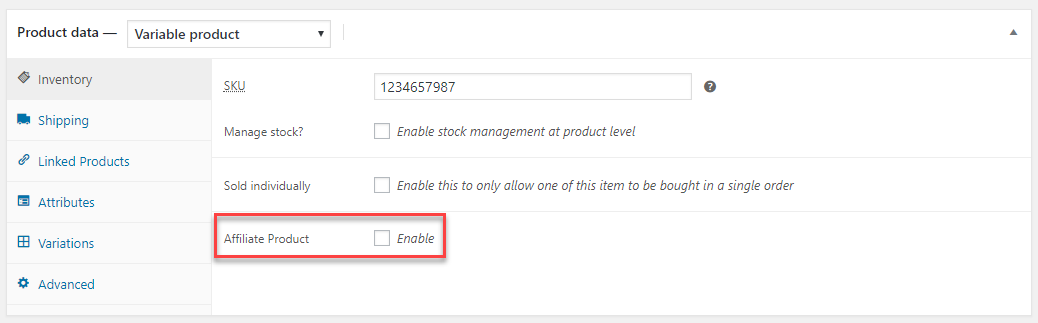
The "Affiliate Product" option.

After enabled.

Variation URLs.
Faq
Go to WooCommerce > Settings and enable the “Enable importing mode” option. Then, when importing the products, you’ll need to import these custom fields:
- “_amb_vap_prod” – import “yes” or “no.
- “_amb_vap_prod_url” – import the parent product affiliate URL.
- “_amb_vap_prod_cart_text” – import the text for the buy button.
- “_amb_wpvap_variation_url” – import the variation affiliate URL.
No, the parent product URL is required if “Affiliate Product” is enabled. This URL is used as a fallback URL in the case that a variation that’s added to the cart does not have an individual affiliate URL.
No, if “Affiliate Product” is enabled, the item will automatically be removed from the cart, the cart notice message will be dismissed, and the user will be redirected to the affiliate URL.
Reviews
Amazing plugin for Affiliate sales
By 
This plugin works very well with my website. Since I have variable products, this plugin helped me create a cool professional product page for combination selection with affiliate links which otherwise would have been difficult.
Thank you for this plugin! Keep updating this!
PS: It also help sync poducts to Google Merchant Center
Não direcionou o link para a página do produto
By 
coloquei com a intenção de justamente os links funcionar direcionando para a página que eu gostaria de criar, só que o plugin não funcionou, espero que funcione em breve pois isso irá ajudar muito.
Does what it says
By 
Installed the plugin, followed the instructions, it works as expected. Solves my problem. Thanks to the team.
A suggestion for improvement would be an option to open the link in new tab.
Doesn't Open Link
By 
It just works
By 
Changelog
1.0.0
- Initial release.
1.0.1
- Fix readme
- Remove assets folder from plugin
1.0.2
- Fixed importing option for product types that aren’t “variable” or “variation”.