Ananyoo Accessible Events

Ananyoo Accessible Events
Description
Every events page answers two questions: when, and where. For millions of disabled visitors the real question comes first – “will this event work for me?”
Ananyoo Accessible Events is built around that question. Every event states, right on the page, the accommodations it provides – wheelchair access, live captions, sign language, a quiet room and more – each with a clear way to ask for what is missing. Visitors can even filter your events list down to only the events they can truly attend. The listing, the single pages and the admin screens are all audited to WCAG 2.2 Level AA, because an “accessible” plugin whose own settings page cannot be used with a keyboard is only half finished.
And a community is more than its next event. The [ananevt_timeline] shortcode looks backwards as well as forwards: it weaves the blog posts and events you already have into one flowing, accessible timeline – year by year, photo by photo – the story of your organisation, telling itself. Five designs, your colours, a “Load more” that needs no JavaScript, and not a single extra post type to maintain.
Developed by Shivaji Mitra (M/S. Anblik) – an accessibility consultant who builds with the screen reader switched on.
Live demos: Accessible events » · Accessible timeline – all five designs »
Why this plugin?
Most events plugins treat accessibility as a checkbox at the end of the project: an unlabelled calendar icon here, a date picker no keyboard can reach there – and nowhere at all to tell a Deaf attendee whether the talk will have captions. This plugin is built the other way round. Accessibility is not a feature of the product; it is the product. Attendees see exactly what each event provides before they register. Organisers manage it in an admin audited to the same standard. Search engines read the same structured facts through Schema.org. Everyone gets the full picture – on the smallest phone, in high-contrast mode, by keyboard, by screen reader.
Key features
- A dedicated Event type – its own menu, list and
/events/links, cleanly separated from your blog. The type lives in the plugin, not a theme, so your events survive any theme change. - “Accessibility at this event” – the standout feature – tick what an event provides: wheelchair access, step-free entry, live captions / CART, sign-language interpretation, audio description, assistive listening, a quiet room, accessible parking, materials in accessible formats. Each shows with its own icon and a clear “how to request an accommodation” note. No other mainstream events plugin does this.
- Filter events by accommodation – visitors who need captions or a wheelchair-accessible venue can filter the list to only the events that provide it.
- Structured details, entered accessibly – start / end date and time, time-zone label, mode (In person / Online / Hybrid), venue, address, register link with your own button text, price, capacity and speaker – all in a labelled meta box with native date and time inputs.
- Accessible “Add to calendar” and Subscribe – a properly labelled
.icsdownload for each event, plus a Subscribe button that keeps all your events up to date in a visitor’s own calendar app via a live feed. - Visitor local time – online events can show the start time in each visitor’s own timezone automatically (progressive enhancement; the site time always remains).
- Event status – mark an event Cancelled, Postponed or Moved online: a clear pill before the title, Schema.org eventStatus for search engines, and a cancelled .ics for calendars.
- Machine-readable dates – real
<time datetime>markup and Schema.org Event structured data, so both screen readers and search engines understand your events. - A real listing – the
[ananevt_events]shortcode: one paginated list with Upcoming/Past status pills, a date tile and accommodation mini-icons on every card, category and accessibility filters, and an accessible Grid/List view switch. Aheadingattribute keeps your page’s heading order sequential. - An accessible timeline – tell your story – the
[ananevt_timeline]shortcode draws your existing blog posts and/or events as one elegant vertical timeline, newest first, with year pills on the line and a small Event/Blog tag on each entry. Five built-in designs (Spine, Alternate, Compact ledger, Photo journey, Feature rows), featured images on or off, hand-picked entries withids="", a category filter, and a “Load more” that works without JavaScript. Change every colour from Settings – the defaults are WCAG-AA out of the box. Perfect for an “Our Journey” page that updates itself. - Optional enquiry form – paste any form shortcode onto your events; pairs naturally with Ananyoo Accessible Forms. A single event can override the site-wide form. Off by default.
- An audited admin – the meta boxes, settings tabs and events list meet the same WCAG 2.2 AA standard, with an ARIA live-region announcement when you filter.
- You stay in control – every behaviour is a simple on/off toggle.
Links
- Plugin home & documentation
- Live demo – accessible events
- Live demo – the accessible timeline, all five designs
- More accessibility plugins from Ananyoo – further WordPress accessibility plugins are in active development.
- Support & contact
Privacy
This plugin stores only the event content you create, in your own WordPress database. It collects no visitor data, sets no cookies, makes no external requests and adds no tracking. The only front-end scripts are the optional Grid/List view switch and the optional local-time display – both run entirely in the visitor’s browser and send nothing anywhere. Nothing leaves your site.
Accessibility
Conforms to WCAG 2.2 Level AA. Verified with automated tooling (axe-core: 0 violations across WCAG 2.0 / 2.1 / 2.2 A & AA) on both the front-end output and the admin screens, plus a manual review:
- Semantic structure – a description list inside a labelled region, real sections and a logical heading order (SC 1.3.1, 2.4.6).
- Contrast – every text pair meets 4.5:1; focus rings and borders meet 3:1 (SC 1.4.3, 1.4.11). Status is stated in words, never colour alone (SC 1.4.1).
- Keyboard & focus – native, keyboard-operable controls with a visible 3px focus indicator; targets at least 44px (SC 2.1.1, 2.4.7, 2.4.11, 2.5.8).
- Clear links – the register and calendar controls name the event and say what they do (SC 2.4.4).
- Reduced motion and Windows High Contrast / forced-colors supported (SC 2.3.3).
Installation
- Install and activate the plugin.
- Go to Accessible Events Add New, fill in the event details and tick the accommodations it provides.
- Create a page (for example “Events”) and add the shortcode
[ananevt_events]to list them (Upcoming first, then Past). - For an “Our Journey” style page, add
[ananevt_timeline]anywhere – it weaves your blog posts and events into one accessible timeline automatically. - Visit Accessible Events Settings to choose what appears, pick your timeline design and colours, and decide how events behave.
Screenshots
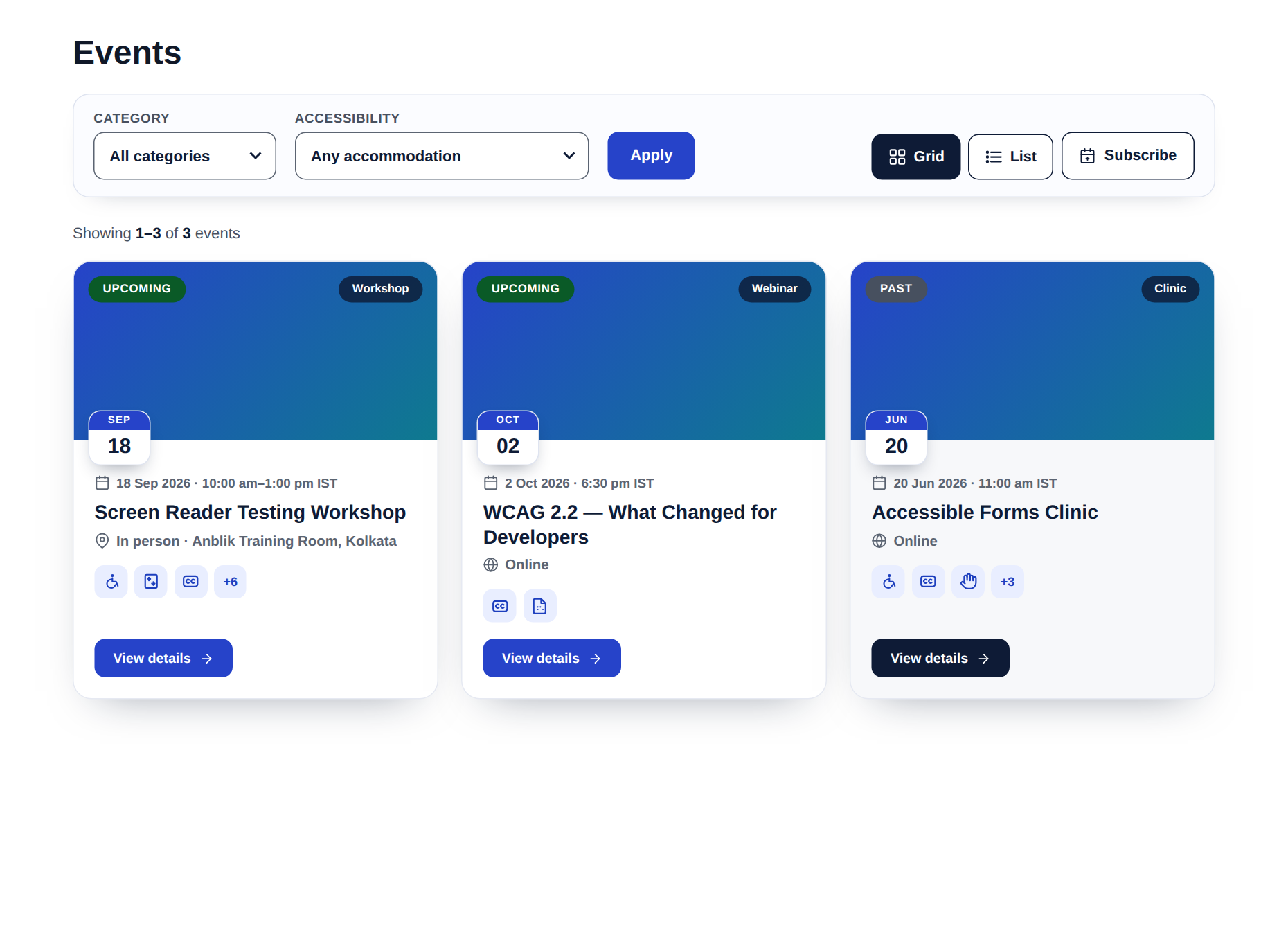
The events list in Grid view - the filter toolbar (category + accessibility), Grid/List switch, Subscribe button, and cards with the Upcoming/Past pill, a date tile and accommodation mini-icons.
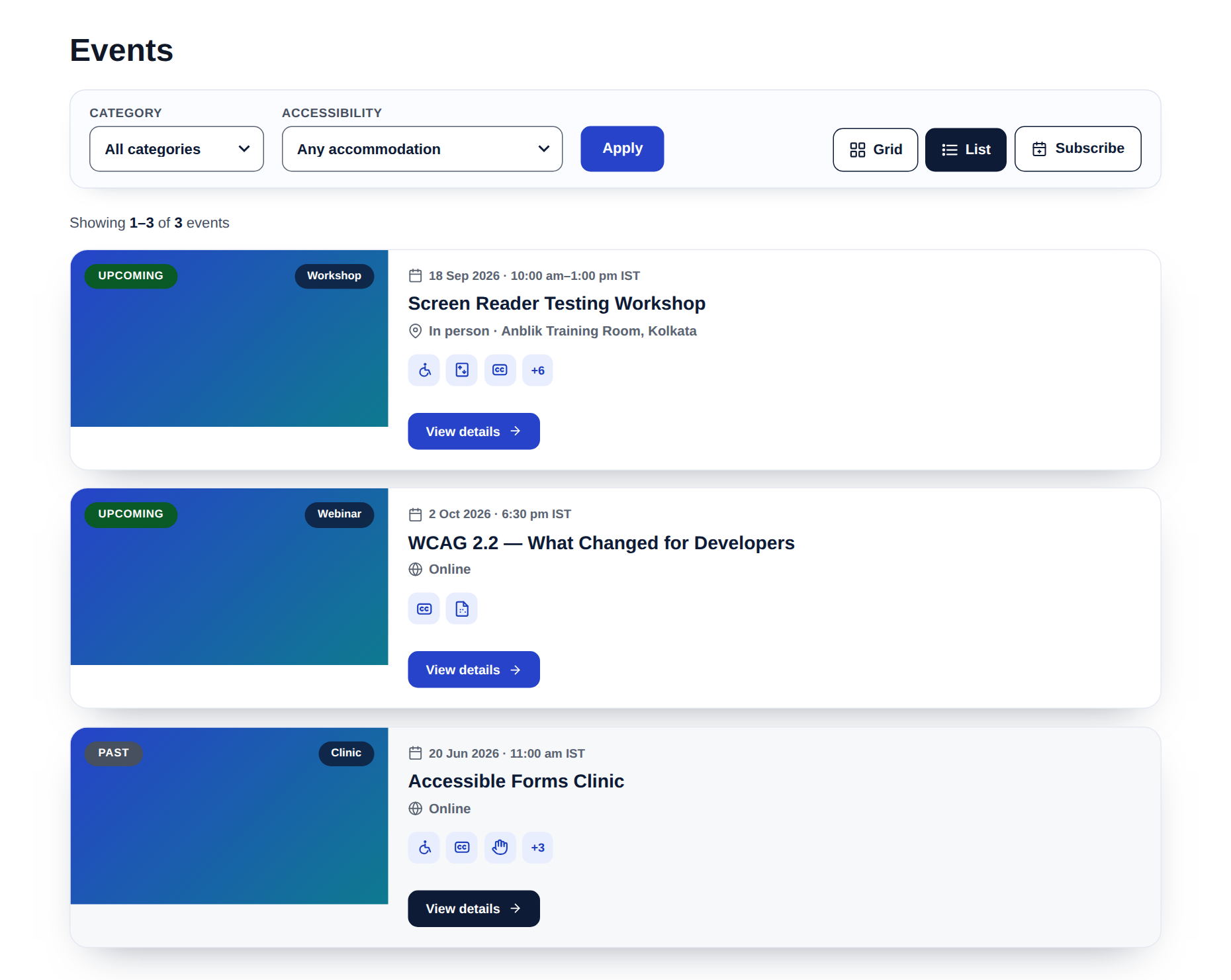
The events list in List view.
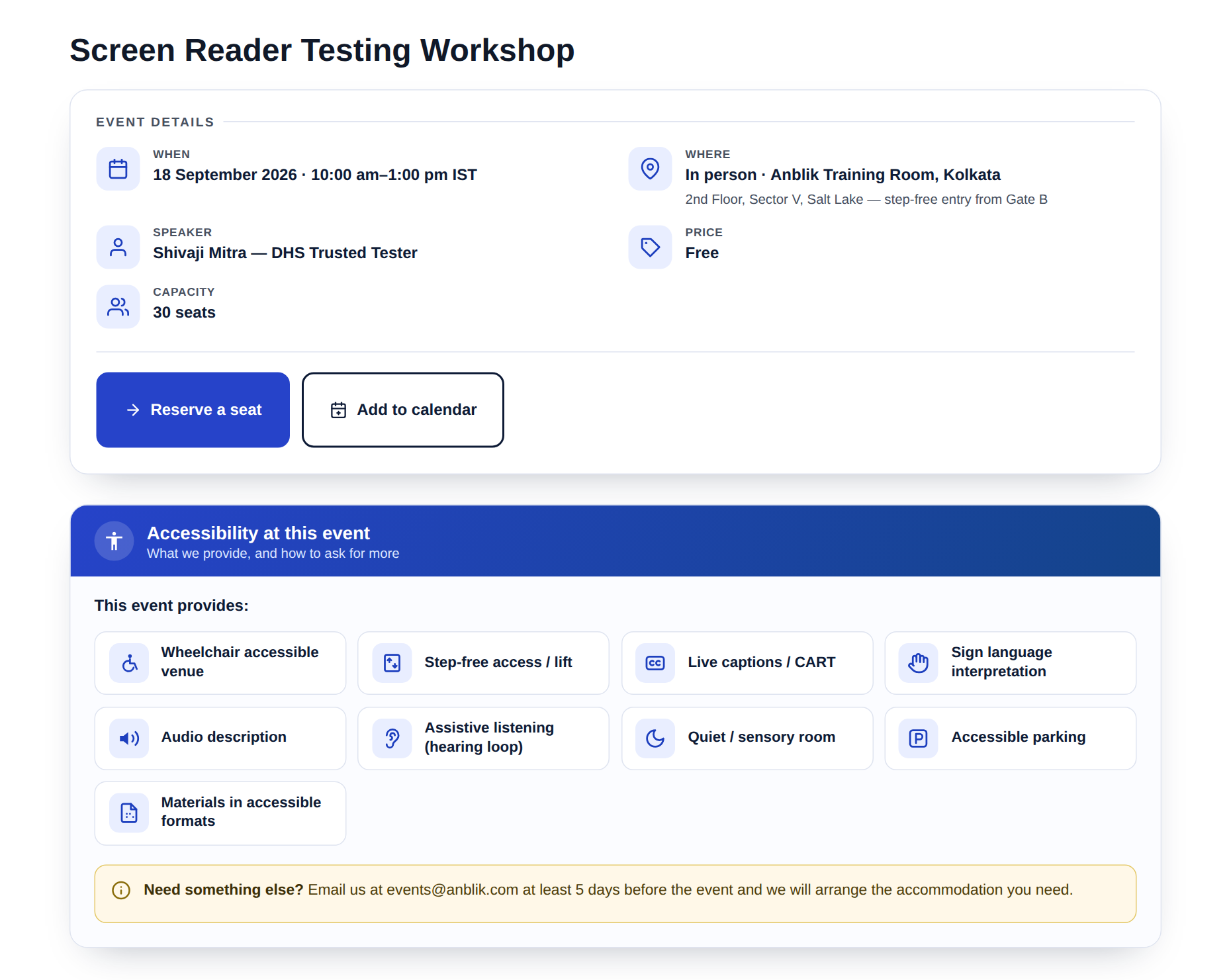
A single event: the "Event details" panel with icon tiles, and the "Accessibility at this event" panel with a real icon for every accommodation.
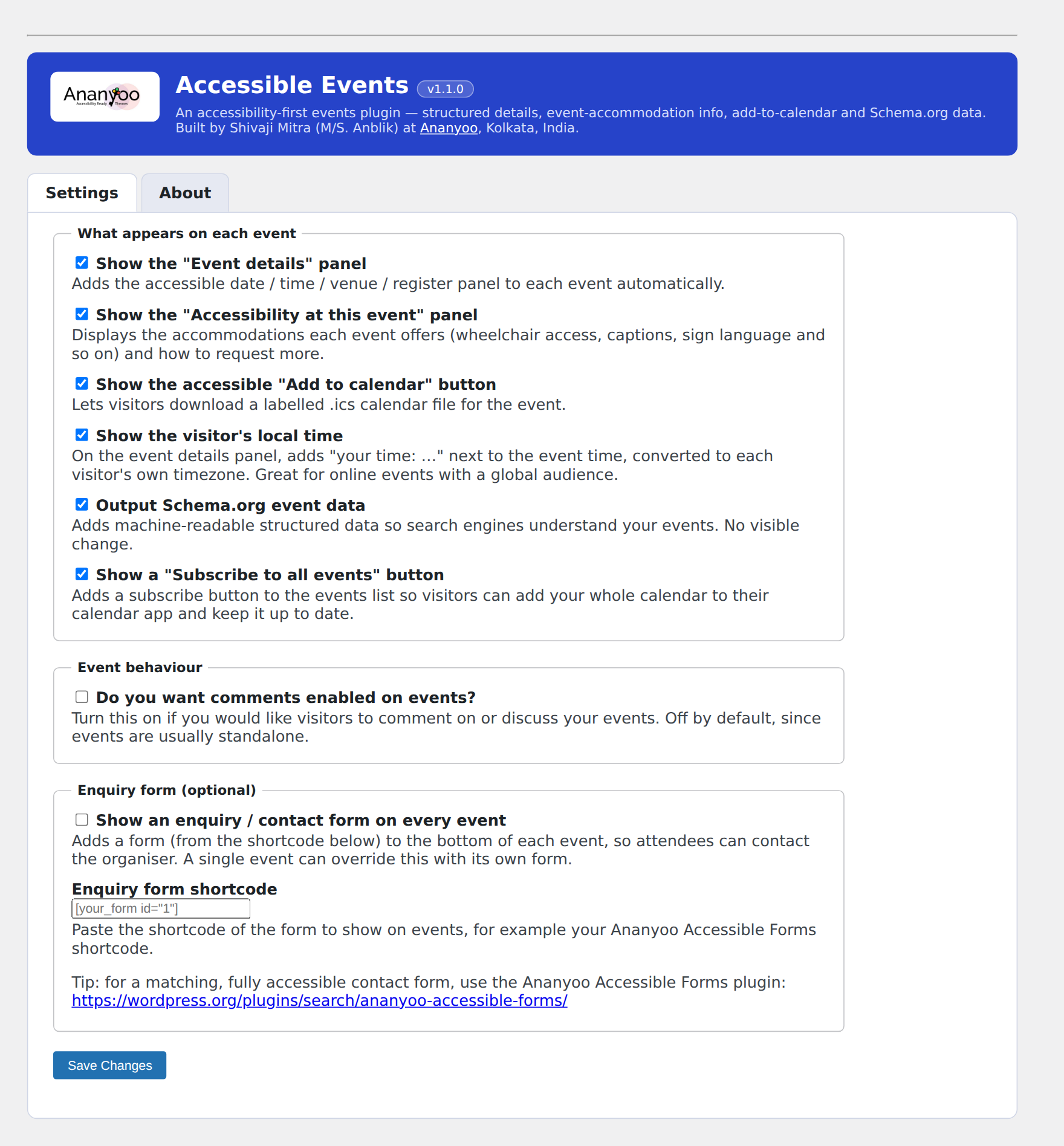
The audited admin: the branded Settings screen with per-feature toggles and the Settings / About tabs.

The accessible timeline, "Photo journey" design - big rounded photos with the date pill on the photo, woven from blog posts and events with year pills and a no-JavaScript Load more.

The accessible timeline, "Alternate" design - cards left and right of the centre line with year pills and Event/Blog source tags; one of five built-in designs.
Faq
Yes. The meta boxes, the Settings and About tabs, and the events list are all built to the same WCAG 2.2 AA standard – labelled controls, visible focus, sufficient contrast, and an ARIA live-region announcement when you filter Upcoming / Past.
In Accessible Events Settings, switch on “Show an enquiry form on every event” and paste a form shortcode. For a matching accessible form, use Ananyoo Accessible Forms. A single event can also have its own form in the “Enquiry form” box on the event editor.
Add [ananevt_timeline] to any page. By default it mixes your events and blog posts newest first; narrow it with source="posts" or source="events", a category="slug", or hand-picked ids="12,34,56". Choose one of the five designs in Settings (or per page with design="journey" and friends), switch featured images off with images="no", and set your own colours in Settings – every empty colour field keeps the accessible default. There is no separate “story” post type: the timeline always reflects your real content.
No. Events and their data live in the plugin, so they are theme-independent.
Single events at /events/your-event/, and wherever you place the [ananevt_events] shortcode. The shortcode splits Upcoming and Past automatically, sorted by date.
Reviews
A Really Helpful Plugin for Inclusive Events
By 
I really like Ananyoo Accessible Events because it makes accessibility feel like a natural and important part of event planning. I found the plugin easy to understand, and I appreciate how it helps organizers clearly communicate accessibility information to attendees.
What stood out to me most is the focus on making everyone feel included. Having accessibility details available upfront can make a big difference for people who need specific accommodations and helps them feel more confident about attending an event.
Overall, I think Ananyoo Accessible Events is a thoughtful and practical plugin. It’s a great tool for anyone who genuinely wants to make their events more welcoming, inclusive, and accessible to everyone.
Changelog
1.9.5
- Readme: the changelog here lists the latest versions only, so
WordPress.org shows it in full. The complete history is in
changelog.txt in the plugin folder.
1.9.4
- Event page: the When / Where / Speaker labels are a little larger
(12px), so no checker reports them as very small text. - Event page: “This event provides:” above the accessibility list is no
longer a paragraph in bold, so it is not reported as a possible heading.
It looks the same. - Event page: when the breadcrumb sits at the top of the content (not in a
dark banner), it keeps the theme’s light styling, so its links keep
4.5:1 contrast.
1.9.3
- Timeline: one link per entry. The title link now covers the whole entry,
so the “Read more” pill is part of it instead of a second link to the
same page. It looks and reacts the same. - Timeline: entry photos have an empty alt, because the entry title next to
them already names the event or post. - Timeline: the Event / Blog source tag is a little larger (same size as the
date), so it is no longer reported as very small text. - Event lists: Previous and Next jump to the top of the list on the new page,
so they are no longer the same link as the page number beside them.
1.9.2
- Accommodation icons on listing cards no longer carry a title attribute
that repeats their hidden label (reported as redundant title text).
1.9.1
- Listing cards now carry one link per event: the image is no longer a
second link and “View details” is a visual cue, while the title link
covers the whole card. Removes the “redundant link” alerts in audits. - Category badge on cards uses a solid navy background so its contrast is
measurable; the month on the date tile is slightly larger.
1.9.0
- New: Event status. Mark an event as Scheduled, Cancelled, Postponed or
Moved online in the Event details box. A status pill appears before the
title on the listing card and the event page, as real text, so screen
readers announce it before the event name, and repeated inside the
heading as hidden text, so moving from heading to heading hears it too.
On the event page the browser title also starts with the status, so it
is the first thing announced when the page opens. Cancelled events lose
their Register button. Schema.org eventStatus tells search engines the same,
so Google can show “Cancelled” in results, and the .ics download marks a
cancelled event as cancelled and a postponed one as tentative. - Date and time ranges now read “8 to 9 October 2026” and “9:30 am to
5:00 pm” instead of using an en dash, which screen readers either skip
or read aloud as “en dash”. - House style: every en dash and em dash in the plugin’s own text and
readme is now a plain hyphen.
1.8.9
- Guests carousel (glow style), follow-up to 1.8.8: the scrollbar now sits close under the cards instead of just above the Previous/Next buttons. The row’s bottom breathing room is trimmed to 32px (still clearing the hover glow, whose deepest shadow reaches about 24px below a card) and the bottom pull-back is removed, so the bar rises toward the cards and the buttons keep a clear ~20px gap below it. The buttons themselves have not moved. CSS-only change.
1.8.8
- Guests carousel (glow style): the row’s native scrollbar no longer runs behind the Previous/Next buttons. The glow variant’s negative bottom margin was pulling the controls up into the scrollbar’s lane at the bottom edge of the scroll row; the bottom pull-back is now smaller (-10px instead of -30px), so the scrollbar keeps its own lane and the round buttons sit fully below it, on desktop and on phones. CSS-only change.
Older versions
- See changelog.txt in the plugin folder for the full history.