AnchorKit – Table of Contents
AnchorKit – Table of Contents
Description
AnchorKit makes it simple to add a professional table of contents anywhere on your site with unparalleled customization and developer-friendly features:
🚀 Core Features:
– Automatically generate WCAG compliant, accessible table of contents for posts, pages, and custom post types by parsing content for headers
– Accessibility-first design with ARIA labels, keyboard navigation, and screen reader compatibility
– Works with Classic Editor, Gutenberg, Elementor, Divi, WPBakery Page Builder, and Visual Composer
– Optionally auto-insert TOC into content or use manual placement with shortcodes, widgets, or blocks
– Comprehensive settings for controlling when and where TOC appears
– Multiple built-in themes with custom colors for borders, backgrounds, and links
– Hierarchical display with nested sub-headings and proper heading structure
– Smooth scrolling with configurable offset and keyboard-friendly navigation
– Collapsible TOC with customizable initial states and focus management
– Selective enable/disable on post-by-post basis with user preference respect
– Advanced heading filtering with keywords, selectors, and regex patterns
– Mobile-responsive with customizable breakpoints and touch-friendly controls
🎨 Appearance & Themes:
– Light/dark/system themes with automatic detection
– Three preset styles (Minimal, Modern, Clean) plus full custom styling
– Multiple bullet formats: none, decimal, numeric, roman numerals, and custom characters
– Customizable colors, fonts, spacing, and animations
– Theme-aware styling that adapts to your site’s design
♿ Accessibility First:
– WCAG compliant with proper ARIA labels and keyboard navigation
– Screen reader compatible with descriptive labels
– Configurable heading levels and anchor formats
– Semantic HTML structure with proper heading hierarchy
🛠️ Developer Friendly:
– Extensive action hooks and filters for customization
– Pull requests and feature requests welcomed on GitHub
– Comprehensive shortcode attributes for granular control
– Schema.org SiteNavigation markup support
– ACF field integration for dynamic content
– WordPress coding standards compliant
📱 Advanced Features:
– Sticky TOC positions with customizable offset
– Scroll spy with active section highlighting
– Reading time and word count metadata
– “View more” truncation for long TOCs
– Back-to-top links with smooth scrolling
– AMP-compatible output (Pro)
– Custom taxonomy description support
Shortcode
Take full command of your table of contents with AnchorKit’s comprehensive shortcode system. Perfect for users who prefer code over visual editors or need granular control. All shortcode attributes maintain full accessibility compliance and WCAG standards.
Basic Usage:
[anchorkit_toc]
Advanced Usage with Attributes:
[anchorkit_toc header_label="Contents" display_counter="yes" theme="dark"]
Supported Attributes:
Display Control:
– header_label="Title" – Custom TOC title
– display_header_label="no" – Hide title
– toggle_view="no" – Disable collapsible toggle
– initial_view="hide" – Start collapsed
Content Filtering:
– heading_levels="2,3" – Include only H2 and H3 headings
– exclude="Test,Draft" – Exclude headings containing these keywords
– post_types="post,page" – Limit to specific post types
– post_in="1,2" – Include only specific post IDs
– post_not_in="1,2" – Exclude specific post IDs
– min_headings="3" – Require minimum number of headings
Appearance:
– display_counter="yes" – Enable numbered lists
– class="custom-toc" – Add custom CSS class
– theme="dark" – Set theme (system/light/dark)
– preset="modern" – Choose style preset
Behavior & Accessibility:
– hierarchical="yes" – Enable nested sub-headings with proper heading structure
– smooth_scroll="no" – Disable smooth scrolling (accessibility option)
– device_target="mobile" – Show only on mobile/desktop for responsive design
PRO Features:
– view_more="5" – Show only first 5 headings initially (PRO)
– sticky="yes" – Enable sticky positioning
– show_reading_time="yes" – Display reading time
– show_word_count="yes" – Display word counts
Upgrade to AnchorKit Pro
Take AnchorKit to the next level with professional features and premium support:
🎨 Enhanced Integration:
– Elementor Widget – Drag-and-drop TOC creation
– Gutenberg Block – Advanced block editor support
– ACF Support – Generate TOC from custom fields
– AMP Compatibility – Automatic AMP-friendly output
📍 Advanced Positioning:
– Fixed/Sticky TOC – Multiple positioning options
– Sticky Customization – Theme-aware sticky styling
– Scroll Spy – Active section highlighting
– Back-to-Top Links – Smooth scroll to top
📊 Content Enhancement:
– Reading Time – Display estimated read time
– Word Count – Show word counts per section
– View More – Truncate long TOCs elegantly
– Schema.org Markup – Rich snippets for SEO
♿ Enterprise Accessibility:
– WCAG 2.1 AA Compliance – Full accessibility audit and certification
– Advanced ARIA Support – Complex widget patterns and live regions
– Keyboard Navigation – Full keyboard and screen reader support
– Multi-device Testing – Accessibility validation across all devices
🛠️ Developer Features:
– Priority Support – Direct developer assistance
– Advanced Hooks – Extended customization API
– Migration Tools – Import from other TOC plugins
– Custom Integrations – Third-party plugin support
Privacy
- Opt-in telemetry only: the free plugin never transmits site data. When you opt in, we only collect your site URL, WP/PHP versions, and admin email to issue a license.
- No front-end tracking: AnchorKit does not load external trackers, ads, pixels, or front-end scripts from third-party domains.
- Self-hosted assets: all CSS/JS lives inside the plugin; no CDNs or remote calls are made on visitor pages.
Upgrade to AnchorKit Pro inside the plugin to unlock Elementor widget, sticky TOC positions, reading-time metadata, schema, ACF integration, and more. Purchases and license management are handled securely via Freemius (Stripe/PayPal).
Installation
- Upload the
anchorkitfolder to the/wp-content/plugins/directory or install via Plugins > Add New. - Activate the plugin through the “Plugins” menu in WordPress.
- Go to Settings > AnchorKit to configure global settings, then use shortcodes, blocks, or widgets anywhere on your site.
Screenshots
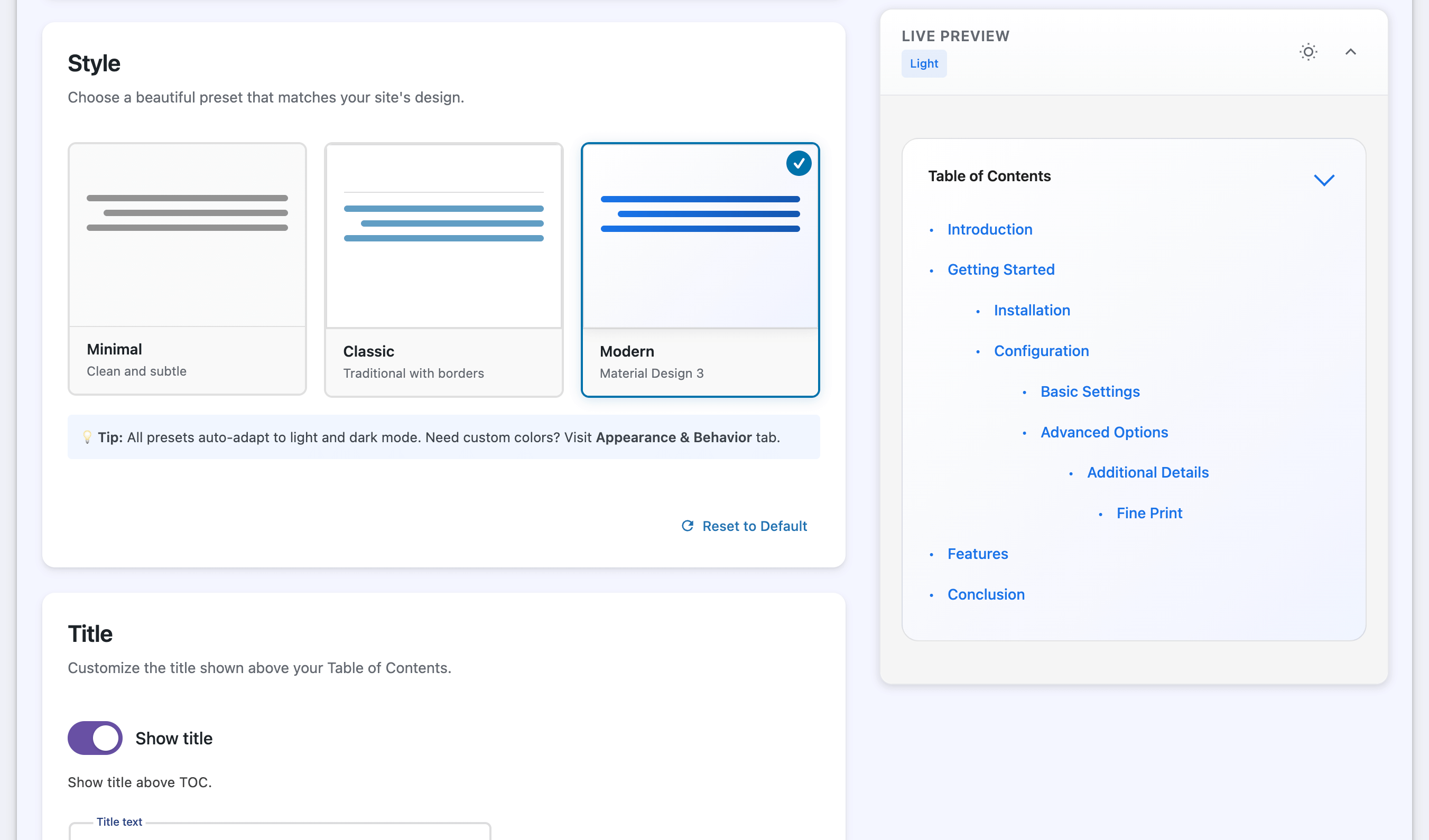
Get started in seconds with instant visual feedback. Create your table of contents with live preview, ready-made presets, and automatic light/dark mode support—no coding required.
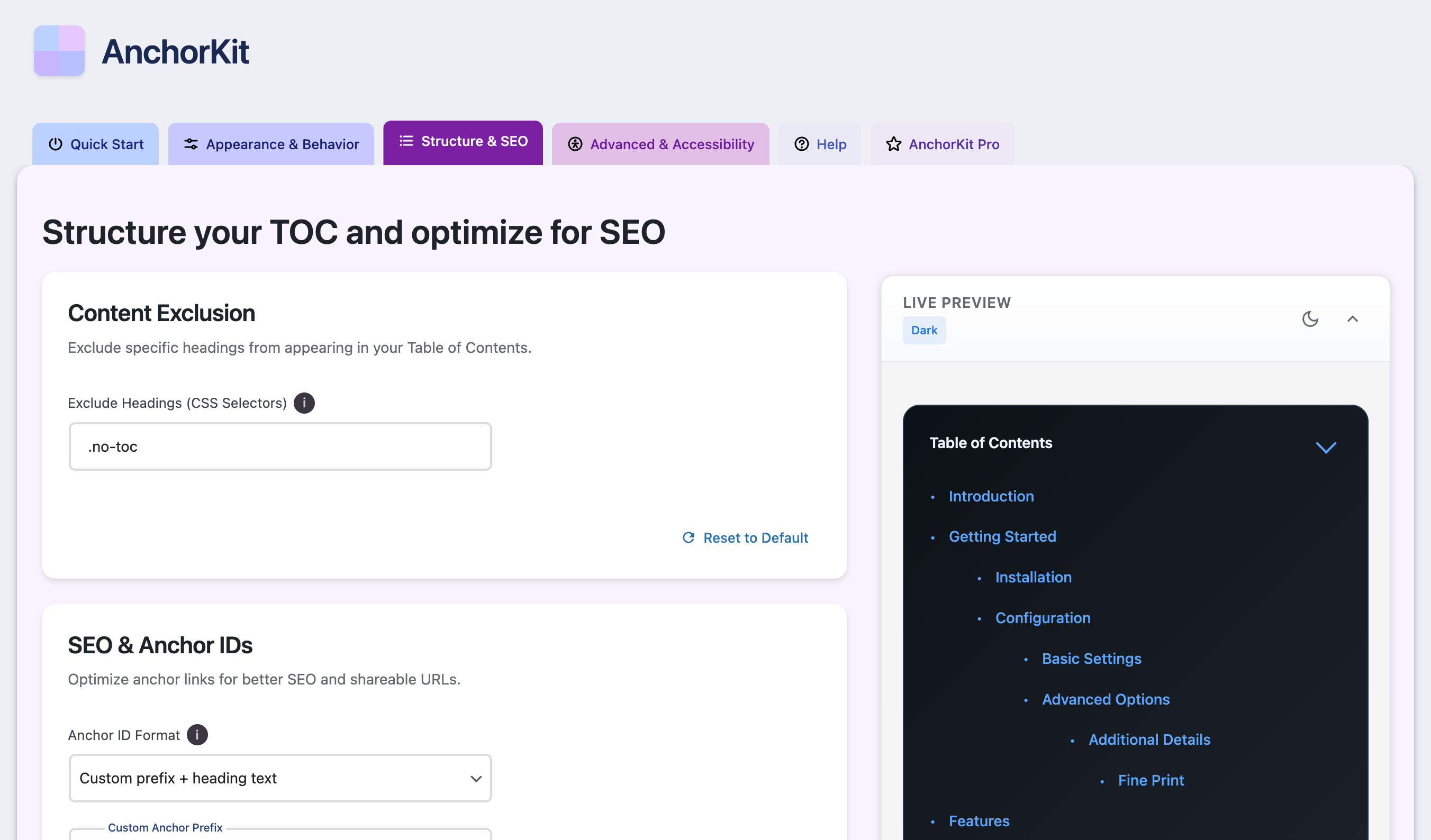
Supercharge your SEO with structured data and smart linking. Generate Schema.org markup, customize anchor formats, and control exactly what search engines see.
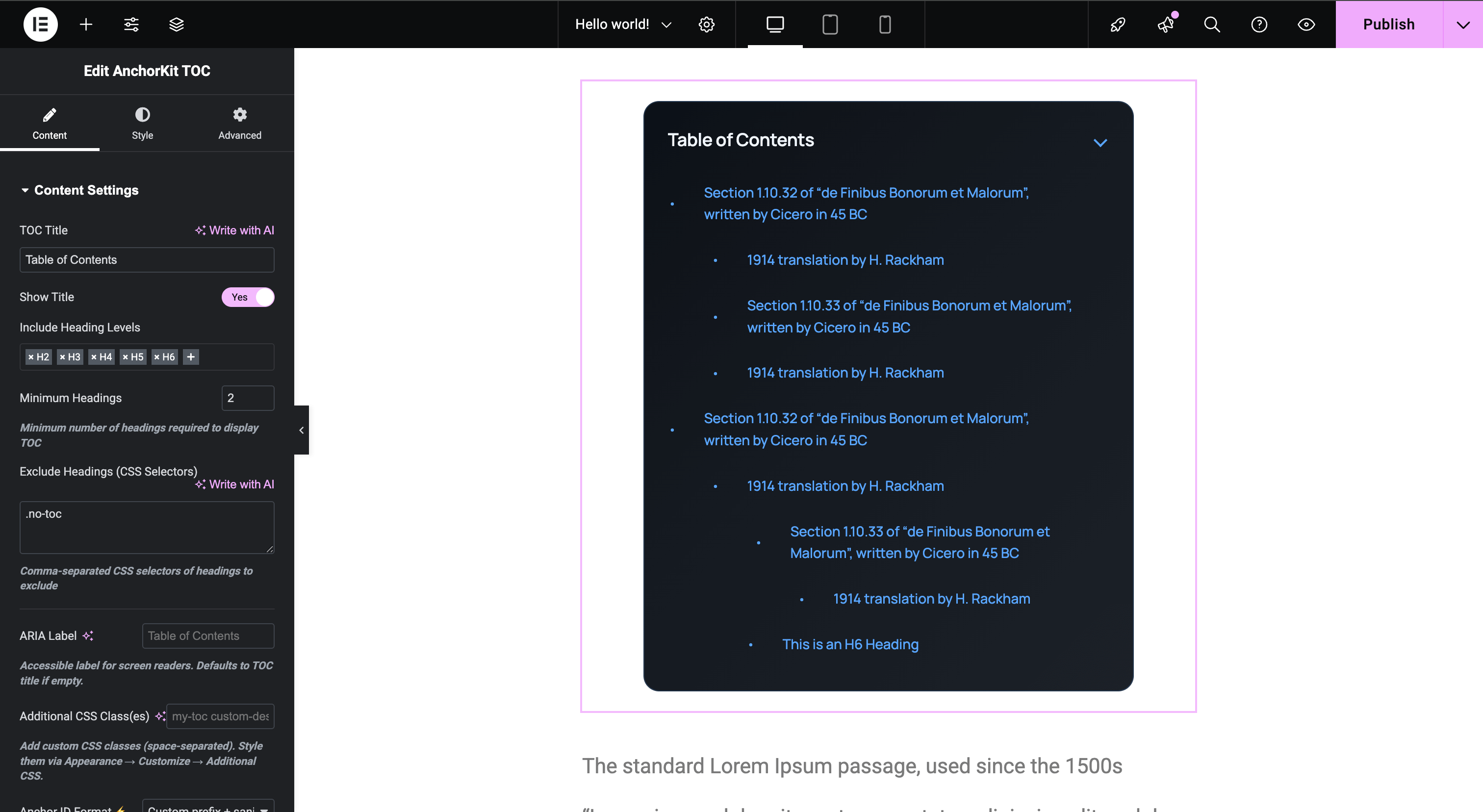
Seamless Elementor integration for per-page customization. Override global settings, match your design system, and preview changes in real-time.
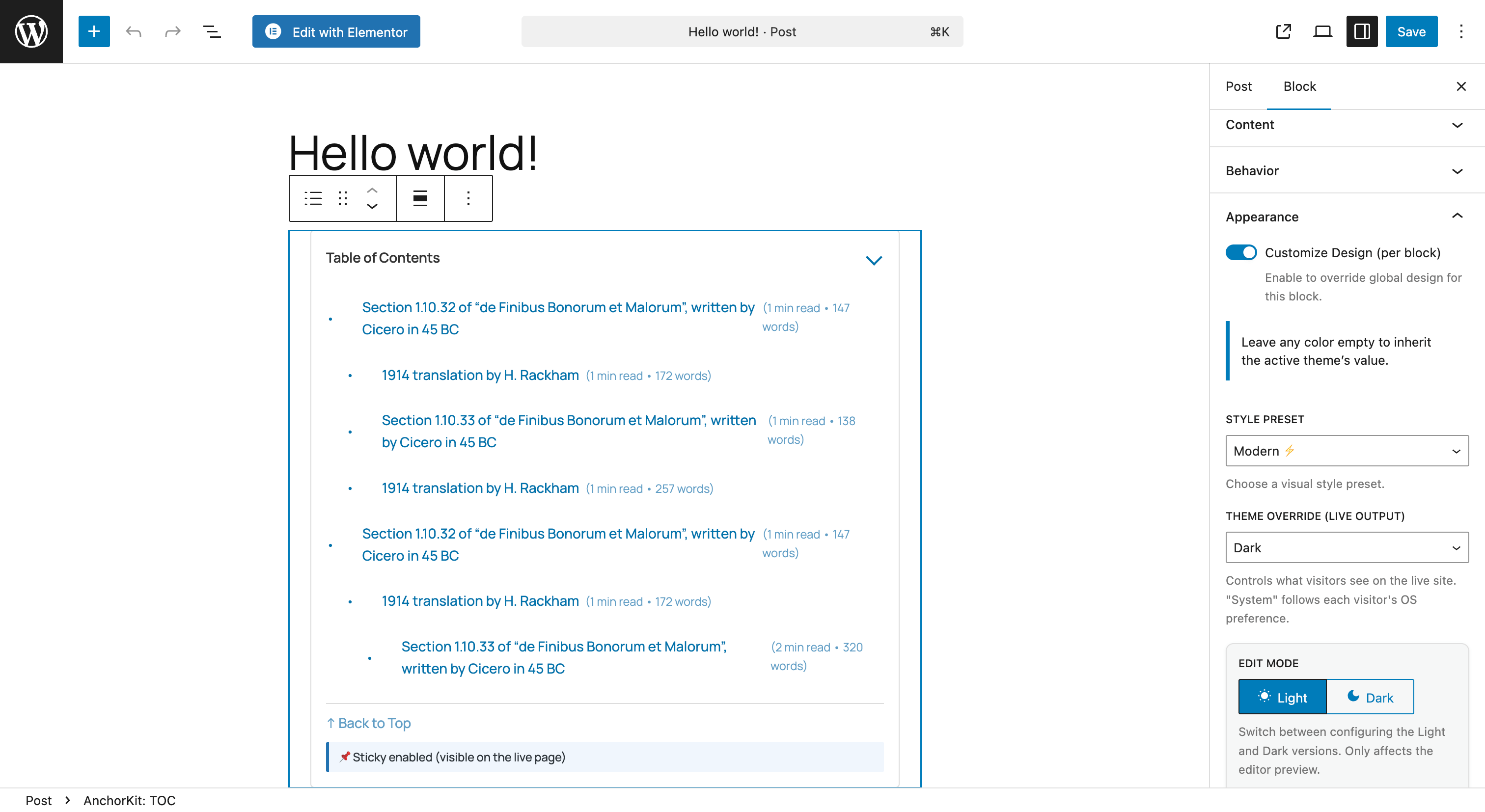
First-class Gutenberg block for the modern WordPress editor. Insert customizable TOC instances anywhere with an intuitive block-based interface.
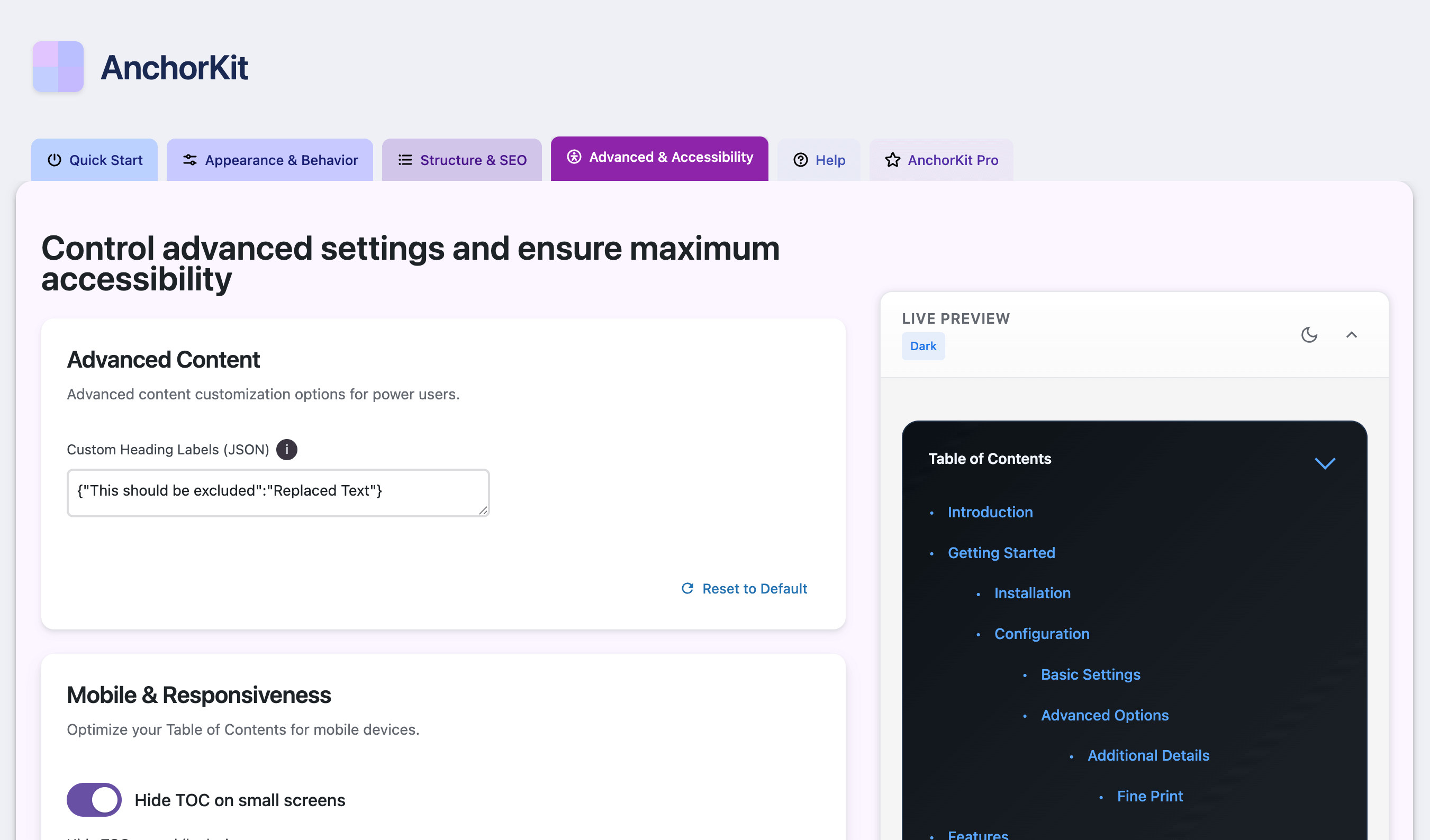
Accessibility-First Controls: WCAG compliant configuration with ARIA labels, keyboard navigation, screen reader support, and enterprise-grade accessibility features.
Faq
No. The free plugin does not send telemetry or tracking data. If you opt into Pro via Freemius, you will be prompted for explicit consent before any licensing checks occur.
Insert the “AnchorKit – Table of Contents” block, choose which heading levels to include, and adjust styling. Global defaults from Settings > AnchorKit are applied automatically.
No. Elementor support is optional (Pro). You can use auto-insert, the Gutenberg block, shortcode, or widget without Elementor.
Yes! AnchorKit works seamlessly with Gutenberg (block editor), Classic Editor, and the Pro version includes dedicated Elementor widget support. It also works with other page builders through the shortcode [anchorkit_toc].
Absolutely! In Settings > AnchorKit > Quick Start, you can select which post types (posts, pages, custom post types) should display the table of contents.
Go to Settings > AnchorKit > Structure & SEO. You can exclude headings by:
– Keywords (e.g., “Introduction, Conclusion”)
– CSS selectors (e.g., “.no-toc, #skip-heading”)
– Regular expressions for advanced filtering
Yes! AnchorKit offers three preset styles (Minimal, Classic, Modern) and full custom styling mode. You can control colors, fonts, spacing, shadows, and much more. The TOC automatically adapts to light/dark mode.
No. AnchorKit is performance-optimized with minimal CSS/JS footprint. Assets are loaded only when needed.
Absolutely! AnchorKit is built with accessibility as a core principle:
– WCAG 2.1 AA compliant with comprehensive accessibility features
– Full keyboard navigation support throughout all interactive elements
– Screen reader compatible with proper ARIA labels and semantic markup
– Focus management for collapsible elements and dynamic content
– High contrast support with theme-aware color schemes
– Semantic HTML structure with proper heading hierarchy
– Configurable anchor formats for SEO and accessibility needs
You have multiple options for maximum flexibility:
1. Shortcode: Use [anchorkit_toc] with 20+ attributes for granular control
2. Gutenberg Block: “AnchorKit – Table of Contents” block with visual controls
3. Elementor Widget: Drag-and-drop widget with live preview (Pro)
4. WordPress Widget: Place in sidebars, footers, or any widget area
5. Auto-insert: Automatic placement based on post type and position settings
AnchorKit offers the most comprehensive shortcode system available:
Basic: [anchorkit_toc]
With Custom Title: [anchorkit_toc header_label="Contents"]
Advanced: [anchorkit_toc display_counter="yes" theme="dark" heading_levels="2,3"]
See the Shortcode section above for all 20+ supported attributes!
Absolutely! AnchorKit includes:
– 15+ action hooks and filters for complete customization
– Extensive shortcode attributes for programmatic control
– GitHub repository with pull request support
– Comprehensive developer documentation
– Schema.org markup and ACF integration
– WordPress coding standards compliance
Yes! AnchorKit is translation-ready and works with WPML, Polylang, and other translation plugins.
Free includes: Auto-insert TOC, Gutenberg block, shortcode, widget, 3 presets, custom styling, smooth scroll, and more.
Pro adds: Elementor widget, sticky TOC positions, scroll spy, reading time/word count, Schema.org markup, ACF integration, and priority support.
Visit Settings > AnchorKit > AnchorKit Pro in your WordPress dashboard to view plans and upgrade securely via Stripe or PayPal.
Reviews
Changelog
1.0.0
- Initial public release with comprehensive TOC features and developer-friendly architecture
- Shortcode System: 20+ shortcode attributes for granular TOC control and customization
- Developer Hooks: 15+ action hooks and filters for complete programmatic customization
- Auto-insert TOC: Automatic placement with advanced positioning and content filtering
- Gutenberg Block: Native block editor support with live preview and per-instance settings
- Widget Support: WordPress widget for sidebar/footer placement with sticky options
- Accessibility-First Design: WCAG 2.1 AA compliant with comprehensive ARIA support, full keyboard navigation, screen reader compatibility, and semantic HTML structure
- Theme Integration: Automatic light/dark/system theme detection with custom presets
- Advanced Filtering: Keyword exclusion, regex patterns, CSS selectors, and heading level control
- Security: ABSPATH checks, nonce verification, input sanitization, and output escaping
- Freemius Integration: Secure licensing and Pro upgrade management
- Schema.org Support: SiteNavigation markup for enhanced SEO
- ACF Integration: Dynamic TOC generation from custom fields (Pro)
- AMP Compatibility: Automatic AMP-friendly output generation (Pro)