Simple Tiered Pricing Table for WooCommerce

Simple Tiered Pricing Table for WooCommerce
Description
Simple Tiered Pricing Table for WooCommerce is the easiest way to add tiered pricing, quantity discounts, and volume price breaks to your WooCommerce store. Customers instantly see how much they save when buying more — no upselling, no coding required.
Whether you run a wholesale store, a B2B shop, or just want to reward bulk buyers, this plugin adds a professional quantity discount table directly on your product pages with live-updating prices as customers change quantities.
Free Features
Quantity-Based Tiered Pricing
- Set percentage discounts or fixed prices per quantity tier
- Unlimited pricing tiers per product
- Apply tiered pricing to unlimited products
- Live price updates as the customer changes quantity
- Instant “You Save” labels show real savings on every tier row
- Supports both Simple and Variable products
- Works alongside WooCommerce coupons and taxes
5 Pricing Table Display Templates
Choose how your quantity discount table appears on each product page:
- Table — classic column layout (Quantity | Discount | Price | You Save) — the most popular tiered pricing table style
- Blocks — card-style grid, ideal for stores with a bolder visual style
- List — clean bullet-style list, minimal footprint on busy product pages
- Tooltip — hover info icon, keeps the page clean while tiered prices stay accessible
- Dropdown — compact select-input for mobile-first or space-tight layouts
Quantity Controls
- Set a minimum order quantity per product
- Set a maximum order quantity per product
- Set a quantity step to sell in packs (e.g., packs of 6, 12, or 24)
Shop & Category Page Price Display
Let shoppers see bulk pricing before they even open a product:
- Show the lowest available price (“From $10.00”)
- Show the full price range (“$75.00 – $100.00”)
- Show “As low as $X.XX” to highlight volume savings
- Customisable prefix text to match your store language
Colours & Column Labels
- Choose highlight colour, highlight text colour, header background, and header text
- Rename any column header (Quantity, Discount, Price) and “You Save” summary labels
- Fully responsive — looks great on desktop, tablet, and mobile
Developer Tools & Integrations
- Shortcode
[tiered-pricing-table]— place the pricing table anywhere: pages, posts, or widgets - WooCommerce Products REST API — read and write tiered pricing data via
/wp-json/wc/v3/products/{id} - Built-in transient cache — zero performance impact, even on high-traffic stores
- Import/Export via WooCommerce’s built-in CSV tools — move pricing type, tiers, and quantity controls across sites in seconds
- HPOS (High-Performance Order Storage / Custom Order Tables) compatible
- Responsive and theme-agnostic — works with Storefront, Astra, Flatsome, Divi, and any well-coded theme
Why Choose Simple Tiered Pricing Table?
Most WooCommerce quantity discount plugins are complex, bloated, or charge for basic features. Simple Tiered Pricing Table gives you five beautiful pricing table templates for free, unlimited tiers, and all the display options you need — with a clean, fast, developer-friendly codebase.
- No per-product limits — apply tiered pricing to your entire catalogue
- No hidden paywalls on core pricing table features
- Live price updates — customers see the discounted price update as they change the quantity input, reducing cart abandonment
- 5 templates in free — competitors charge for this
- REST API included — sync pricing data with external systems or headless setups
Enjoying This Plugin?
If Simple Tiered Pricing Table has helped you set up quantity discounts and bulk pricing on your store, please take a moment to leave a ★★★★★ review. Your review helps other WooCommerce store owners discover the plugin and directly supports its continued development. Thank you!
Upgrade to Pro
The Pro version unlocks advanced pricing strategies built for wholesale stores, B2B shops, and high-volume merchants:
Role-Based Pricing
Set different tiered prices, tiers, and minimum quantities per user role — Wholesaler, Retailer, VIP, Guest, or any custom role. Optionally hide the pricing table entirely for specific roles.
Global Pricing Rules
Define one volume discount rule and apply it across multiple products and/or categories simultaneously. No need to configure each product individually. Supports Mix & Match quantity calculation — a customer’s combined cart quantity across different products counts toward tier thresholds.
Cart Upsell Messages
Show contextual “Buy 2 more to save 15%!” messages directly inside the WooCommerce cart. Fully customisable message template with smart placeholders to drive higher average order values.
Full CSV Round-Trip with Role Data
Export and re-import role-based pricing, global rule assignments, and all tier configurations via WooCommerce’s CSV tools.
Shortcode Usage
Place the tiered pricing table anywhere on a page, post, or widget area:
[tiered-pricing-table product_id="123"]
Override the display template per placement:
[tiered-pricing-table product_id="123" template="blocks"]
Available templates: table, blocks, list, tooltip, dropdown
The prefixed alias [anhqtm-pricing-table] is also supported for backward compatibility.
REST API
The plugin extends the WooCommerce Products REST endpoint with a tiered_pricing field.
Read pricing data:
GET /wp-json/wc/v3/products/123
Returns:
`json
{
“tiered_pricing”: {
“pricing_type”: “percentage”,
“tiers”: [
{ “qty”: 5, “value”: 10 },
{ “qty”: 10, “value”: 15 }
],
“min_qty”: 1,
“max_qty”: 0,
“qty_step”: 0
}
}
`
Write pricing data (requires authentication):
POST /wp-json/wc/v3/products/123
Send the same tiered_pricing object in the request body.
The field anhqtm_tiered_pricing is also available as a prefixed alias for backward compatibility.
Installation
- Upload the
anhqui-tiermatrix-for-woocommercefolder to/wp-content/plugins/. - Activate the plugin through the Plugins screen in WordPress.
- Go to WooCommerce Tiered Pricing to configure global settings.
- Open any product and switch to the Tiered Pricing tab inside the product data box.
Screenshots
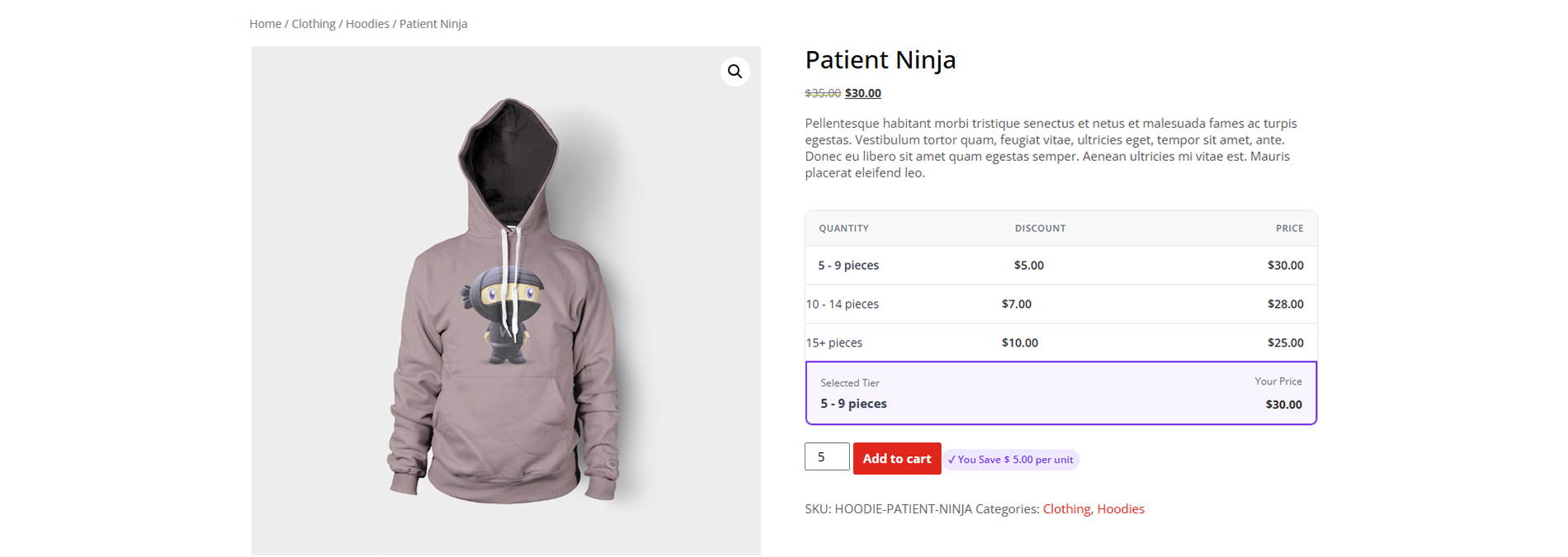
Frontend pricing table (Table template) on a product page with live "You Save" labels
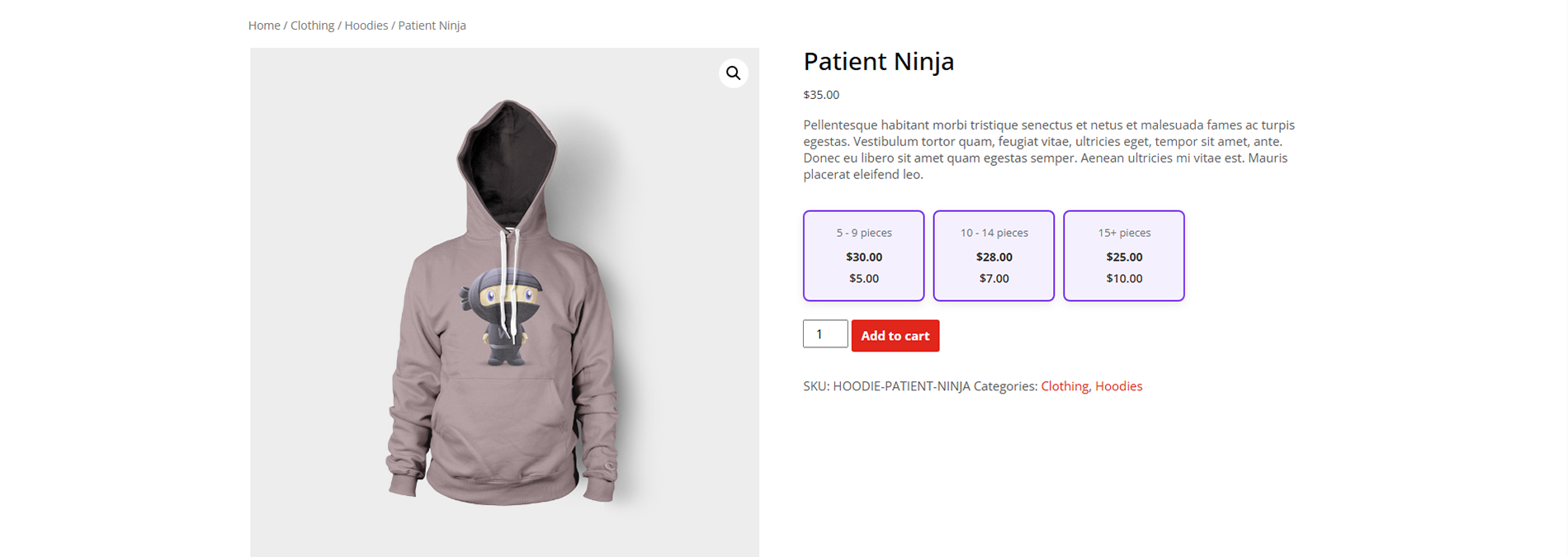
Blocks template — card-style grid for a bold, visual quantity discount display
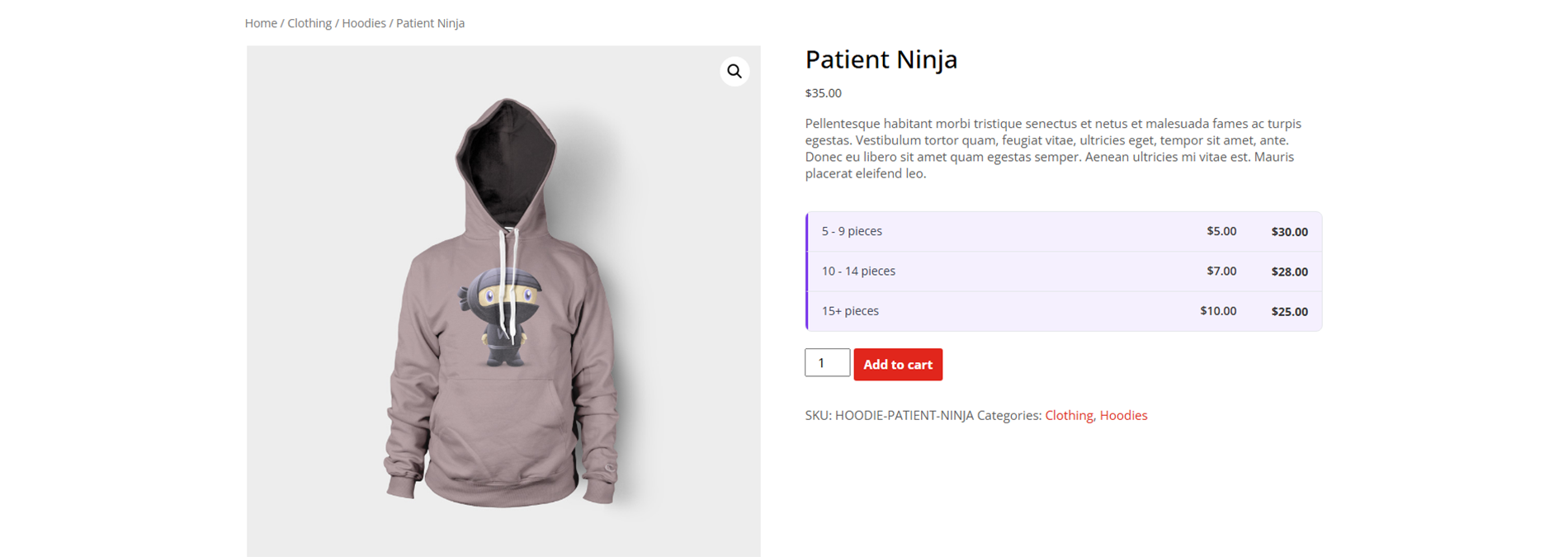
List template — minimal bullet layout, great for simple stores
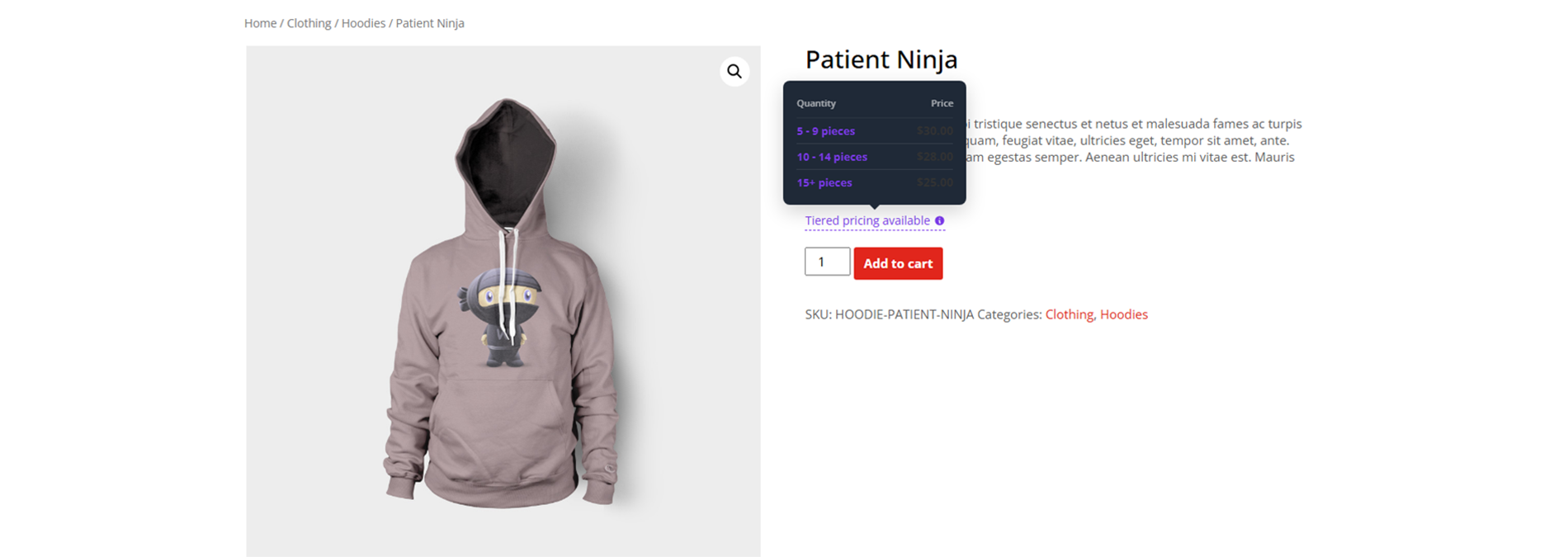
Tooltip template — hover icon keeps the page clean while prices stay accessible
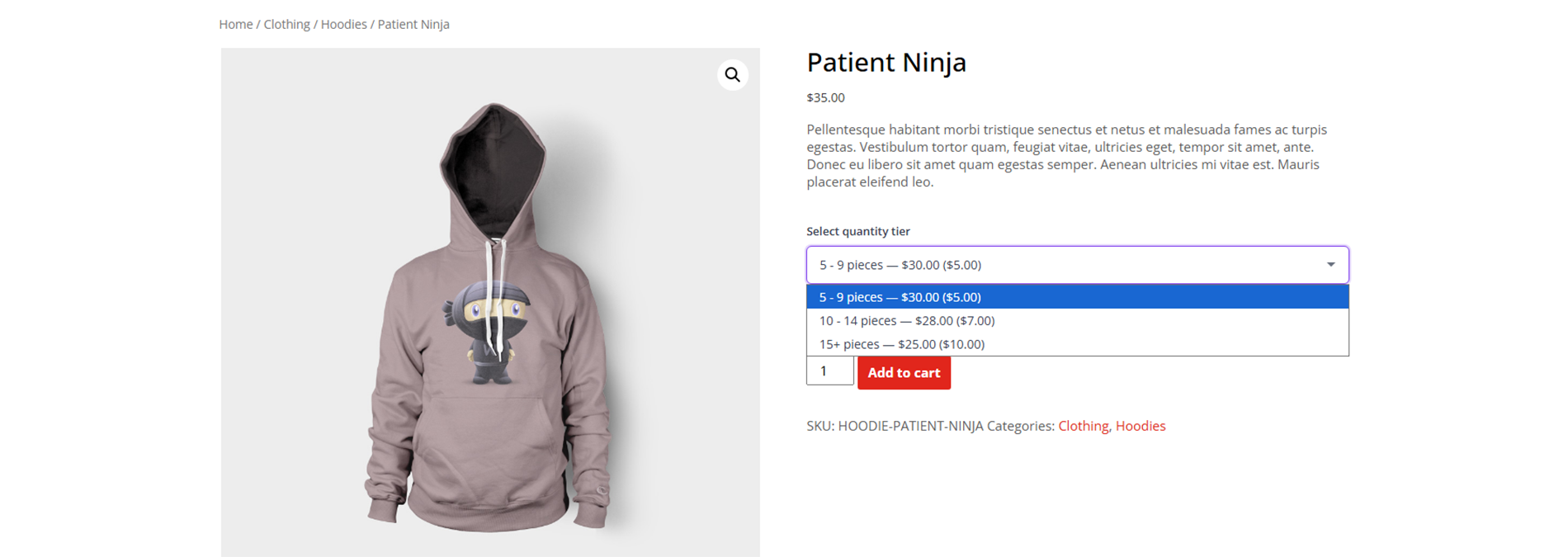
Dropdown template — compact select input, ideal for mobile-first layouts
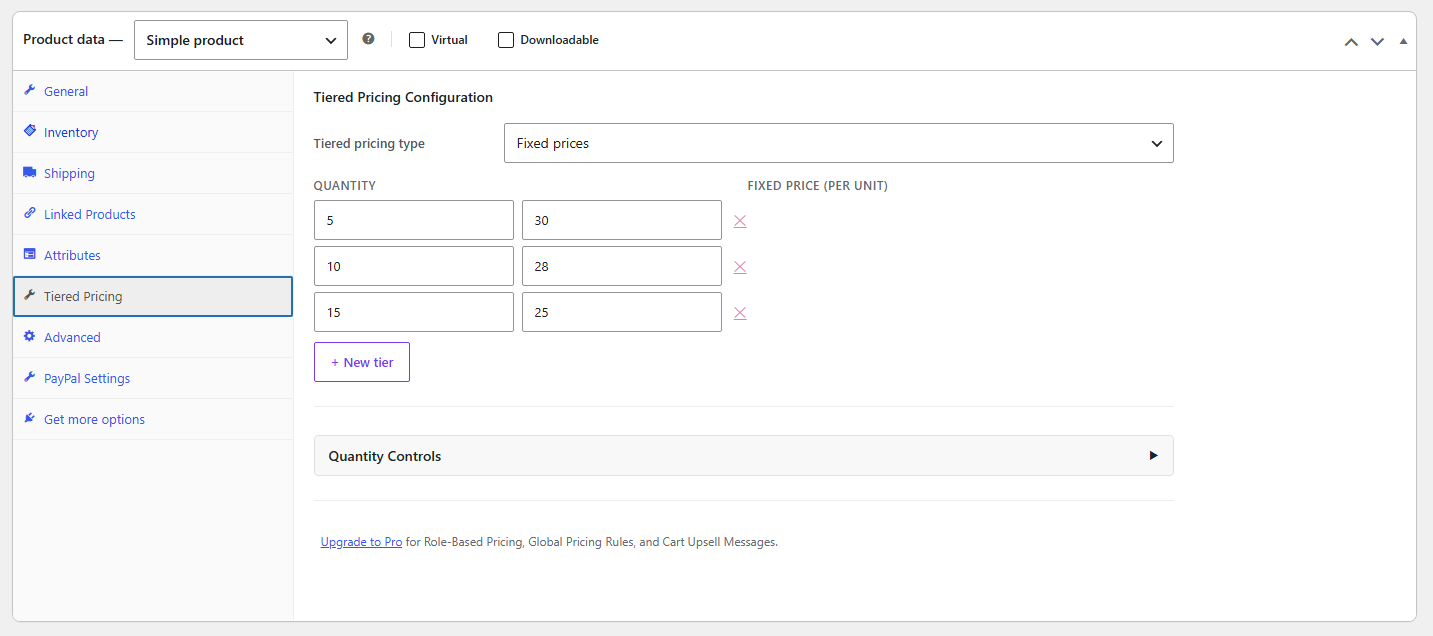
Backend product configuration — Tiered Pricing tab showing tiers and quantity controls
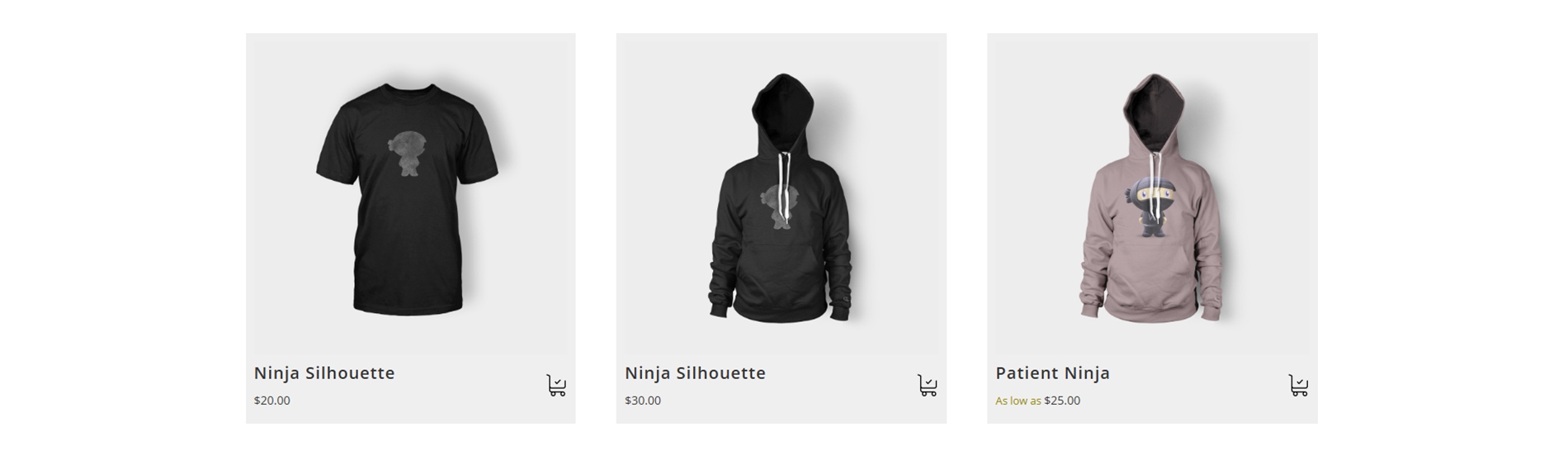
Shop page showing full price range and "As low as" bulk pricing labels
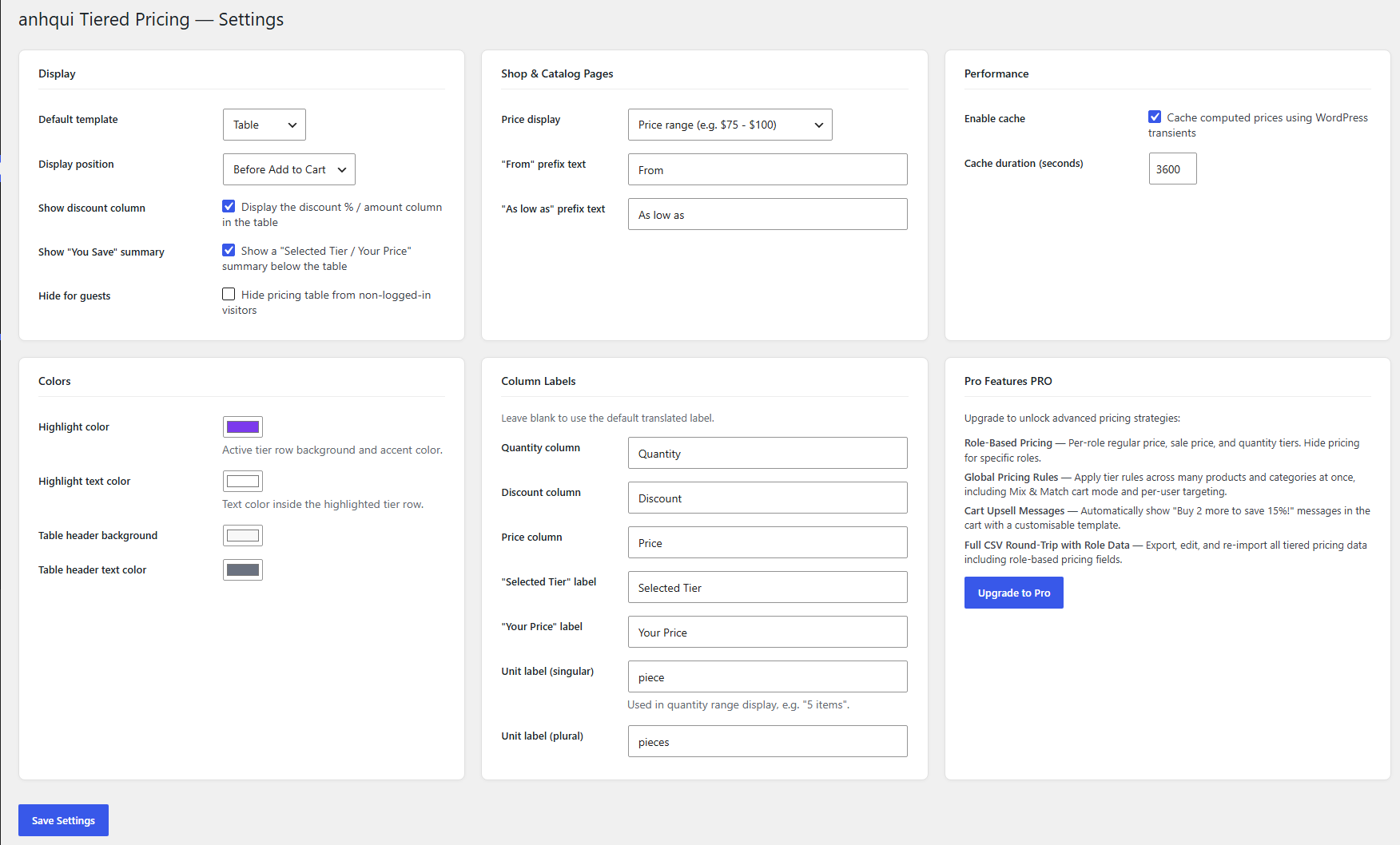
Plugin settings page — colours, column labels, and display options
Faq
The free version is fully functional with no product limits. You get unlimited pricing tiers, unlimited products, all five display templates, quantity controls, shop-page price display, colour customisation, shortcode support, REST API access, and CSV import/export — all free. The Pro version adds role-based pricing, global pricing rules, and cart upsell messages.
After installing and activating the plugin, open any product in WooCommerce, scroll to the Product Data box, and click the Tiered Pricing tab. Add your quantity tiers (e.g., Buy 5+ 10% off, Buy 10+ 20% off) and save the product. The pricing table appears automatically on the product page.
Go to the Tiered Pricing tab on any product, choose “Percentage” or “Fixed Price” as the pricing type, and add rows for each quantity threshold. Customers who reach that quantity automatically receive the discounted price at checkout. The table updates live as they adjust the quantity input.
Yes. The core bulk pricing table features — unlimited tiers, five templates, quantity controls, and CSV import/export — are completely free with no subscription required.
Yes. Tiered pricing applies to the selected variation’s base price. You can set tiers at the product level and they apply across all variations.
Yes. Go to WooCommerce Tiered Pricing Display and enable the shop/catalog price display. You can show the lowest available price (“From $10.00”), the full price range (“$75.00 – $100.00”), or an “As low as $X.XX” label.
All five templates are included for free: Table, Blocks, List, Tooltip, and Dropdown. You choose a default template in the global settings and can override it per-product.
Yes. Go to WooCommerce Tiered Pricing Colors to set the highlight colour, text colour, header background, and header text. Go to Column Labels to rename any column header (Quantity, Discount, Price) or the “You Save” label.
Role-based pricing is a Pro feature. With Pro you can set separate price tiers, minimum quantities, and pricing tables per user role — ideal for wholesale and B2B stores. Get the Pro version.
Global Pricing Rules are a Pro feature. They let you define one tiered pricing rule and apply it across multiple products and categories simultaneously — no need to edit each product individually. Get the Pro version.
Yes. The plugin declares full compatibility with WooCommerce High-Performance Order Storage (HPOS).
Yes. Tiered pricing applies to the product base price; WooCommerce then applies coupons and calculates tax on the discounted price as normal.
Yes. Use [tiered-pricing-table product_id="123"] to display the table anywhere on your site. You can also pass a template parameter to choose which of the five display styles to use. The prefixed alias [anhqtm-pricing-table] is also accepted.
Yes. You can use the shortcode [tiered-pricing-table] inside a Shortcode block in the Gutenberg editor to place the pricing table anywhere on a page or post.
Yes. Insert the shortcode into any Shortcode widget in Elementor, Divi, WPBakery, or any page builder that supports shortcodes.
No. All computed tier data is stored in WordPress transients (server-side cache). You can control the cache duration in WooCommerce Tiered Pricing Performance.
Yes. The free version exports and imports the pricing type, tier data, and quantity controls via WooCommerce’s built-in product CSV tools. Full CSV round-trip support for role-based pricing fields is available in the Pro version.
Yes. In the Tiered Pricing tab on any product, set the Minimum Quantity field. Customers will not be able to add fewer than that number to the cart.
Post in the support forum on WordPress.org.
The best way is to leave a ★★★★★ review on WordPress.org. It only takes a minute and helps other store owners find the plugin.
Reviews
Simple to set up and works perfectly!
By 
Exactly what I needed for my bulk store. It literally took less than 5 minutes to set up my first pricing tiers. The "You Save" label is a great touch for boosting conversions, and the layout looks fully responsive on mobile. Super lightweight and does exactly what it promises without any annoying upselling pop-ups. Thank you to the developer!
Fantastic lightweight plugin for WooCommerce tiered pricing!
By 
If you are looking for an easy way to set up a WooCommerce volume discount or tiered pricing table, this plugin is an absolute lifesaver. Unlike bloated plugins that slow down your online store, this one is lightweight, intuitive, and works flawlessly out of the box. It makes setting up dynamic bulk pricing strategies simple, helping to boost average order value (AOV) without any coding. Highly recommend it for any e-commerce site needing simple wholesale or bulk pricing grids!
Best Free WooCommerce Tiered Pricing Plugin!
By 
Super lightweight and easy to set up. It’s the perfect plugin for adding a quantity discount table or volume discounts to WooCommerce without slowing down your store. The live-updating price and "You Save" labels are amazing for boosting bulk sales. Fully HPOS compatible and works flawlessly!
Changelog
1.0.2
- Confirmed compatibility with WordPress 7.1 and WooCommerce 11.0.1.
- Fixed a WordPress.org listing warning caused by the short description exceeding the 150-character limit.
- Improved plugin listing keywords (tags and short description) for better search visibility.
1.0.1
- Feature: Shortcode
[tiered-pricing-table]now matches the Pro plugin’s shortcode tag — no changes needed when upgrading. The[anhqtm-pricing-table]alias remains supported for backward compatibility. - Feature: REST API field
tiered_pricingnow matches the Pro plugin’s field name — no API changes needed when upgrading. Theanhqtm_tiered_pricingalias remains supported for backward compatibility.
1.0.0
- Initial release.
- Quantity-based tiered pricing with percentage discounts or fixed prices per tier.
- Live price update as the customer changes quantity on the product page.
- Five display templates: Table, Blocks, List, Tooltip, Dropdown.
- “You Save” labels on each tier row.
- Customisable highlight colours and column labels via Settings.
- Quantity controls: minimum order quantity, maximum order quantity, quantity step.
- Shop and catalog page price display — lowest price (“From $X”) or full range (“$X – $Y”).
- Shortcode
[anhqtm-pricing-table]for manual placement. - WooCommerce REST API support — read and write tiered pricing via the Products endpoint.
- Basic CSV import/export via WooCommerce’s built-in product CSV tools.
- Built-in transient cache for zero performance impact.
- HPOS (Custom Order Tables) compatible.
- Tested up to WordPress 6.8 and WooCommerce 9.8.0.