Anik Smart Table of Contents
Anik Smart Table of Contents
Description
Anik Smart Table of Contents is the ultimate lightweight, SEO-friendly Table of Contents plugin for WordPress. It automatically generates a beautiful, clickable TOC from your post and page headings — helping visitors navigate long-form content effortlessly while boosting your site’s SEO with structured, crawlable anchor links.
🚀 Upgrade to Smart TOC Pro for Sticky TOC, Reading Progress Bar, Gutenberg Block, and more!
🎯 Perfect For
- Bloggers with long-form content
- Documentation & knowledge base sites
- Tutorial and how-to websites
- News and magazine publishers
- Educational platforms & online courses
- Any WordPress site with lengthy articles
✨ Free Features
- Automatic TOC Generation – Instantly creates a table of contents from your H2-H6 headings
- Smooth Scrolling – Elegant smooth scroll animation when clicking TOC links
- Collapsible TOC – Visitors can expand/collapse the table of contents
- Active Heading Highlight – Highlights the current section as users scroll
- Shortcode Support – Use
[aniksmta_toc]to place TOC anywhere in your content - Customizable Heading Levels – Choose which headings to include (H2-H6)
- Counter Formats – Choose decimal numbers, Roman numerals, or no counters
- Theme Presets – Light, Dark, and Minimal theme presets plus default style
- Theme Color Picker – Match your site’s branding with custom accent color
- SEO Schema Markup – SiteNavigation JSON-LD structured data for search engines
- SEO Optimized – Clean HTML markup with proper anchor links for search engines
- Ultra Lightweight – Under 15KB, zero jQuery dependency
- Translation Ready – Fully internationalized with POT file included
- Per-Post Control – Enable/disable TOC for individual posts or pages
- Per-Post Heading Override – Override global heading levels on individual posts
- Global Heading Exclusion – Exclude headings by text across the entire site
- Exclude Headings by CSS Class – Skip specific headings using the
no-tocclass - Multiple Positions – Before content, after first paragraph, or manual placement
- Dashboard Widget – Quick TOC stats and access from your WordPress dashboard
Take your table of contents to the next level with Smart TOC Pro:
- 📌 Sticky/Floating TOC – Always-visible TOC that follows users as they scroll
- 📊 Reading Progress Bar – Visual indicator showing reading progress
- ⏱️ Estimated Reading Time – Display how long it takes to read the article
- ⬆️ Back to Top Button – Quick scroll-to-top functionality
- ⌨️ Keyboard Navigation – Navigate TOC with keyboard shortcuts
- 💻 Custom CSS Support – Full styling control with custom CSS
- 📱 Mobile-Specific Options – Optimized settings for mobile devices
- 🔢 Hierarchical Numbering – Advanced numbering like 1.1, 1.2, 2.1…
- 🧱 Gutenberg Block – Native block editor support
- 📦 Sidebar Widget – Display TOC in any widget area
- 🔒 Priority Support – Fast, dedicated customer support
How It Works
- Install and activate the plugin
- Configure settings under Settings Anik Smart TOC
- The TOC automatically appears on your posts and pages
- Or use
[aniksmta_toc]shortcode for manual placement
Shortcode Usage
Basic usage:
[aniksmta_toc]
With custom title:
[aniksmta_toc title=”In This Article”]
Collapsed by default:
[aniksmta_toc collapsed=”true”]
🐛 Bug Reports
Found a bug? Please report it on our GitHub Issues page.
💬 Support & Help
- Documentation: Anik Smart Table of Contents Documentation
- Support Forum: WordPress.org Support
- Contact: Contact
- Pro Support: Priority Support for Pro Users
🗺️ Roadmap
We’re constantly improving Smart TOC! Upcoming features:
- Additional shortcode attributes
- Advanced styling options
- Performance optimizations
- More counter format options
Have a feature request? Submit it on GitHub!
Installation
- Upload the
anik-smart-table-of-contentsfolder to the/wp-content/plugins/directory - Activate the plugin through the ‘Plugins’ menu in WordPress
- Go to Settings Anik Smart TOC to configure the plugin
- That’s it! TOC will automatically appear on your posts and pages
Screenshots
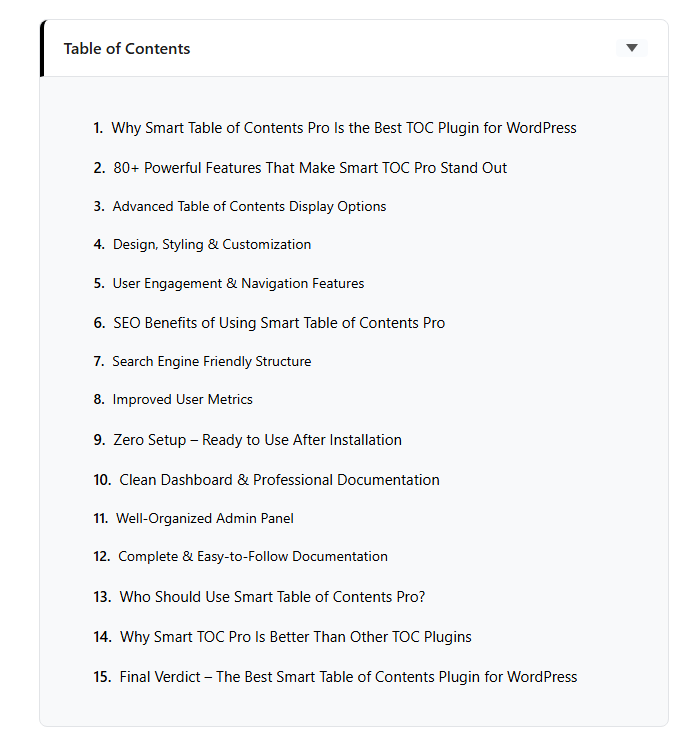
Table of Contents displayed on a post
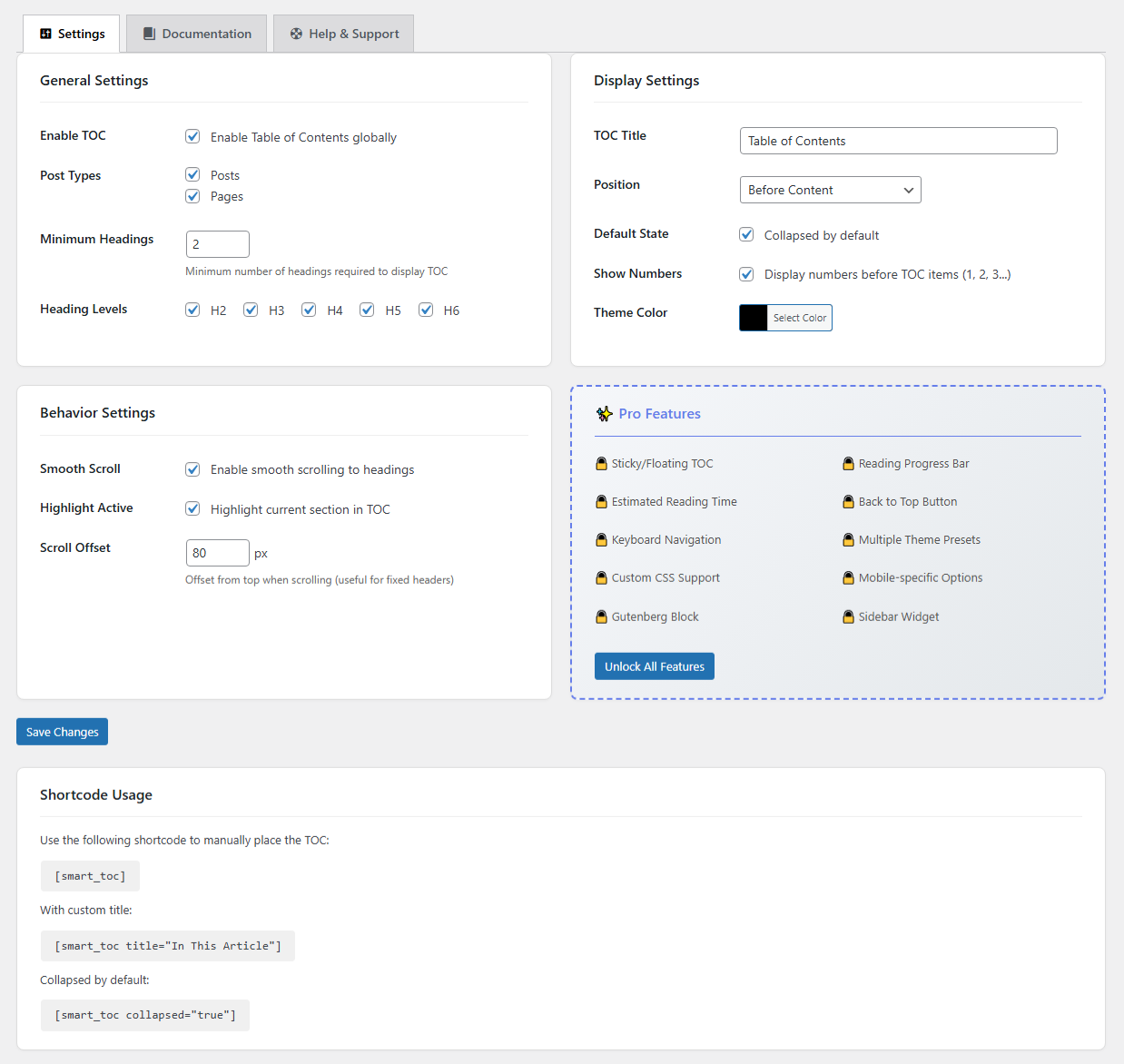
Admin settings page - General settings
Faq
Use the shortcode [aniksmta_toc] in your post or page content where you want the TOC to appear. Set the position to “Manual (Shortcode Only)” in settings.
Yes! Edit the post and look for the “Smart TOC” meta box in the sidebar. Check the box to disable TOC for that specific post or page.
Go to Settings Anik Smart TOC Display Settings and choose from:
* Before Content – TOC appears at the top of your content
* After First Paragraph – TOC appears after the first paragraph
* Manual (Shortcode only) – Use [aniksmta_toc] shortcode for custom placement
Yes! Add the CSS class no-toc to any heading you want to exclude:
This heading won’t appear in TOC
Go to Settings Anik Smart TOC Display Settings and change the “TOC Title” field. Or use the shortcode attribute: [aniksmta_toc title="In This Article"]
Yes, Smart TOC works with most page builders including:
* Elementor
* Beaver Builder
* Divi Builder
* WPBakery
* Gutenberg
Yes, Smart TOC is fully compatible with popular caching plugins:
* WP Super Cache
* W3 Total Cache
* WP Rocket
* LiteSpeed Cache
* Autoptimize
Check these common issues:
1. Make sure the plugin is enabled in Settings Anik Smart TOC
2. Verify the post type is selected in settings
3. Check if you have the minimum number of headings required
4. Make sure TOC isn’t disabled for that specific post
No! Smart TOC is extremely lightweight (under 15KB) and doesn’t use jQuery on the frontend. It has minimal impact on your page load time.
Yes! You can:
1. Change the theme color in settings
2. Add custom CSS to your theme
3. The TOC uses clean HTML with CSS classes for easy styling
Yes, Smart TOC fully supports RTL (Right-to-Left) languages like Arabic, Hebrew, and Persian.
Go to Settings Anik Smart TOC Display Settings and check “Show Numbers” option.
Reviews
Changelog
1.1.0
- Added counter format setting: choose Decimal, Roman numerals, or None
- Added TOC theme presets: Default, Light, Dark, and Minimal styles
- Added per-post heading level override via the Smart TOC meta box
- Added global heading exclusion by text (comma-separated list in settings)
- Added SiteNavigation Schema JSON-LD output for SEO
- Updated Free Features list and Pro Features list
- Code quality improvements
1.0.9
- Version bump for WordPress.org resubmission
- All changes from 1.0.8 included
1.0.8
- Moved all inline CSS and JavaScript to properly enqueued files (WordPress.org compliance)
- Renamed all generic prefixes from smart_toc to unique aniksmta prefix
- Added Help & Support tab with quick links and system information
- Added load_plugin_textdomain for proper translation loading
- Fixed critical heading ID duplication bug when duplicate headings exist
- Fixed empty heading levels causing invalid regex errors
- Fixed 3-character hex color code handling in theme color processing
- Fixed shortcode content processing order to match WordPress core
- Improved dashboard widget performance with capped 100-post sample
- Added exclude_class setting preservation during settings save
- Improved meta box storage pattern
- Improved toggle button focus states for better accessibility
- Enhanced keyboard navigation support
- Full PHPCS WordPress Coding Standards compliance
- Updated all Pro links to correct URL
1.0.7
- Renamed plugin from “Smart Table of Contents” to “Anik Smart Table of Contents” for distinctive branding
- Updated text domain from smart-table-of-contents to anik-smart-table-of-contents
- Updated all plugin references, URLs, and documentation to reflect new name
- Renamed main plugin file to anik-smart-table-of-contents.php
- Updated translation template (.pot file) with new text domain
1.0.6
- Added Documentation tab in admin settings panel with comprehensive user guide
- Includes Quick Start guide, Settings Reference, Shortcode Usage, Troubleshooting, and FAQ sections
- Improved admin UI with tabbed navigation
- Added Dashboard widget with TOC stats and quick access to settings
- Added review request notice after 7 days of usage
1.0.5
- Fixed text domain mismatch for proper internationalization
- Renamed admin menu to “Smart TOC” for clear branding
- Added PHPCS with WordPress Coding Standards configuration
- Applied WordPress coding standards formatting throughout
- Fixed all PHPCS errors and warnings
- Updated minimum PHP requirement to 7.4
- Code quality improvements and cleanup
1.0.4
- Added missing ABSPATH checks and normalized line endings for Plugin Check compliance
- Bumped internal version constants to ensure cache busting for assets
- Minor documentation updates for WordPress.org submission
1.0.3
- Renamed the translation text domain to anik-smart-table-of-contents to align with the plugin slug
- Updated POT file and text-domain references throughout the admin UI
1.0.2
- Added additional security hardening
- WordPress.org review compliance improvements
1.0.1
- Improved scrolling behavior for last TOC items and removed inner scrollbar
- Added show-number option to frontend output and settings defaults
- Updated documentation links and admin assets to new slug
1.0.0
- Initial release
- Automatic TOC generation
- Smooth scroll navigation
- Collapsible TOC
- Active heading highlight
- Shortcode support
- Theme color customization
- Per-post enable/disable
- Show numbers option
- Multi-language ready