AnyTry – AI Virtual Try-On for WooCommerce

AnyTry – AI Virtual Try-On for WooCommerce
Description
AnyTry is an AI-powered virtual try-on system that lets your customers see how they’ll look wearing your products before they buy. The plugin integrates directly with WooCommerce product pages, adding a “Try On” button that uses cutting-edge generative AI.
External services
This plugin connects to the AnyTry API (https://api.anytry.ai) to generate virtual try-on images using generative AI. Using the plugin requires an AnyTry account (a free trial is available from the plugin settings screen).
What the plugin uses the AnyTry API for:
- Try-On generation — submitting the customer photo together with the product image, following the job’s progress (a real-time stream, with polling as a fallback), cancelling a job when the customer closes the dialog mid-generation so the reserved processing is released, and fetching the finished image. Result images are only ever fetched over HTTPS from
api.anytry.aior an*.anytry.aisubdomain. - AI Size Advisor — a size recommendation, requested only when the merchant has enabled the feature and the customer completes the quiz.
- Account and administration (operator workflow only; never customer-facing) — creating the free-trial account on first activation (admin email, WordPress username and store domain only), sending the activation magic-link email, recovering an existing API key, single sign-on to the AnyTry Portal, validating the configured key on the Settings screen and in the background after the key changes or the plugin is upgraded (retried until the account can be identified; these checks send only the key, no order or customer data), and loading the figures shown on the plugin’s own admin Settings screen.
- Analytics and conversion attribution — funnel events (button impressions, generation completes, add-to-cart, checkout start, purchases, refunds), an abandon event when the customer closes the window mid-generation, and order attribution. Gated on analytics consent, which is OFF by default on new installs.
The Try-On feature works whether or not analytics is enabled. Enable analytics at WooCommerce AnyTry AI “Send analytics & conversion events”.
What is sent to the AnyTry API:
- The customer photo uploaded via the Try-On modal (transmitted only when the customer explicitly clicks “Try On”).
- The product image URL and product identifier from WooCommerce.
- A random session identifier (no personally identifiable information).
- Order and product IDs, product names, selected sizes, quantities, purchase/refund amounts, currency and event times; where available, try-on job and session identifiers used for attribution. Complete order operations are sent through
/api/v2/commerce/evidence; older queued events keep their previous delivery path — only when analytics consent is enabled. - Optional: height, weight, and usual size values the customer enters in the AI Size Advisor quiz.
When the data is sent:
- Try-On generation: when a customer uploads a photo and clicks “Try On” on a product page.
- Size Advisor: when a customer completes the AI Size Advisor quiz.
- Conversion events: when an order containing a tried-on product is placed — only when analytics consent is enabled.
Cookies (server-set, persistent):
anytry_sessioncookie (90 days) — stores the random session ID and the list of product IDs the visitor has tried on, used to attribute orders to try-on sessions for the conversion dashboard. Set only when analytics consent is enabled.anytry_triedcookie (90 days) — stores a fallback list of tried product IDs for cases whereanytry_sessionis unavailable (third-party cookie blockers, REST checkout flows). Set only when analytics consent is enabled.anytry_legal_accepted_v2cookie (1 year) — remembers that the customer has accepted the Try-On legal/age-consent overlay so they are not asked again on every page. Set ONLY after the customer clicks “Accept” on the legal overlay. Not used for any analytics or attribution.
Persistent browser storage (localStorage):
anytry_lang— the language chosen in the widget, used to restore that choice on later visits.anytry_legal_accepted_v2— mirror of the consent cookie above, same purpose, same trigger. No analytics or attribution use.anytry_tried— client-side mirror of theanytry_triedcookie value, used when third-party cookies are blocked. Written only when analytics consent is enabled.anytry_tried_products— same purpose asanytry_triedbut stored in a structured per-product map; used by the admin Conversions tab to attribute orders to try-on sessions. Written only when analytics consent is enabled.anytry_canonical_session_id— a randomsess_*identifier kept across reloads so the API can JOIN a try-on generation event to a later purchase event for conversion attribution. Persisted only when analytics consent is enabled. When consent is off, an ephemeral id is held in memory for the current page only and never written to localStorage.anytry_active_jobs— registry of try-on jobs and their recovery metadata, used to resume work and restore completed results after a page reload. Completed entries can remain until the customer removes them. On widget startup, entries older than one hour are discarded; this is a cleanup check, not a background deletion timer while the page is closed. Removing a still-running job can retain a minimal status handle until the server confirms completion/failure or the one-hour limit is checked. Removing a completed job retains only its job identifier, dismissal time and removal flags for up to one hour, checked on startup, so open or resumed copies can remove the same result. This removal record contains no image or job token and does not occupy an active try-on slot. Not used for analytics or attribution.
Ephemeral per-tab storage (sessionStorage):
These stores are scoped to the current browser tab. They support the Try-On interface and, when analytics consent is enabled, retry failed analytics events. A photo stored here powers the local before/after toggle; when the widget restores an earlier try-on (for example after a page reload), that stored photo can also be sent with a Size Advisor request the customer initiates. Quiz answers may likewise be reused in such a request. The photo is bound to its own try-on job; another job’s upload is not used as a fallback.
anytry_before_<jobId>— a compressed copy of that job’s uploaded photo, kept for the “before / after” toggle and a customer-initiated repeat Size Advisor analysis after a reload. If this copy is unavailable, the widget keeps the generated result but does not substitute another photo.anytry_result_<jobId>— the generated result image data URL, used so the same result re-renders instantly when the customer reopens the modal in the same tab._anytry_result_cache_order— job identifiers in cache order, used to evict older result images when the per-tab image cache reaches its limit.anytry_feedback_state— whether the customer already rated 👍 / 👎 the current result.anytry_quiz_user_height,anytry_quiz_user_weight,anytry_quiz_usual_size,anytry_quiz_skipped— Size Advisor quiz answers, kept so the customer doesn’t have to re-enter them while comparing multiple try-ons.anytry_size_recommendation,anytry_size_<photoHash>andanytry_size_<photoHash>_p<productId>— cached Size Advisor responses, which may include estimated body measurements and recommended sizes, used to restore the recommendation for the photo and product.anytry_tab_id— a random identifier used to keep track of which browser tab owns an active try-on job after a reload.anytry_pending_submit— pending request identifiers, timestamps, recovery credentials, intent and product metadata. With submission recovery enabled, these records let WordPress recover an accepted job after a lost response without starting a second try-on. Recovery checks discard expired records after 25 hours; dismissed requests are marked so they are not restored as wanted. Legacy records use the older short cancellation path.anytry_sw_blocks_sse— internal counter the plugin uses to detect a Service Worker that’s blocking real-time updates, so it can transparently fall back to the same-origin SSE proxy on the next try-on.anytry_pending_events_v1— up to 20 failed critical analytics events, including their product, job and session identifiers. With current analytics consent, the plugin retries them at the AnyTry API on a later page view in the same tab. A refusal received by the widget or disabled analytics clears this queue and prevents new retries on that page.
Persistent browser storage (IndexedDB):
Generated results are cached in the visitor’s browser for local display. An older installation may also retain an uploaded-photo cache, described below. Clearing the site’s browser data removes these caches.
anytry_cacheobject storephotos— legacy uploaded-photo cache. The current widget does not write new uploads here or use this global cache for before/after comparison or repeat Size Advisor requests. Existing cache cleanup remains in place.anytry_resultsobject storeimages— the data URL of generated result images keyed by job ID, so revisiting a recently-generated try-on renders instantly.
Analytics consent:
The plugin does NOT send analytics or conversion-attribution events by default. Enable them at WooCommerce AnyTry AI “Send analytics & conversion events”. The Try-On image generation itself works whether or not this is enabled — only the conversion-attribution dashboard in the AnyTry Portal depends on this opt-in.
When analytics is enabled and a tracking token is available, the widget checks the current merchant setting and the site’s anytry_allow_session_cookie consent filter through WordPress once per page view, before sending or retrying browser analytics. It reuses that result for the rest of the page. CMP integrations must implement that filter; the plugin does not automatically detect every consent manager. An explicit refusal or disabled analytics clears the browser’s attribution cookies, attribution storage and pending-event queue. A failed or unrecognized consent check clears the pending-event queue and stops browser analytics for that page, while preserving existing attribution and session identity. Try-On and Size Advisor remain available. This does not recall requests already transmitted or erase historical order records.
Optional Google Fonts (default OFF):
By default the plugin uses system-sans typography and makes NO third-party font request — the AnyTry API is the only external service it contacts. An internal anytry_load_google_font option (OFF by default, with no user-facing control) would, if enabled, request the Outfit web font from Google Fonts (https://fonts.googleapis.com) on the storefront and the AnyTry admin Settings page; it stays off in a standard install.
- Service: Google Fonts (https://fonts.google.com)
- Data sent: visitor IP and User-Agent (standard HTTP request) at the moment a page that has this option enabled is rendered
- Terms of Service: https://policies.google.com/terms
- Privacy Policy: https://policies.google.com/privacy
Customer and product images are sent to AnyTry and the selected AI providers, including Google, for processing. Uploaded images, generated results, browser caches and Size Advisor data have separate lifecycles. Closing the widget does not trigger immediate deletion of every copy. Server cleanup depends on deployed retention settings and scheduled cleanup; this plugin does not enforce a five-minute deletion deadline. Entered and estimated measurements and analytics records may remain after image cleanup. Minimal removal markers (try-on identifier, removal time and terminal state; no photos or access tokens) are stored in the browser to synchronize removal across tabs. The widget honors them for up to 25 hours and removes expired markers on the next successful synchronization. Clearing all site data also removes these markers; older open tabs may need a reload to use the new synchronization.
This service is provided by AnyTry. By using the plugin, customers agree to the AnyTry Terms of Service and Privacy Policy:
- Terms of Service: https://anytry.pl/terms
- Privacy Policy: https://anytry.pl/privacy
Key Features:
- Photorealistic Try-On — Uses generative AI to create realistic images of customers wearing your products.
- Data Privacy — Photo copies, Size Advisor data and analytics records have separate lifecycles, as described above. The plugin includes its local order tracking data (session ID, tried-product list and attribution job IDs) in WooCommerce’s built-in personal-data Export and Erase tools.
- High Performance — Real-time SSE streaming with a polling fallback; doesn’t burden your hosting.
- Responsive Design — Works perfectly on mobile and desktop devices.
- Variant Support — Works with simple and variable products (color/size).
- AI Size Advisor — Size recommendations from a short quiz (height and weight with photo silhouette analysis, or a single “what size do you wear?” question).
- Eye Advisor — For glasses and sunglasses, AnyTry checks whether the frame width fits the face in the customer’s photo and shows a frame-fit verdict on the try-on result. Runs automatically, no setup.
- Works across categories — clothing, jewellery, watches, eyewear, shoes and accessories.
- Multilingual — The shopper widget ships 10 languages (EN, PL, DE, UK, IT, ES, FR, SV, DA, NB); admin settings are English, with translations delivered via WordPress.org language packs.
- HPOS Compatible — Full support for WooCommerce High-Performance Order Storage.
- WooCommerce Blocks — Compatible with the new block-based checkout.
- Multi-Job Navigation — Compare results from multiple try-ons with swipe navigation.
How It Works:
- Customer clicks “Try On” on a product page.
- They upload a photo of themselves.
- AI generates a photorealistic image of them wearing the product.
- Optional: AI Size Advisor recommends the best size.
SaaS Model: This plugin connects to the AnyTry API for AI processing. An API key is required (free trial available). See Terms of Service and Privacy Policy.
Configuration
- Navigate to WooCommerce > AnyTry AI in the admin panel.
- Enter your API key or start a free trial.
- Customize the button appearance (color, text, position).
- Enable AI Size Advisor (optional).
- Ensure your products have featured images set (flat-lay or ghost mannequin photos work best).
Requirements
- WordPress 6.4 or newer.
- WooCommerce 8.2 or newer.
- PHP 7.4+ (recommended: 8.1+).
- Active internet connection (for API communication).
Source code & build
The plugin ships its full unminified sources — src/js/anytry.js, src/css/anytry.css and src/css/anytry-admin.css — alongside the minified runtime in assets/. The two small admin scripts keep their unminified sources in assets/ next to the minified files. Minification is done with esbuild on Node.js 18+ via the minify_wp.js build script.
Third-party code: assets/js/heic2any.min.js is a prebuilt bundle of heic2any 0.0.4 (MIT) that embeds gifshot (MIT) and libheif (LGPL-3.0-or-later). Full attribution, licence texts and the corresponding-source offer are in THIRD-PARTY-NOTICES.txt in the plugin folder. It converts iPhone HEIC photos to JPEG in the browser, loads only when the customer picks an HEIC file, and can be turned off with the “iPhone HEIC support” toggle in WooCommerce AnyTry AI.
Installation
- Download the plugin ZIP file.
- In WordPress admin, go to Plugins > Add New > Upload Plugin.
- Select the file and click Install.
- Activate the plugin.
- Go to WooCommerce > AnyTry AI to configure your API key.
Screenshots

The try-on result — the customer's own photo, wearing the product, generated by AI. A Before / After toggle sits above it, add-to-cart and save below.
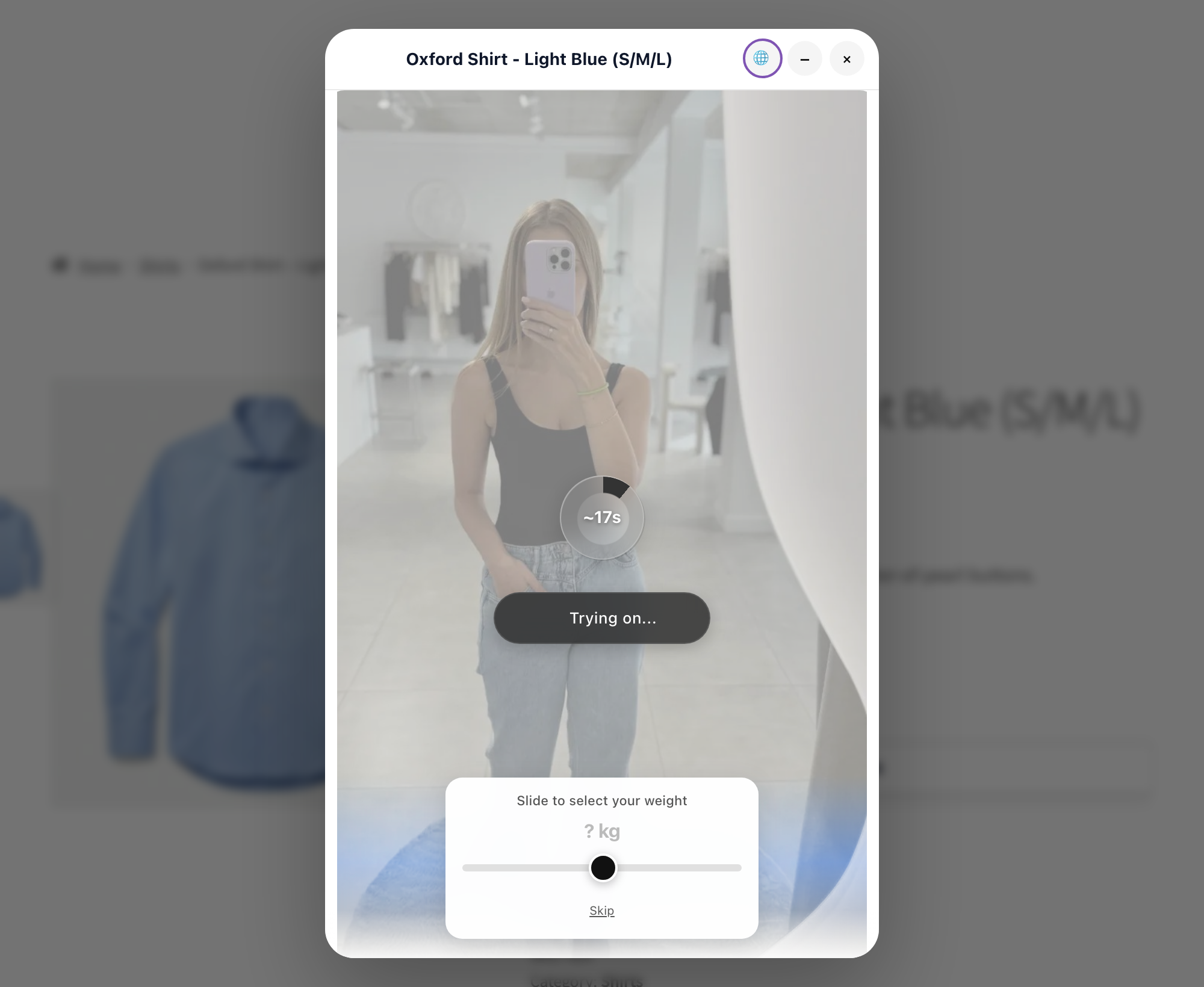
AI Size Advisor — the short quiz runs while the try-on generates, so the size recommendation is ready together with the result.
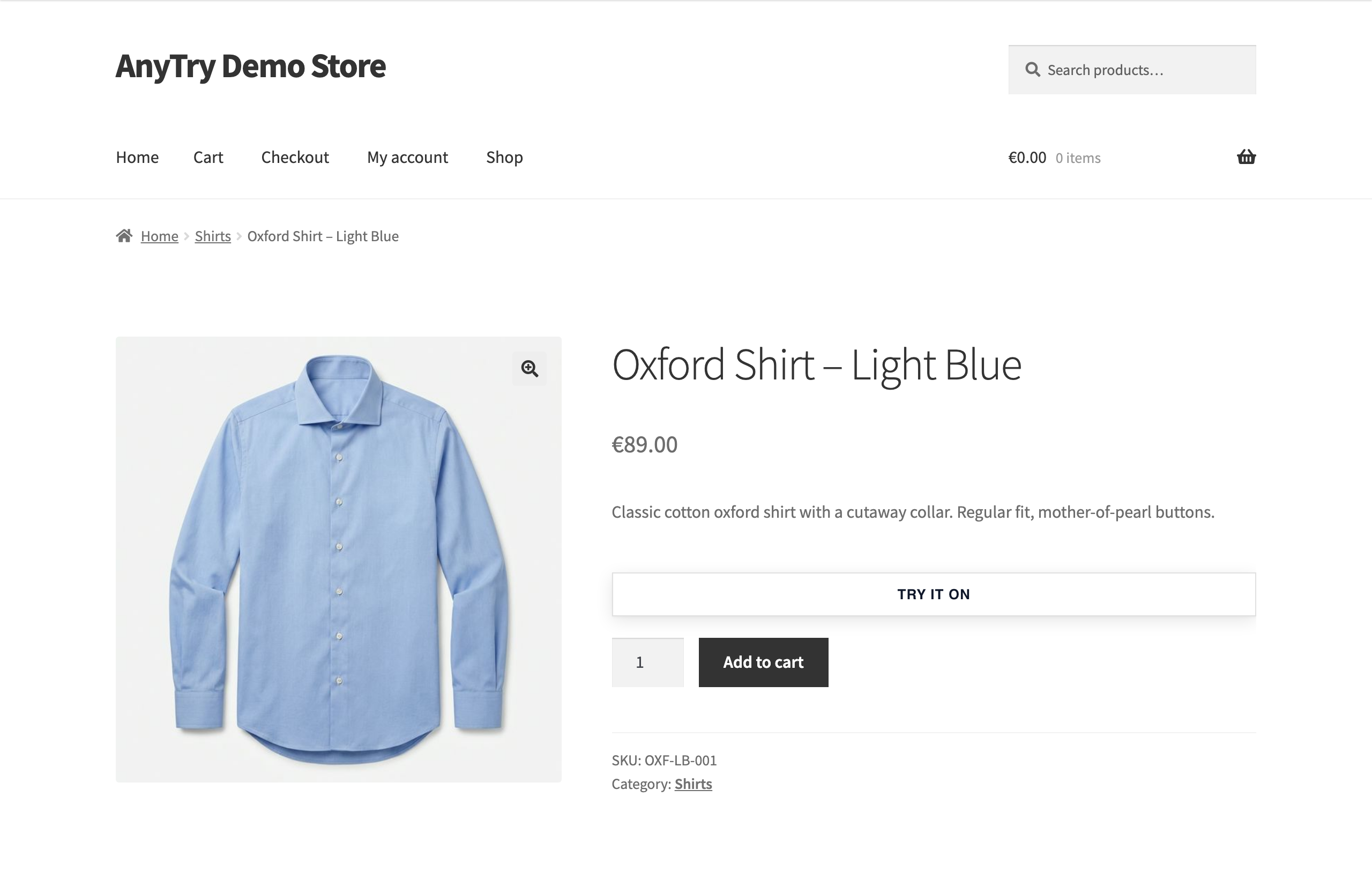
WooCommerce product page — the "Try It On" button in the standard product layout, above Add to cart.
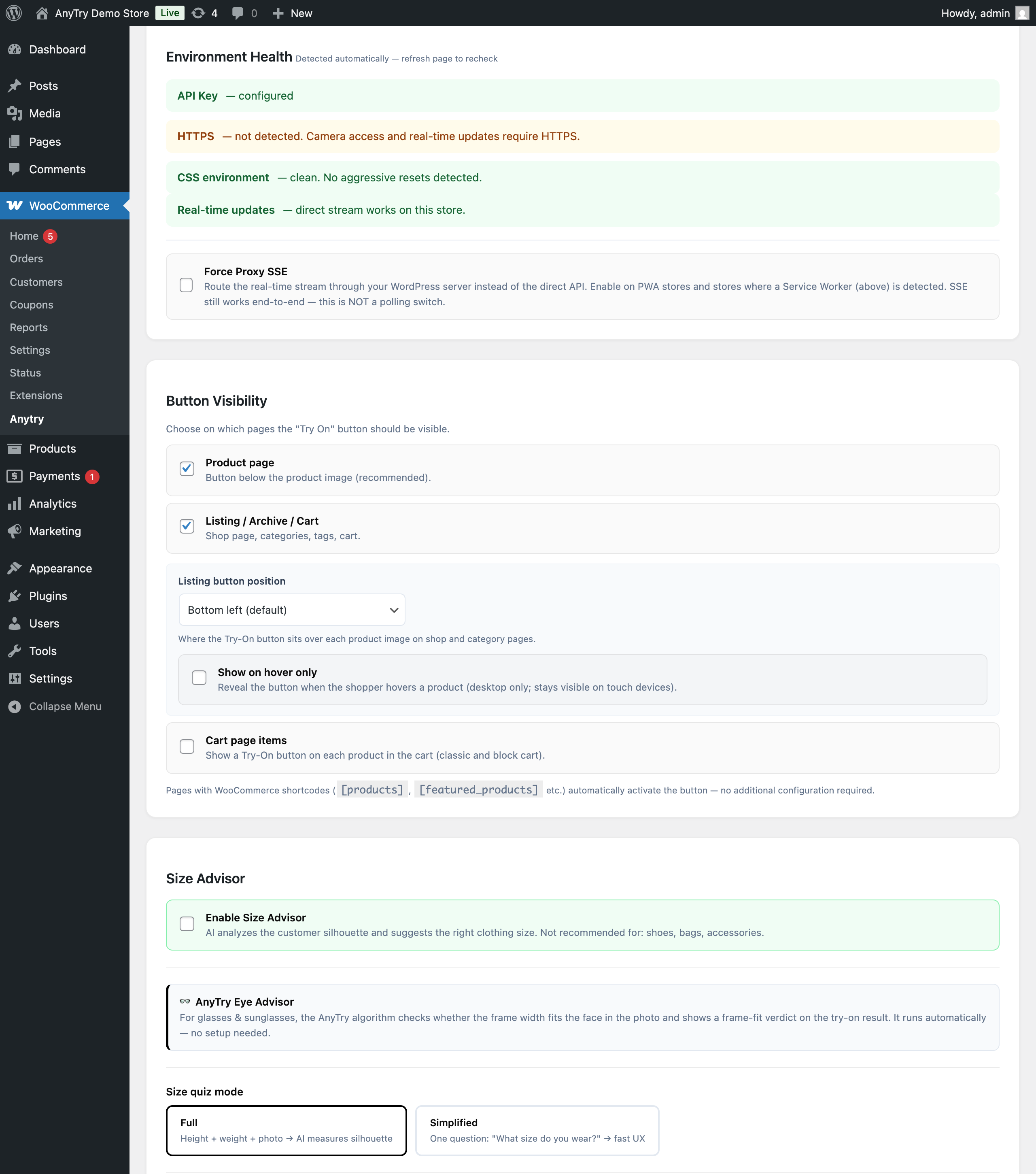
Admin settings — environment health checks, button visibility, and the Size Advisor / Eye Advisor configuration.
Faq
The widget sends photos to AnyTry for processing by the selected AI providers, including Google. Browser images, server images and Size Advisor records have separate lifecycles. Closing the fitting room does not immediately erase every copy. See the privacy information above and the service Privacy Policy for processing details.
Most try-ons finish in 15–20 seconds. The plugin does not paste the garment onto the photo — it generates an entirely new image with generative AI, which is a genuinely heavy computation. The widget shows a live progress estimate while it works, and the customer can minimise the window and keep browsing; the finished result is picked up as soon as it is ready.
Best results come from full-body photos with good lighting on a plain background.
The plugin stores its WooCommerce configuration options (API key, button style, size advisor mode, etc.) and a small amount of WooCommerce order metadata for conversion attribution. No customer photos are ever stored on your site. AI processing and the analytics reports themselves are handled by the AnyTry cloud service; on your site the plugin keeps only the bookkeeping records described below, which let it deliver those reports reliably.
Version 1.0.36 stores each new purchase, cancellation or refund as a complete operation before background delivery. A confirmed purchase snapshot is retained while the order exists so later order edits do not replace its recorded facts. Delivered cancellation and refund payloads become eligible for minimization after 30 days; undelivered operations and incomplete refund groups after 90 days. Ready purchases held because analytics consent is off follow the existing 14-day default. Minimal records remain to prevent duplicate operations and distinguish confirmed delivery from unconfirmed expiry. After permanent order deletion is verified in both WooCommerce stores, a maintenance pass removes the purchase facts from records older than 24 hours. Moving an order to trash does not do this. The personal-data eraser removes per-order records. Cleanup requires the scheduler and database to be available.
For older queued events and the other local records, the existing rules remain: Three small database tables are used for bookkeeping only. One prevents the same cancellation being reported twice; these records have no age limit. The outbox records purchase, refund and cancellation work before it is sent to AnyTry in the background, so temporary network or server problems can be retried. Delivered purchase and return entries become eligible for removal 30 days after delivery. Queued purchase and return entries in the ready phase age out at 90 days from admission once due; failed or quarantined purchase and return entries become eligible for removal at 90 days from admission. Return entries are only removed after their refund accounting has been preserved; if that repair cannot complete, they remain without an age limit. Two kinds are removed sooner, by default after 14 days from admission: ready purchases while analytics consent is off, and ready deferred refunds whose readable order shows no AnyTry activity and has no purchase still owed. Unresolved refund reservations and pending refund or attribution receipts have no age limit. Legacy staged purchases can remain without an age limit, including while held for an unknown or different account; an unreadable legacy order’s staged batch can be retired after 90 days when recovery runs. New purchases keep one fixed declaration of the products and try-on identities being reported, so interrupted recording resumes the same purchase. After publication, this declaration retains product and order-line identifiers and attribution, without product names or amounts. It has no age limit while the order remains; after the order is permanently deleted and its absence is verified in both WooCommerce stores, a later maintenance pass reduces a declaration older than 24 hours to a minimal order and ownership marker. Moving an order to trash is not permanent deletion. Pending cancellation records retain a snapshot of the order lines and attribution; resolved reports also keep their exact outgoing content until acknowledged. Purchase declarations awaiting publication and cancellation work stop automatic attempts after 12 failures or when due work reaches 90 days, and remain for operator review. Consent or account holds consume no attempts. These new records are not removed merely because they are old. An acknowledged cancellation leaves the duplicate-prevention record; interrupted cleanup is retried. Orphaned cancellation content is diagnosed separately and retained for review. The outbox also keeps permanent per-order refund ledgers and ownership records: they preserve refund amounts and coverage, order and refund ids, the owner’s key fingerprint and, when known, account id, without customer names, contact details or photos. Key-to-account mappings are kept as options containing key fingerprints, account ids and validation times, without order or customer data; they remain until uninstall because other orders may still refer to them. An option also registers purchases that could not be queued: it keeps at most 200 outstanding orders and sheds the oldest on overflow — except an entry whose ownership could not yet be recorded (for example during a database outage), which is kept until it can be, and stops retrying after 24 unsuccessful recovery attempts; account holds use no attempts and have no age limit. The third table, submit-answer escrow, briefly keeps hashes, a job id, an encrypted job access token and a small status response so the answer to one try-on submission can be recovered; it stores no photos and becomes eligible for hourly cleanup 25 hours after its last update. Cleanup depends on the background scheduler and database being available. Changing to another API key of the same AnyTry account changes nothing about ownership or delivery. Purchase, refund and cancellation data known to belong to a different account is never sent to the new account and follows the same retention rule as any undelivered entry of its kind, including the kinds with no age limit. When account ownership cannot be verified, history remains held: two known different accounts on one legacy order cannot be resolved automatically or by CLI assertion, an unmapped legacy key remains held until mapped, and a read failure before an ownership candidate is verified leaves unknown provenance that never resolves automatically; an operator may explicitly assert ownership of genuinely unknown history through the CLI, but cannot override known conflicting accounts, and during a storage outage the refused-purchase register may exceed its usual 200-order limit because entries whose ownership cannot be preserved are retained. All three tables and the key-to-account mappings are removed on uninstall. The plugin’s WordPress personal-data eraser removes the shopper’s per-order rows, including purchase declarations, permanent refund and ownership records, pending and acknowledged cancellation records, refused-purchase references and order metadata, regardless of WooCommerce’s “remove order data” setting; shared key-to-account mappings are retained until uninstall. One non-personal marker (a timestamp) is retained per erased order so erased analytics cannot be silently re-created and re-sent.
Only when the merchant has enabled analytics consent (default OFF). When enabled, anytry_session and anytry_tried cookies persist for 90 days on visitor browsers — both store a random session ID and a list of product IDs the visitor has tried on, used to attribute purchases to try-on sessions. See the “External services” section for full disclosure.
Yes. The plugin is fully compatible with WooCommerce High-Performance Order Storage (HPOS).
Reviews
Changelog
1.0.39
- Fixed reopening the try-on window immediately after closing it.
- Improved keyboard focus when closing, minimizing and restoring the try-on window.
- Fixed resuming an answered size quiz after restoring a try-on that is still generating. Unfinished questions remain available.
- Fixed a completed size quiz blocking a new quiz after minimizing and restoring the result.
1.0.38
- Check the existing try-on one final time before reporting a waiting timeout.
- Ignore delayed status replies after stopping or resuming a try-on.
1.0.37
- Improved recovery when a try-on status stream stays connected but stops delivering useful updates. The plugin checks the existing try-on automatically so customers can receive their result without reopening the tab or starting another try-on.
1.0.36
- Fixed: purchase events explicitly carry the summed product value, including when it equals the basket total.
- Fixed: the try-on result button hands off to WooCommerce without showing an added-to-cart confirmation before the store processes the action.
- Fixed: HEIC/HEIF conversion and photo-loading errors stay visible so the shopper can choose another file or retry. A converter script that does not load stops waiting after 15 seconds; a later attempt can load it again.
- Fixed: refreshing the analytics token from the settings screen accepts only a successful response containing a non-empty text token. Invalid responses leave the previous token unchanged.
- Fixed: removing a try-on is shared between open tabs even when localStorage is unavailable, using other browser storage and tab messaging when available. Clearing all site data or keeping an older page open still limits recovery.
- Fixed: cancellations are saved before sending and retried in the background with the same recorded content. Failed or unresolved work is visible in the shop’s diagnostics and stops automatic retries at its limit.
- Fixed: a purchase interrupted while being recorded resumes its original product and attribution snapshot. Later edits to the order do not silently replace that snapshot.
- Recovery limit: if the initial cancellation record cannot be saved, the shop reports the failure for manual retry; the original unsaved time cannot be recovered.
- Reporting limits: older purchases without reliable saved line details keep their previous product-level selection. Missing historical evidence is not reconstructed. Conflicting observations can make a reported amount unavailable; the original records are retained.
- Fixed: complete purchase and refund operations use separate background-delivery records, so an older PHP process finishing during an update cannot publish or overwrite the new operation.
- Rollback: after new records are created, restoring an older ZIP alone is not a supported rollback. Rehearse the update on a development site first.
1.0.35
- Improved recovery of an accepted try-on after a reload or a lost browser response. Finished results remain available until the shopper removes them; they do not prevent a new try-on.
- Improved purchase and refund attribution, account ownership checks, privacy cleanup and background delivery. Purchases are reported after payment, and repeated refund delivery preserves the recorded amount.
- Fixed product-variation attribution and use of saved order-line sizes. Tried-on product evidence is checked against its own 90-day window.
- Known limits: a cancellation report that fails has no scheduled retry. Missing or unreadable saved purchase-line details use the older cancellation selection. A server interruption while re-recording a purchase can leave those details inconsistent with a retained earlier batch. These were limitations of 1.0.35; see the 1.0.36 changes above. Earlier events are not rewritten.
The complete earlier release notes, including migration and reporting limitations, are in changelog.txt included in the plugin ZIP.