Aouwal Static Site Export – Static Site Generator
Aouwal Static Site Export – Static Site Generator
Description
Aouwal Static Site Export is a WordPress Static Site Generator that converts dynamic WordPress websites into static HTML websites. Export complete websites including CSS, JavaScript, images, fonts, sitemap.xml and robots.txt for deployment on Cloudflare Pages, GitHub Pages, Netlify or any static web server.
The export is a plain folder of HTML files and assets. You can commit it to GitHub and deploy it on Cloudflare Pages, or host it on any static host or CDN. No WordPress, PHP or database is needed to serve it.
Author: Abdul Aouwal, Technical SEO Consultant.
Export WordPress to static HTML
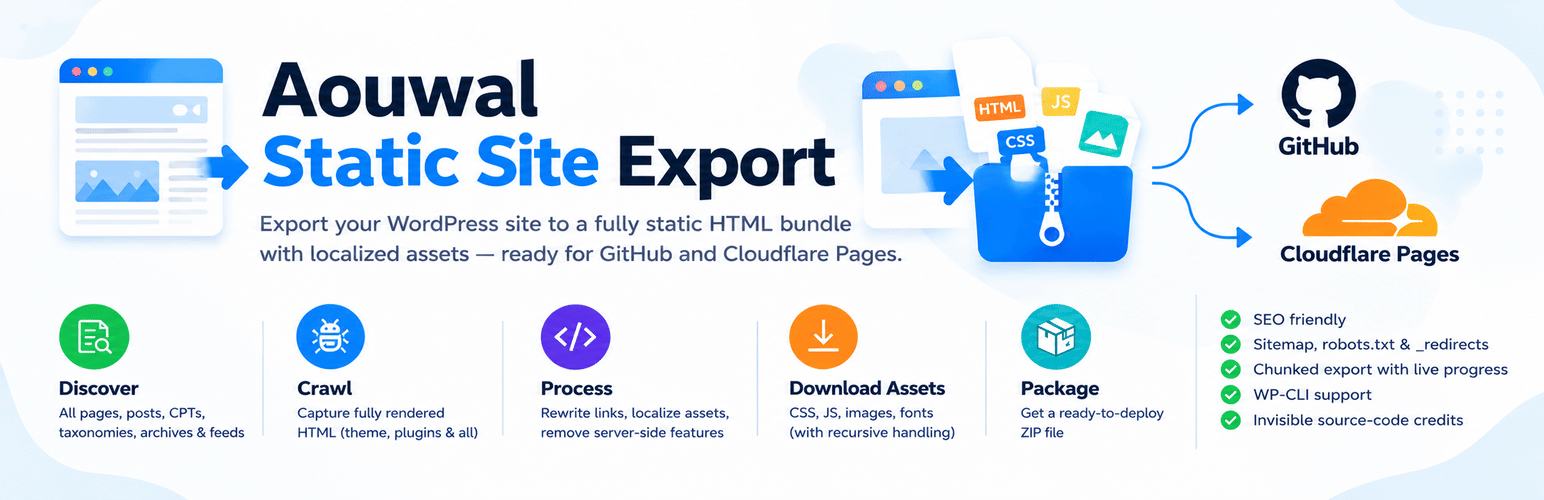
The plugin turns your published WordPress pages into plain static HTML files. It works in six steps:
- It discovers every public URL on your site.
- It requests each URL through the WordPress HTTP API and keeps the fully rendered HTML.
- It downloads and localizes every asset, including recursive CSS
url()and@importreferences. - It rewrites internal links to portable relative or root-absolute URLs, keeping
<picture>,<source>,<track>,<template>and custom-element markup intact. - It removes server-side features that cannot run on a static host.
- It packages everything into one ZIP file you can download.
You can export:
- Posts, pages and custom post types.
- Category, tag and custom taxonomy archives, author archives and date archives, including page 2 and later.
- RSS feeds.
- A
404.htmlpage, plussitemap.xmlandrobots.txt. - Cloudflare Pages
_redirectsand_headersfiles, both on by default.
WordPress static site generator features
- Chunked export with a live progress log, so large sites do not hit PHP timeouts.
- Every page is fetched as WordPress renders it, so theme templates, shortcodes and plugin output are included.
- Images, CSS, JavaScript and fonts are downloaded and localized, including
srcsetand<picture>sources. - Internal links become relative or root-absolute URLs, so the static site works on any domain and in any subfolder.
- HTML5 markup stays valid:
<picture>,<source>,<video>,<track>,<template>and custom elements survive the export. - The Maximum asset size setting (25 MB by default) skips oversized files instead of exhausting memory.
- Every write is checked. Pages or assets that cannot be written are reported in the log instead of being marked as done.
- The crawler fetches only public URLs. Every redirect hop and both A and AAAA records are validated.
- Optional WP-CLI command:
wp aouwal-static-export run. - Optional, invisible author credit. It is off by default and can be enabled in Settings.
Deploy to Cloudflare Pages
Cloudflare Pages is the fastest path to a live static site. The export already includes the _redirects and _headers files Cloudflare Pages expects, and the Deploy tab walks you through creating a GitHub repository and connecting it to Cloudflare Pages. Once the repository is connected, every push redeploys the site automatically.
Export to GitHub Pages
The same export folder works on GitHub Pages. Commit the exported files to a repository, enable Pages for the branch or folder you pushed, and GitHub serves the static HTML. Relative links work as they are, so no extra configuration is needed.
Netlify, Jamstack and any static host
The output is a plain folder of HTML files and assets, which makes it a good fit for any Jamstack workflow. Upload it to Netlify (which also reads _redirects and _headers), Amazon S3, Vercel, a CDN, or any static hosting account. No WordPress, PHP or database is needed to serve it.
Why use a static WordPress website
A static website is faster and safer than a dynamic one. There is no PHP to execute and no database to query, so pages are served as small HTML files, usually from a CDN close to the visitor. There is also much less to attack: no login page, no plugin endpoints and no database on the public server. You keep WordPress for writing and publishing, and export a fresh static copy whenever the content changes.
What the export cleans up
- Removes comment forms, comment sections and comment feeds (on by default).
- Removes search forms (on by default).
- Strips WordPress version tags.
- Strips staging “noindex” robots meta so the exported site stays indexable.
Not suitable for
A static site has no PHP and no database, so features that need a server stop working after the export:
- E-commerce stores. Cart, checkout, payment and order confirmation need WooCommerce and a database.
- Membership sites and sites that require user logins. A static host has no sessions, accounts or password reset.
- Real-time data, such as live stock levels, prices, dashboards or feeds that change by the minute.
- Heavy AJAX functionality, including live search, AJAX filtering, infinite scroll endpoints and form submissions.
- Built-in forms, site search, comments and “add to cart” buttons. They need a server to receive and store the result.
If you need those features, keep the dynamic WordPress site, or replace them with third-party services before you go static: a hosted form service, a static search service, and a hosted checkout. Static export works best for content sites such as blogs, documentation, portfolios, marketing pages and company websites.
Installation
- Upload the
aouwal-static-site-exportfolder to/wp-content/plugins/. - Activate the plugin in the Plugins screen.
- Open the Static Export menu and configure the settings.
- Run an export, then download the ZIP file.
- Follow the Deploy tab to publish the site.
Screenshots
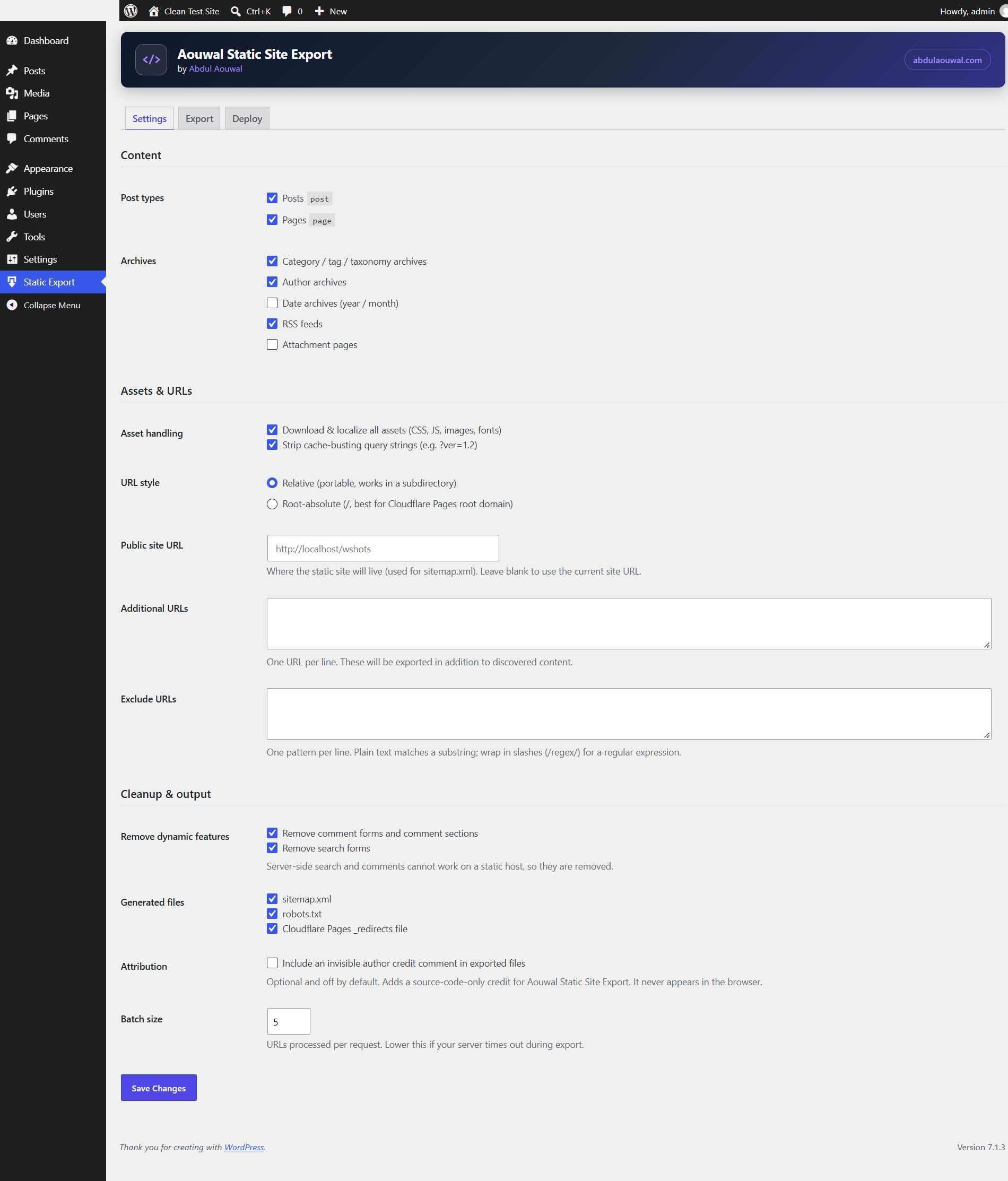
Configure what to export: post types, archives, asset handling, URL style, cleanup options and generated files.
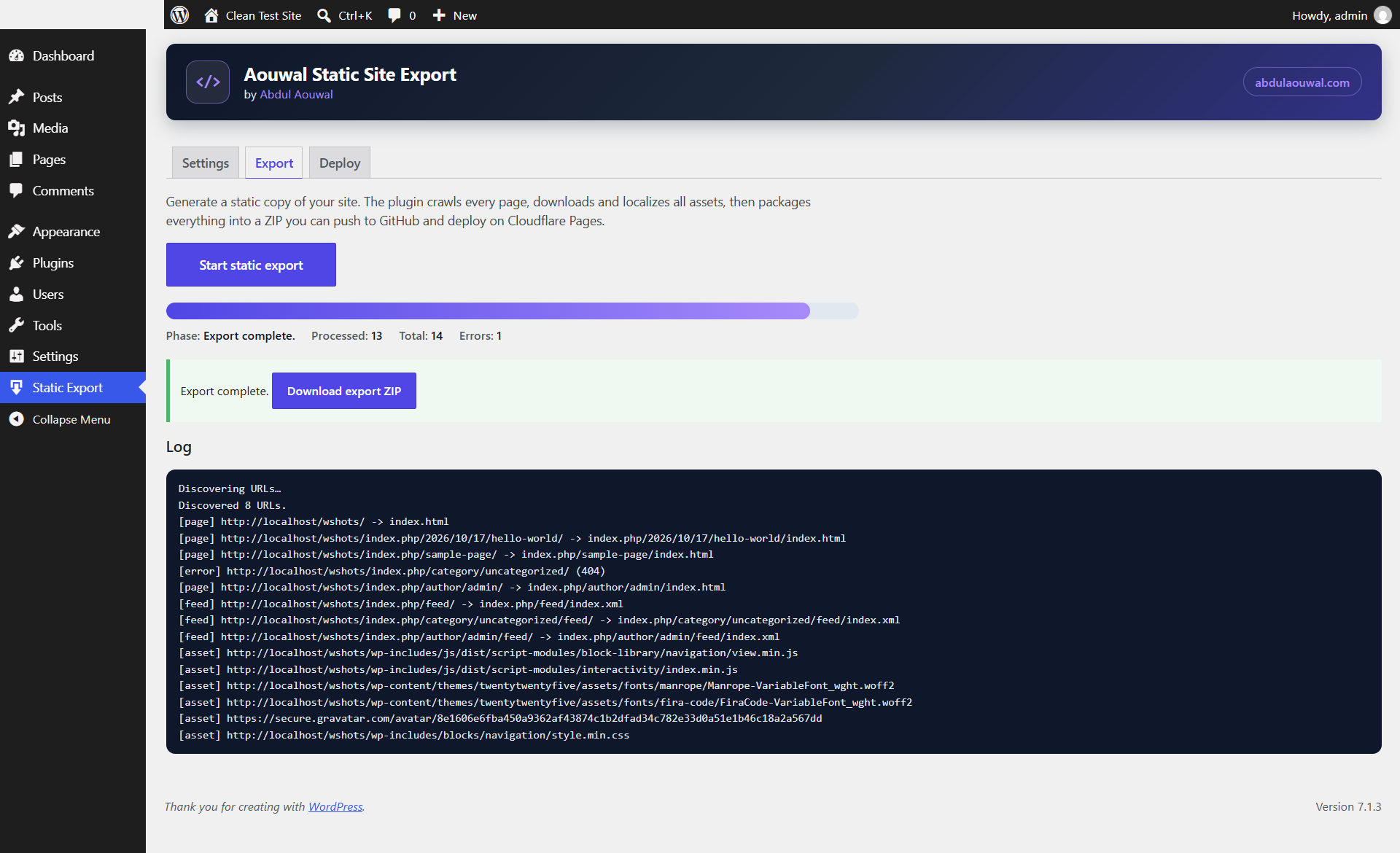
Run the export and follow the live progress log, then download the finished ZIP.
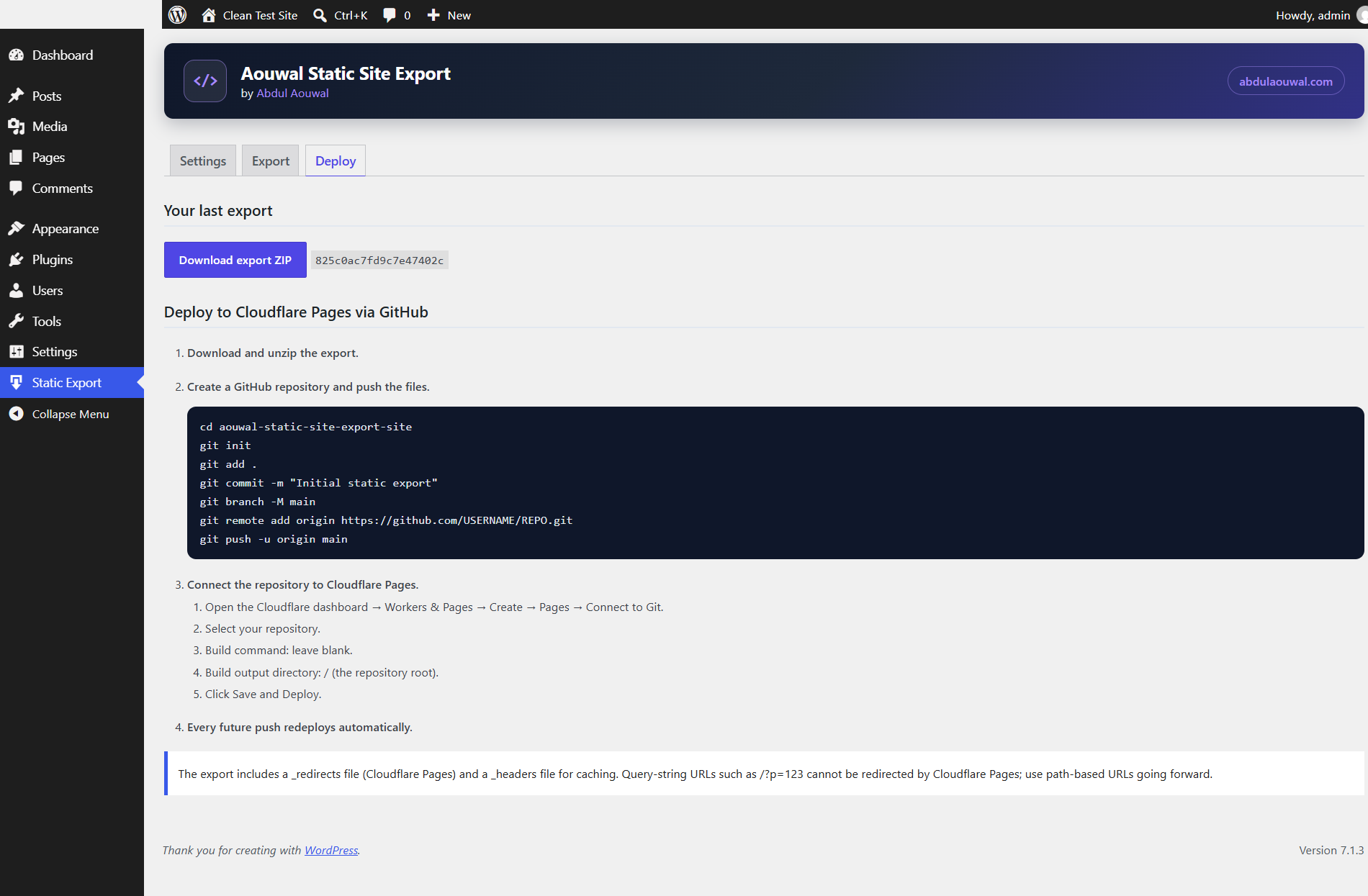
Deploy with the built-in GitHub and Cloudflare Pages steps, including the generated _redirects and _headers notes.
Faq
Install and activate the plugin, open Static Export in the admin menu, choose which post types and archives to include, then run the export. The plugin renders every page, localizes the assets and builds a ZIP file. Download the ZIP, unzip it, and upload the folder to your static host. The Deploy tab has the full walkthrough for GitHub and Cloudflare Pages.
It is a static site generator for WordPress. It converts your WordPress site into a static HTML site. The plugin crawls each public page, saves the rendered HTML, downloads and localizes all assets, and packages the result into a ZIP file. You can then host the site anywhere without WordPress, PHP or a database.
Yes. Every public post type is listed in Settings and you choose which ones to export. Products, portfolio items, documentation pages and other custom post types are exported with the same permalink structure they use on your WordPress site.
Usually yes. Elementor renders its layout to HTML and CSS on the server, so pages export with their design intact. Widgets that need a server, such as forms, popups with dynamic content and logged-in-only sections, cannot work on a static host and should be tested before you publish.
Product and category pages can be exported, so a product catalog works as a static site. The cart, checkout, my-account and product search pages are dynamic, so they cannot work without WordPress. The plugin does not convert WooCommerce into a static shop.
Yes. Images are downloaded and stored in the uploads structure the HTML expects, including srcset and <picture> sources. Images served from a CDN or another domain are localized too when they are reachable. Any single asset larger than the Maximum asset size setting (25 MB by default) is skipped and listed in the log.
Yes. Stylesheets and scripts are downloaded and rewritten to local paths, including CSS url() and @import references, so icons, fonts and background images keep working. Inline styles and inline scripts stay in the page. Files are not minified or combined, so the export matches what your site already serves.
Search and comments are server-side features, so they cannot run on a static host. The plugin removes search forms, comment forms, comment sections and comment feeds from the export by default. Both cleanup steps can be turned off in Settings, for example when you only need a partial static copy. There is no built-in replacement for them.
No, not unless you enable it. In Settings, under Attribution, you can turn on an invisible, source-code-only credit. It is off by default and never appears in the browser or in the exported pages your visitors see.
Yes. The export includes _redirects and _headers files, which Cloudflare Pages reads automatically, and the Deploy tab gives you the GitHub and Cloudflare Pages steps. Connect the repository once and every new export redeploys the site.
Yes. The output is plain HTML, CSS, JavaScript and media, so it runs on any static hosting or CDN: Netlify, GitHub Pages, Cloudflare Pages, Amazon S3, Vercel, or a basic web host. No WordPress, PHP or database is required.
No. You run the export from the WordPress admin and download a ZIP file. The Deploy tab gives you copy-and-paste commands for GitHub and Cloudflare Pages, so you can publish the site without writing any code.
No. The plugin only reads your content and writes the export to a files folder inside your own WordPress uploads directory. Your live site, database and settings stay unchanged, and you can delete the export files at any time.
Exports are written to wp-content/uploads/aouwal-static-site-export/, the same area WordPress uses for its own export files. The folder is protected from browsing with an index.php file and, on Apache, a .htaccess deny rule. The ZIP is served only through a signed, expiring admin link, never a permanent public URL, and the file disappears when the job is pruned. Nginx ignores .htaccess, so on Nginx either add a deny rule for wp-content/uploads/aouwal-static-site-export/ or move exports outside the web root. Developers can relocate the directory with the aouwal_export_dir filter.
The plugin requires WordPress 6.0 or later and PHP 7.4 or later. It is tested up to WordPress 7.1. It uses only the WordPress HTTP API and the WordPress filesystem, so it works on standard shared hosting.
Yes. Run a new export to create a fresh ZIP, then push the updated files. On Cloudflare Pages, every push to your connected repository redeploys the site automatically, so updates take only a few minutes.
Yes. The export runs in batches, which keeps each request short and avoids server timeouts. If your server is slow, lower the batch size in Settings. Very large sites take more time and produce a larger ZIP file.
Any single asset larger than the “Maximum asset size” setting (25 MB by default) is skipped and listed as an error in the log, so one large video or archive cannot run the export out of memory. Raise the limit if you need to export big media files.
Yes. The export keeps your page URLs, titles and content, generates a sitemap.xml and robots.txt, and strips version tags and staging “noindex” meta. Because the pages are static HTML, they load quickly and are easy for search engines and AI systems to crawl.
Reviews
Excellent Plugin for Easy Static Site Export
By 
Aouwal Static Site Export is a very useful plugin for anyone who wants to export their WordPress website as a static site. It offers a practical solution for simplifying website deployment and improving site performance. I appreciate the effort put into developing this plugin and making static site export more accessible. It can be especially helpful for website owners who want a faster, more lightweight website. Highly recommended for anyone looking for a convenient static site export solution!
Changelog
1.4.0
- New display name: Aouwal Static Site Export – Static Site Generator, with a clearer short description and tags. The plugin directory slug is unchanged, so updates keep working as usual.
- Archive pagination is now exported. The blog index, category, tag, custom taxonomy, author and date archives include page 2 and later, so older posts stay reachable in the static site.
- Pagination follows your site settings: posts per page, the pagination base and the permalink style. Sites with plain permalinks skip pagination, because a static file server cannot serve ?paged=2 as its own page.
- Paginated archive URLs are left out of sitemap.xml, matching WordPress core sitemap behaviour.
- HTML5 markup is kept intact.
<picture>and<source>,<video>and<track>,<template>blocks and custom elements survive the export without being re-nested. - Inline scripts that build HTML are no longer truncated by the parser.
- SVG sprite references keep their fragment, so
sprite.svg#iconicons keep working after asset localization. - New: automated checks on GitHub Actions for PHP syntax (7.4, 8.2, 8.4), PHP_CodeSniffer with the WordPress and WordPress-Extra rulesets, and Plugin Check.
- New: the plugin ships a translation template at
languages/aouwal-static-site-export.pot. - The codebase passes PHP_CodeSniffer WordPress and WordPress-Extra with no errors and no warnings.
1.3.0
- Files that cannot be written (permissions, full disk, WP_Filesystem unavailable) are now reported. The page or asset is marked as an error instead of “done”, the log names the path, and the export finishes with a warning that counts the failures.
- The generated files (404.html, sitemap.xml, robots.txt, _redirects, _headers) are checked the same way, and the log lists any that could not be written.
- WP-CLI exits with a non-zero status when items fail, so automated exports stop reporting success for an incomplete site.
- 404.html is only taken from the theme when the site actually answers 404 for unknown URLs. Sites that serve the homepage (or a 200 status) get a generic 404 page and a note in the log.
- New “Maximum asset size” setting (25 MB by default). Larger files are skipped with a clear error instead of being loaded into memory. HTML pages are never truncated.
- Security: every redirect hop is validated by the SSRF guard, so a public URL cannot redirect the request to localhost, a private range or a link-local address.
- Security: the guard resolves both A and AAAA records and validates every address. IPv6-only hosts now work, and IPv4-mapped IPv6 addresses cannot bypass the private-range checks. DNS results are cached per request.
- The previous ZIP file is removed through WP_Filesystem instead of raw unlink(), with a clear error when it cannot be removed.
- Documented the one deliberate WP_Filesystem exception (ZipArchive and the directory iterator used to build the archive).
1.2.0
- Settings now control what the export actually does:
- “Remove comment forms and comment sections” now removes comment markup, the comment reply script, comment feed links and the unused block stylesheet.
- “Cloudflare Pages _redirects file” now controls whether that file is written.
- New “Cloudflare Pages _headers file” setting. The file is no longer written unconditionally.
- The RSS feeds setting now also removes the feed rules from _redirects.
- Fixed the nested feed rewrite rule, which used invalid Cloudflare Pages syntax. It is now
/*/feed/ /:splat/feed/index.xml 200. - Page URLs with dots in the slug, such as /v1.2/, are exported as v1.2/index.html instead of a file named “v1.2”.
- /index.php is exported as index.html, and other .php pages as .html, instead of nested folders.
- Sites installed in a subdirectory no longer treat sibling paths such as /w2/ as internal, and no longer strip their prefix.
- The base element is removed from exported pages, because every URL is rewritten.
- Images that use data-lazy-src with a URL the export does not download no longer lose their src attribute.
- The “Strip cache-busting query strings” setting was removed. Query strings are always stripped, because a static file server cannot serve style.css?ver=1.2 differently from style.css.
- Documentation, the settings table and the Deploy tab now describe the optional cleanup and generated files accurately.
- Removed an unused deactivation cron hook and an undocumented WP-CLI –keep-zip option.
1.1.2
- The PHP zip extension is now checked when the export starts, before any page is crawled, instead of after a full export.
- The Export tab shows a clear message and disables the start button when the zip extension is missing.
1.1.1
- Removed the unused localized AOUWAL.batch value. The batch size is read server-side on every request, so exports always use the current setting.
- Corrected the project structure tree in the README so it matches the actual file layout.
1.1.0
- Security: export ZIP downloads now use a signed, expiring admin link instead of a permanent public URL. A shared or leaked link stops working when the nonce expires and when the job is pruned.
- Security: the export folder is protected from direct browsing with an index.php guard and, on Apache, a .htaccess deny rule.
- New aouwal_export_dir filter to store export files outside the web root (recommended on Nginx).
- The Deploy tab shows a ready-to-paste Nginx deny rule when the server runs Nginx.
- WP-CLI prints the local ZIP path instead of a public URL.
- Fixed the Deploy tab and README instructions for exports that have no wrapper folder.
1.0.3
- Fixed link hint tags (preconnect, dns-prefetch, prerender, profile) being downloaded and rewritten to broken local files.
- Fixed multi-token rel values (for example “preconnect dns-prefetch”) being misclassified.
- Localize web app manifest icon and shortcut URLs so they work on the static site.
1.0.2
- Removed the non-HTTP-API remote fetch fallback from the crawler; all remote requests now use the WordPress HTTP API (
wp_remote_get) exclusively.
1.0.1
- Renamed to “Aouwal Static Site Export” (aouwal_) with a distinctive slug. Previous sts_ settings and job table are migrated automatically on activation.
- Export output is written via WP_Filesystem only, inside the plugin’s own uploads directory.
- Server-side fetching is restricted to the site’s own hosts and public IPs (SSRF hardening).
1.0.0
- Initial release.
- Renamed from the pre-release “WP Static Export” (wse_) to “Site to Static” (sts_). Leftover pre-release options and database table are removed automatically on activation.