Arewa Recently Viewed Content
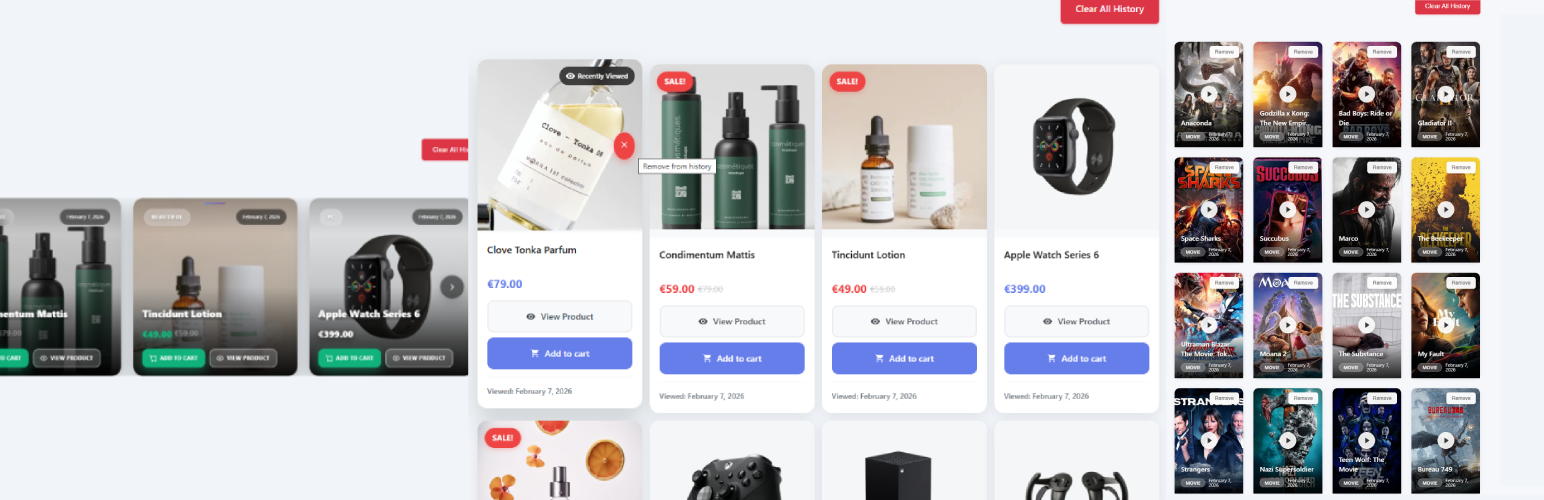
Arewa Recently Viewed Content
Description
Arewa Recently Viewed Content is a lightweight and professional WordPress plugin that tracks and displays recently viewed content for both logged-in and guest users. All data is stored on your server; no external tracking or third-party services are used.
When users are logged in, viewing history is saved to their user account. When they are not logged in, the plugin uses cookies to store history locally. After login, cookie-based history is automatically merged into the user account so nothing is lost. The plugin is designed to work correctly in WebView and mobile app contexts, supports multiple content types and layouts, and is optimized for performance and user experience.
Key Highlights:
- Dual Tracking System: Tracks viewing history for both logged-in users (via user meta) and guest users (via cookies)
- Automatic Sync: Merges guest history into user account upon login
- Privacy-Friendly: No external tracking services or third-party dependencies
- Multiple Layouts: Choose from Video, Article, Shop, and Carousel layouts
- WooCommerce Compatible: Dedicated shop layout for product tracking
- Mobile & WebView Ready: Works seamlessly in mobile apps and WebView environments
- Performance Optimized: Efficient database queries and caching mechanisms
- Fully Responsive: All layouts adapt beautifully to any screen size
The plugin is ideal for news sites, blogs, online stores, video platforms, and any WordPress site that wants to improve user engagement by showing personalized recently viewed content.
Features
-
Recently Viewed Tracking
- Automatic tracking of posts, pages, products, and custom post types
- Configurable maximum items (default: 100 for logged-in users, 50 for guests)
- Timestamp-based ordering (most recent first)
- Duplicate prevention with automatic repositioning
-
User Management
- Logged-in users: History stored in user meta
- Guest users: History stored in cookies (30-day expiration)
- Automatic merge on login
- Per-user history management
-
Layout Options
- Video Layout: Media-focused grid with overlay text
- Article Layout: Magazine-style responsive grid
- Shop Layout: WooCommerce product grid or carousel
- Carousel Layout: Horizontal scrolling with navigation
-
Customization
- Shortcode-based rendering with multiple parameters
- Configurable items per page
- Show/hide images and dates
- Pagination support
- Post type filtering
- Category and taxonomy filtering
-
Privacy & Security
- No external tracking services
- GDPR-friendly cookie usage
- Secure nonce verification
- Data sanitization and validation
- Optional data removal on uninstall
-
Performance
- Optimized database queries
- Efficient post retrieval
- No impact on page load times
- Clean code following WordPress standards
-
Compatibility
- Works with any WordPress theme
- WooCommerce integration
- Mobile app and WebView support
- Multisite compatible
- Translation ready
How It Works
For Logged-In Users:
When a logged-in user views a post, page, or product, the plugin automatically saves the post ID, post type, and timestamp to the user’s meta data. The history is stored in the database under the meta key arewa_recently_viewed and persists across sessions and devices.
For Guest Users:
When a guest (non-logged-in) user views content, the plugin stores the viewing history in a browser cookie named arewa_recently_viewed. The cookie expires after 30 days and is accessible across the same browser sessions.
Automatic Sync on Login:
When a guest user logs in, the plugin automatically:
1. Reads the guest history from the cookie
2. Merges it with any existing user history
3. Removes duplicates (keeping the most recent timestamp)
4. Saves the merged history to user meta
5. Clears the guest cookie
This ensures a seamless experience where users never lose their browsing history when they log in.
Revisiting Content:
When a user revisits previously viewed content, the plugin:
1. Updates the timestamp to the current time
2. Moves the item to the first position in the history
3. Maintains the most-recent-first ordering
Shortcodes
Basic Usage:
[watch_history]
Displays recently viewed content using default settings.
Layout Types:
[watch_history layout_type="video"]
Displays content in video/media layout with overlay text.
[watch_history layout_type="article"]
Displays content in magazine-style article layout.
[watch_history layout_type="shop"]
Displays WooCommerce products in shop layout.
[watch_history layout_type="carousel"]
Displays content in horizontal scrolling carousel.
Display Options:
[watch_history limit="10"]
Limits the number of items displayed.
[watch_history show_image="yes" show_date="yes"]
Controls visibility of images and dates.
[watch_history pagination="yes"]
Enables pagination for large histories.
[watch_history show_clear_all_history="no"]
Hides the “Clear All History” button. Default is “yes” (button visible).
Filtering:
[watch_history post_type="post"]
Shows only blog posts.
[watch_history post_type="product"]
Shows only WooCommerce products.
[watch_history category="news,sports"]
Filters by category names or slugs.
[watch_history taxonomy="genre:action,comedy"]
Filters by custom taxonomy terms.
Combined Examples:
[watch_history layout_type="article" limit="6" show_date="yes"]

[watch_history layout_type="shop" post_type="product" limit="8"]

[watch_history layout_type="carousel" limit="12" pagination="no"]

[watch_history layout_type="carousel" post_type="movies" limit="20" pagination="no" show_clear_all_history="no"]<h3>Layout Types</h3>
Video Layout
A grid-based layout optimized for video content and media. Features:
* Responsive grid (configurable columns)
* Large thumbnail images
* Overlay text with title and metadata
* Play button icon overlay
* Hover effects
* Best for: Video sites, media libraries, movie databases
Article Layout
A magazine-style layout perfect for blog posts and articles. Features:
* 2-column grid on desktop and tablet
* 1-column on mobile devices
* Featured images with gradient overlay
* Excerpt display
* Category badges
* “Continue Reading” button
* Best for: Blogs, news sites, magazine-style websites
Shop Layout
A WooCommerce-optimized layout for product display. Features:
* Product images with sale badges
* Price display
* “Add to Cart” button
* “View Product” link
* Stock status indicators
* Recently viewed badge
* Best for: Online stores, WooCommerce shops
Carousel Layout
A horizontal scrolling layout with navigation controls. Features:
* Smooth horizontal scrolling
* Previous/Next navigation buttons
* Dot indicators
* Touch/swipe support
* Auto-height adjustment
* Responsive breakpoints
* Best for: Homepage widgets, sidebar displays, featured content
Installation
Automatic Installation:
- Log in to your WordPress admin panel
- Navigate to Plugins > Add New
- Search for “Arewa Recently Viewed Content”
- Click “Install Now” and then “Activate”
Manual Installation:
- Download the plugin ZIP file
- Log in to your WordPress admin panel
- Navigate to Plugins > Add New > Upload Plugin
- Choose the downloaded ZIP file and click “Install Now”
- After installation, click “Activate Plugin”
Configuration:
- After activation, go to Settings > AR Viewed Content
- Configure your preferred settings:
- Enable/disable tracking
- Set maximum items for logged-in users and guests
- Choose default layout type
- Configure display options
- Add the shortcode
[watch_history]to any page or post - Customize the shortcode with parameters as needed
Screenshots

General Settings – Main plugin settings panel for configuring tracking behavior, limits, and display options.

Shortcodes Documentation – Built-in documentation showing available shortcodes, parameters, and usage examples.

Data Management & Backup – Tools for managing viewed content data, clearing history, and handling backups.

Shop Layout – WooCommerce product grid displaying recently viewed products with prices, badges, and actions.

Video Layout – Grid-based layout with overlay text, optimized for video content, media libraries, and movie websites.

Carousel Layout – Horizontal scrolling layout with navigation controls and touch support for smooth browsing.

Article Layout – Magazine-style responsive layout with featured images and excerpts for blog posts and articles.

Shop + Carousel Layout – Combined carousel view for WooCommerce products, ideal for highlighting recently viewed items.
Faq
Yes! The plugin tracks viewing history for both logged-in and guest users. Guest history is stored in browser cookies and automatically syncs to the user account when they log in.
Yes. The plugin is privacy-friendly and GDPR compliant. It only stores viewing history locally (user meta for logged-in users, cookies for guests) and does not send data to external services. The cookies used are functional and necessary for the feature to work. You should mention this in your privacy policy.
Yes! The plugin includes a dedicated Shop Layout specifically designed for WooCommerce products. It displays product images, prices, sale badges, and “Add to Cart” buttons.
Yes. The plugin is fully compatible with mobile apps and WebView environments. The cookie-based tracking works correctly in WebView, and the responsive layouts adapt to mobile screens.
Yes. You can limit items using the limit parameter in the shortcode:
[watch_history limit=”10″]
You can also configure default limits in the plugin settings (100 for logged-in users, 50 for guests).
Yes. Use the post_type parameter:
[watch_history post_type=”post”] for blog posts
[watch_history post_type=”product”] for WooCommerce products
[watch_history post_type=”movies”] for custom post types
Yes. Use the category or taxonomy parameters:
[watch_history category=”news,sports”]
[watch_history taxonomy=”genre:action,comedy”]
Go to Settings > AR Viewed Content and enable “Remove all data on uninstall”. When you uninstall the plugin, all user history and settings will be permanently deleted.
Yes. The plugin includes CSS classes for all elements, allowing you to customize the appearance using your theme’s custom CSS or a child theme.
No. The plugin is optimized for performance with efficient database queries, proper caching, and minimal resource usage. It does not impact page load times.
Yes. You can use multiple shortcodes with different layouts and settings on the same page.
When content is revisited, it automatically moves to the first position in the history with an updated timestamp, ensuring the most recently viewed items always appear first.
Yes. In the plugin settings, you can select which post types should be tracked.
Reviews
Changelog
2.0.6
- Added: Configurable grid gap in General Settings (Desktop, Tablet, Mobile) for Video, Article, Shop and Carousel layouts
- Changed: Default grid gap reduced to 11px (desktop), 9px (tablet), 8px (mobile)
- Improved: Removed unnecessary !important from grid inline CSS
- Improved: Pagination uses WordPress query var (wh_page) for better security and PHPCS compliance
- Improved: PHPCS WordPress / WordPress-Extra compliance (admin-settings.js, frontend.js, tracker)
2.0.5
- Fixed: Guest users now see simple empty message when “Guest User Access” is disabled
- Fixed: Login button no longer appears when the option is disabled
- Fixed: Correct behavior for empty history based on admin settings
- Enhanced: Proper message display logic for guest users
2.0.4
- Added: New admin setting to require login for guest users to view watch history
- Added: “Guest User Access” option in General Settings
- Enhanced: Admin can now choose whether guest users see their history or a login prompt
- Enhanced: More control over guest user experience
- Feature: When enabled, guest users will see a login message with button instead of their watch history
- Feature: When disabled (default), guest users can view their watch history as before
2.0.3
- Fixed: CRITICAL – Guest user removals now persist after page reload (server-side cookie update)
- Fixed: Guest user remove operations now use AJAX to update server cookie before page reload
- Fixed: Guest user clear all now properly expires server-side cookie
- Enhanced: Server-side cookie management for guest user operations
- Enhanced: Proper synchronization between client-side and server-side storage
- Technical: PHP now updates cookie when guest users remove items, not just JavaScript
- Technical: Prevents PHP from regenerating removed items from stale cookies on page reload
2.0.2
- Fixed: Guest user item removal now persists correctly after page reload
- Fixed: Type comparison issue in removeFromHistory() causing items to reappear
- Fixed: Empty history cookie now expires properly instead of persisting
- Fixed: Cookie path/domain consistency for reliable storage operations
- Enhanced: Added comprehensive logging for guest user operations debugging
- Enhanced: Improved localStorage and cookie synchronization
- Enhanced: Skip tracking indicator when removing items for better UX
- Improved: Guest user history management reliability and data persistence
2.0.1
- Fixed: Guest users can now remove items from their history
- Fixed: Guest users now only see configured post types in history
- Fixed: Post type filtering now works consistently for both logged-in and guest users
- Added: New AJAX endpoints for guest user operations (arwrev_guest_remove_item, arwrev_guest_clear_all)
- Added: JavaScript methods for guest history management (removeFromHistory, clearHistory)
- Added: Post type configuration passed to JavaScript for client-side filtering
- Enhanced: Unified remove button logic for both user types
- Enhanced: Better filtering in get_guest_history() method
- Improved: Consistent behavior between logged-in and guest users
2.0.0
- Enhanced: Improved Article Layout with proper post type filtering
- Fixed: Article Layout now correctly displays most recent posts first
- Fixed: Revisited items now properly move to first position in all layouts
- Enhanced: Better order preservation in WP_Query for all layouts
- Added: New is_post_item() method for Article Layout filtering
- Improved: Consistent ordering behavior across all layout types
- Optimized: Better performance with post type-specific queries
- Updated: Comprehensive documentation and troubleshooting guides
- Fixed: Layout sorting issues resolved for Article, Shop, and Carousel
- Enhanced: Test suite for layout ordering verification
1.0.0
- Initial release
- Dual tracking system for logged-in and guest users
- Four layout types: Video, Article, Shop, and Carousel
- Automatic history sync on login
- WooCommerce integration
- Shortcode-based rendering with multiple parameters
- Post type and taxonomy filtering
- Responsive design for all layouts
- Mobile and WebView compatibility
- Privacy-friendly cookie usage
- Performance optimizations
- Clean uninstall option
- Translation ready
- WordPress coding standards compliance