Arva SEO – Speed Booster & Security Scanner

Arva SEO – Speed Booster & Security Scanner
Description
Improve how your WordPress site loads, scan for known security problems, and optionally connect it to your Arva SEO workspace. Local speed fixes and the security scan work without an Arva SEO account. Connected features use the service and allowances of your plan.
PageSpeed fixes you control
Arva SEO Speed explains each fix and the PageSpeed (Lighthouse) problems it addresses. Every fix starts off. Try mode shows supported changes only to signed-in administrators before you enable them for visitors. Server-level caching and compression instead check the site when enabled.
- Page caching: serve saved HTML without running WordPress, through .htaccess or PHP. Signed-in users, personal pages, carts and checkouts are excluded. Cached pages are cleared when relevant content or settings change.
- Images and layout: prioritize featured images and the homepage image identified by a connected PageSpeed test; lazy-load images, videos and maps below the first few images; add missing media-library image dimensions and the mobile viewport tag when needed.
- Critical and used CSS: Load styles faster supplies first-screen styles; Remove unused CSS supplies the styles a page uses, with full stylesheets available on interaction. Arva SEO generates these on its servers using your plan’s page optimizations. Choose generation by page type or URL, inline or cached-file used CSS, and an inline or external asynchronous loader. Original styles load until suitable results are ready.
- CSS and JavaScript minification: smaller cached copies of supported local files, plus separate controls for minifying inline style blocks and classic scripts in their existing tags. Unsupported files and code stay unchanged.
- CSS and JavaScript combining: bundle compatible neighboring files in order. Optional inline combining requires approval of an exact public static snippet; a changed snippet stops matching its approval. External combining requires exact approved public HTTPS URLs and background caching. Incompatible scripts, integrity-protected resources and managed critical/used CSS stay separate. Fewer requests do not always improve performance.
- Script loading: defer supported scripts until HTML is parsed, or delay supported independent classic scripts until interaction. Dependencies, consent tools, protected measurement scripts and your exclusions are retained. Changing a public loading mode returns it to preview; enabling it requires checking your important pages.
- Chat and third-party widgets: separately delay supported chat, heatmap and social widgets until interaction. Analytics and consent tools are not selected automatically; you can list additional scripts.
- Fonts: optimize Google Fonts delivery, optionally serve local copies, and apply font-display: swap to supported styles so fallback text can appear while fonts load.
- YouTube facades: show a preview image and load the player when someone presses play.
- Browser caching and compression: checked .htaccess rules for Apache and LiteSpeed, with backups and rollback if the site does not respond normally. Other servers can use the suggested rules.
- WordPress extras: choose whether to remove emoji scripts, embed discovery, visitor Dashicons, jQuery Migrate or unneeded block styles.
- Image optimization: make WebP copies of new or existing uploads while keeping originals. Compress existing Media Library JPEG, PNG and supported WebP images in background batches, or select images with bulk actions. See saved bytes and restore originals when backups were kept. WebP compression is local; optional consented cloud compression sends JPEG/PNG images to Arva SEO and uses your image allowance only when it makes an image smaller.
Use page, script, plugin and element exclusions to leave sensitive parts of your site alone. Defer/delay and CSS delivery leave shop pages alone by default. Turning delivery fixes off restores their normal behavior; image changes have their own restore controls. Theme source files and post content are not rewritten by delivery fixes. Keep backups and test menus, forms, booking flows and checkout before enabling changes for everyone.
When another supported speed plugin handles a job, Arva SEO leaves it to that plugin. Deactivation is offered only as an explicit administrator action. An emergency wp-config.php switch can disable all speed fixes; see the FAQ.
Connected PageSpeed results link to the matching controls. Remote switching is off by default and needs administrator approval. Authorized workspace managers can then request supported changes, subject to the same rules; Defer scripts still requires approval in WordPress. Changes are recorded in Activity.
Cloudflare
Optionally connect a Cloudflare API token on the Speed page, without an Arva SEO account. The token is stored encrypted. The plugin clears Cloudflare’s cached pages when relevant content, delivery settings or optimized assets change, and checks for Rocket Loader conflicts. You can disable duplicate post purges if Cloudflare’s own plugin already handles them.
Security scan and chosen repairs
Arva SEO Health Security scans locally in background batches, weekly or when you choose Scan now. No account is required. It checks:
- WordPress core and directory plugins against official WordPress.org checksums, including changed, missing and unexpected files.
- PHP in uploads, disguised code, suspicious patterns in nonofficial files, injected redirects and .htaccess rules.
- Exposed configuration, repository, debug, backup and database files; directory listings; and security-related settings.
- New or changed theme, premium-plugin, must-use-plugin and drop-in files, including selected added-line evidence.
- External scripts loaded by sample pages and where they were added, plus dashboard theme/plugin file edits.
Results explain the finding and suggested action. Nothing is repaired automatically. Choose to restore an official file, quarantine unexpected PHP or disable dashboard file editing; supported repairs can be undone for 30 days. Mark an expected result as trusted until its file changes.
Connected sites can receive updated security patterns, known-malware fingerprints, vulnerability findings from Wordfence Intelligence and optional alerts. Sharing scan evidence requires separate consent. A scan detects known signs of trouble; it cannot prove a site is clean and does not replace a firewall, backups, updates or professional cleanup.
Optional deep scans need separate administrator consent and are started individually. Code files not matched to official copies are sent to Arva SEO for malware checks and deleted when the scan finishes. Configuration secrets, logs, database exports, backups and media are excluded. Deep scans use the service’s applicable allowance.
Optional Arva SEO connection
Approve the connection on app.arvaseo.com without entering an Arva SEO password in WordPress. Each site receives revocable encrypted credentials.
- Inventory and Website Health: share installed plugin/theme versions and approved health checks for findings, tasks and reports.
- Content delivery: receive drafts, pending-review, scheduled or published posts within your chosen publishing ceiling; Draft only is the default.
- SEO updates: separately allow approved SEO titles and meta descriptions for published posts, pages, products and the homepage in Yoast SEO or Rank Math. Only those fields change; caches are cleared and updates can be undone.
- IndexNow: serve the key supplied by Arva SEO for its supported search-engine notifications.
Review shared fields in Settings Diagnostics and data sharing. External services, consent requirements and data handling are detailed below and in the FAQ.
External services
Connecting to Arva SEO (https://arvaseo.com) is optional and starts only when an administrator connects the site. Local fixes work without an account. The optional features below contact their listed services only when you enable or use them.
- When connecting: you are sent to app.arvaseo.com to sign in and approve; the plugin then exchanges a one-time code with api.arvaseo.com for this site’s own credentials, and sends the site address, name, WordPress and plugin versions, time zone, environment type, your publishing settings, which of the plugin’s PageSpeed fixes are on, and your data-sharing choice.
- Plugin inventory and Website Health (only if you agree when connecting, or later in Settings Diagnostics and data sharing): installed plugins and themes with versions and update state, and the results of about 40 health checks (booleans, counts and versions only). Sent after connecting, twice a day for the inventory and once or twice a day for health checks, after plugin changes, and when you or Arva SEO ask for a recheck.
- Security scan results (off by default, a separate choice): after each scan, when an administrator agreed to share them, each open problem’s kind, severity, a key, the file’s path inside the site and its SHA-256 fingerprint, and for suspicious code the pattern’s name, line and the start of that line, with how many files were checked. Never the files themselves.
- Security feed (only when connected): once a day the plugin downloads Arva SEO’s security feed from api.arvaseo.com (fingerprints of known malware and of files found safe, PHP’s latest versions, new patterns), sending only the version it has.
- Deep scans (off by default, a separate choice, and each one started by an administrator): the code files the security scan couldn’t match to an official copy (the theme, premium and custom plugins, and anything unexpected), with their paths inside the site, SHA-256 fingerprints and sizes, 2 MB each and 50 MB in all at most, sent to api.arvaseo.com to be checked for known malware and deleted as soon as the scan finishes. Never wp-config.php, .env files, logs, database exports, backups or media. The plugin then fetches what was found.
- Content: every 5 minutes the plugin asks api.arvaseo.com for content you sent from Arva SEO, and reports back the post ID, status and link it created.
- Switching fixes from Arva SEO (off by default): when allowed, the plugin asks api.arvaseo.com every 5 minutes (and when Arva SEO signals it) for fixes switched there, and reports back what it did and each fix’s state.
- Signed requests from Arva SEO: api.arvaseo.com may call this site’s /wp-json/arvaseo/v1/events endpoint to ask it to check for content or run a recheck sooner.
- Featured images (off by default): only from image hosts you approve.
- Combine external CSS/JavaScript (off by default): only exact public HTTPS asset URLs the administrator approves. The site’s server requests those public files in the background, without visitor cookies, account credentials or page content, and keeps bounded six-hour copies for combining. The selected asset host receives the requested address and the server’s IP address. Personal, signed, redirected and unsupported responses are not cached. No new files are requested merely because a URL is approved; a page must already use that resource.
- Load styles faster and Remove unused CSS (PageSpeed fixes, off by default, only when connected): the plugin sends api.arvaseo.com the address of one public page of each type, and Arva SEO’s renderer loads it like a visitor to work out its styles; the critical and used CSS come back to this site. Only page addresses are sent. While Arva SEO loads a page, the address carries a short-lived signed parameter so the page is served with its original styles.
- Faster Google Fonts, “Serve them from your site” (off by default): the plugin downloads the Google Fonts stylesheets and font files your pages already use from fonts.googleapis.com and fonts.gstatic.com, once, into your uploads folder, so visitors’ browsers no longer connect to Google for them. Google’s privacy policy: https://policies.google.com/privacy
- Cloudflare (off until you connect it on the Speed page): with the API token you enter, the plugin asks api.cloudflare.com which zone your site’s domain is in, reads the Rocket Loader setting, and asks Cloudflare to clear its cached copy of your pages when they change. Only page addresses and the token are sent. Cloudflare’s terms: https://www.cloudflare.com/website-terms/ · Privacy policy: https://www.cloudflare.com/privacypolicy/
- Click-to-play videos (a PageSpeed fix, off by default): visitors’ browsers load each video’s preview picture from YouTube (i.ytimg.com), and the player from youtube-nocookie.com only when they press play. YouTube’s terms: https://www.youtube.com/t/terms · Google’s privacy policy: https://policies.google.com/privacy
Restoring a file’s official copy (only when you choose it) downloads that one file from core.svn.wordpress.org or plugins.svn.wordpress.org, for your WordPress or plugin version, and uses it only when it matches WordPress.org’s checksum.
The security scan also asks WordPress.org for the official checksums of your WordPress version (api.wordpress.org/core/checksums) and of each installed plugin from its directory (downloads.wordpress.org/plugin-checksums), sending only the version number, language and plugin folder names, and it requests a few files from your own site to see whether they can be downloaded. WordPress.org’s privacy policy: https://wordpress.org/about/privacy/
No visitor data, user accounts, emails, passwords, settings or existing content is ever sent. Arva SEO terms: https://arvaseo.com/terms/ · Privacy policy: https://arvaseo.com/privacy/
Privacy
See Arva SEO Settings Diagnostics and data sharing for the full list of shared fields and their purpose, and the suggested text added to Settings Privacy.
The plugin’s admin pages use the Fraunces and Inter fonts, which come with the plugin (SIL Open Font License 1.1, see assets/fonts/OFL.txt); nothing is loaded from other sites to show them.
Installation
- Upload the plugin through Plugins Add New Upload Plugin, and activate it.
- Open Arva SEO Get started, review what is shared, and click Connect to Arva SEO.
- Sign in to Arva SEO, choose the website, and approve. You return to WordPress connected.
- In Arva SEO Settings, choose the default author and publishing mode.
For reliable scheduled publishing on low-traffic sites, run WP-Cron from a server scheduler (see the administrator guide).
Screenshots
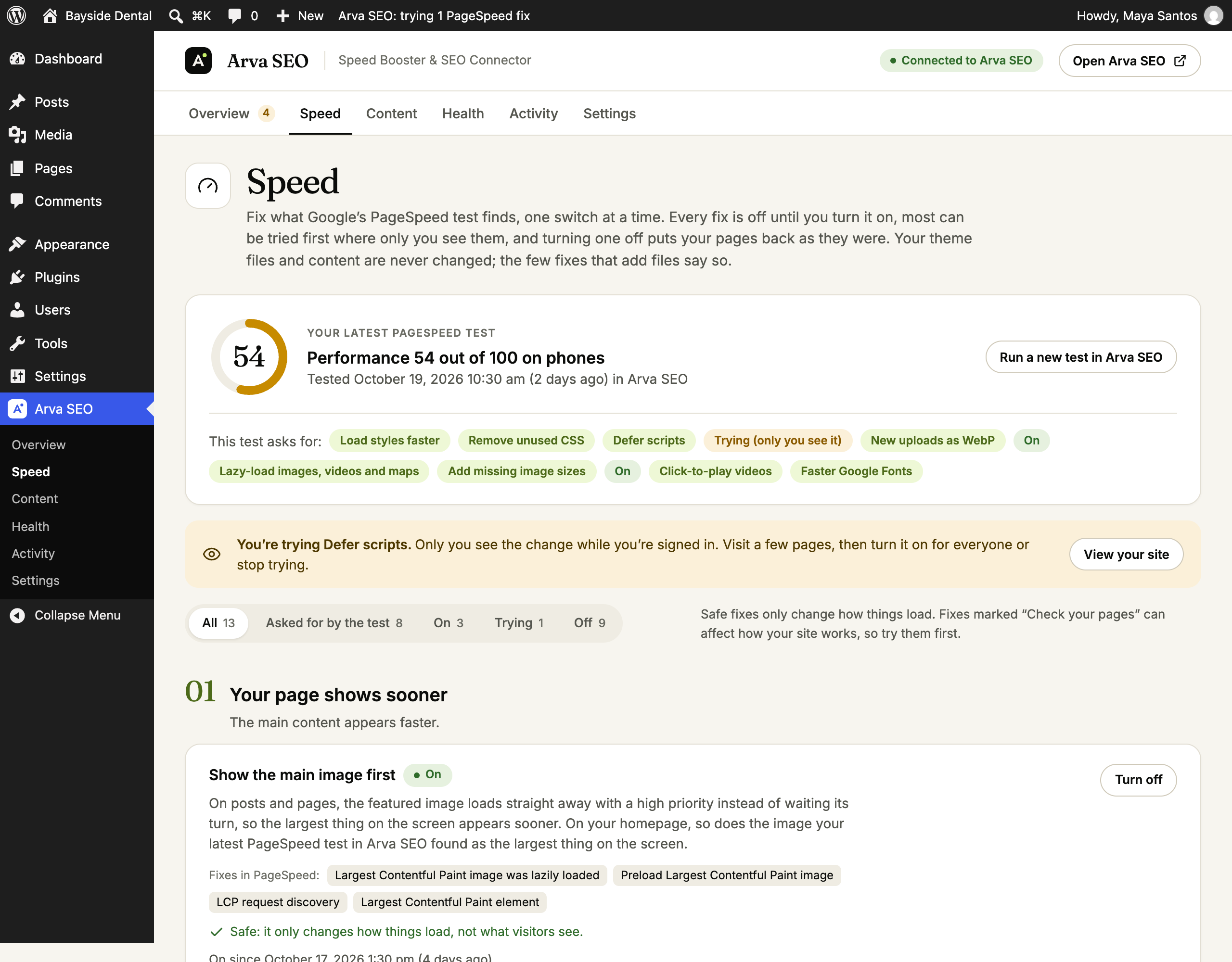
Speed: your latest PageSpeed score, the fixes it asks for, and whether each one is off, being tried or on.
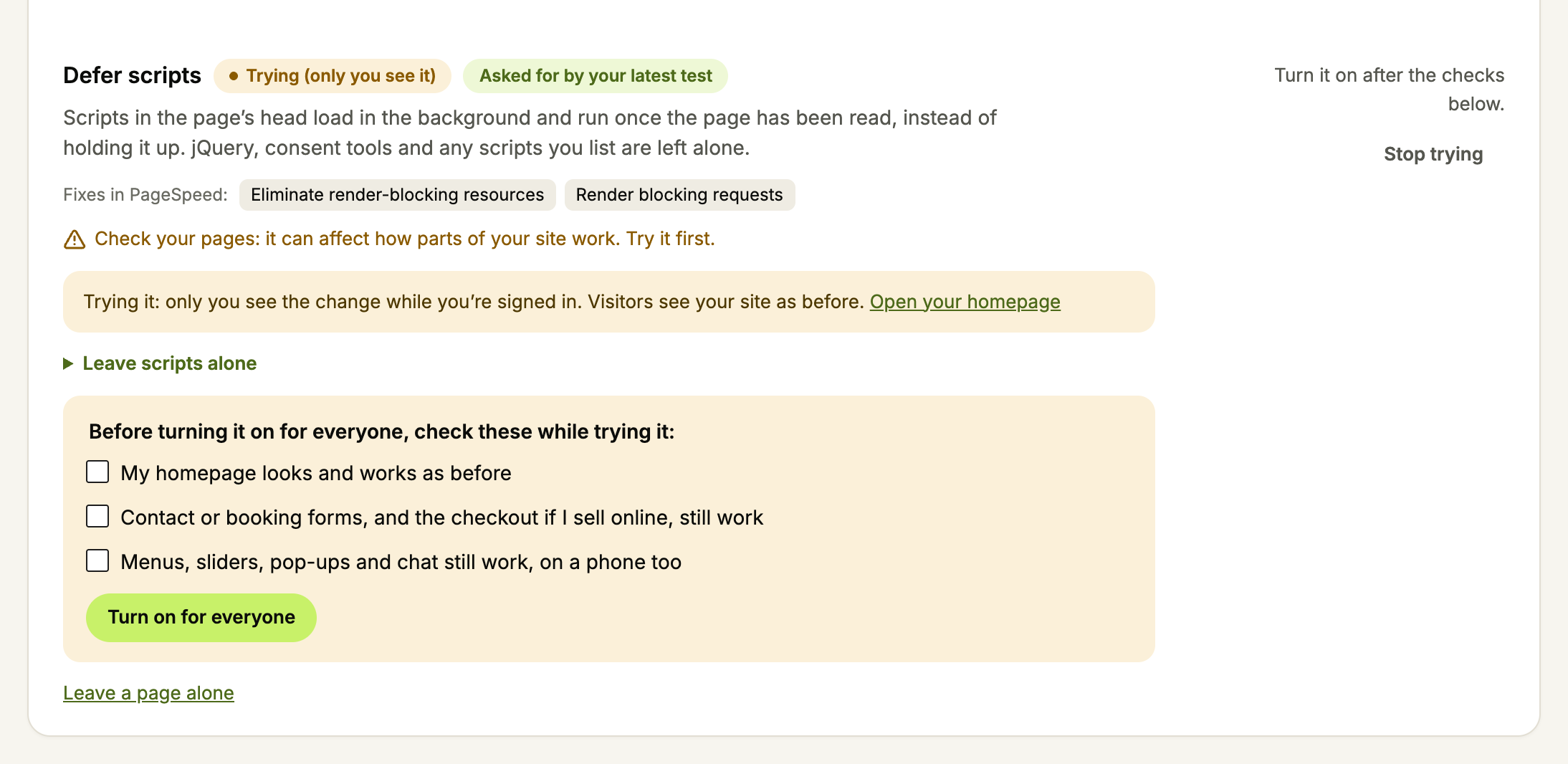
Defer scripts: try it while only you see it, check your important pages, then turn it on for everyone.
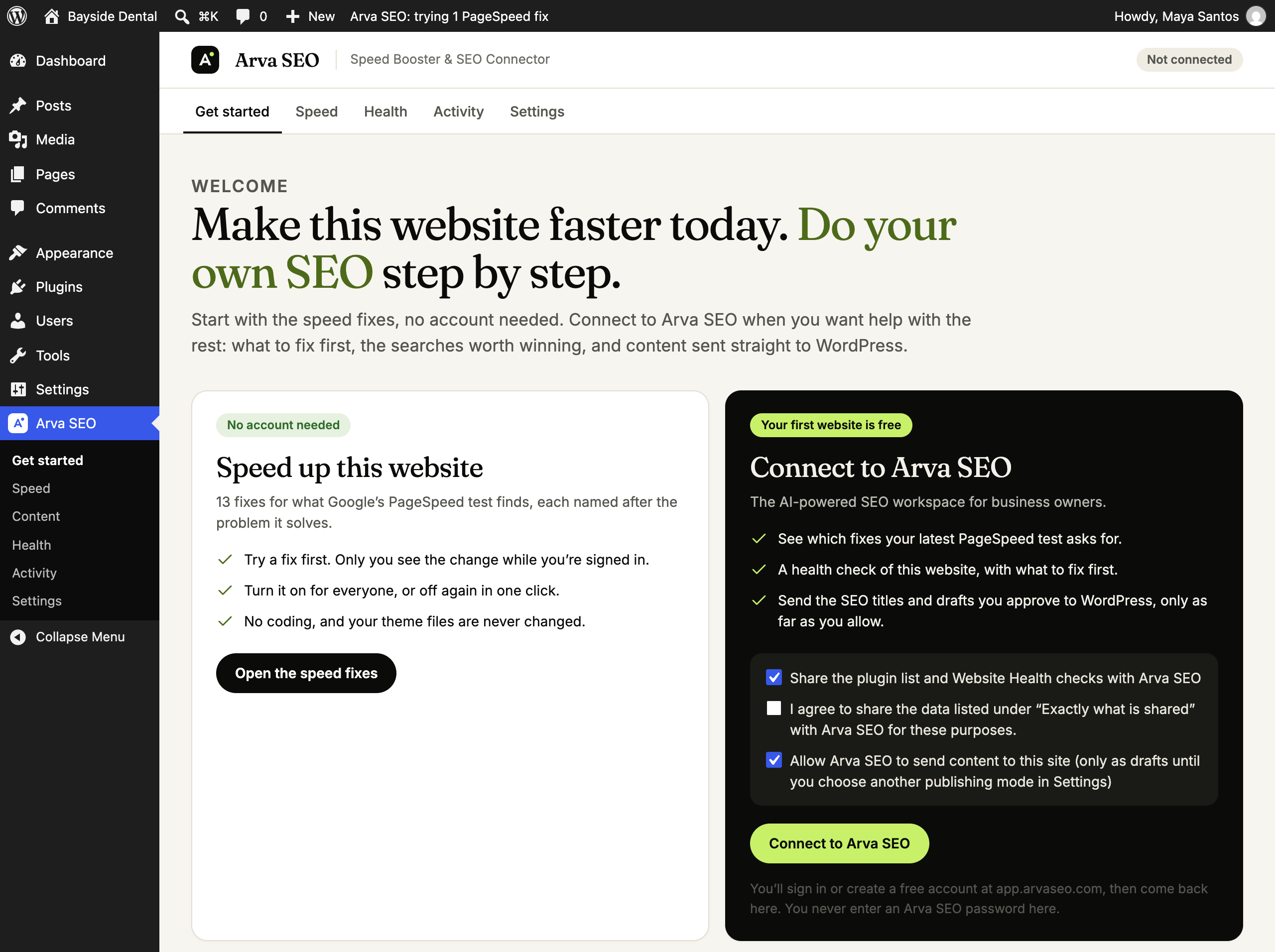
Get started: the speed fixes work without an account; connect to Arva SEO when you want the rest.
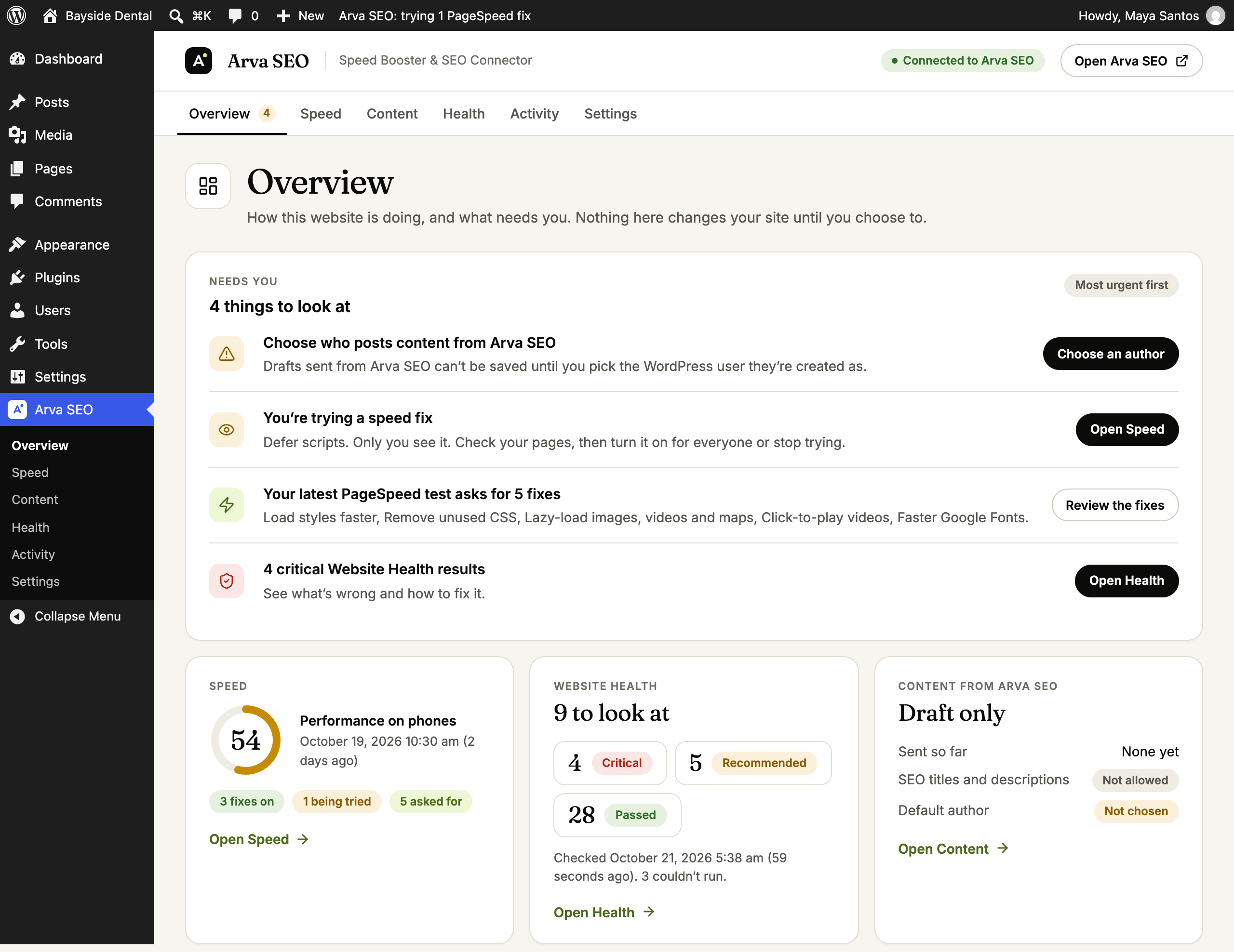
Overview: what needs you first, with speed, Website Health and content at a glance.

Settings: choose how far Arva SEO can go when it sends posts, from drafts only to full publishing.
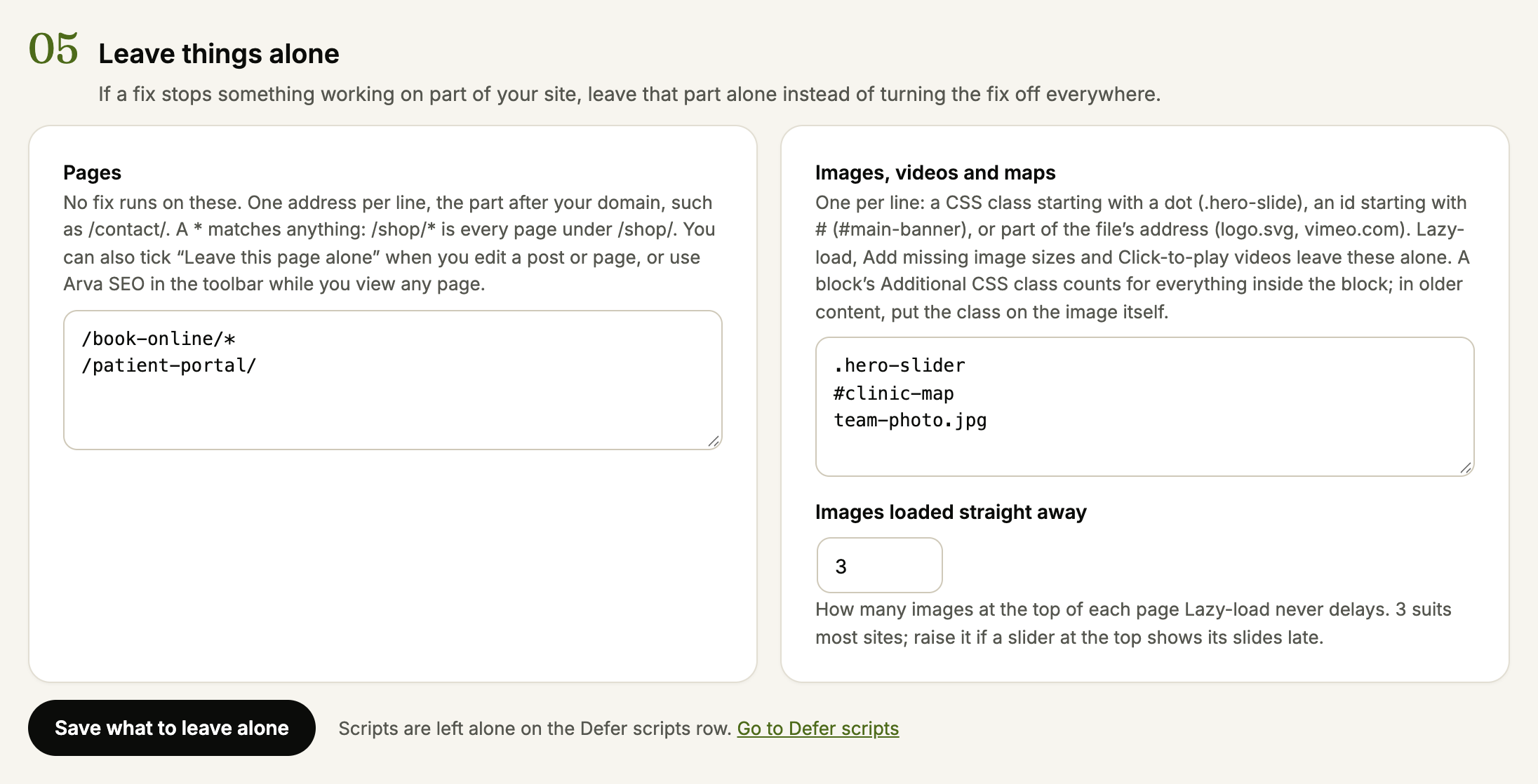
Leave things alone: pages, images, videos and maps the speed fixes skip.
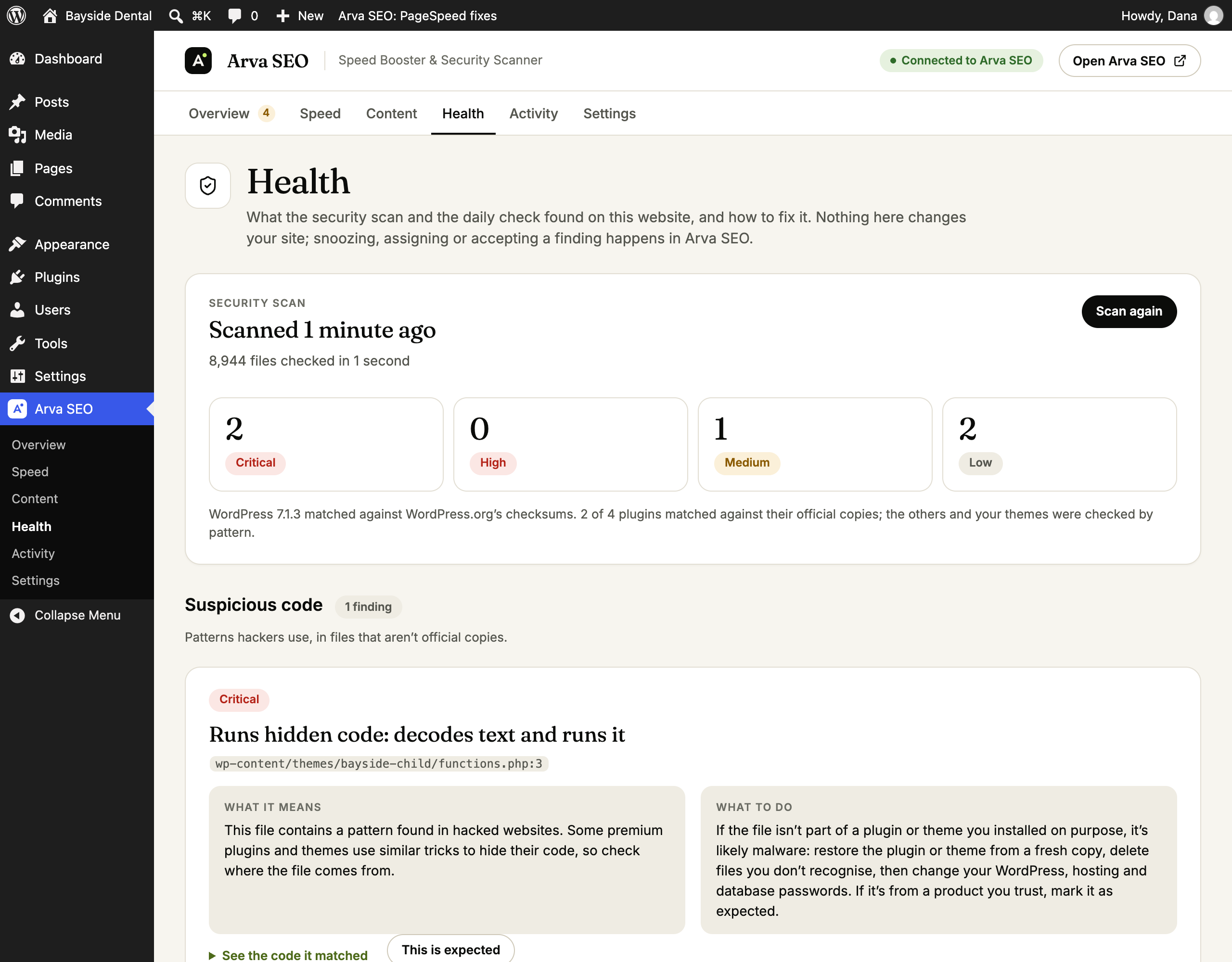
Health → Security: the latest security scan, what it found, why it matters and what to do.
Faq
Yes. Arva SEO Speed has separate Combine CSS and Combine JavaScript controls. Each starts off and has a Try mode visible only to administrators. Compatible neighboring local files are bundled in their existing order. CSS image and font addresses keep working; inline code, asynchronous or module scripts, excluded files and Critical CSS/Remove unused CSS delivery stay separate. Minification remains a separate setting. Fewer requests do not always improve performance, so check your site before enabling a control for visitors.
Only in the ways you switch on. PageSpeed fixes change how your pages load, only after you turn each one on, and turning it off undoes it. Website Health and the security scan are read-only: they report, and every finding is a recommendation. Arva SEO can only create or update posts it sent, within your publishing mode, and, if you allow it in Settings, change the SEO title and meta description of published content in Yoast SEO or Rank Math.
No. It finds problems and says what to do, and it doesn’t block traffic or log-in attempts. It can put back official copies of WordPress and plugin files and move PHP out of the uploads folder into quarantine, when you choose to, and each can be undone for 30 days. A hacked theme, a database or passwords still need a clean-up, which your host or developer can help with.
Only when an administrator has allowed deep scans and starts one: the code files the security scan couldn’t match to an official copy, with their paths inside the site, their SHA-256 fingerprints and sizes. Configuration files, logs, database exports, backups and media are never sent, and the files are deleted on Arva SEO’s servers as soon as the scan finishes.
It runs in the background in batches of about 20 seconds with pauses in between, reading files only up to 2 MB for patterns, and stops after 150,000 files. You can stop a scan at any time, and turn the weekly scan off in Settings.
Nothing, unless the site is connected and an administrator ticks “Also share the security scan’s results” when connecting or in Settings Diagnostics and data sharing. Then it sends each open problem’s kind, severity, the file’s path inside the site and its SHA-256 fingerprint (for suspicious code, the pattern’s name, the line and the start of that line), and how many files the scan checked. The files themselves are never sent.
From 2.7.0, with that consent given again for the new fields (the Health page asks once), it also sends: up to 10 lines added to a file that’s new or changed since the last scan; the host names and addresses of scripts your pages load from other websites, with where each is added (a file and line, a setting’s name or a post’s ID); the kind, path and fingerprint of problems marked as expected; and, when a file is saved with WordPress’s file editor, its path, the time, the username and display name of who saved it, the IP address the request came from (and the one a proxy in front of the site reported) and up to 10 added lines. Until then the results are shared as before, without these.
Most only add or change attributes on images and links, and visitors see the same page. Defer scripts, Delay chat widgets and trackers, Click-to-play videos and Remove unused WordPress extras can affect how some sites work, so try them first and check your important pages. Page caching and Browser caching and compression change your server’s settings, so they can’t be tried first; they check your site straight away instead (see below). If something stops working, leave that page, script or image alone (see the next question) or turn the fix off on the same page. In an emergency, add define( 'ARVASEO_CONNECTOR_DISABLE_SPEED_FIXES', true ); to wp-config.php to switch every fix off. Arva SEO’s own page cache clears itself when a fix changes; if you use another page cache, clear it after changing a fix.
Yes. In Arva SEO Speed Cloudflare, paste a Cloudflare API token with Zone Zone Read and Zone Cache Purge Purge for your site’s domain (add Zone Zone Settings Read so Rocket Loader can be checked). The token is stored encrypted and only ever sent to Cloudflare. If Cloudflare’s own plugin already clears a post’s pages when it changes, switch that part off here; the plugin still clears Cloudflare’s copy when a fix changes.
Yes, in Arva SEO Speed Leave things alone:
- Pages: addresses such as
/checkout/or/shop/*, a “Leave this page alone” tick box when you edit a post or page, or Arva SEO in the toolbar while you view any page. Defer scripts also leaves WooCommerce and Easy Digital Downloads cart, checkout and account pages alone unless you untick it. - Scripts (Defer scripts): a script name (handle), part of its file address such as
booking.js, or every script from a plugin you choose. - Images, videos and maps: a CSS class (
.hero-slide), an id (#main-banner) or part of the file address (logo.svg). A block’s Additional CSS class counts for everything inside the block. Lazy-load also respects theskip-lazyandno-lazyclasses other plugins use, and every fix skips an element with thedata-arvaseo-skipattribute. - How many images at the top of each page always load straight away (3 unless you change it).
arvaseo_connector_speed_fix_applies (bool $applies, string $fix_id) turns a fix off for any condition, arvaseo_connector_defer_script (bool $defer, string $handle, string $src) leaves a script alone, and arvaseo_connector_optimize_element (bool $optimize, string $fix_id, string $tag, array $attributes) leaves an image or frame alone.
Yes, from 1.6.0, when the site is connected: Load styles faster and Remove unused CSS. Arva SEO loads one page of each type (homepage, page, post, product, category and so on) on its servers, as a phone and as a computer, and sends back each stylesheet’s critical and used CSS. Each page type uses one page optimization of your plan (Free 50 a month, more on paid plans, and an add-on of 15,000). A stylesheet whose contents change makes a new page type; clearing your cache costs nothing. When the month’s page optimizations run out, page types whose styles haven’t changed keep their optimized CSS and the others load their normal stylesheets, never out-of-date CSS.
Yes, from 1.7.0, once an administrator ticks “Let Arva SEO switch these fixes” on the Speed page. Arva SEO’s PageSpeed results then show Try it, Turn on and Turn off next to each fix for people who manage the website’s integrations there. Switches are picked up within a minute or two; the rules are the same as in WordPress, and each change is logged with the name of the person who asked. Untick the box to stop it at any time.
Yes, from 2.6.0, with Page caching (off until you turn it on). Each page is saved as ready-made HTML the first time a visitor opens it, and the next visitors get that copy without WordPress running. On Apache and LiteSpeed, rules at the top of .htaccess let the server send it without PHP; the plugin keeps a copy of your .htaccess from before it changed it, which you can download from the Speed page. Elsewhere (nginx, for example) a small advanced-cache.php file sends it before WordPress loads, and the plugin adds define( 'WP_CACHE', true ); to wp-config.php, or tells you the line to add when it can’t.
Turning it on checks your homepage from the server: made once, then served from the cache. If it isn’t, everything is taken out again. Signed-in users, visitors with a comment, password or cart, carts, checkouts and account pages, searches, addresses with a query (tracking ones like utm_source are fine) and pages that set a cookie are never cached, nor pages you leave alone. Saved pages are made again after 10 hours; a post’s pages are cleared when it changes, and every page when your theme, menus, widgets or a fix change, or when you press Clear the cache (also in the toolbar). Cloudflare’s copy is cleared too when it’s connected. After clearing, your main pages are refilled in the background, a few a minute. Turn on “A separate copy for phones” only if your theme sends phones different HTML.
If WP Rocket, W3 Total Cache or another cache plugin is active, Arva SEO leaves page caching to it. If your host caches pages itself (SiteGround, LiteSpeed Cache, WP Engine, Kinsta, Cloudways), that’s kept by default, and you can choose Arva SEO’s instead; the card says how to turn the host’s cache off. Turning it off, deactivating or deleting the plugin removes the rules, the file, the line it added and the saved pages.
The rules only use standard Apache settings, wrapped so a server without those modules ignores them. Still, a server that doesn’t allow one of them in .htaccess would answer every page with an error, so the plugin checks your homepage and one of its own files from the server right after adding them, and takes them out again in the same moment if either doesn’t answer normally, or if the check can’t be made. Turning the fix off, deactivating or deleting the plugin, or the wp-config.php switch removes them.
No. They work as soon as the plugin is active. Connecting adds which fixes your homepage’s latest PageSpeed test asks for, and before-and-after results in Arva SEO.
Yoast SEO and Rank Math. The connector detects which one is active; if both are, choose one in Arva SEO Settings. Without either, SEO titles and descriptions aren’t written.
Yes. The connector sends Arva SEO the previous values with every change, and Undo in Arva SEO writes them back (an empty previous value restores the SEO plugin’s default).
Credentials are removed from this site and revoked at Arva SEO, scheduled syncs stop, and earlier findings are shown as stale.
The connector works with every Arva SEO plan, including Free.
Credentials are always revoked and removed. Settings, logs and delivery records are removed too if you ticked that option in Settings. Posts are never deleted.
Reviews
Changelog
2.10.0
- New: inline CSS/JavaScript minification and explicitly approved static inline/external sources in compatible ordered bundles; external files are cached in bounded pinned background requests, never fetched while rendering pages.
- New: inline or cached-file UCSS, per-URL CSS generation, inline/external asynchronous CSS loader and supported font-display swap.
- New: deferred/delayed JavaScript loading choice under the existing script control; changing the public mode returns it to preview.
- Improved: existing-image compression is visible directly on the Speed card and available as a native Media Library bulk action, with queue/compression/savings status. Added lossless local WebP compression while retaining originals and cloud consent/allowances.
- Kept: default-off new switches, existing settings, exclusions, optimized-CSS delivery, source files and unsupported-resource fallback.
2.9.0
- New: separate opt-in Combine CSS and Combine JavaScript controls with administrator-only Try mode and existing file/page exclusions.
- Compatible neighboring local files share a cached bundle in their existing order. CSS image and font URLs are preserved; unsupported, inline, asynchronous, module and optimized-CSS delivery stays separate.
- Combining is separate from minification. Original files are untouched, failed or unsupported groups retain their original delivery, and both controls start off.
2.8.1
- Fixed: large completed CSS results no longer exceed the connector’s normal response limit when fetched together. CSS results download individually with a bounded CSS-only response allowance; other API calls retain their existing limit.
- Result checks prioritize recently requested page types and process a bounded number per run, so large old backlogs continue in the background without delaying current pages indefinitely.
- Fixed: uninstall finishes speed cleanup before removing its logs and options, avoiding writes to already-removed tables.
2.8.0
- New: Minify CSS and Minify JavaScript serve smaller cached copies of supported local files, preserve original files and loading order, and fall back to originals for unsupported or unsafe files. Both start off and respect existing exclusions and other optimizers.
- New: DNS prefetch and Preconnect for explicitly chosen external HTTPS origins, with limits, duplicate prevention and optional anonymous preconnect for fonts or CORS resources. These start off and do not change DNS records.
- Fixed: themes adding a changing v/ver timestamp to Google Fonts no longer make unchanged styles a new CSS optimization on every request. Font family, subset, display and text choices still distinguish different CSS.
- Updating refreshes cached pages once when speed fixes are on, so HTML from the previous version does not hide the updated behavior. Settings and saved CSS results are preserved.
2.7.0
- Show the main image first now works on every page you tested with PageSpeed in Arva SEO, not only the homepage, and when a slider or page builder shows the main image as a background: it’s preloaded at the top of the page. WordPress’s own “load first” hint no longer goes to another image, such as the logo.
- Changes sent from Arva SEO (turning a PageSpeed fix on or off, browser caching, new content and SEO titles) apply within seconds, while Arva SEO waits for the answer, instead of at the next visit that runs WordPress’s scheduled tasks. The scheduled task stays as a fallback.
- Security scan, Changed since the last scan: the scan records a fingerprint of every PHP and JavaScript file in themes, child themes, must-use plugins, drop-ins and plugins that aren’t WordPress.org’s copies, and reports files that are new or changed since. Updates are recorded again quietly. For a theme’s functions.php, header.php and footer.php and must-use plugins, the last copy is kept in your database so the finding shows the lines that were added. A change stays listed until you mark it as expected.
- A risky file that changes between weekly scans starts a scan the next day.
- Files saved with WordPress’s theme or plugin file editor are recorded as it happens, with who saved them, when, from which address and the lines added, and sent to Arva SEO, which emails the workspace’s owners and admins at once.
- New repair: Turn off the file editor adds DISALLOW_FILE_EDIT to wp-config.php, and can be undone.
- Scripts from other websites: the scan reads your homepage, latest post and latest page as a phone visitor, lists the scripts they load from other websites, and looks for where unfamiliar ones are added (a file and line, a setting, or a code snippet). Arva SEO checks the hosts (how new the domain is, whether the script hides what it does, Google’s list of unsafe sites), free on every plan. A host Arva SEO confirmed as bad is flagged straight away, from the security feed.
- The security feed also teaches the scan which lines and hosts are safe, so changes many sites share (a host’s own line) stop being reported.
- The new details these checks share with Arva SEO (added lines, script addresses, who edited a file and from where) are sent only after an administrator agrees once more, with Share these too on the Health page. Until then the scan’s results are shared as before.
- Page caching: a change Arva SEO makes to every page also clears your host’s cache (SiteGround’s Speed Optimizer, LiteSpeed Cache, WP Engine, Breeze), and SEO title updates clear SiteGround’s copy of the page. On SiteGround without its Speed Optimizer plugin, the Speed page explains why changes can take hours to show.
2.6.1
- Speed, Optimized CSS: the results of Optimize now, Check for results and Regenerate show under the buttons, not at the top of the page. While page types are being optimized, the page checks every 20 seconds and updates when they’re ready.
- Page types that couldn’t be optimized are listed with the reason in plain words (for example, a host’s bot protection blocking Arva SEO’s page renderer). Optimize now tries them again.
- Missing files that reach your site’s not-found page (a stylesheet, a script, manifest.json) are no longer treated as page types to optimize.
- Leave things alone is always open on the Speed page.
- Security scan: Wordfence’s firewall loader no longer shows as an unexpected file or an .htaccess rule found in hacked websites when it builds its paths from its own folder, as Wordfence’s newer loaders do. A loader of anything outside a security plugin is still reported.
2.6.0
- New PageSpeed fix, Page caching: pages are saved as ready-made HTML and sent to visitors without running WordPress. On Apache and LiteSpeed the server sends them through rules at the top of .htaccess; elsewhere advanced-cache.php sends them before WordPress loads, with WP_CACHE added to wp-config.php.
- Turning it on checks your homepage is made once and then served from the cache; if it isn’t (a cookie for every visitor, a no-cache header, the host’s cache answering first), everything is taken out again and the card says why.
- Never cached: signed-in users, comment authors, password-protected posts, carts and checkouts, searches, addresses with a query other than tracking parameters, and pages that set cookies or ask not to be cached. Pages left alone on the Speed page aren’t cached either.
- Pages are cleared when a post, comment, product stock, menu, widget, theme or a fix changes, or from Clear the cache (also in the toolbar), with Cloudflare’s copy; the main pages are refilled in the background, a few a minute, and pages past 10 hours are made again.
- A copy of .htaccess is kept from before the plugin first changed it, and before its latest change; both can be downloaded from the Speed page (Browser caching and compression too).
- Other cache plugins keep the job, and Arva SEO’s page cache turns itself off if one becomes active. On hosts with their own cache (SiteGround, LiteSpeed Cache, WP Engine, Kinsta, Cloudways), the host’s cache is kept by default and you can choose Arva SEO’s instead.
- A separate copy for phones, for themes that send phones different HTML (off by default).
2.5.1
- Speed: each fix shows its name, state, what it does and its buttons underneath; the PageSpeed problems it fixes, numbers and options open from Details. Leave things alone and Cloudflare’s setup open when you need them.
- Health: each finding shows its severity, title and file with its buttons; what it means and how to fix it open from one link.
- When this server can’t reach Arva SEO, connecting says why (DNS, a timeout or a secure connection) instead of blaming the code, and Activity keeps the server’s own error.
2.5.0
- New: while the site is connected, the security scan downloads Arva SEO’s security feed once a day. A file that a deep scan found to be malware on another website is reported as Known malware here too, without a deep scan of your own; a file Arva SEO checked and found safe (such as a premium plugin that hides its code) is no longer reported; and new patterns arrive between plugin updates. Files are recognized by their SHA-256 fingerprint.
- New: the scan says when your server’s PHP is missing its latest security fixes (PHP released them on October 21, 2026: 8.5.12, 8.4.27, 8.3.36 and 8.2.35), or no longer gets them (PHP 8.1 and older), with the version to ask your host for. On Ubuntu, Debian and Red Hat builds, which add fixes under an older number, it’s marked Medium.
- Shared scan results include each flagged file’s SHA-256 fingerprint, so Arva SEO can tell when the same file turns up on several websites. Because that’s new, Health asks an administrator once more before sharing the results again.
2.4.0
- New: Compress images (Speed). Images you upload are saved smaller a minute after WordPress makes their sizes, and the media library can be done in the background with progress, Stop and Restore. A file is replaced only when it gets at least 5% smaller, and the original is kept in wp-content/arvaseo-originals unless you turn that off.
- On your own server, free: full-size photos above quality 85 are saved at 82 without the hidden camera data (the colour profile is kept, and a photo that still needs turning upright is left alone), and PNGs are saved again without loss. On Arva SEO’s servers, when the site is connected and an administrator allows it: stronger compression of every size, each image counted once against the plan’s monthly image compressions, and only when it gets at least 5% smaller. When none are left, your own server carries on.
- The security scan shows its step (1 of 4), a progress bar and how many files it checked, against the last scan’s count.
- SiteGround’s and LiteSpeed’s own plugins are named as running your host’s page cache; keeping them is usually best.
- A deep scan’s result says it checked the files that aren’t official copies.
2.3.0
- New: Speed lists other active speed plugins that do some of the same jobs (WP Rocket, LiteSpeed Cache, Autoptimize, Smush and others), with the fixes each one does, and a Deactivate button for each. A plugin that also caches pages or compresses images says so first, because Arva SEO doesn’t do either. “Keep them” leaves those fixes to them until another speed plugin is activated.
- After activating Arva SEO, the next dashboard page names those plugins once, and Overview lists them under Needs you until you choose.
- “Done by another plugin” on your latest test links to that list.
- Fixed: a deep scan of a site with many small files stopped while sending them, and then every new one was refused as “already running”. It now sends at most 400 files a request.
- Fixed: a running deep scan showed one line and no progress. It now shows its step (1 of 3), a progress bar while the files are sent, how many are sent, and when it started.
2.2.1
- Other plugins’ and themes’ notices (“recommended plugin” reminders, offers and the like) no longer show on the Arva SEO pages. They still show everywhere else in the dashboard. Arva SEO’s own notices and WordPress’s recovery mode notice stay.
- Fixed: the security scan reported the firewall of Wordfence, All In One WP Security, MalCare or NinjaFirewall as a hack (its line in .htaccess, and its loader file such as wordfence-waf.php). They’re recognized now, and any other line in the same .htaccess is still checked.
- Fixed: plugin logs kept in the uploads folder as PHP that stops on its first line (Mailchimp for WordPress’s debug-log.php, for example) were reported as PHP in the uploads folder.
- Results in .htaccess say what to do about a rule in a settings file, instead of restoring a plugin or theme.
- Health Security and Health Website health: the buttons under a result no longer touch the boxes above them, and opening “See the code it matched” or the evidence no longer moves them.
2.2.0
- New: “Restore the official copy” for a changed or missing WordPress file or a changed WordPress.org plugin file. The copy comes from WordPress.org for your version and is used only when it matches WordPress.org’s checksum.
- New: “Move to quarantine” for PHP in the uploads folder, code disguised as an image and PHP files WordPress doesn’t ship. Quarantined files are kept where they can’t run (wp-content/arvaseo-quarantine, closed to web requests, under random names).
- Every repair can be undone for 30 days under “Changes made here”, unless the file changed again since. Nothing is repaired where WordPress disallows file changes or needs FTP details.
2.1.0
- New, when connected: deep scans on Health Security. The files the security scan couldn’t match to an official copy go to Arva SEO, where ClamAV’s database of known malware and Arva SEO’s own rules check them, and are deleted straight after. What a deep scan finds joins the scan’s results, stays while the file is unchanged, and reaches Arva SEO with them.
- Deep scans have their own choice (on Health, or in Settings Diagnostics and data sharing), need the scan’s results to be shared, and are each started by an administrator. Secrets, logs, database exports, backups and media are never sent.
- Each website’s deep scans this month show on Health, with a link to get more in Arva SEO when they run out.
2.0.0
- New name: Arva SEO – Speed Booster & Security Scanner. Your settings, fixes and connection stay as they are.
- New: a security scan on Health Security, on your own server, weekly (Settings can turn that off) and on Scan now, in background batches that resume where they stopped. It works without an account and only reports.
- It compares WordPress’s own files and your WordPress.org plugins with their official checksums (changed, missing and extra files), looks for PHP in uploads, code disguised as images and unexpected PHP in the main folder, matches patterns found in hacked websites in files that aren’t official copies, and checks for exposed .env, .git, debug log and backup files, folder listings, file editing in the dashboard, an “admin” administrator, XML-RPC and username lists.
- Each result says what it means and what to do; “This is expected” hides one until the file changes. Serious results come first on Overview.
- New, when connected: known vulnerabilities in your installed plugins, themes and WordPress version on Health, from Wordfence Intelligence, with a link to each record and the data’s copyright notices.
- New, optional: share the scan’s results with Arva SEO (a separate choice when connecting, on Health, or in Settings Diagnostics and data sharing), for Website Health, email alerts, tasks and reports. Withdrawing the plugin list and health consent withdraws it too.
1.9.0
- New: Cloudflare, on the Speed page. Connect it with an API token, and Cloudflare’s copy of every page is cleared when a fix goes on or off for visitors, your choices change, or new optimized CSS, WebP copies or local fonts are ready. Trying a fix clears nothing, since only you see it.
- New: a post’s own pages on Cloudflare (the post, the homepage, the blog page, the feed and its category and tag pages) are cleared when it’s published, updated or unpublished, including content sent from Arva SEO. It can be switched off if Cloudflare’s own plugin does it.
- New: “Clear Cloudflare’s copy now”, the last clear and its result, and a warning when Cloudflare’s Rocket Loader is on alongside Defer scripts or Delay chat widgets and trackers.
- New: when an administrator opens the site through Cloudflare, Overview suggests connecting it; a token Cloudflare stops accepting shows there too.
- For developers: the arvaseo_connector_pages_changed action runs after any change that alters what visitors get, so other page caches can clear their copies.
- The Cloudflare token is stored encrypted and removed when you disconnect or delete the plugin. Diagnostics show only whether Cloudflare is connected and the last clear.
1.8.0
- New: a redesigned admin in Arva SEO’s look, with tabs for Overview, Speed, Content, Health, Activity and Settings.
- New: Overview shows what needs you first, most urgent at the top, with your PageSpeed score, Website Health results and content settings at a glance. Before connecting it’s Get started, which shows the speed fixes work without an account.
- Speed: your latest PageSpeed score at the top, the fixes it asks for, and a filter for all fixes, the ones the test asks for, and those on, being tried or off. Fixes are grouped by what they improve.
- Settings has a section list, and the plugin list and Diagnostics and data sharing are now pages of Settings (under Data and privacy).
- The pages are named Overview (was Connection), Speed (PageSpeed fixes), Content (Content Sync), Health (Website Health), Activity (Activity Log) and Plugin list (Plugin Inventory). Links from Arva SEO open the same pages as before.
- The fonts (Fraunces and Inter) come with the plugin, so the admin pages load nothing from other sites.
- Nothing changes on your site by updating: every fix, setting and switch stays as it was.
1.7.1
- Fixed: with Load styles faster or Remove unused CSS being tried, an administrator’s view counted toolbar styles from other plugins (such as Yoast SEO’s) as part of the page, so it was optimized as a different page from what visitors see and used an extra page optimization. Styles that depend on the toolbar, or are named after it, are now left out, like the toolbar’s own.
1.7.0
- New: “Let Arva SEO switch these fixes” (PageSpeed fixes page, off by default). People who manage the website in Arva SEO can then try, turn on and turn off fixes from its PageSpeed results, by the same rules as the page; Defer scripts still goes on only in WordPress, after its checklist. Each change is in the Activity Log with who asked.
1.6.0
- New: Load styles faster. The styles each page type needs for its first screen go straight into the page, and stylesheets load without holding it up.
- New: Remove unused CSS. Each page type gets only the styles it uses; the full stylesheets load on the first scroll, tap, click or key press.
- Both are worked out by Arva SEO for each type of page (homepage, page, post, product, category…) and grouped by the stylesheets’ contents, so a theme or plugin update that changes styles gets new CSS and a cache clear costs nothing. Optimize now, Check for results and Regenerate on their cards; stylesheets you choose are left alone; Leave things alone and shop pages apply.
- The readme’s External services list now includes the page addresses sent for these fixes and the Google Fonts downloads of “Serve them from your site”.
1.5.0
- New: Browser caching and compression (Apache and LiteSpeed). Rules in .htaccess for year-long browser caching and compression, checked from your server straight away and taken out again if your site doesn’t answer normally or can’t be checked. Removed when turned off, when the plugin is deactivated or deleted, and with the wp-config.php switch. On nginx, the card shows the rules to give your host.
- New: Delay chat widgets and trackers. Known chat, heatmap and social widgets (Tawk.to, Crisp, Intercom, LiveChat, Tidio, Zendesk, Drift, HubSpot chat, Hotjar, Clarity, Facebook, X and Pinterest widgets, Elfsight) and scripts you list load on the first scroll, tap, click or key press. Analytics, tag managers, consent tools and scripts that other scripts need are never delayed.
- New: Faster Google Fonts can serve copies of the fonts from your site (uploads/arvaseo-fonts), made in the background; Google’s fonts are used until a copy is ready.
- New: New uploads as WebP can convert the images already in your media library, a few at a time in the background, with progress, Stop and Undo. Copies sit beside the originals and are kept only when smaller.
- Show the main image first: on the homepage, the image your latest PageSpeed test in Arva SEO found as the largest thing on the screen loads first too.
- The cards say which fixes change your server’s settings, and a fix that can’t be tried first says so.
1.4.0
- New: Leave things alone (Arva SEO PageSpeed fixes). Keep pages out of every fix by address (with * wildcards), with a tick box in the editor, or from the toolbar while viewing a page.
- Defer scripts leaves alone scripts by name or part of their file address, every script of a plugin you choose, and WooCommerce and Easy Digital Downloads cart, checkout and account pages (on by default; untick to include them). Each script it deferred while you try it has its own Leave alone button.
- Lazy-load, Add missing image sizes and Click-to-play videos leave alone images and frames by CSS class, id or file address, including everything inside a block with a listed class. Lazy-load respects the skip-lazy and no-lazy markers other plugins use.
- Choose how many images at the top of each page always load straight away.
- The toolbar’s Arva SEO item shows while any fix is on, not only while trying one.
- Filters for developers: arvaseo_connector_speed_fix_applies, arvaseo_connector_defer_script, arvaseo_connector_optimize_element.
- Fix: Faster Google Fonts kept only the last font when one Google Fonts link asked for several, so the others didn’t load. Every font now stays.
1.3.1
- The plugin is now called Arva SEO – Speed Booster & SEO Connector. Its address on WordPress.org, its settings and everything it does stay the same.
- Fix: while you try Defer scripts, the list of scripts it deferred now shows the page you opened, not the browser’s background request for the site icon.
1.3.0
- New: PageSpeed fixes (Arva SEO PageSpeed fixes). Nine fixes for the problems Google’s PageSpeed test finds, each off until you turn it on, with a Try it mode only you see: show the main image first, lazy-load images, videos and maps, defer scripts, add missing image sizes, the mobile viewport tag, click-to-play YouTube videos, faster Google Fonts, removing unused WordPress extras, and WebP for new uploads.
- Defer scripts can only be turned on after you’ve tried it and ticked off your important pages, shows a reminder for a week after, and lets you leave chosen scripts alone.
- A fix another speed plugin already does (WP Rocket, LiteSpeed Cache, Perfmatters, FlyingPress and others) stays off, so pages aren’t processed twice.
- When connected: which fixes your homepage’s latest PageSpeed test asks for, and Arva SEO learns which fixes are on.
1.2.0
- New: IndexNow. The site serves its IndexNow key file by itself, so Arva SEO can ask Bing, Yandex, Seznam, Naver and Yep to recrawl pages after a post is published or an SEO title or description changes. The key is received when the plugin checks in with Arva SEO and stops being served when the site disconnects.
1.1.0
- New: bulk SEO title and meta description updates from Arva SEO into Yoast SEO or Rank Math, for published posts, pages, products and the homepage. Off until an administrator allows it in Settings; every change can be undone from Arva SEO.
- Yoast SEO’s cache (indexables) is rebuilt for each changed post, and page caches are cleared (LiteSpeed Cache, WP Rocket, W3 Total Cache, WP Super Cache).
- Settings: the SEO plugin is detected automatically; adding SEO fields to new drafts is its own setting.
1.0.0
- First release: secure connection, plugin inventory, Website Health with assessed findings, content delivery with a local publishing ceiling, activity log, diagnostics.