AtayaLabs Made-to-Measure Pricing for WooCommerce

AtayaLabs Made-to-Measure Pricing for WooCommerce
Description
This plugin turns a WooCommerce product into a made-to-measure product. The customer types the width and height in millimetres, picks a colour and a thickness, and sees the price update as they type – calculated from the m2 price you set for that combination. A cutting diagram is drawn from the numbers they enter, so they can see what they are ordering before they buy.
The price is always re-calculated on your server before anything is added to the cart, so a manipulated form can never produce a cheaper order.
Typical uses: glass, acrylic and polycarbonate sheet, mirrors, wood and MDF panels, worktops, fabric and vinyl, foam, rubber, metal sheet – anything sold by area and cut to the customer’s measurements.
What it does
- A colour / thickness / m2 price table per product, with as many colours and thicknesses as you need
- Minimum and maximum width and height, so nothing outside your machine’s range can be ordered
- A fixed cutting fee, and a minimum unit price
- Live price on the product page, and a live cutting diagram with dimension arrows
- A “Price by size” label in shop and category listings instead of a meaningless base price
- No base price needed on the product, and no bogus “discount” shown in the cart
- Full size, colour and thickness breakdown on the cart, the order and the e-mails
- Number formatting follows your WooCommerce settings (separators, decimals, symbol position)
- Works in any WooCommerce store currency
- Compatible with WooCommerce HPOS and the block-based Cart & Checkout
- Enabled per product: products you do not switch it on for behave exactly as before
Privacy and external services
This plugin contacts no external service. Every price is calculated on your own server, nothing leaves your site, and the measurements your customer enters are stored only with their order.
Who makes this
Built and maintained by AtayaLabs. AtayaLabs also publishes a Pro edition of this plugin; you can read about it on our site. Support: info@atayalabs.com
Installation
- In wp-admin go to Plugins – Add New – Upload Plugin and choose the ZIP, or install it from the plugin directory.
- Activate it. WooCommerce must be installed and active.
- Check your store currency under WooCommerce – Settings – General. That is the currency your customers pay in, and the currency you enter your prices in.
- Edit a product, open the Product Data box and go to the Made-to-Measure Pricing tab.
- Tick Enable for this product, fill in the colour / thickness / m2 price table and the size limits, then update the product.
You can leave the product’s regular price empty – the price always comes from the calculator.
Screenshots
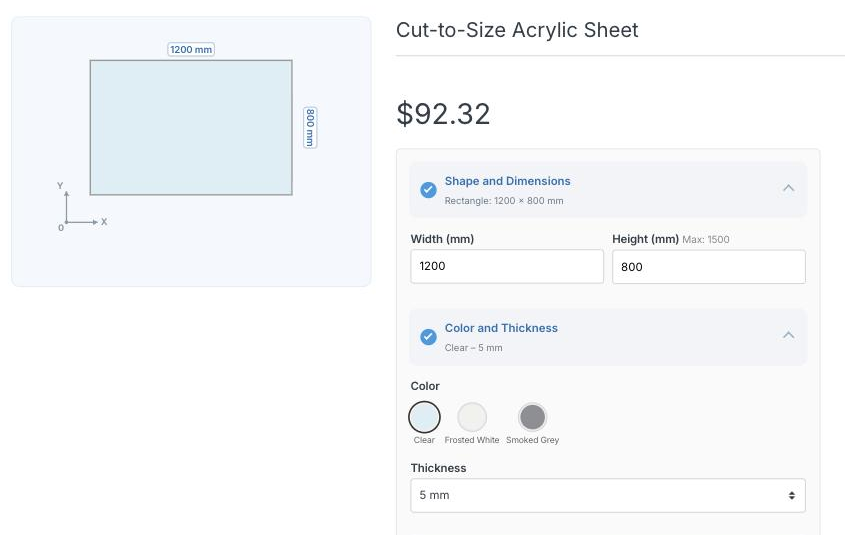
The size calculator on the product page: the customer types the width and height, picks a colour and thickness, and the price and the cutting diagram update as they type.
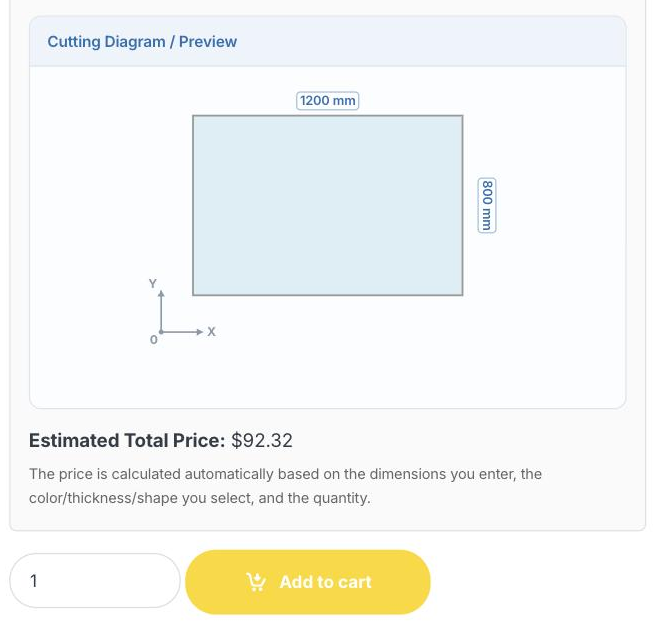
The calculator close up: the cutting diagram is drawn from the numbers entered, with dimension arrows, and the estimated total is shown underneath it.
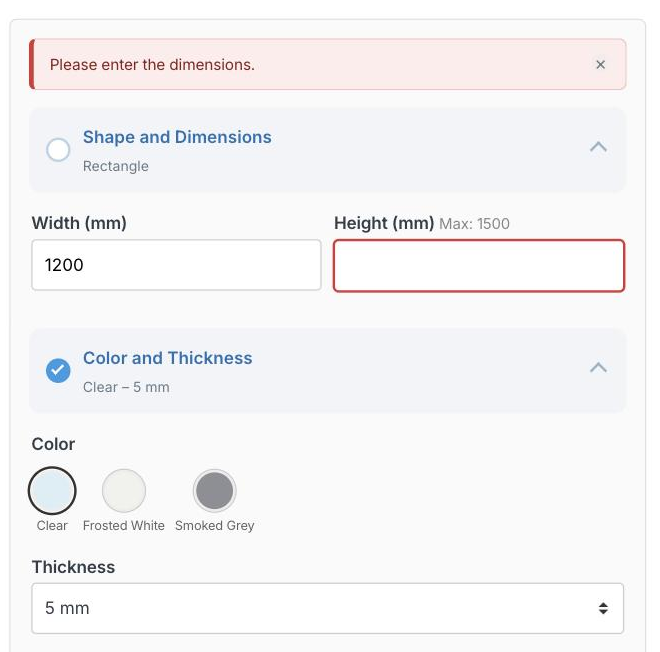
Nothing is lost when a field is left incomplete: the missing field is highlighted, the warning appears in the site language, and every other choice stays exactly as it was.
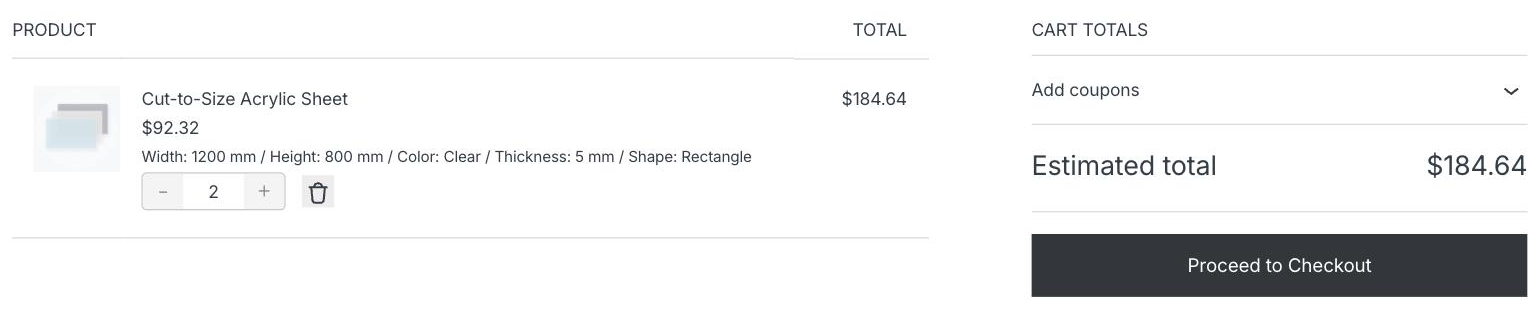
The cart line carries the full size, colour and thickness breakdown, and the calculated price is never shown as a discount.
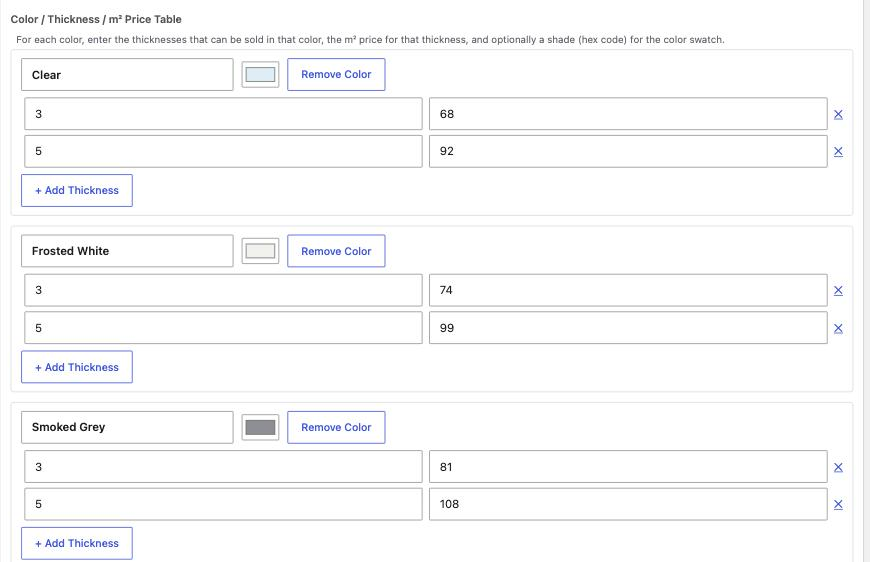
The product settings: the colour / thickness / m2 price table.
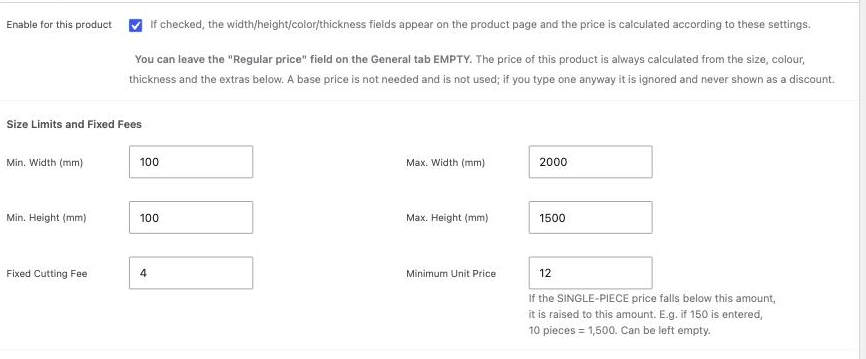
Size limits and fixed fees: minimum and maximum width and height, a fixed cutting fee and a minimum unit price.
Faq
Area in m2 multiplied by your m2 price for the chosen colour and thickness, plus the fixed cutting fee, with the minimum unit price applied if the result falls below it. The calculation always runs again on the server before the product is added to the cart.
No. Leave the “Regular price” field empty. If you do type one it is ignored, and it is never shown as a discount in the cart.
As many as you like, with as many colours and thicknesses as you like.
All of them. The plugin works in whatever currency your store is set to, and formats numbers according to your WooCommerce settings.
Not yet. The calculator appears on simple products.
Yes, both. The plugin declares compatibility with each of them.
Yes. The text domain is atayalabs-made-to-measure-pricing and translations come from translate.wordpress.org, so you can help translate it there – or add your own with Poedit or Loco Translate.
No. Nothing in this plugin makes an external request.
Reviews
Changelog
4.0.0
- The plugin has a new name: AtayaLabs Made-to-Measure Pricing for WooCommerce. Your settings and your configured products are carried over automatically the first time the new version runs; nothing has to be entered again.
- Removed: the caps on the number of products, colours and thicknesses. Use as many as you need.
- Changed: this package now contains only the features it offers.
- Changed: the plugin no longer makes any external request.
- Changed: translations now come from translate.wordpress.org instead of being bundled, so they stay up to date on their own.
3.6.3
- Fixed: five “translators” comments sat one line above the wrong statement, so the people translating the plugin could not see what the placeholders stood for.
- Changed: values submitted from the product form and the product editor are now passed through WordPress’s own sanitiser.
- Fixed: the “Tested up to” header gave a patch version instead of a WordPress release.
3.6.2
- Fixed: two settings descriptions gave their examples in Turkish Lira whatever the store currency was.
3.6.1
- Fixed: the plugin menu could show two separate entries. Only one is shown now.
3.6.0
- Added: the product editor now explains what each setting does.
- Changed: the text domain changed, which allows the WordPress translation community to translate the plugin.
3.5.1
- Fixed: leaving one field incomplete no longer clears the whole form. The field is highlighted and the warning appears in the site’s language.
- Added: if a submission is rejected for any other reason, the form is rebuilt from what was submitted instead of being emptied.
3.5.0
- Fixed: the calculated price was rendered as a discount, showing a struck-through base price and a bogus “Save X” badge in the cart.
- Added: the base price is no longer required; a configured product stays purchasable with an empty price field.
- Added: shop and category listings show a “Price by size” label instead of a meaningless base price.
3.4.2
- Fixed: cutting-shape names now follow the site language instead of always appearing in English.
3.4.0
- Added: the live product-page form became translatable.
3.3.0
- Added: the plugin now works in any WooCommerce store currency, and number formatting follows the store locale.
3.2.0
- The price under the product title now reflects the customer’s chosen dimensions instead of the product’s base price.