Aura Chat: Click to Chat Support, Floating Contact Button & Customer Service for WooCommerce
Aura Chat: Click to Chat Support, Floating Contact Button & Customer Service for WooCommerce
Description
Aura Chat: High-Performance WhatsApp Support & WooCommerce Chat Widget
Are you losing customers because of slow support? Aura Chat is the premier WhatsApp Support (WhatsApp Destek) solution for any WordPress site. Built specifically as a WhatsApp Chat for WooCommerce tool, it provides an instant bridge between your visitors and your team. By adding this professional WhatsApp Widget, you create a direct WhatsApp Chat channel that boosts trust and skyrockets sales.
Our Click to Chat technology is optimized for speed. Unlike other heavy plugins, Aura Chat uses TinyPNG-level compression for all icons, ensuring your Google Core Web Vitals and SEO rankings remain perfect. Whether you need a simple WhatsApp Button or a complex WhatsApp Business integration, Aura Chat is the fastest and most reliable choice for e-commerce.
🚀 Neden Aura Chat? (Why Aura Chat?)
Store owners choose Aura Chat to provide professional WhatsApp Support because it’s built for conversion. It’s not just a WhatsApp Button; it’s a complete communication suite for your WooCommerce store.
- Skyrocket Conversion Rates: A direct WhatsApp Chat line on Product Pages eliminates purchase anxiety and increases cart value instantly.
- Fully WooCommerce Optimized: Dedicated visibility triggers for Shop, Cart, Account, and Checkout pages ensure a seamless WhatsApp Support experience.
- Zero Performance Loss: TinyPNG optimized assets and asynchronous loading keep your PageSpeed score at the top, which is vital for SEO.
- Intelligent Click to Chat: Automatically shares Product URL, Page Title, and SKU for context-rich support conversations in WhatsApp Business.
- Global WhatsApp Destek: Native support for Arabic (RTL), Turkish, German, Spanish, and 110+ other languages.
- No Configuration Needed: Simply enter your phone number and start providing WhatsApp Support today.
💎 Exclusive Benefits of our WhatsApp Widget
- 24/7 Virtual Support: Use Business Hours and Offline Mode to manage customer expectations even when your team is away.
- Premium Visual Styles: 6 stunning, 3D WhatsApp Button designs that match your site’s aesthetic and look premium.
- Data-Driven Decisions: Built-in WhatsApp Analytics dashboard to track every click, chat, and conversion ROI.
- Responsive Control: Custom mobile vs desktop positioning ensures your WhatsApp Support button never blocks essential UI elements like “Add to Cart”.
🌍 Common Use Cases
- E-Commerce Support: Help customers make decisions instantly on WooCommerce product pages using WhatsApp Chat.
- WhatsApp Destek Hattı: Provide a reliable support line for orders, tracking, and post-purchase inquiries.
- Lead Generation: Use the Click to Chat widget to capture leads and close sales on landing pages.
- Client Retention: Build a direct personal connection via WhatsApp Business for personalized offers.
Installation
- Upload the
aura-chat-buttonfolder to the/wp-content/plugins/directory. - Activate the Aura Chat plugin.
- Access the ‘Aura Chat’ dashboard from your WordPress admin menu.
- Enter your WhatsApp Support mobile number and customize your Click to Chat style.
- Select your WooCommerce display pages and save settings.
Screenshots
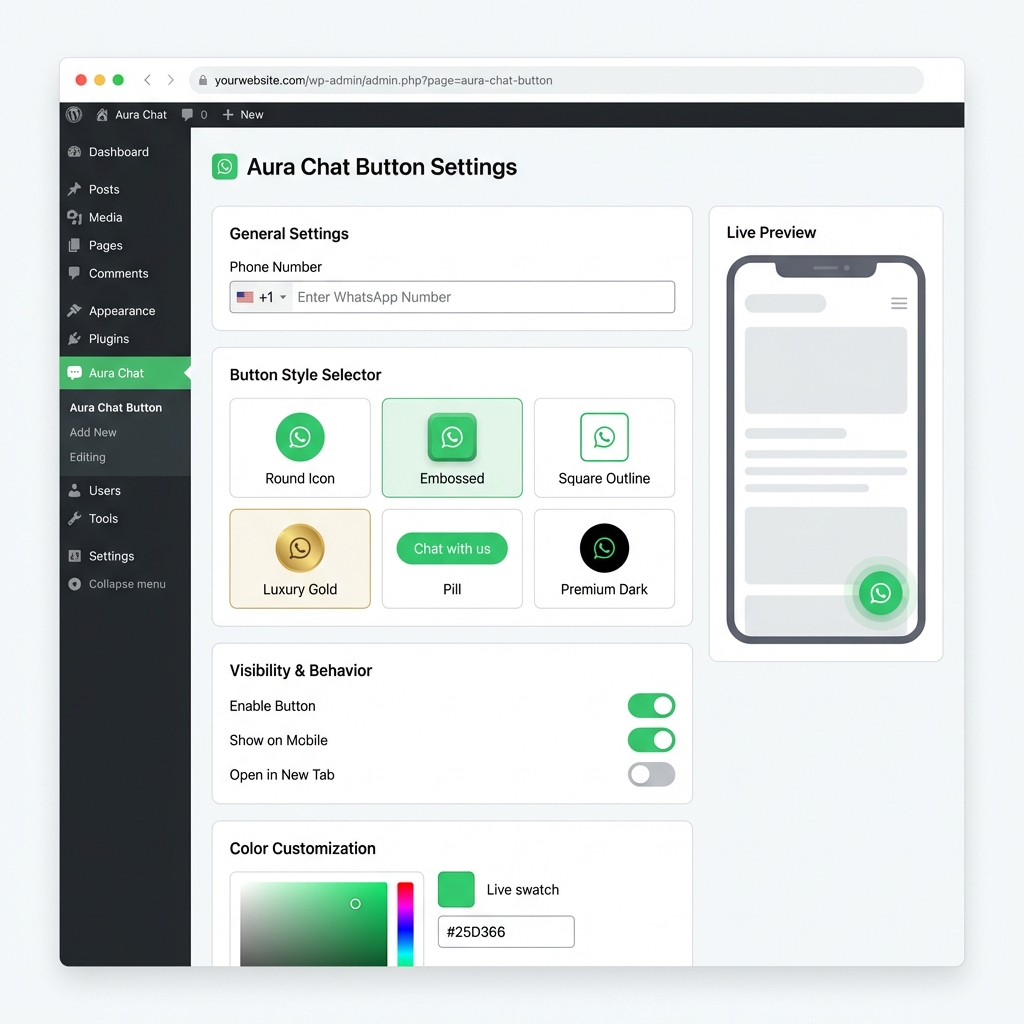
Dashboard Overview - Configure your WhatsApp Support and Click to Chat settings easily.

WooCommerce Triggers - Best-in-class WhatsApp Chat for WooCommerce logic and page settings.

Analytics Tracking - Monitor your WhatsApp conversion statistics and traffic ROI.
Faq
Absolutely! Aura Chat offers the deepest WooCommerce integration, allowing you to track conversions and share product details directly in the WhatsApp Chat window, making it the best WhatsApp Support tool for stores.
Image size is a critical factor for mobile speed and Google SEO. By using TinyPNG logic, we reduced the size of our WhatsApp Widget assets by 80%, ensuring your site stays fast and ranks higher.
Yes! Aura Chat generates a professional Click to Chat link that works seamlessly with both personal accounts and the official WhatsApp Business application.
Evet! Aura Chat, Türkiye’deki mağazalar için en gelişmiş WhatsApp Destek aracıdır. “WhatsApp Destek Hattı” olarak kullanıldığında müşteri memnuniyetini ve satışları artırır.
Our WhatsApp Widget is fully responsive. You can set a unique vertical and horizontal offset for mobile devices to avoid blocking any “Checkout” or “Chat” UI buttons.
Yes, you can easily change numbers or route users to different agents for efficient WhatsApp Support management.
Yes, it automatically detects the user’s device to open the WhatsApp App on mobile or WhatsApp Web on tablets and desktops.
Reviews
👉 Great WhatsApp Customer Support Plugin for WordPress
By 
This WordPress WhatsApp chat plugin is simple, lightweight, and easy to use. Setup was quick, and the WhatsApp support chat worked perfectly on both desktop and mobile. A solid choice for adding WhatsApp customer support to any WordPress website.
Best WhatsApp Support Plugin I’ve Ever Used
By 
This plugin is simply amazing. It’s incredibly easy to use, packed with features, and more reliable than any premium alternatives I’ve tried. Everything works perfectly out of the box, and it makes managing WhatsApp support effortless. Truly a game-changer—I can’t recommend it enough.
Clean, Lightweight and Easy to Use WhatsApp Chat Plugin
By 
Changelog
1.1.2
- UPDATED: Verified compatibility with WordPress 6.9.1.
- IMPROVED: Overall stability and performance enhancements.
1.1.1
- NEW: Hyper-optimized directory title for maximum search visibility.
- FIXED: Removed growth and bounce animation from Style 5 for a cleaner UI.
- UPDATED: Refined SEO structure for WooCommerce support keywords.
1.1.0
- NEW: Complete Hyper-SEO optimization for all fields.
- NEW: Enhanced WhatsApp Support (WhatsApp Destek) descriptions.
- UPDATED: Refined metadata for better WooCommerce Chat integration.
- UPDATED: Improved TinyPNG-level asset loading performance.
1.0.9
- NEW: TinyPNG logic for advanced asset compression and faster loading.
- UPDATED: Better WhatsApp Chat accessibility markers for mobile devices.
- UPDATED: Optimized WhatsApp Support mobile positioning engine.
- FIX: Enhanced Click to Chat link stability for international number formats.
1.0.8
- NEW: Custom Avatar support for personalized WhatsApp Support agents.
- NEW: Live preview for WhatsApp Click to Chat button color customization.
- UPDATED: SEO-optimized WhatsApp Chat for WooCommerce metadata structures.
1.0.7
- NEW: Expert translations for 110+ WhatsApp Chat languages.
- UPDATED: Performance improvements for the WhatsApp Widget front-end script for better SEO.