Auto Cloudinary

Auto Cloudinary
Description
Check out the Github Repository ♥
This plugin provides a super simple Cloudinary auto-upload implementation for WordPress.
It is inspired by Photon and Tachyon.
Cloudinary will automatically fetch and serve the images from your media library like a CDN, without you having to worry about the complicated upload API! Just set up auto-upload in your Cloudinary settings, enter the details in the plugin’s options, and you’re all set!
Easy peasy 😎
Important
This plugin is incompatible with the official Cloudinary plugin. You’d need to disable that plugin before using this one.
Quick Links
Setup | Issues | Functions | Filters | Best Practices
Why did you build this plugin?
There already is an official Cloudinary plugin available. But in my opinion, it’s a bit of an overkill and takes over the admin UI. This plugin aims to be:
- Super simple and light-weight
- Totally seamless and out of the way
- A flexible tool for WordPress developers
What is Cloudinary Auto-Upload?
Cloudinary gives you two options to upload files to it’s servers:
- The complicated Upload API 😱
- The super easy and magical Fetch API 🎩
Upload API
TL;DR: Too complicated and in the way 👎
Cloudinary gives you an API, using which, you can manually upload the images to Cloudinary. So you’d need an API key, etc. The official plugin uses this method. When you upload an image to the media library, it in turn, uploads it to Cloudinary. This could be a problem if you have thousands of existing images, and might not be flexible enough to support custom architecture.
Fetch API
TL;DR: Magical 👍
This plugin uses the super easy Auto-Upload feature in the Fetch API. We just tell Cloudinary where to find the files on our server (or on S3 or anywhere on the Internet), and it automatically downloads it from there and saves it on to it’s servers the first time you ask for it, like a CDN would!
What does this plugin do?
This plugin does two main things:
- Provides a simple function
cloudinary_url()to get a Cloudinary auto-upload URL for any image in your media library, with all the Cloudinary transformations, so you can dynamically manipulate an image on the fly. - Attempts to automatically convert all image URLs on the front-end into a Cloudinary auto-upload URL, so you can use Cloudinary as an image CDN.
The magical function 🎩
cloudinary_url( $identifier, $args )
This function returns a Cloudinary Auto Upload URL for an image. Please read the Best Practices page before using this.
Parameters
- identifier (integer/string)(required) : Either the ID of the attachment, or a full image URL.
- args (array)(optional) : Arguments to manipulate the image.
Return Value
Returns a URL (string):
'https://res.cloudinary.com/cloud-name/auto-mapping-folder/2017/12/your-image.jpg'
Arguments
You can optionally send an array of arguments which can transform the image, and set a dynamic file name. Ex:
array(
    'transform' => array( // Optional. All transformations go here.
        'width'   => 300,
        'height'  => 200,
        'crop'    => 'fill',
        'quality' => '80',
        'gravity' => 'face',
    ),
    'file_name' => 'whatever-file-name-you-want', // Optional. If you want to use a dynamic file name for SEO. Don't use the file extension!
);
Here’s a full list of transformations you can achieve with Cloudinary.
Examples
<?php
$url_1 = cloudinary_url( 123, array(
    'transform' => array(
        'width'   => 300,
        'height'  => 200,
        'crop'    => 'fill',
        'quality' => '80',
        'gravity' => 'face',
    ),
    'file_name' => 'dynamic-file-name',
) );

$url_2 = cloudinary_url( 'https://www.yourwebsite.com/wp-content/uploads/2017/12/my-image.jpg', array(
    'transform' => array(
        'width'   => 100,
        'height'  => 100,
    ),
) );

// $url_1 : https://res.cloudinary.com/cloud-name/images/w_300,h_200,c_fill,q_80,g_face/auto-mapping-folder/2017/12/my-image/dynamic-file-name.jpg
// $url_2 : https://res.cloudinary.com/cloud-name/w_100,h_100/auto-mapping-folder/2017/12/my-image.jpg
?>

<img src="<?php echo esc_url( $url_1 ); ?>" width="300" height="200" alt="">
<img src="<?php echo esc_url( $url_2 ); ?>" width="100" height="100" alt="">
Installation
Upload ‘auto-cloudinary’ to the ‘/wp-content/plugins/’ directory.
Activate the plugin through the ‘Plugins’ menu in WordPress.
Screenshots
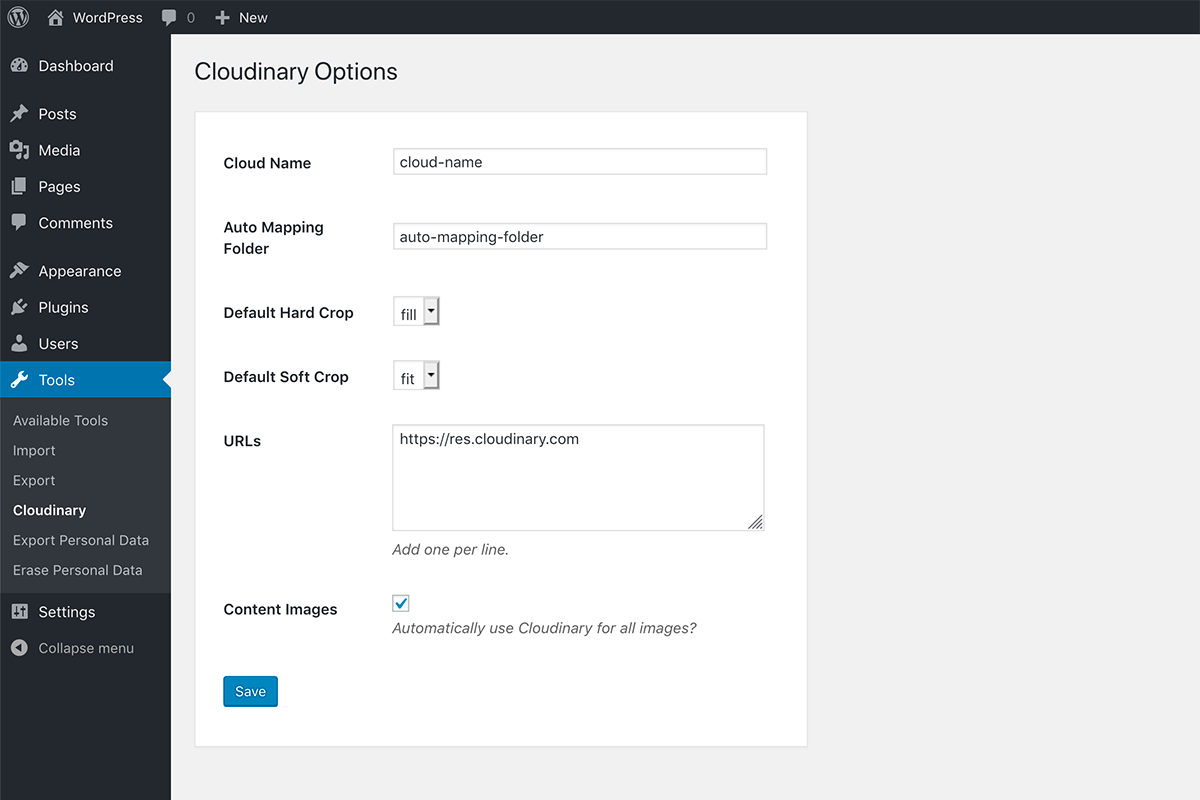
WordPress Options
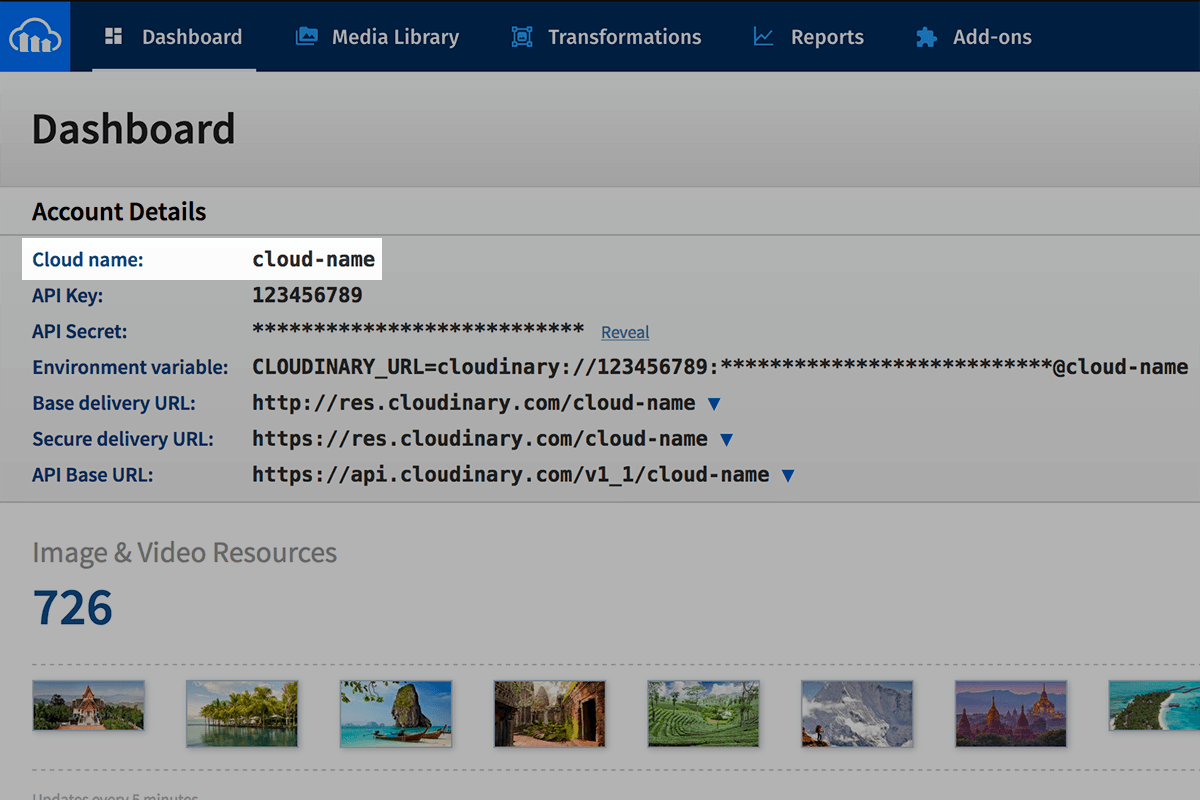
Cloudinary Cloud Name
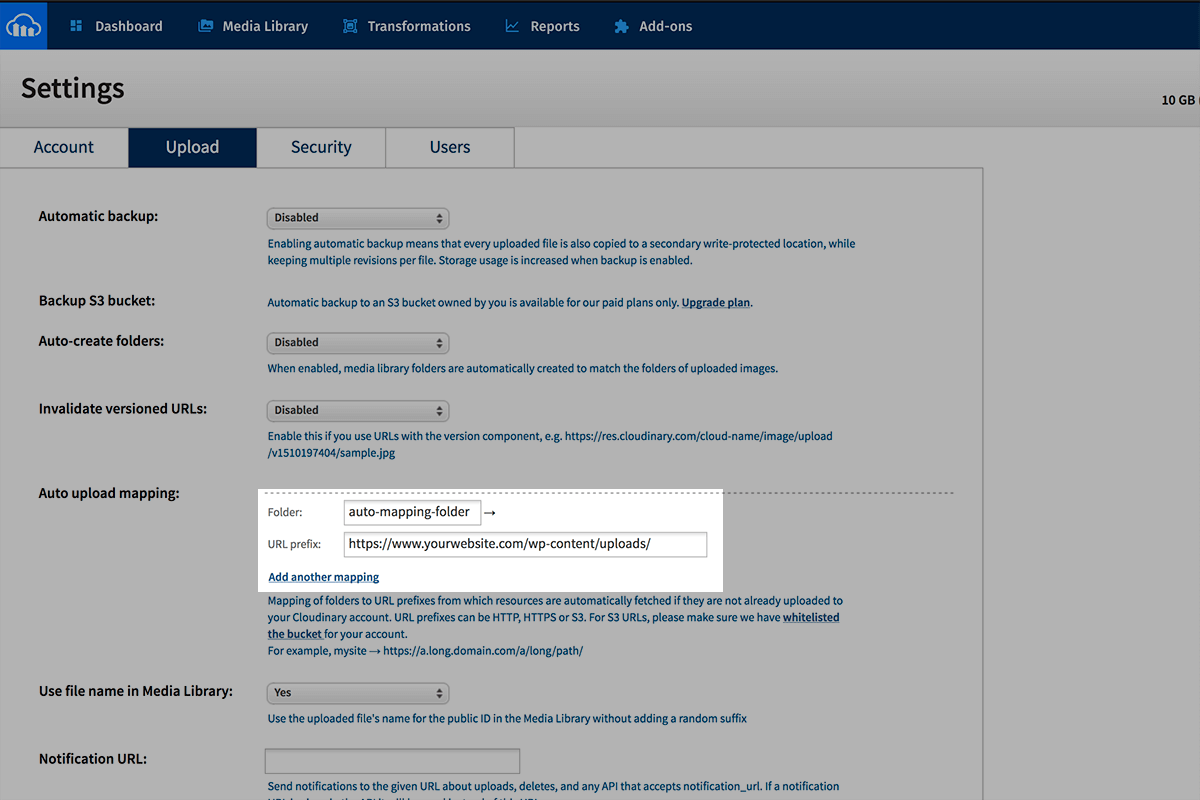
Cloudinary Auto Upload Setup
Reviews
Amazing for Automatically Optimizing Images
By 
Auto Cloudinary has been an incredible tool for automatically optimizing and delivering my images quickly and efficiently on my WordPress site. Since I installed it, it’s not only handled the automatic compression but also improved my page loading speed by delivering images via Cloudinary.
The setup is pretty straightforward, and the plugin integrates seamlessly with my workflow. I love that it automatically handles all image transformations, saving me time and effort. Plus, the image quality remains intact, which is crucial for the visual design of my site.
If you need to optimize images and boost your site’s performance without any hassle, this plugin is an excellent choice.
----------------------------------------------------
Spanish
Auto Cloudinary ha sido una herramienta increíble para optimizar y entregar mis imágenes de manera rápida y eficiente en mi sitio de WordPress. Desde que lo instalé, no solo se ha encargado de la compresión automática, sino que también ha mejorado la velocidad de carga de mi página al entregar las imágenes a través de Cloudinary.
La configuración es bastante sencilla, y el plugin se integra perfectamente con mi flujo de trabajo. Me encanta que el plugin maneje todas las transformaciones de imágenes automáticamente, ahorrándome tiempo y esfuerzo. Además, la calidad de las imágenes se mantiene intacta, lo que es crucial para el diseño visual de mi sitio.
Si necesitas optimizar imágenes y mejorar el rendimiento de tu web sin complicarte, este plugin es una excelente opción.
Insta-crashed my site
By 
Great plugin for developers.
By 
Cheaper than Imgix
By 
(free) Image Optimization & CDN in 10 Minutes
By 
Could not get it to work. 🙁
By 
Breaks my website
By 
Exactly what I needed
By 
Effortless to set up
By 
that is exactly how a plugin should be
By 
Changelog
1.3.0
- Better handling of soft crops #41
1.2.3
- Fixed missing admin settings page #32
1.2.2
- Re-opened and fixed “Fix images sizes in block editor” #25
1.2.1
- Fix images sizes in block editor #25
1.2.0
- Turn off Cloudinary URLs for REST API calls #18
- Added progressive image loading parameter #20
- Full release details: https://github.com/junaidbhura/auto-cloudinary/releases/tag/1.2.0
1.1.1
- Better AJAX support #13
1.1.0
- Added default crop options to the WP Admin #10
- Full release details: https://github.com/junaidbhura/auto-cloudinary/releases/tag/1.1.0
1.0.3
- New filters for default hard and soft crops #2. Props @petersplugins
- Performance improvements
- Full release details: https://github.com/junaidbhura/auto-cloudinary/releases/tag/1.0.3
1.0.2
- Remove empty width and height from URL #1
1.0.1
- Add default crop to replaced content images.
1.0.0
- First stable release.