Autocomplete Location field Contact Form 7

Autocomplete Location field Contact Form 7
Description
Autocomplete Location field Contact Form 7 provide to text field in automatically suggestion of location. that location get by google location in contact form 7.
For you using this you need to setup google api key in setting that is simple setting
Pro Version | Support | Google Place Key Documentation
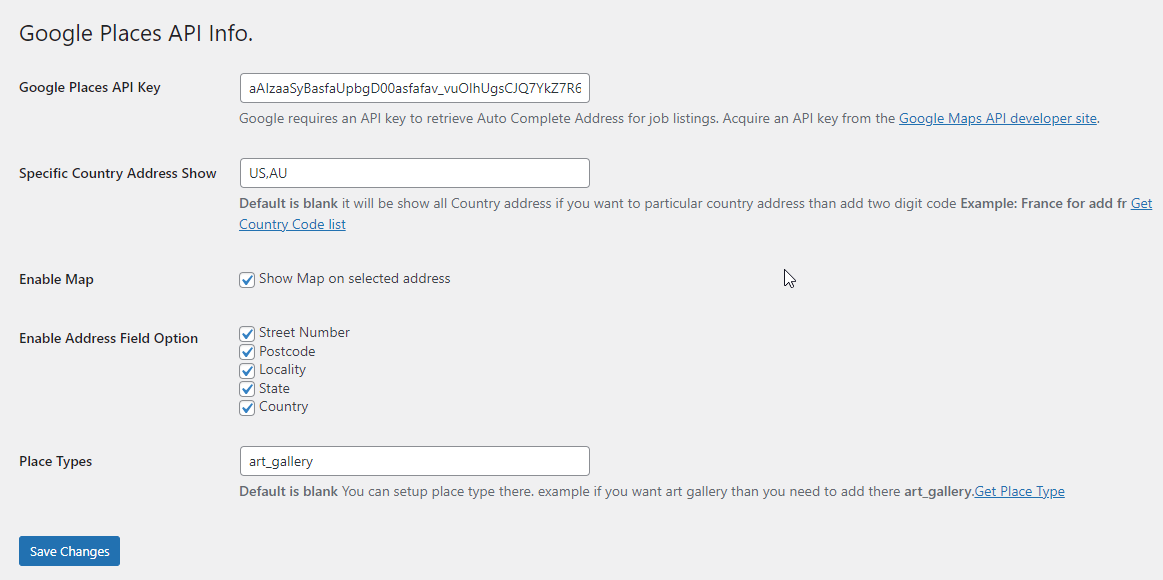
Go to admin Contact >> Google Place API there is text field that field in you need to add key you can be get api key from google location
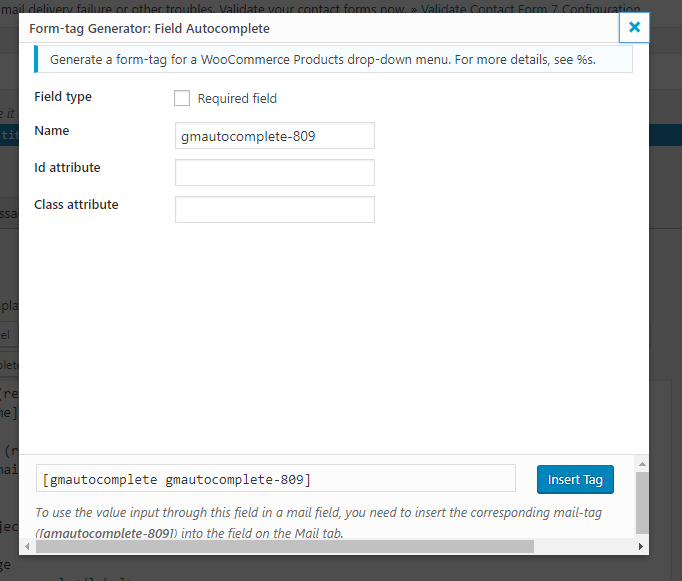
For adding Autocomplete field in contact form 7 in contact form 7 there will be show tag Field Autocomplete.
Features
- Auto Complete Google Address
- Specific Country Address Show (US,AU) Pro
- Enable Map Pro
- Enable Address Field Option – Street Number,Postcode,Locality,State,Country Pro
- Place Types (art_gallery) Pro
- Translation PlaceholderPro
Our More Plugins
Date Picker for Gravity Form plugin allows users to select dates easily, improving form usability and accuracy.
Pixel Manager for Contact Form 7 This plugin integrates seamlessly, allowing you to add tracking pixels to your forms for precise analytics.
Map Field For Contact Form 7 Users can select locations easily, enhancing user engagement and data accuracy.
Digital Signature for Wpforms allowing users to sign forms electronically. This plugin ensures secure and legally binding signatures, improving the professionalism of your forms.
Autocomplete Location field Contact Form 7 This plugin allows users to easily search and select locations, improving user experience and accuracy.
Date Picker For Contact Form 7 It simplifies date selection, enhancing user experience and ensuring accurate submissions.
Screenshots

Faq
- Open the browser’s Inspect Element tool, go to the Console tab, and check for any error messages.
- Go to Contact >> Google Place API in the WordPress admin panel.
- Enter your Google API Key in the provided field.
- You can generate an API Key from Google’s official documentation.
- Open your Contact Form 7 form editor.
- Click on Field Autocomplete to insert the location field.
- Save the form and add it to your page using the shortcode.
Yes, but this feature is available in the Pro version. You can restrict address suggestions to specific countries like US, AU, etc.
Yes, Google Maps can be enabled in the Pro version, allowing users to view selected locations on a map.
For support, visit our support page.
Reviews
Great plugin, does the job!
By 
The developper was very helpful and quick adding a function.
Amazing - Thank You!
By 
This plugin is AMAZING, thank you for creating it 🙂
The only thing is that it doesn't work with conditional fields, but it's totally fine!
Great Support with plugin
By 
It was really a great experience with plugin support. The plugin feature also very good. Highly recommended!
Great plugin, does what it says it will!
By 
I used the free version for a little while, and decided to upgrade to premium for the additional functionality. It was also easy to code up a little modification of my own to further customise it. Great plugin!
good support
By 
Good post sales support
Awesome PlugIn and support is outstanding.
By 
I would 100% recommend this plugin, It does exactly what I need it to do and other custom features that I specifically needed they added it in a matter of hours thanks to their awesome customer support. Thanks a lot!
Good plugin, Great support
By 
Good plugin, Great support
powerful plugin that meets the need
By 
Great support also
Great Support
By 
Recommend this author! Very quickly to help out and in case you need customization he can also do it fast.
Get the PRO version
By 
The developer was very helpful with my questions, and I am happy to use PRO version. Worth it ! Only one thing to note : address input has to start with address number, not street.