AutoROICalc for WooCommerce

AutoROICalc for WooCommerce
Description
AutoROICalc for WooCommerce sends consent-aware customer journey events and authoritative paid order-performance records from WooCommerce to AutoROICalc. A guided setup can create an account or securely connect an existing account without exposing your service token to store visitors.
General WordPress interaction tracking and WordPress Dashboard report widgets are available separately through the AutoROICalc Event Tracking plugin.
WooCommerce customer journey
Optionally create configurable count records for:
- Product views
- Successful or submitted add-to-cart actions
- Checkout starts
Each event can be enabled independently and has its own record type, description, tags, and debounce window. Event-specific tags extend the global WooCommerce record tags. Journey events use the plugin’s captured, fixed, or combined source strategy. Their runtime consent category can be set to Analytics, Marketing, or no runtime gate when consent is managed through another lawful site-level process. Administrator and store-manager journey activity is excluded by default and can be enabled for deliberate testing.
Optional journey product breakdowns identify the product viewed, the validated product involved in an add-to-cart action, and all products currently present when the basket or checkout is tracked. Product names, IDs, variation IDs, SKUs, and quantities are resolved by WooCommerce on the server rather than trusted from visitor-supplied descriptive data.
Paid purchases are intentionally not inferred from the browser thank-you page. They are reported by the reliable server-side order flow described below.
WooCommerce order performance
For each eligible paid order, the plugin can create:
- A configurable paid-order count record.
- A configurable turnover record based on order total, product net sales, or operating net revenue.
- A configurable profit record when a product cost-of-goods field is selected.
- Refund records and matching negative adjustments.
Record types and descriptions can be adapted to an existing AutoROICalc reporting model. Global tags and metric-specific tags make records easier to filter and group.
Order reporting runs asynchronously after payment or after the order reaches Processing or Completed status. Per-record delivery markers prevent normal WooCommerce payment, webhook, and status retries from creating duplicate records.
The returned AutoROICalc record IDs are stored in private WooCommerce order metadata. When WooCommerce creates a refund, the plugin preserves the original sale and sends source-attributed negative revenue and profit adjustments. Partial refunds do not change the order count; the refund that fully refunds an order sends a -1 transaction adjustment. Each refund also creates a refund-count record and stores its returned AutoROICalc IDs on the WooCommerce refund.
Profit and product breakdowns
Profit can use the final order total, product net sales, or product net sales plus fees and shipping as its revenue basis. The selected per-unit cost of goods is then deducted. Product variations use their own cost value when present and otherwise fall back to the parent product.
The settings screen discovers existing product and variation metadata across the catalog and presents available fields in a searchable selection list. Select the field containing the numeric per-unit cost. If a product cost is missing, choose whether to skip profit, treat the missing cost as zero, or send a visibly marked partial calculation.
Structured product breakdowns with quantity, revenue, cost, profit, product ID, and SKU can be included for up to 50 order items. Raw non-customer order context and product breakdowns can be enabled independently.
On multilingual stores, an optional page-language breakdown identifies the WPML language displayed for journey events and at checkout. The checkout language is stored on the WooCommerce order so delayed order reporting and later refunds keep the original purchase language. Sites without WPML can use the WordPress locale instead.
Marketing source attribution
The bundled AutoROICalc runtime derives familiar source / medium values from UTM parameters and referrer information. Examples include (direct) / (none), google / organic, google / cpc, and example.com / referral.
Captured sources are attached to the WooCommerce order before server-side reporting. Records can use captured values, administrator-defined fixed sources, or both, with a configurable fallback. AutoROICalc attribution is independent from Google Analytics and does not connect to or read a Google Analytics account.
Consent
Consent category offers Analytics, Marketing and No runtime consent gate for journey events. No runtime consent gate skips that event’s consent check; it does not make tracking anonymous. Browser storage, attribution and product/cart event details may still be used. WooCommerce journey tracking does not offer anonymous event counting. The separate AutoROICalc Event Tracking plugin provides an Anonymous event counting mode for supported page elements.
In required consent mode, captured checkout attribution still requires Analytics even when journey events use No runtime consent gate. Version 1.5.0 gated source-cookie writing in the browser, but trusted existing source cookies on the server. Version 1.5.1 added the server-side check. Consent mode’s Consent is managed by the site option explicitly bypasses internal consent checks without making tracking anonymous. Fixed sources configured by the administrator are separate from captured visitor attribution.
The default consent mode waits for an explicit analytics consent signal before storing captured attribution in the arc_sources cookie:
window.AutoRoiCalc.setConsent( {
    analytics: true,
    marketing: false
} );
A consent manager can also dispatch an autoroicalc:consent browser event with the same values. Both interfaces immediately refresh WooCommerce tracking. Withdrawing analytics consent removes the checkout attribution cookie; withdrawing all categories used by this plugin also clears stored sources and their capture timeout. A later grant can capture sources immediately. Choose “Consent is managed by the site” only when the site establishes an appropriate consent or other lawful basis before attribution runs.
In required mode, checkout attaches captured sources only when the arc_consent cookie grants analytics consent. Missing, denied or malformed consent clears previously captured attribution on the order being updated. Journey requests require their configured Analytics or Marketing category before any record is created. A signed event configuration alone does not establish consent. Explicit site-managed and no-runtime-gate settings retain their existing override behavior. Paid-order and refund reporting remain separate server-side flows.
External service and transmitted data
An AutoROICalc account and service token are required. WordPress sends records server-to-server to the configured AutoROICalc API endpoint.
The optional guided setup communicates directly with the same AutoROICalc service. When connecting an existing account, the entered email or username and password are sent to AutoROICalc for authentication; the password is not stored by WordPress. The plugin uses the temporary login session to create a scoped service token for this installation and then ends that session. When creating a new account, the entered email, optional username, password, selected language, and Terms acceptance are sent to AutoROICalc for registration.
Depending on configuration, transmitted journey, order, and refund data can include the event type, page path, displayed language and locale, product name, product ID, SKU, quantity, order and refund IDs, order number, status, currency, item count, payment method identifier, order and refund values, calculated cost and profit adjustments, tags, and captured marketing sources.
Customer names, email addresses, postal addresses, payment details, customer notes, and checkout form contents are not transmitted.
- AutoROICalc: https://autoroicalc.com/
- Record API documentation: https://autoroicalc.com/docs/records/api/
- Terms of Service: https://autoroicalc.com/terms-of-service/
- Privacy Policy: https://autoroicalc.com/privacy-policy/
Installation
- Install and activate WooCommerce.
- Install AutoROICalc for WooCommerce through Plugins -> Add New Plugin, or upload the plugin folder to
/wp-content/plugins/. - Activate AutoROICalc for WooCommerce and follow the guided setup under WooCommerce -> AutoROICalc.
- Connect an existing AutoROICalc account or create one from the setup screen.
- Open WooCommerce -> Settings -> AutoROICalc and choose the records, value bases, sources, and tags to use.
- If profit is enabled, select the product or variation field containing per-unit cost of goods.
- Configure attribution consent and optional structured-data behavior.
The service token can instead be defined in wp-config.php:
define( 'AUTOROICALC_SERVICE_TOKEN', 'your-service-token' );
Developers can point a test installation at a local or staging API:
define( 'AUTOROICALC_API_BASE_URL', 'http://localhost:8000' );
When AUTOROICALC_SERVICE_TOKEN is defined, the token field is disabled in WooCommerce settings and the token remains outside the WordPress database.
Screenshots
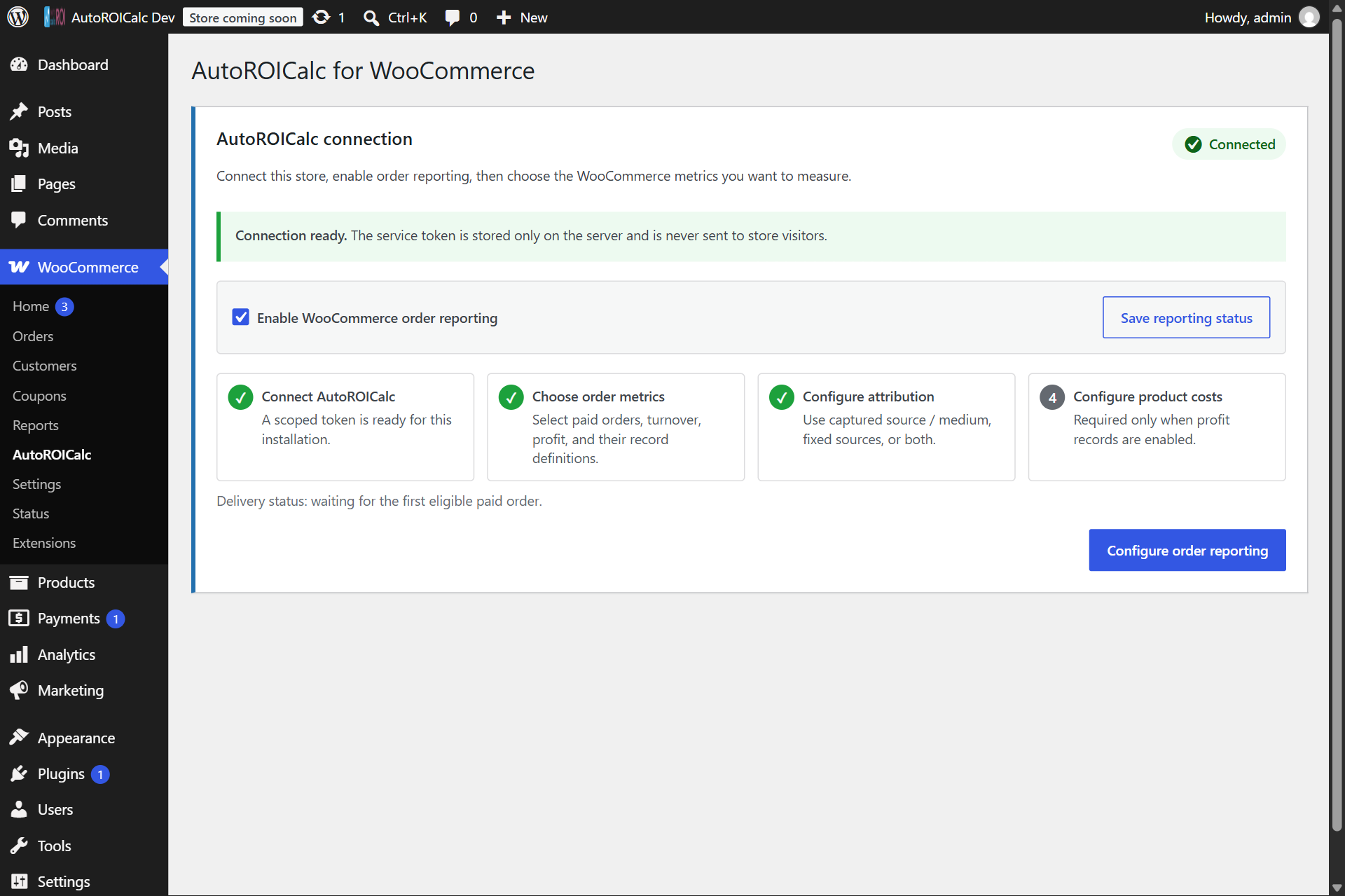
Connect an existing AutoROICalc account or create an account from the guided WooCommerce setup screen.
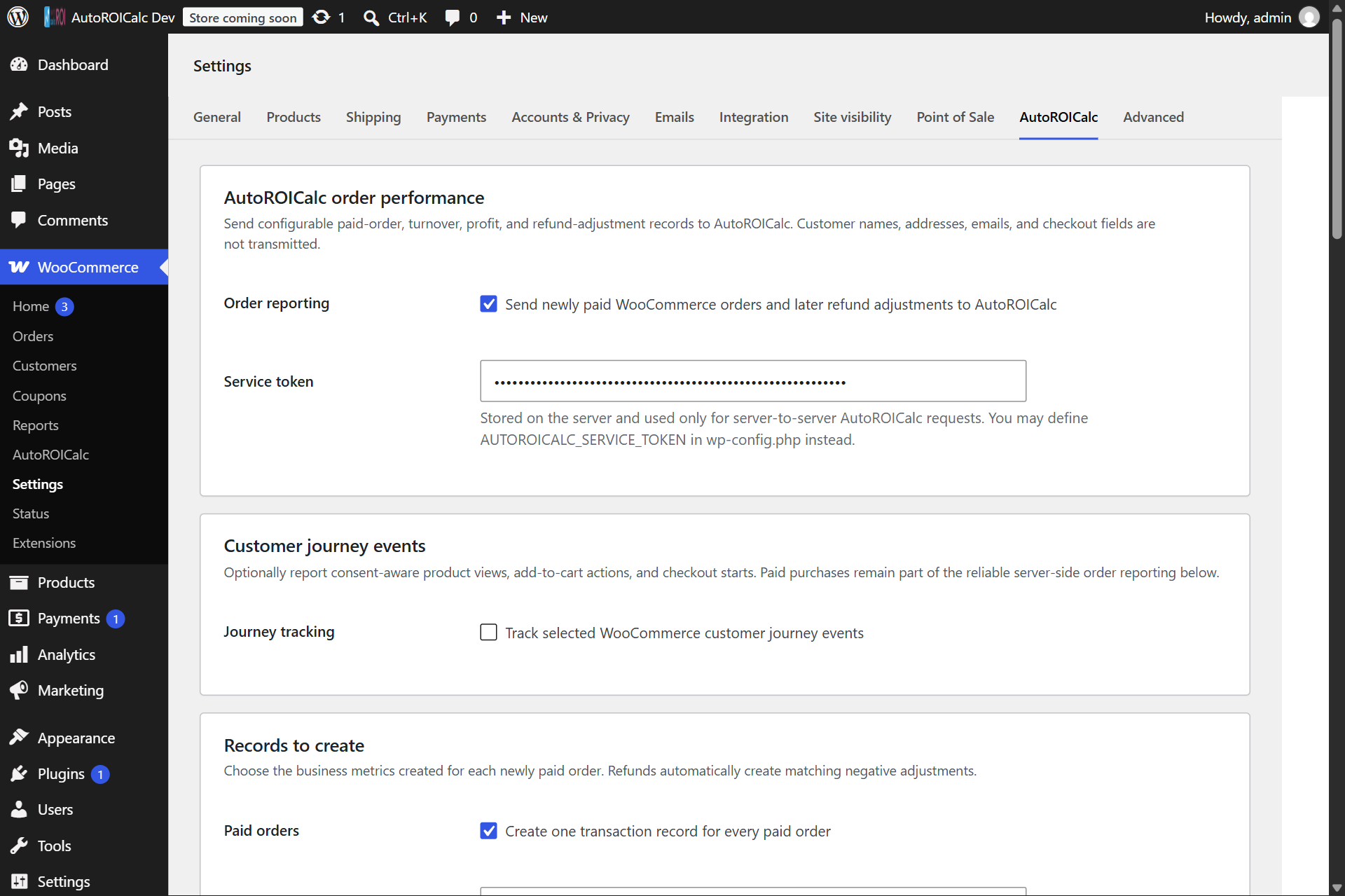
Configure order-performance reporting and optional customer-journey events.
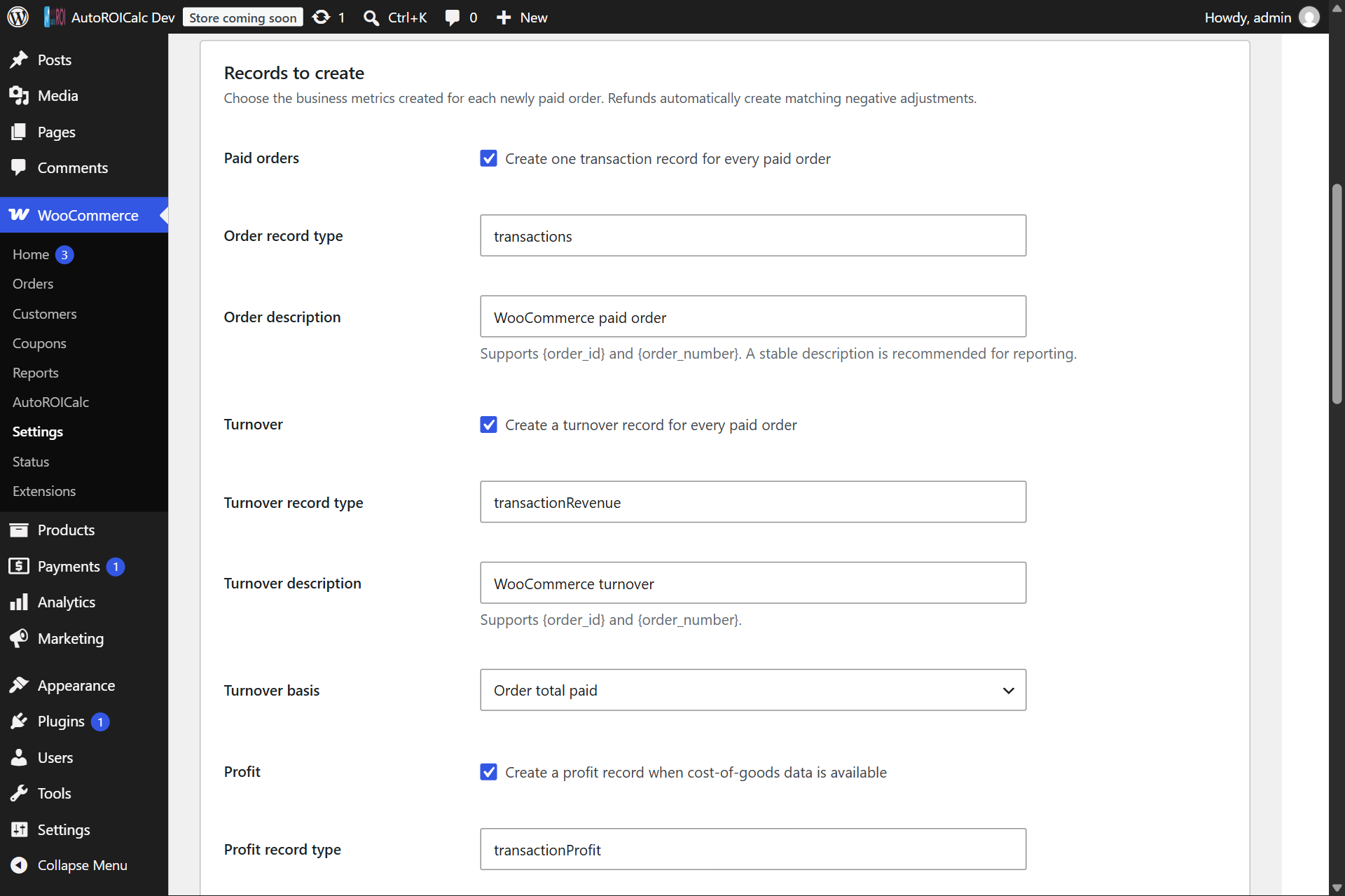
Choose the paid-order, turnover, profit, refund, value-basis, and cost-of-goods settings used to create records.
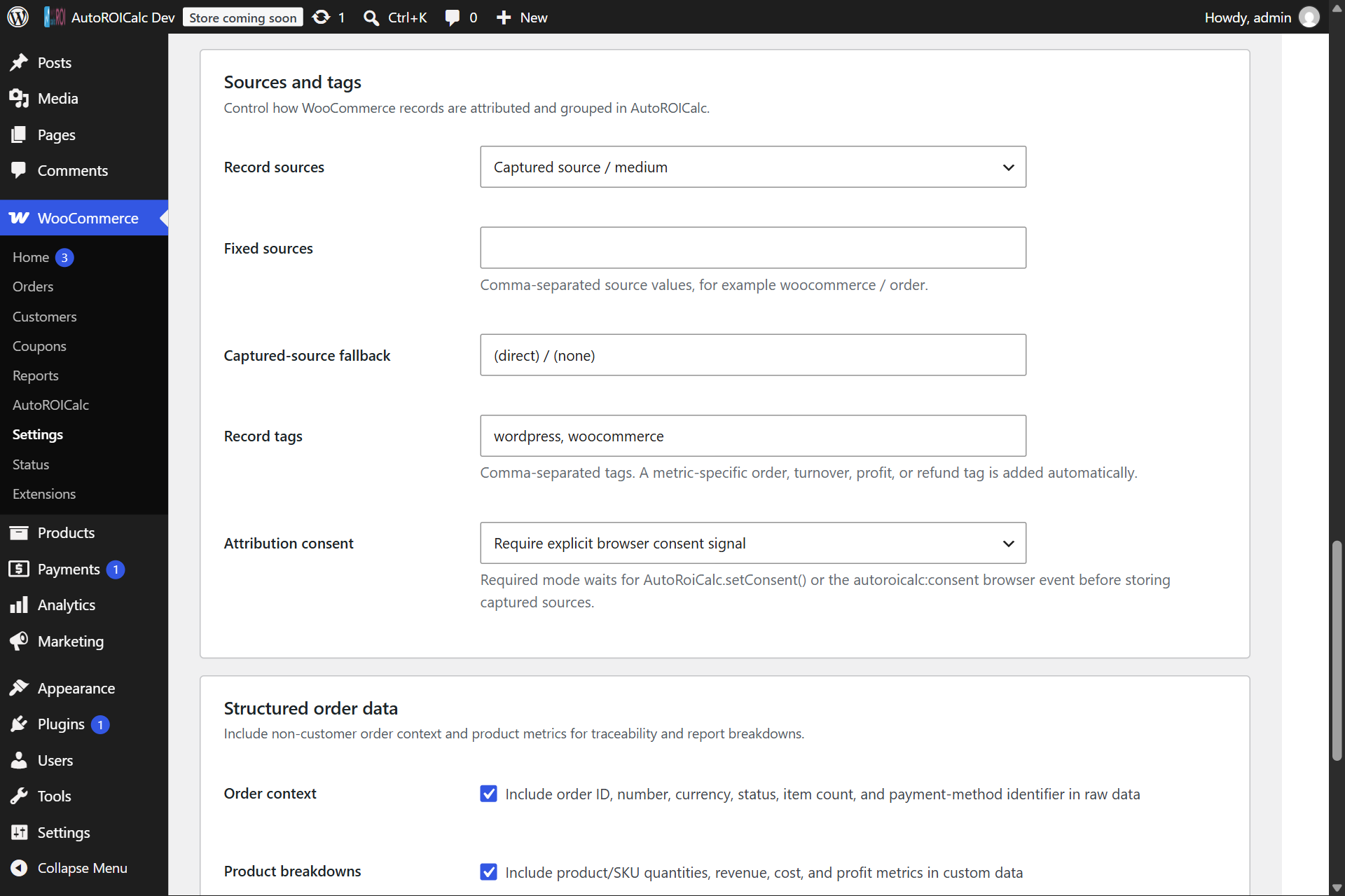
Configure marketing sources, record tags, raw order context, and structured product breakdowns.
Faq
After WooCommerce confirms payment, or when an order reaches Processing or Completed status. Creating a checkout order by itself does not send revenue.
Product views, add-to-cart actions, and checkout starts can be enabled independently. Each event supports a configurable record type, description, tags, and debounce window. Optional product breakdowns provide product and quantity context from the product page or current WooCommerce cart. Purchases are handled by the paid-order reporting flow instead of a browser event.
The plugin keeps returned AutoROICalc record IDs and per-record delivery markers on the WooCommerce order or refund. Normal payment callbacks, webhooks, status transitions, and refund retries therefore do not resend records that were already accepted.
The original sale remains unchanged for auditability. Each WooCommerce refund creates negative revenue and optional profit adjustments attributed to the original marketing sources, plus a refund-count record. A partial refund keeps the original transaction count; the refund that fully refunds the order reverses the count with a -1 transaction adjustment. Returned product quantities reverse their configured cost of goods in the profit adjustment.
The plugin retries asynchronous delivery up to three times. It records a concise final order note after repeated failure and writes technical details to the WooCommerce log with the source autoroicalc-for-woocommerce.
Profit is discounted line revenue plus fee and shipping income, minus the configured per-unit cost of goods. Tax is excluded. If no cost meta key is configured, the plugin sends revenue and order count but does not send a profit record.
Yes. It checks the variation for the configured cost meta key first and falls back to the parent product when the variation has no value.
When attribution consent is available, it uses the arc_sources cookie to make captured source information available to WooCommerce during checkout. Journey-event debounce state is kept in browser session storage. The source cookie is removed when an explicit denied consent event is received.
No. Customer names, email addresses, postal addresses, payment details, customer notes, and checkout form values are not sent.
Install AutoROICalc Event Tracking for authenticated WordPress Dashboard report widgets. This WooCommerce plugin remains focused on order-performance collection.
Yes. Product-view, add-to-cart, checkout-start, paid-order count, turnover, and profit records can be enabled independently. You can configure their record types, descriptions, global and event-specific tags, sources, debounce windows, value bases, raw order context, and structured product breakdowns. Customer identity and checkout form fields are not included.
Reviews
Changelog
1.5.2
- Standardized Consent category, Consent mode and No runtime consent gate labels with AutoROICalc Event Tracking.
- Explained that bypassing a runtime consent check does not make journey tracking anonymous.
- Clarified that required-mode checkout attribution needs Analytics consent independently of the journey consent category, including the server-side enforcement added in 1.5.1.
1.5.1
- Refresh WooCommerce tracking immediately after direct AutoRoiCalc.setConsent() calls as well as consent browser events, without duplicate page events.
- Remove checkout attribution on analytics withdrawal and clear stored sources and their timeout when all relevant consent is withdrawn, allowing immediate capture after a new grant.
- Require analytics consent when reading checkout source cookies and clear stale attribution from orders updated without that consent.
- Validate the configured journey consent category server-side before delivery, rate limiting or duplicate acknowledgement. Preserve explicit site-managed and no-runtime-gate overrides.
1.5.0
- Added an optional website-language breakdown for journey, order, turnover, profit, and refund records.
- Added WPML current-language detection with a WordPress locale fallback.
- Persisted the checkout language on WooCommerce orders so asynchronous reporting and refunds retain the original purchase language.
- Bound journey-event language data to the signed browser configuration while accepting legacy cached event signatures during upgrades.
1.4.0
- Added an enabled-by-default option to exclude administrator and store-manager journey activity.
- Added editable tags for product-view, add-to-cart, and checkout-start journey records.
- Added optional server-resolved product breakdowns for journey records.
- Added current basket and checkout product quantities, including variation context, to journey breakdowns.
- Added a validated add-to-cart product fallback for classic cart-update timing.
1.3.0
- Added guided setup for connecting an existing AutoROICalc account or creating a new account from WordPress.
- Added installation-scoped service-token creation and a WooCommerce onboarding checklist.
- Added configurable paid-order, turnover, profit, and refund record definitions.
- Added consent-aware product-view, add-to-cart, and checkout-start customer-journey tracking.
- Added order-total, product-net-sales, and operating-net value bases.
- Added a searchable catalog-wide selector for existing product and variation cost-of-goods metadata.
- Added explicit skip, zero-cost, and marked-partial policies for missing product costs.
- Added captured, fixed, and combined source strategies, fallback attribution, and configurable tags.
- Added independent raw order context and structured product breakdown controls.
- Added opt-in settings cleanup on uninstall.
1.2.0
- Moved reporting from checkout creation to asynchronous paid, Processing, or Completed order handling.
- Added per-record delivery state and bounded retries to avoid normal duplicate reporting.
- Stored returned AutoROICalc record IDs on WooCommerce orders and refunds.
- Added idempotent partial and full refund adjustments for revenue, profit, refund count, and fully refunded transaction count.
- Added shared
AUTOROICALC_SERVICE_TOKENandAUTOROICALC_API_BASE_URLconfiguration. - Moved service-token authentication from request URLs to the
X-Service-Tokenheader while preserving legacy API compatibility. - Added consent-aware source capture and compatibility with the AutoROICalc Event Tracking runtime.
- Improved profit calculation using discounted order line totals, fees, shipping, variation costs, and parent-product fallbacks.
- Added sanitized raw order context and structured product performance breakdowns.
- Added HPOS, Cart and Checkout Blocks, modern WordPress, and WooCommerce compatibility declarations.
- Updated settings, external-service disclosures, privacy documentation, and API links.
1.1.0
- Updated bundled AutoROICalc tracking module.
- Improved marketing source cookie decoding and sanitization.
- Fixed plugin deactivation hook registration.
- Improved frontend script dependency ordering.
1.0.1
- Updated API URL to V2.
1.0.0
- Initial version.