Avif Express
Avif Express
Description
On upload, images like jpg, png and WebP gets converted to avif format. Converted images get served on web pages.
Feature list
- Images get converted on upload.
- Bulk convert previously uploaded images.
- Schedule Bulk convert in the background.
- Bulk convert theme images.
- Local Conversion
- Cloud Conversion (Freemium)
- Serve Webpage with altered avif images.
- Fully CDN compatible.
- Backward compatibility – Browsers that don’t support Avif images will get Original images served on-the-fly.
- Native Language Support for German, Spanish, Russian, French, Hindi and Bengali.
Official documentation of Avif Express
For a more detailed description of options and features of Avif Express, please read the official documentation.
Installation
- Download and Unzip the file.
- Upload the plugin into the
wp-content/plugins/directory of your WordPress site. - Activate
Avif Expressfrom plugin page.
Screenshots
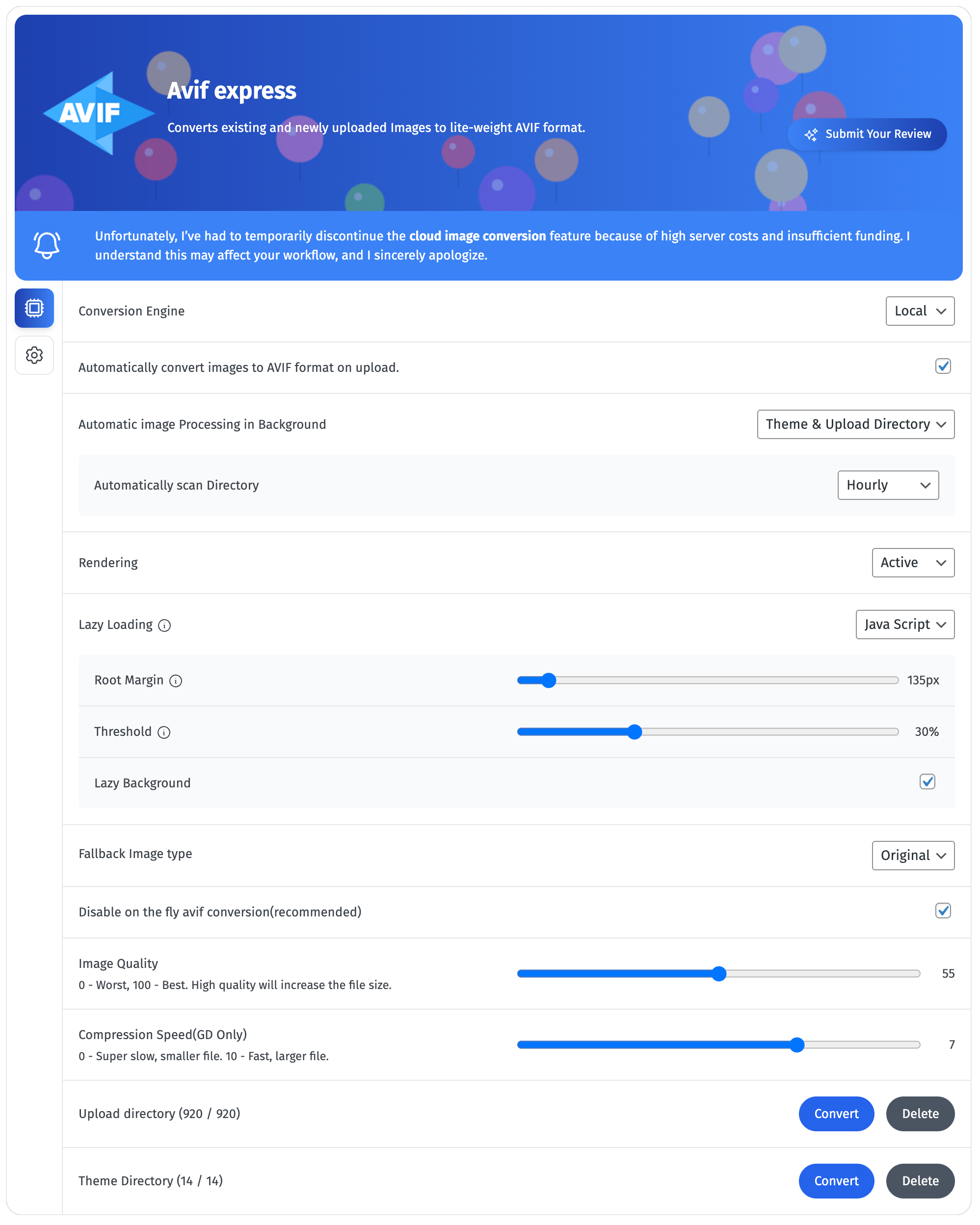
Setting Page
Faq
Quick documentation Avif express documentation
You can obtain API key from Avif Express API – discontinued.
Go to “Avif Express” on the left sidebar menu > On the “Avif express” page > Click on the generate button on “Upload directory” row.
Go to “Avif Express” on left sidebar menu > On the “Avif express” page > Click on the generate button on “Theme directory” row.
Go to “Avif Express” on left sidebar menu > On the “Avif express” page > Select the mode from the dropdown on “Rendering” row.
Reviews
Works as advertised
By 
Took a while to realise that you have to turn the rendering on first, though. 😀 Hardly the developer's fault. But you might want to make that particular setting a tad bigger maybe?
I especially appreciate the possibility for local conversion. Personally I have no need for the cloud option.
EDIT: Unfortunately it doesn't work with a static site generator – at least not with Staatic. Possibly related to the fact that it also doesn't show avif images if you're logged in as an admin. Most of the time this shouldn't be an issue, though.
Amazing Plugin
By 
I do recommend this plugin, it does what it offer
Good plugin
By 
Does it work with newest wordpress? Seems that it converts uploaded images but some images are still displayed in jpg format. Bug?
Update: it works and it serves avif and webp images but when I'm not logged in on my website. After signing in it displays images in jpg format
Works fine
By 
It works pretty fine. Needs some little improvement but overall it works ok.
Ajax error; internal 500
By 
The plugin did nothing. I got an ajax error:
POST mysite.nl/wp-admin/admin-ajax.php 500 (Internal Server Error)
Best plugin
By 
Thank you very much for the plugin, this is exactly what I was looking for for so long
crasht my site!
By 
I must backup now pfff
It works.
By 
It converted the images well, but it breaks the images that are in SVG. If you can fix that, it'll be perfect.
Changelog
29.08.2025
- Background Image processing
- Background Image Scanning for Image processing
- Image Lazy loading – Native, JavaScript, Background Lazy loading
- Bug fix: – false negative condition for local image conversion. Issue by David Degner.
01.12.05.2025
1.Improved background replacement logic.
2.Added image lazy-loading feature.
3.Bug fix: Fixed image replacement logic for images outside the upload directory.
02.08.2024
- Fixed background image replacement bug.
- Fixed Imagick version checking bug.
- Added file system permission check before writing.
- Enabled cloud conversion from localhost.
01.20.06.2024
- Removed aviflog(wrapper of monolog), due to php version issue.
19.06.2024
- Added cloud conversion for ease of use in case the server doesn’t support AVIF conversion.
- Added an option for a fallback image type (WebP/original) for older browsers/webviews.
- Added a cookie to notify the server whether to catch pages for browsers that don’t support AVIF. (Cookies: browser_avif_support_true, browser_avif_support_false)
- Implemented a logging system.
- Added system information to display local server capabilities to the end user.
- Added on-the-fly AVIF conversion if the server supports it.
28.06.2023
Feature:
1. Externally added webp images can be served via this plugin on browser that does not support avif image. note: Image fix name should be same as source.
Bugfix
1. If server is capable of generating webp and not avif, then this plugin will generate and serve webp images. In case server is not capable of generating webp and avif both, original image will get served in case no externally added webp image found.
2. Other small bug fixes.
02.05.11.2023
Bugfix: Image Magic class checking.
05.11.2023
Bugfix: Skipping SVG processing on rendering. Checking server capability to convert Avif even when rendering is off.
05.07.2023
Backward compatibility – Browsers that don’t support Avif images will get WebP images served on the fly.
Bugfix: Images that don’t belongs to the same domain no logger getting skipped.
03.20.2023
Added translation for German, Spanish, Russian, French, Hindi and Bengali, for backend Admin dash.
02.27.2023
Issue: Undefined Constant. Fixed. Pointed by [argument](https://wordpress.org/support/users/argument/,”Bug finder”).
02.26.2023
ImageMagick version checking. Version ‘7.0.25’ or above required.
Issue: Auto convert on upload was not working. Fixed : Typo in namespace.
02.25.2023
Issue: php 8.1 or 8.2 with GD with libavif support still creating 0 byte avif images. #Php_bug. Fixed with Imagick library.
02.23.2023
Issue: Migrated images with post type of attachment were not getting converted. Fixed.
Issue: php 8.1 or 8.2 with GD with libavif support still creating 0 byte avif images. Not fixed. #Php_bug
01.30.2023
Conflict with Autoptimize plugin fixed.
01.20.2023
Lowered the “Requires at least” wordpress version.
Updated Description on README.txt.
Code commenting.
Added php version checking, require at least 8.1, since imageavif() method only comes with php8.1 or later.
Added method checking for imageavif(), it prevent ajax error in case Php GD not having libavif. libavif is library required by GD to convert image to avif image.
Note: latest Plesk Obsidian(Version 18.0.49) with php 8.2 do not provide libavif to GD. No way around.
01.19.2023
Updated FAQ section on README.txt.
Added Additional file checking on frontend. If .avif file exist then only alter the image url.