IP Whitelist

IP Whitelist
Description
IP Whitelist lets administrators limit access to the WordPress dashboard and login page to a list of trusted IP addresses. Any visitor whose address is not on the list receives a 403 “Access Denied” response, which keeps brute-force bots and curious strangers away from /wp-admin and /wp-login.php without touching the public site.
Features
- Protects
/wp-adminand/wp-login.php; the login protection can be switched off separately. - Accepts single IPv4 and IPv6 addresses and CIDR ranges such as
203.0.113.0/24or2001:db8::/32. - Optional comments after
#on each line so you can label entries. - Shows the IP address WordPress sees for you, with a one-click “Add to list” button.
- Lock-out guard: the whitelist refuses to enable itself if your own address is not on the list.
- Choose where the visitor IP comes from: the connection address (default) or the
X-Forwarded-For,X-Real-IPorCF-Connecting-IPheader when the site runs behind a proxy, load balancer or Cloudflare. Headers are never trusted unless you select them. - Customisable access-denied message.
- Public site features keep working: AJAX (
admin-ajax.php), cron, WP-CLI, front-endadmin-post.phpsubmissions and password-protected post forms are not blocked. - Emergency bypass: define
AWESOFT_IP_WHITELIST_DISABLEinwp-config.phpto switch the whitelist off without database access. awesoft_ip_whitelist_allowedfilter for developers who need custom allow rules.- Removes all of its options when the plugin is deleted.
Installation
- Upload the
awesoft-ip-whitelistfolder to/wp-content/plugins/, or install it from the WordPress plugin directory. - Activate the plugin through the Plugins screen.
- Go to Settings IP Whitelist.
- Click Add to list next to your detected IP address (or type the addresses and ranges you want to allow, one per line).
- If your site is behind a proxy or CDN, pick the matching Visitor IP source.
- Tick Enable the IP whitelist and save.
Screenshots
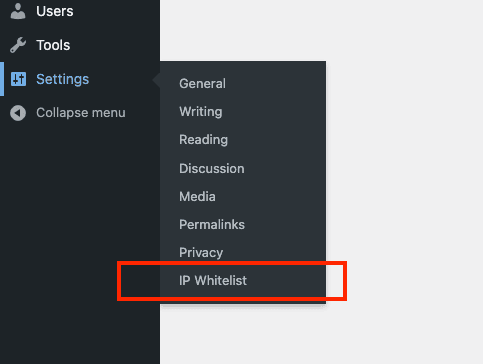
The IP Whitelist entry under the Settings menu.

The settings page with the detected IP address, allowed addresses and proxy header options.

What a blocked visitor sees when trying to open the admin area.
Faq
Add the following line to wp-config.php and the whitelist is bypassed immediately:
define( 'AWESOFT_IP_WHITELIST_DISABLE', true );
Then log in, fix the list, and remove the line again. Alternatively, delete the awesoft_ip_whitelist_enabled option from the wp_options table, or remove the plugin folder over FTP/SSH.
By default the plugin only trusts the connection address (REMOTE_ADDR), which is the proxy’s address in that setup. Choose the header your proxy sets under Visitor IP source: CF-Connecting-IP for Cloudflare, X-Forwarded-For for most load balancers, or X-Real-IP for Nginx. Only do this when a proxy really sits in front of the site, because visitors can forge these headers otherwise.
No. Only the admin screens and the login page are protected. admin-ajax.php, wp-cron.php, WP-CLI and front-end form submissions to admin-post.php are left alone so themes and plugins keep working for every visitor.
Yes. Use CIDR notation, for example 203.0.113.0/24 for an IPv4 range or 2001:db8::/32 for IPv6.
Use the awesoft_ip_whitelist_allowed filter. It receives the current decision, the visitor’s candidate IP addresses and the configured rules, and must return a boolean.
Reviews
Changelog
1.1.0
- New: IPv6 and CIDR range support.
- New: Selectable visitor IP source for sites behind a reverse proxy, load balancer or Cloudflare.
- New: Lock-out guard; the whitelist will not enable unless your current IP address matches the list.
- New: Current IP address panel with an “Add to list” button on the settings page.
- New: Option to turn login page protection on or off, and a customisable access-denied message.
- New:
AWESOFT_IP_WHITELIST_DISABLEemergency constant andawesoft_ip_whitelist_allowedfilter. - New: “Settings” link on the Plugins screen.
- Security: The
X-Forwarded-Forheader is no longer trusted by default; it could be forged to bypass the whitelist. - Fix: Invalid entries are no longer saved to the list.
- Fix: AJAX requests, cron and front-end
admin-post.phpsubmissions are no longer blocked for non-whitelisted visitors. - Fix: Login protection now uses the
login_initaction instead of theauthenticatefilter. - Options are removed when the plugin is deleted.
1.0.2
- Initial public release.