BBH Custom Schema – Add Custom JSON-LD to Your Website
BBH Custom Schema – Add Custom JSON-LD to Your Website
Description
BBH Custom Schema helps you add, manage, and control custom JSON-LD schema in WordPress — without the limitations, conflicts, or unnecessary bloat often caused by traditional SEO plugins.
Many SEO plugins automatically generate structured data, but they can restrict customization, create duplicate schema, or output markup you cannot fully control. This makes advanced schema management difficult for developers, agencies, and SEO professionals.
BBH Custom Schema gives you direct control over your structured data by allowing you to manually add and manage JSON-LD schema on individual posts and pages. You decide exactly what schema is output, how it is structured, and where it appears.
The plugin also helps manage multiple schema blocks, validate JSON formatting, and combine separate JSON-LD structures into a clean valid format — all directly inside the WordPress editor.
Built for developers, SEO professionals, freelancers, and advanced WordPress users who need flexible and precise schema implementation without unnecessary complexity.
Note: This plugin does not generate schema automatically. You must provide valid JSON-LD markup.
🎥 Fix schema issues and take full control of JSON-LD
👉 Watch full tutorial: https://youtu.be/vtijgX5JWr0
Key Features
- Full control over WordPress schema output without SEO plugin restrictions or lock-in
- Generate schema using two modes: Automatic Schema Engine and Manual Schema Builder
- AI-like automatic Article schema generation that analyzes post content and extracts structured data (title, author, date, headings, context) with a single click
- Built-in structured generators for FAQPage and LocalBusiness schema with guided input fields
- Fix duplicate and conflicting schema generated by SEO plugins like Rank Math or Yoast
- Add custom JSON-LD schema to any post, page, or supported post type
- Manage multiple schema types including Article, Product, FAQPage, LocalBusiness, Service, and more
- Combine multiple JSON-LD blocks into a single valid structure to avoid schema errors
- Works alongside existing SEO plugins without breaking compatibility
- Lightweight and performance-focused — outputs only the schema you define or generate
- Developer-friendly design built for SEO specialists, agencies, and WordPress power users
- Clean and minimal WordPress editor integration with flexible schema workflow control
Note: Validation only checks JSON format validity.
Plugin homepage:
https://jahidshah.com/plugins/bbh-custom-schema/
Our All Themes and Plugins
Themes
Plugins
- BridgeHub Security Insight
- BridgeHub Design Kit
- BBH SEO Toolkit
- BBH Custom Schema
- BBH Redirection
- AJ FAQ Block
- AJ Card Element
- AJ Square Testimonial Slider
- AJ Category Posts
- AJx Filter for WooCommerce
Usage
Automatic Schema (Article Only)
- Create or edit any post or page.
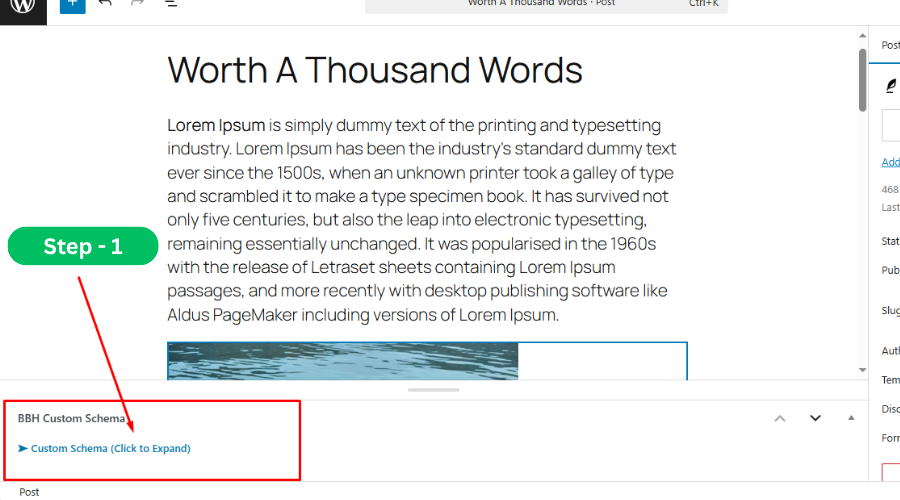
- Scroll down to the “BBH Custom Schema (Click to Expand)” section below the content editor.
- Click the arrow to expand the field.
- Enable “Automatic Schema Generator” option.
- (Optional) Add custom inputs if needed (e.g., override author, schema headline, or description). Otherwise, leave blank for auto-detection.
- Click “Generate Schema” — the system will automatically analyze your post content and create optimized Article schema (based on title, content structure, author, publish date, and headings).
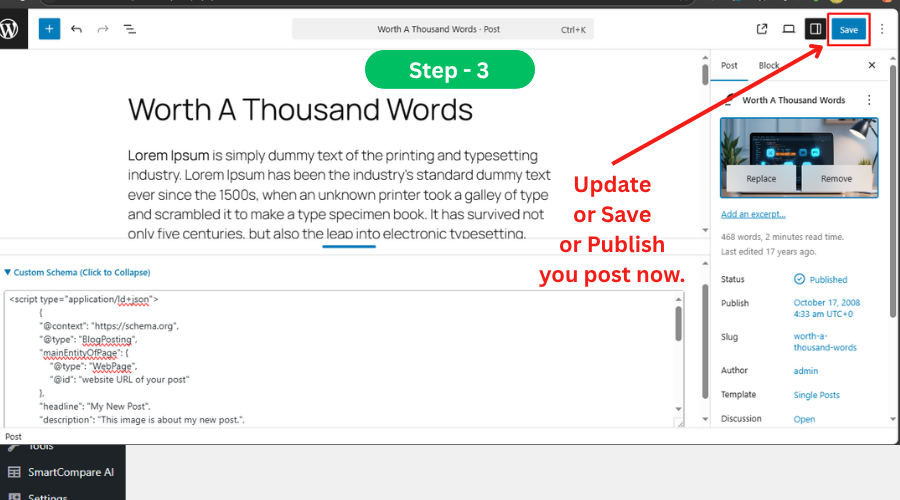
- Click Publish or Update to save changes.
- Your schema will be automatically injected into the page source as JSON-LD in the website header (not visible to visitors).
Manual Schema (FAQ, LocalBusiness, Custom JSON-LD)
- Create or edit any post or page.
- Scroll down and open the “BBH Custom Schema (Click to Expand)” section below the content editor.
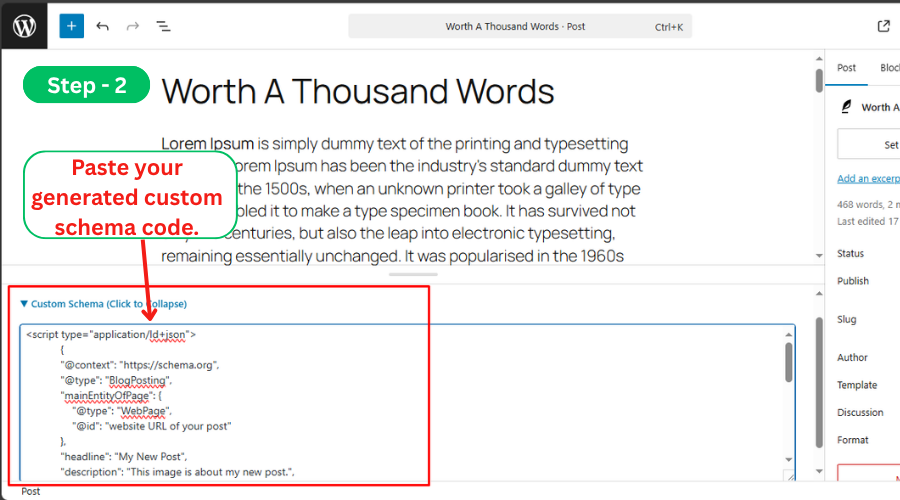
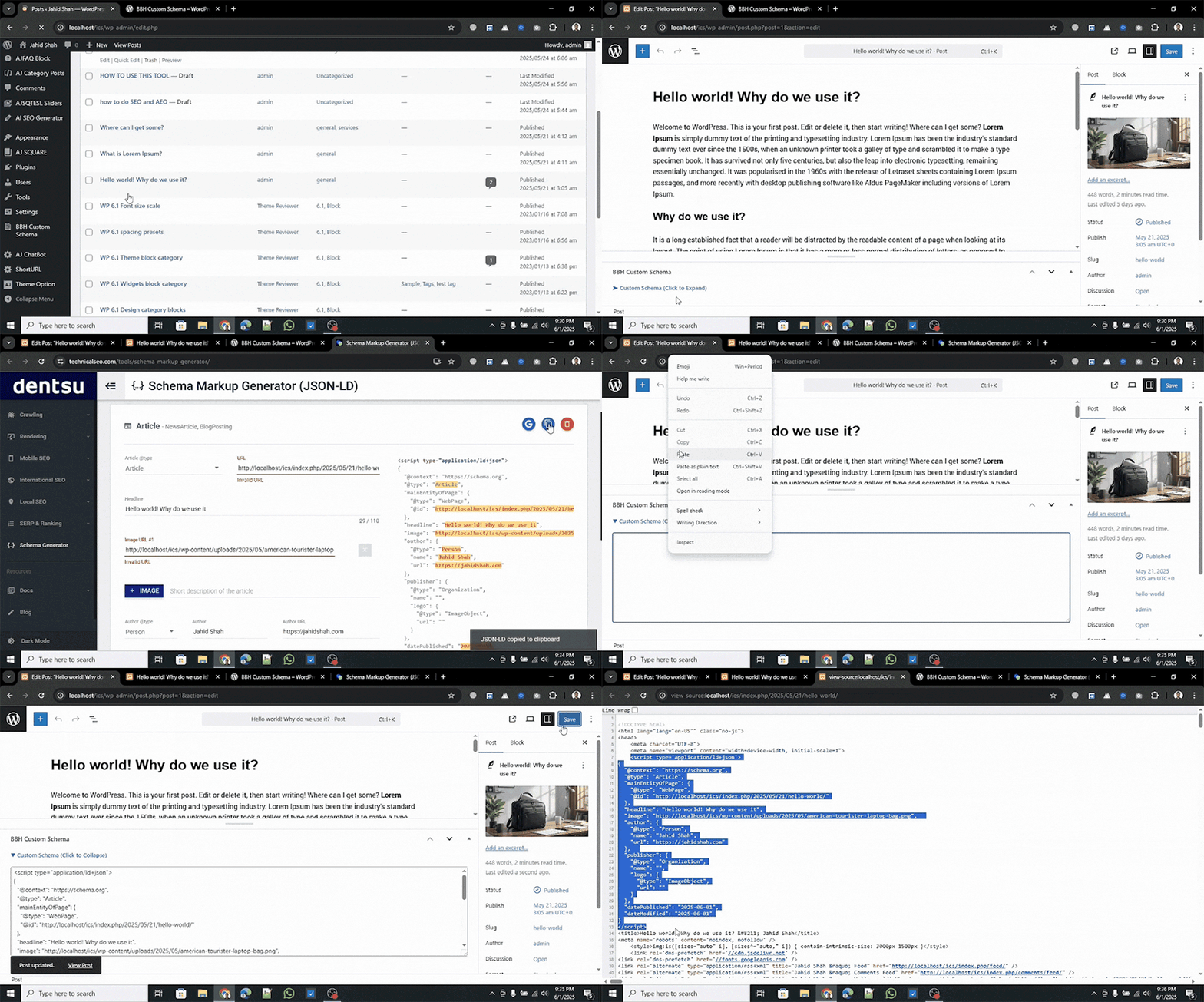
- Paste your JSON-LD schema markup into the input box.
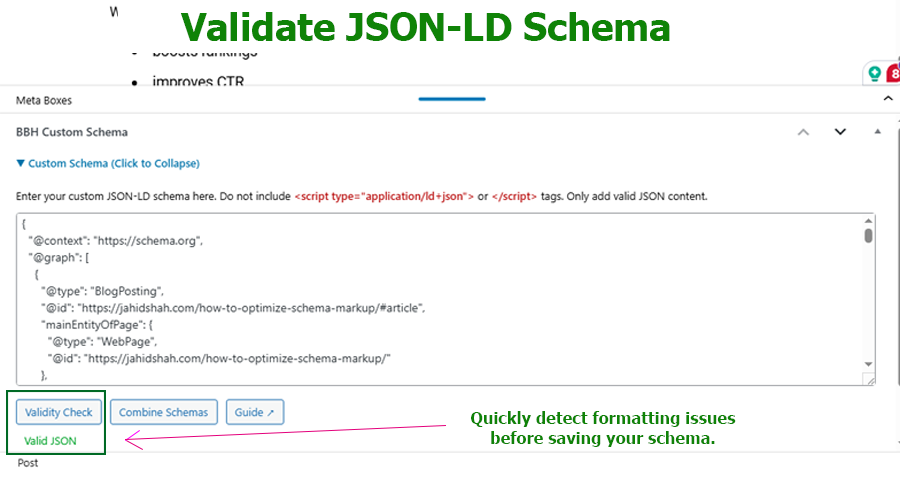
- Click “Validate Schema” to check JSON format validity.
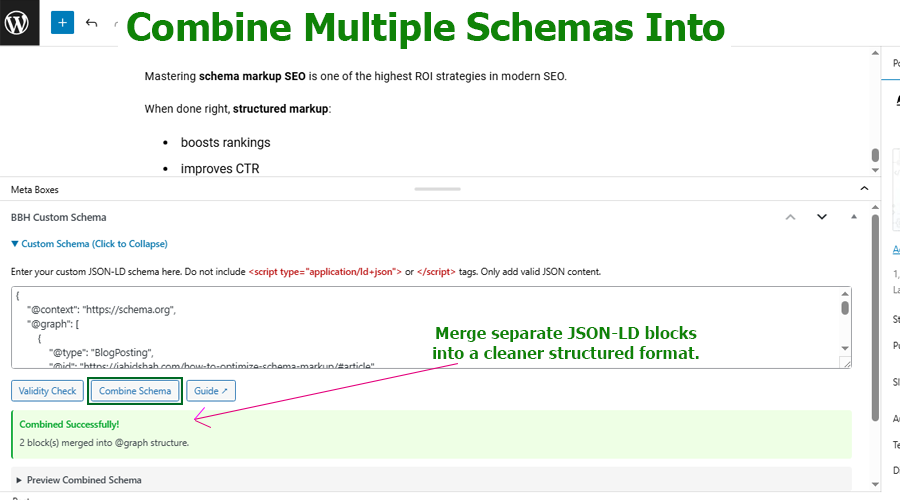
- If using multiple JSON-LD blocks, paste them one after another (without
<script>tags), then click “Combine Schemas” to merge them into a single valid structure. - Click Publish or Update to save your changes.
- Your schema will be injected into the page source as JSON-LD structured data inside the website header (not visible to visitors).
Customize Your Schema:
You can use any schema type supported by schema.org. Simply paste the JSON-LD script into the provided field on each post or page.
Support & Contact
Need help or want to report an issue?
For any issues, please open a support ticket in the WordPress plugin repository or visit our support page.
Installation
Minimum Requirements
– WordPress 5.2 or higher
– PHP 7.2 or higher
– MySQL 5.0 or higher
Automatic Installation (Recommended)
1. Go to your WordPress dashboard
2. Navigate to Plugins > Add New
3. Search for BBH Custom Schema
4. Click Install Now and activate the plugin
Manual Installation
1. Download the plugin ZIP file
2. Unzip and upload the bbh-custom-schema folder to /wp-content/plugins/
3. Go to Plugins > Installed Plugins and click Activate
Screenshots
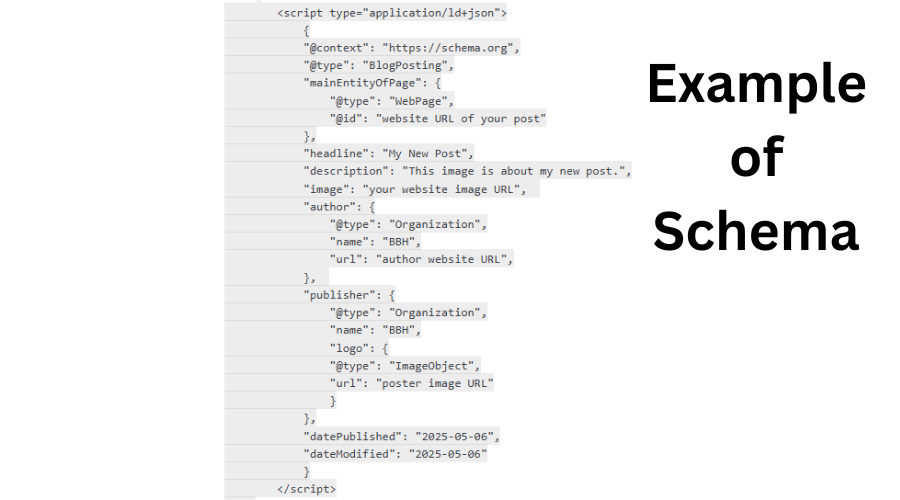
Example of schema applied to a post
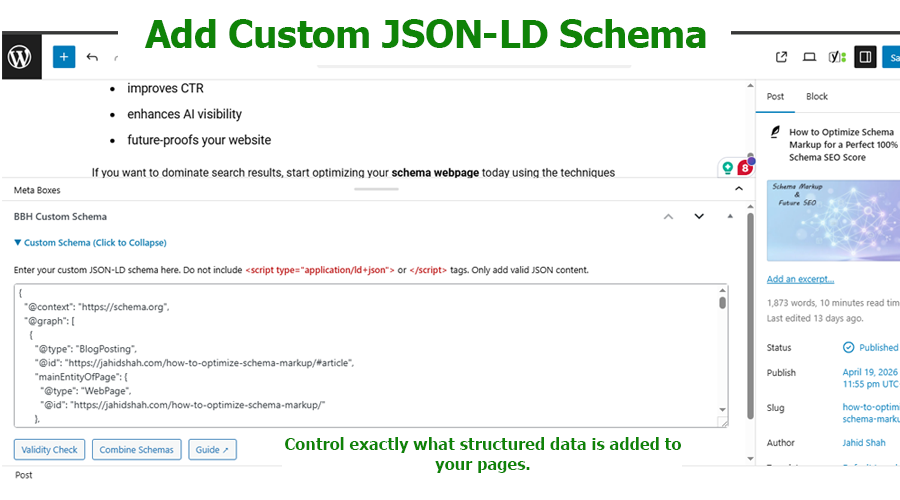
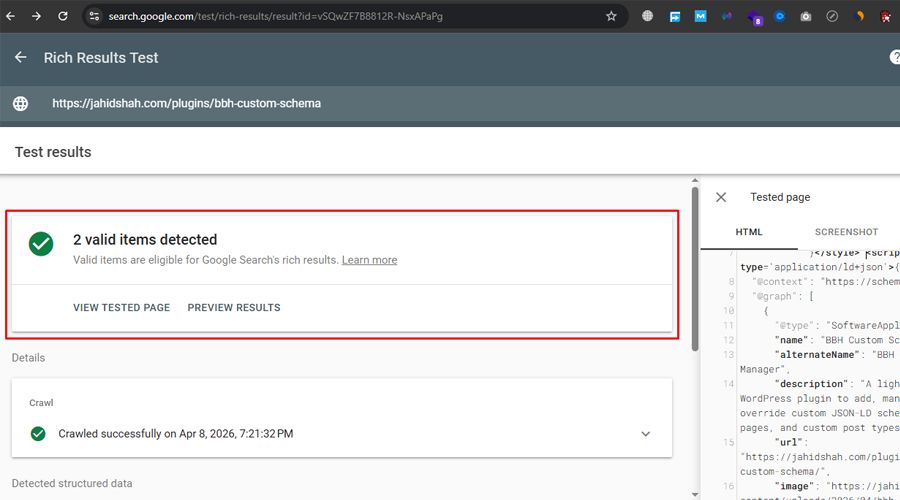
Custom Schema input box under post/page editor
Plugin settings in the admin panel
Faq
Schema markup is a special type of structured data that helps search engines understand the content of your website more clearly. Instead of only reading plain text, search engines like Google can identify specific information such as articles, products, reviews, FAQs, events, and more.
When schema markup is added correctly, search engines may display enhanced search results called rich results. These can include extra details like star ratings, FAQ dropdowns, product prices, or article information. Rich results can make your page more noticeable in search results and may increase the chance that users click on your website.
This plugin allows you to add custom JSON-LD schema markup to any post or page so search engines can better interpret your content.
This plugin gives you full control over how structured data is generated and displayed on your WordPress site—without being locked into SEO plugin limitations.
You can:
- Generate automatic Article schema by analyzing your post content with a single click
- Create manual schema blocks for FAQ and LocalBusiness with structured input fields
- Add or manage custom JSON-LD without depending on SEO plugins like Yoast or Rank Math
- Prevent duplicate or conflicting schema issues that can harm SEO performance
- Combine multiple schema blocks into a single valid structured output when needed
- Improve how search engines understand your content, leading to better indexing and rich result eligibility
You stay in full control of your SEO structured data—nothing is injected automatically without your decision.
Basic knowledge of schema markup can be helpful, but it is not required. The plugin simply provides a place where you can add your schema in JSON-LD format, which is the format recommended by Google.
If you already have schema generated from tools such as Google’s Structured Data Markup Helper or other schema generators, you can copy the JSON-LD code and paste it into the schema box provided by the plugin.
Advanced users and developers may prefer this approach because it gives full control over the schema structure without being limited by preset schema templates.
No. The plugin is designed to be lightweight and does not add unnecessary scripts, styles, or database queries to your website.
It simply inserts the JSON-LD schema markup into the page output when the page loads. Since JSON-LD is just structured data placed inside a tag, it has no visual impact and minimal performance overhead.
Because of this simple approach, the plugin should not affect your page speed or website performance.
Yes. The plugin is designed to work alongside popular SEO plugins such as Rank Math, Yoast SEO, and other SEO tools.
In many cases, SEO plugins automatically generate schema markup based on your content. However, sometimes users need to add custom schema that those plugins do not support.
This plugin allows you to insert your own JSON-LD schema and, when necessary, manages custom schema alongside existing structured data. This gives developers and SEO professionals more flexibility when implementing structured data strategies.
Yes. The plugin allows you to add custom JSON-LD schema to individual posts or pages directly from the WordPress editor. This makes it easy to apply structured data only where it is needed instead of affecting the entire website.
After adding schema to your page, you can verify it using tools such as Google Rich Results Test or other structured data testing tools. These tools will show whether your schema markup is detected and if there are any errors or warnings.
Testing your schema helps ensure that search engines can properly read and interpret the structured data you added.
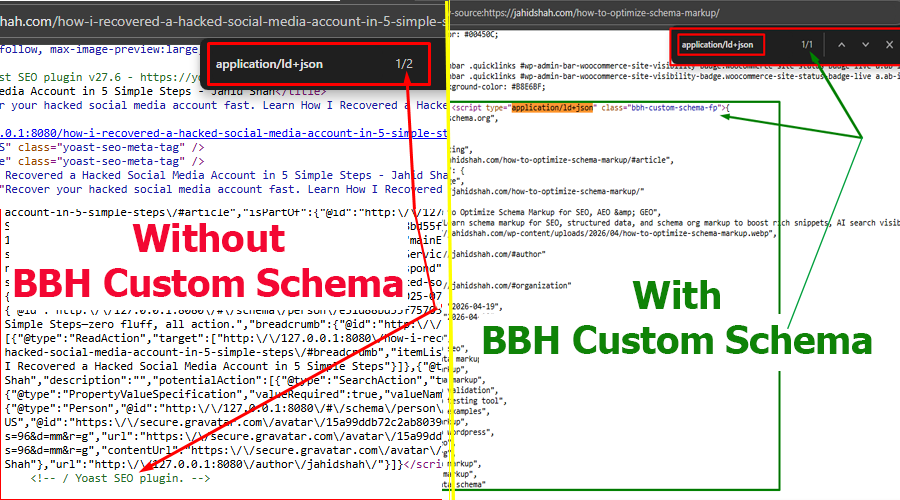
Schema markup is for search engines and not displayed to visitors. To see it:
– Press Ctrl + U (View Page Source) on your post or page
– Press Ctrl + F and search for “schema” or “ld+json” to find the script
This plugin allows you to generate and manage custom schema markup without external tools. You can define structured data in JSON-LD format, assign it to specific content, and control how search engines interpret your pages. Take your require format from below example and modify as your needs.
Also you can use free online tools like:
– https://technicalseo.com/tools/schema-markup-generator/
– or, AI (like ChatGPT, Gemini).
Use these tools to test your schema:
– Inside Post editor you will see a Validate Schema button, simple just click on the button, and check the validity.
– or use Google Rich Results Test
– or, Schema.org Validator
Yes, the plugin is fully responsive and works on desktop, tablet, and mobile devices.
Yes — but only for Article schema, when the Automatic Schema Generator is enabled inside the post editor and you click “Generate Schema.”
The plugin also supports its primary feature: adding custom schema using a structured input box, where you can paste or build your own JSON-LD schema with full control.
For structured schema types like FAQ and LocalBusiness, you can also use dedicated input fields to build schema without writing raw JSON.
This gives you two levels of control:
- Manual schema input (core feature): full custom JSON-LD control
- Automatic Article schema generation: content-based structured data creation
The plugin ensures all schema outputs are conflict-free and works alongside SEO plugins like Yoast or Rank Math without duplication issues.
Yes. Example schemas are available inside official schema.org documentation.
- Copy any schema example above
- Paste it into the plugin schema editor
- Customize it for your content
- Assign it to posts or pages
- Publish and let search engines read it
Yes. You can paste multiple JSON-LD schemas one after another (without <script> tags).
Click the Combine Schemas button to merge them into a single valid JSON-LD structure. This resolves syntax errors caused by multiple separate JSON objects.
The tool combines your schemas without modifying the original data.
After that, click Schema Validity Check to verify. You should see: “Valid JSON”.
Reviews
lightweight and works great - no bloat
By 
yoast and rankmath are so bloated its crazy. this does exactly what you need it to do, nothing more. I love it
GEO Extreme Control
By 
This plugin I have installed to several sites now for my AI-readable GEO services. Adding a custom Schema outside of basic SEO plugins is vital and this plugin just works perfectly, is light-weight and I can paste all my custom JSON into it. This saved me building my own plugin so thanks so much for this! Excellent work!
Changelog
1.0.0
- Initial release
1.0.1
- Update CSS and fix errors
1.1.0
- Introduced Content Schema Report feature – a dashboard section that lists posts and pages with or without custom schema markup.
- Helps administrators quickly identify which content needs schema implementation.
- Added pagination support for easier navigation through large content libraries.
1.2.0
- Added settings page to select post types for meta box
- Supports Custom Post Types (CPT)
1.2.1
- New: Added a review request notice for the WordPress.org plugin page.
- Improvement: Review notice now appears after the plugin has been used multiple times.
- Improvement: Added options to dismiss or postpone the review request.
- Fix: Resolved missing CSS styling issues.
1.2.2
- New: Added JSON-LD validation feature in the post editor.
- New: “Validity Check” button for instant client-side validation using JSON.parse.
- New: AJAX fallback handler for server-side validation.
- Improvement: Green/red inline feedback for valid/invalid JSON.
1.2.3
- New: Schema Combiner feature – to use Multiple Schema
1.3.0
- New: Quick Start onboarding page
- New: First-time users see minimal UI with 3 schema buttons
- New: FAQ Schema (Recommended), Article Schema, Custom JSON-LD options
- New: Schema draft saves temporarily and applies on post save
1.3.1
- New: Basic Validation engine (JSON + Duplicate Check) – validates JSON syntax, structure (@context, @type, required fields), labeled as “Basic Validation (JSON + Duplicate Check)” not Google validation
- Add guide video
1.3.2
- New: Update schema control system.
1.3.3
- Improved UI styling for better readability and user experience.
- Added step-by-step BBH Custom Schema setup guide inside the documentation page.
1.3.4
- Improved admin CSS scoping to prevent styling conflicts on WordPress admin pages.
1.3.5
- Fixed: Resolved an issue where empty custom schema values could persist after saving a post.
1.4.0
- New: Added Automatic Schema mode alongside manual JSON-LD input workflow.
- New: Added built-in schema generators for FAQ, Article, and LocalBusiness schema types.
- Improved: Introduced structured schema builder UI for easier JSON-LD creation.
- Fixed: Ensured full compatibility with existing manual custom schema workflow.
1.4.1
- Updated README documentation with information about new development products.