BBP Core – Advanced bbPress Forum Management with Voting, Private Replies & Elementor
BBP Core – Advanced bbPress Forum Management with Voting, Private Replies & Elementor
Description
BBP Core is the ultimate enhancement plugin for bbPress communities. Designed for forum administrators, content creators, and community managers, BBP Core adds powerful features to create professional, engaging forums with minimal effort.
What is BBP Core?
BBP Core transforms your bbPress setup into a fully-featured community platform. Whether you’re building a support forum, knowledge base, or discussion community, BBP Core provides the tools you need to foster engagement, manage content effectively, and create an exceptional user experience.
Key Features That Make BBP Core Essential
🎯 Unified Forum Builder
Take complete control of your forums with an intuitive, all-in-one builder interface. View all forums and topics in one organized dashboard, filter by status (open, closed, pending, spam), and manage discussions efficiently without navigating multiple pages.
🔐 Private & Confidential Replies
Enable users to post private responses visible only to forum owners and moderators. Perfect for sensitive discussions, support tickets, and confidential advice while maintaining full transparency where needed.
✅ Solved Topics System
Help community members quickly identify answered questions. Mark topics as solved to display a prominent ‘Resolved’ badge, reducing duplicate questions and improving user experience. Visitors instantly know which topics have solutions.
⭐ Smart Voting & Reputation System
Empower your community with an AJAX-powered voting system. Users vote on the most helpful replies, automatically elevating quality answers to the top. Build reputation-based authority and encourage quality contributions.
📎 Media Attachments & File Sharing
Allow users to attach files, documents, images, and media to replies. Organized attachment sections make it easy for community members to share resources, code snippets, documents, and collaborate effectively.
💡 Advanced Forum Statistics Widget
Display real-time forum information including topic count, reply count, last activity, and most active users. The ‘Current Forum Info’ widget provides visitors with a quick overview of forum vitality and engagement.
🎨 Elementor Page Builder Integration
Create stunning forum layouts using Elementor’s drag-and-drop builder. Use specialized BBP Core widgets to display forums, topics, and replies on any page with full customization control. No coding required.
⚡ Lightweight & Performance-Optimized
BBP Core loads assets intelligently—CSS and JavaScript only when needed. Minimal footprint ensures your forum runs fast without bloat or unnecessary dependencies.
🔧 Intuitive Admin Interface
Create, edit, and delete forums and topics directly from the BBP Core admin dashboard. Streamlined interface eliminates confusion and reduces admin overhead.
PRO Features – Everything You Need for Advanced Community Management
Upgrade to BBP Core Pro for enterprise-grade forum management:
-
Real-Time Admin Notifications – Stay updated with instant dashboard alerts for new posts, moderation requests, and community activity.
-
Smart User Notifications – Keep members engaged with real-time updates on subscribed forums, topics, and replies they care about.
-
Mini User Profiles – Display compact user profile cards with activity summaries, follower counts, and quick-view reputation.
-
Pre-Built Elementor Templates – Import professional forum layouts with one click. Fully customizable templates for forums, knowledge bases, and support centers.
-
“I’ve the Same Question” Feature – Reduce duplicate threads by letting users indicate similar questions, improving forum organization.
-
Anonymous Posting – Allow sensitive discussions without revealing user identity. Ideal for support forums and confidential advice.
-
Dynamic User Profile Links – Generate personalized profile URLs for logged-in users. Perfect for user bios and contributor pages.
-
Topic Approval Workflow – Control content quality with admin-approval for new topics. Prevent spam and maintain forum standards.
-
Advanced File Management – Support multiple file uploads with increased size limits. Delete attachments independently or with content.
-
Powerful Voting Controls – Guest voting restrictions, prevent closed-topic voting, disable self-voting, admin voting privileges, and vote-based sorting.
-
External Image Insertion – Insert images via URL or media library picker. Enhance replies with visual content effortlessly.
-
Auto-Approval System – Automatically publish reply replies instantly. Streamline moderation workflows and maintain conversation flow.
-
Attachment Moderation – Approve/unapprove replies containing files for enhanced content security and compliance control.
Video Overview
Important Links
Why Choose BBP Core?
✨ The Trusted Choice for bbPress Communities
- ⭐ 1000+ Active Users – Join thousands of community managers using BBP Core
- 🚀 Actively Maintained – Regular updates with new features and security patches
- 🛡️ Security First – Built with WordPress security best practices
- 📈 Scalable Solution – Handles small communities to large enterprise forums
- 🎓 Beginner-Friendly – Intuitive UI requires no technical knowledge
- 💬 Expert Support – Responsive team ready to help you succeed
- 🔗 Open Source – Community contributions welcome on GitHub
Ready to Transform Your Forum?
Start with BBP Core Free today and upgrade to Pro when you’re ready for advanced features.
Get Started | View Pricing | Read Documentation
Support & Community
Installation
Getting started with BBP Core is quick and easy. Follow these simple steps:
Prerequisites
Before installing BBP Core, ensure you have:
* WordPress 5.0 or higher
* bbPress plugin installed and activated
* PHP 7.4 or greater
* MySQL 5.6 or greater
Installation Method 1: Install from WordPress Admin Dashboard (Recommended)
- Go to Plugins Add New in your WordPress dashboard
- Search for “BBP Core” in the plugin search box
- Click the Install Now button
- After installation completes, click Activate Plugin
- Navigate to BBP Core Settings to configure features (optional but recommended)
- Start building your enhanced forum!
Installation Method 2: Manual Upload via FTP/cPanel
- Download the
bbp-core.zipfile from the plugin page - Extract the ZIP file on your computer
- Upload the extracted
bbp-corefolder to/wp-content/plugins/directory via FTP or cPanel File Manager - Go to Plugins in your WordPress admin and locate BBP Core
- Click Activate Plugin
- Configure settings in BBP Core Settings
Installation Method 3: Upload ZIP from WordPress Admin
- Download the
bbp-core.zipfile - Go to Plugins Add New Upload Plugin
- Select the downloaded ZIP file and click Install Now
- After installation, click Activate Plugin
- Configure your forum settings
Troubleshooting Installation
Plugin not showing after activation?
Ensure bbPress is installed and activated first. BBP Core depends on bbPress.
Getting PHP errors?
Verify your PHP version is 7.4 or higher. Contact your hosting provider to upgrade if needed.
Still need help?
Visit our Documentation or check our Support Repository
Screenshots
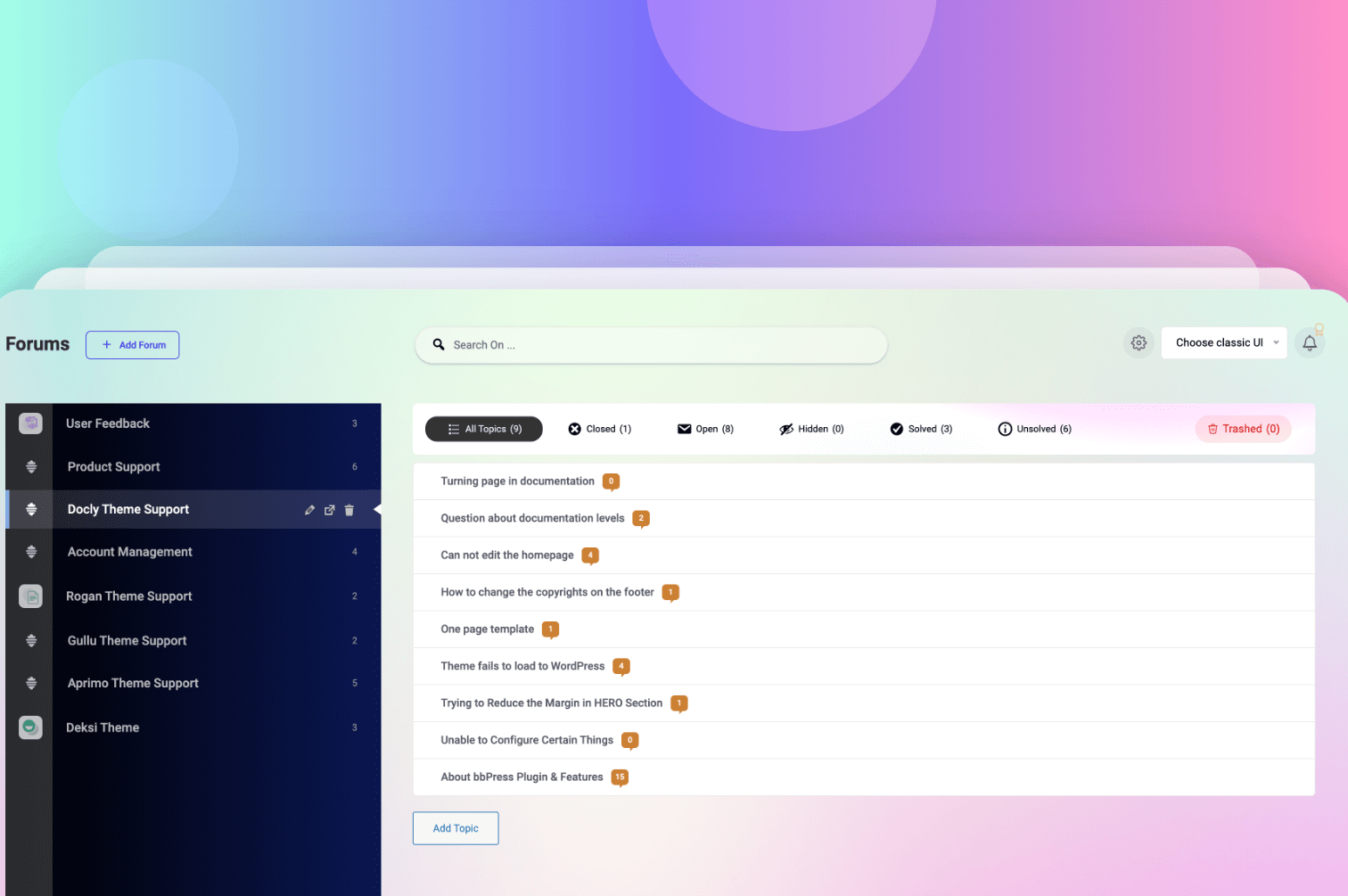
Advanced Forum Builder Dashboard - Unified interface for managing forums, topics, and discussions
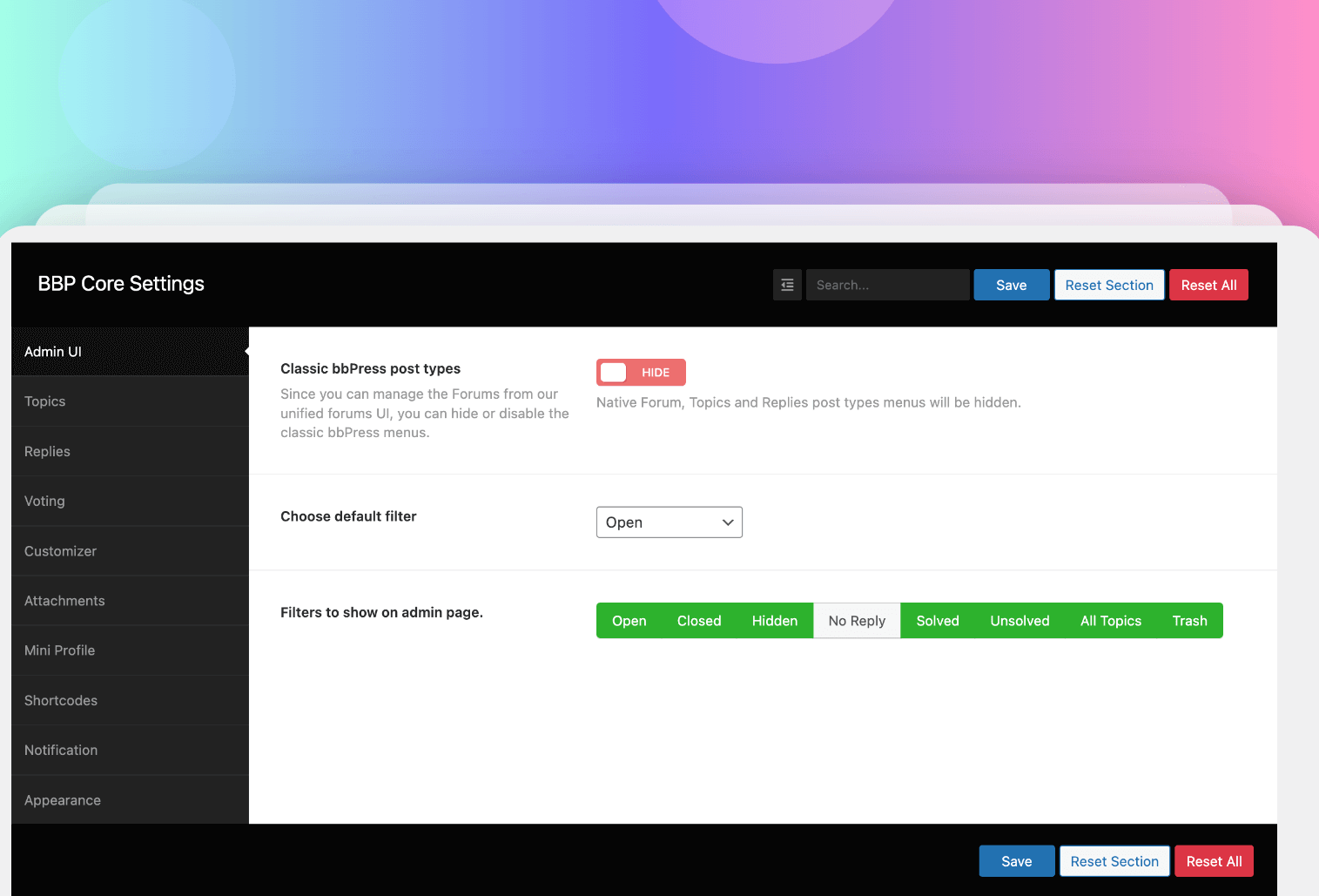
Intuitive BBP Core Settings Panel - Configure all features from one organized dashboard
Faq
BBP Core is perfect for WordPress site owners, community managers, support teams, and anyone running a bbPress forum who wants professional features without custom coding.
Yes! BBP Core works seamlessly with any bbPress-compatible WordPress theme. The plugin enhances functionality without theme dependency.
Absolutely not! BBP Core is designed for non-technical users. All features are accessible through intuitive admin interfaces and visual builders. No coding required.
Completely! With Elementor integration, you can drag-and-drop customize forum layouts. Pre-built templates and full styling options give you unlimited design flexibility.
BBP Core requires WordPress 5.0 or higher and PHP 7.4 or greater. Check that your bbPress plugin is also installed and activated.
Yes. BBP Core only loads necessary assets when needed, ensuring minimal impact on site performance and fast loading times.
Found an issue? Report it on our GitHub repository. For detailed help, visit our Documentation.
BBP Core Pro adds advanced features like real-time notifications, pre-built templates, anonymous posting, advanced attachments, topic approval workflow, and more. Check Pro pricing
Reviews
Great Support
By 
thanks for the quick and great support
I'm satisfied with BBP Core!
By 
I'm satisfied with BBP Core.
After purchasing and testing BBP Core for four months, I find its bbPress-style interface and customization capabilities, along with its demo support, to be very convenient. From a user perspective, it offers continuous updates. The guide pages and support for troubleshooting and answering questions were also impressive. It's perfect for simple information communities and I highly recommend it.
It's compatible with EazyDocs themes and plugins. These are its biggest strengths.
- The interface is convenient.
- The guides are well-explained.
- It's well-updated.
- They respond to support requests very quickly.
- It's a constantly evolving plugin.
BBP Core에 만족합니다.
BBP Core를 구매하고 4개월 동안 테스트 및 사용해 본 결과, bbpress 형태와 커스텀이 가능하다는 사실과 데모를 지원하는 것이 편리한 점으로 생각됩니다. 사용자 관점에서 볼 때, 지속적인 업데이트를 제공합니다. 가이드 페이지와 문제 및 질문 해결을 위한 지원도 인상적이었습니다. 간단한 정보 커뮤니티에 적합하며 추천드리고 싶습니다.
EazyDocs 테마와 플러그인들과 호환과 연동이 됩니다. 이점이 가장 장점이라고 생각합니다.
- 인터페이스가 편리합니다.
- 가이드가 잘 설명되어 있습니다.
- 업데이트가 잘 되어 있습니다.
- 지원 요청에 매우 신속하게 대응합니다.
- 꾸준히 발전하는 플러그인입니다.
Great product
By 
BBP Core is a fantastic plugin — it makes bbPress so much more powerful and user-friendly. The added features are exactly what my forum needed, and everything integrates seamlessly!
BBP Core: Finally, bbPress Feels Complete
By 
BBP Core doesn’t replace bbPress—it empowers it. It adds genuinely useful features that make bbPress feel more modern, functional, and user-friendly, without overcomplicating things.
The interface improvements are clean, the extras are practical, and everything runs smoothly. If you're building a community with bbPress, BBP Core is a must-have enhancement that saves time and improves the experience—for you and your users.
The steroid injection BBpress always needed
By 
Using BBP-Core, i'm able to offer my members those extra features mostly found inside crazy expensive forum compeditors platforms - so a big thank you to the developer for making this important plugin!!
WPFORO VS BBPRESS + BBP Core
By 
I'm currently testing the switch from WPFORO to BBPRESS, and it's a great and lightweight plugin!
Recommended. While checking compatibility
SEOPRESS
Polylang
parmarlink manager
Aiomatic
Bricks builder
very good lightweight plugin
By 
I compared performance with wp foro. This is lightweight and lot of features. Also many more ative integrations since this is based on bbpfress. This is also much much better value for money at which he is offering the pro plugin...
Nice design
By 
Some nice widgets that works with elementor pro making your bbpress forum stand out.
solid addition to bbpress
By 
i love the enhancements this brings to bbpress and you can grab the lifetime pro plan for cheap right now fir black friday
Support is great
By 
Appreciate that the team is willing to give us their support by going into our website to rectify the issue first before rolling out the updates publicly! Thank you!
Changelog
1.4.1 (23 September 2025)
Fixes:
* FResolved issue with required plugin (bbPress) installer not functioning properly
* is_attachment_icon error to prevent display inconsistencies
Enhanced:
* Compatibility with Docy Dark Mode for seamless appearance across themes
Improved:
* Made previously untranslatable strings fully translatable, ensuring better localization support
Updates:
* Freemius SDK updated to version 2.13.0
1.4.0 (23 September 2025)
New Features:
* Author and Topic Refresh functionality added to Forum Builder
* Pagination support added for improved forum navigation
* Enhanced forum visibility and management
Improvements:
* Forum Builder UI design refined for better usability
* Security enhancements and vulnerability fixes
Updates:
* Freemius SDK updated to version 2.12.2
1.3.3 (23 August 2025)
Fixes:
* Resolved Forum Builder tab content active state issue
* Fixed brand color variable functionality
Improvements:
* Active reaction design enhanced for better user feedback
* Attachment preview design improved
1.3.2 (15 August 2025)
Fixes:
* Resolved attachment field visibility issue
* Fixed asset loading conflicts
Improvements:
* Forum Tabs widget design refined
* Assets folder restructured (admin CSS/JS organized)
* Removed unnecessary dependencies (normalize.js, fontawesome.css)
* Added “bbpc_get_opt()” function for CSF settings consistency
* Improved function prefixes to prevent plugin conflicts
* Enhanced Docy theme dark mode compatibility
* Non-translatable strings made translatable
Updates:
* Freemius SDK updated to version 2.12.1
1.3.1 (16 June 2025)
Fixes:
* Fixed deprecation warning for attachment files
* Resolved tab CSS conflicts with third-party plugins
* Improved dark mode compatibility
Improvements:
* Sidebar now supports flexible width
* Featured image sizing optimized for Forum Builder
* Enhanced overall plugin stability
Updates:
* Freemius SDK updated to version 2.12.0
1.3.0 (22 April 2025)
New Features:
* Renamed “Forums” page to “Forum Builder” for clarity
* Default open state for first forum item
Improvements:
* Topic open icon refreshed for better UX
* Status icons added to topics for quick identification
* Search input response improved with optimized keypress delay
* Current Forum Info widget redesigned (shows all info by default)
* Settings page reorganized with intuitive tab icons
* Topic details page UI enhanced (reply, favorite, attachment design)
* Forum Builder UX significantly improved
* Dashicons implemented instead of FontAwesome (better performance)
* BBPC Forum Information widget now displays only on forum pages
Fixes:
* Resolved BBP Core conflicts with Dukan and Job Manager plugins
1.2.9 (24 February 2025)
New:
* Loco.xml configuration added for multiple text domain mapping in Loco Translate plugin
* Special offer notice for existing customers
Fixed:
* Resolved deprecation warning for non-alphanumeric string increment