Better Post & Filter Widgets for Elementor

Better Post & Filter Widgets for Elementor
Description
The only free Elementor plugin for unlimited pro-grade filtering of all your post content. Filter by taxonomies, custom fields, ACF, relational fields, and numeric ranges – with seamless integration, no restrictions, and full customization. Get advanced filtering features without paying for limitations.
Filter Widget Key Features:
- Compatible with Elementor Pro post widget, ACF, WooCommerce and most translation plugins.
- Filter any post type.
- Customizable filter items list with easy re-ordering options.
- Filter anything using taxonomies, custom fields/ACF, relational and numeric fields.
- Keyword search support for custom field/ACF.
- Various filter types catered to diverse use-cases: checkboxes, radio buttons, label list, dropdown, numeric range, select2 (single & multiple select).
- Fine-tune the filter with the choice of relation (AND or OR) between terms and parents.
- User-friendly more/less and toggle options, ideal for managing extensive lists.
- Choose how filters are applied: Auto-submission or Submit button mode.
Filter Widget Demo – See the filter in action.
Post Widget Key Features:
- Query multiple post types at once.
- Do more with less – display posts, users, and taxonomies using a single widget.
- Effortlessly switch between a dynamic carousel or grid layout at different breakpoints.
- Make the most of Swiper API with advanced features such as carousel synching, parallax effects, and more.
- Multiple layout options, including classic, on the side, banner, template grid (loop grid), and custom HTML.
- Possibility to create your own loop grid, with any dynamic tags and Elementor widgets.
- Flexible post content options: title, content, excerpt, custom field/ACF, taxonomy, HTML, post meta, read more, bookmark, edit options, product price, product rating, buy now, and product badge.
- Flexible query system with AJAX pagination.
- Customize widget content and style like native Elementor widgets.
Post Slider/Carousel Demo – Check out the post widget possibilities.
Create Loop Grids for Free:
Unlock the power of dynamic loops in Elementor, without needing the Pro version! Effortlessly showcase custom content in a loop format and experience the full potential of Elementor at no extra cost.
Exclusive Dynamic Tags:
- Exclusive Repeater Field Tag: Unlock the ability to directly output ACF repeater fields in the Elementor frontend, with the flexibility to wrap each part in different HTML tags.
- Includes a series of dynamic tags, allowing users to fully utilize template grids with the free version.
Crafted for Seamless Elementor Integration:
- Blends seamlessly with Elementor’s native interface.
- No disruptive branding — Enjoy a clean, streamlined interface without unnecessary distractions.
- Lightweight design, utilizing Elementor’s resources to minimize external dependencies.
Developer-Friendly:
Tailor the widget to your needs with the help of a dedicated filters.
Docs and Support
Find support for this plugin in the documentation.
Source Code
This plugin includes both compressed and uncompressed versions of CSS and JavaScript files and can be found under the /assets/ directory.
Installation
- Upload the plugin files to the
/wp-content/plugins/better-post-and-filter-widgetsdirectory, or install the plugin through the WordPress plugins screen directly. - Activate the plugin through the ‘Plugins’ screen in WordPress.
- Navigate to the Elementor editor and start using the widgets.
Screenshots
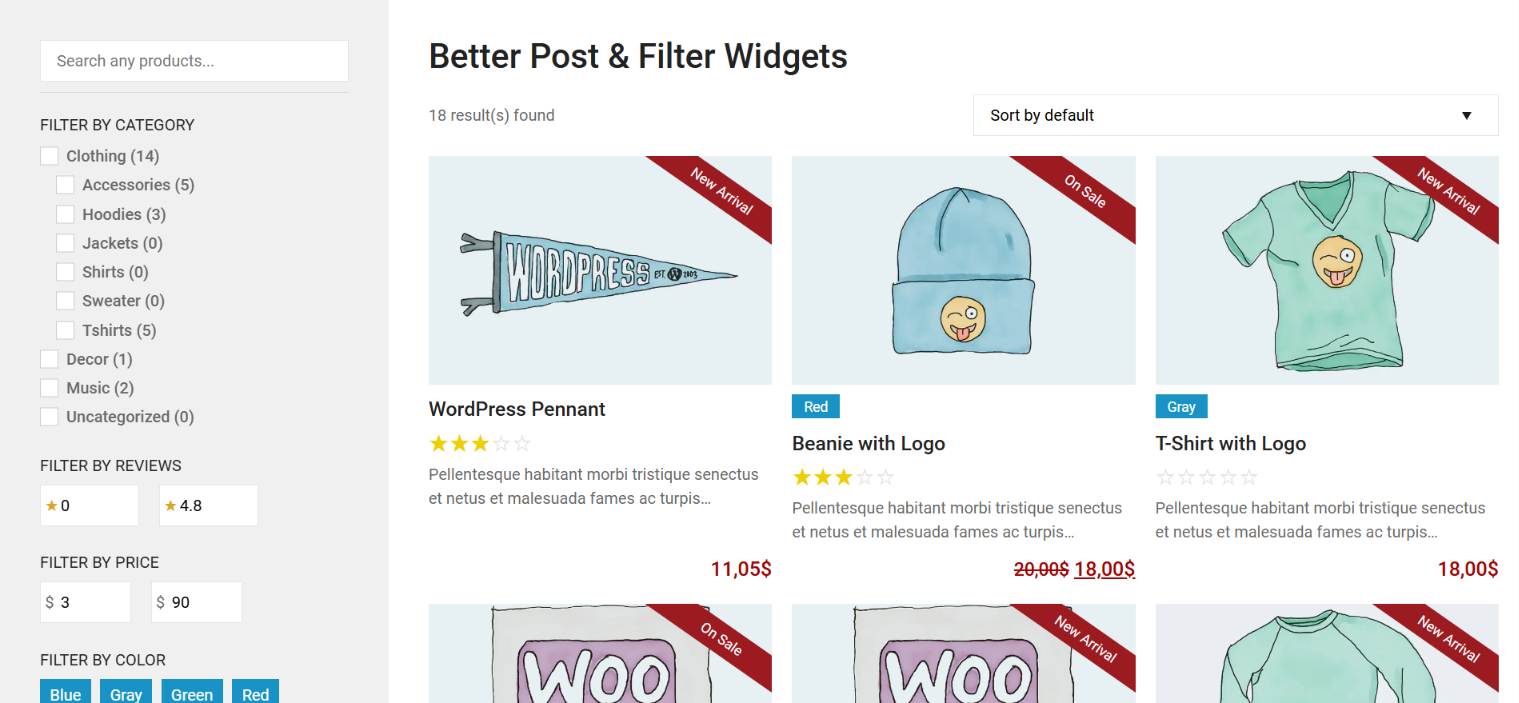
Overview of the widgets on a page.
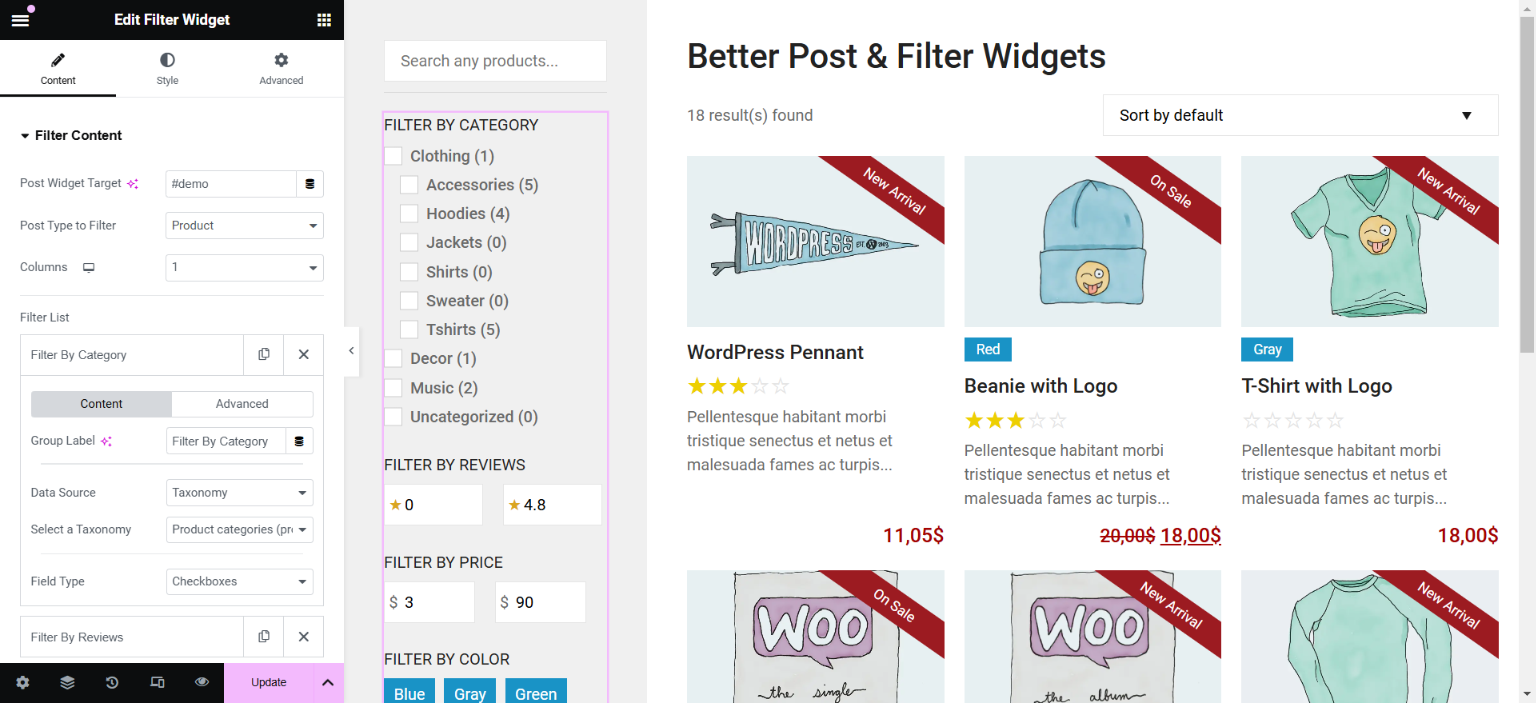
Backend view of the Elementor edit screen, showing the filter widget options.
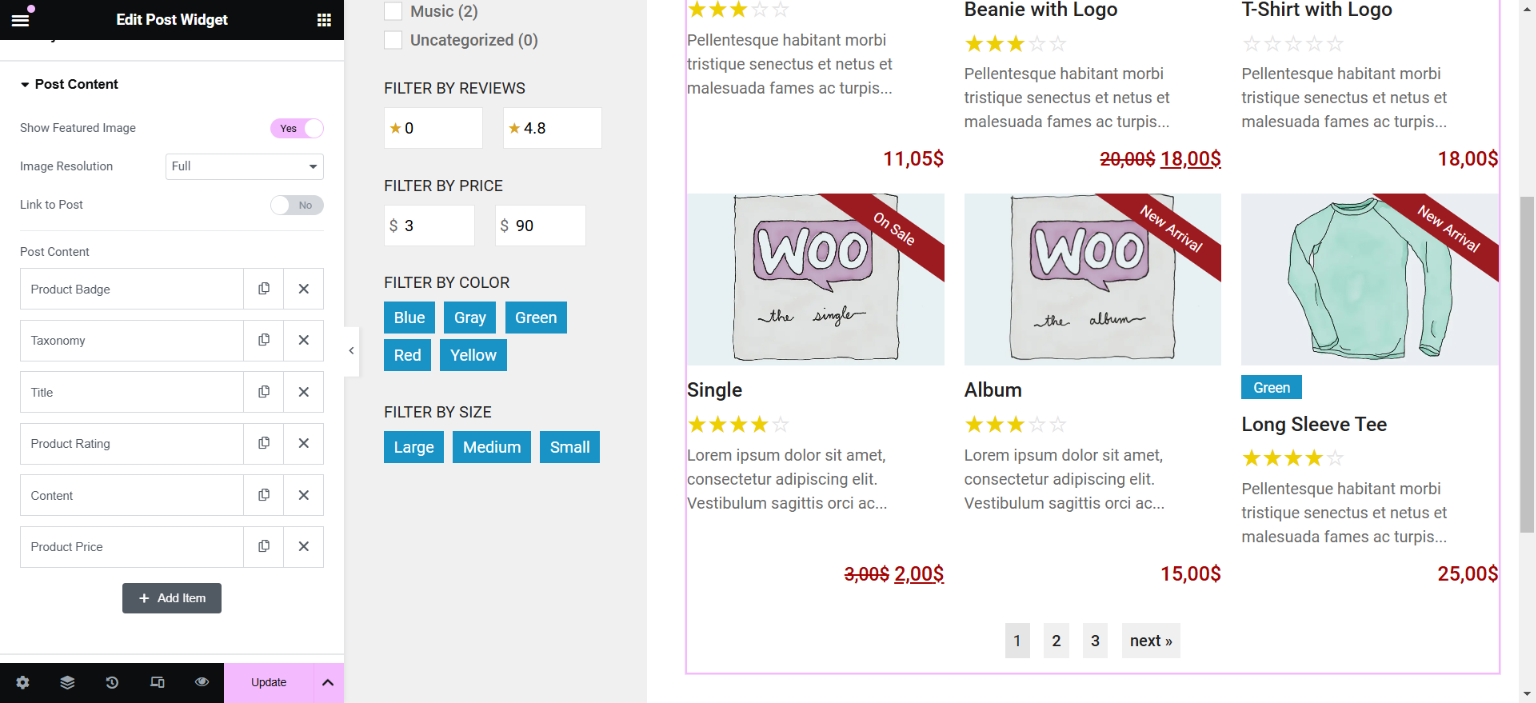
Backend view of the Elementor edit screen, showing the post widget options.
Faq
If you’re having trouble getting the Filter Widget to work properly, follow these steps to ensure it’s set up correctly:
1. Ensure that you have set a unique ID or class for the target post widget. Without it, the widget will not know where to apply the filters.
2. Verify that you have selected the correct post type to filter.
The list of available meta fields will only display for the selected post type.
For more details, check out this article.
AJAX should work automatically on most WordPress themes built according to standards. However, if AJAX isn’t working, here are a few things to check:
- Check if WordPress logging is enabled. Sometimes, when WordPress logging is enabled, it can interfere with AJAX functionality. Try disabling logging to see if that resolves the issue.
- Ensure your theme supports AJAX. Some themes, especially older or custom-built ones, might not properly support AJAX. Make sure your theme is up to date and follows WordPress best practices.
- Check for JavaScript errors. JavaScript errors on the page can prevent AJAX from working. Open your browser’s developer tools and check the console for any errors that could be affecting AJAX functionality.
- Conflicting plugins. Certain plugins, especially caching or performance optimization plugins, might conflict with AJAX. Try temporarily disabling them to see if the issue persists.
- Check server-side restrictions. Some servers might have restrictions that prevent AJAX requests from functioning properly. Contact your hosting provider to ensure that AJAX requests are not being blocked by security rules or firewall settings.
If none of these steps resolve the issue, feel free to reach out on the support forum for further assistance.
Yes, it does out-of-the-box, but be aware of the following:
1. The post type you choose in the filter will override the post type selected in the post widget. For example, if your post widget is showing posts, but you select products in the filter, once you interact with the filter, the post widget will display products instead of posts.
2. If you want the filter to return results based on the selected meta or taxonomy instead of the post type, you can choose the “Any” option under the post type to filter.
3. Dynamic filtering can be enabled to include the current archive context in the filter results.
The filter widget is designed to work with most widgets that use a post query, such as post or product widgets. If a widget pulls data via a post query, the filter can potentially hook into it. However, pagination is fully supported only for widgets from Better Post & Filter Widgets for Elementor and Elementor Pro. Other widgets may lack pagination or loading animations, as these features rely on specific HTML and CSS.
You can report security bugs through the Patchstack Vulnerability Disclosure Program. The Patchstack team helps validate, triage and handle any security vulnerabilities. Report a security vulnerability.
Reviews
Great filter plugin for Elementor
By 
Easy to setup and use, well made plugin.
Perfect for Archive / Single Posts, very well made in general
By 
I love how this is an elementor widget, very easy to configure + it even includes relationship fields which saved me quite some time on writing code
Excellent plugin + Premium support
By 
Thank you for that wonderfull plugin and for the very fast support you provided to help me solve all my questions.
Great plugin!
By 
Great plugin! Convenient and functional widgets. Thanks!
A brilliant plugin that's developer friendly
By 
This plugin is one of the most developer friendly plugins out there for Elementor, hooks can be found on the developer's website to assist in tweaking the behaviour of the plugin where there's not already a setting (although you'll be hardpressed to find setting that you need that isn't covered by the plugin).
Bravo.
Works fine
By 
Nice Plugin that provides easy to use filter widget for elementor loops (also for loop carousel).
Really incredible plugin
By 
This is a truly comprehensive plugin that enabled me to resolve a rather uncommon use case that I was unable to resolve with Elementor's native taxonomy filter.
And thank you to the person who assisted me in resolving this issue; you saved me on this one!
Fantastic App and Team
By 
This app was able to do what I wasn't able to do with my theme and Elementor: use a dynamic filter to filter posts! Support from Dara has been exceptional, would very highly recommend this app, and looking forward to see what else they develop soon! Thanks for all the help.
Thank you kind stranger
By 
Was about to embark on a long journey to develop custom solutions to achieve what this beautiful plug in already did! You saved me countless hours of stress and debugging dear stranger!
By far the best filtering plugin for Elementor
By 
Outstanding Plugin with Even Better Support
This is hands down the best plugin I’ve found for filtering ACF fields in Elementor – clean, lightweight, and does exactly what it says without all the bloat you find in similar tools.
I ran into an issue with ACF gallery fields not displaying correctly after filtering, and the developer responded incredibly quickly. Not only did they take the time to understand the problem, but they also developed and shared a fix within days. The level of support was above and beyond; thoughtful, fast, and genuinely helpful.
If you're working with custom fields and Elementor loops, this plugin is a no-brainer. Highly recommended!
Changelog
1.7.1 – 2025-10-29
- Fix: Added “Include Loop Grid Query ID” switch under the Query section to prevent potential query ID conflicts that could cause HTTP 500 errors.
- The Loop/Post Widget Query ID was injected by default since v1.6.1. It is now disabled by default for backward compatibility.
- UI/Tweak: Reorganized Filter widget UI for clarity and better grouping of query-related controls.
- Tweak: Added
$with_css = trueparameter to the Template Grid option.
1.7.0 – 2025-10-24
- New: Added “Include Loop Grid Query ID” switch under the Query section to prevent potential query ID conflicts
- Relational fields were also added to the Default Filter section, allowing pre-filtering of results based on related users or posts.
- New: Added quick deselect pill support for numeric ranges.
- New: Added URL-based filter triggering.
- Filters can now be triggered using ?results=filter-XXXXXXX (replace XXXXXXX with the Filter ID).
- After interacting with the widget, the URL scheme will be automatically revealed for sharing or linking.
- New: Filter query results now detect Elementor Pro and BPFWE Post Widget
query_id, ensuring filter results do not override the Loop Grid’s own query. - New/Dev: Added a developer filter for extending relational meta-based terms:
bpfwe/get_relational_terms/{query_id}
- Fix: Prevented a potential HTTP 500 error when using a single template directly on a static page instead of assigning the template to the page itself.
1.6.2 – 2025-10-06
- Fix/Security: Patched a vulnerability reported on Patchstack. Added stricter validation for HTML tag settings in the Post widget & Repeater dynamic tag.
- Fix: Backend cache now matches frontend output for meta key lists, preventing inconsistencies in filter options between logged-in users and visitors.
- Fix: “Load More” pagination now correctly replaces admin-ajax.php URLs with frontend URLs to prevent exposing backend endpoints.
- Fix: Nested term ordering has been corrected to prevent reversed or inconsistent ordering in some cases.
- New: Filter widget can now auto-detect the targeted widget’s post type using the new “Targeted Post Widget” option.
- New: Added Inclusive Mode to the Visual Range filter, allowing users to choose between exact values (e.g., 3 stars only) or inclusive ranges (e.g., 1–3 stars).
- New: Added height style controls for the filter’s button.
- New: Filter query results now detect Elementor Loop Grid
query_id, ensuring filter results do not override the Loop Grid’s own query. - New/Dev: Added two developer filters for extending meta-based terms:
bpfwe/get_numeric_meta_terms/{query_id}bpfwe/get_meta_terms/{query_id}
- Dev: Meta fetching logic refactored to a hybrid approach, combining
WP_Query(to respect language and archive filtering) with direct database queries (for performance). - Dev: Order and Orderby parameters in filter and term queries are now fully conditional. If left unset, WordPress defaults or third-party plugins/functions will control sorting without interference.
- Dev/Tweak: Moved global and query-specific filters (
bpfwe_ajax_query_argsandbpfwe/filter_query_args/{query_id}) to the bottom of the AJAX action to prevent them from being overwritten. - UI/Tweak: Fixed some filter controls still displaying under the wrong conditions.
- Tweak: Added basic CSS values to term pills and filter buttons to prevent overlapping.
- Tweak: Adjusted filter form HTML structure for better consistency and styling.
1.6.1 – 2025-09-04
- New: Added option to show post counts for meta key values in the Filter widget.
- Fix: Custom field label formatting now applies correctly for radio, dropdown, and label filter types.
- Fix/Security: Added escaping to helper functions and taxonomy swatches for better security.
- Dev/Performance: Replaced WP_Query with custom SQL for retrieving meta key lists, improving performance on large databases. Added stricter sanitization to all queries.
- Tweak: In the Post widget, moved the “Content Horizontal Position” control from Layout to Post Content section to reflect where it actually applies.
- Tweak: Minimum required WordPress version increased to 6.2.
- Tweak: Verified compatibility with the latest Elementor release.
- Tweak: Removed unused dynamic group file.
1.6.0 – 2025-08-26
- New: Added visual range option to transform numeric ranges into a 1–10 scale, ideal for star ratings or scoring systems.
- New: Added label formatting for custom fields.
- New: Introduced
.quick-deselect-FILTERIDclass to create quick-remove “pills” that deselect associated filter terms when clicked. - New: Added post wrapper alignment controls for post widget content.
- Dev: Added filters to extend queries and widget attributes for both the post and filter widgets. See docs.
bpfwe/filter_query_args/{query_id}– Modify filter’s query arguments before execution.bpfwe/get_terms_args/{query_id}– Modify arguments passed to the filter’s get_terms().bpfwe/post_wrapper_attr/{query_id}– Add or modify attributes for the post wrapper container.bpfwe/post_wrapper_inner_attr/{query_id}– Add or modify attributes for the inner post wrapper container.bpfwe/post_attr/{query_id}– Add or modify attributes for each post item.
- Fix: Resolved issue where post content dynamic tag did not display after AJAX re-render.
- Fix: Masonry layout flickering on mobile devices.
- Tweak: Improved Filter widget UI.
- Tweak: More robust post and filter widgets pagination.
1.5.3 – 2025-08-07
- New: Added a “None” option to the Filter widget’s term order setting.
- New: Added a Gallery Mode to the Image Custom Field dynamic tag.
- Fix: Pagination in the Post widget returned incorrect total pages when using the main query. The plugin now explicitly sets ‘post_status’ to ‘publish’ for main queries.
- Core: Refactored part of the plugin’s query filtering logic to improve inner template rendering in Elementor. Query arguments are now injected using widget-specific $query_id logic, resolving conflicts and ensuring correct post context for dynamic tags and nested templates.
For more information, see Changelog.