Better Search Replace
Better Search Replace
Description
When moving your WordPress site to a new domain or server, you will likely run into a need to run a search/replace on the database for everything to work correctly. Fortunately, there are several plugins available for this task, however, all have a different approach to a few key features. This plugin consolidates the best features from these plugins, incorporating the following features in one simple plugin:
- Serialization support for all tables
- The ability to select specific tables
- The ability to run a “dry run” to see how many fields will be updated
- No server requirements aside from a running installation of WordPress
- WordPress Multisite support
Time-saving features available in the Pro version:
- View exactly what changed during a search/replace
- Backup and import the database while running a search/replace
- Priority email support from the developer of the plugin
- Save or load custom profiles for quickly repeating a search/replace in the future
- Support and updates for 1 year
The search and replace functionality is heavily based on interconnect/it’s great and open-source Search Replace DB script, modified to use WordPress native database functions to ensure compatibility.
Supported Languages
- English
- French
- German
- Spanish
Want to contribute?
Feel free to open an issue or submit a pull request on GitHub.
Installation
Install Better Search Replace like you would install any other WordPress plugin.
Dashboard Method:
- Login to your WordPress admin and go to Plugins -> Add New
- Type “Better Search Replace” in the search bar and select this plugin
- Click “Install”, and then “Activate Plugin”
Upload Method:
- Unzip the plugin and upload the “better-search-replace” folder to your ‘wp-content/plugins’ directory
- Activate the plugin through the Plugins menu in WordPress
Screenshots

The Better Search Replace page added to the "Tools" menu
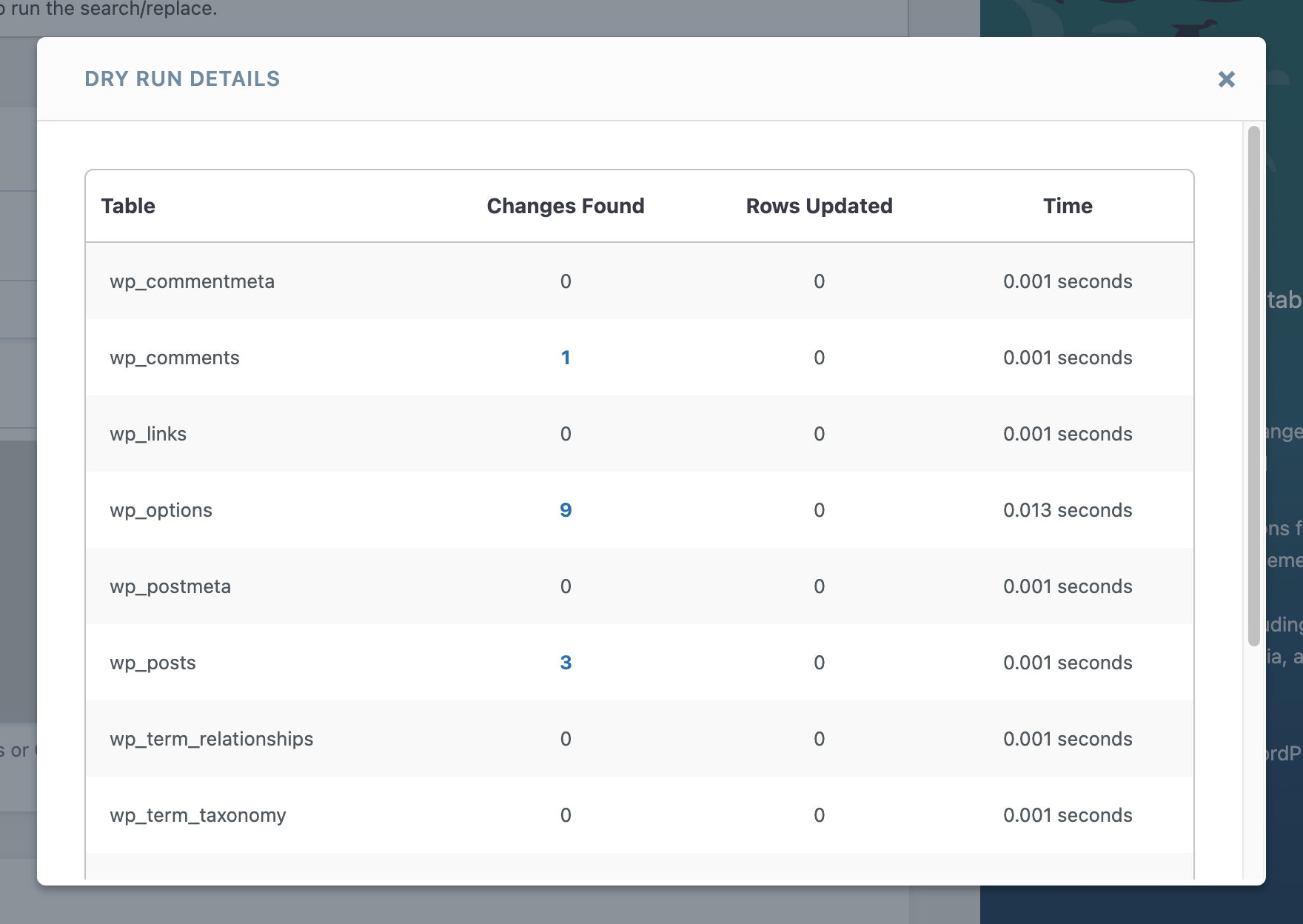
After running a search/replace dry-run.
Faq
Once activated, Better Search Replace will add a page under the “Tools” menu page in your WordPress admin.
Yes! This plugin should be compatible with any host.
Yes! Entering a wrong search or replace string could damage your database. Because of this, it is always advisable to have a backup of your database before using this plugin.
When this plugin is installed on a WordPress multisite network:
- Subsite administrators can only search and replace within tables that belong to that subsite by visiting Dashboard > Tools > Better Search Replace from WP Admin of the subsite.
- Network administrators (i.e. Super Admins) and administrators of the primary site can search and replace across all tables in the multisite network by visiting Dashboard > Tools > Better Search Replace from WP Admin of the primary site.
To change which users have access to the plugin, the user capability can be modified via code using the bsr_capability filter.
If you’re moving your site from one server to another and changing the URL of your WordPress installation, the approach below allows you to do so easily without affecting the old site:
- Backup the database on your current site
- Install the database on your new host
- On the new host, define the new site URL in the
wp-config.phpfile, as shown here - Log in at your new admin URL and run Better Search Replace on the old site URL for the new site URL
- Delete the site_url constant you added to
wp-config.php. You may also need to regenerate your .htaccess by going to Settings -> Permalinks and saving the settings.
More information on moving WordPress can be found here.
Reviews
Simple and efficient
By 
Simple and efficient, ways working good thanks!
So helpfull
By 
This plugin helped me a lot after migrating my website from staging to live.
5 Stars for sure
Excellent !!!
By 
Following a change of server and security certificates, I used the plugin to change the URLs of my website to remove the 'www.'
I had to do this as new security certificates were not generated for www. URLs.
The plugin worked flawlessly!
Title title title (title)
By 
Nice plugin… if you want to replace ALL database values to the same string.
worked great
By 
super simple - worked first try
The Best Find and Replace for WP
By 
This is the standard for Find-and-Replace functions on your WordPress site.
The 'Dry Run' setting is awesome, allowing you to see how many items will be updated prior to replacing 'Live'.
If you know of a more developer friendly and robust plugin, we want to know!
Doesn't work with links and bad support
By 
It doesn't find some or all URLs apparently (doesn't work for me and there are many open issues about that).
I've posted about this in a support thread opened by someone with the same problem, but they decided to remove my post (apparently it's a problem if 2 people with the same issue post in the same thread), so I would have to write again from scratch all the explanation of my problem to open another thread. I'm going to use another plugin instead.
Functional and stays in its lane
By 
Does what it says it does (5 stars)
A rare occasion where a good plugin stays good and doesn't clutter its own pages or worse; the entire site with upsells and advertisements.
Oh right, and it refrains from opting you in for the frequent, unsollicited bulk spam that so many freemium plugins waste your time with these days
Nice plugin
By 
Nice plugin always helps out
Essential for Migrations and Database Adjustments
By 
This plugin is a must-have for any WordPress user who needs to make bulk database changes without hassle. Its interface is simple yet powerful, allowing you to search and replace across tables safely and efficiently.
I've used it multiple times to update URLs after migrations and fix database entries, and it has always worked flawlessly. Plus, the dry-run option before executing changes is a great feature.
Highly recommended! A must-have in my WordPress toolkit!
----------------------------------------------------------------------------------
Spanish
Este plugin es una herramienta esencial para cualquier usuario de WordPress que necesite realizar cambios masivos en la base de datos sin complicaciones. Su interfaz es sencilla, pero potente, permitiendo buscar y reemplazar en tablas de forma segura y eficiente.
Lo he utilizado en varias ocasiones para actualizar URLs tras migraciones y corregir datos en la base de datos, y siempre ha funcionado a la perfección. Además, la opción de prueba antes de ejecutar los cambios es un gran acierto.
Totalmente recomendado. ¡Un imprescindible en mi caja de herramientas de WordPress!
Changelog
1.4.10 – January 14, 2025
- Fix: Improved security and stability
1.4.9 – October 4, 2024
- Security: The plugin now uses its own update mechanism from WP Engine servers
- New: Dependencies have been updated
1.4.8 – September 3, 2024
- No changes as this was a pro-only release for Better Search Replace Pro
1.4.7 – May 30, 2024
- Fix: The case-insensitive setting once again allows case-insensitive strings to be matched within serialized data, fixing a regression introduced in version 1.4.6
1.4.6 – April 17, 2024
- Changed: Serialized text strings are now only deserialized when containing a match, resulting in faster performance
- Security: Table names are now escaped when displaying search results
1.4.5 – January 18, 2024
- Security: Unserializing an object during search and replace operations now passes
'allowed_classes' => falseto avoid instantiating the object and potentially running malicious code stored in the database (thanks to Wordfence for responsible disclosure on December 18, 2023 followed by development and testing of the fix by WP Engine) - Fix: A regression in version 1.4.4 which caused some search results to be skipped has been fixed to ensure only numeric keyed objects are skipped
1.4.4 – December 14, 2023
- Fix: Objects with numerical properties are now skipped to avoid causing errors
1.4.3 – September 5, 2023
- New: Links to plugin documentation, support, feedback, and changelog are now available in the footer of WP Admin
- Improvement: PHP 8.2 and Better Search Replace are now compatible
1.4.2 – January 11, 2023
- Security: Arbitrary tab templates in the
templatesdirectory can no longer be loaded using a query parameter.
1.4.1 – July 25, 2022
- Security: Selected tables are now confirmed to exist before processing the request
1.4 – April 7, 2022
- New: Better Search Replace has a brand new user interface
- Improvement: Default capability required to use the plugin has changed from “install_plugins” to “manage_options” for compatibility with DISALLOW_FILE_MODS
1.3.4 – December 7, 2020
- Improvement: WordPress 5.6 and PHP 8 compatible
- Fix: Strings that have been serialized twice showing up as false-positives
1.3.3 – February 26, 2019
- Fix: Some special characters interfering with search/replace
- Security: Pass template filenames through
sanitize_file_name() - Security: Verify nonce when downloading diagnostic info
1.3.2 – January 3, 2018
- Fix: Only one table searched on some environments (props @Ov3rfly)
- Tweak: Update text in sidebar
1.3.1 – September 14, 2017
- Security: Check if data is serialized before unserializing it
- Improvement: Increased size of table select
1.3 – November 10, 2016
- Improvement: Updated sidebar and added pro version discount
- Fix: Outdated links to old website
- Fix: Prevent requests to invalid tabs
1.2.10 – June 2, 2016
- Fix: CSS not loaded on details page
1.2.9 – December 8, 2015
- Fix: Bug with case-insensitive searches in serialized objects
- Fix: Bug with early skip due to lack of primary key
1.2.8 – November 25, 2015
- Fix: Bug with report details
1.2.7 – November 24, 2015
- Fix: Untranslateable string
- Tweak: Check BSR_PATH instead of ABSPATH to be consistent
- Tested with 4.4
1.2.6
- Removed unused code/small cleanup
1.2.5
- Improved progress bar info and styles
- Small cleanup
1.2.4
- Added “Settings saved” notice when saving settings
- Fixed bug with wp_magic_quotes interfering with some search strings
1.2.3
- Fixed bug with searching for backslashes
- Fixed potential bug with getting tables in large multisites
- Fixed potential notice in append_report
- Improved handling of missing primary keys
1.2.2
- Fixed AJAX conflict with WooCommerce
- Fixed a few issues with translations
- Tweaked “System Info” to use get_locale() instead of WP_LANG constant
- Updated German translation (props @Linus Ziegenhagen)
1.2.1
- Fixed minor issue with display of progress bar
- Updated translation file
1.2
- Switched to AJAX bulk processing for search/replaces
- Decreased minimum “Max Page Size” to 1000
- Added “Help” tab with system info for easier troubleshooting
1.1.1
- Added ability to change max page size
- Decreased default page size to prevent white screen issue on some environments
1.1
- Added ability to change capability required to use plugin
- Small bugfixes and translation fixes
1.0.6
- Added table sizes to the database table listing
- Added French translation (props @Jean Philippe)
1.0.5
- Added support for case-insensitive searches
- Added German translation (props @Linus Ziegenhagen)
1.0.4
- Potential security fixes
1.0.3
- Fixed issue with searching for special characters like ‘\’
- Fixed bug with replacing some objects
1.0.2
- Fixed untranslateable strings on submit button and submenu page.
1.0.1
- Fixed issue with loading translations and added Spanish translation (props Eduardo Larequi)
- Fixed bug with reporting timing
- Updated to use “Dry Run” as default
- Added support for WordPress Multisite (see FAQs for more info)
1.0
- Initial release