Block IE6

Block IE6
Description
This plugin keeps people from viewing your site if they are using Internet Explorer 6. Gives options to download a variety of newer browsers.
For more information on the plugin visit: http://vasthtml.com/js/wordpress-block-ie6-plugin/
Installation
This section describes how to install the plugin and get it working.
- Upload
block-ie6folder to the/wp-content/plugins/directory - Activate the plugin through the ‘Plugins’ menu in WordPress
Please visit http://vasthtml.com/js/wordpress-block-ie6-plugin/ for usage instructions.
Screenshots
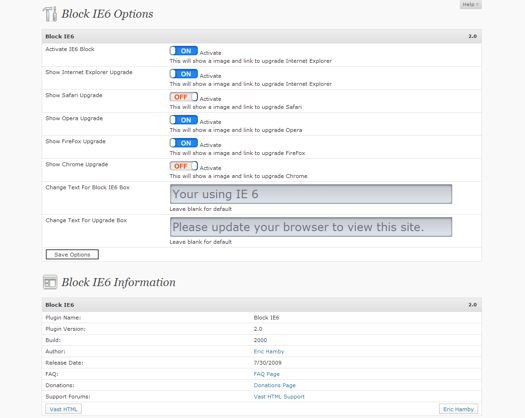
Admin options.

View of block screen with all option active.
Faq
May I recommend some new features?
Yes please do. http://vasthtml.com/support/?vasthtmlaction=viewforum&f=20.0
Where can I get support?
At the support forums on Vast HTML: http://vasthtml.com/support/
I need some help modifying this. Can you help?
Yes I can. http://vasthtml.com/support/ and let me know what you need.
Reviews
Changelog
2.1
- WordPress MU compatible
- Fixed the title text
- Fixed images not working on a Unix server
2.0
- Total redesign for front and back ends
1.1
- Added the ability to change the text on the warning boxes
1.0
- First release