Block Responsive – Make Editor Blocks Responsive Easily
Block Responsive – Make Editor Blocks Responsive Easily
Description
Block Responsive is the ultimate WordPress plugin for creating mobile-friendly, responsive websites with Gutenberg blocks. This comprehensive responsive design tool gives you complete control over how your content appears across all devices, making it easy to build responsive layouts without any coding knowledge.
Perfect for creating mobile-responsive websites, this plugin automatically adds responsive breakpoints and device-specific styling options to every core WordPress block. Whether you’re optimizing for mobile SEO, improving tablet user experience, or fine-tuning desktop layouts, Block Responsive provides the responsive web design tools you need.
Key Features
📱 Display Controls
Hide/show blocks on specific devices (mobile, tablet, desktop)
Simple toggle controls with device-specific icons
Visual feedback for hidden blocks
🎨 Responsive Styling Options
Alignment Controls: Block alignment settings for different screen sizes
Colors Controls: Text color, background color, and link color with device-specific settings
Background Image Controls: Responsive background image settings
Typography Controls: Font size, line height, letter spacing, and text transform for each device
Dimensions Controls: Padding, margin, width, and height controls for responsive layouts
Border & Shadow Controls: Border radius, border width, and shadow effects per device
⚙️ Settings Dashboard
Manage the whole plugin from the new dashboard under Settings > Block Responsive:
- Custom breakpoints – define your own mobile and tablet breakpoints (defaults: 767px / 1024px) so your responsive design matches your theme perfectly.
- Per-block control – enable or disable the responsive controls for individual block types.
- User role permissions – choose which user roles are allowed to customize blocks.
- Import & export – move your plugin settings between sites with a JSON file.
How It Works
- Block Inspector Integration: Responsive controls appear in the block inspector panel
- Device-Specific Settings: Configure different styles for mobile, tablet, and desktop
- Real-time Preview: See changes immediately in the editor
- Frontend Rendering: Automatically generates and applies responsive CSS
Have feedback, suggestions, or feature ideas?
Feel free to share them with me at hello@ashrafuzzaman.com. I’d love to hear your thoughts!
Installation
Method 1: WordPress Admin (Recommended)
- Go to Plugins > Add New in your WordPress admin
- Search for “Block Responsive”
- Click Install Now and then Activate
Screenshots
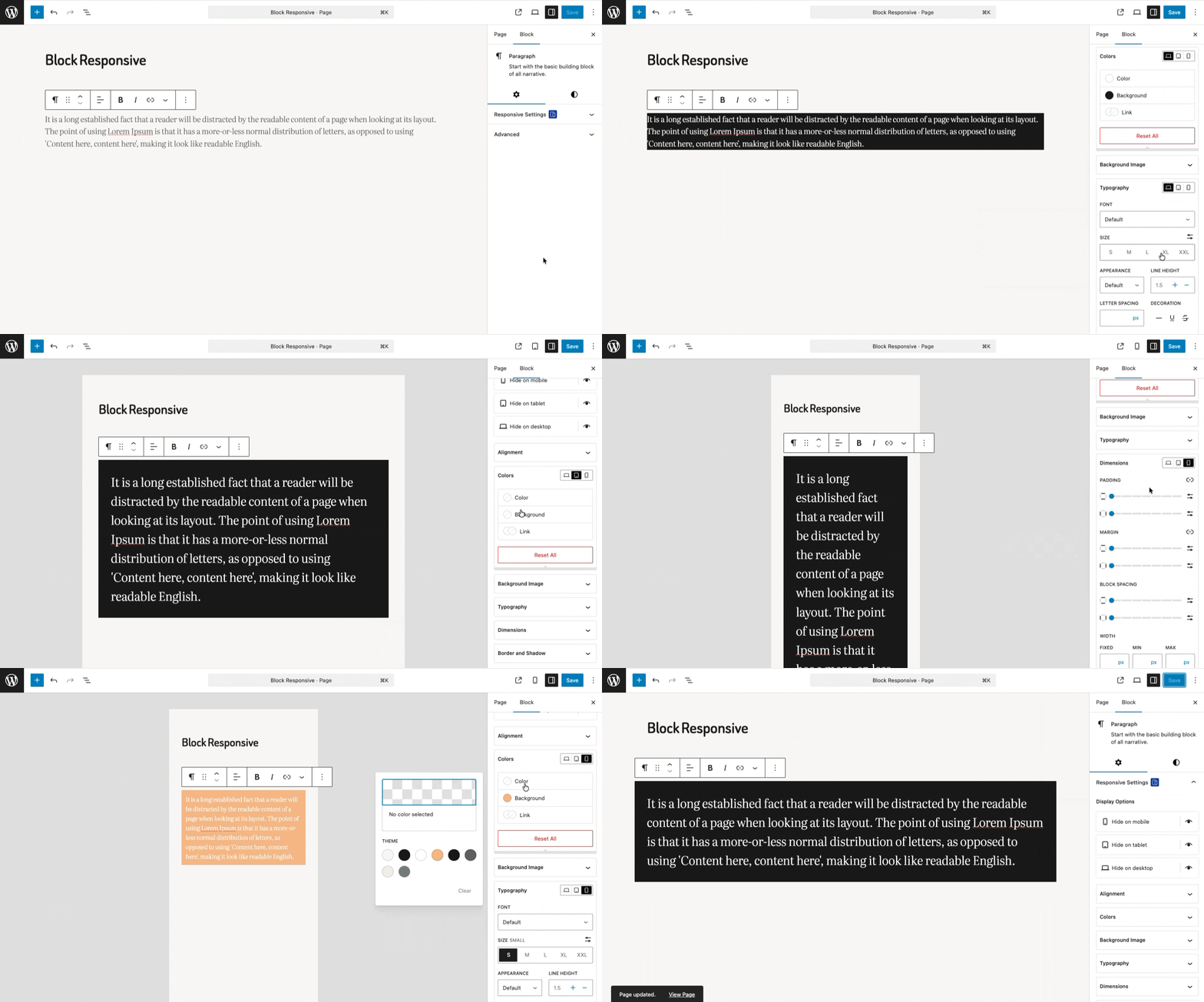
Real-Time Preview of Block Responsive Settings
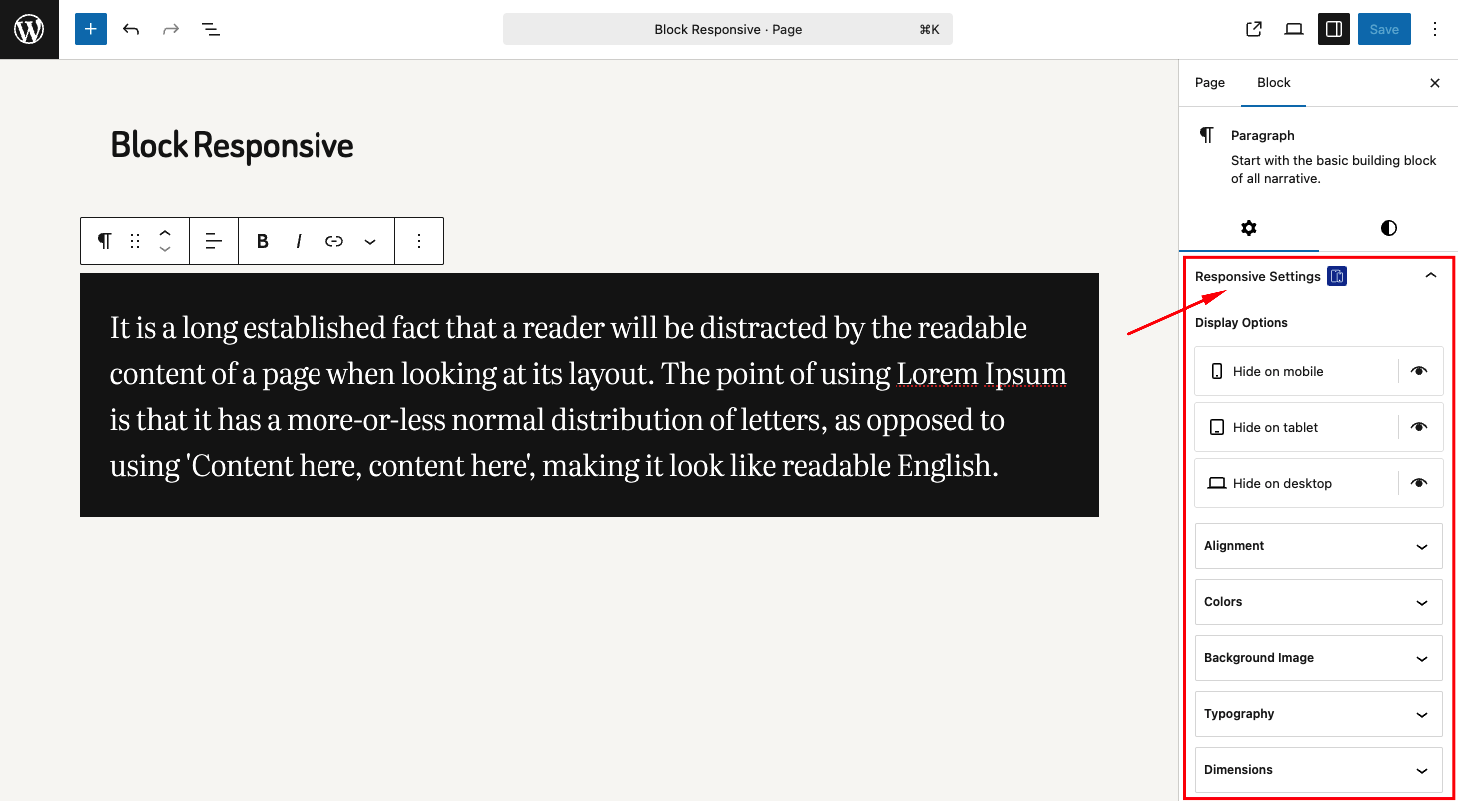
Responsive Settings Panel in Block Editor
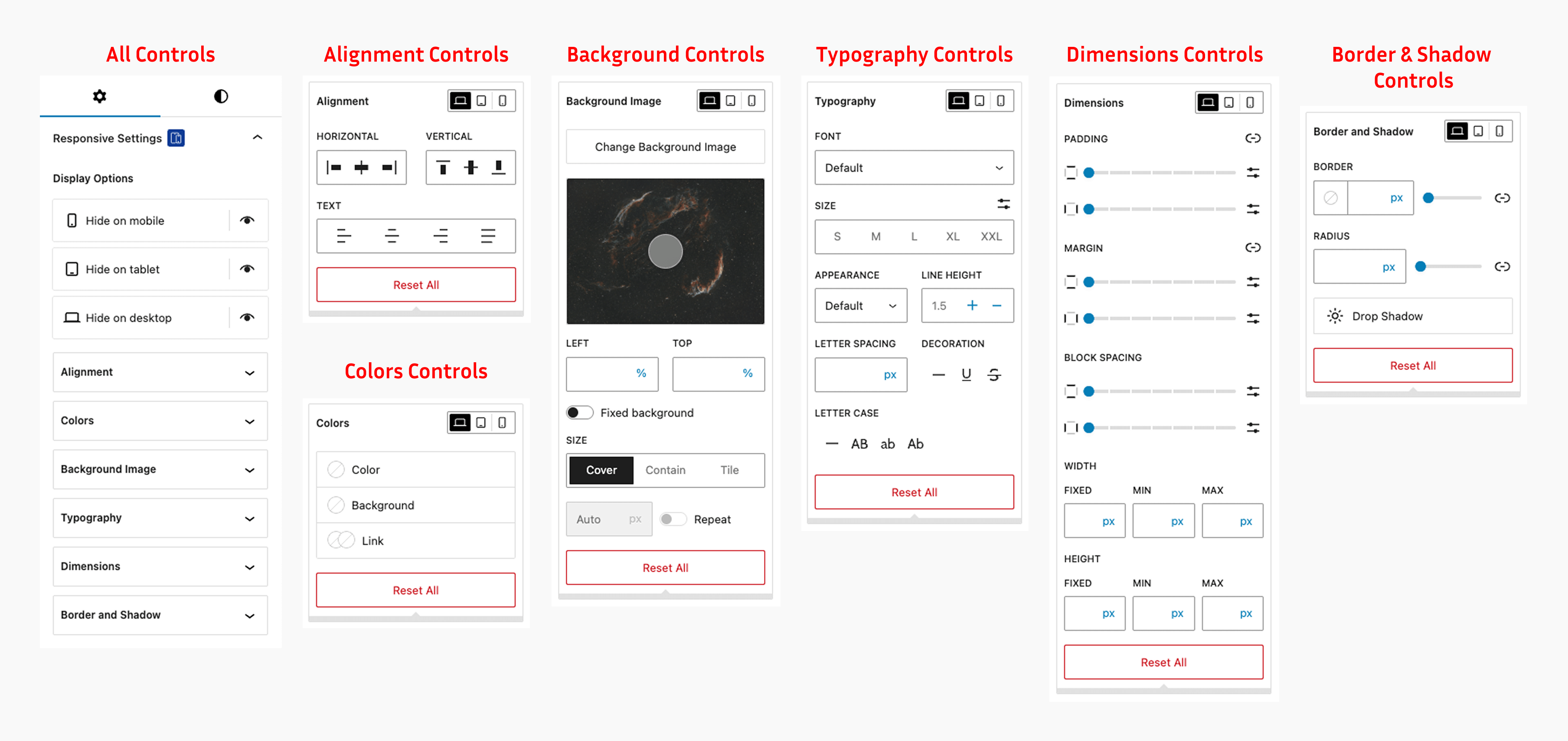
Block inspector showing responsive controls panel with display, typography, and color options
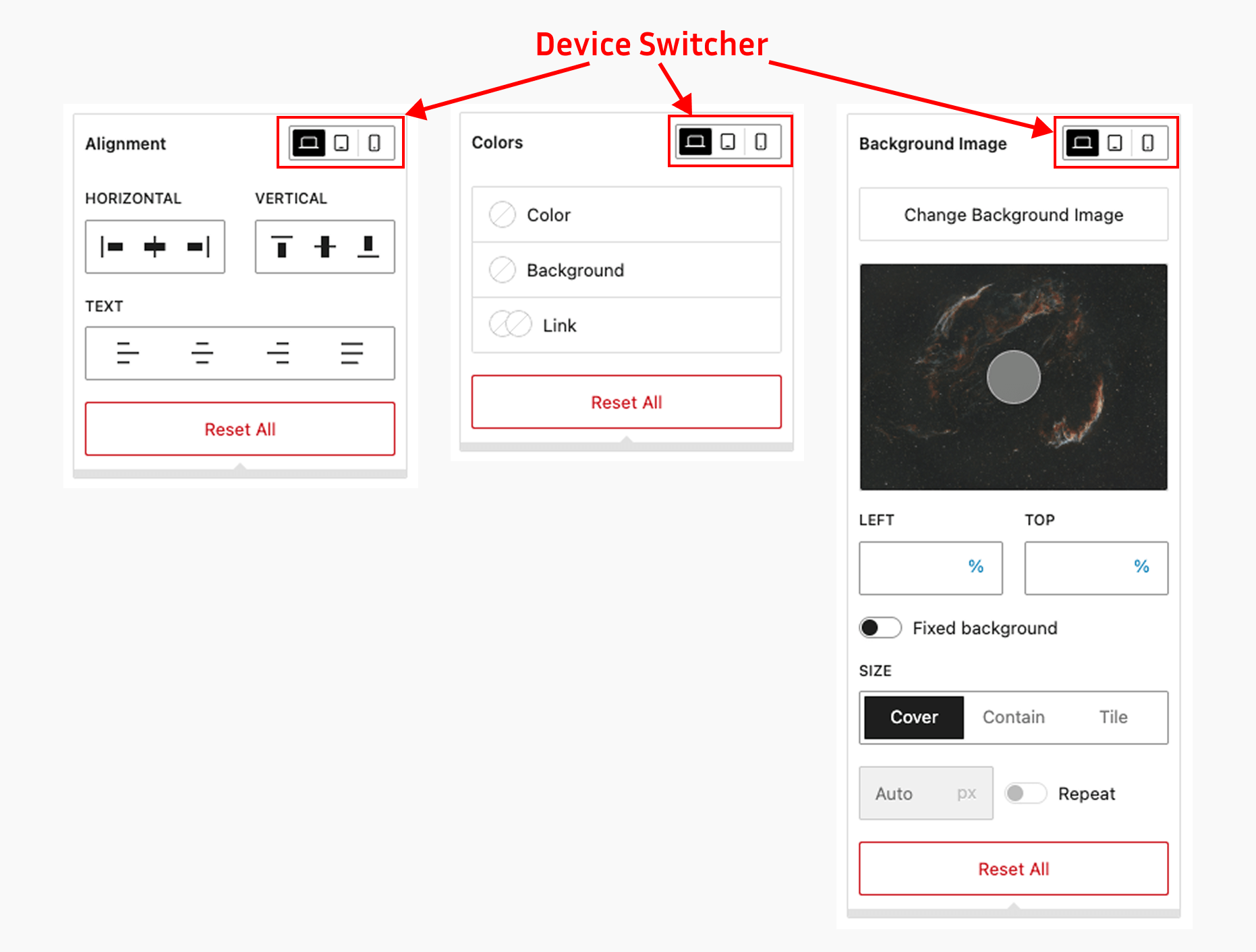
Device-specific controls for mobile, tablet, and desktop
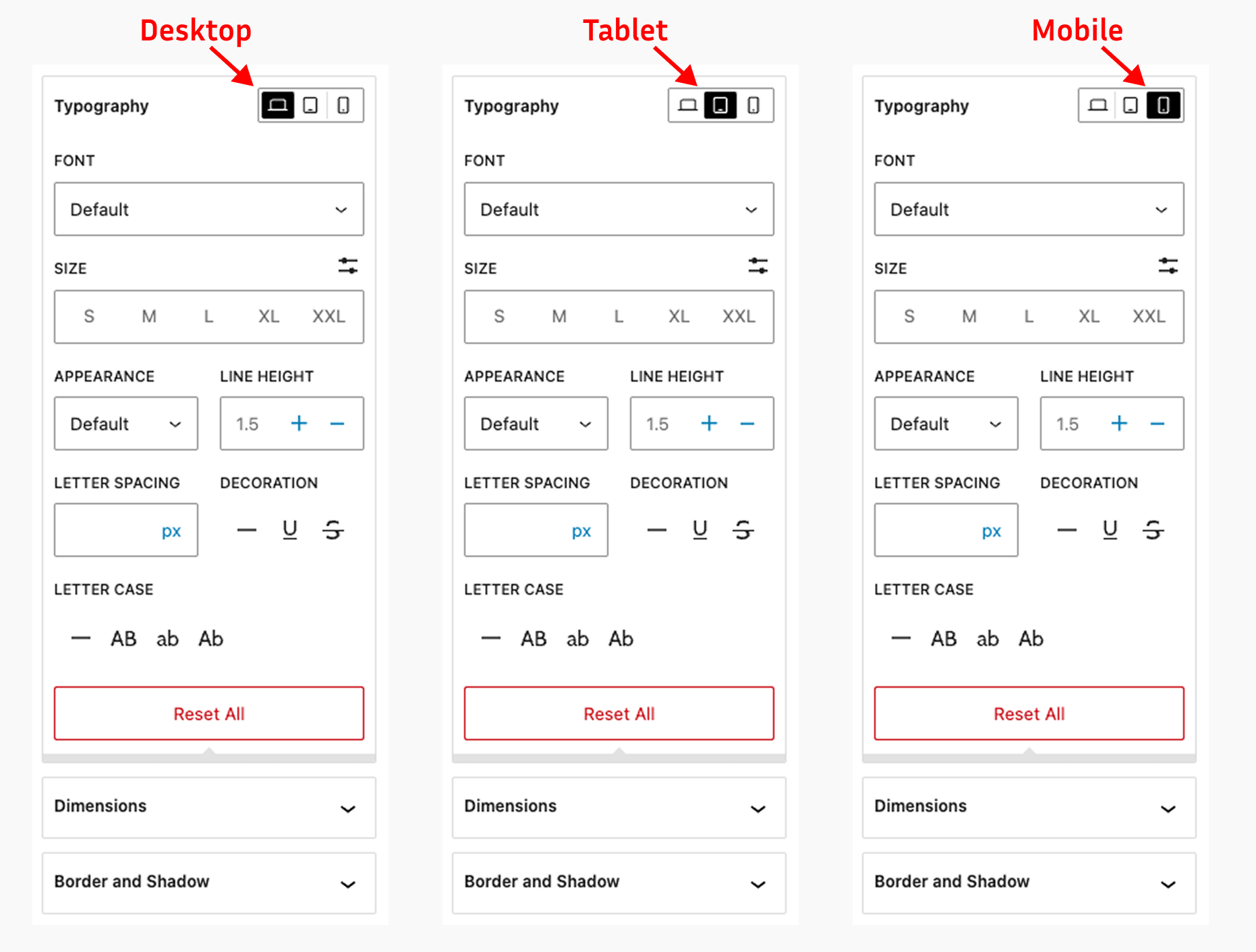
Responsive typography controls with device-specific font size settings
Faq
After activating the plugin, open any post or page in the Gutenberg editor. Select any block and look for the “Block Responsive” panel in the block inspector (right sidebar). You’ll see various responsive controls organized by category.
The plugin works with all core Gutenberg blocks (blocks that start with “core/”) and WooCommerce blocks (blocks that start with “woocommerce/”). This includes paragraphs, headings, images, buttons, columns, product grids, cart blocks, checkout blocks, and many more.
No, the plugin only adds controls to blocks. It doesn’t modify existing content unless you specifically use the responsive controls on blocks.
The plugin is optimized for performance. It only loads the necessary scripts and styles in the editor and generates minimal CSS for the frontend.
Yes! Since version 1.1.0, go to Settings > Block Responsive and enable or disable the responsive controls for each block type individually.
Yes. By default the plugin uses 767px for mobile and 1024px for tablet, but you can set your own custom breakpoints from Settings > Block Responsive to match your theme’s responsive design.
Yes. From the settings dashboard you can choose which user roles are allowed to use the responsive controls in the block editor.
Yes. The settings dashboard includes import and export options, so you can download your configuration as a JSON file and import it on another site.
Your content will remain intact, but any responsive styling applied through the plugin will no longer be visible. The blocks will display with their default styling.
Reviews
Very GOOD
By 
This is exactly what I was looking for. I often don't want or need all of the additional blocks that other plugins offer, the provided Gutenberg blocks are usually enough. But, they are lacking some niceties for responsive design. This plugin brings those niceties and makes adjusting things SO MUCH BETTER.
THANK YOU.
9.8/10 works very well.
By 
As i am trying to get the most out of the basic blocks, this plugin is very useful.
A indicator icon on the setting modals where there are changed values and also on the device icons within would be big usability improvement.
also small bug, i cannot overwrite the single column block width. would be quite usefull to controll it via the fixed width dimension.
thanks Sheikh!
Great plugin
By 
Excellent implementation - well done! Very useful.
Block Responsive addresses what's missing in Gutenberg blocks
By 
I want to stay native using Gutenberg blocks as much as possible to build my layouts. But G blocks lack responsive settings badly. Block Responsive takes care of the problem! Just exactly what I need. Big thank you to the author.
Should be in core
By 
What can I say, is a good plugin. Please keep going to enhance this plugin. Power and power, let's the WP core team know that what is user need.
Fantastic addition to core blocks!
By 
Absolutely fantastic and non-opinionated! I've been looking for a plugin to extend this functionality to core blocks without having to add all new blocks.
This should be in the core.
By 
Tested it for a few minutes, and I can already picture all the different ways this can be used - job well done, really !
Changelog
1.1.1
- Fixed: Border styling of the device toggle buttons in the editor UI.
- Enhance: Added compatibility with WordPress v7.1.
1.1.0
- New: Settings dashboard under Settings > Block Responsive.
- New: Custom mobile and tablet breakpoints (previously fixed at 767px/1024px).
- New: Enable or disable responsive controls per block type.
- New: Choose which user roles can use the responsive controls.
- New: Import/export of plugin settings as a JSON file.
- New: Order control (flex order) in the alignment settings.
- New: Indicators showing which devices have custom values.
- Enhance: Responsive styles now target the same element as core styles (e.g. the button link, not its wrapper).
- Enhance: Zero (“0”) values for spacing and border radius are now applied.
- Enhance: Faster CSS collection on classic themes (no double render).
- Fixed: Inline responsive CSS was output twice on the frontend.
- Security: Generated CSS values are sanitized; background URLs validated.
- Update: Settings are removed on uninstall; content is untouched.
1.0.5
- Fixed: Minor bugs and code improvements.
- Enhance: Added compatibility with WordPress v7.0.
1.0.4
- New: Compatibility with WordPress Site Editor
- Enhance: Added compatibility with WordPress v6.9.
1.0.3
- New: Responsive position and overflow controls
1.0.2
- New: Compatibility with WooCommerce blocks
- Fixed: Reset issue with flex direction settings
- Update: The language (.pot) file
1.0.1
- New: Flex direction control in the alignment settings
- New: Support for negative margin values in the spacing controls
- Update: The language (.pot) file
1.0.0
- Initial release
- Added display controls for mobile, tablet, and desktop
- Added responsive typography controls
- Added responsive color controls
- Added responsive dimensions controls
- Added responsive alignment controls
- Added responsive background image controls
- Added responsive border and shadow controls
- Integrated with Gutenberg block inspector