BNE Gallery Extended

BNE Gallery Extended
Description
The default WordPress shortcode only displays your images in a traditional column grid. BNE Gallery Extended adds a new option called “display” allowing you to also show the images as a 3D carousel or masonry grid.
When adding a new image gallery or editing an existing gallery in your page, a new option will show on the gallery settings to either set the display to 3D Carousel, Masonry, or Default Grid. The default grid is what you have been used to and is the default behavior of WordPress. 3D Carousel adds a jquery rotation to your images and Masonry is similar to the default grid but allows different sizes and stacks them. The Masonry grid will also automatically reduce the number of columns for tablet and mobile screens.
To use with the block editor, use a classic editor block, then use the media button on that block’s toolbar to add your legacy media gallery.
Installation
- Upload “bne-gallery-extended” folder to the “wp-content/plugins/” directory
- Activate the plugin through the “Plugins” menu in WordPress
- A new option will be added to the WP gallery modal window to select the display type. Otherwise add display=”carousel” or display=”masonry” to the shortcode.
Screenshots
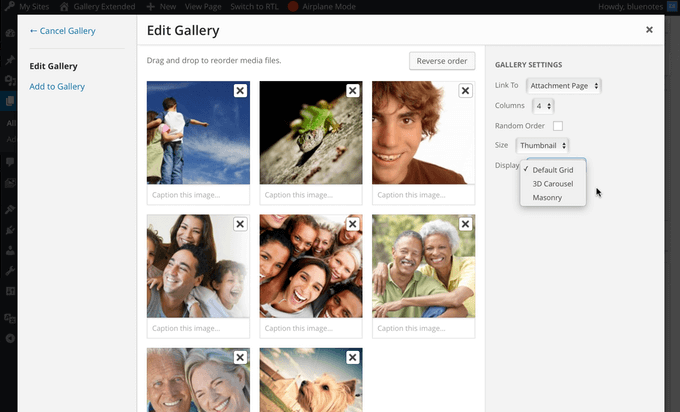
Display Options in the WP Gallery Window

3D Carousel Display

Masonry Display

Traditional Grid
Faq
Add display=”carousel” or display=”carrousel” to the shortcode. Example:
Add display=”masonry” to the shortcode. Use “columns” to set the number of columns within the grid and “gutter” to set the distance between each image. The number of columns will reduce based on screen size. Example:
display
- Options: carousel or masonry
- Description: Sets the display type for the WordPress shortcode.
- Example: or
caption
- Options: true or false (default: false)
- Description: shows the image caption below the centered image.
- Example:
gutter
- Options: Any numerical value, ex: 5 or 3. (default: 5)
- Description: Masonry only – sets the distance surrounding each image in the grid layout. If you use a high number, this may negatively impact the column sizes on mobile. Stay between 5 and 15 for best results.
- Example:
responsive
- Options: true or false. (default: true)
- Description: Masonry only – When used, the number of columns will reduce based on the window width or viewport. For example, 6+ columns will go down to 5 columns at < 1200 viewport, 5+ columns down to 4 columns at < 980 viewport, 4+ columns down to 3 at < 768 viewport, and finally 3+ columns down to 2 at < 480 viewport and smaller.
- Example:
autoplay
- Options: Any numerical value, ex: 4000 or 2000. (default: none)
- Description: Carousel only – Sets the carousel to play automatically. The number represents the time each image is focused on in milliseconds (4000 is equal to 4 seconds).
- Example:
Reviews
Nice!
By 
Nice plugin for WP 5.2
By 
Simply Superb
By 
Perfection!
By 
Good plugin
By 
AMAZING
By 
Très bien
By 
great tool
By 
Very Impressed
By 
Good plugin
By 
Good plugin
Changelog
1.2.2 Nov 18, 2024
- Security fix for XSS via the shortcode image ID’s attribute. My thanks to Peter Thaleikis for the discovery.
- Note that this is a legacy plugin. Users should move towards the built in block editor gallery features.
1.2.1 June 3, 20222
- Fix PHP 8.0 warning.
- Set images to use the “eager” loading attribute.
1.2 December 15, 2020
- Move roundabout inline js to use wp_add_inline_script()
- Adjust JS to support jQuery v3.5+
1.1.1 November 8, 2017
- Fix: Adjust masonry caption if using the link option in to respect either file, none, or attachment.
1.1 November 6, 2017
- New: Captions are now available with the masonry display while the image is hovered.
- New: Image titles are now included in the carrousel.
- Enhancement: Caption meta title and caption fields are separated for greater css customization.
1.0.4 June 17, 2017
- Notice: Now requires WP 4.5+
- Fix: Masonry display items would sometimes overlap one another.
- Enhancement: Move masonry inline js to the footer.
- New: Add a loading indicator to masonry gallery
1.0.3 May 15, 2016
- Enhancement: Better calculation of columns with any gutter size for the masonry display.
- New: Add autoplay option to carrousel by adding autoplay=”4000″ within the gallery shortcode. 4000 (in milliseconds) is equal to 4 seconds.
- New: Option to disable masonry responsive columns by adding responsive=”false” to the gallery shortcode. Default behavior will reduce 6+ columns down to 5 columns at < 1200 viewport, 5+ columns down to 4 columns at < 980 viewport, 4+ columns down to 3 at < 768 viewport, and finally 3+ columns down to 2 at < 480 viewport and smaller.
1.0.2 March 27, 2016
- Clean up and adjust css.
1.0.1 January 22, 2016
- Add caption option for carousel
1.0 December 17, 2015
- First Public Release. *