Bookinda Booking Widget

Bookinda Booking Widget
Description
The Bookinda Booking Widget plugin embeds the Bookinda online booking natively into any WordPress site, and puts the right booking on every page: the full booking, selected categories or services, one service’s free slots, packages or memberships, narrowed to a location or staff member. You pick everything from your own lists, with a live preview of the real booking in the block editor and in Elementor.
It supports four embed methods (Gutenberg block, Elementor widget, Classic editor toolbar button, shortcode) and two display modes (inline, or a button that opens the booking full screen).
The plugin is a thin client for the Bookinda SaaS booking platform (https://bookinda.hu). Since 1.2.0 it loads the Bookinda booking widget script from bookinda.hu, the same booking flow as on the Bookinda site, so every new Bookinda booking feature appears on your site without a plugin update. The older iframe embed is still available with engine="iframe". Booking lifecycle events are bridged to the host page as native DOM CustomEvents.
You need an active Bookinda account to use this plugin. The plugin itself is free.
Features
- Gutenberg block in the Widgets category with a live preview in the editor: the real booking widget, started with exactly the settings your page gets.
- Choose from your own lists: locations, categories, services, staff, packages and memberships are loaded from your Bookinda account, no IDs to copy.
- Filters: show the full booking, selected categories, selected services, one service’s free slots, packages, memberships, group classes or gift vouchers; narrow it to locations and staff. With one location the location step is skipped.
- Titles and texts: hide or rewrite the header (salon name, language, sign in), hide the step titles and descriptions. Everything is shown by default.
- Category image cards: guests first pick a category from picture cards, then see only that category’s services, with an “All categories” link back.
- Detailed services: each service with its description and reference photos, which open full size on click.
- Saved widgets: paste the ID of a widget you set up in Bookinda (Settings > Widgets), and its colours and content appear.
- Elementor widget with the same lists and options in the sidebar, and a live preview.
- Classic editor (TinyMCE) toolbar button with a dialog that inserts the appropriate shortcode.
- Shortcode
[bookinda]/[bookinda mode="lightbox"]for any template, widget area, or content block. - Inline mode: the booking flow is embedded directly in the content and grows with it.
- Lightbox mode: a button opens a fullscreen modal with the booking flow (mobile-optimized with sticky continue button, ESC and backdrop click to close).
- Preselection and deep links:
services,staff,category,promo,location, plusview(skip the “what would you like to book” step: services, packages, memberships, groupClasses, giftVouchers),packageandmembership(open a specific package or membership purchase). - Slug from any URL: paste
bioskin,bioskin.bookinda.huorhttps://bioskin.bookinda.hu, the plugin reads the slug from it. - Host DOM events:
bookinda:complete,bookinda:error,bookinda:step,bookinda:resizeCustomEvents dispatched ondocumentfor custom integrations. - Optional GA4 and Meta Pixel tracking: if the host page already loads
gtagorfbq, the plugin can fire apurchaseevent on booking completion. Configured via plugin settings (off by default).
Where to find your tenant slug
Your tenant slug is the prefix of your Bookinda URL: https://YOUR-SLUG.bookinda.hu/manager/calendar. The slug is the part before .bookinda.hu.
External Services
This plugin connects to Bookinda (https://bookinda.hu), a third-party SaaS booking platform operated by Bookinda Kft. The connection is required for the plugin to function: the booking widget script is loaded from https://bookinda.hu/embed/v2/bookinda-widget.js and talks to the Bookinda API (https://api.bookinda.hu). With engine="iframe" the booking flow is loaded in an iframe from your tenant subdomain instead.
What is sent to Bookinda:
- When a visitor opens a page containing the booking widget, their browser loads the booking widget script from
https://bookinda.hu/embed/v2/bookinda-widget.js, which requests your salon’s public booking data (services, free slots, staff, locations) fromhttps://api.bookinda.hu. The request includes the embed settings you chose (what to show, filters, preselected IDs, language) and an analytics-onlysource=wp-pluginparameter so Bookinda can distinguish WordPress plugin traffic from other embed sources. Withengine="iframe"the browser loadshttps://{your-tenant-slug}.bookinda.hu/embed/{your-tenant-slug}in an iframe instead. - When the visitor proceeds with a booking, the data they enter (name, email, phone, payment details) is sent directly to Bookinda’s servers, not to your WordPress site. The plugin does not collect or store visitor data on the WordPress site.
- In the block editor and Elementor, your WordPress site fetches your salon’s public lists (locations, categories, services, staff, packages, memberships) from
https://api.bookinda.huso you can pick from them. These are cached for 10 minutes.
What is received from Bookinda:
- The booking widget HTML, CSS, and JavaScript, served from the Bookinda CDN.
- Booking lifecycle events (completion confirmation, step changes, height changes). The plugin re-broadcasts these as DOM CustomEvents on the host page.
Service documentation:
- Bookinda website: https://bookinda.hu
- Privacy Policy: https://bookinda.hu/adatkezeles
- Cookie Policy: https://bookinda.hu/cookie-szabalyzat
- Terms of Service: https://bookinda.hu/aszf
- Data deletion request: https://bookinda.hu/adatok-torlese
By installing and activating this plugin you acknowledge that visitor interactions with the embedded widget are subject to Bookinda’s Privacy Policy and Terms of Service. Please review them and ensure your site’s privacy notice reflects the data flow described above.
Installation
- Download the plugin zip from https://bookinda.hu/integracio/wordpress
- In WordPress admin, go to Plugins Add New Upload Plugin and select the zip file.
- Click Install Now, then Activate.
- Go to Settings Bookinda and enter your tenant slug.
- Embed the widget anywhere using the Gutenberg block, Elementor widget, Classic editor button, or shortcode
[bookinda].
Screenshots
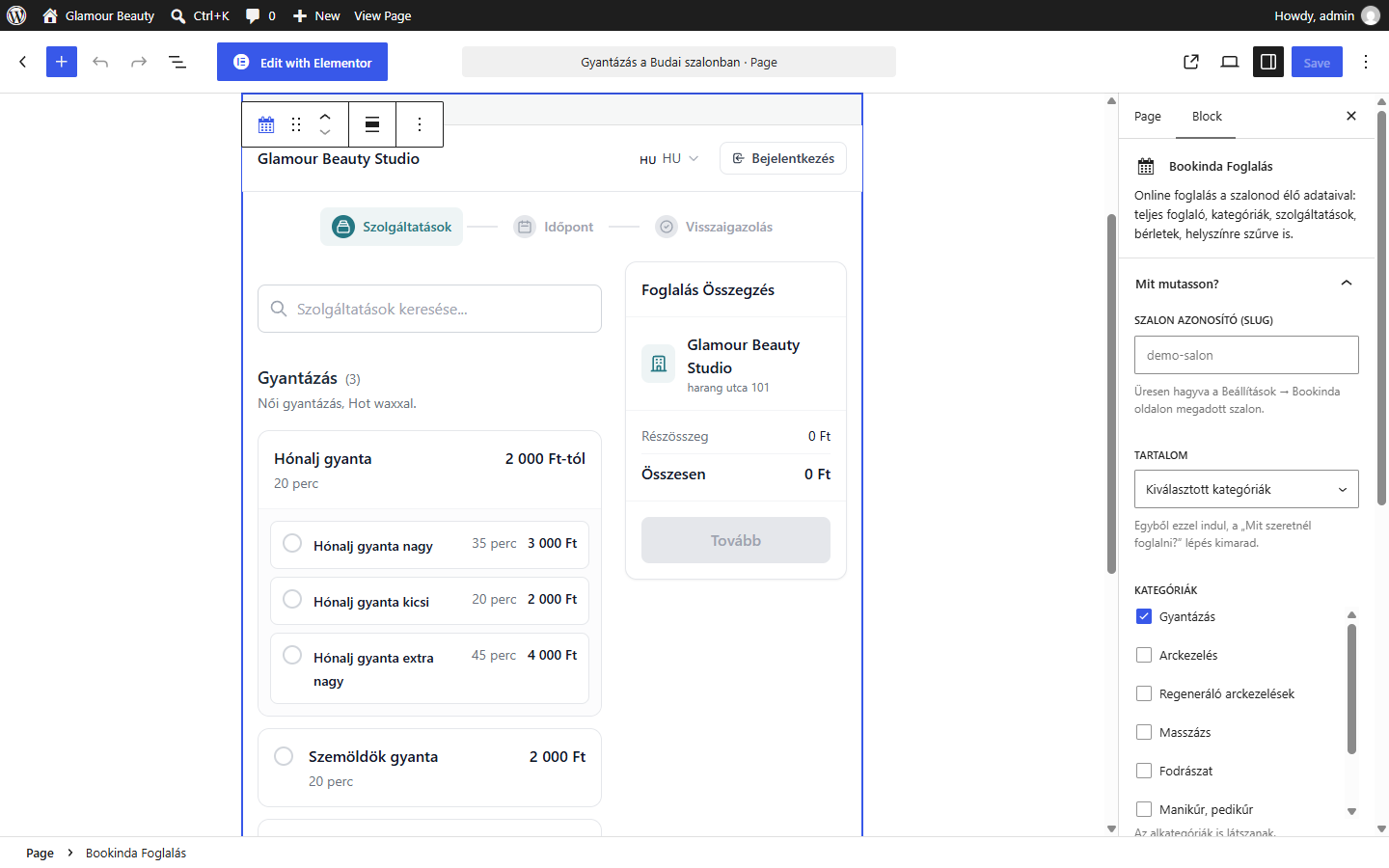
Block editor: pick what the booking shows from your own lists (here one category), with a live preview of the real booking.
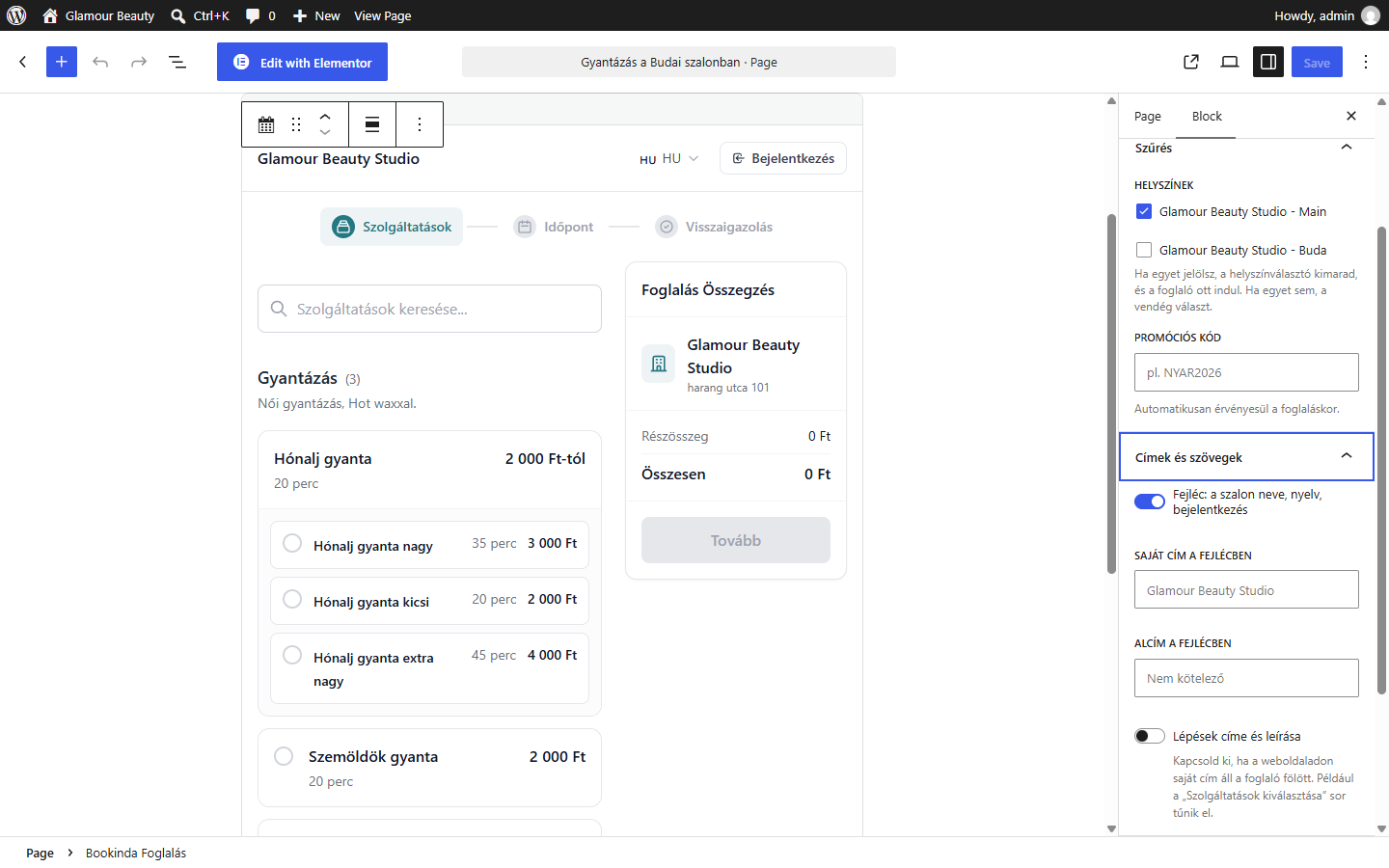
Filters and titles: with one location selected the location step is skipped; the header and the step titles can be hidden or rewritten.
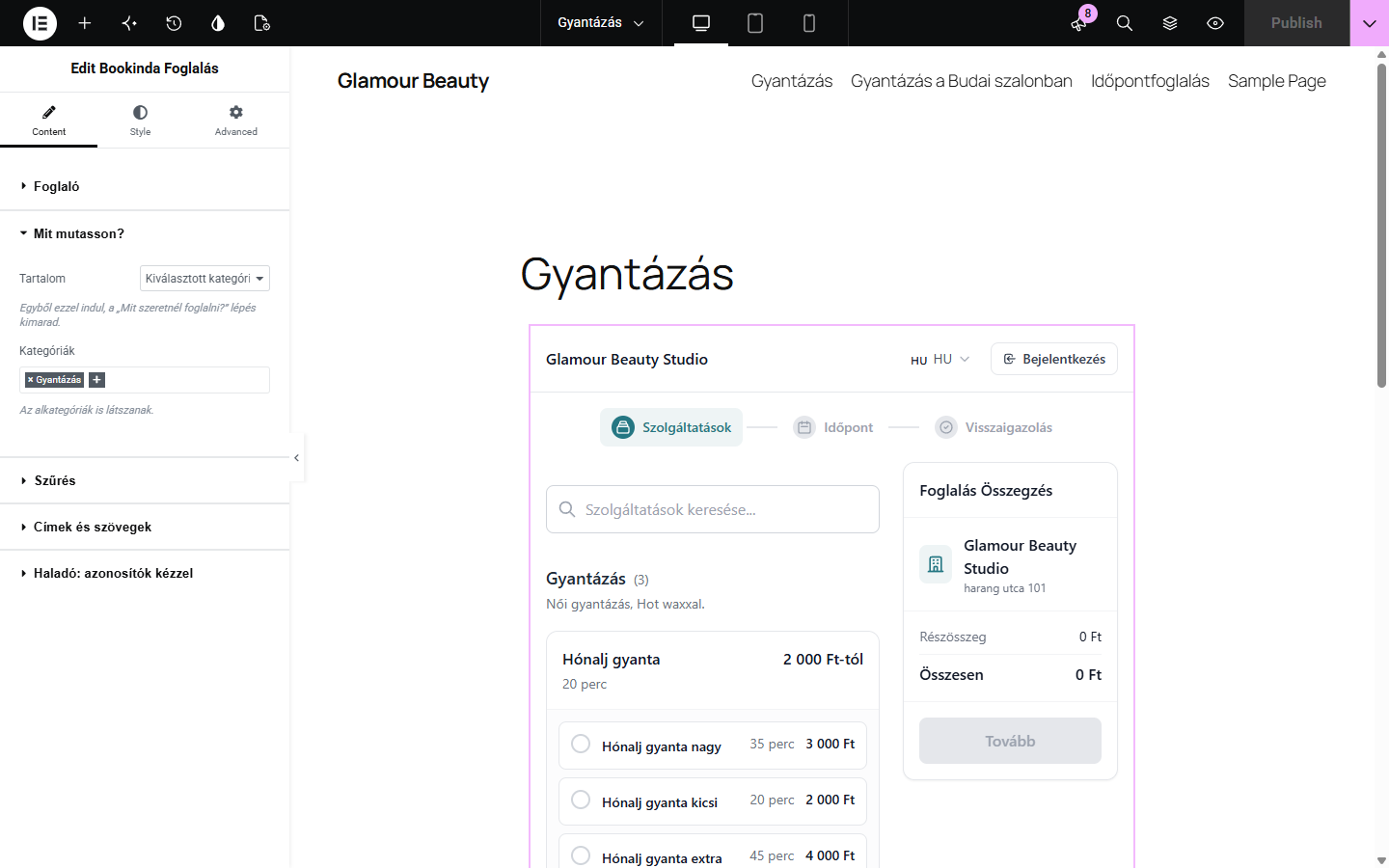
Elementor widget with the same lists and options, and a live preview.
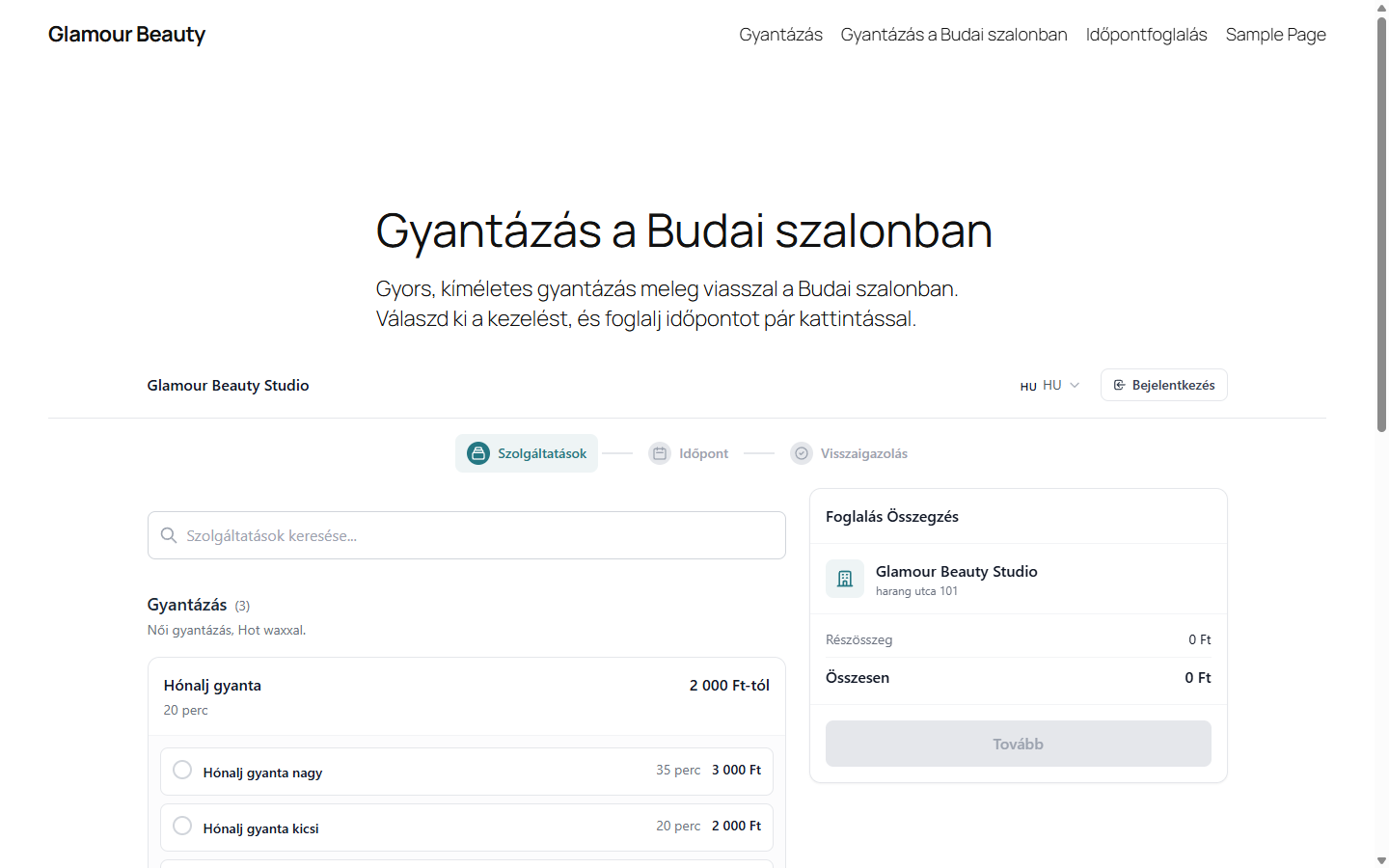
The booking on a page: only the waxing services of one location, without step titles.
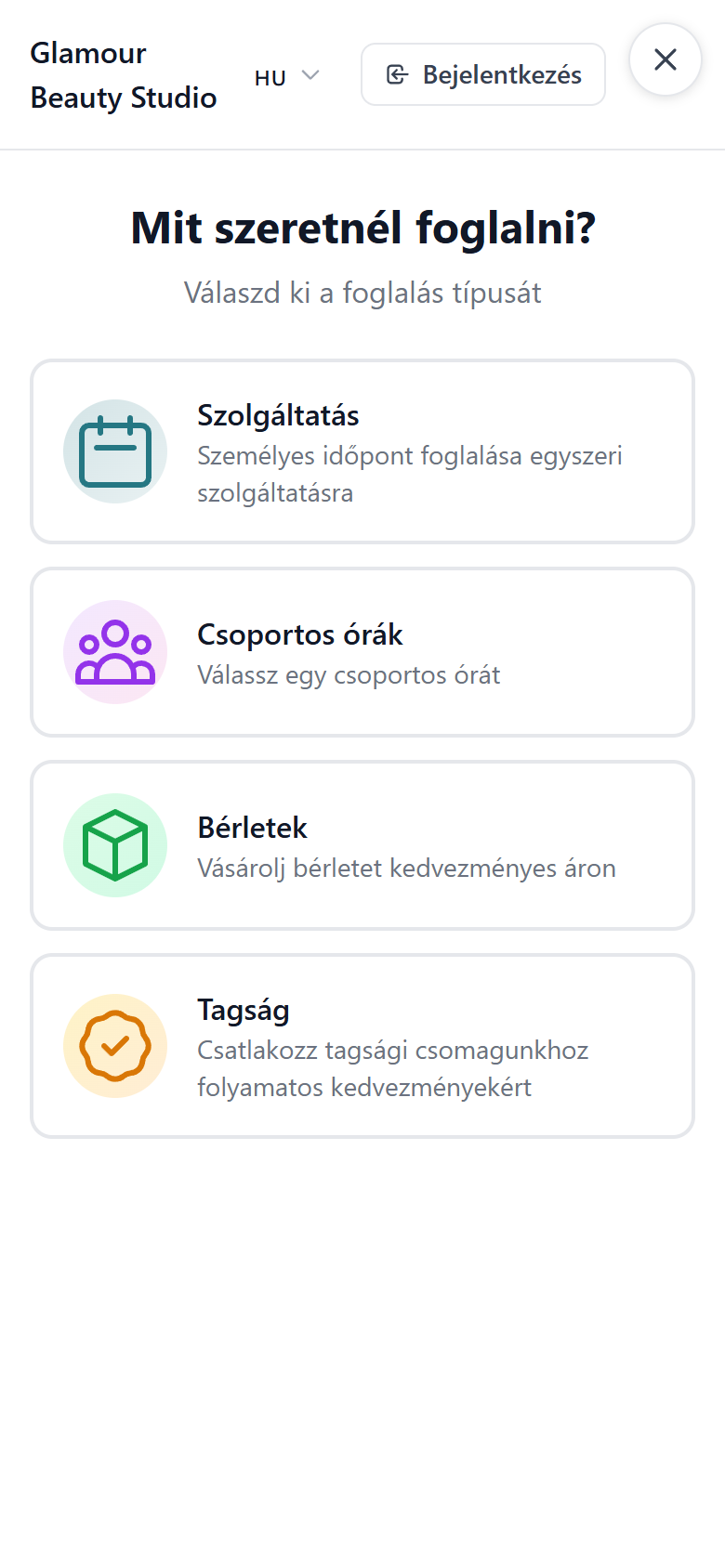
Button mode on mobile: the booking opens full screen.
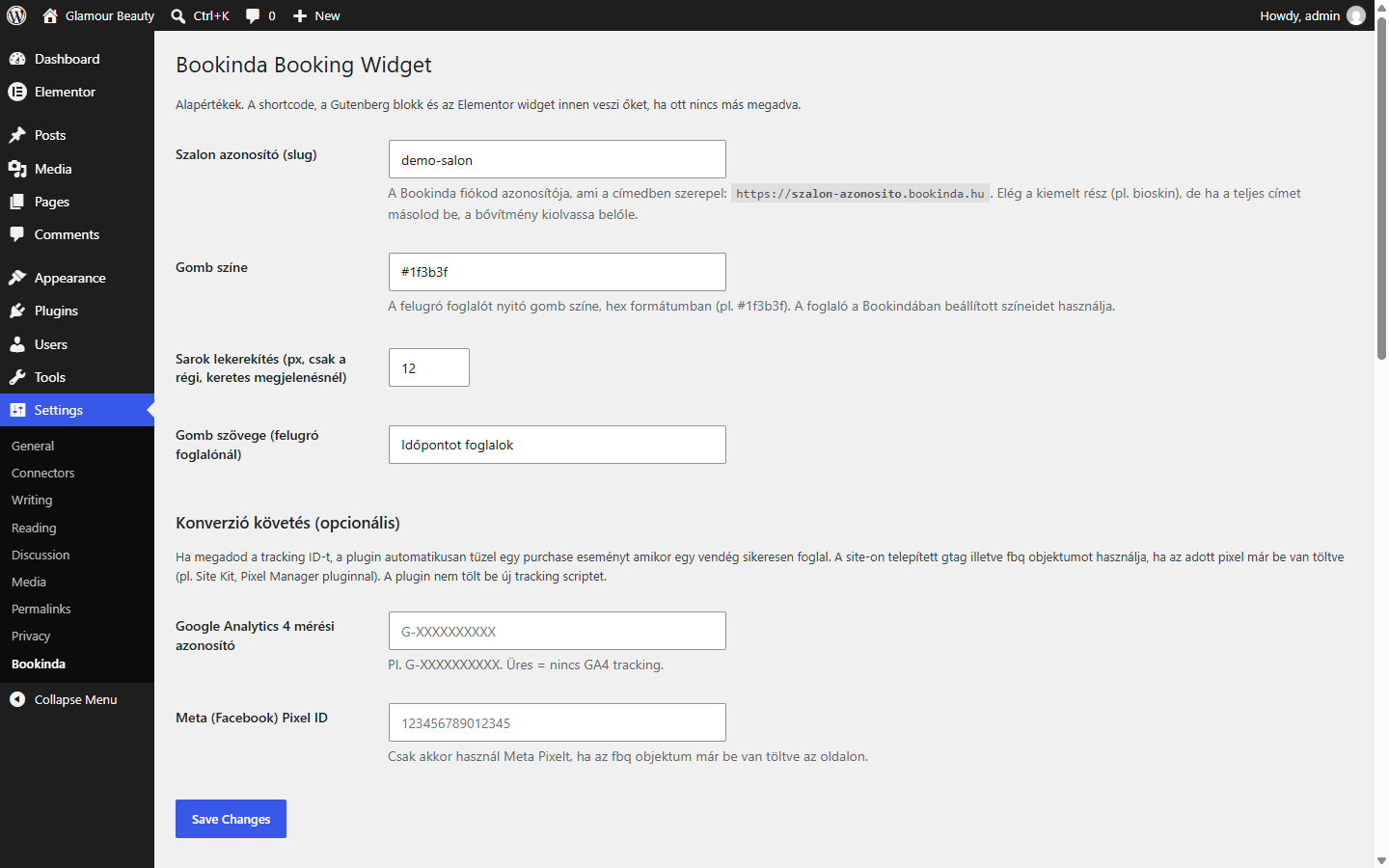
Plugin settings: salon slug, button label and optional GA4 and Meta Pixel tracking.
Faq
Yes. The plugin embeds the Bookinda booking widget, which requires an active Bookinda account. You can sign up at https://bookinda.hu. The plugin itself is free.
Yes. The plugin is licensed under GPLv2 or later and is free to use. There is no one-time purchase fee and no annual subscription cost for the plugin. A Bookinda SaaS account is required for the booking functionality (separate from the plugin).
It is the prefix of your Bookinda URL: https://YOUR-SLUG.bookinda.hu/manager/calendar. The part before .bookinda.hu is your slug.
When a visitor opens a page with the booking widget, their browser loads the Bookinda widget script from bookinda.hu, which then talks to the Bookinda API. The plugin does not send data from your WordPress site to Bookinda. All visitor interactions (filling in name, email, payment) go directly from the visitor’s browser to Bookinda and are subject to Bookinda’s Privacy Policy.
By default, no. The plugin only sends one analytics-only parameter to Bookinda (source=wp-plugin) so Bookinda can identify WordPress plugin traffic on its own analytics.
The plugin can optionally fire a Google Analytics 4 or Meta Pixel purchase event when a booking completes, but only if you explicitly configure the GA4 measurement ID or Meta Pixel ID in the plugin settings, and only if the host page already loads gtag or fbq (the plugin does not load any tracking scripts itself).
Lightbox (recommended for most cases): a button on the page opens a fullscreen modal with the booking flow. Mobile-friendly because the iframe gets its own scroll context.
Inline: the iframe is embedded directly in the content. Good for dedicated booking pages.
Download the latest zip from https://bookinda.hu/integracio/wordpress, deactivate and delete the current plugin in WP-admin, then install the new zip. Your settings (slug, primary color, tracking IDs) are preserved across updates.
Reviews
Changelog
1.4.0
- Category image cards:
category_cards="yes"shows the categories as picture cards first; after a click only that category’s services are listed, with an “All categories” link back. Subcategories appear as chips under the category header. - Detailed services:
service_photos="yes"shows each service’s description and reference photos, which open full size on click. - Both follow the salon’s booking page setting in Bookinda when left empty, and can be set per page in the block and in Elementor (“Categories”, “Services”).
- Readme: fixed the changelog and upgrade notice that appeared twice, and updated the external services section to the widget script.
1.3.0
- Filters:
show(full, categories, services, service, packages, memberships, classes, vouchers),categories,service_list,staff_list,locations,packages,memberships. Categories, services and packages start straight with the filtered list, without the “what would you like to book” step. With one location the location step is skipped. - Titles and texts:
header="hide",title,subtitle,step_titles="hide". Everything is shown by default, as before. widget: show a widget set up in Bookinda (Settings > Widgets) with its colours and content.lang: hu or en.- Block editor: the salon’s locations, categories, services, staff, packages and memberships are offered as lists, and the block shows a live preview of the real booking widget.
- Elementor: the same lists and options, and the editor preview shows the real booking widget.
1.2.0
- Tested up to WordPress 7.1 (block editor controls use the new 40px default size).
- The plugin now embeds the Bookinda booking widget (the same booking flow as on bookinda.hu) instead of the old iframe page: images, packages, memberships, installments, online payments and every future booking feature work on your site automatically. The old iframe embed is available with
engine="iframe". - The tenant slug field accepts a full URL (
https://bioskin.bookinda.hu); an earlier, wrongly saved slug is repaired automatically. Before, a pasted URL left the booking loading forever. - New shortcode parameters:
view(skip the “what would you like to book” step),packageandmembership(open a specific purchase).servicesandcategorynow also skip that step. - Moving to the next step no longer jumps to the top of your page.
1.1.3
- Aligned the text domain with the plugin slug (bookinda-booking-widget) for all translatable strings.
- Added the text domain to the block editor (JavaScript) strings and registered script translations via wp_set_script_translations().
- Renamed the translation template to bookinda-booking-widget.pot.
1.1.2
- Tested up to WordPress 7.0.
- Removed the manual load_plugin_textdomain() call. WordPress.org loads translations automatically for plugins hosted in the Plugin Directory.
1.1.1
- External Services disclosure section in readme (WordPress.org plugin guideline 6).
- Privacy Policy and Terms of Service links on settings page.
- Output escape audit on settings page (defense-in-depth).
- User-facing strings wrapped with
__()/esc_html__()for i18n. - Empty
/languagesfolder +.pottemplate so the Domain Path declaration validates cleanly. - Plugin name set to ASCII for the WordPress.org repository (“Bookinda Booking Widget”).
- Tested up to WordPress 6.7.
1.1.0
- New: Gutenberg block (“Bookinda Foglalás”) with sidebar InspectorControls for every parameter.
- New: Classic editor (TinyMCE) toolbar button with shortcode-inserting dialog.
- New: Host-side DOM events (
bookinda:complete,bookinda:error,bookinda:step,bookinda:resize). - New: GA4 + Meta Pixel auto-purchase tracking via plugin settings.
1.0.0
- Initial release. Shortcode + Elementor widget + lightbox modal mode.