BotWriter – Free AI Content Generator
BotWriter – Free AI Content Generator
Description
Do you want to keep your WordPress blog updated automatically with fresh, SEO-optimized content? 📈 With BotWriter, artificial intelligence takes care of writing and publishing articles for you!
You can go on vacation or stop worrying about your blog:
🔹 Automatically publish content every day / every week
🔹 Generate 100% original articles with AI images
🔹 NEW: Choose from 7+ AI text providers (OpenAI, Claude, Gemini, Mistral, Groq…)
🔹 NEW: 8 image providers including Flux 2, Nano Banana Pro & DALL-E 3
🔹 NEW: Article templates for consistent, professional content
🔹 Optimize your blog to rank higher on Google
🔹 Set it up in minutes and let AI do the rest
In this video, we’ll show you how to set up BotWriter in just a few steps so your blog stays active effortlessly. Take advantage of AI-powered automation and streamline your content strategy! 🚀
BotWriter has been designed to simplify content creation for blogs, websites, and online stores. Version 2.0 introduces multi-provider architecture—choose the best AI for each job. Use GPT-5 for creative writing, Claude for technical content, or Gemini for multilingual articles. Pair them with cutting-edge image models like Flux 2 Pro, Google’s Nano Banana, or Stable Diffusion.
BotWriter is capable of creating entire blog content in minutes! Check out the example:
How to Auto-Generate Articles from an RSS Feed | BotWriter + NASA RSS
Key Features
🆕 Multi-Provider AI Text Generation
Choose from 7 different AI providers for text generation:
* OpenAI: GPT-5, GPT-4.1, GPT-4o series
* Anthropic: Claude Sonnet 4.5, Claude Haiku
* Google: Gemini 2.5 Pro, Gemini 2.5 Flash
* Mistral: Mistral Large, Mistral Small
* Groq: Llama 3.3 70B (ultra-fast inference)
* OpenRouter: Access to 200+ models through one API
* DeepSeek: Cost-effective alternatives
⛽ Multi-Provider AI Image Generation
5 image providers with 50+ models:
* OpenAI DALL-E: GPT-Image-1, DALL-E 3
* Fal.ai: Flux 2 Pro/Dev, Nano Banana Pro (Google Gemini), Seedream 4.5
* Replicate: Flux 1.1 Pro, Ideogram V3, Imagen 4
* Stability AI: Stable Diffusion 3.5, SDXL
* Cloudflare Workers AI: Flux Schnell (fast & affordable)
⛽ Article Templates
Create professional, consistent content with reusable templates:
* Pre-configured prompts for different content types
* SEO-optimized structures
* Custom style guidelines
* One-click template application to any task
Scheduled Content Automation
BotWriter automates your content creation workflow. Schedule tasks to publish AI-generated articles on specific days and times—daily, weekly, or custom schedules. Perfect for maintaining a consistent publishing calendar without manual intervention.
Multiple Content Sources
* AI-Generated Content: Create 100% original articles from scratch using custom prompts and AI keywords
* RSS Feed Integration: Transform RSS feeds into unique, rewritten articles automatically
* News Aggregation: Pull trending news stories and rewrite them for your niche
* Super Tasks: Generate entire content series—create multiple related articles in bulk with a single configuration
Smart Content Generation
Each scheduled task runs automatically via WordPress cron, generating:
* SEO-optimized titles and content
* Relevant tags and categories
* AI-generated featured images (configurable per task)
* Custom post lengths (from short to comprehensive articles)
Instant Publishing with “Write Now”
Need content immediately? The “Write Now” feature creates and publishes a single post instantly with real-time progress tracking—no waiting for scheduled cron jobs.
Full Customization
* Choose from multiple AI text and image models per task
* Configure image size and quality
* Customize writing style, tone, and narrative voice
* Set post status (publish, draft, pending, private)
* Control publishing frequency and timing
Your API Keys, Your Control
BotWriter is 100% free. You only pay the AI providers directly for API usage—BotWriter doesn’t charge subscription fees or take a cut of your API costs.
External Services
This plugin relies on third-party external services to generate text and images automatically, as well as to retrieve related content for your blog.
Service's Terms
 https://wpbotwriter.com/services-terms/

Privacy Policy
https://wpbotwriter.com/privacy-policy/
Below is a summary of the external services used and the data they handle:
1. BotWriter Platform (wpbotwriter.com)
These endpoints are part of the service provided by our platform:
– Activation: https://wpbotwriter.com/public/activation.php – Validates and activates the plugin
– Generate Posts: https://wpbotwriter.com/public/redis_api_cola.php and redis_api_finish.php – Process content generation
– User Data: https://wpbotwriter.com/public/getUserData.php – Subscription data for Pro users
– Email Confirmation: https://wpbotwriter.com/public/envio_email_confirmacion.php – Optional email registration
2. Text Generation Providers
When configured, the plugin connects to these services for text generation:
– OpenAI API – Terms | Privacy
– Anthropic API (Claude) – Terms | Privacy
– Google AI (Gemini) – Terms | Privacy
– Mistral AI – Terms | Privacy
– Groq – Terms | Privacy
– OpenRouter – Terms | Privacy
3. Image Generation Providers
When configured, the plugin connects to these services for image generation:
– OpenAI DALL-E – Terms | Privacy
– Fal.ai – Terms | Privacy
– Replicate – Terms | Privacy
– Stability AI – Terms | Privacy
– Cloudflare Workers AI – Terms | Privacy
Data Transmitted: The plugin sends user-supplied prompts, configuration parameters, and API keys when requesting content generation. Your API keys are stored encrypted in your WordPress database and transmitted securely to the respective providers.
By using this plugin, you acknowledge that it communicates with these third-party and external services, and that data is transmitted as described above. Please review the respective Terms of Service and Privacy Policies for each service.
Installation
- Upload the botwriter.zip file to your plugins folder (
/wp-content/plugins/). - Activate the plugin through the “Plugins” menu in WordPress.
- Go to BotWriter Settings and configure your preferred AI providers.
- Create your first task and let the automation begin!
Screenshots
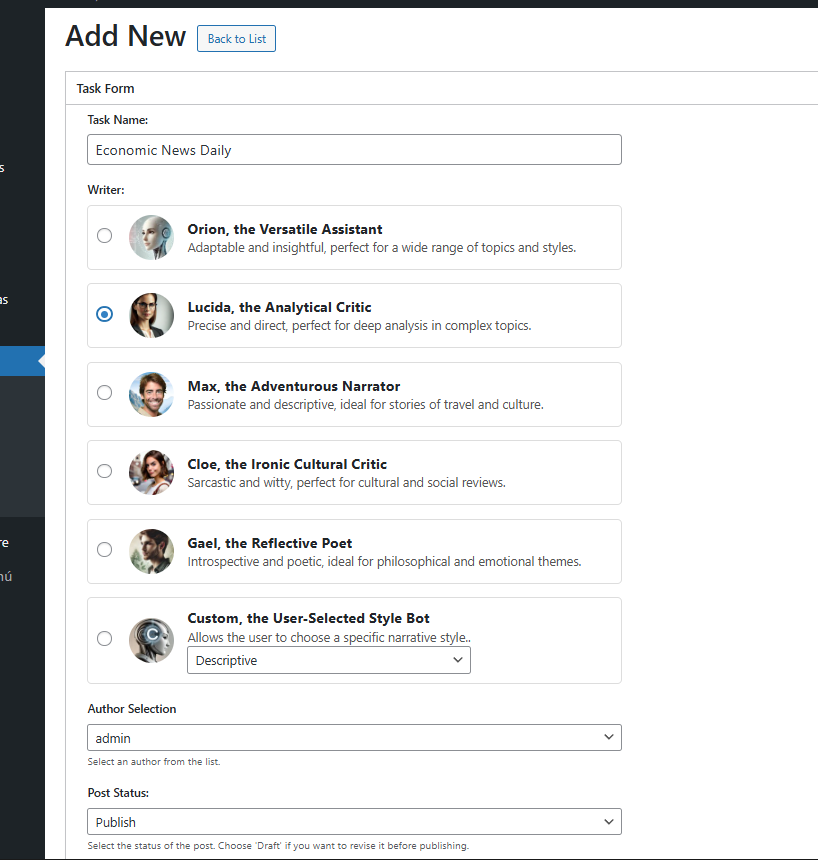
Add New AI Task 1/3.
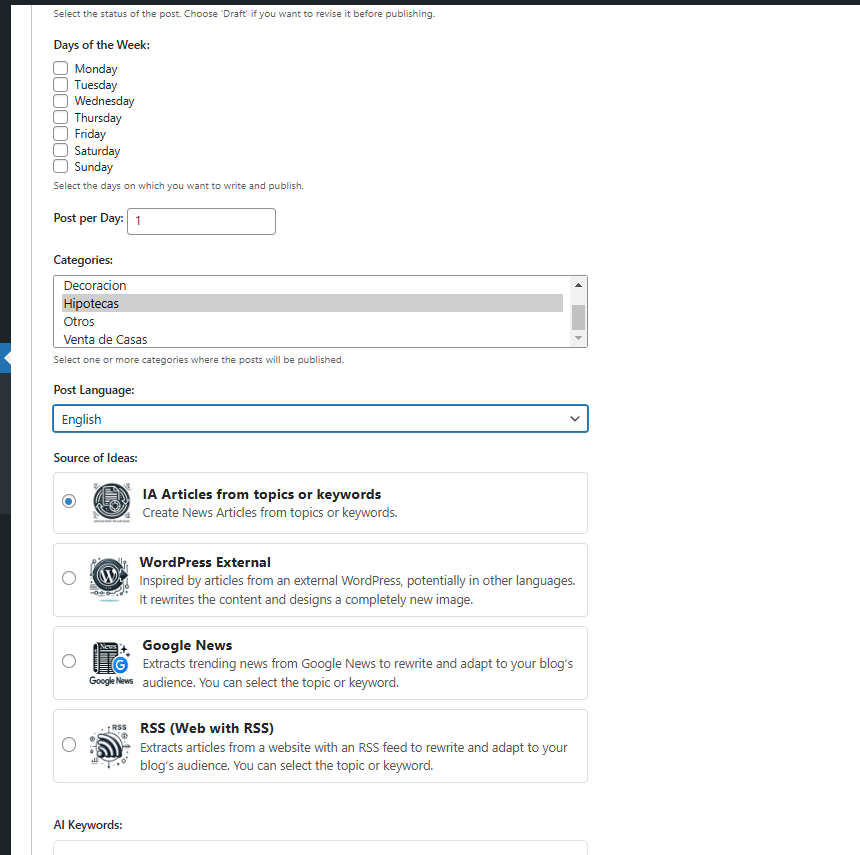
Add New AI Task 2/3.
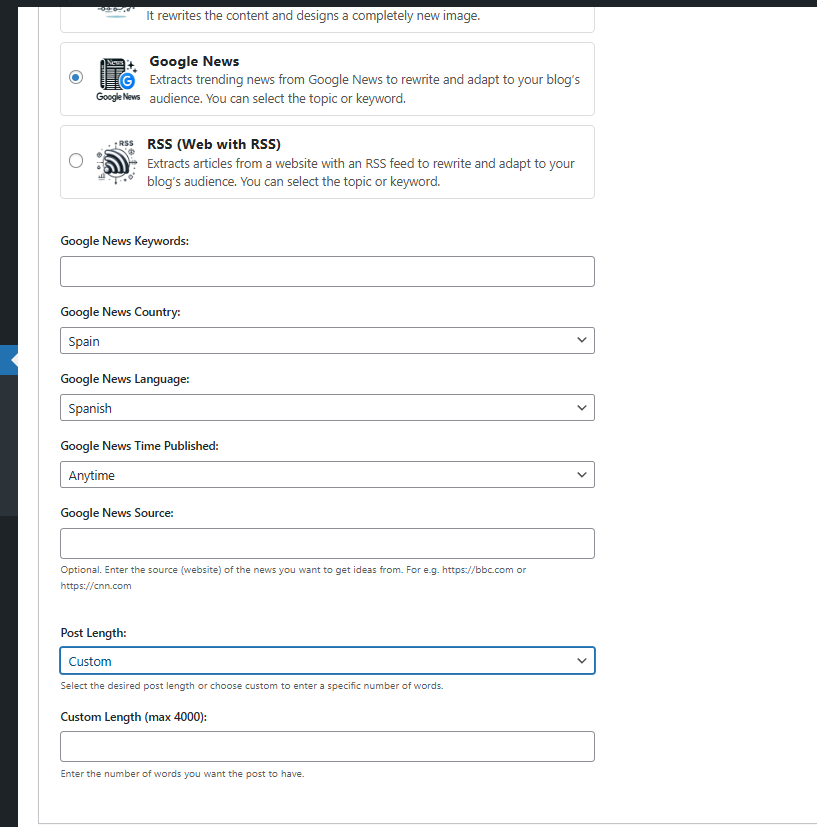
Add New AI Task 3/3.

Add Tasks
Faq
BotWriter is a multi-provider AI-powered WordPress plugin that automatically writes and publishes blog posts on a schedule you define. Choose from 7 text AI providers and 8 image generators. Set it up once, and it will keep your blog updated with fresh, SEO-optimized content automatically.
Yes! BotWriter is completely free. You only need API keys from your preferred AI providers (OpenAI, Anthropic, Google, etc.). You pay the providers directly—BotWriter doesn’t charge any subscription fees or commissions.
Text Generation: OpenAI (GPT-5, GPT-4o), Anthropic (Claude), Google (Gemini), Mistral, Groq, OpenRouter, DeepSeek
Image Generation: OpenAI DALL-E, Fal.ai, Replicate, Stability AI, Cloudflare Workers AI
BotWriter 2.0 supports the latest 2025 image models:
* Nano Banana Pro (Google) – High-quality generation via Fal.ai/Replicate
* Flux 2 Pro/Dev – Next-gen Black Forest Labs models
* Seedream 4.5 (ByteDance) – Fast, high-quality images
* Imagen 4 (Google) – Via Replicate
BotWriter can:
* Generate 100% original articles from custom prompts and AI keywords
* Rewrite content from RSS feeds into unique posts
* Pull and rewrite trending news articles
* Create bulk article series with Super Tasks
* Generate instant posts with the “Write Now” feature
* Apply article templates for consistent formatting
Templates let you save and reuse content configurations:
1. Create a template with your preferred prompts, style, and structure
2. Apply the template to any task with one click
3. Templates ensure consistent tone, formatting, and SEO optimization across all your content
Create a “task” in BotWriter and specify:
* Days of the week to publish (e.g., Monday, Wednesday, Friday)
* Number of posts per day
* Content source (AI, RSS, News, or Super Task)
* AI provider for text and images
* Custom prompts, keywords, and settings
BotWriter’s cron engine automatically executes these tasks on schedule.
Super Tasks let you generate entire content series in bulk. Configure it once with your topic and preferences, then BotWriter creates multiple related articles (5, 10, 20+) automatically—perfect for building comprehensive content libraries quickly.
Yes! Each task can use a different text provider and image provider. Use GPT-5 for one task, Claude for another, and Gemini for a third. Same flexibility applies to image generation.
Yes, BotWriter creates AI-generated featured images using your chosen provider. Options include DALL-E 3, Flux 2 Pro, Nano Banana Pro, Stable Diffusion, and more. Configure size (landscape, square, portrait) and quality per task.
Absolutely! Each task has a “Disable AI Images” option. When enabled, BotWriter generates text-only posts, reducing your API costs and speeding up content creation.
Yes! BotWriter focuses on creating SEO-optimized content with relevant titles, meta descriptions, tags, and well-structured articles designed to rank in search engines.
Absolutely. Set the “Post Status” to “Draft” in your task configuration, and BotWriter will save posts as drafts for you to review and edit before publishing.
Typically 30-90 seconds per article, depending on content length, AI model selected, and whether image generation is enabled. Some providers like Groq offer ultra-fast inference.
Yes! BotWriter offers multiple writer personas with different narrative styles (Descriptive, Informative, Persuasive, etc.), plus you can provide custom style instructions and use templates.
Yes. When using RSS or News sources, BotWriter’s AI completely rewrites the content, creating unique articles that pass plagiarism checks. For AI-generated content, each article is original.
Yes, BotWriter generates unique, high-quality content that is compatible with Google AdSense and other monetization platforms.
No! BotWriter is designed to be user-friendly. Simply configure your tasks using the intuitive interface, add your API keys, and let the automation handle the rest.
Yes, BotWriter integrates seamlessly with any WordPress theme and is compatible with popular SEO plugins, page builders, and other tools.
BotWriter includes automatic retry mechanisms with intelligent backoff. If a task fails, it will retry at increasing intervals. You can view detailed logs and error messages in the Logs section.
Yes! Create as many tasks as you need. BotWriter’s cron engine processes them intelligently, respecting the cooldown period you configure between posts.
Yes. BotWriter connects to:
* wpbotwriter.com for task processing and coordination
* Your configured AI providers (OpenAI, Anthropic, Google, Fal.ai, Replicate, etc.)
* Optional: News APIs and RSS feeds for content sources
All external service usage is detailed in the “External Services” section below.
Reviews
Awesome tool 🤩
By 
EDIT: That's great! Thank you
---
Please add the "No image" option to the "AI Generated Images Size" setting. This will significantly reduce token usage, as many people prefer to upload images themselves.
I wish you continued success in developing this tool. Great work!
⭐⭐⭐⭐⭐
Excellent plugin
By 
Excellent plugin, congratulations!
Plugin genial
By 
Plugin genial, la IA es alucinante!
"BotWriter is a game-changer! Highly recommended
By 
"BotWriter is a game-changer! Highly recommended for bloggers and content creators. Love it!"
Botwriter. Un gran pluggin
By 
Es un gran Plugin, lo recomiendo para tener el blog siempre actualizado.
Amazing AI Plugin
By 
This plugin has been a game-changer for my blog. Thanks to its ability to generate content automatically, my site stays updated effortlessly
El mejor plugin de IA para escribir en WordPress de forma automática
By 
Si buscas una forma eficiente de generar contenido de calidad en tu blog sin invertir demasiado tiempo, este plugin de escritura con IA es una herramienta imprescindible.
Amazing plugin, exactly what I needed!
By 
I've been looking for a solution like this for a while, and this plugin has exceeded my expectations. It's easy to install, the setup is intuitive, and the performance is outstanding. It has saved me a lot of time and improved my website's functionality effortlessly. 5 stars without a doubt. Thanks for the great work!
Changelog
2.0.1
Major Release: Multi-Provider Architecture
🚀 Multi-Provider Text Generation
* NEW: Support for 7 AI text providers
* OpenAI: GPT-5, GPT-5-mini, GPT-4.1, GPT-4o series
* Anthropic: Claude Sonnet 4.5, Claude Haiku
* Google: Gemini 2.5 Pro, Gemini 2.5 Flash
* Mistral: Mistral Large, Mistral Small
* Groq: Llama 3.3 70B with ultra-fast inference
* OpenRouter: Access to 200+ models
* DeepSeek: Cost-effective alternatives
* Each task can use a different text provider
🎨 Multi-Provider Image Generation
* NEW: Support for 5 AI image providers with 50+ models
* OpenAI DALL-E: GPT-Image-1, DALL-E 3
* Fal.ai: Flux 2 Pro/Dev, Nano Banana Pro, Seedream 4.5, Recraft V3
* Replicate: Flux 1.1 Pro, Ideogram V3, Imagen 4, Nano Banana Pro
* Stability AI: Stable Diffusion 3.5, SD3 Turbo
* Cloudflare Workers AI: Flux Schnell (fast & affordable)
* Each task can use a different image provider and model
📝 Article Templates
* NEW: Create and save reusable article templates
* Pre-configured prompts, styles, and structures
* One-click template application to any task
* Ensures consistent, professional content
🔧 Improvements
* Redesigned Settings UI with provider-specific tabs
* Better error handling and retry logic for all providers
* Improved logging with provider information
* Faster task processing with optimized API calls
1.4.3
- New feature: Option to disable AI image generation per task
- Enhanced task configuration: Added “Disable AI Images” checkbox
- Improved user experience: Updated progress messages
1.4.2
Major: Write now (one-off post, runs immediately)
* New: “Write now” screen to create a single post instantly
* UX: Live progress with timeline messages and progress bar
* Error handling: Friendly error details with Retry and Cancel options
* Security: Stricter nonce/capability checks
1.4.0
- Change to total free plan with your own OpenAI API key
1.3.9
- Super task reset for multiple retries
1.3.8
- Update supertask considering blog pages in addition to posts and categories
1.3.7
- Change GMT time to local WordPress time zone
1.3.6
- New video tutorial
1.3.5
- Added 2 video tutorials
1.3.1
- New options for article packs. Super Tasks.
1.3.0
- Various bug fixes
1.2.9
- Various revisions to comply with WordPress.org guidelines
1.2.6
- Initial version of the plugin