Boxzilla – WordPress Popup Builder

Boxzilla – WordPress Popup Builder
Description
Boxzilla is a WordPress popup builder for adding targeted popups, slide-ins, and call-to-action boxes to your site. Show a box after a visitor scrolls, waits on the page, views multiple pages, clicks a link, or reaches a specific page element. Each box can contain any WordPress content, including shortcodes from form plugins.
Use Boxzilla for newsletter sign-up forms, content upgrades, product offers, important notices, surveys, or any other message that should appear at the right moment without taking over the whole page.
What you can build with Boxzilla
- Targeted WordPress popups – show boxes only on the posts, pages, or conditions you choose.
- Scroll-triggered slide-ins – open a box after a visitor scrolls past a percentage of the page or reaches a specific element.
- Timed call-to-action boxes – show a message after a set number of seconds on the page.
- Pageview-based prompts – wait until a visitor has viewed several pages before showing a box.
- Click-triggered modals – open a box from a link, button, or URL hash such as
#boxzilla-94. - Flexible content – add text, images, forms, shortcodes, embeds, or custom HTML to any box.
- Visual appearance controls – choose the position, animation, colors, and box style from the WordPress admin.
- Dismissal control – decide how long a box should stay hidden after a visitor closes it.
- Small front-end script – Boxzilla adds only 6 kB of JavaScript to your website.
Works with your forms and content
Boxzilla works with plugins that output shortcodes, including Mailchimp for WordPress. Add the shortcode to your box content, choose when the box should appear, and publish it.
Premium add-ons
The core Boxzilla plugin is free. Paid add-ons are available for advanced triggers and integrations, including exit-intent popups and time-on-site targeting.
Helpful links
- Read more about Boxzilla
- View the Boxzilla demo site
- Read the Boxzilla Knowledge Base
- Get community support on WordPress.org
If you are a Boxzilla Premium customer, use the premium support email for a faster reply.
Installation
- In your WordPress dashboard, go to Plugins > Add New.
- Search for “Boxzilla”.
- Click Install Now, then Activate.
- Go to Boxzilla > Add New to create your first popup or slide-in box.
- Add your content, choose display rules, adjust the appearance settings, and publish the box.
To install manually:
- Download the Boxzilla ZIP file from WordPress.org.
- Go to Plugins > Add New > Upload Plugin.
- Upload the ZIP file and click Install Now.
- Activate the plugin.
- Go to Boxzilla > Add New to create your first box.
Optional: install Boxzilla add-on plugins for advanced triggers and integrations.
Screenshots
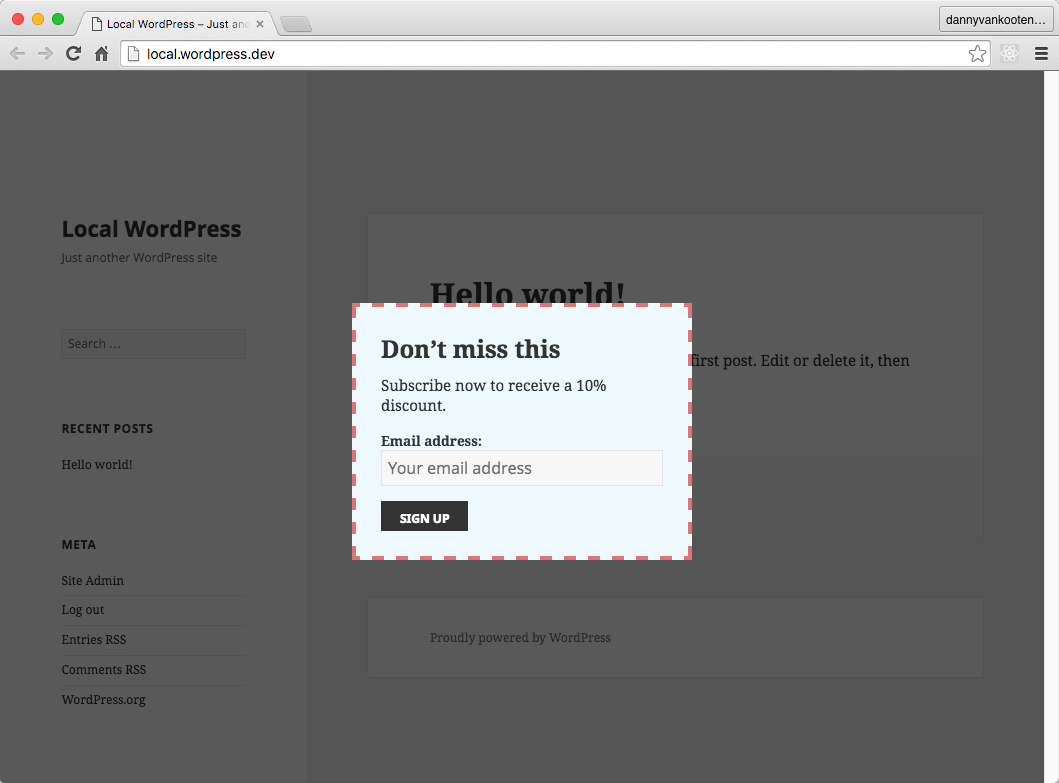
A Boxzilla WordPress popup with a newsletter sign-up form.
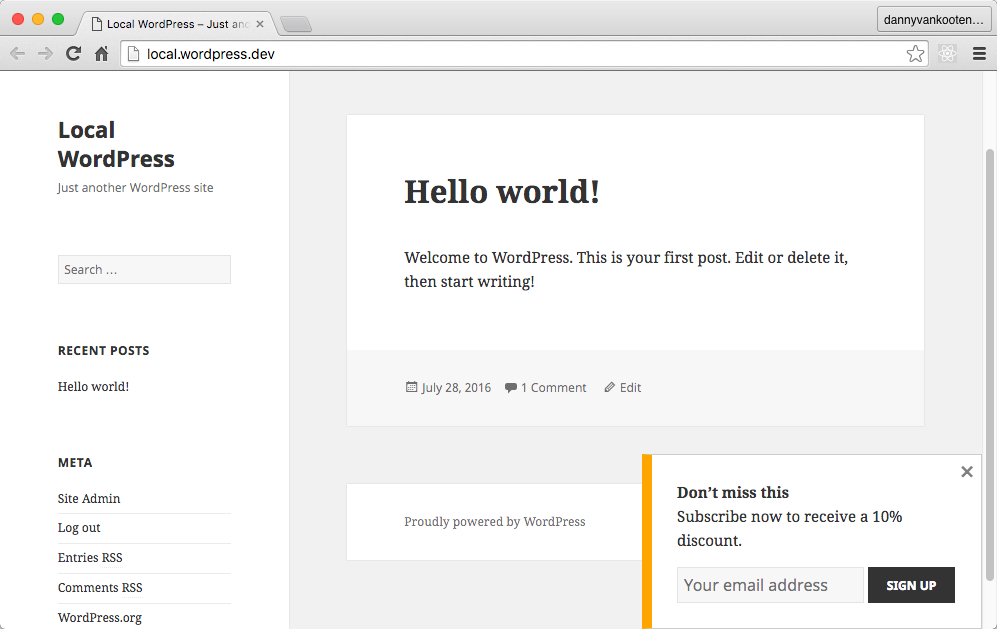
A styled Boxzilla popup showing a different modal design.
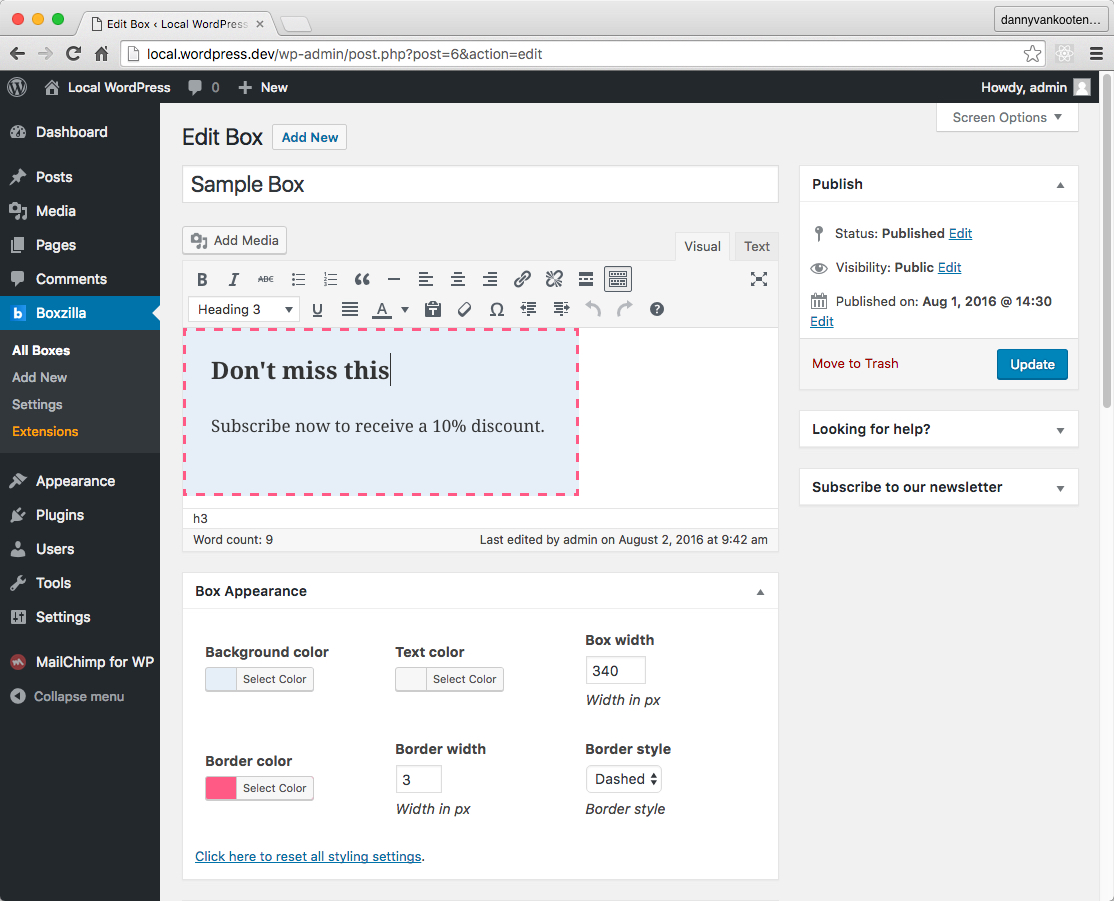
The Boxzilla popup editor, where you manage content, triggers, targeting, and appearance settings.
Faq
Boxzilla lets you create popup, slide-in, modal, and call-to-action boxes for WordPress. You choose the content, page targeting, trigger, animation, and dismissal behavior.
Yes. Boxzilla works with shortcode-based form plugins, including Mailchimp for WordPress. Add the form shortcode to the box content and publish the box.
Yes. Link to the box ID from any link or button. For example, if your box ID is 94, use this link:
<a href="#boxzilla-94">Open Box</a>
Yes. Configure this in the box settings, or add a URL hash such as #boxzilla-13 to the page URL. Replace 13 with the ID of the box you want to show.
Yes. Boxzilla includes appearance settings for the popup position, animation, and style. You can also add custom CSS when you need more control.
.boxzilla { } /* all boxes */
.boxzilla-5 { } /* only the box with ID 5 */
Boxzilla adds only 6 kB of JavaScript to the front end. The script is built for small, targeted popups and slide-ins.
WordPress content filters are added to the boxzilla_box_content filter hook. You can remove them with this code:
remove_filter( 'boxzilla_box_content', 'wptexturize' );
remove_filter( 'boxzilla_box_content', 'convert_smilies' );
remove_filter( 'boxzilla_box_content', 'convert_chars' );
remove_filter( 'boxzilla_box_content', 'wpautop' );
remove_filter( 'boxzilla_box_content', 'do_shortcode' );
remove_filter( 'boxzilla_box_content', 'shortcode_unautop' );
Please report security bugs found in the source code of the plugin through the Patchstack Vulnerability Disclosure Program. The Patchstack team will assist you with verification, CVE assignment, and notify the developers of this plugin.
Reviews
Perfect
By 
Simpel, complete and updated regularly.
Perfect & Easy setup
By 
Perfect Plugin and easy to setup and have where and when appear.
thank you
Fantastico plugin!!
By 
Funziona egregiamente, fa tutto quello che promette e lo fa benissimo. Grazie!
This is what a WP plugin should be like
By 
Free. Simple. Decent. Does the job.
Easy to Implement
By 
Boxzilla is a great plugin...easy to implement and ideal for a variety of applications. The free version gets the job done, but there are also premium options for folks who want more advanced functionality.
Great Plugin works well
By 
Have been using this for a long time. Works very well with lots of options. Recommended.
Love it, works great, easy to style
By 
I love the simplicity and HTML output of this plugin. It allows for proper custom css theming.
It does exactly what it says
By 
Works as a charm, you'll have a pop-up set in a minute. Fantastic plugin.
Very useful nice plugin!
By 
Simply works great!
The plugin that i was looking for after trying few.
Nice, easy, suggested.
Very useful to show something in evidence or to show a message on the website!
Easy to use
By 
Super easy to use, change out boxes, update for promos. Best pop-up system I've used.
Changelog
3.4.11
Release date: Jun 22, 2026
- Prevent a JavaScript error when Boxzilla loads before the page body is available.
- Support opening boxes from links with deeply nested content.
- Add instructions for securely reporting plugin vulnerabilities through Patchstack.
3.4.10
Release date: Jun 01, 2026
- Add Shake animation option for boxes.
- Bundle add-on images instead of fetching extension metadata remotely.
- Prevent notices on new installations when plugin settings do not exist yet.
3.4.9
Release date: May 20, 2026
- Fix URL matching when expected URL is just a single slash.
- Fix script contents showing up as text in box content.
3.4.8
Release date: Apr 21, 2026
- Ensure nav links has href attribute before filtering.
- Normalize request URL’s for URL matching. Ensures consistent trailing slash and strips tracking query parameters.
- Set cookie with expiration time matching the one for dismissing the box whenever a form inside a box is submitted.
- Remove
Boxzilla.offfrom the JS API as it was a no-op and no one is using it.
3.4.7
Release date: Mar 9, 2026
- Add uninstall script to clean up all database entries from the plugin
- Fix missing closing element in box rule settings
- Fix duplicate class attribute on wrapper element on settings page
- Fix duplicate id attribute on box width input field
- Fix deprecation in call to get_terms()
- Various other type fixes, PHPDoc improvements or removal of unused code.