BP Birthday Greetings

BP Birthday Greetings
Description
BP Birthday Greetings plugin will send a birthday greeting notification to members. You just need to create a DOB field and have to map in the plugin settings, that you can find under options tab of BuddyPress settings.
We have one widget called BuddyPress Birthdays that you can use in sidebars to display the list of member birthdays and can wish them as well using private message functionality of BuddyPress. One shortcode [ps_birthday_list] is also added which can be used to list birthdays as well.
Installation
From your WordPress dashboard
- Visit ‘Plugins > Add New’
- Search for ‘BP Birthday Greetings’
- Activate BP Birthday Greetings from your Plugins page.
From WordPress.org
- Download BP Birthday Greetings.
- Upload the ‘bp-birthday-greetings’ directory to your ‘/wp-content/plugins/’ directory, using your favorite method (ftp, sftp, scp, etc…)
- Activate BP Birthday Greetings from your Plugins page.
Screenshots
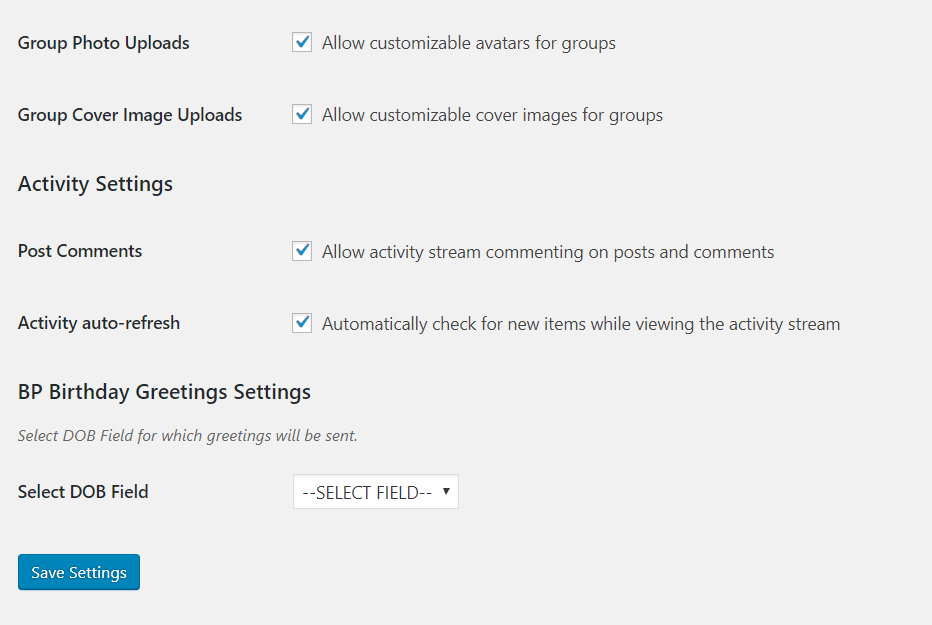
Setting to select profile field

Birthday Greeting Notification

Birthday Widget

Listing With Member Avatar

New Settings
Faq
After the activation of this plugin just go to the BuddyPress settings(options tab) page and there select the profile field, in ‘Select DOB Field’ option, that you have created for date of birth.
Yes! It can be translated easily.
There is one filter code that you can add in your child theme or any custom plugin:
add_filter( ‘bp_birthday_empty_message’, ‘ps_change_birthday_message’ );
function ps_change_birthday_message() {
_e( ‘Your Changed Message Here’, ‘bp-birthday-greetings’ );
}
Yes there is one shortcode [ps_birthday_list].
Width and height is to define profile picture width and height. Type is to define the type of the image you want to display.
BuddyPress has two sets of avatar sizes:
Thumb – defaults to 50px square
Full – defaults to 150px square
Note: If you chose type full or thumbnail but defined width and height lesser or higher than the default values then profile pic will be displayed according to the defined size.
Also, if defined width and height is not reflecting then most probably any other plugin or your theme’s CSS rules are overriding it.
Now, we have a filter for this. You can paste the below given code in your child theme’s functions file or any site specific plugin’s file:
add_filter( ‘bp_birthday_cake_img’, ‘ps_change_birthday_img’ );
function ps_change_birthday_img() {
$img = ”;
return $img;
}
Reviews
Best kept secret
By 
Great plugin
By 
loader.php
this the function:
function kechweb_load_textdomain() {
		load_plugin_textdomain( 'bp-birthday-greetings', false, dirname( plugin_basename( __FILE__ ) ) . '/languages' );
}
add_action( 'plugins_loaded', 'kechweb_load_textdomain' );
Really nice
By 
Nice plugin
By 
Very nice plugin working fine
By 
Changelog
1.0.0
Initial Release
1.0.1
Fixed Typo
1.0.2
Added Birthday Widget
1.0.3
- Added Member Avatar
- Fixed Translation Issue
- Added Shortcode For Birthday Listing
1.0.4
- Added Setting For Profile Pic Size Changes
- Added Filter To Change The Image Of The Cake
1.0.5
- Fixed translation issues
1.0.6
- Fixed HTML rendering on top issue.