BrikPanel: WooCommerce Dashboard, Abandoned Cart Recovery, Google Sheets Sync, Inventory Management & Bulk Editor

BrikPanel: WooCommerce Dashboard, Abandoned Cart Recovery, Google Sheets Sync, Inventory Management & Bulk Editor
Description
Live demo (no install needed): Explore the full BrikPanel admin on a real WooCommerce store
BrikPanel turns the default WooCommerce admin panel into a clean, fast, all-in-one cockpit: a modern WooCommerce dashboard, a real-time WooCommerce sales report, a powerful WooCommerce bulk editor, an inventory management workspace, an order management center, a coupon manager, a custom WP login page, and a real-time conversion tracking suite. Everything is free. Forever. No premium tier, no feature locks, no monthly subscriptions. A self-hosted Shopify alternative for WooCommerce: own your data, your products, and your customer list, with no monthly platform fee and no transaction fee.
Who is BrikPanel for?
- Store owners who want a modern WooCommerce dashboard with real numbers, not the slow built-in reports, and a self-hosted WooCommerce analytics solution instead of paying monthly fees to external SaaS tools
- Stores that want a lighter woocommerce inventory management workspace built into a complete admin redesign
- Anyone who needs to bulk edit WooCommerce products, including variations, without a premium plugin
- Agencies handing off stores to non-technical clients who need a simplified WooCommerce admin
- Shop owners migrating from Shopify who want a familiar, modern admin for their WooCommerce store, a free, self-hosted Shopify alternative
What you get (all free)
Modern WooCommerce Dashboard & Sales Report with Real-Time Analytics
The heart of BrikPanel is a modern WooCommerce dashboard, a true woocommerce admin panel plugin, not a styling layer.
- Total Sales, Total Orders, Average Order Value (AOV): today, yesterday, last 7/30 days, or any custom range, with ±% period-over-period delta on every metric
- Visitors counted from your own database (admins excluded), and Conversion Rate computed live from real visitors and real orders
- Beautiful sales chart powered by Chart.js, plus an order status donut (Completed, Processing, Cancelled, Refunded, Failed)
- WooCommerce conversion funnel: Visitors Add to Cart Checkout Orders, with the conversion percentage at every step
This is a complete WooCommerce sales report and reporting layer: real-time sales reports, charts and KPIs inside a modern WooCommerce admin, with no external analytics service.
Customer Analytics: LTV, RFM Segmentation & Cohort Retention
BrikPanel ships a complete WooCommerce customer analytics suite, calculated from your store data and visualized in the dashboard, no external service.
- Customer Lifetime Value (LTV): total customers, average and top LTV, full LTV distribution histogram, and a sortable top-customers table
- RFM segmentation: every customer scored on Recency, Frequency, and Monetary, then bucketed into Champions, Loyal, At Risk, About to Sleep, Hibernating, and Lost, with revenue per segment
- Cohort retention: month-by-month cohort retention grid plus an average retention by month-offset trend line
- Advanced filtering and segmentation: combine spend range, product, location, date and more to build saved segments for both customers and orders
Live Visitors & Real-Time Conversion Tracking
BrikPanel ships a built-in WooCommerce live visitors widget, see who is on your store right now, what page they are on, and whether they have items in the cart. Refreshes every 30 seconds by default (configurable). No external service, no Hotjar, no monthly fee.
- WooCommerce real time visitors widget with cart status (Browsing / Has items in cart / On thank-you page), current page, and customer info
- WooCommerce conversion tracking in the same database that powers the dashboard
- Visitor IPs are never stored, only a salted SHA-256 hash, and live visitor data stays in a short-lived cache, never in the database
- Privacy switches: make tracking wait for cookie consent (WordPress Consent API or your own banner), turn front-end tracking off entirely, or keep it on while excluding logged-in customer details from the Live view
- Most-viewed pages and most added-to-cart products reports
A free woocommerce statistics plugin and woocommerce sales tracker without any external SaaS.
Geographic Analytics: WooCommerce Sales by Country
A 3D rotating globe (Cobe.js) plots every order on its real location, see WooCommerce sales by country and city without exporting a CSV, with Top 10 Countries and Top 10 Cities tables. Works with both HPOS and legacy order storage.
Lightning-Fast Order Search: Cmd/Ctrl + K from Anywhere
Hit Ctrl + K (or Cmd + K on Mac) anywhere in wp-admin and an order search overlay opens, the free woocommerce order search plugin. Searches order ID, customer name, email, phone and product SKU inside line items at once. True woocommerce quick search, with results as you type, status badges, totals and dates.
Modern WooCommerce Order Management
BrikPanel replaces the cluttered default orders page with a clean woocommerce order list plugin screen.
- 30-day overview bar: total orders, completed, refunded, cancelled, revenue
- Inline status change without opening the edit page
- HPOS (
wc_get_orders) and legacy storage (WP_Query) both supported - Two new statuses: Return Draft and Change
- Reskinned order edit page with copy-to-clipboard for billing/shipping
- Sold downloadable products column on the order edit page
- Optional BrikMarket marketplace stats integration
A real woocommerce order management plugin, not a reskin. Disable from settings anytime.
WooCommerce Product List Plugin: Built for People Who Actually Edit Products
The default WooCommerce product list is fine for browsing, painful for editing. BrikPanel ships a complete woocommerce product list plugin that fixes it.
- Thumbnail, name, SKU, regular/sale price, stock badge, category
- Publish status toggle: flip draft published with one click, no reload
- Edit, Duplicate, Delete actions; bulk publish, draft, delete
- Status tabs (All / Published / Draft / Trash), live search by name or SKU
- Configurable per-page (5–100, default 20), AJAX pagination
- Per-user toggles for any third-party / SEO column added by Yoast, Rank Math, ASE and other plugins
- Admin and Site Enhancements (ASE) custom columns are respected in the BrikPanel product, order and customer lists
Quick Edit Sidebar: Edit Without Leaving the List
A slide-in panel from any product row to edit name, SKU, regular/sale price, stock and category, saved without leaving the list. The woocommerce quick edit WooCommerce should have shipped years ago: update woocommerce quick edit price, stock or category in two clicks.
Bulk Edit WooCommerce Products with the Variation Editor: Full Variation Support
This is where BrikPanel pulls ahead of every other free woocommerce bulk editor. Most free plugins only handle simple products and only “increase price by X%”. BrikPanel does far more, on variable products too.
- WooCommerce bulk price update (regular and sale): percentage, fixed amount, or absolute value, across the whole catalog or filtered by category
- Bulk update WooCommerce products stock quantities (in/out of stock, set quantity, add/subtract)
- WooCommerce bulk price by category: pick a category, set a rule, every product updates
- WooCommerce bulk sale price updates with a date range
- Confirmation dialog on every bulk action
Now the part nobody else does for free: variation support.
- WooCommerce variation editor: open any variable product and edit every variation in one modal (regular price, sale price, stock, SKU)
- Bulk edit variation prices WooCommerce: set the same price for all variations of an attribute (every “Red” variation, every “L” size), or apply a percentage rule
- Bulk update variation stock: set or adjust the stock of every variation in one click
- Attribute filter to narrow visible variations when a product has 50+ combinations
How to bulk edit WooCommerce products including variations without buying a $79/year plugin? BrikPanel handles both simple and variable products for free.
Simplified WooCommerce Product Editor
The default WooCommerce add-product screen has 11 metaboxes, 3 tabs and 40+ fields. BrikPanel ships a complete woocommerce product editor plugin with the noise removed.
- Featured image + product gallery with drag-and-drop upload, unlimited images, drag-to-reorder
- Regular price, sale price with decimal validation
- Searchable category picker with multi-select + quick create category without leaving the page
- Brand field: the WooCommerce
product_brandtaxonomy is now first-class alongside categories and tags - Short description + full rich-text description (wp_editor)
- SEO fields: custom slug, meta title, meta description, live Google SERP preview
- Full SEO plugin compatibility: Yoast SEO, Rank Math, All in One SEO and SEOPress metaboxes (including the SEO score panel) render and save inside the BrikPanel product editor
- Product type (Simple, Variable), attribute management with inline create
- Auto-generate variations from attribute combinations, per-variation price/sale/SKU/stock
- Duplicate any product in one click
Opt-in. Keep the default WooCommerce product page if you prefer.
WooCommerce Variation Gallery
Attach a separate image gallery to each product variation, the frontend swaps gallery automatically when a customer picks a variation. Image metadata (srcset, sizes, alt text) is fully preserved.
WooCommerce Categories Page: Drag-and-Drop Parent/Child Management
BrikPanel rebuilds the dated WooCommerce category screen with per-page settings (5–200) and drag-and-drop parent/child nesting with circular reference prevention, for both product_cat and product_tag.
Best WooCommerce Coupon Plugin: Free Coupon Manager
A complete WooCommerce coupon manager that makes coupons first-class in the admin, and we think the best WooCommerce coupon plugin in the free repository.
- Coupon table with code copy-to-clipboard, discount type icon, amount, usage count, expiry highlighting, and status
- Status tabs, AJAX pagination, slide-over coupon panel: create/edit without a reload
- Auto-generate random coupon codes; one-click duplicate
- Discount types: percentage, fixed cart, fixed product + free shipping toggle
- Expiry date picker, total + per-customer usage limits, min/max spend, individual use toggle, product/category include/exclude rules
WooCommerce Cart Abandonment & Cart Recovery
A built-in WooCommerce cart abandonment and cart recovery system, with no external email SaaS. A dedicated Abandoned Carts screen captures the checkout email of shoppers who do not finish (classic and block checkout, plus logged-in add-to-cart) and snapshots each cart down to the exact variation. Carts move Active to Abandoned to Recovered automatically, and an optional popup hands each subscriber a single-use cart recovery coupon. Search and date filters, plus CSV / Excel export.
Custom WordPress Login Page: Custom WP Login Page for WooCommerce
A custom WP login page that fully replaces the default wp-login.php look, a real WordPress login customizer for WooCommerce stores.
- Centered card layout with your site name as logo
- Minimal, distraction-free fields, AJAX submission (no reload)
- Toast notification on errors, footer site branding
- Default WordPress login styles fully hidden
WooCommerce Inventory Management
A complete woocommerce inventory management workspace: the product list, bulk editor, variation editor and quick edit sidebar work together as one inventory workflow.
- Current stock for every product and variation in one place, with stock badges in the product list (in stock / low stock / out of stock)
- Update stock inline from the quick edit sidebar, or bulk update across categories and variations
- HPOS-enabled stores supported
A free woocommerce inventory management plugin that covers the daily workflow, no heavy stock control plugin needed.
Custom Top Admin Bar & Notifications
A Custom BrikPanel-styled top admin bar replaces the default WordPress toolbar with an e-commerce notification bell and quick links, toggleable from settings. Sound, confetti and a popup the moment a completed order arrives.
Google Sheets Sync: Real-Time WooCommerce Google Sheets Integration
BrikPanel ships a free WooCommerce Google Sheets sync, a fully native WooCommerce to Google Sheets integration that streams orders, customers and analytics into a Google Sheet you control. The free GSheetConnector alternative with no Zapier, no Make, no monthly fee.
- Real-time order sync: every new WooCommerce order is appended within seconds, one row per line item so variations get their own columns. Free woocommerce order sync to google sheets with no external automation tool
- Scheduled WooCommerce Google Sheets export: hourly, every 4h or daily catch-up; idempotent so re-runs never duplicate rows
- Analytics report snapshots: Sales Summary, Daily KPIs, Top Products and Funnel tabs refreshed on an interval for pivots and dashboards in Sheets
- Customer + RFM snapshot: chained to the nightly RFM recompute
HPOS-compatible: a real google sheets woocommerce sync, free.
WooCommerce ROAS, Net Profit & Ad Spend: Google Ads + Meta Ads
BrikPanel pulls daily spend from Google Ads and Meta Ads (Facebook / Instagram) so you see real WooCommerce ROAS, Net Profit and ad spend next to revenue. Multi-currency aware. A free Triple Whale alternative and woocommerce profit tracking dashboard with no monthly fee.
BrikMarket Marketplace Analytics
When BrikMarket is active, marketplace orders are excluded from the storefront conversion rate, and a dashboard block breaks down orders, share and top categories per marketplace.
Subscription & Membership Plugin Compatibility
Subscription products and member orders (WooCommerce Subscriptions, MemberPress, Paid Memberships Pro and more) show up in the same product list, order screens and customer analytics.
Developer Hooks & Filters
A developer hooks and filters system for agencies, actions and filters like brikpanel_after_product_save, plus a built-in docs popup in settings with one-click copy buttons.
Navigation & Admin UI Cleanup
- BrikPanel dashboard becomes the first WordPress admin menu item; admin bar gains quick links, footer rebranded
- Optional simplified mode hides the full WordPress menu, showing only BrikPanel + WooCommerce for non-technical clients
A Free, Self-Hosted WooCommerce Analytics & Inventory Suite
Store owners pay monthly SaaS fees for parts of what BrikPanel does free:
- Self-hosted WooCommerce analytics: sales, AOV, conversion, funnels, geo data, customer LTV, RFM, cohort retention, no third-party
- A free Metorik and Triple Whale alternative: analytics, ROAS and profit on your own server
- Shopify alternative for WooCommerce: the clean admin experience of Shopify with your storefront, customer data and orders on your own server
Why BrikPanel and not the default WooCommerce admin?
WooCommerce’s built-in analytics are slow, refresh hourly, and have no live visitor tracking, conversion funnel, geographic data, customer LTV / RFM / cohort reports, Cmd+K order search, quick edit sidebar, variation bulk editor, custom login or coupon manager. BrikPanel fixes every one of those gaps inside a single free WooCommerce admin plugin.
WooCommerce HPOS Compatibility & Performance
- Zero impact on storefront speed: only loads inside wp-admin
- Hardened performance for low-resource hosting: heavy queries are batched, cached and run through Action Scheduler so the dashboard, customer analytics and bulk editor stay responsive on shared hosting
- HPOS (High-Performance Order Storage) fully supported with dual code paths
- WooCommerce 7.x, 8.x, and newer; works alongside Admin Menu Editor, Slider Revolution, Yoast SEO, RankMath, WPML, Polylang
- Translation-ready (
.potfile included), with all JavaScript / jQuery strings routed throughwp_localize_script - All AJAX actions verify nonces and
manage_woocommercecapability; DB writes use prepared statements; visitor IPs stored only as truncated salted SHA-256 hashes; admin activity excluded from analytics; front-end tracking can be disabled entirely from settings
Installation
- Upload the plugin files to
/wp-content/plugins/brikpanel, or install via Plugins Add New Upload Plugin. - Activate through the Plugins menu.
- Open BrikPanel in the admin sidebar, the dashboard loads immediately.
- (Optional) Visit WooCommerce Settings BrikPanel to enable or disable specific modules.
That is it. No license key, no email signup, no external account.
Screenshots
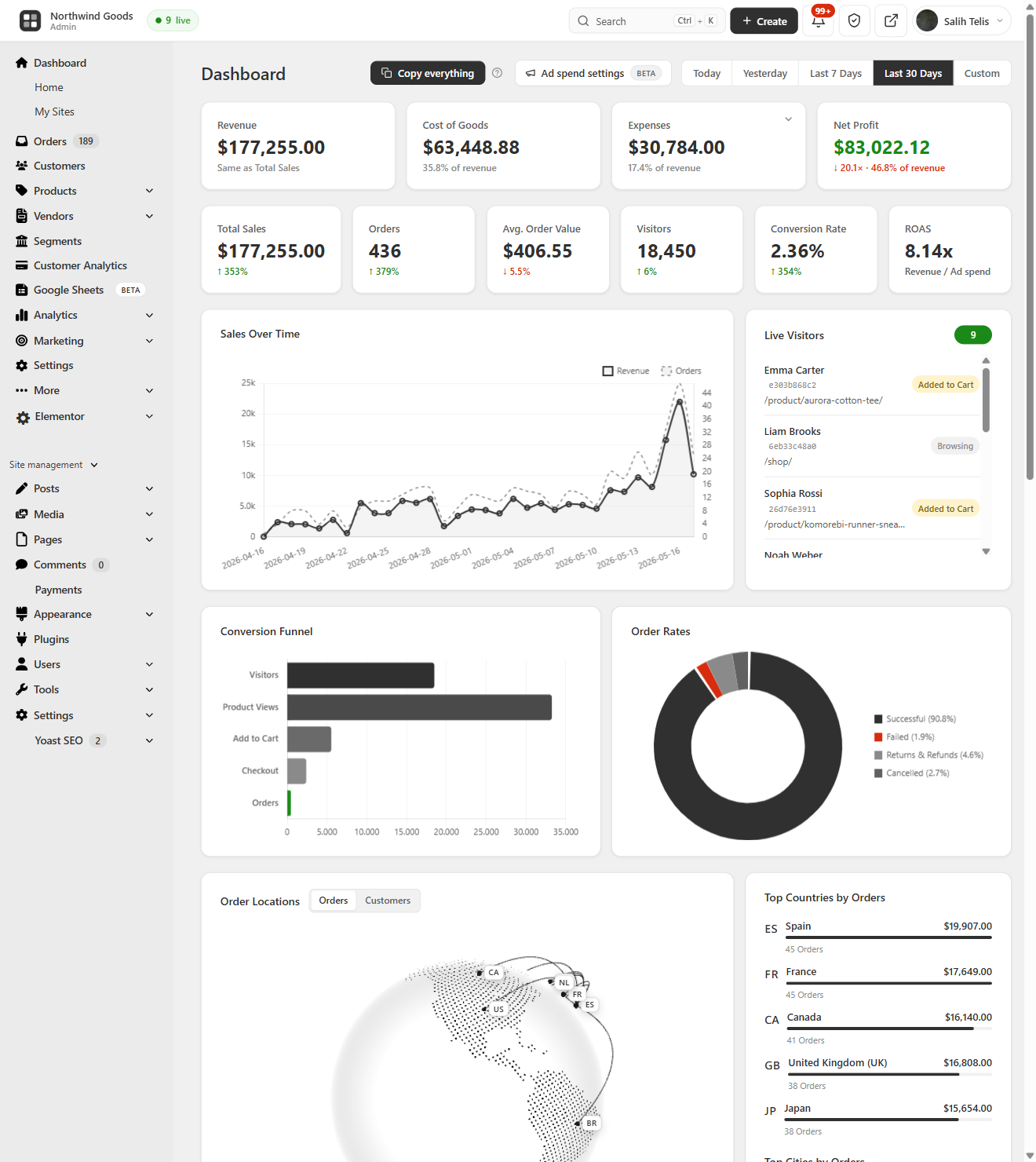
Dashboard
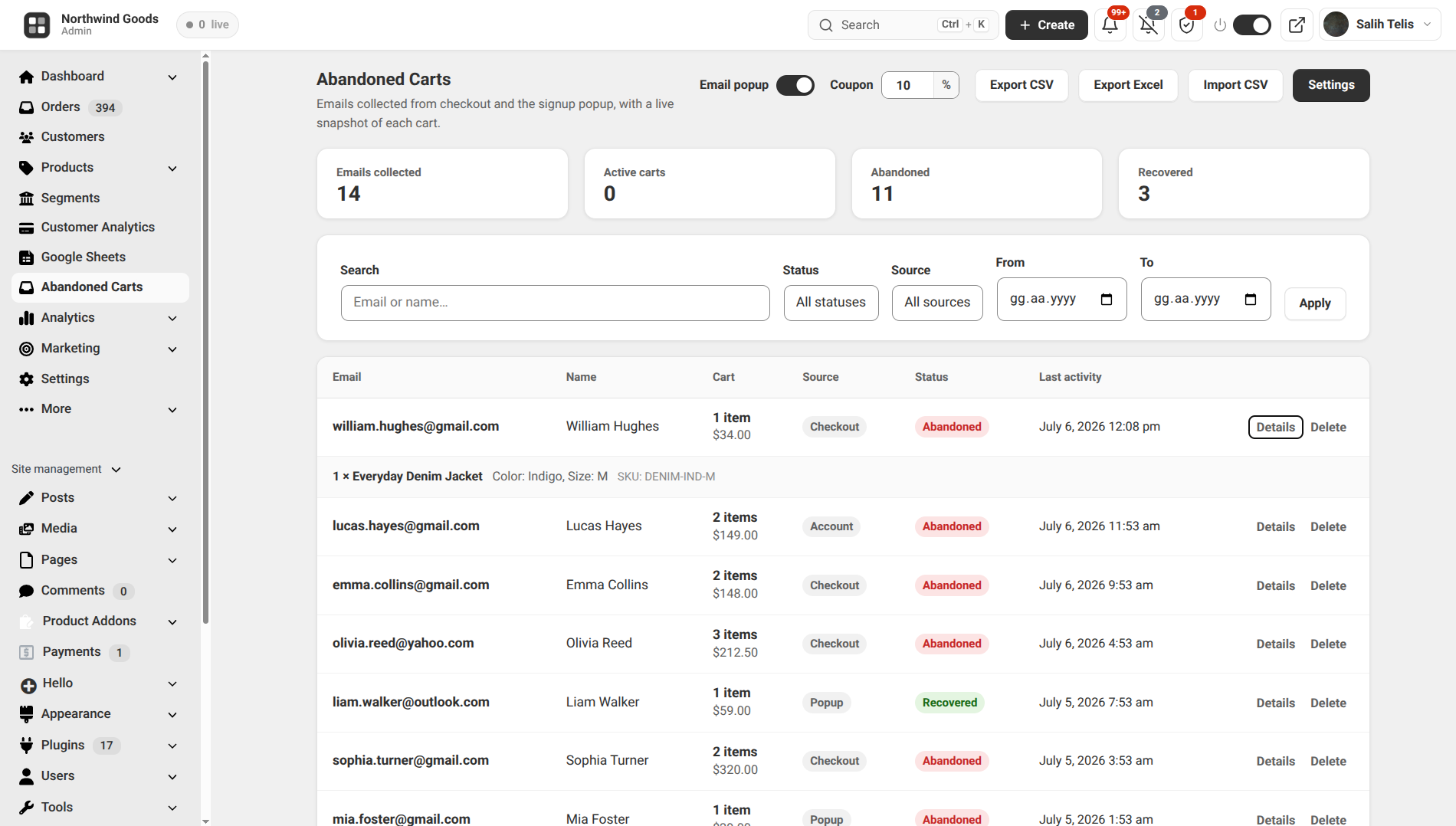
Cart Recovery
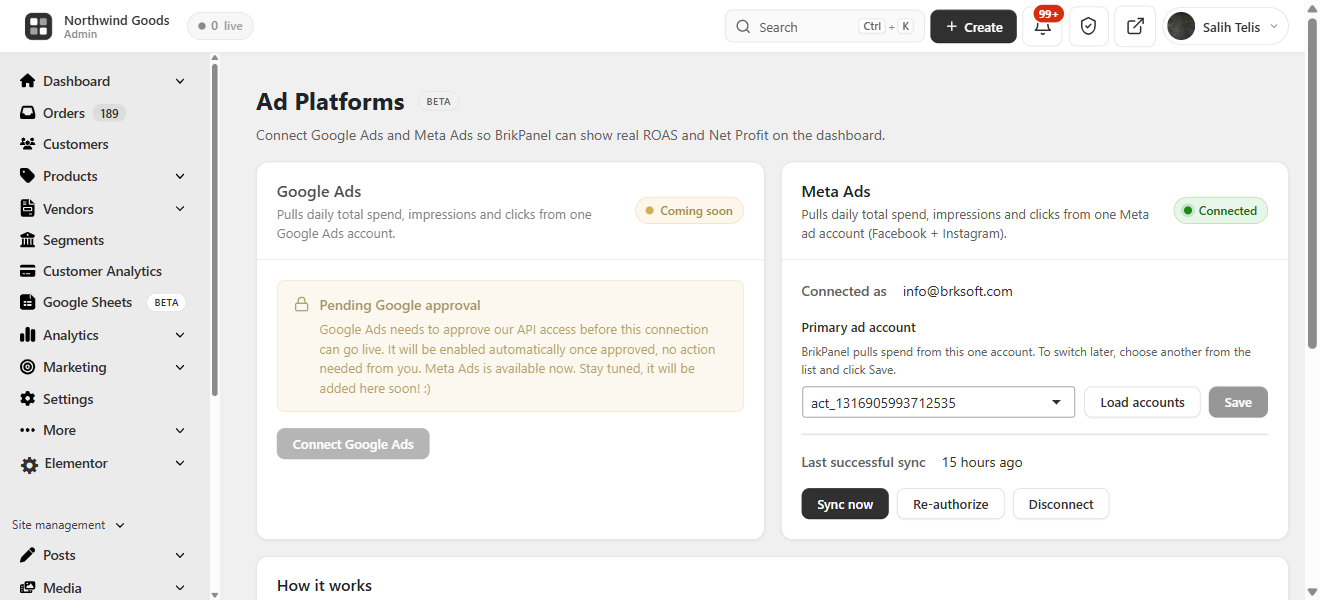
Ads ROAS
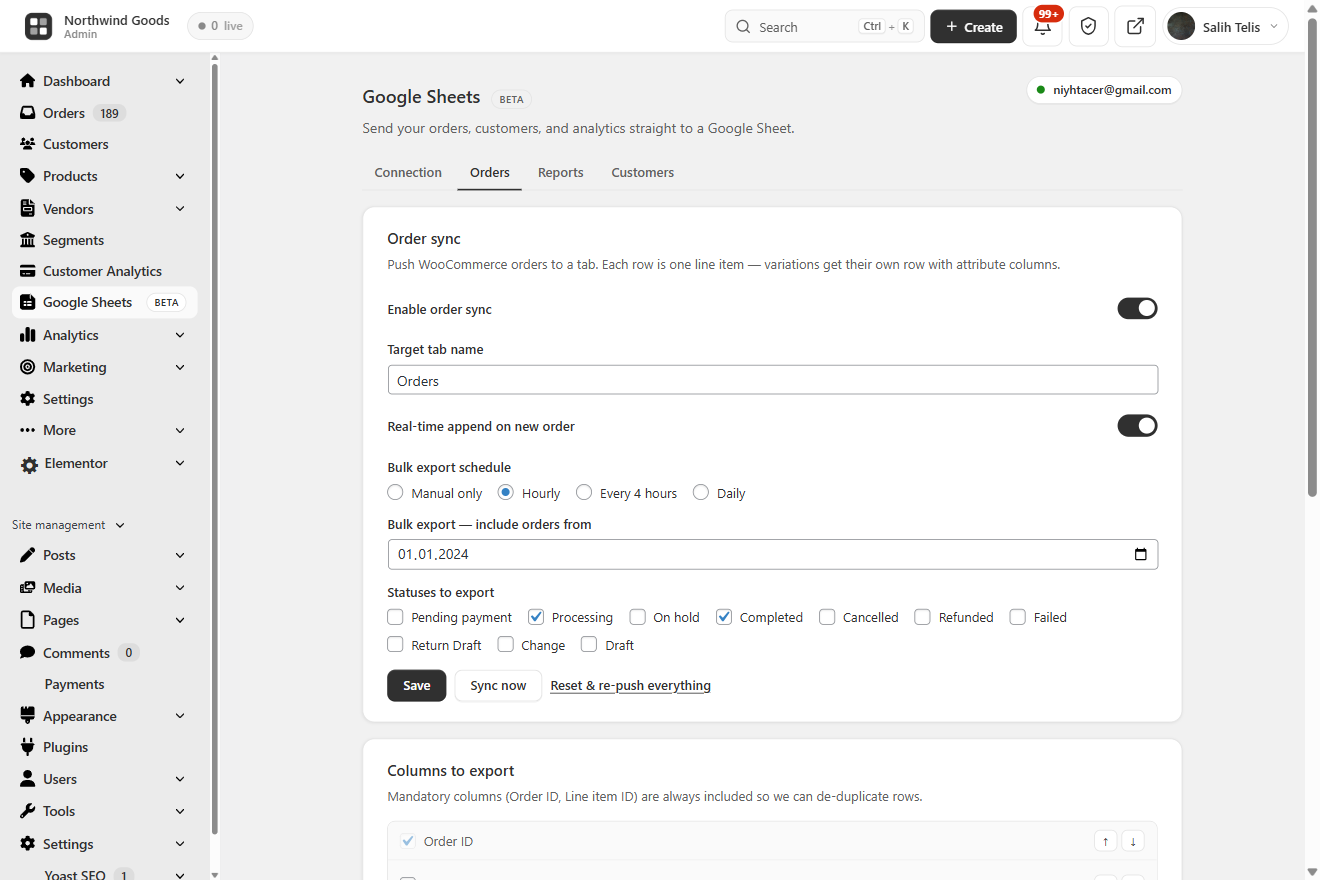
Sheets Sync
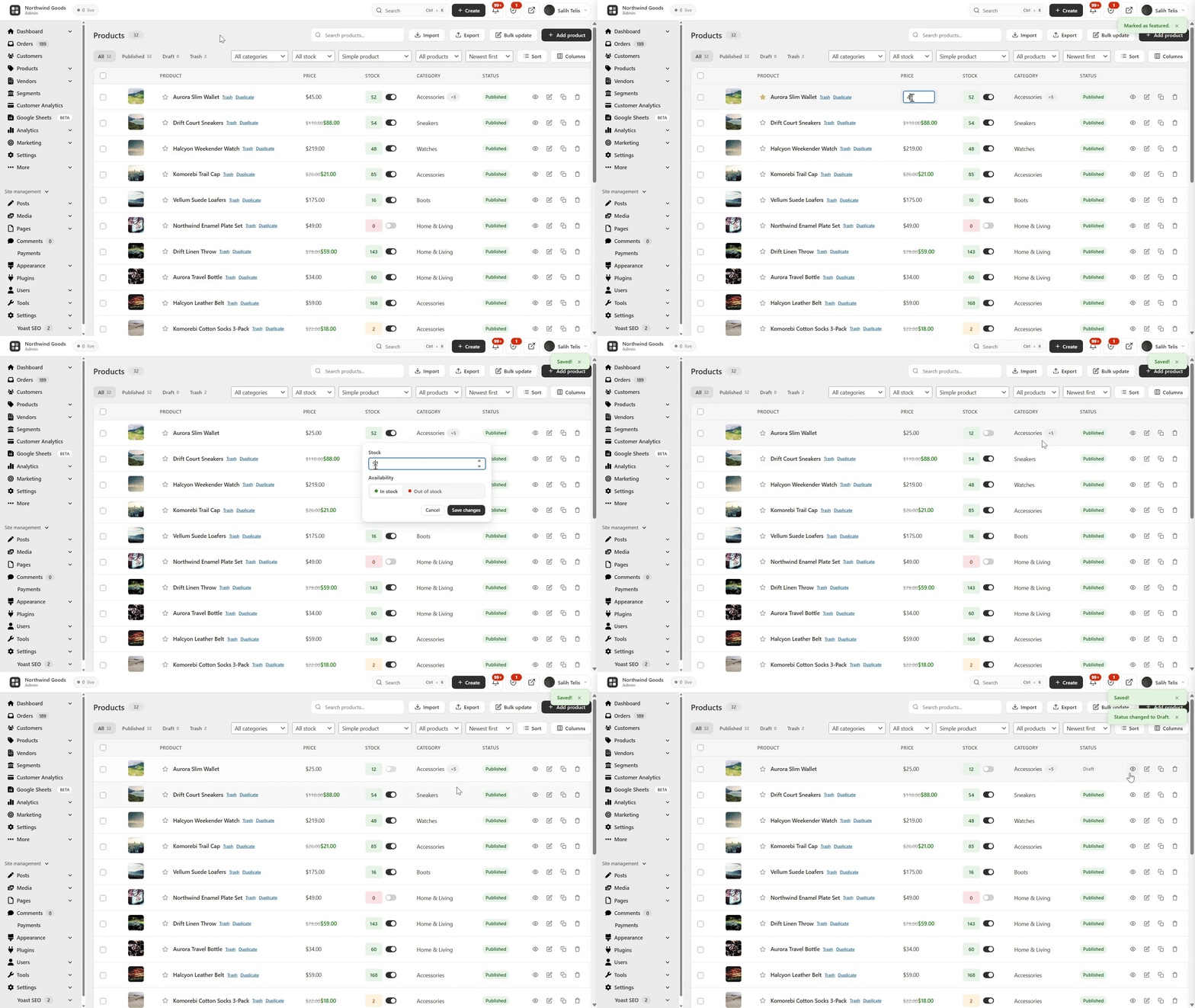
Product List
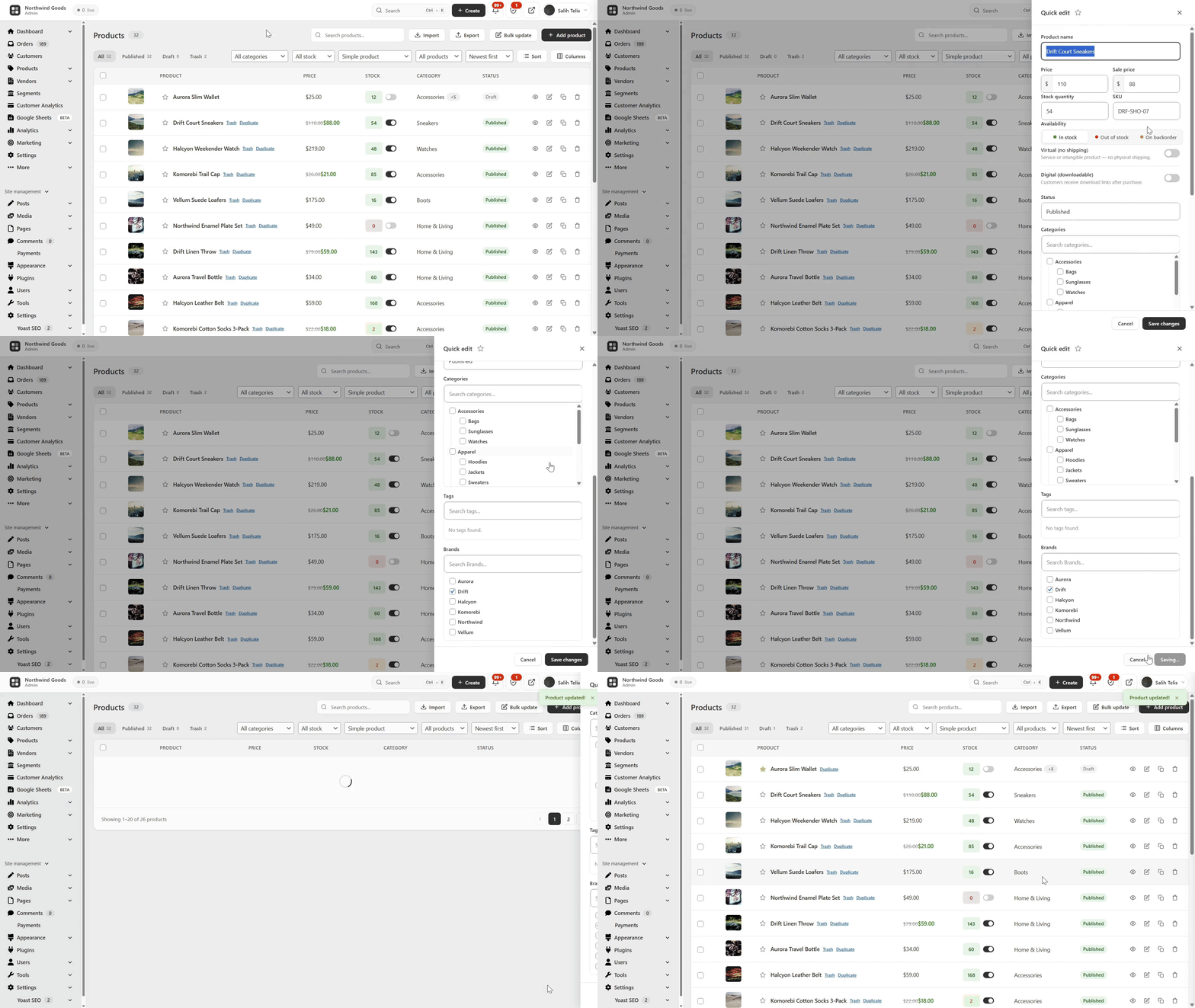
Quick Edit
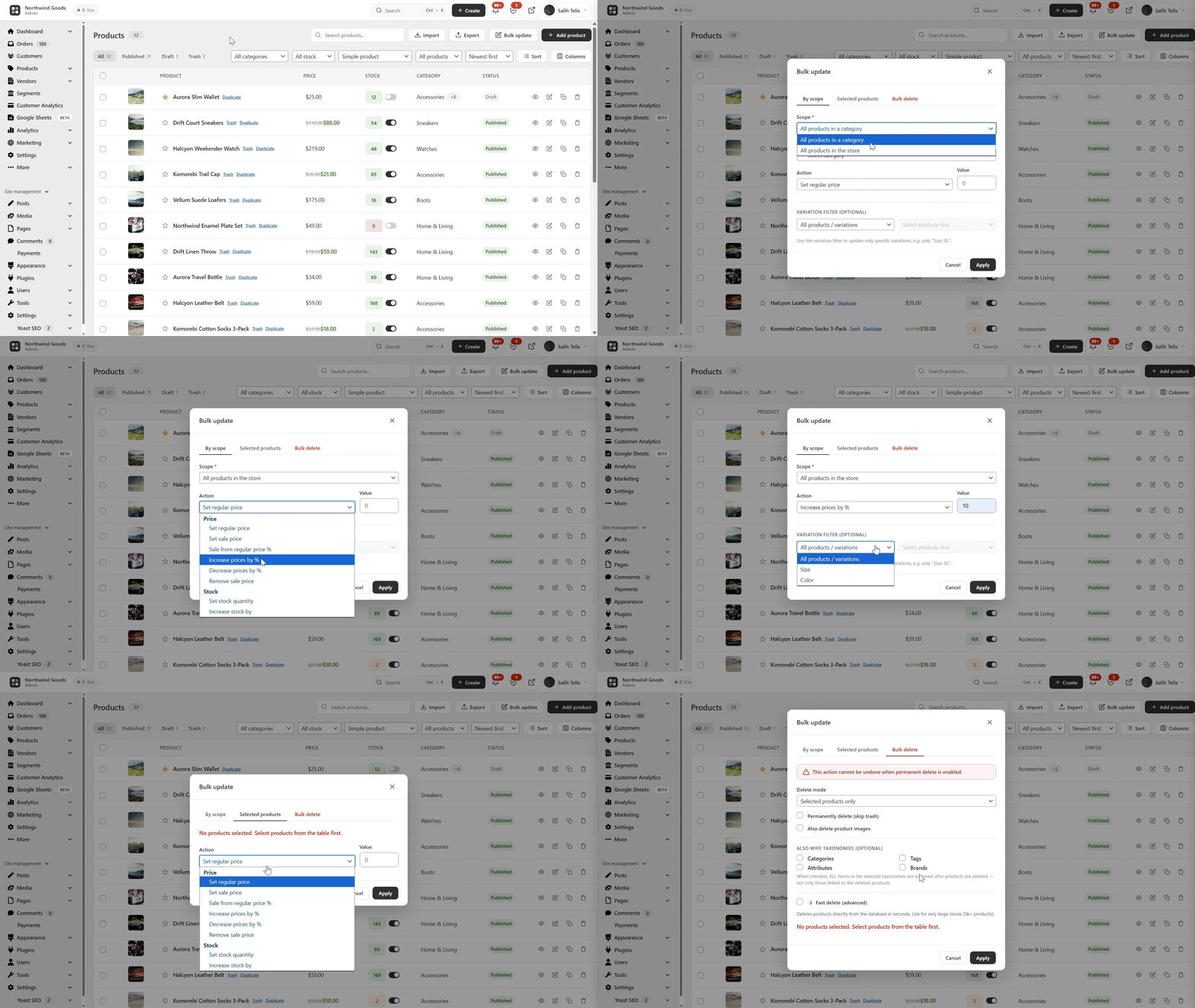
Bulk Edit
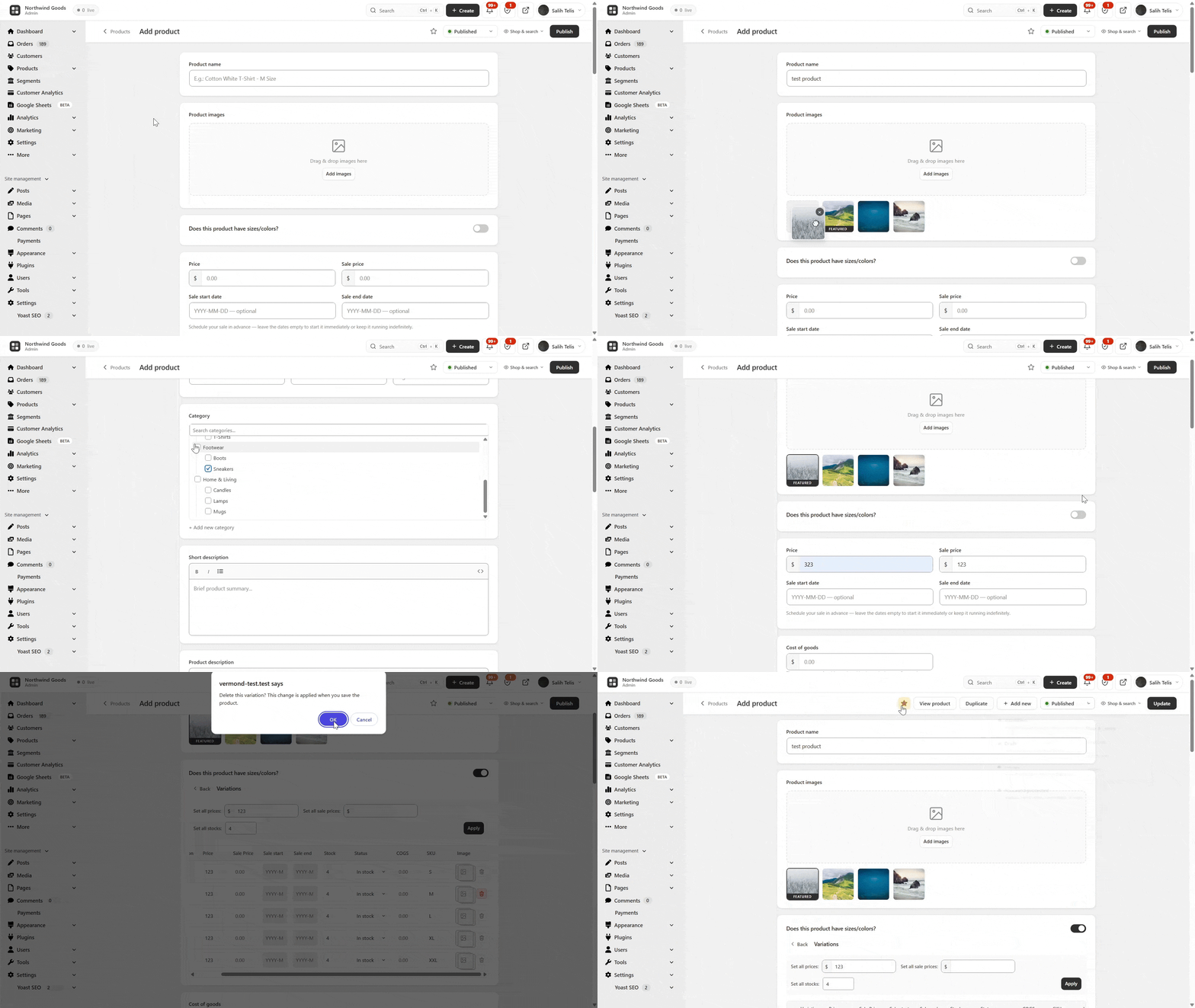
Product Editor
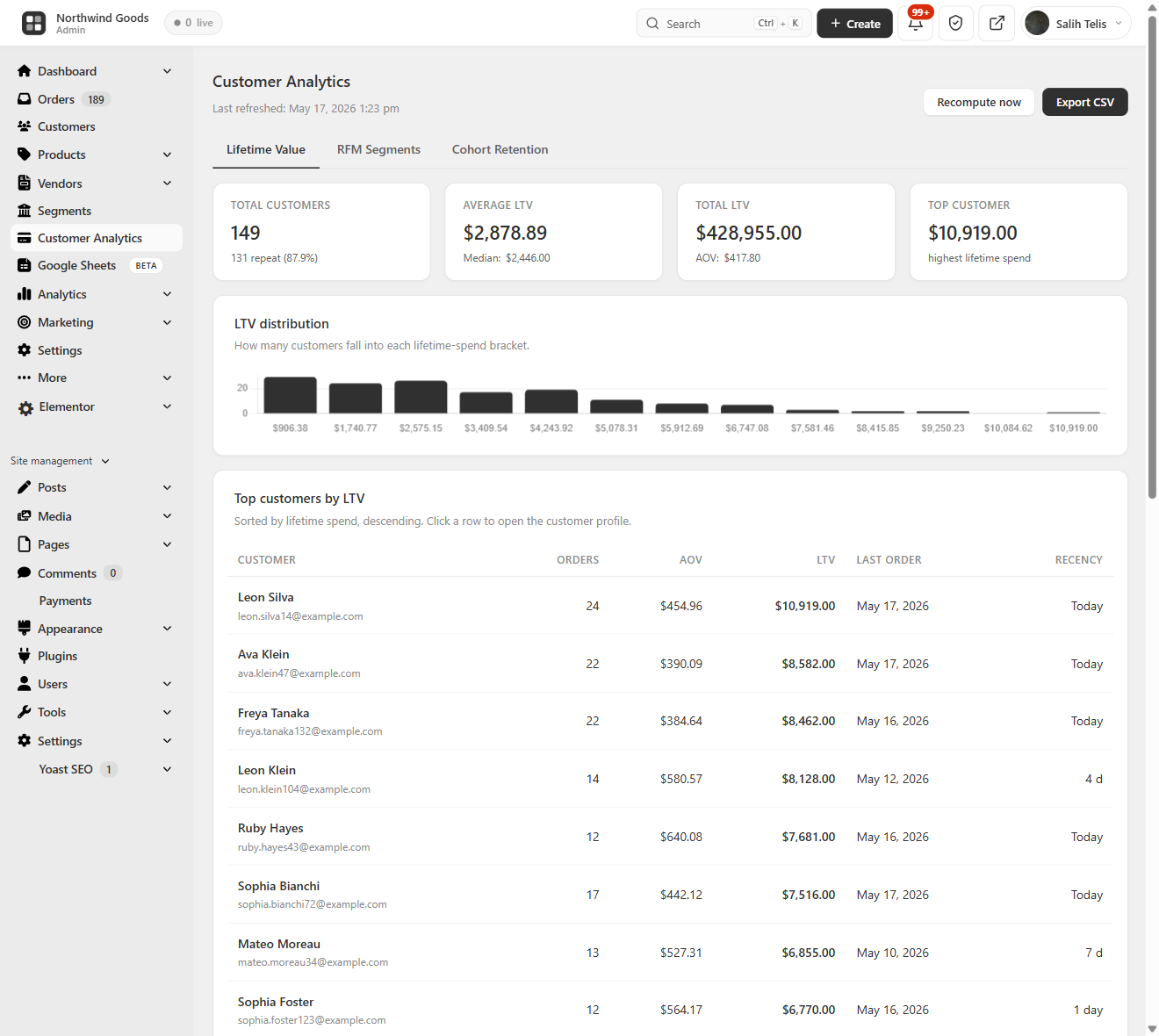
Customer LTV
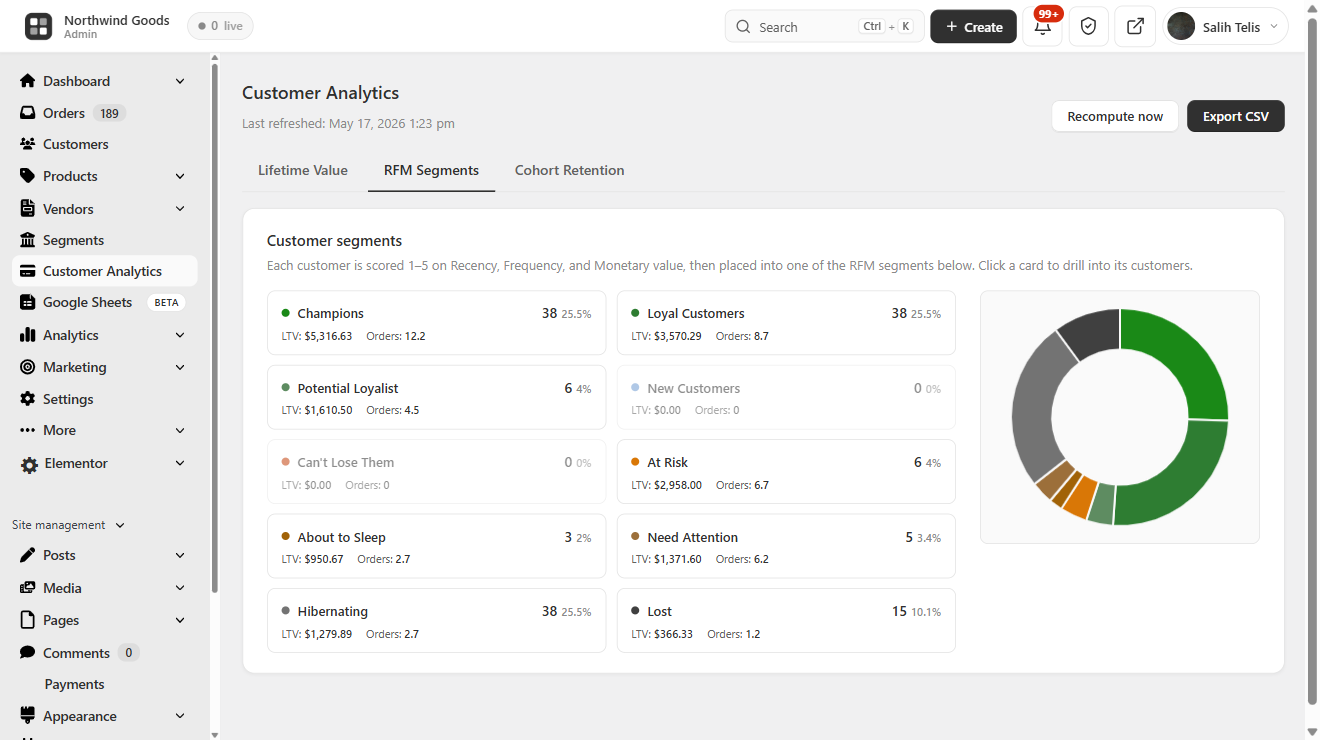
RFM Segments
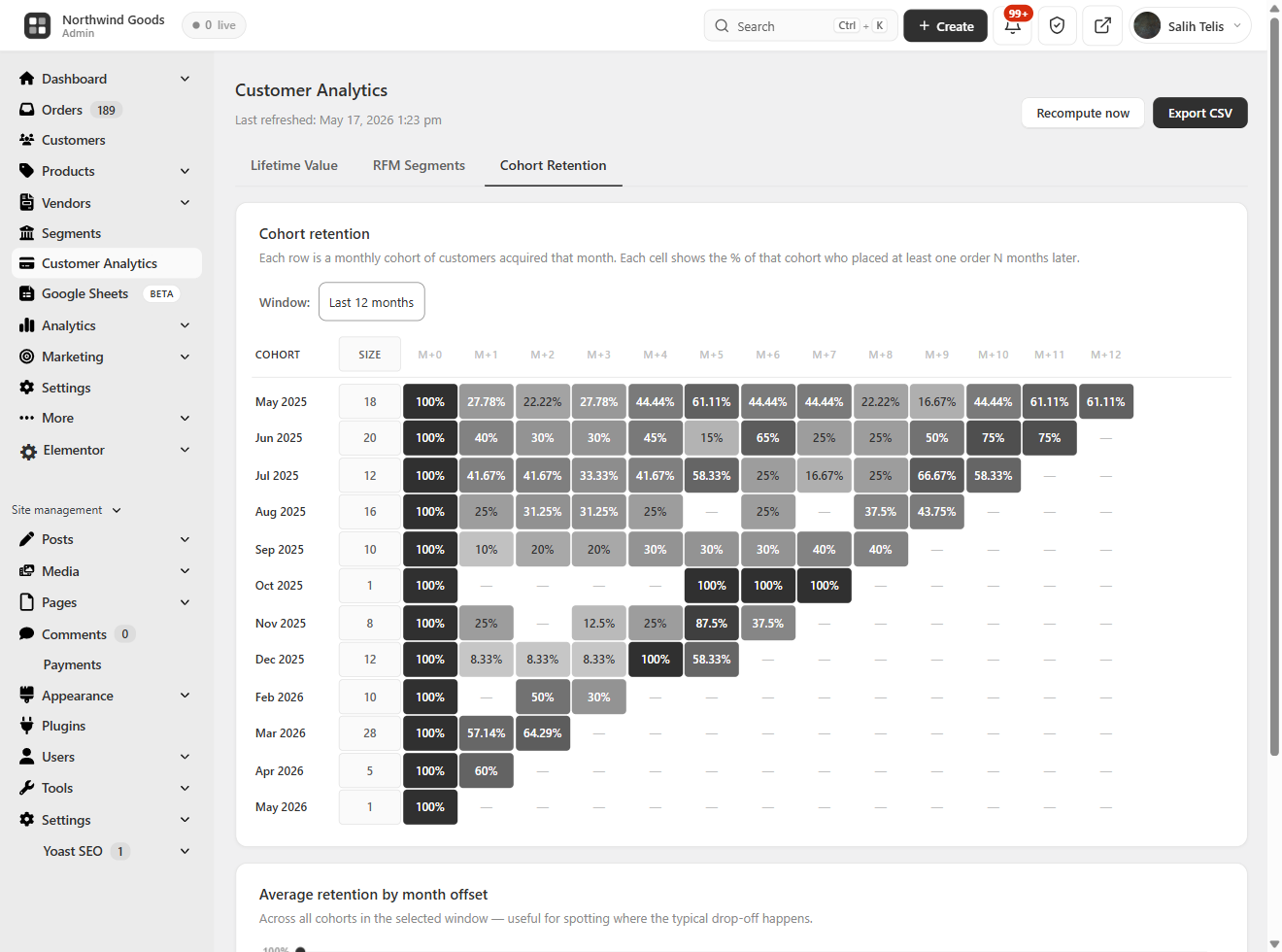
Cohort Retention
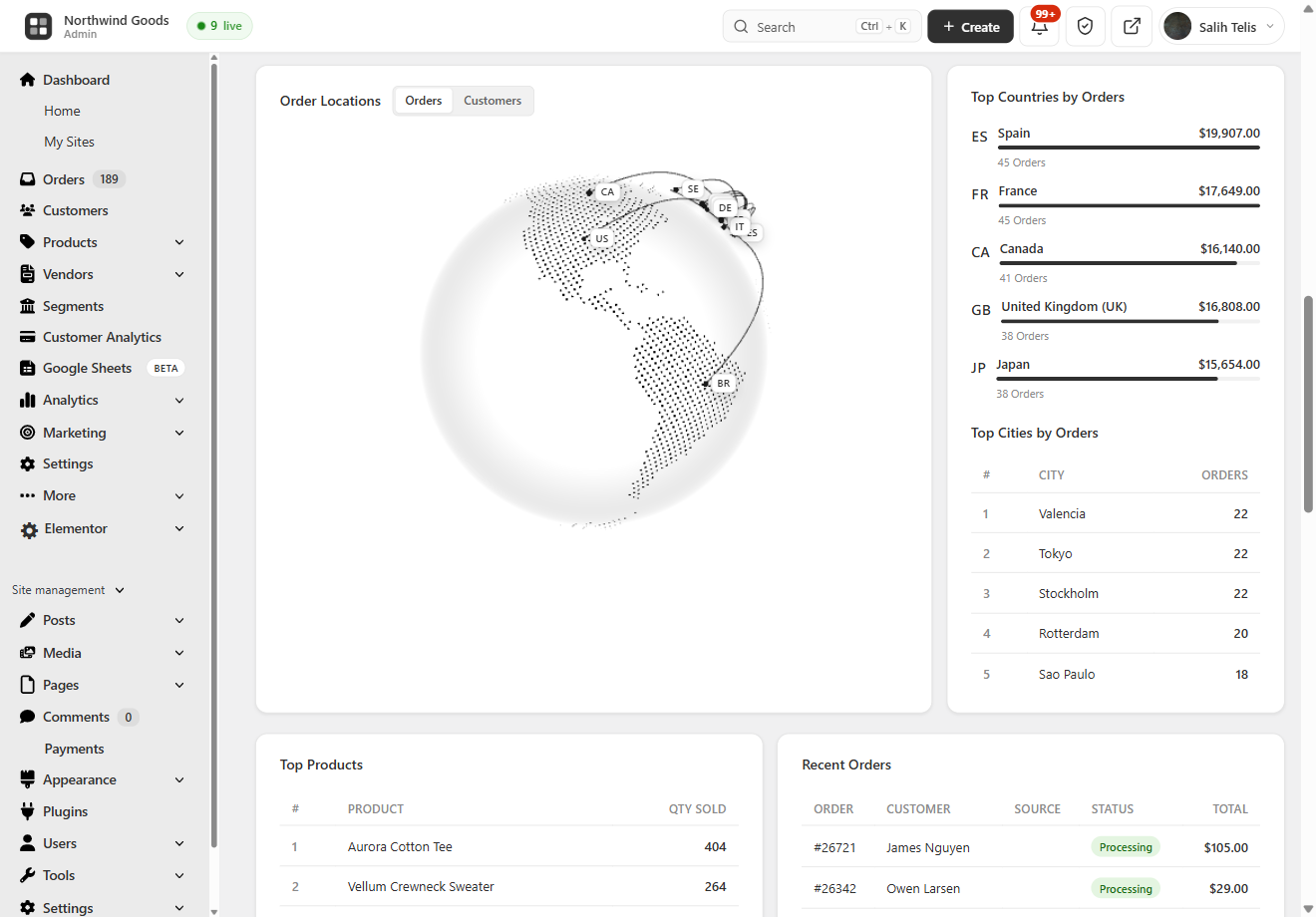
Geo Analytics
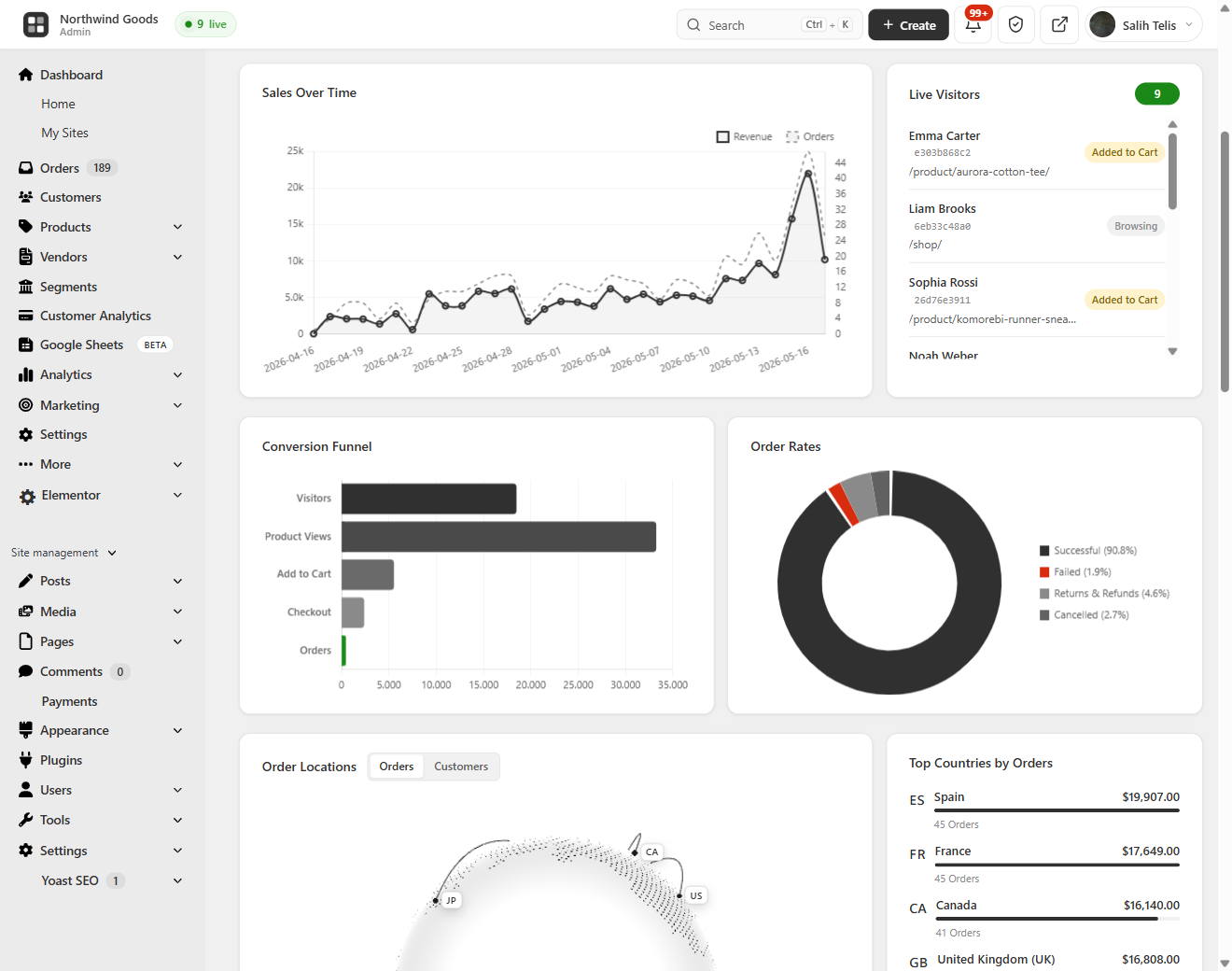
Live Visitors
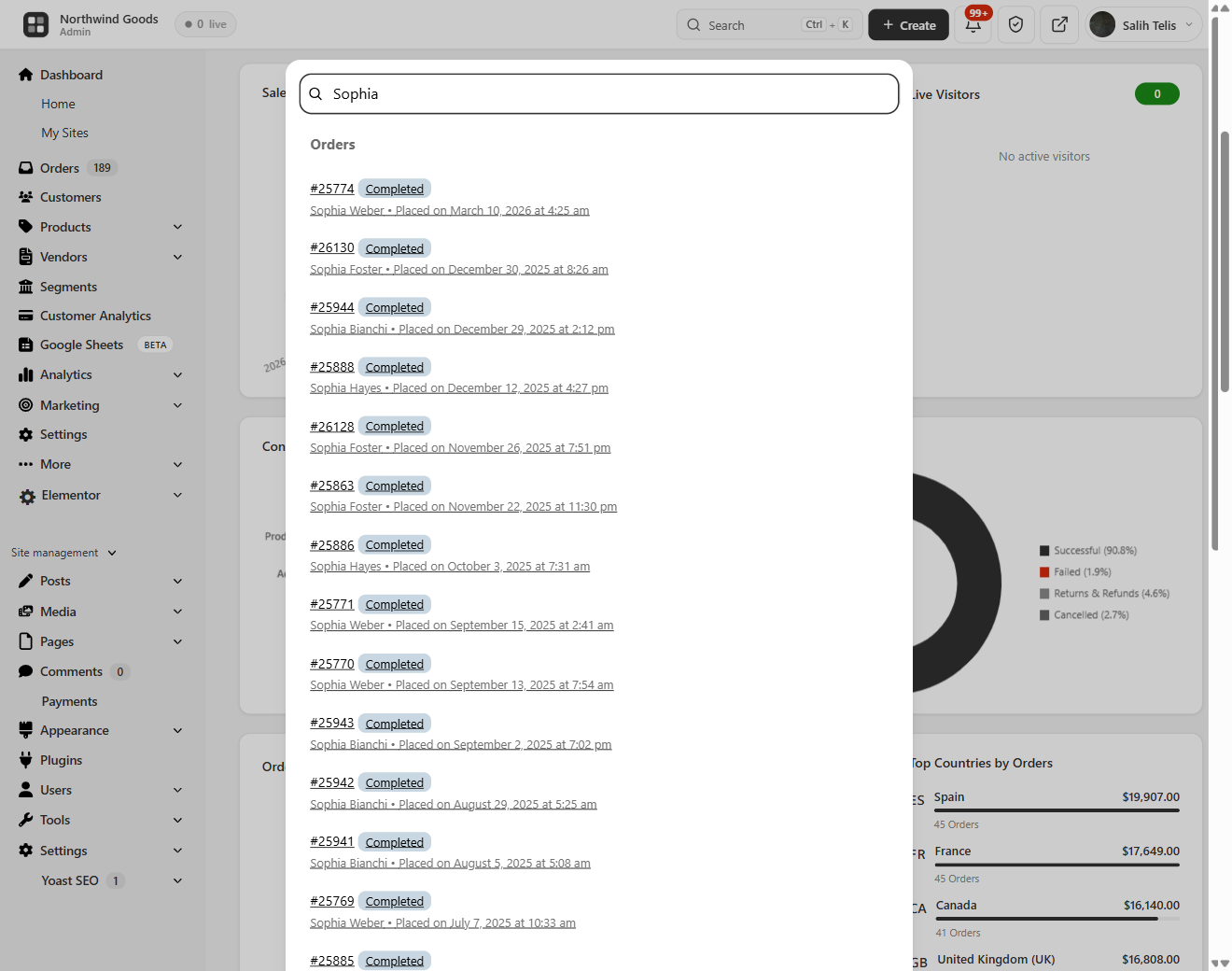
Order Search
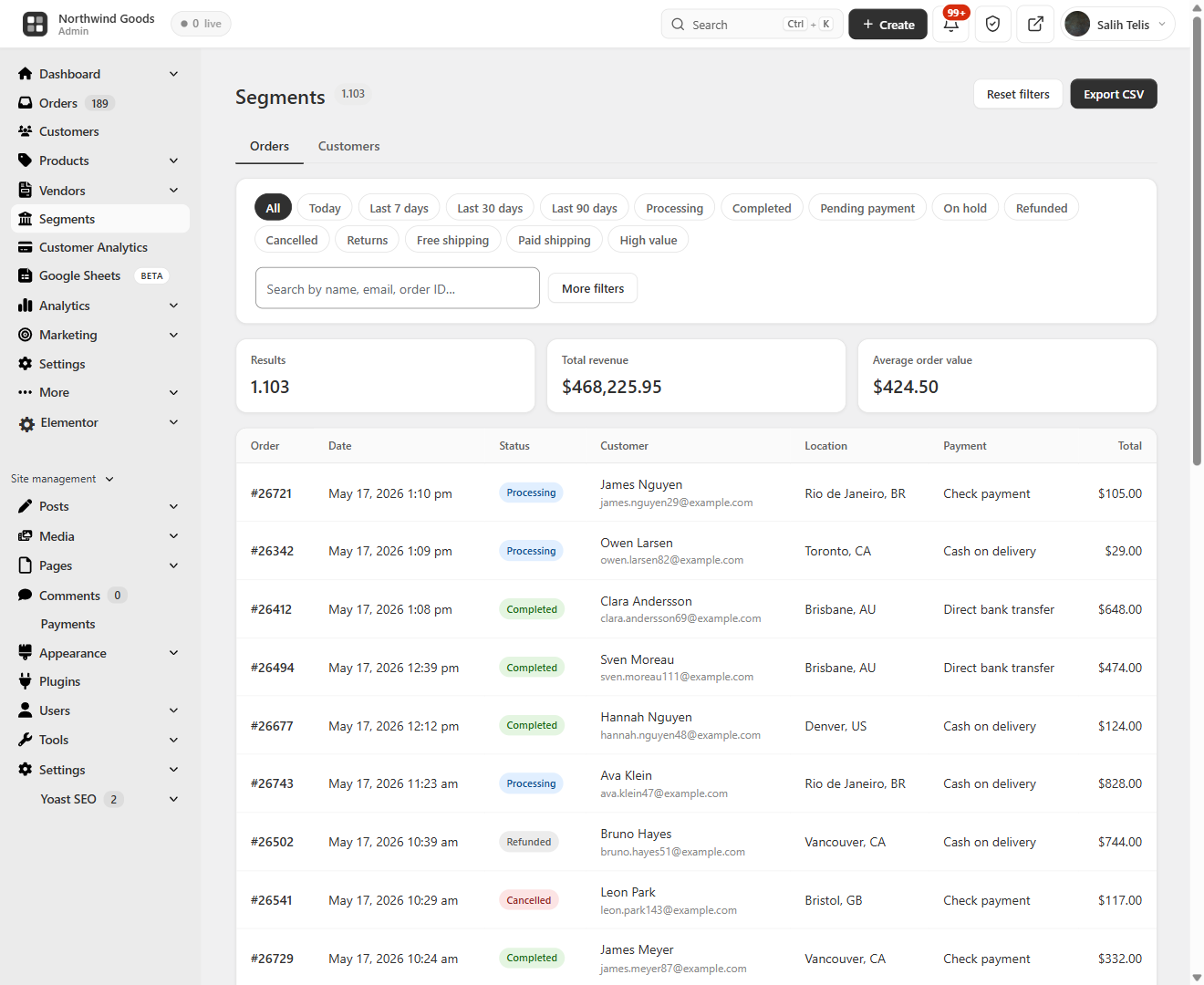
Orders Explorer
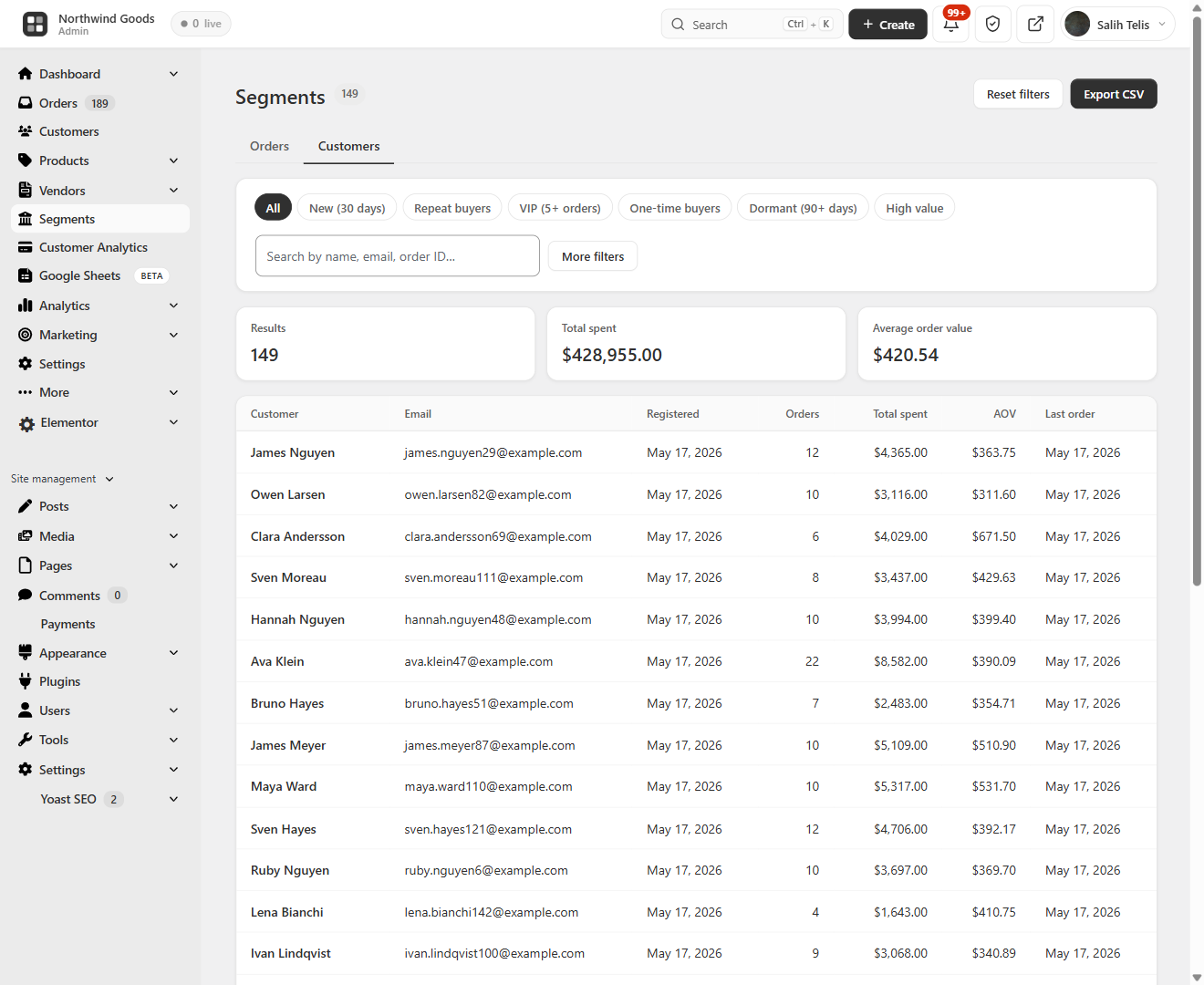
Customers Explorer
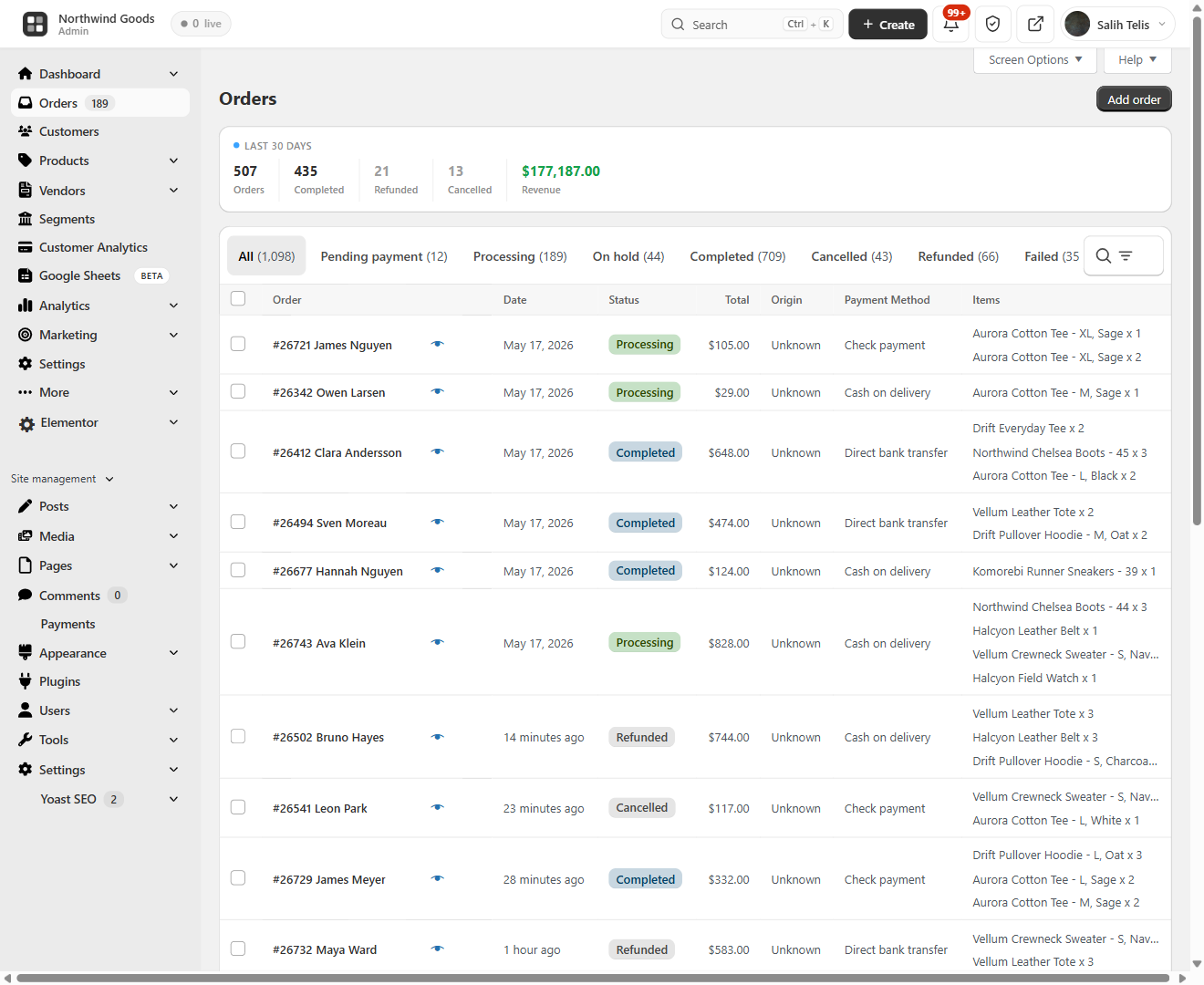
Order Management
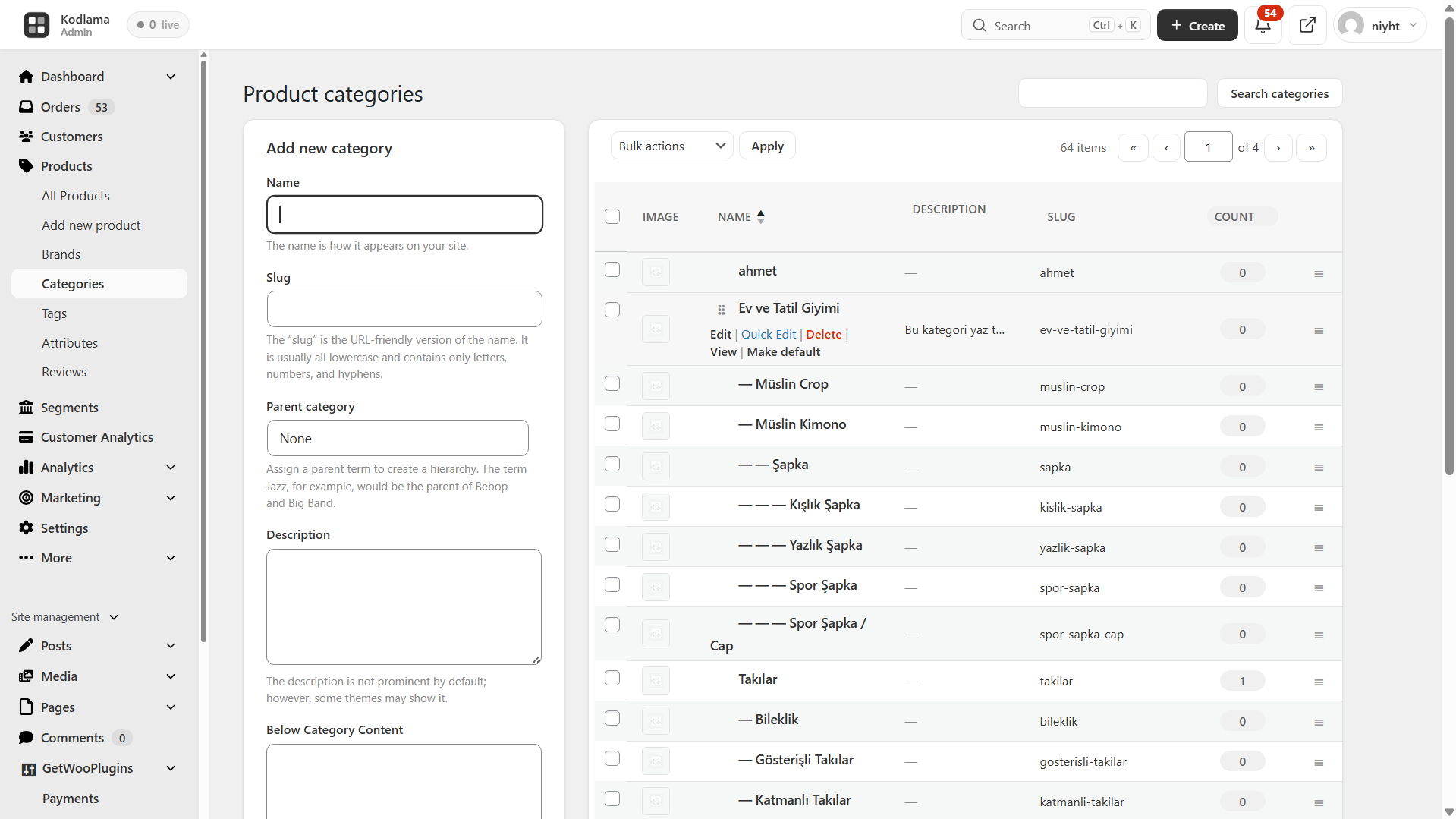
Categories
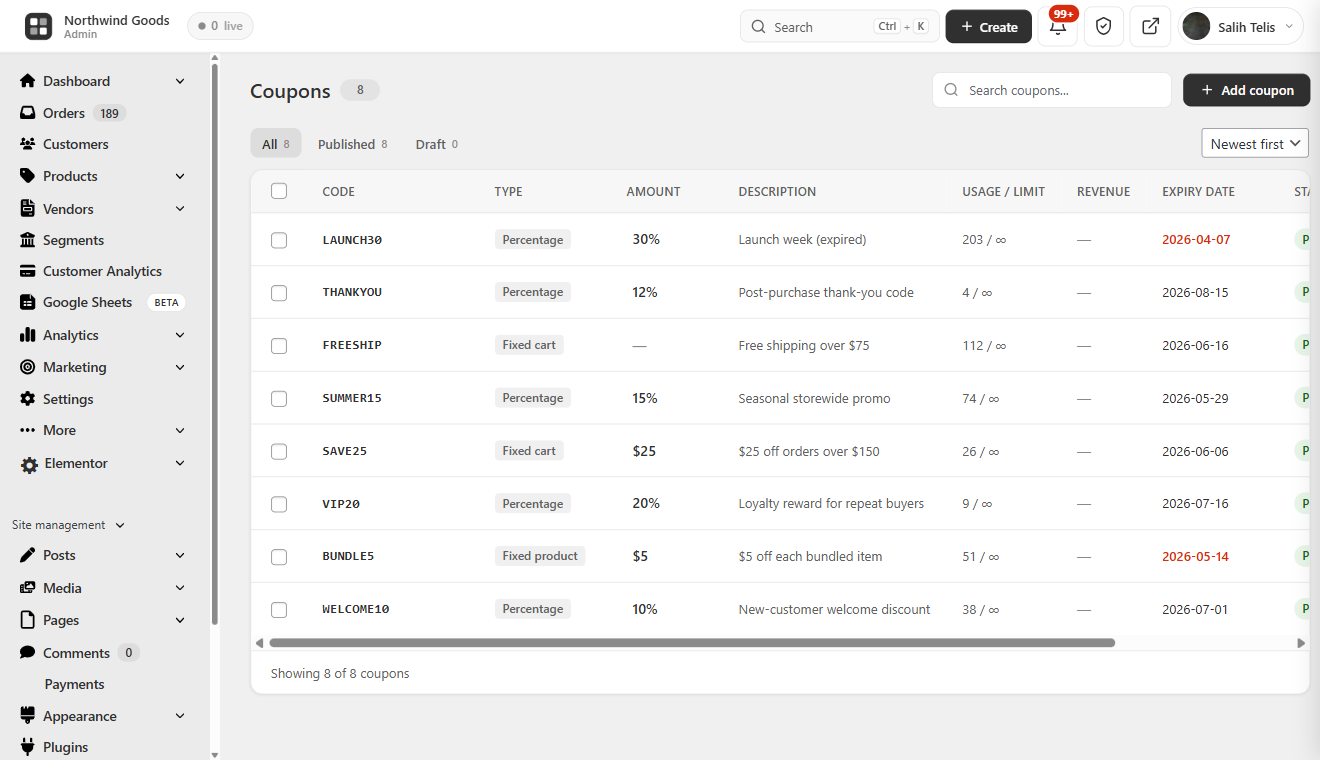
Coupons
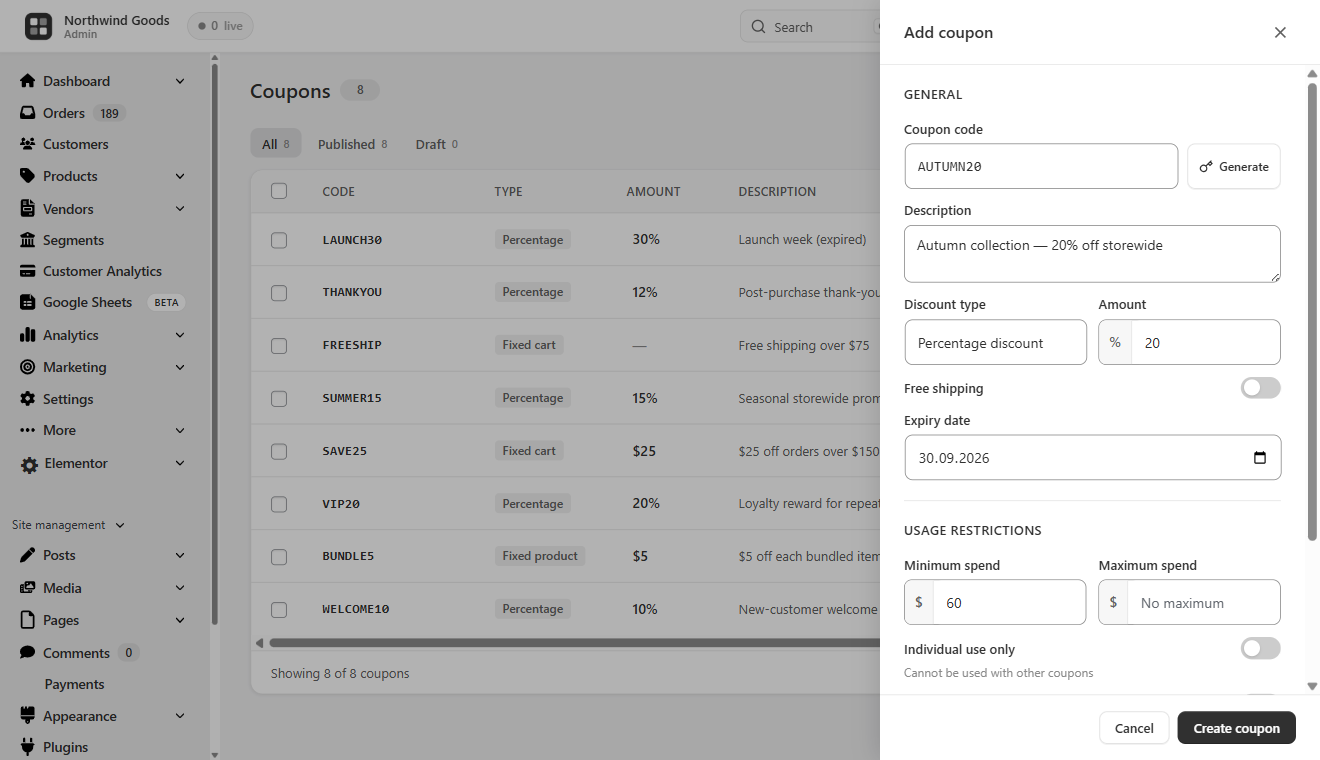
Add Coupon
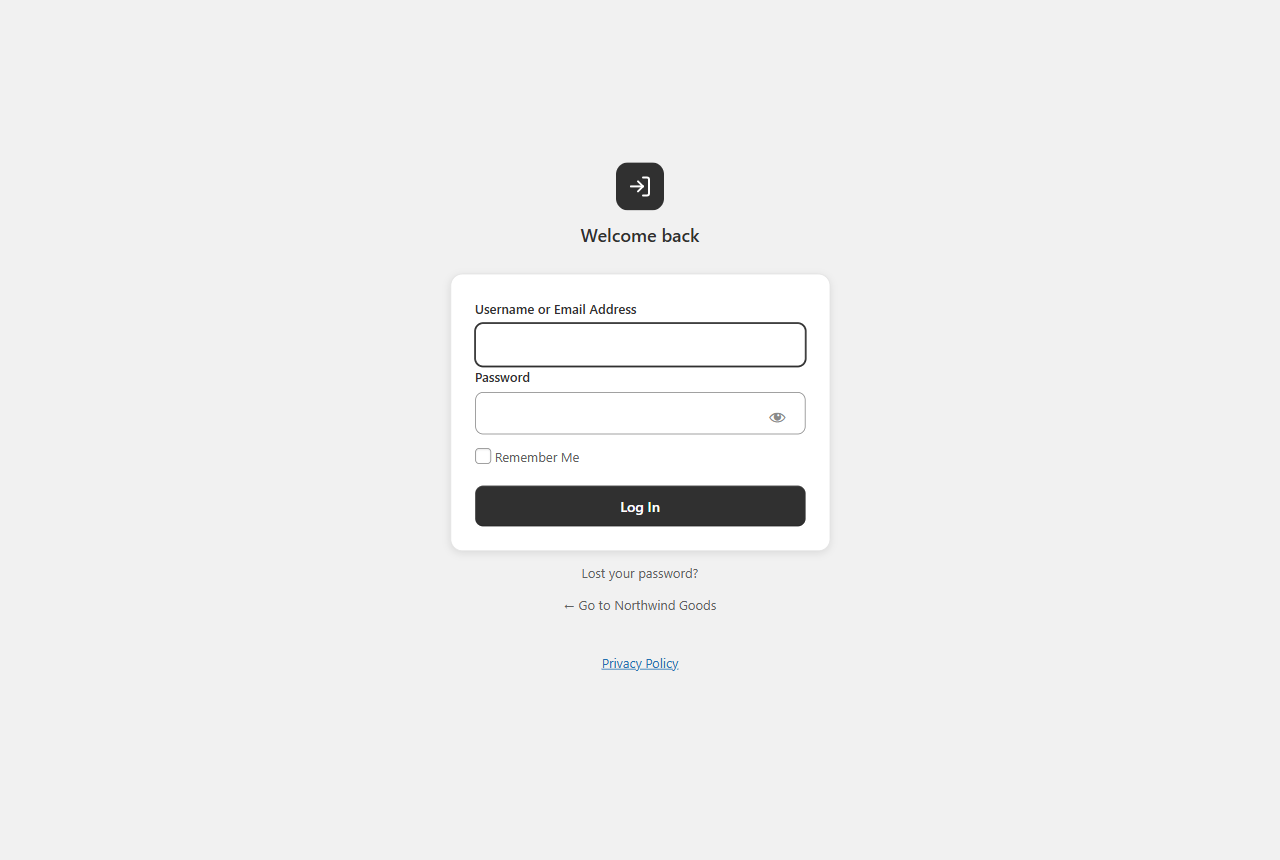
Login Page
Faq
Yes. Every feature on this page is in the free version. There is no premium tier, no feature lock, no trial period, no upsell. We built this because we needed it for our own 1000+ WooCommerce stores and decided to release it.
Yes. BrikPanel gives you a complete WooCommerce analytics suite that runs entirely on your own server with no external dependencies. Sales analytics, product reports, conversion tracking, customer LTV, RFM segmentation, cohort retention and customer data are all included, nothing is sent to any third-party SaaS.
Yes. The BrikPanel dashboard ships a complete WooCommerce sales report out of the box, total sales, total orders, average order value (AOV), refunds, and net revenue, each with a ±% period-over-period delta. Filter the sales report by today, yesterday, last 7 days, last 30 days, or any custom date range. The sales chart is rendered with Chart.js and pairs with the order status donut and conversion funnel for a full sales report you can read at a glance, without ever leaving wp-admin and without paying for an external analytics service.
Yes. The dashboard goes far beyond the built-in screens with a complete set of WooCommerce reports and WooCommerce sales analytics computed live from your own store data: sales, orders, AOV, conversion rate, customer LTV, RFM segments and cohort retention. Every headline metric is shown as a WooCommerce KPI card with a period-over-period delta, and a real profit report (revenue minus COGS, ad spend and manual expenses) sits right next to revenue. Because the LTV, RFM, cohort and geographic views are not part of core, BrikPanel effectively ships advanced reports for WooCommerce and custom WooCommerce reports as a free, self-hosted WooCommerce reporting layer, with no external SaaS and nothing sent off your server.
Yes. The BrikPanel admin dashboard is built from modular dashboard widgets (sales, orders, AOV, the conversion funnel, live visitors, the geographic globe, customer analytics and more), and the modules you do not need can be turned off from WooCommerce Settings BrikPanel. The sales charts and sales graphs are rendered with Chart.js and redraw for any date range you pick, so your custom dashboard shows exactly the sales charts, KPIs and reports you care about and nothing you do not.
Yes. When your store takes orders in more than one currency, BrikPanel converts every order to your store’s base currency before summing, so Revenue, AOV and the sales chart are never a meaningless mix of currencies. With CURCY (WooCommerce Multi Currency) the exact day-of-sale rate is read from the snapshot CURCY stores on each order. With WCML (WooCommerce Multilingual & Multicurrency) the current WCML rate is applied and snapshotted onto the order the moment it is placed, which captures the day-of-sale rate for every order going forward. For any other multi-currency setup you can enter flat fallback rates under WooCommerce Settings BrikPanel Currency, or supply a rate programmatically through the brikpanel_order_base_factor filter (parameters: current factor, WC_Order, order currency, base currency — return the multiplier that converts one unit of the order currency into the base currency).
BrikPanel reads product cost from WooCommerce’s own native Cost of Goods Sold field (_cogs_total_value, WooCommerce 9.5+) — the same field the WooCommerce product screen edits — so any plugin or import pipeline that writes the native cost is picked up automatically, including direct database writes. Costs saved by older BrikPanel versions are migrated into the native field automatically. Variation costs follow WooCommerce’s semantics, including the “additive” flag that adds a variation’s cost on top of the parent’s. If you keep cost somewhere else entirely, hook the brikpanel_product_cogs filter (parameters: resolved cost or null, product id, variation id) to point BrikPanel’s per-product cost reads at your own source.
Yes. If you already run a dedicated analytics tool, disable Visitor tracking under WooCommerce Settings BrikPanel Analytics and BrikPanel adds zero scripts and zero requests to your storefront. You can also keep tracking on but raise the live-visitor refresh interval to reduce server load, or exclude logged-in customer details from the Live view for a fully anonymous setup. If you only want tracking to wait for cookie consent rather than switching it off, see the next question.
Yes. Tick Wait for cookie consent under WooCommerce Settings BrikPanel Analytics and BrikPanel’s visitor tracking creates no cookie, no browser storage and no request at all until the visitor allows analytics. Consent is accepted from any of three sources, so any consent platform can drive it:
- the WordPress Consent API (the
statisticscategory), which BrikPanel also listens to for live changes; - a banner calling
brikpanel_start_tracking()in JavaScript, withbrikpanel_stop_tracking()on withdrawal; - the
brikpanel_frontend_tracking_allowedPHP filter, for agencies wiring up a CMP without touching plugin files.
Consent takes effect immediately, with no page reload. When it is withdrawn, tracking stops at once and BrikPanel deletes its own cookies and browser storage for that visitor and drops them from the Live view. The anonymous daily totals already recorded are untouched, because they contain no visitor identifier to erase.
Tested against the most-installed consent banners. Working with no setup at all: Complianz, CookieYes, GDPR Cookie Compliance (Moove), WPConsent, Cookiebot, iubenda and Beautiful Cookie Consent Banner — they all speak the WordPress Consent API, so ticking the setting is the only step. Cookie Notice / Compliance by Hu-manity needs its Compliance mode connected, because its free unconnected mode never reports a category decision. CookieAdmin, Real Cookie Banner and Termly do not use the WordPress Consent API at all; bridge them with a few lines, using the pattern below (this exact snippet was tested against CookieAdmin, swap the cookie name and button ids for another banner):
add_filter( 'brikpanel_frontend_tracking_allowed', function ( $allowed ) {
    return isset( $_COOKIE['my_banner_cookie'] ) && $_COOKIE['my_banner_cookie'] === 'accepted';
} );
and in your theme’s footer, so a click takes effect without a reload:
document.addEventListener('click', function (e) {
    if (e.target.closest('#my-banner-accept') && window.brikpanel_start_tracking) window.brikpanel_start_tracking();
    if (e.target.closest('#my-banner-reject') && window.brikpanel_stop_tracking) window.brikpanel_stop_tracking();
}, true);
What visitor tracking stores in the browser, and only after consent when the setting is on: brikpanel_vid (a random id, 1 year, so a visit is counted once instead of once per page), brikpanel_consent (the value 1, 30 days, remembering the choice), brikpanel_add_to_cart_count_cookie and brikpanel_checkout_count_cookie (until midnight, one funnel count per day), and the local storage keys brikpanel_visitor_viewed_<date> and brikpanel_product_viewed_<date>. All of it is first-party and stays on your own site.
This setting governs analytics. Abandoned-cart email capture is a separate feature with its own switch under Cart abandonment, and it stores nothing at all until a customer types their email address themselves; when they do, it reuses the same brikpanel_vid id to tie the cart to that address.
Yes, both ways: network-activate it to run on every store in the network, or activate it on individual subsites only. Each site gets its own tables and settings either way. When network-activated, super admins additionally get network-wide access rules under Network Admin Settings BrikPanel Access.
Yes. BrikPanel ships a full WooCommerce customer analytics suite directly in the dashboard. Customer Lifetime Value (LTV) is calculated for every customer with average, top, and full distribution histogram. RFM segmentation scores every customer on Recency, Frequency and Monetary and groups them into Champions, Loyal, At Risk, About to Sleep, Hibernating and Lost. Cohort retention shows a month-by-month grid plus an average retention trend line. All three are computed from your own store data, no external service involved.
Yes, for store owners who want to stay self-hosted. BrikPanel gives your WooCommerce store the clean, modern admin experience of Shopify: product list with inline editing, bulk price and stock updates, live visitors, conversion tracking, geographic analytics, customer LTV / RFM / cohort reports, a branded login page, but your storefront, your customer data, and your orders stay on your own server. No monthly platform fee, no transaction fee, no vendor lock-in. If you were evaluating Shopify but want to own your stack, this is the Shopify alternative for WooCommerce we built for that exact use case.
For most stores, yes. BrikPanel includes complete woocommerce inventory management: stock levels, low stock badges, bulk stock updates, variation stock updates, all integrated into the same dashboard you use for sales and orders. If you only need daily stock work without advanced supplier or purchase order features, BrikPanel is a much lighter ATUM alternative.
The default WooCommerce product list is built for browsing, searching, sorting and editing it is slow. BrikPanel ships a complete woocommerce product list plugin with thumbnail, SKU, regular and sale price, stock badge, category, AJAX pagination, live search, status tabs, one-click publish toggle and a slide-in quick edit panel for every row. Works on both simple and variable products, and the same woocommerce product list screen powers the bulk price and bulk stock updates so you never leave the page to edit your catalog.
Yes. The product list search matches the product title, the description and the WooCommerce SKU out of the box, including a variation SKU, which returns the parent product. If your warehouse also stamps a supplier code, a manufacturer part number or an EAN onto each product in its own custom field, point BrikPanel at it with the brikpanel_product_search_meta_keys filter, which receives the list of meta keys (just _sku by default) and the search term. Add your own key to the list and staff can find a product by typing it, on simple and variable products alike, because a match on a variation returns the parent. Up to ten keys are scanned. The filter is documented with a copyable example under WooCommerce, Settings, BrikPanel, Developers.
Open BrikPanel Products and click the Bulk Update button in the toolbar. You can update prices, sale prices, and stock for all products, by category, or for selected products. For variable products, open any product, click Edit Variations, and bulk update prices and stock across every variation in one modal. This is the part most free WooCommerce bulk editor plugins do not handle, BrikPanel does.
Yes. Bulk edit variation prices WooCommerce is a core BrikPanel feature, and it is free. Set a percentage rule, set a fixed price, or update by attribute (every “Red” variation, every “Large” size). The same modal handles bulk update variation stock for the same products.
No. BrikPanel only loads inside wp-admin. It has zero impact on your storefront speed, customer experience, page weight, or Core Web Vitals. The frontend never loads any BrikPanel code.
Yes. Every order query has dual code paths, wc_get_orders() for HPOS, WP_Query for legacy. BrikPanel declares HPOS compatibility via FeaturesUtil::declare_compatibility('custom_order_tables', ...) and is tested on stores running both modes.
Open the BrikPanel dashboard. Scroll to the geographic analytics section. The 3D globe shows every order on its real geographic location, and the Top 10 Countries and Top 10 Cities tables update in real time. BrikPanel extracts country and city from the billing or shipping address of every order, so this works with no extra setup.
BrikPanel includes a built-in wordpress login customizer. Enable the custom wp login page module from BrikPanel settings and the default wp-login.php is replaced with a clean, branded login form that matches the rest of the BrikPanel admin. No CSS knowledge required.
Press Ctrl + K (or Cmd + K on Mac) anywhere inside wp-admin. The BrikPanel quick search overlay opens and searches across order ID, customer name, email, phone, and product SKU at the same time. This is the woocommerce search orders experience the WooCommerce admin should ship with by default.
Yes. BrikPanel includes a woocommerce live visitors widget on the dashboard that updates every 30 seconds. You can see what page each visitor is on, whether they have items in the cart, and whether they are an existing customer. This is real woocommerce real time visitors tracking, not estimates.
Yes. BrikPanel includes a complete woocommerce conversion tracking system that records visitors, add-to-cart events, checkout starts, and completed orders. The dashboard shows your woocommerce conversion funnel as a four-step visual: Visitors Add to Cart Checkout Orders, with the conversion percentage at every step.
Yes. BrikPanel ships a free WooCommerce conversion tracking plugin that records every visitor, add-to-cart, checkout start and completed order in your own database, no Google Analytics setup, no Hotjar, no monthly fee. The funnel and conversion-rate widgets on the dashboard are computed from this same dataset in real time.
Yes. BrikPanel includes a built-in WooCommerce cart abandonment and cart recovery system in the free version: no Klaviyo, Mailchimp or external email SaaS. It captures the email of shoppers who begin checkout but do not complete the order (from both the classic shortcode checkout and the newer block checkout, and from logged-in customers the moment they add to cart) and lists every one on a dedicated Abandoned Carts screen. Each entry keeps a full snapshot of the cart, including the exact variation, quantity and total, and moves through Active, Abandoned and Recovered automatically, even if the shopper later checks out with a different email. The screen has search, status, source and date filters, per-row product details, CSV and Excel export, and statistics cards. It works on both simple and variable products.
Switch on the optional email popup and BrikPanel shows a clean, on-brand sign-up offer to your visitors. Anyone who subscribes is issued their own single-use percentage cart recovery coupon (10% by default, and you set the rate), restricted to their email and valid for 30 days, shown right there with a one-click Copy button. You control the heading, message, button and success text, the delay before it appears, the cooldown after it is dismissed, and which of six animated reveal styles the coupon uses (Sealed envelope, Pocket card, Scratch card, Slot machine, Magnetic assembly or Classic ticket), all of which respect a visitor’s reduced-motion preference. Close the popup and it folds into a small floating tab, one click from reopening.
Open WooCommerce BrikPanel Google Sheets, click “Connect Google account”, pick or create a target spreadsheet, and toggle “Real-time order sync” on. Every new WooCommerce order is then appended to your Sheet within seconds, with one row per line item so variations land in their own columns. Status changes update the existing row in place. No Zapier, no Make, no monthly fee, a real woocommerce google sheets sync built into BrikPanel.
Yes. BrikPanel includes a complete WooCommerce to Google Sheets integration in the free version: real-time order sync, scheduled bulk export, analytics snapshot tabs (Sales Summary, Daily KPIs, Top Products, Funnel) and a customer + RFM snapshot. All four flows ship free with no row limit, no premium tier, and OAuth-based authentication that requests minimum scopes only (drive.file, never full Drive access).
Connect Google Ads and/or Meta Ads from the BrikPanel Ad Platforms page. BrikPanel then pulls your daily ad spend and shows three new dashboard cards: Ad Spend (summed across every connected platform for the active date range), WooCommerce ROAS (store revenue ÷ ad spend), and Net Profit (revenue − COGS − ad spend − manual expenses). COGS comes from WooCommerce’s native order cost meta and expenses from the BrikPanel expenses table, so the woocommerce roas and net profit numbers are real, not estimates. The cards are multi-currency aware, if an ad account reports in a different currency than the store, spend is shown split and ROAS / Net Profit are omitted instead of printing a misleading converted number.
For self-hosted stores, yes. BrikPanel gives you the WooCommerce ROAS and net profit view store owners buy Triple Whale, TrueProfit or BeProfit for: daily Google Ads and Meta Ads spend pulled in next to store revenue, COGS and expenses, but it runs entirely on your own server with no monthly fee and no data sent to a third party. If you only need true ROAS and profit (not full multi-touch ad attribution), this is the free Triple Whale alternative built for that exact use case.
Yes. BrikPanel connects to both Google Ads and Meta Ads through a secure OAuth proxy (the plugin only ever stores encrypted tokens, never your password). It pulls daily spend per platform, backfills history, and re-syncs recent days automatically so the dashboard ROAS and net profit stay accurate. The integration is spend-and-profit focused, it does not install a Facebook pixel or do multi-touch attribution; it gives you true woocommerce roas and net profit without a paid SaaS.
Yes. BrikPanel includes a complete WooCommerce variation editor in the free version. Open any variable product, click “Edit Variations”, and you can bulk update every variation’s price, sale price, stock and SKU in one modal, with attribute filtering when a product has 50+ combinations. The same woocommerce variation editor also supports per-attribute rules (“set every Red variation to $X”).
The built-in WooCommerce analytics are slow, refresh on a delay, only show historical data, and have no live visitor tracking, no conversion funnel, no geographic globe, no customer LTV / RFM / cohort reports, no Cmd+K order search, no quick edit sidebar, no variation bulk editor, no custom login page, and no coupon manager. BrikPanel adds every one of those features inside a single free plugin.
No. BrikPanel is a real woocommerce admin dashboard plugin with custom database tables for visitor tracking, custom AJAX endpoints for every interaction, real conversion analytics, a working bulk editor, a real product editor, a real coupon manager, and a real custom login system. Other plugins (Dashify, UiPress) only restyle the admin. BrikPanel rebuilds the parts of WooCommerce that needed to be rebuilt.
In practice, yes. BrikPanel is built specifically for WooCommerce, but for store owners it behaves like a focused WordPress admin theme: it reskins the WooCommerce parts of wp-admin into a clean, Shopify-style custom admin panel, replaces the default toolbar, and restyles the product, order, customer and coupon screens. If you have been looking for a wp admin theme or an admin skin that makes the WooCommerce admin genuinely pleasant to work in (rather than a generic restyle that breaks on the next WooCommerce update), this is built for exactly that. You can also hide admin menu items for non-technical clients with the optional simplified mode, leaving only BrikPanel and WooCommerce in the sidebar.
Yes. BrikPanel does not interfere with frontend rendering, so it works with every page builder and SEO plugin we have tested. Yoast SEO, Rank Math, All in One SEO and SEOPress metaboxes (including their SEO score panels) render and save inside the BrikPanel product editor. It also has its own translation files and is fully compatible with WPML and Polylang for multilingual stores.
Yes. BrikPanel is compatible with WooCommerce Subscriptions, Subscriptions for WooCommerce (WP Swings), MemberPress, Paid Memberships Pro, WooCommerce Memberships, YITH WooCommerce Subscription, SUMO Subscriptions, WebToffee Subscriptions for WooCommerce and Restrict Content Pro. Subscription products and member orders show up in the same product list, order screens and customer analytics as the rest of your catalog.
Everything stays in your WordPress database. Visitor tracking writes to wp_brikpanel_visitors (daily totals), wp_brikpanel_visited_pages, wp_brikpanel_referrers and wp_brikpanel_cart_tracking — all anonymous counters with no visitor identifier in them. Other features add their own tables as you use them (expenses, suppliers, customer metrics, abandoned carts). Live visitor data is stored in a transient that auto-expires every 2 minutes and is never written to the database permanently. Your store, order, customer and visitor data is never sent anywhere. BrikPanel only contacts an external service for optional features you switch on yourself, described in the next question.
By default, nothing. BrikPanel only contacts an external service for features you explicitly opt into:
- Newsletter (optional). From a dismissible card on the dashboard, or from the Newsletter row in WooCommerce > Settings > BrikPanel, BrikPanel offers to email you occasionally about new features, WooCommerce tips and ideas for growing your store. Only if you type your email address and tick the consent box is that address sent to our server at brksoft.com, together with your site address, site language and BrikPanel version, so we can add you to the list. Nothing is sent unless you fill in the form and consent, and you can unsubscribe from any email we send. Privacy policy: https://brksoft.com/privacy-policy/ . Terms: https://brksoft.com/terms-and-conditions/
- Google Sheets sync and Google / Meta Ads (optional). If you connect these, BrikPanel exchanges data with Google, Meta and our authentication helper at brksoft.com to run the sync and read your ad spend. They only run after you connect the relevant account.
Yes. The dashboard, the bulk editor, the inventory tools, the order management, the coupon manager, the custom login, the conversion tracking, the customer analytics suite, and every other feature listed above will remain free forever. We also sell a separate paid product (BrikMentor) on top of BrikPanel, but it is additive, BrikPanel itself stays 100% free.
Reviews
Super plugin, elevates store management.
By 
Changes woo to a proper backend business platform, super plugin, appreciate the nag switch off also!
A Must-Have Plugin for Any WooCommerce Store
By 
BrikPanel completely transforms the WooCommerce admin experience. The dashboard is modern, intuitive, and packed with features that normally require several premium plugins. From real-time analytics and abandoned cart recovery to Google Sheets sync and advanced inventory management, everything is integrated into a single, well-designed interface.
What impressed me most is how much time it saves when managing products, orders, and customers. The bulk editor, quick product management tools, and live visitor tracking are incredibly useful for day-to-day operations. It's hard to believe that a plugin with this level of functionality is available for free.
If you run a WooCommerce store and want a faster, cleaner, and more efficient backend, BrikPanel is an easy recommendation. Highly recommended!
Great feature
By 
This plugin giving us feeling like shopify, too useful and user friendly.
Ridiculously good - GET IT NOW!
By 
I never write reviews, in fact I created a WordPress account solely to write this. Brikpanel is the best WP admin customisation plugin, bar none. I could go on for hours as to why you need to install it although I shouldn't have to, it is 100% FREE and it is beautiful. My biggest issue with WordPress along with WooCommerce is that there wasn't a dashboard just for WooCommerce, but this does that. It separates the menu navigation into 2 sections: the top section has WooCommerce and analytics and the bottom (hideable) section is for WordPress site management (eg. appearance, pages, plugins). So for most of my day to day the top section is great.
Here are just a few of the other reasons you need to get this plugin:
- It makes adding / amending products via desktop and mobile devices so much easier
- The live visitors widget is a great add on that I look at far more than I should
- The modern look of the WP admin log in is great
- The ability to move navigation menus around and hide the ones I don't need is a god send
- Shareable cart links! You can just enable Cart Share and everyone will have the ability to share their cart
- Updated Coupons page, which is so much easier to use!
- The Cart Abandonment setting could be a whole plugin in itself!
As I said, I could go on forever, but why are you still reading? Install the plugin!
Genuinely free, and genuinely good
By 
We run a fairly complex WooCommerce store, and BrikPanel has changed how the team works in wp-admin day to day. The dashboard, order management, and product editor replace a bunch of clunky default screens with something that actually feels built for running a store, not just administering a CMS.
What stands out most, though, is that this is entirely free. In a plugin ecosystem where "free" so often means a crippled teaser for a paid upgrade, BrikPanel is the real thing: full featured, actively maintained, and not gated behind a paywall. The developer is also clearly engaged, shipping frequent updates with specific, well-explained changelogs rather than vague "bug fixes" entries.
Easy recommendation for any WooCommerce store looking for a more modern admin experience, and rare to find this level of quality at no cost.
Amazing Plugin with Brilliant Features
By 
I've been using BrikPanel for a little while now and it's quickly become an essential part of managing my WooCommerce store.
We process hundreds of orders each week, and BrikPanel has made managing orders, products and customers considerably quicker and easier than relying on the standard WooCommerce interface. Everything feels much more streamlined, and having so much information available in one clean dashboard saves a surprising amount of time during the day.
There are also lots of thoughtful features throughout the plugin that make it feel like it has been designed by people who actually understand the day-to-day reality of running a WooCommerce store.
Development also seems very active, which is great to see. There are still a few areas I'd love to see expanded as the plugin develops, particularly around product management, but even in its current form it has already become something I wouldn't want to run my store without.
If you manage a busy WooCommerce store and find the standard WordPress/WooCommerce backend cumbersome, BrikPanel is absolutely worth trying.
Highly recommend.
Excellent plugin and great support!
By 
What impressed me the most is the developer’s responsiveness. The support is fast, friendly, and they genuinely listen to user feedback and improve the plugin based on real needs.
Thank you for the continuous updates and great work. Highly recommended for anyone looking for a better WooCommerce admin experience!
A Premium Plugin That's Surprisingly Free ⭐⭐⭐⭐⭐
By 
I've tried many WooCommerce admin plugins over the years, and BrikPanel genuinely stands out. It feels like a premium product, yet the developer offers an incredible amount of functionality completely free. Features that many other plugins put behind expensive paywalls are included out of the box. The interface is modern, well thought out, and makes managing a WooCommerce store much more enjoyable. A fantastic contribution to the WordPress community. Highly recommended!
The best plugin for turning WooCommerce into an easy-to-manage interface.
By 
I can't thank the plugin developers enough for such excellent work.
They’ve made the WordPress/WooCommerce interface easy to use.
They’ve also added very useful features for managing products in bulk.
And they’ve improved the analytics, making it so intuitive to view everything at a glance.
Now there's no need to pay for Shopify, haha.
Good Support!
By 
The plugin is awesome.. all woocommerce admin all over the world should use it!
Changelog
3.3.1 (2026-09-10)
- New: The abandoned cart popup can now be written separately for each of your languages. Its wording lived in one set of boxes, so a store selling in Estonian and Finnish showed the same text on both. On a store running Polylang, WPML, TranslatePress or Weglot a “Popup text per language” card now appears under WooCommerce Settings BrikPanel Abandoned Carts, with a tab for each language; anything you leave empty falls back to the wording above it. The wording the popup writes on its own is included as well (the discount code heading, the Copy button, the “OFF” badge, the error messages), so a language BrikPanel ships no translation for no longer ends up half in English. A store with one language sees no change.
- Fix: Add-to-cart figures are no longer inflated by scripted traffic. The “one visitor, one product, once a day” rule was kept in the WooCommerce session, so a script that dropped its cookies between rounds arrived with a blank memory and was counted again every round; one store recorded 13,053 add-to-carts in a month where the real level was four to seven a day. The rule is now held on the server too, where a visitor cannot clear it, and it covers all three figures: per product, store-wide and on the checkout page. Signed-in customers are unaffected. Two guests sharing one connection and the same browser make-up who add the same product on the same day are now counted once.
- New: BrikControl can put right add-to-cart history that was already inflated. A new “Add-to-Cart History” check lists days that cannot be real (more add-to-carts than the store had visitors) and days far above that product’s own normal, and “Correct these days” lowers them to an honest ceiling. Nothing is deleted, your products, orders and customers are untouched, and “Undo last correction” puts the earlier figures back exactly.
- New: BrikControl now reports abandoned cart entries that look automated. A new “Abandoned Cart Entries” check looks for four shapes a shopper’s browser does not produce: an entry carrying a browser id BrikPanel never issued, one browser id typing many addresses within minutes, one address arriving from many browser ids, and dozens of empty signups inside a single minute. It only reports. Nothing is deleted and there is no button, because a shared computer or a busy promotion can look much the same.
- Fix: The abandoned cart signup endpoint is far harder to flood. It accepted any browser id the caller sent and tied its two-second limit to that same id, so a script that changed its cookie on every request wrote a row every time. An id BrikPanel did not issue is now refused and replaced, and the limit follows the connection as well as the cookie: a cookie-swapping script drops from a row per request to one in five, while real shoppers, and several people behind one connection, carry on as before.
3.3.0 (2026-09-07)
- New: BrikMentor is out. BrikMentor is our separate paid add-on that acts on the figures BrikPanel shows you: it chases abandoned carts, wins lapsed customers back and sends campaigns to your customer segments, by email, from inside WooCommerce. Now that it is available, the “coming soon” wording is gone and BrikPanel points at the real thing: a card on the dashboard, a row under WooCommerce > Settings > BrikPanel, a button on Customer Analytics and Abandoned Carts that explains what BrikMentor would do with the screen you are looking at, and a single one-time note announcing the launch. The first month is $1. Nothing is ever installed from inside your admin: the buttons open BrikMentor’s own page, where you buy it and download it yourself. Every one of these is dismissible, none of them appear if BrikMentor is already installed here, and a brand new store is left alone for its first three days.
- New: The BrikMentor waiting list is now a plain newsletter. It used to offer a place in a private beta, which no longer exists now that BrikMentor is out. It offers what it always really was: an occasional short email about new features, WooCommerce tips and ideas for growing your store. The sign-up box no longer opens by itself when your store passes 100 or 200 orders; it opens only when you press Subscribe, on the dashboard or under WooCommerce > Settings > BrikPanel. It is two steps instead of three, since it no longer asks which email tool you use, and the cards it used to place on Customer Analytics and Abandoned Carts are gone. If you are already on the list you stay on it and need do nothing.
- Fix: The X on the Store Health warning now closes it for good. It was written as a seven-day snooze, so the warning you had dismissed came back by itself a week later. Dismissing now sticks for the problems it was showing you, and the banner only speaks up again if a different check turns critical. Two things that made this worse are fixed with it: the X did nothing at all while the top bar was switched on, and a dismissal the server refused still cleared the banner from the screen without being saved anywhere, so it returned on the next page load. If saving fails you are now told. On a multisite network, dismissing on one store no longer silences the warning on all the others.
- Fix: No more repeated deprecation lines in the error log on WooCommerce 11.1. Drawing the notifications bell asked WooCommerce whether its Analytics feature was switched on, in a way WooCommerce retired in 11.1, and that wrote a line to the log on every admin page load. The question is now asked the way 11.1 expects. The “New customers today” entry still opens the right screen, with Analytics on or off.
3.2.99 (2026-09-07)
- Fix: Exported CSV files can no longer run anything when you open them. Spreadsheet programs treat a cell starting with
=,+,-or@as a formula rather than as text, so wording a customer typed at checkout could be run by Excel or Google Sheets the moment you opened an export. Placing a guest order was enough to plant it, and it ran on your computer, not the store’s. Only the phone column was protected, and only in two of the exports. Every column of every CSV export is now protected: orders and customers under Segments, the lifetime value, RFM and cohort files under Customer Analytics, abandoned carts, selected products, and operational expenses. Plain numbers are left alone, so a negative stock level or a refund still reads as a number and still sorts. Excel downloads were never affected and are unchanged. - Fix: An expense whose title contains a comma no longer breaks the exported file. In the operational expenses export the date, title and amount were written without quoting, so a single comma in a title pushed every following column one place to the right for that row. The file also carries the same marker as the other exports now, so Turkish characters open correctly in Excel instead of as symbols.
3.2.98 (2026-09-06)
- Fix: Yoast’s SEO analysis works in the product editor again, instead of waiting forever. On a store running Yoast WooCommerce SEO the Yoast panel showed up but nothing in it moved: the score badge never changed and the “Analysis results” list stayed empty. Yoast WooCommerce looks for the product type dropdown of the standard WooCommerce screen, and the editor prints a hidden stand-in for it, but only when Yoast arrives through the SEO card. If you had placed Yoast yourself from “Visible editor sections” the stand-in was missing, and Yoast’s analysis stopped with an error before it had read a word of the page. Both routes print it now, so the score, the readability checks and the keyword checks update as you type and are saved with the product, on simple and variable products alike.
- Fix: Screen readers can read the Yoast score again. Hidden wording that other plugins’ panels put in for screen readers was being taken off the page entirely rather than just hidden from view. In Yoast that wording is the only text form of the coloured score dot (“OK”, “Needs improvement”), so the score could not be read out at all. It is now hidden the way WordPress hides its own.
- Fix: Red error messages no longer disappear from the screen. Submitting the Add User form with an email that is already registered looked like nothing had happened: WordPress printed its red error box, BrikPanel’s notice tidying hid it, and because it was an error nothing moved it into the notifications bell either, so the message was gone with no trace. The same went for every error a screen prints itself, including WooCommerce’s own error box on its settings pages and in the product and order editors, and WordPress’s errors on Users, Plugins, Menus, Comments and the file editors. Red errors now stay on screen, on those screens as they already did elsewhere. Nothing changes if you have turned on “Also hide error notices” under WooCommerce, Settings, BrikPanel: those errors still go to the bell, and now the ones that used to vanish arrive there too.
3.2.97 (2026-09-05)
- New: The WhatsApp button on the abandoned cart list now tells you how many times you have opened that shopper’s draft, and when you last did. Until now the button left no trace at all, so the one channel most stores actually chase carts on was the one you had no record of. A small number sits on the corner of the icon and the button’s tooltip spells it out (“opened 3 times, last …”). It says opened, never sent: the draft is yours to edit or discard, and only you know whether it went. The counting itself is done by BrikMentor; on a store without it the button looks and behaves exactly as it did before, with no badge and no “0”.
- Fix: “Merge orders” no longer shows up for staff whose BrikPanel interface is switched off. The bulk action skipped the check every other BrikPanel addition to the orders list makes, so an account moved back to the plain WooCommerce screens still saw it in the dropdown. It is now hidden for those accounts, and opening the merge page by its address is refused with the reason.
- Fix: The merge confirmation can no longer be sent twice. Going back and re-submitting the same confirmation, or a double click that got through, could run the merge a second time. The confirmation is now spent once and repeats are turned away. A confirmation that fails its checks is left untouched, so you can go back, fix the problem and carry on.
- Fix: A failure while adding up the merged order no longer leaves a blank page. The items had already moved and the old orders had already been cancelled by that point, so an error there gave you a white screen with no idea what had happened. You now get the merged order with a note asking you to press Recalculate.
- Fix: BrikPanel’s own merge bookkeeping is out of the field pickers. Two internal entries appeared in the “Order custom fields” picker and in the Google Sheets order field list, where picking them would only ever produce blank cells. The two fields worth having, the order the goods went into and the numbers they came from, are still there to pick.
3.2.96 (2026-09-04)
- New: Merge orders. When the same customer orders twice in a day you had two orders to pick, pack and post separately. Tick two or more orders in the list and a “Merge orders” button appears; it opens a preview screen where you choose which order stays, decide whether the customer is charged shipping once or for every order, and see the merged total before anything is written. On confirming, the products, fees and shipping move onto the order you picked, and the others are cancelled with a note linking to it. Nothing is deleted, so an old order number a customer quotes still opens and points at where their goods went. Stock is never counted twice, tax is carried across exactly as each order recorded it rather than being recalculated at today’s rates, and coupon usage counts stay correct. Orders with a refund on them, orders in different currencies, and orders that disagree about whether prices include tax are refused with the reason shown. Switch the whole thing off under WooCommerce, Settings, BrikPanel, Orders List.
3.2.95 (2026-09-03)
- Fix: “Use the full screen width” now really uses the width, and arranges the page the way the WordPress editor does: a main column with a narrow side column beside it. It used to widen only the variations table and the two description editors, leaving every other card in a narrow centre strip, and it stopped growing at a fixed 1500 pixels, so on a large monitor the editor still sat marooned in the middle with a wide empty margin on each side. It now scales with the screen, and the short setting cards (price, cost, stock, category, brand, tags, shipping, linked products) move into the side column, so a card holding one price box no longer takes a whole line to itself. The product name, the permalink under it, the images, the variations table, both description editors, the SEO card and panels added by other plugins keep the main column, since their content is what asked for the width in the first place. Each column flows on its own, so a short card never leaves an empty gap beside it, and your own section order is kept within each column: the list is split, never reordered. The side column grows with the screen and then stops, so the variations table still fits without a scrollbar on a wide monitor and the main column is never narrower than it is with the setting switched off. Nothing changes while the setting is off, or on screens narrower than about 1360 pixels, where the side column simply stacks underneath.
- Fix: The “+ Add new category” and “+ Add new brand” forms fit the side column. Their name box, parent picker and button sat on a single line that needs about 500 pixels, which pushed the parent picker out of a column half that wide. They now stack, and the fields in the side column fill it rather than keeping the narrower width they are given inside a wide card.
3.2.94 (2026-09-02)
- Fix: Turning a variable product into a simple one now asks first, and no longer throws the variations away when the save fails. Switching a product to simple deletes every variation for good — they do not go to the trash and cannot be brought back — and it was the only place in the editor that did that without asking, even though clearing the variation list and deleting a single row both ask. It now confirms first and tells you how many variations are at stake. The deletion also waits until the product has actually been saved: if the save is stopped by a missing product name, or by another plugin raising an error, the product keeps its variations and its type instead of losing them behind a message saying nothing was saved.
- New: The Permalink (URL slug) field is far easier to find, and lands right under the product name. It has been in the editor since 3.1.46 but sat in the middle of the section list, so merchants reported there was no way to change a product’s web address at all. It is still off out of the box; switching it on now places it directly under the product name, where the WordPress editor puts it. Turn it on under WooCommerce Settings BrikPanel Products “Visible editor sections”.
- Fix: Your SEO plugin’s panel now appears in the editor on stores that use the block editor for products. Some themes and plugins switch the block editor on for products. SEO plugins notice that and offer their settings as a block-editor sidebar instead of a panel, so BrikPanel’s SEO card came up empty with a message blaming a plugin setting that was not the cause — SEOPress was the clearest case, but any plugin that works this way was affected. The BrikPanel editor now identifies itself correctly as a classic editing screen, so the SEO panel is registered and drawn where you would expect it. Nothing about the standard WooCommerce product screen changes.
- Fix: The SEO “Canonical URL” box is no longer half the size of the field beside it. It was the only web-address field in the editor and had been left out of the styling rule the other fields share, so it kept the browser’s default width and sat noticeably short next to “Focus keyword”.
3.2.93 (2026-08-30)
- New: Categories and tags can now be assigned in bulk from the selection bar itself. Ticking a few products used to offer nothing but Export, Publish, Set as draft and the delete actions; the taxonomy actions existed, but behind the “Bulk update” button and on a tab that did not follow your selection. “Categories” and “Tags” buttons now sit in that bar and open the panel on “Selected products” with the matching action already chosen.
- New: A category or tag can be removed from the selected products. Until now the only way to take one off in bulk was “Set” with nothing ticked, which cleared every category the products had. Removing the last category leaves the product on your default one instead of none at all, unless the default is what you asked to remove.
- New: New tags can be typed into the bulk panel, separated by commas, as in WordPress’ own bulk edit. Categories stay pick-only, since a new category needs a parent, and the box is only shown to users allowed to create terms.
- New: An attribute’s values can be dragged into the order shoppers should see them in. A merchant reported a “Pack Size” dropdown listing 100, 12, 24, 50, 6: WooCommerce orders those values from a setting BrikPanel never wrote, so they all tied and fell back to alphabetical order. Values are now reorderable in the editor and that order is saved with the attribute, for variation attributes and plain ones alike. If the attribute is set to sort itself, the editor says so, because the order will not reach the product page.
- New: The Cart share screen now has a home in the menu. It was only reachable from “Create” in the top bar, and now also appears under “More”, where it can be renamed, moved or hidden from Settings Navigation like any other item.
3.2.92 (2026-08-30)
- Fix: The SEOPress panel now fits the product editor instead of being squeezed into a column too narrow for it. With SEOPress Pro the panel gains five more tabs, and its own layout sizes the tab list as a share of the window rather than of the card it sits in, so every tab label broke onto two or three lines and the Google preview lost its web address off the right edge. The tab list now keeps a comfortable width, and the Google preview moves below the fields when there is not enough room beside them. If you use the Widescreen setting, the SEO card now takes the full width and shows the same roomy layout as the standard WooCommerce product page.
- Fix: A product’s barcode / GTIN is no longer emptied when you save. SEOPress Pro adds those two fields to WooCommerce’s Inventory section and rewrites them on every save even when they are not on the screen, so hiding the “Additional product data” card silently wiped them each time you saved a product. The fields are now left alone when they are not shown, and still save normally when they are.
3.2.91 (2026-08-30)
- New: SEOPress now draws its own SEO panel inside the product editor, so everything it offers is there, including its AI buttons. The editor used to replace SEOPress with five plain fields of its own. Your meta title and description were saved correctly, but everything else SEOPress puts in that panel was missing: the “generate with AI” buttons, the Social tab for the Facebook and X preview, per-product redirections and the content analysis. The real panel is now shown, exactly as on the standard WooCommerce product page, and it saves from its own Save button as well as from the editor’s.
- Fix: Saving a variable product no longer copies the parent’s SEO settings onto its variations. Reordering variations, or switching one on or off, could write the product’s meta title, description, canonical and redirection settings onto every variation as well.
- Fix: A duplicate Google preview and a duplicate “Primary category” selector are gone when SEOPress is in charge. The editor’s own preview could also show a leftover template from a different SEO plugin.
- Fix: Opening the product editor with SEOPress active no longer logs a script error in the browser, and SEOPress’s editor code is no longer loaded at all on a product where the SEO section is switched off.
3.2.90 (2026-08-28)
- Fix: Saving a product no longer loses the colour and size chosen for each variation. On a product whose attributes had been rewritten by an import, a stock sync or an ERP feed, WooCommerce stops showing the variations’ choices and every row reads “Any Colour, Any Size” even though the choices are still stored. The editor believed that emptiness and wrote it back on the next save, which deleted the choices for good. It now reads what is actually stored, and a value it was never shown is left exactly as it was instead of being erased.
- Fix: A variable product can no longer be turned into a simple one, and its variations deleted, without anybody asking for it. When the same kind of import left the product’s attributes unusable, the editor opened with an empty variation list and took that to mean the product was no longer variable — so saving it removed every variation permanently. The editor now loads the variations regardless, and the save refuses to change the product type or remove variations unless the merchant actually made that choice.
- Fix: An attribute whose options were emptied by an import is repaired instead of removed. Where the product’s list of colours or sizes had been wiped but the variations still held theirs, saving used to drop the attribute from the product as well, leaving a variable product with variations and no options at all. The list is now rebuilt from the variations themselves, which restores the product in one save. Clearing an attribute’s options yourself still removes it, as before.