Broken Link Notifier

Broken Link Notifier
Description
The “Broken Link Notifier” WordPress plugin is a vigilant guardian for your website’s links, monitoring and alerting you to broken or dead links as users visit your site. This ensures a seamless user experience and helps prevent search engine ranking penalties. Unlike other broken link checker plugins that can cause performance and timeout issues with full site scans, this plugin focuses on notification, making it a great complement to offsite services that handle full site scans.
This plugin:
- Scans content when users visit a page after the page fully loads, preventing performance lag
- Identifies broken links, including 404 errors, timeouts, images, and embedded YouTube videos
- Notifies you via dashboard notifications, email, Discord, and/or Microsoft Teams
- Provides a list of broken links for easy review and correction
- Allows easy replacement of links straight from the results page (NEW with Version 1.2.0)
- Caches working (good) links to skip rechecking them for a configurable amount of time (NEW with Version 1.2.5)
With “Broken Link Notifier”, you can:
- Ensure accurate and functional links for your users
- Prevent search engines from indexing broken links
- Maintain a professional and trustworthy website image
- Save time and effort in manual link checking
- Scan multiple pages at a time on the back-end from your WP List Tables
- Improve performance by caching successful link checks (optional)
This plugin is a must-have for website owners, developers, and SEO enthusiasts who want to guarantee a smooth and error-free browsing experience for their audience!
IF THIS PLUGIN FLAGS SOME LINKS AS BROKEN WHEN THEY ARE NOT, PLEASE READ THE FAQ BELOW
Demo
Installation
- Install the plugin from your website’s plugin directory, or upload the plugin to your plugins folder.
- Activate it.
- Go to
Broken Link Notifier > Settingsin your admin menu. - Update your notification method(s) and post types.
- Go to
Broken Link Notifier > Omitted Pages, and add any pages that you don’t want to scan, such as pages you know won’t have any links on them. This will speed up the multi-scan option. - Page load scans are enabled automatically, so it’s recommended that you test it out by deliberately making some broken links on a test page and then visiting the page. The results should show up on the
Broken Link Notifier > Resultspage, and notify you if you have enabled email, Discord, or Microsoft Teams notifications. Reloading the page will not submit them twice. For testing, you should delete them from the results so they get reported again. - It is suggested to run a Multi-Scan on each of your public-facing post types to quickly see if there are any broken links before others encounter them. Also to omit some links that will be reported as false positives. You can omit individual links quickly from the results, or you can go to
Broken Link Notifier > Omitted Linksto add a domain with a wildcard (*), which will omit all links starting with that domain. See screenshots for examples.
Screenshots
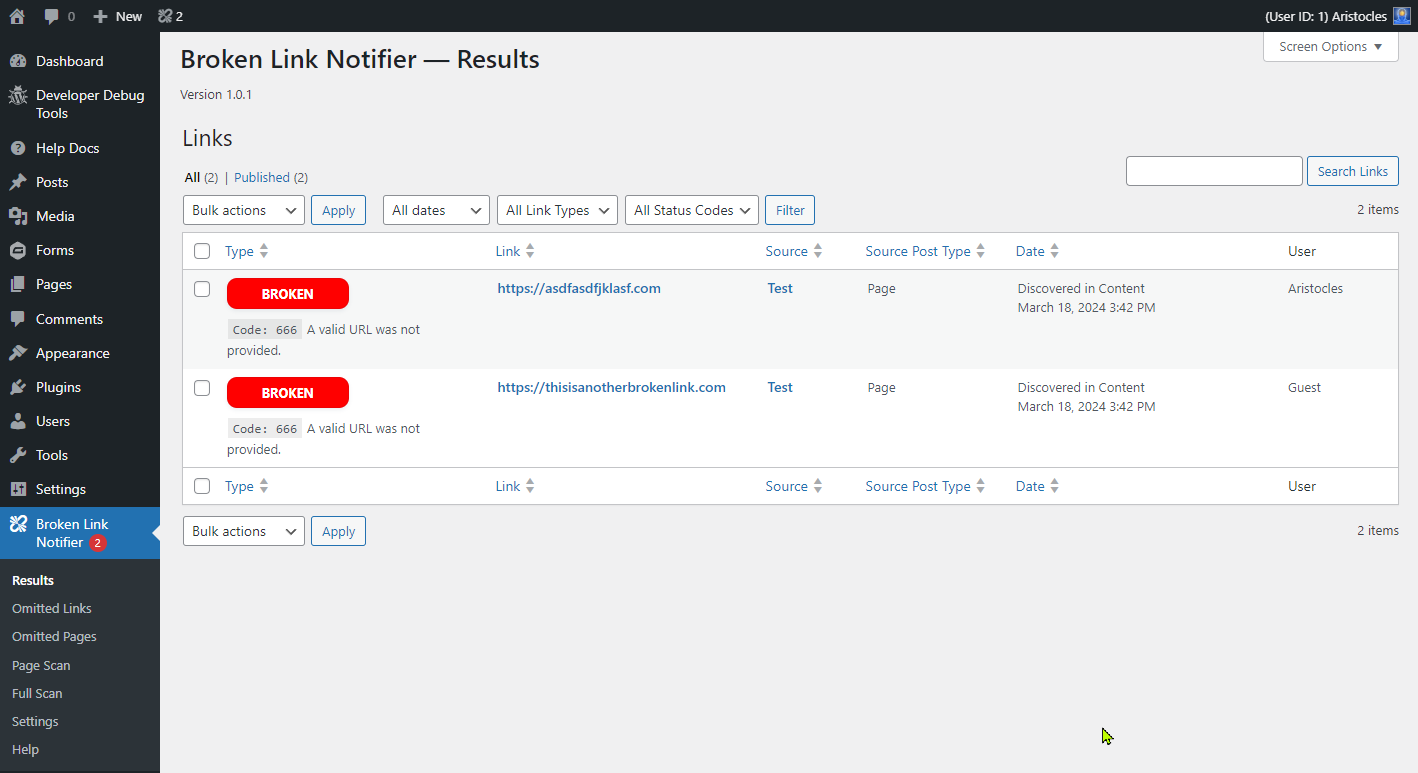
Page load scan results on back-end
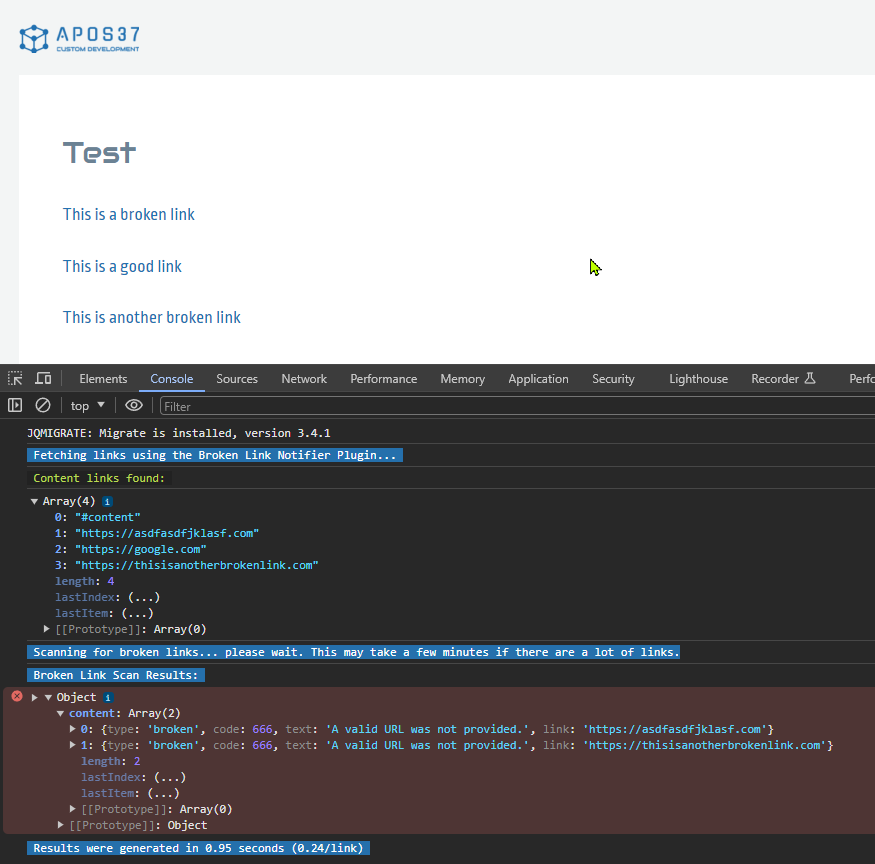
Page load scan results on front-end in dev console
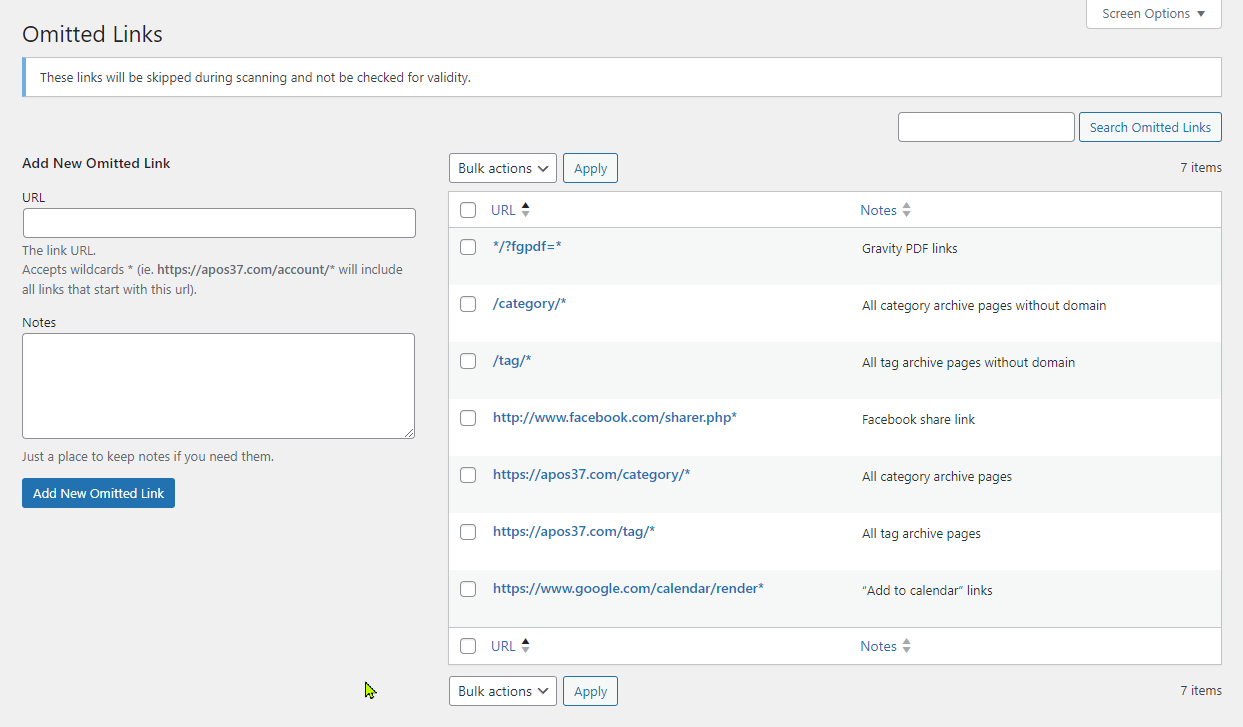
Omitted links
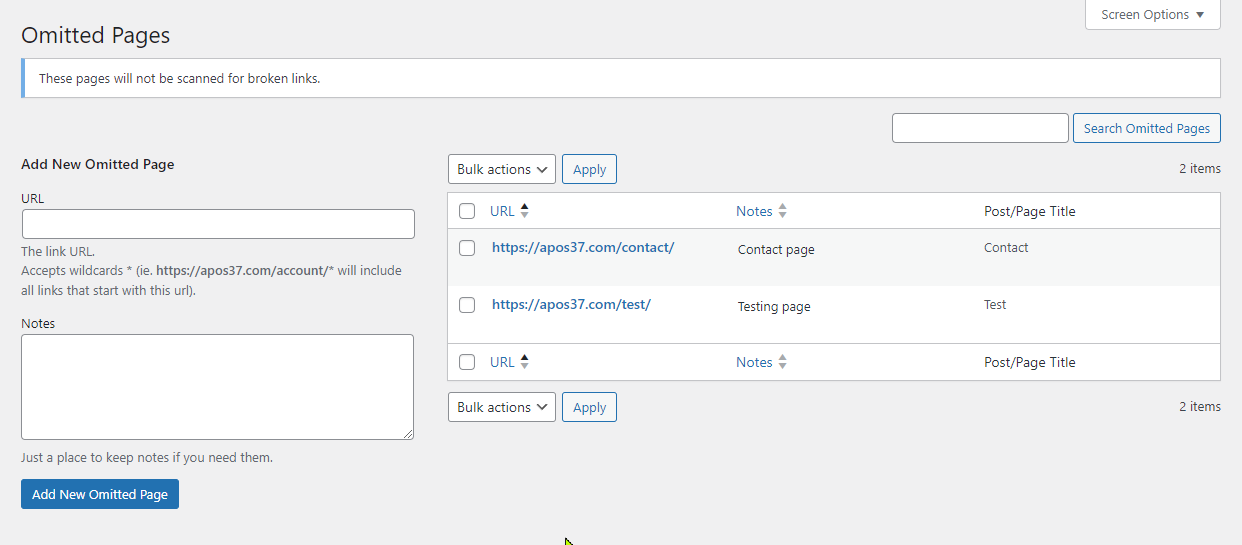
Omitted pages
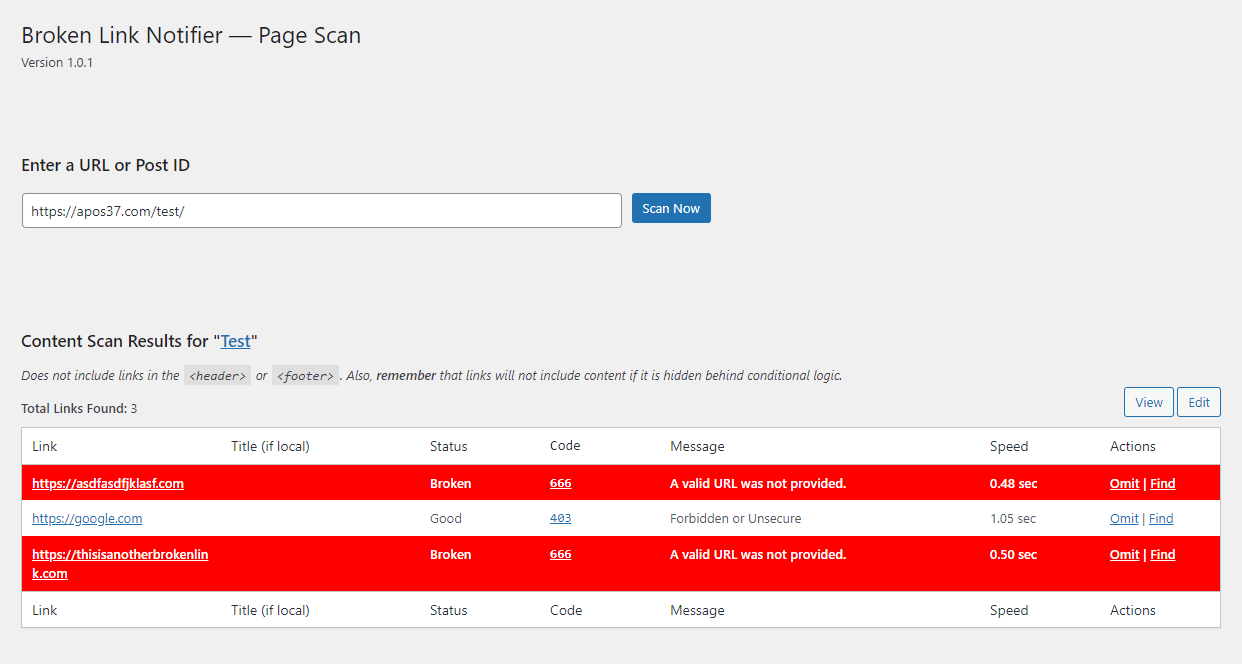
Detailed single page scan
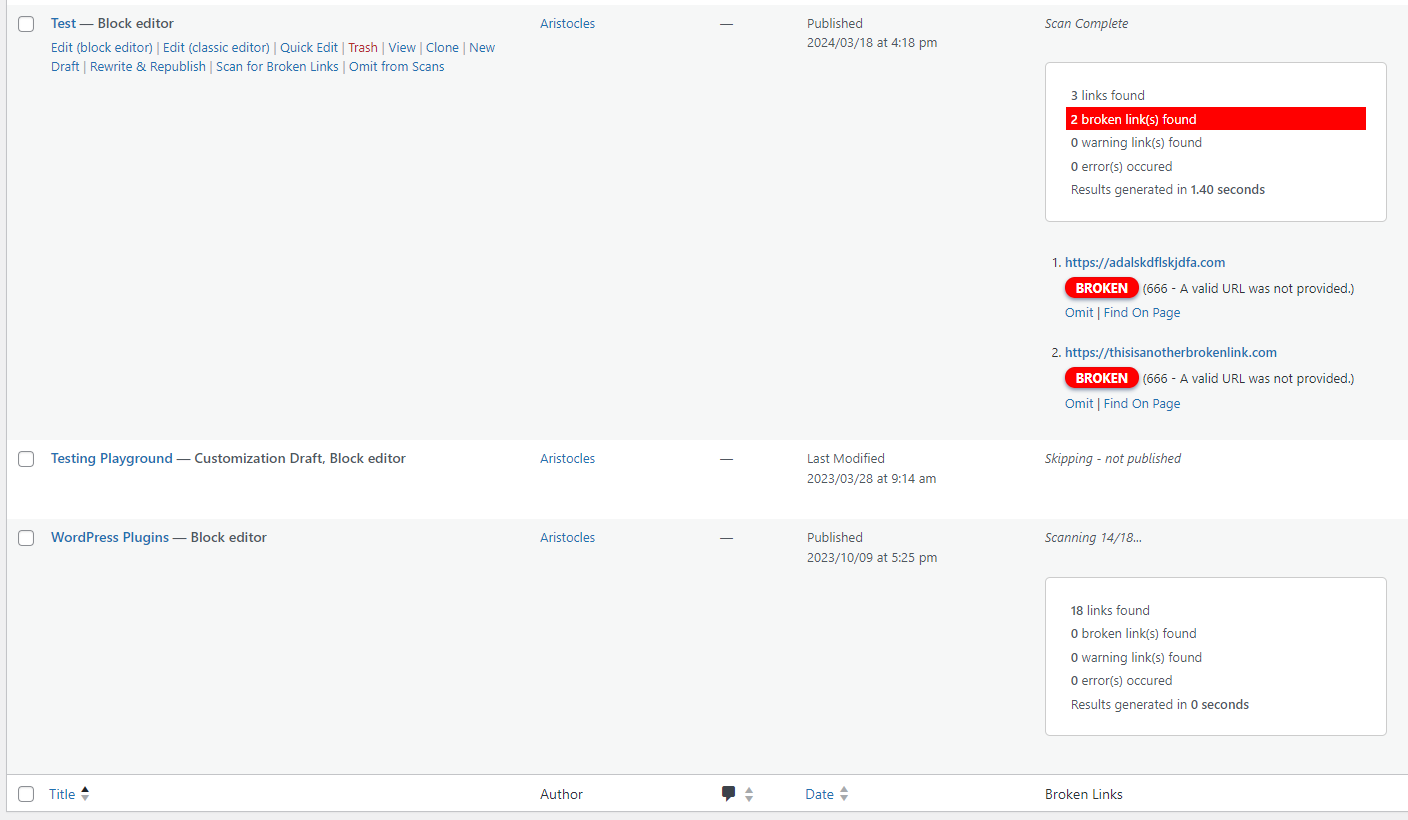
Multi-Scan running scans on multiple pages in WP List Tables
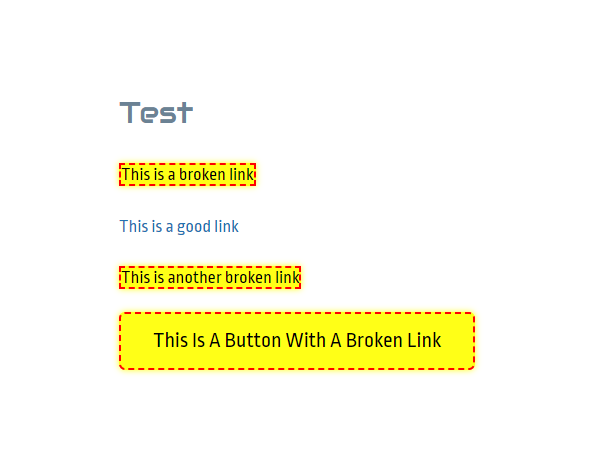
Find broken links easily on front-end with a glowing animation and red border
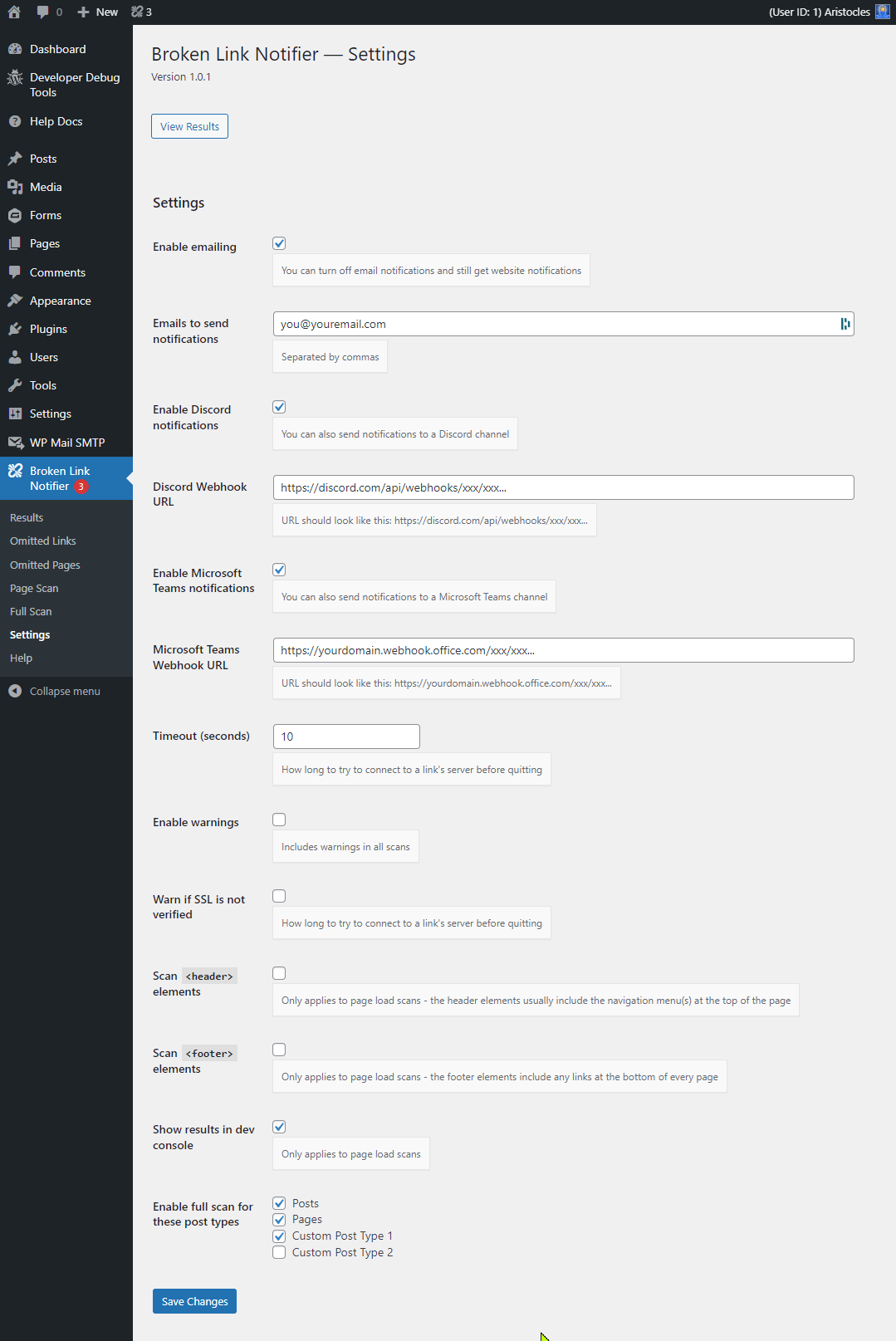
Settings
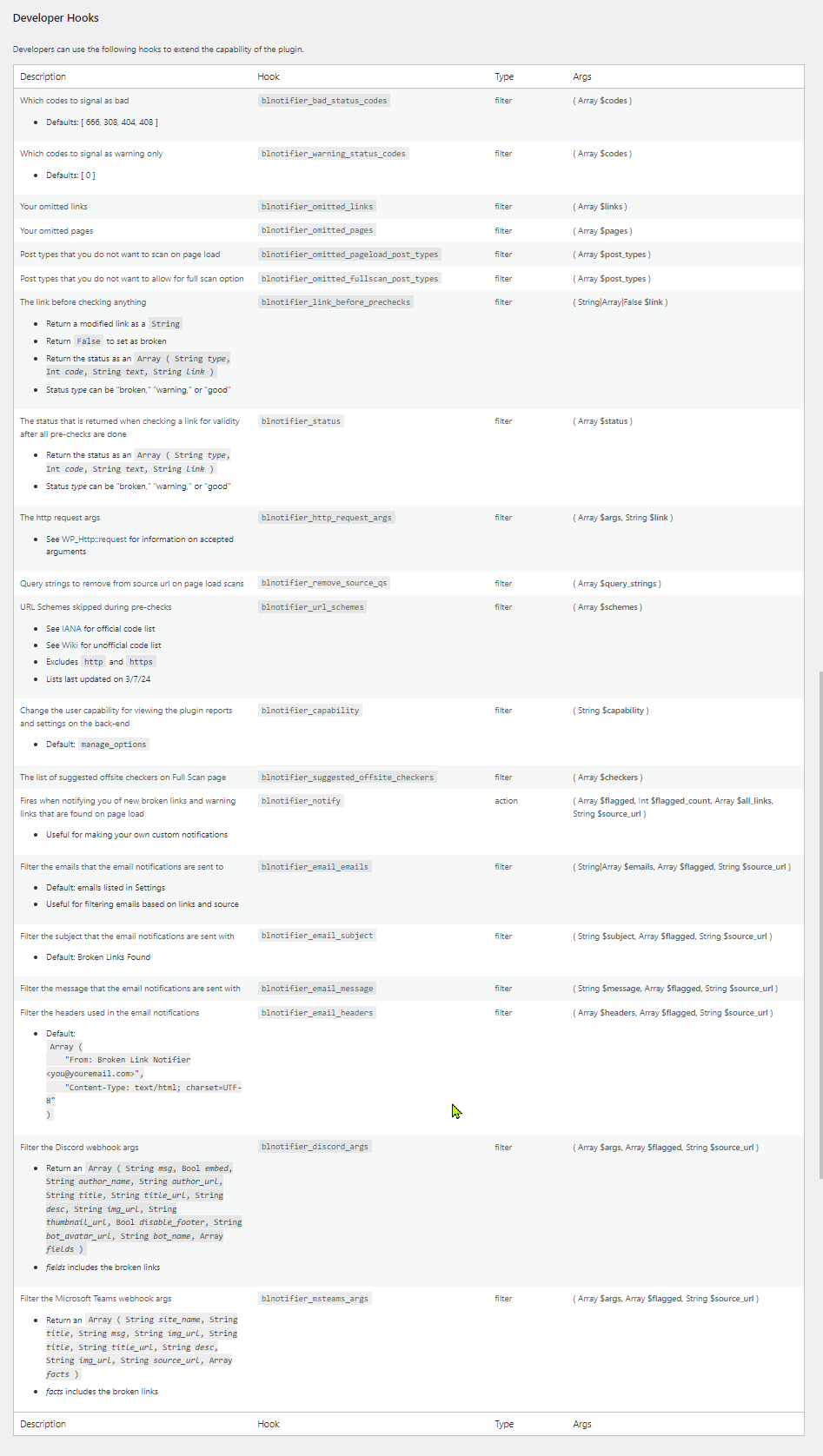
Developer hooks on Help tab
Faq
No — The plugin is designed to have minimal impact on performance by only scanning content after the page has fully loaded for a visitor. This means it doesn’t interfere with the page render or user experience. Additionally, in version 1.2.5, we introduced a link caching option that can further improve performance.
If enabled (via the Settings page), caching good links will prevent the same working links from being rechecked repeatedly for a set period of time. This reduces unnecessary HTTP requests and improves scan efficiency on high-traffic sites.
You can set the cache duration in seconds — common values include:
– 28800 for 8 hours
– 43200 for 12 hours
– 86400 for 24 hours
Adjust this based on your site’s traffic and how frequently your links change.
If the link works fine and it’s still being flagged as broken, then it is likely either redirecting to another page or there is an issue with the page’s response headers, and there’s nothing we can do about it. If it is a redirect on your own site due to permalink modification, then it’s better to fix the link instead of unnecessarily redirecting. You may use the Omit option to omit false positives from future scans as well. If you are seeing a pattern with multiple links from the same domain, you can go to Broken Link Notifier > Omitted Links to add a domain with a wildcard (*), which will omit all links starting with that domain.
If you feel that there is another issue at hand, We are happy to look into it further with you.
Warnings mean the link was found, but they may be unsecure or slow to respond. If you are getting too many warnings due to timeouts, try increasing your timeout in Settings. This will just result in longer wait times, but with more accuracy. You can also disable warnings if you have too many of them.
A status code of 666 is a code we use to force invalid URL code 0 to be a broken link in case warnings are disabled. It is not an official status code.
Yes, you can omit links from being checked for validity by using the “Omit” link in the scan results, or by entering them in manually under Omitted Links. Likewise, you can omit pages from being scanned from the results page or Omitted Pages. Wildcards (*) are accepted.
Sometimes links are hidden with CSS or inside modals/popups. To find hidden links, go to the page and either open your developer console or view the page source and search for the link. This will show you where it is and which element to look in. Then you can edit the page accordingly. This is more advanced and may require some assistance, so feel free to reach out to us for help.
The Multi-Scan link count does not include links that are filtered out from the pre-check.
We skip links that start with # (anchor tags and JavaScript) or ? (query strings), non-http url schemes (such as mailto:, tel:, data:, etc. ), and any links you have omitted.
There are other plugins such as Better Search Replace by WP Engine that will quickly replace URLs on your entire site at once.
There is likely an issue with the content on that page causing a redirect. We cannot intercept all redirected content unfortunately. If that is the case, you can omit the page being scanned so you can continue scanning the entire page the next time you try.
Yes, there are plenty. The following hooks are available:
* blnotifier_html_link_sources ( Array $sources ) — Filter where the links are found in the content’s HTML
* blnotifier_omitted_pageload_post_types ( Array $post_types ) — Filter the post types that you don’t want to scan on page load
* blnotifier_omitted_multiscan_post_types ( Array $post_types ) — Filter the post types that you don’t want to allow for Multi-Scan option
* blnotifier_link_before_prechecks ( String|Array|False $link ) — Filter the link before checking anything
* blnotifier_status ( Array $status ) — Filter the status that is returned when checking a link for validity after all pre-checks are done
* blnotifier_http_request_args ( Array $args, String $link ) — Filter the http request args
* blnotifier_remove_source_qs ( Array $query_strings ) — Filter the query strings to remove from source url on page load scans
* blnotifier_url_schemes ( Array $schemes ) — Filter the URL Schemes skipped during pre-checks
* blnotifier_suggested_offsite_checkers ( Array $checkers ) — Filter the list of suggested offsite checkers on Multi-Scan page
* blnotifier_notify ( Array $flagged, Int $flagged_count, Array $all_links, String $source_url ) — Action hook that fires when notifying you of new broken links and warning links that are found on page load
* blnotifier_email_emails ( String|Array $emails, Array $flagged, String $source_url ) — Filter the emails that the email notifications are sent to
* blnotifier_email_subject ( String $subject, Array $flagged, String $source_url ) — Filter the subject that the email notifications are sent with
* blnotifier_email_message ( String $message, Array $flagged, String $source_url ) — Filter the message that the email notifications are sent with
* blnotifier_email_headers ( Array $headers, Array $flagged, String $source_url ) — Filter the headers used in the email notifications
* blnotifier_discord_args ( Array $args, Array $flagged, String $source_url ) — Filter the Discord webhook args
* blnotifier_msteams_args ( Array $args, Array $flagged, String $source_url ) — Filter the Microsoft Teams webhook args
* blnotifier_strings_to_replace ( Array $strings_to_replace ) — Filter the strings to replace on the link
* blnotifier_force_head_file_types (Array $file_types, Boolean $docs_use_head) — Filter the list of file types that should force a HEAD request, with the $docs_use_head variable determining whether document types should be included
We recommend using our website support forum as the primary method for requesting features and getting help. You can also reach out via our Discord support server or the WordPress.org support forum, but please note that WordPress.org doesn’t always notify us of new posts, so it’s not ideal for time-sensitive issues.
Reviews
Review & Fix Request: Broken Link Notifier Plugin
By 
Hello,
Thank you for developing the Broken Link Notifier plugin — it’s a very useful tool that helps keep my website healthy and error-free.
However, I’ve noticed a recurring issue that I hope can be fixed in a future update.
When the plugin detects a broken link and I fix or remove it, the dashboard correctly shows the message:
“Link is good, removing from list…”
But after reloading the page or reopening the plugin dashboard, the same link and page reappear in the broken links list. It then re-verifies the link again and gives the same output —
“Link is good, removing from list…” —
yet the item never actually disappears from the list permanently.
🔍 Expected Behavior:
Once a link is fixed and verified as good, it should be permanently removed from the list and not appear again after refreshing or rescanning. 🧩 Environment:
- WordPress Version: 6.8.3
- PHP Version: 8.3
This plugin is genuinely helpful, and I’d really appreciate it if this bug could be addressed in an update to make the experience smoother and more reliable.
Thanks again for your great work on this plugin!
Great idea, missing url filter
By 
I installed this plugin today, and it seems that I've found at last, the solution for checking broken links on my website !
I found very interesting the idea of leveraging visitors for triggering broken links scans... indeed that doesn't require a resource-intensive browsing, generating additional traffic, whereas the visitors already do it... and moreover, they prioritize themselves the pages most visited, which deserve more attention !
The only issue I've identified sofar, is that the plugin is generating many "false positives" on some "ads" URLS, starting with ...googleads.g.doubleclick.net. I suppose it's due to specific behavior on those urls, and actually I don't care for those, since it's all taken care of by Google themselves.
Therefore I think it would be great to have a "url filter" feature, allowing to discard any url containing a given pattern, like in my case " googleads".
Regards,
Pascal.
Completely Amazing, This is the Checker to Get
By 
I looked at the various link-checking plugins and this one seemed to have the best philosophy on how to do it right, and it was very transparent and helpful in the descriptions.
So I installed it and it looked pretty good...but was disappointed to see that the plugin's Settings page wasn't working. There was no Save button and the my changes stayed at the defaults. Just to see if maybe I was doing something wrong, I jumped on PluginRX's Discord and posted about it...and even though I was apparently the only user experiencing this problem, the developer immediately replied asking for more information! After confirming what I was seeing, he immediately (on a Sunday, even) released a new version that fixed the issue! It's working great and I found a bunch of bad links on my site that I can now fix.
To top it all off, this plugin is free, so don't hesitate to install it immediately. I'll also be checking out the other plugins from PluginRx, most of which are also free.
Good plugin for managing multiple articles with many external links
By 
The plugin is very useful for checking links. I have a website with multiple references to other websites and external links. The plugin just checks if the referenced URLs display any errors when accessed. Excellent for the purpose.
Fantastic plugin—clean interface and a real time-saver!
By 
Fantastic plugin—clean interface and a real time-saver! The only thing I’d love to see added is an option to include links with an HTTP 200 status in the results list. Being able to view healthy links alongside broken ones would make it even easier to verify that everything is working perfectly. Keep up the excellent work!
Gets the job done
By 
I had some performance issues in the beginning; support was very helpful and reactive and now it works perfectly. Thank you!
The link checker I've been looking for
By 
Awesome
By 
The Best Link Checker Plugin!
Very useful tool, great support
By 
The developer has been extremely responsive and provided many improvements in a very short time. This very useful tool keeps getting better 🙂
Best Broken Links Plugin on WordPress
By 
This relatively unknown plugin works great and is easy to use. The functionality is very comprehensive and can run checks on all pages or all posts.
I hope that more people discover this plugin. I would rate with 10 stars if possible.
Many thanks to Aristocles (@apos37) for developing this great plugin.
Changelog
1.3.4
- Tweak: Change “Delete” action link on omitted links/pages to “Remove Omission” (props Diane for suggestion)
- Tweak: Highlighted the admin bar count red
1.3.3
- Fix: Settings error causing missing fields and submit button (props @DLLHell)
1.3.2
- Update: Added support for additional roles to have capability of managing broken links; removed blnotifier_capability hook
1.3.1.1
- Fix: preg_replace() deprecation error (props @venutius)
1.3.1
- Fix: Improper Neutralization of Formula Elements in a CSV File (props @jfriedli/WordFence)
- Fix: SSRF vulnerability by validating all URLs before remote requests using is_url_safe() (props @jfriedli/WordFence)
1.3.0
- Update: New support links
1.2.6.1
- Fix: Option in settings to show good links on results page was set to true by default; turned it off
1.2.6
- Update: Added an option in settings to show good links on results page (props to @colnago1 for suggestion)
- Update: Added an export page (props to @colnago1 for suggestion)
1.2.5.3
- Fix: Link search not finding some URLS
- Fix: Undefined array key “min”
1.2.5.2
- Fix: Function wpdb::prepare was called incorrectly. Unsupported value type (array).
1.2.5.1
- Fixes: Sanitizing and unslashing some variables
1.2.5
- Update: Added option for caching good links (enable in settings)
1.2.4.2
- Fix: If no link is found, omit it
1.2.4.1
- Tweak: Updated “Did not pass pre-check filter” error to provide more information
1.2.4
- Tweak: Added minified versions of results-front.js and results-front.css
- Tweak: Removed omitted links and omitted pages hooks from readme.txt since they were moved to their own pages
1.2.3
- Update: Auto-switch user agent for X/Twitter links if a custom user agent isn’t provided
- Update: Updated author name and website again per WordPress trademark policy
1.2.2
- Update: Changed author name from Apos37 to WordPress Enhanced, new Author URI
- Tweak: Optimization of main file
- Fix: Undefined variable $redirect_detected
1.2.1
- Update: Added a method column to the results page
- Fix: Links being added from invalid sources
- Tweak: Links without a source will be automatically removed
- Fix: Some links are being added to results without a source
- Update: Added option to pause auto-verification on results page
- Update: Admin bar count is reduced in real time if results are removed
- Tweak: Update notice on results page from “trash” to “clear” (props @cantabber for pointing it out)
1.2.0
- Update: Added code 413 to warnings and automatically code files larger than 10 MB with 413 when using
GETrequests (allowing redirects option) - Update: Added an option for forcing documents to use
HEADrequests - Fix: Gifs, videos, and other large files timing out (props @mrphunin)
- Update: Added a Replace Link action to link column on results page (props a4jp-com for suggestion)
- Update: Added a Trash Page action to source on results page; must enable it in Settings (props @mrphunin for suggestion)
- Fix: Sometimes no permission for trash error; changed Clear Result action to use ajax instead
- Tweak: Renamed all other action links on link and source columns on results page
- Tweak: Changed Edit link to “Edit Page” (props a4jp-com)
1.1.4.2
- Tweak: Added support for translations on some other info boxes
- Update: Added an info box to the top of the results page with clarification on trashing results
- Fix: Undefined array key “HTTP_REFERER”
1.1.4.1
- Update: Added an option to pause front-end scanning (props @ravanh)
- Update: Added status codes to settings, allowing you to change types, deprecated hooks will only work if codes in settings have no been saved: blnotifier_bad_status_codes, blnotifier_warning_status_codes
1.1.4
- Update: Added field for user agent and option to mark status code 0 as broken instead of warning (props @ravanh)
1.1.3.8
- Update: Allowed max redirects to be 0 to show redirect status code instead of the final status code
1.1.3.7
- Fix: Multi-Scan redirecting if content is not found or if pages have shortcodes that redirect
1.1.3.6
- Update: Added settings for allowing redirects and setting max redirects amount (props @ravanh)
1.1.3.5
- Fix: Fatal error on helpers.php at line 1001
1.1.3.4
- Fix: Fatal error when trying to uncheck all post types in settings (props @ravanh)
1.1.3.3
- Fix: Added support for links starting with // (props pauleipper)
1.1.3.2
- Fix: Added full path to multi scan links to support multisite (props oddmoster)
1.1.3.1
- Fix: Added full path to “Edit” link to support multisite (props oddmoster)
1.1.3
- Update: Added a link search page
1.1.2
- Fix: Warnings from Plugin Checker
1.1.1
- Update: Auto-delete omitted links on Results page
- Fix: Some links not being deleted due to special characters
1.1.0
- Fix: YouTube links showing broken
1.0.9
- Fix: Umlauts in links showing broken (props ralf d)
- Tweak: Removed donate link, nobody donates anyway, working on premium version instead
1.0.8
- Update: Added demo to readme.txt
1.0.7
- Fix: Results page rescan not working on some links
- Fix: Offsite checker links broken XD
1.0.6
- Fix: wp_mail_failed logging error
- Update: Added a string replace for
"×" => "x", which is being converted in images with sizes (ie _100x66.png) - Update: Added a new filter
blnotifier_strings_to_replacefor replacing simple characters
1.0.5
- Update: Added a re-scan verification when loading results page as some false-positives occur with poor connections
- Tweak: Updated plugin tags
- Update: Added other plugins to bottom of help page
- Update: Added an option in settings to include/exclude image src links
- Tweak: Changed default timeout to 5 seconds
1.0.4.2
- Fix: Emailing empty content if already added to results; stopped duplicate emails
1.0.4.1
- Fix: MS Teams integration error with logging
1.0.4
- Fix: Undefined variable on help page
- Update: Added support for checking YouTube video links (props shirtguy72)
- Update: Added support for iframe links (props shirtguy72)
- Update: Added support for image source links
1.0.3.1
- Tweak: Fix minor issues found by WP repo plugin reviewer
1.0.3
- Tweak: Updates recommended by WP repo plugin reviewer
- Fix: Settings saved notification not echoing
- Tweak: Removed links post type and help docs post types if installed
1.0.2
- Tweak: Added nonce to Page Scan JS
- Update: Added Multi-Scan and Page Scan results to results page
- Tweak: Changed “Full Scan” references to “Multi-Scan”
1.0.1
- Deployment