Brozzme Fullwidth and Automatic Layout in Divi

Brozzme Fullwidth and Automatic Layout in Divi
Description
Brozzme Fullwidth and Automatic Layout in Divi is made to simplify the workflow when new content are created. Choose the predefined layout type and apply it on each post, page or product.
You can also, hide or display the post title.
A tools page in the setting panel allows administrator to modify whole website layout type in one click.
To use this plugin, Divi theme must be activated.
Options:
- Choose the layout : fullwidth, left sidebar, right sidebar
- Apply changes to Woocommerce products
- Show or hide title on layout (only available for posts – Divi restriction)
- Apply dot navigation
- Apply hide nav bar before scroll
Tools
1. Apply layout type in one click
2. Apply post title visibility in one click
3. Apply dot navigation in one click
4. Apply hide nav bar before scroll in one click
Installation
- Upload the archive into the “/wp-content/plugins/” directory.
- Activate the plugin through the “Plugins” menu in WordPress.
Screenshots
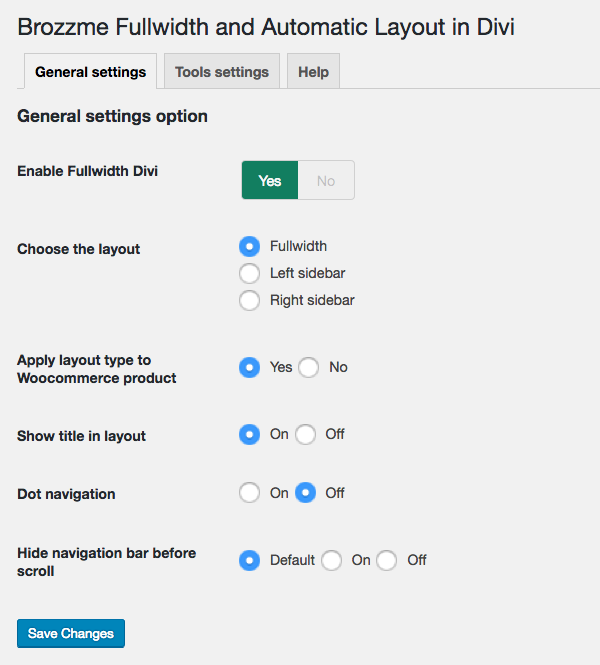
Setting options screenshot-1.png.

Tools page screenshot-2.png.
Faq
There is a special filter to add any post type to the tools
Just add this in your functions.php
add_filter(“bfd_layout_tools_post_types”, “your_function”);
function your_function($post_types){
$my_new_post_types = array(“project”, “event”);
$post_types = array_merge($post_types, $my_new_post_types);
return $post_types;
}
Reviews
Bien joué, merci
By 
Usefull tool
By 
Changelog
=1.1=
* bug fixes
* new editor compatibility (partial)
* add new option
=1.0 =
* Initial release.