Brozzme Product Navigation

Brozzme Product Navigation
Description
Brozzme Product Navigation, is the best way for your customer to browse your Woocommerce shop.
This plugin adds Next and Previous links in the Woocommerce product template without editing it.
The links are generate with the automatic shortcode. Navigation container can be customize to fit your wishes.
In addition, the main shortcode that is running, is available as a simple shortcode (to place in your content) and a widget (for any widgetized area).
Require Woocommerce
- No coding skill require.
- No need to edit template, the plugin add navigation box with the Woocommerce template hooks.
- Customizable.
- widget to get it in any widgetized area.
- add [wc_bpn_navigation] to place it exactly where you want in your template or content.
- English and french translation
- help for better shortcode.
Options:
- Navigation position (with Woocommerce zone),
- Position float,
- choose display type, only text, only icons or both,
- FontAwesome style and size,
- additional class container for more styling, you can use your class.
- change link text
Since 1.3.0 :
Add settings options for Next and Previous text.
Since 1.2.8 :
Add the availability to change previous and next text link. Waiting for the 1.3 version, this is only available via filter.
In your functions.php or in plugin, add :
- add_filter(‘wc_bpnav_previous_text’, ‘my_custom_previous_text’);
-
add_filter(‘wc_bpnav_next_text’, ‘my_custom_next_text’);
function my_custom_previous_text(){
return __(‘Previous’,’brozzme-product-navigation’);
}function my_custom_next_text(){
return __(‘Next’,’brozzme-product-navigation’);
}
Since 1.2.5 :
Lot of plugin can embed Font-Awesome css and font files.
You can use ‘load_fontawesome’ filter to stop loading fontawesome files if you theme or other plugin load them on each page.
Example for php > 5.4 : add_filter( ‘load_fontawesome’, function(){ return false;} );
More plugins available : search Brozzme on WordPress.org
Link to Brozzme.
Installation
- Upload Brozzme Product Navigation to the \”/wp-content/plugins/\” directory.
- Activate the plugin through the \”Plugins\” menu in WordPress.
- Enable and configure the plugin in Woocommerce settings, section Navigation.
Screenshots

Plugin settings panel.

Options for navigation text.
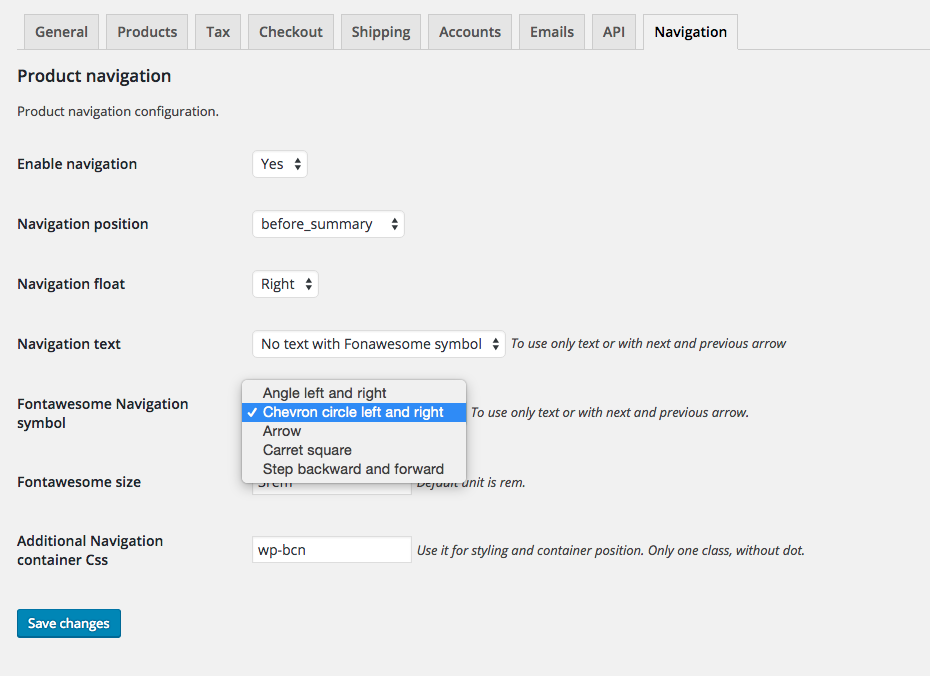
Available symbol.

Basic integration.

Sidebar navigation.

Product summary integration.

Text and symbols integration.

Widget available.
Reviews
Not working
By 
Perfect
By 
Simple and very effective
By 
Great plugin !
By 
Simple and perfect
By 
Cool plugin
By 
Destroys product page
By 
Rapide à mettre en place
By 
Changelog
- =1.4.0=
- Imporve excluded terms to stay in same taxonomy and term in all situation.
- =1.3.0=
- Add option to change text (filter are still available).
- Change some hook definition to work with ajax.
- =1.2.9=
- correct global for the fallback, that breaks product page with some themes.
- =1.2.8=
- add filter to change text
- =1.2.5=
- fallback when no adjacent post available
- =1.2=
- introduces taxonomy for adjacent post
- improve shortcode attributs
- bugs fixes
- =1.1=
- Bugs fixes
- =1.0=
- Initial release.