Split Pay – Stripe Connect Split Payments & Multi-Vendor Marketplace for WooCommerce & FluentCart

Split Pay – Stripe Connect Split Payments & Multi-Vendor Marketplace for WooCommerce & FluentCart
Description
Split Pay is the leading WordPress split payments plugin powered by Stripe Connect. Automatically split payments between your platform and one or more connected Stripe accounts — perfect for multi-vendor marketplaces, vendor payouts, commission management, and business partner revenue sharing.
Split Pay works with multiple e-commerce platforms including WooCommerce and FluentCart, with support for multiple Stripe payment gateways per platform. Whether you’re building a multi-vendor marketplace, managing supplier payments, running an affiliate storefront, or sharing revenue with business partners, Split Pay handles the entire payment splitting workflow so you can focus on growing your store.
How It Works
Split Pay uses the Stripe Connect Transfers API to automatically route a percentage or fixed amount of every sale to one or more connected Stripe accounts. It integrates with the Stripe payment gateway configured in your e-commerce platform — transfers appear in the Stripe Dashboard and are fully trackable from your WordPress admin.
Supported Platforms & Gateways
- WooCommerce with WooCommerce Stripe Payment Gateway (official)
- WooCommerce with Payment Plugins for Stripe WooCommerce
- FluentCart with FluentCart’s built-in Stripe integration
The Integrations tab stores one default platform key for official WooCommerce Stripe and as FluentCart’s fallback. For Payment Plugins, save the matching gateway-specific transfer key for every enabled mode so transfers, readiness, account sync, and the row-level check all use that explicit key. If it is empty, normal order transfers, delayed releases, guarded retries, and store-initiated refunds can fall back to Payment Plugins’ own same-mode gateway secret, but the Split Pay row remains incomplete. Account sync is explicit; webhook buttons are read-only checks and never create or change endpoints.
Who Is Split Pay For?
- Multi-vendor marketplace owners who need automatic vendor payouts
- Business partnerships where revenue is shared between parties
- Supplier and vendor relationships with automated commission payments
- Affiliate or referral storefronts that split sales with partners
- Service platforms that distribute payments to service providers
- Subscription businesses that share recurring revenue with vendors
Requirements
- At least one supported e-commerce plugin: WooCommerce or FluentCart
- A Stripe payment gateway plugin configured for your chosen platform
- Your Stripe platform secret key; when using Payment Plugins, its matching Split Pay transfer key for every enabled mode
- A positive transfer amount of at least one smallest currency unit; Stripe may apply additional currency- or account-specific limits
- A Stripe Connect platform and connected-account country combination that Stripe currently permits; cross-border availability depends on Stripe
🆓 Free Features
% PERCENTAGE-BASED SPLIT PAYMENTS
Transfer a percentage of every sale to a single connected Stripe account. Define a global split percentage and every payment is automatically divided — no manual payouts required. Works with WooCommerce and FluentCart.
💱 CURRENCY AGNOSTIC PAYMENTS
Accept payments in any currency supported by Stripe. Split payment calculations happen automatically regardless of your store currency — USD, EUR, GBP, AUD, CAD, and 100+ more.
🔧 INTEGRATIONS TAB WITH GUIDED SETUP
The Integrations tab auto-detects your installed e-commerce plugins and Stripe gateways, shows each gateway’s effective transfer-key source, runs explicit account sync, and provides read-only checks for this site’s WooCommerce Stripe webhook. It supports WooCommerce and FluentCart simultaneously without modifying webhook endpoints.
↩️ AUTOMATIC REFUND HANDLING
When a refund is processed in WooCommerce, or received through FluentCart’s supported Stripe refund event, Split Pay automatically reverses the proportional transfer amounts to each connected vendor account. Supports full and partial refunds with detailed order notes.
🔄 RETRY FAILED TRANSFERS
Encountered a failed WooCommerce transfer? Use the “Retry Split Pay Transfers” order action to reprocess it from the order edit screen. No need to manually recreate transfers in Stripe.
🏢 VENDOR CONNECT SHORTCODE
Place the [split_pay_vendor_connect] shortcode on any page so an eligible signed-in vendor can connect Stripe with one click through Stripe-hosted onboarding.
🔁 WOOCOMMERCE SUBSCRIPTIONS SUPPORT
Compatible with the official WooCommerce Subscriptions plugin. Recurring renewal orders follow the same Split Pay transfer path and saved product settings as ordinary WooCommerce orders.
💳 SUPPORTED STRIPE CHARGE FLOWS
Split Pay runs only after a supported gateway exposes a paid Stripe charge. Payment-method compatibility depends on that gateway’s event payload and settlement flow, so verify every enabled payment method in Stripe Test mode before relying on it.
⏩ HIGH-PERFORMANCE ORDER STORAGE (HPOS) COMPATIBLE
Compatible with WooCommerce High-Performance Order Storage and legacy order storage.
🛡️ ROBUST SETUP VALIDATION
API-key format checks, incomplete-configuration warnings, aggregate transfer alerts, and connected-account country mismatch detection help surface setup problems before live use.
🔌 DEVELOPER HOOKS & FILTERS
WordPress hooks and filters are available for transfer metadata, recipient selection, calculations, and custom workflows.
⭐ PRO Features
🔀 SPLIT PAYMENTS ACROSS MULTIPLE VENDOR ACCOUNTS
Split payments across multiple connected Stripe accounts simultaneously. Onboard unlimited vendors, suppliers, or service providers and configure individual transfer amounts for each connected account. Works with both WooCommerce and FluentCart orders.
🏢 VENDOR ONBOARDING ADMIN CONTROLS
Invite vendors directly, let them choose the vendor role through your site’s existing WordPress registration form, and assign additional WordPress user roles as vendor roles. WCFM stores can optionally route generic Connect links through the existing WCFM Stripe Payouts flow so the returned account is bound to the exact signed-in vendor, site, and Test or Live mode; existing generic links remain unchanged until the option is enabled.
🔍 PRODUCT-LEVEL COMMISSION RATES
Set transfer percentages globally or override them at the product level. For example, split all sales at 10% globally, but set Product A at 20% and Product B at 5%. Fine-grained commission control for every product in your catalog — available for both WooCommerce products and FluentCart products.
📊 GLOBAL & PRODUCT-LEVEL FIXED AMOUNT TRANSFERS
Configure fixed transfer amounts globally or per product. Transfer $5 from every sale, or set $10 for Product X and $25 for Product Y. Mix and match with percentage-based splits across your store.
🃏 COMBINE PERCENTAGES AND FIXED AMOUNTS
Use percentage-based commissions for some products and fixed-amount payouts for others — all in the same store. Transfer $10 from Product X sales and 25% from Product Y sales simultaneously.
🍒 VARIABLE PRODUCT SUPPORT
Full support for WooCommerce variable products. Set unique transfer values, transfer types, and connected accounts for each product variation. Percentages and fixed amounts can be combined across variations.
🚢 SHIPPING FEE TRANSFERS
Transfer a percentage or fixed amount of shipping fees to connected vendor accounts. Ideal for marketplaces where vendors handle their own product fulfillment and shipping.
💸 TAX TRANSFERS
Transfer 100% of collected taxes to connected vendor accounts, or transfer partial taxes proportionally based on product-level transfer values. Full control over how tax revenue is distributed.
💳 OPTIONAL STRIPE FEE ALLOCATION
For new WooCommerce orders, optionally deduct the charge’s exact Stripe processing fee proportionally across all connected-account transfer legs. The setting is off by default; existing and in-progress orders keep their saved payout behavior, and refunds use only the fee-adjusted amount actually transferred.
📃 TRANSFER DASHBOARD & CSV EXPORT
The Transfers tab in your WordPress admin displays a complete history of all split payment transactions across all integrations. Filter by source (WooCommerce / FluentCart), search, paginate, and export to CSV for accounting, reporting, or reconciliation.
🕜 BULK EDITOR FOR PRODUCTS
Manage transfer settings for hundreds or thousands of products with a spreadsheet-style bulk editor. Supports both WooCommerce and FluentCart products with source identification. Filter by category, product name, SKU, or attributes — then update transfer values and connected accounts in bulk.
✉️ TRANSFER CONFIRMATION EMAILS
Automatically send transfer confirmation emails detailing every split payment amount, links to transfers in the Stripe Dashboard, and any failures that occurred. Keep stakeholders informed on every transaction.
🌱 WEBSITE & PRICING
📕 DOCUMENTATION
💬 SUPPORT
Compatibility
- WooCommerce — Full integration with WooCommerce orders, products, and admin
- FluentCart — Full integration with FluentCart orders, products, and SPA admin
- WooCommerce Stripe Payment Gateway — Official Stripe gateway for WooCommerce
- Payment Plugins for Stripe WooCommerce — Alternative Stripe gateway for WooCommerce
- FluentCart Stripe — FluentCart’s built-in Stripe payment integration
- WooCommerce Subscriptions — Recurring split payments for subscription products
- WooCommerce HPOS — High-Performance Order Storage fully supported
- WooCommerce Bundles — Parent bundle lines are processed; child lines are skipped to prevent duplicate transfers
- Advanced Product Fields — Compatible with custom product field plugins
- WordPress Multisite — Supports multisite installations
GAUCHO PLUGINS PORTFOLIO
Payment Page: Start accepting payments in a beautiful payment form in less than 60 seconds
Split Pay Plugin: Split WooCommerce payments across multiple connected Stripe accounts.
Login for Stripe Customer Portal: Create an Account login area for your Stripe customers.
Gyta Buyback: Create a trade-in / buyback business using WooCommerce.
Version Info: Show WP, PHP, MySQL & Web Server Versions in the WP-Admin Dashboard.
China Payments Plugin: Accept WeChat Pay and Alipay payments from Chinese customers.
Blocked in China: Check if your website is available in the Chinese mainland.
Speed in China: Check your website’s speed in the Chinese mainland.
Installation
- Upload
bsd-split-pay-stripe-connect-woo.zipthrough the Plugins > Add New > Upload menu in WordPress. - Click Activate to enable the plugin.
- Navigate to Split Pay > Integrations and save the default platform secret key for each mode you use.
- If you use Payment Plugins, open its Advanced row and save the matching platform-account secret key for each enabled mode. Its transfer path does not inherit the default key; without Advanced, normal order transfers, delayed releases, guarded retries, and store-initiated refunds can fall back to Payment Plugins’ own same-mode gateway secret, but readiness, account sync, and the row-level check stay incomplete.
- Use Sync connected accounts on the active gateway, then configure the recipient and value under Global Transfer Settings.
- Process a Stripe Test-mode payment and verify the transfer result before enabling live use.
- Check our documentation for detailed setup guides and configuration options.
Screenshots
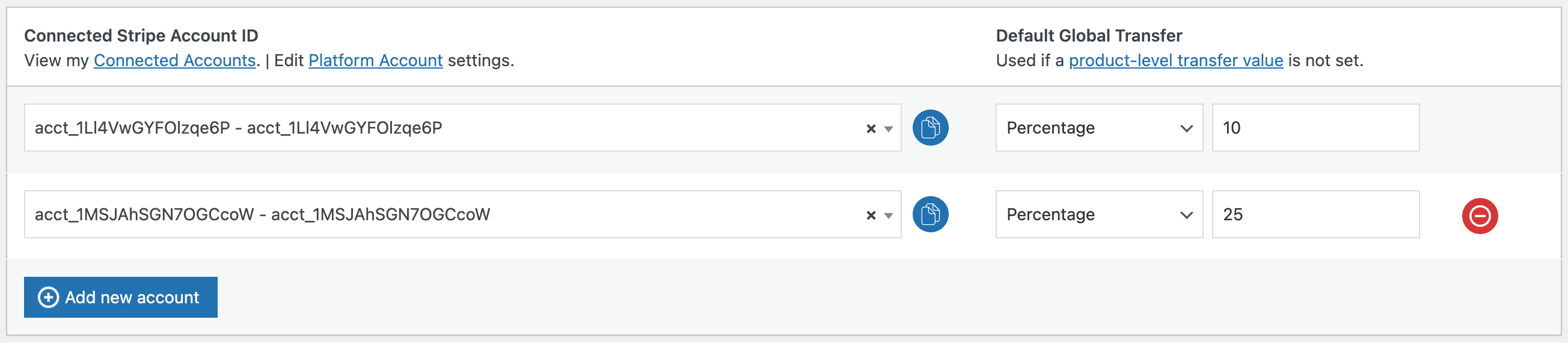
Global Transfer Settings — add your connected Stripe accounts and set the default split percentage used when a product has no product-level value.

Per-product split — on any product's Split Pay tab, choose the connected account and set a product-specific transfer percentage or fixed amount (overrides the global default).

Shipping transfers — split the order's shipping charge to the vendor account by percentage or fixed amount, globally or per product.

Transfers log — every automatic split payout, with the WooCommerce order, Stripe charge, and Stripe transfer IDs, in Test and Live mode.
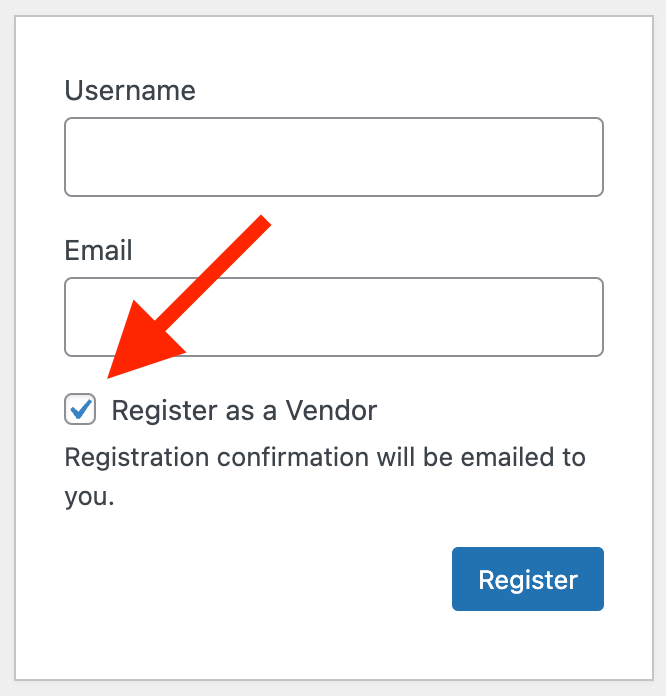
Vendor onboarding — sellers register as vendors and connect their own Stripe account to start receiving their share automatically.
Faq
Split Pay is a WordPress plugin that uses the Stripe Connect Transfers API to automatically split payments between your Stripe platform account and one or more connected Stripe accounts. It works with WooCommerce and FluentCart. When a customer makes a purchase, the payment is collected by your platform and a configured percentage or fixed amount is automatically transferred to the connected vendor account(s).
Split Pay requires at least one supported e-commerce plugin with a Stripe payment gateway. Supported combinations include: WooCommerce with the WooCommerce Stripe Payment Gateway, WooCommerce with Payment Plugins for Stripe WooCommerce, or FluentCart with its built-in Stripe integration. You can run multiple platforms and gateways simultaneously.
Yes! Split Pay is designed to power multi-vendor marketplaces on WooCommerce or FluentCart. With the Pro version, you can onboard multiple vendors, allow them to self-register and connect their Stripe accounts, set product-level commissions, and automatically split every payment across vendor accounts.
Split Pay runs only after a supported gateway exposes a paid Stripe charge. Payment-method compatibility depends on that gateway’s event payload and settlement flow. Verify every payment method you enable in Stripe Test mode before relying on it.
Yes, Split Pay is fully compatible with the official WooCommerce Subscriptions plugin. When a subscription renewal payment is processed, the same split payment transfer is automatically triggered — so recurring revenue is shared with your connected vendors or partners on every billing cycle.
Absolutely. With Split Pay Pro, you can set transfer percentages or fixed amounts globally and then override them at the product level. You can even set different transfer values for each variation of a variable product. Mix percentage-based and fixed-amount commissions across your entire product catalog.
Place the [split_pay_vendor_connect] shortcode on any page; an eligible signed-in vendor uses its “Connect with Stripe” button to start onboarding. Split Pay Pro adds administrator invitation, registration, and additional vendor-role controls.
Yes. When you process a full or partial refund in WooCommerce, or FluentCart delivers its supported Stripe refund event, Split Pay automatically calculates the proportional transfer amount and reverses it from each connected vendor account. Detailed order notes preserve the result.
If a WooCommerce transfer fails due to a Stripe error or configuration issue, Split Pay logs the failure and adds a note to the order. Use the “Retry Split Pay Transfers” order action to reprocess it from the order edit screen — no need to log into the Stripe Dashboard.
Yes. Split Pay Pro allows you to transfer a percentage or fixed amount of shipping fees to connected vendor accounts. You can also transfer 100% of collected taxes or distribute taxes proportionally based on each product’s transfer value — giving you full control over how fees and taxes are shared with vendors.
Yes, Split Pay is fully tested and compatible with WooCommerce HPOS (High-Performance Order Storage). Whether you’re using the legacy post-based storage or the new HPOS tables, split payments work reliably.
Yes. The Transfers tab in your WordPress admin dashboard shows a complete log of all split payment transactions across all integrations. You can filter by source (WooCommerce or FluentCart), search for specific transfers, and export the full dataset to CSV for accounting, bookkeeping, or reconciliation.
Split Pay’s default runtime minimum is one smallest currency unit (for example, $0.01 USD). Stripe may apply additional currency- or account-specific limits, so confirm its current requirements for your setup.
Cross-border Connect availability is determined by Stripe for specific platform and connected-account countries. Split Pay does not override those rules; confirm current eligibility in Stripe’s current Connect documentation before relying on cross-border transfers.
Yes. Split Pay Pro includes a spreadsheet-style bulk editor that lets you filter products by category, name, SKU, or attributes, and then update transfer values and connected accounts for multiple products at once. It’s designed for stores with hundreds or thousands of products.
Split Pay supports simple and variable WooCommerce products. For WooCommerce Bundles, it processes the parent bundle line and skips child lines to prevent double counting; configurations that place the payable amount only on individually priced child lines are not supported. For FluentCart, Split Pay supports products with multiple variations.
Yes. Split Pay can run the official WooCommerce Stripe gateway, Payment Plugins, and FluentCart Stripe together. Official WooCommerce Stripe uses the default platform key; FluentCart inherits that key unless you save an override. For Payment Plugins, save its matching gateway-specific transfer key for every enabled mode. Normal order transfers, delayed releases, guarded retries, and store-initiated refunds can fall back to Payment Plugins’ own same-mode gateway secret when that field is empty, but readiness, account sync, and the row-level check require the explicit transfer key. The Integrations tab shows the effective source for each gateway.
Yes. As of v3.7.0, Split Pay works with FluentCart as a standalone integration. You do not need WooCommerce installed if you are using FluentCart with its built-in Stripe payment gateway.
Full documentation including setup guides, configuration tutorials, webhook setup instructions, and troubleshooting is available at docs.splitpayplugin.com. For plugin support, visit the WordPress.org support forum.
Reviews
excellent service
By 
I had to get help with a specific action for my needs , and reached out to Brandon . He spent so much time and put so much effort into it, it was amazing. I'd still be struggling if it wasn't for him. this is why each review is 5 stars.
Excellent support
By 
I have used split pay plugin with my marketplace site and it works great. Absolutely it does something which Dokan does not have for the payment solution. Their customer support is excellent and very quick in replies. They also go above and beyond to help if you need small changes in the plugin to adjust or open to take feedback. Absolutely recommend.
Excellent customer support.
By 
Excellent support, congrats!
Excellent Customer Service
By 
I had some questions regarding the plugin. I scheduled a meeting with Brandon and he walked me through my issues and questions. 100% would recommend this plugin!
Great Plugin - STELLAR Customer Service.
By 
I was having some issues getting the plugin to work correctly, so I reached out to support. I did not expect that the founder and CEO would be the person helping me. They took over 30 minutes of their day to help me get everything working - some of which had to do with my stripe account and not even their plugin - and they still assisted me with that. Very happy with the plugin, and blow away by the support.
Great plugin with even better support
By 
Just added this to my woocommerce site on Salient theme, a couple days ago. Worked really well! Going to save me and my partners a ton of time and hopefully reduce potential accounting headaches. Even more impressed with the level of support and responsiveness we received from plugin developers. Keep up the great job!
Great service great plugin
By 
I Just wanted to get some information before i am installing and try the plugin. I wrote to support and got such an excellent service that I couldn't believe. Branden answer in details any one of my quotations and try to help me achieve the best results for my web site. He told me to start with free version. I appreciate his help and knowledge. Great service and look like great plugin!
Best Plugin Ever !
By 
Great Plugin [Full transparency – I’m a developer behind this plugin]
By 
I'm truly captivated by this plugin, as it addresses a distinctive challenge of facilitating payments to vendors in multivendor stores.
With this tool, effortlessly split payments among various vendors in real-time.
I strongly endorse it for multivendor setups!
A+ Plugin & Support
By 
This is the best split payment / commission based plugin we have used on WordPress. Brian and his team were AMAZING in sorting out any issues we ran into. 100% recommended not only for the functionality of this plugin but the support is really a breath of fresh air.
Changelog
3.8.4
- Added (PRO): optionally deduct each WooCommerce charge’s exact Stripe processing fee proportionally across its connected-account transfers. The setting is off by default, never changes existing or in-progress orders, and does not affect FluentCart.
- Added (PRO): optional sequential global product splits for WooCommerce orders, applied to the merchandise amount left after fixed product-level transfers. Product percentages and existing tax, shipping, fee, and add-on calculations are unchanged; existing gross behavior stays the default.
- Added (PRO): append one connected-account recipient to selected WooCommerce products and displayed variations from the Bulk Editor. Products without that recipient get one new row; an identical row is left alone; one conflicting row can be merged or skipped; multiple matching rows can only be skipped. All unrelated rows remain unchanged, and a preview shows conflicts and exact row counts before saving.
- Added (PRO): optional identity-bound generic Stripe Connect links for WCFM vendors. Existing generic links remain unchanged until this setting is enabled.
- Added (PRO, WCFM): a “Default vendor share for auto-linked products (%)” setting on the WCFM integration card, with a matching spp_wcfm_autolink_default_percent filter. Previously a newly auto-linked vendor product was always assigned 100% unless a legacy global percentage option existed, so the platform kept nothing on that product; the default is unchanged, the card now warns when it applies, and existing product links are never rewritten.
- Fixed: “Retry Split Pay Transfers” now records an order note when a site gate declines the retry, instead of returning silently with no trace of the click.
- Fixed: Global Transfer Settings could not be saved on sites upgraded to 3.8.4 (“previous settings were restored”); option writes and the recovery-journal restore now create a missing option row instead of relying on a WordPress update that skips values equal to a registered default, and a rolled-back save now logs its exact reason under WooCommerce > Status > Logs.
- Improved: rarely-needed transfer options (sequential global splits, Stripe-fee allocation, WCFM identity-bound Connect links) are grouped under a collapsible “Advanced transfer options” section on Global Transfer Settings. Values and behavior are unchanged.
- Added: exact, site-scoped Test/Live account pairing for new vendor onboarding and administrator-confirmed pairs. Existing saved account IDs keep the 3.8.3 email, then name, then as-saved fallback unless an administrator confirms that exact pair or replaces a mode’s key with a key for a different verified Stripe platform. The WCFM opt-in is isolated to WCFM vendor identity and cannot change unrelated Global or FluentCart routing. Strict-mode conflicts stop before any transfer is created.
- Compat: unexpired Connect links created by 3.8.3 remain valid until their signed expiry. New links are also bound to the WordPress site that created them.
- Compat: a normal uninstall that retains account and financial records now also retains the signed proof keys and site-scoped Connect identity policy needed to authenticate those records after reinstall. The explicit destructive-data option removes that bundle only when Split Pay verifies a stable product-settings generation with no recovery journal; otherwise recovery-owned state is retained for a safe reinstall. The in-flight onboarding generation token is always reset.
- Compat: while Split Pay 3.8.4 or newer is active, standard WordPress Update now/auto-update flows reject Split Pay packages older than 3.8.4, or packages whose main plugin file cannot be verified, before installed files are replaced. Manual FTP/file replacement, uploaded-ZIP overwrite/force-install flows, and WP-CLI commands that skip loading Split Pay are not covered.
- Fixed: connected-account refresh keeps the 3.8.3 credential order, using the first key that returns a complete mode catalog and trying lower-priority keys only when an earlier catalog is unavailable or incomplete. Reset verifies one complete catalog for every configured mode before clearing local rows. After a mode is explicitly moved to a different verified Stripe platform, refresh and reset also require its potentially usable credentials to resolve to that platform; conflicts leave rows and settings unchanged. Rejected onboarding attempts are ignored, Stripe’s Dashboard display name is used when available, and manually added accounts require complete mode-specific catalog verification.
- Fixed: product, variation, Bulk Editor (including FluentCart rows), and Global Transfer Settings saves now use a verified recovery journal. Partial or interrupted saves restore the prior state when possible; an unresolved routing generation stops WooCommerce transfer preparation instead of mixing configurations.
- Fixed (WCFM/Dokan): newly auto-linked product routes now carry signed ownership proof. Proof-bearing routes are removed on disconnect only when the exact plugin-owned vendor/account tuple verifies; manual routes are not adopted, while legacy unmarked WCFM rows retain 3.8.3 disconnect behavior.
- Fixed: the first WooCommerce transfer retry now uses a fresh Stripe idempotency attempt while preserving duplicate-payment protection for already-successful transfers.
- Fixed: FluentCart mixed-transfer retries now keep a signed, per-transfer plan. A transfer already proven complete is not sent again; a clearly rejected transfer alone gets a fresh key; and an uncertain or older result is reconciled against the complete Stripe transfer inventory before any new transfer is allowed. Missing, conflicting, or incomplete evidence stops safely for review.
- Fixed: Vendor Onboarding settings now recognize a usable platform key supplied by Payment Plugins or FluentCart instead of requiring the official WooCommerce Stripe settings array.
- Fixed: readiness classifies misplaced keys by their actual Test/Live prefix, and official WooCommerce Stripe refunds accept that gateway’s matching same-mode native key during the final rotation check.
- Clarified: gateway key and read-only webhook-check labels now describe their exact key source, and Dokan reconcile mode is labeled as the order-note-only action it performs.
- Clarified: delayed transfers released after a charge settles require enough available platform balance; automatic payouts can otherwise make the delayed transfer fail.
3.8.3
- Fixed: existing sites upgrading from 3.8.0/3.8.1 keep an interactive settings tab — the verified platform identity is backfilled on upgrade from the saved platform key (the same read-only Stripe check “Run readiness check” performs), and “Run readiness check” now persists a verified identity instead of only reporting it. Previously the Global Transfer Settings tab could stay grayed out after the upgrade until the key was saved again.
- Fixed: re-activating the plugin after an uninstall that kept your data no longer logs “Duplicate column name” database notices; existing table columns are detected before each schema step runs.
- Compat: WordPress 7.1 compatibility (Tested up to: 7.1).
- Note: 3.8.3 also contains everything listed under 3.8.2 below — the 3.8.2 candidate was certified but never published.
3.8.2
- Fixed: new WooCommerce products with an untouched Split Pay row no longer emit PHP warnings, and blank product rows continue to use the global product transfer.
- Security: Product Add-Ons recipient settings now save only from an authorized group edit; autosaves, unrelated posts, missing fields, and invalid nonces leave the saved recipient unchanged.
- Improved: background migrations now use the available public Action Scheduler APIs. The verified minimums are WordPress 6.1, WooCommerce 7.9, and PHP 7.4; WooCommerce 10.9 is also verified.
- Added (PRO): field-value routing — route a product’s transfer to a different connected account based on the value the customer selected for a product field (e.g. WooCommerce Custom Fields, Advanced Product Fields) or a checkout/order-meta field. Configure the field identifier and value account rules on the new Field-value routing card under Global Transfer Settings; split percentages and amounts are never changed, and values without a rule keep the product’s configured account.
- Fixed: tax routed to vendors from coupon-discounted WooCommerce orders now uses WooCommerce’s post-discount line tax, preventing the pre-discount tax from inflating a split.
- Fixed: WooCommerce refunds for orders settled in a different currency now size transfer reversals in the settlement currency’s minor units.
- Fixed: cross-currency transfer notes, vendor emails, failed-payout logs, and Transfers rows now show settlement amounts in the correct currency and minor-unit scale. Mixed transfer batches also remain visibly failed when another recipient was paid successfully.
- Fixed: FluentCart products whose saved recipient slots are all blank remain eligible for the configured global split instead of silently paying no recipient.
- Fixed: removing the final connected account from a product or variation now stays removed after Update and reload instead of restoring the previous recipient.
- Fixed: connected-account database upgrades now reconcile and verify the current schema without rewriting existing merchant routing rows or marking a failed upgrade complete.
- Fixed: product-settings recovery now restores only one unambiguous, positive WooCommerce product transfer. Legacy, global, add-on, FluentCart, and ambiguous rows can no longer become product routes, including fixed-zero routes that suppress a valid global split.
- Fixed: WordPress.org language packs now use the plugin directory’s registered text domain so translations can load correctly.
- Fixed: unavailable multi-account preview controls are now non-interactive in Free and expired-license views.
- Improved: Connect Status, settings, integrations, and onboarding now use one consistent readiness check. Product-only routing counts as configured, incomplete recipients remain visible with clear warnings, and readiness views no longer contact Stripe.
- Fixed: Stripe platform keys are now identity- and permission-checked before either settings screen can replace a saved key. Rejected keys and provider errors keep the previous key and state; failed readbacks restore the previous snapshot or show a blocking warning when restoration cannot be confirmed. Key changes, account sync/reset actions, and active transfer/refund work now share a per-site lock so one request cannot mix two generations of platform state. Secret fields now use blank password inputs with accessible reveal controls and clear typed values on every terminal path. Repeated Save Changes clicks can no longer race duplicate settings writes.
- Fixed: fee-routing rules now save through the Global Transfer Settings page’s single native Save Changes action instead of a separate button that could silently leave the rules unsaved.
- Fixed: fixed-amount shipping splits on product variations remain effective across 3.8.1 upgrades. Split Pay now keeps the legacy and modern variation amount keys synchronized, while preserving existing 3.8.1 values until each variation is saved again.
- Fixed: FluentCart transfers now use Stripe’s settlement currency for cross-currency charges, keep global shipping independent from product routing, and retain charge-bound idempotency state through retries. Partial refunds use the current refund amount, and unexpected failures remain safely retryable.
- Fixed: WooCommerce retries now match already-paid global, product, shipping, and add-on legs across the complete plan before sending new money. Valid same-recipient retries no longer trip a false divergence stop, while a genuinely changed payout remains fail-closed.
- Fixed: transfer-log amounts now preserve three-decimal currencies such as KWD without truncation. The database upgrade widens all eight money columns in place and verifies the resulting definitions before enabling debt-ledger transactions.
- Fixed: expired-license and stale admin forms no longer erase stored fixed, shipping, or product-routing values that the browser could not submit. FluentCart bulk edits also preserve fixed shipping when that field was not submitted.
- Fixed: status/readiness indicators, the Transfers mode switcher, and the Bulk Editor category search now expose accessible contrast, state, and labels in wp-admin.
- Security: legacy privileged AJAX actions now return HTTP 403 for insufficient permissions and reject invalid nonces explicitly instead of ending with an ambiguous HTTP 200 response.
- Security: successful transfer emails no longer write full email and order objects to the PHP debug log.
- Fixed: uninstall now removes every Split Pay option and ephemeral dismissal. Destructive cleanup also removes each opted-in site’s financial tables; shared Split Pay vendor metadata is removed on single-site installs or when every multisite site opts in. Product-level split values remain attached to products.
- Fixed: “Retry Split Pay Transfers” was blocked on every store running 3.8.1 with “the amount already transferred for this order’s charge could not be verified with Stripe just now.” The retry’s double-pay safety check asked Stripe a question the current Stripe API no longer answers (filtering the transfer list by source charge), so verification failed every time and the fail-safe refused every retry. The check now reads the transfers created since the charge and matches them itself. The fail-safe itself is unchanged: if the already-transferred amount can’t be fully verified, nothing is ever sent.
- Fixed: an order whose products have no Split Pay recipient configured no longer logs a scary “every transfer attempt failed” note. When there is simply nothing to transfer, the order note now says so plainly and the order is marked processed, so it is never mistaken for a failure or picked up by the auto-retry.
- Fixed: Dokan Stripe Express orders whose transaction ID is already a Stripe charge can now use Retry Split Pay Transfers without treating that charge as a PaymentIntent. Source-charge limit errors now show charge-headroom guidance unless Stripe explicitly reports a currency mismatch, and only genuine live/test destination mismatches raise the persistent mode-mismatch notice.
- Fixed: the Dokan vendor Stripe Payouts page now uses Dokan’s standard dashboard wrapper, preventing its content from overlapping the vendor navigation on desktop or mobile.
- Fixed: when a retry safety stop cannot verify Stripe transfer headroom, every retry attempt fails, or an extension throws unexpectedly, the order remains visibly failed and retryable instead of receiving a false completion note. A running automatic retry can still queue its single deduplicated successor.
- Fixed: a transfer or reversal delayed by another Split Pay money/settings operation is now recovered through a bounded, deduplicated background retry instead of being silently missed. Replays keep the original idempotency identity, and an incomplete reversal is never marked finished.
- Fixed: distinct equal-amount FluentCart refunds now use distinct stable reversal identities, so a second legitimate refund cannot be mistaken for a replay of the first.
- Improved (WCFM Marketplace): with “derive each vendor’s share from their WCFM commission” enabled, a per-vendor commission override entered under WCFM’s “Percent + Fixed” mode with the fixed field left blank is now honored. Previously only the plain “Percent” mode was read, so those vendors fell back to the global/manual percentage and the log warned it could not resolve their rate.
- Improved (WCFM Marketplace): with automatic product linking enabled, a vendor’s product created or edited from the WordPress admin now links to the vendor’s connected Stripe account even when Split Pay’s product tab is never opened — matching what already happened for products saved from the vendor’s own dashboard. Existing manual splits are never changed.
- Fixed (WCFM Marketplace): when the WCFM integration is enabled, Guard and Reconcile no longer filter WCFM settings or mark commission rows from a single transfer callback. They block only WCFM’s scheduled and order-status automatic withdrawals. Orders paid by WCFM’s Stripe Split or Wirecard checkout gateway stop Split Pay before any Stripe lookup and persist as a clean no-op, preventing a duplicate payout; manual withdrawals remain available and are disclosed in status.
- Improved: when the “Retry Split Pay Transfers” safety-stop can’t verify the amount already transferred, the order note now links straight to your Stripe API keys and reminds you to check that the key isn’t restricted (it must be allowed to read Charges and Transfers) — so a restricted key surfaces as an actionable fix instead of an endless “try again.”
- Improved (WCFM Marketplace): the Integrations status now warns when a connected vendor account hasn’t finished Stripe onboarding (its Transfers capability is off), with a link to your Stripe Connect accounts — so you see it before an order rather than only when a payout is skipped.
3.8.1
- Fixed: the Connected Stripe Account selector on Global Transfer Settings could show “[object Object]” instead of the business name on some sites (typically sites cloned from a template, or where another plugin loads its own copy of the dropdown library). The name and its Live/Test indicators now render correctly everywhere.
- Fixed: the Transfer Confirmation email’s “Tax Transfer to” line displayed the product commission percentage instead of the tax transfer percentage — the transferred amount was always correct; only the label was wrong. It now shows the correct percentage (100% when Tax Transfer is set to “All”).
- Fixed: vendor Stripe accounts connected in Test mode now register in Split Pay. Completing the test-mode connect link records the account immediately, and “Refresh from Stripe” now reads the same keys the connect link used, so a test-connected account no longer stays “Not connected.”
- Added: a “Reset / reconnect accounts” control so you can clear and re-sync your connected accounts without uninstalling the plugin. “Refresh from Stripe” now also prunes accounts that no longer exist in Stripe, so deleted/phantom accounts disappear cleanly.
- Fixed: the Connect Status “some vendors aren’t connected in both modes” warning no longer appears on stores that only use Live mode (or only Test) — it now only asks for the modes you actually have a platform key for.
- Fixed: the vendor onboarding page now shows a clear, actionable message instead of a raw Stripe error (“Connect platforms cannot create new accounts…”) when the saved key is scoped to a connected account rather than a platform account.
- Fixed: the WCFM “double-pay risk” banner is now mode-aware — it confirms when Guard mode is neutralizing WCFM’s payouts instead of always alarming, and reports WCFM’s true payout configuration. Added a clear notice when the WCFM integration is off but its settings have been changed.
- Added: set the Connected Account, Transfer Amount and Shipping Transfer Value once at the product level for a variable product and have them applied to every variation automatically — any per-variation values you set still take precedence. Clearer section labeling in the variation editor, and an inline hint when a product’s vendor isn’t connected to Stripe yet.
- Added: Split Pay now honors a vendor’s WCFM per-vendor commission override (not just membership-tier plans) when the WCFM commission source is enabled.
- Fixed: an order that WooCommerce auto-cancelled (for example, an unpaid order cancelled by the hold-stock timer) but whose card was charged later now has its vendor split completed, instead of the transfer being silently missed. Paid-but-cancelled orders are also flagged and can be retried manually.
- Fixed: per-product shipping transfers now apportion the order’s shipping charge across its line items by quantity, so each product routes only its own quantity-weighted share and every item’s share adds up to exactly the shipping you collected — a cent-level correction on orders with more than one line item. The product Shipping Transfer fields now explain how the share is calculated, and the shipping field’s “Global Transfer Value” link label is corrected to “Global Shipping Transfer Value”.
- Fixed: vendor self-onboarding via the [split_pay_vendor_connect] shortcode and the “Connect with Stripe” button now use the same platform key you save on the Integrations tab. This resolves cases where onboarding failed outright with “Could not start Stripe onboarding” (admin) or a “$config must be a string” error (vendor).
- Fixed: per-product shipping transfers are now calculated by Split Pay itself instead of depending on a WooCommerce Analytics helper — so stores with the Analytics feature turned off now get the correct per-item shipping share instead of $0.00.
- Fixed: refunding shipping now reverses the correct portion of each vendor’s shipping transfer. Previously a shipping-only refund could reverse too little (and a goods-only refund too much) because shipping and product transfers were reversed by the same overall ratio.
- Fixed: line-item refunds now reverse the correct vendor transfer even for WPML/Polylang-translated products, parent-level splits on variable products, and WCML variations — cases where the ordered product differs from the one the split was configured on, which previously could reverse nothing.
- Fixed: retrying transfers on an order is now double-pay-safe. A retry seeds its ceiling from Stripe’s own record of what was already sent for the charge (rather than the local log, which can under-count), and if a recomputed payout no longer matches what a vendor was already paid, the retry stops before sending anything and leaves an order note to reconcile.
- Added: when a vendor transfer is planned but can’t be sent — for example a per-product shipping transfer below Stripe’s $1 minimum, or an add-on with no connected account — Split Pay now records the reason in the order notes and shows an honest “N of M transfers sent” badge instead of a green all-clear.
- Added: a dedicated “split-pay” log under WooCommerce Status Logs (with a “View log” link on the Transfers tab), so transfer activity and any skipped legs are readable even when WooCommerce-Stripe’s own logging is off.
- Changed: the Stripe webhook status is now verified against Stripe rather than a cached flag, so a store whose webhook endpoint was removed no longer shows a false “configured” checkmark. The Connect Status tab now shows each mode’s webhook health and when its last event was received.
- Changed: corrected admin guidance that incorrectly implied Stripe fees cap transfers at about 97% of a sale. Split Pay routes transfers on the charge (source_transaction), so up to 100% can go to vendors; the notice now explains this. The genuine over-100% validation error is unchanged.
- Added: a pre-flight warning when product splits total 100% (or more) while “Adjust transfers for coupons” is off, so a coupon can’t quietly push planned transfers past what the order actually charged. Notice only — payouts are unchanged.
- Added: optional order-fee routing. Map a WooCommerce order fee by name to a connected account (with a percentage, default 100%) on the Global Transfer Settings tab, and Split Pay routes that fee to the vendor alongside the product splits. Off by default and ignored entirely when unconfigured; negative/zero fees are never transferred; fees route ex-tax.
- Fixed: “Sync connected accounts” on the Integrations tab now pulls in both your Test and Live vendors in one click whenever you have a key saved for both modes. Previously it only ever looked at the mode your store was currently switched to, so a live store whose vendors had onboarded in test just reported “Synced 0” with no hint that they existed. The result now tells you how many were found in each mode, and if one mode can’t be reached the other still syncs.
- Added: choose the type of Stripe connected account vendors get when they onboard — Standard (default) or Express — under Vendor Onboarding. Express gives vendors the Stripe-hosted Express Dashboard and suits platforms configured for Express; both use Stripe-hosted onboarding. Existing accounts are unaffected, and developers can select Custom or adjust other supported Accounts v1 creation parameters via the spp_account_create_args filter.
- Fixed: FluentCart refunds now reverse the vendor’s Split Pay transfers. The refund webhook handler required a payload field FluentCart never sends, so refunds never clawed anything back — the merchant absorbed every refund while the vendor kept their split. Full refunds reverse each transfer in full; partial refunds reverse each vendor’s share of that specific refund (never double-counting earlier partials). If a partial refund’s amount can’t be determined from Stripe, nothing is reversed and an order note tells you to reverse manually — the safe direction.
- Added: FluentCart chargebacks now reverse vendor transfers automatically. A dispute that withdraws funds reverses each vendor’s share of the disputed amount at creation; a dispute inquiry (no funds withdrawn) only adds a note, and if it later closes as lost the reversal runs then. Winning a dispute leaves an explanatory note. One dispute can never reverse twice, and a re-delivered webhook is ignored.
- Changed: the webhook buttons are now read-only checks. “Check Webhook” (Stripe Configuration) and the Integrations-tab checks look only for this site’s enabled WooCommerce Stripe endpoint on the selected key. Split Pay no longer adds transfer.* events to any webhook endpoint: nothing consumed them (transfers are order-driven), the Integrations sync edited every endpoint on the Stripe account including other sites’ endpoints, and on WooCommerce Stripe the modification caused the gateway to rebuild its endpoint (rotating the webhook secret) on its next plugin update. Events previously added are harmless and are cleaned up by WooCommerce Stripe itself over time.
- Fixed: the Connect Status “Last Stripe event received” reading always showed “No events recorded yet” — it read a WooCommerce Stripe option name that has never existed. It now reads the gateway’s real webhook-monitoring timestamps.
- Fixed: the automatic transfer retry no longer pays vendors on an order that was fully refunded while the retry was waiting. A refunded order now goes through the same charge-payability check as cancelled/failed orders, which refuses to send anything when the charge shows a refund.
3.8.0
Behavior changes when updating — please read before upgrading a live store:
* Transfers now fire for ANY order that carries a Stripe charge from your platform account, whichever Stripe-backed gateway took the payment — previously only the official WooCommerce Stripe gateway and Payment Plugins for Stripe triggered transfers. Charges that are not in your platform account are detected and skipped with a clear order note, so a transfer is never misfired. If you use a third-party Stripe gateway and have been paying those vendors manually, stop after updating — Split Pay handles those orders now.
* FluentCart subscription renewals are now split automatically (details below) — recurring charges pay the vendor their configured percentage with no setting change.
* Per-product shipping transfers and Product Extras (PEWC) add-on transfers now actually fire when configured — both were silently broken in earlier releases. If you configured them in the past, those transfers begin with this update.
* The Transfer Confirmation email (enabled by default, but silently broken since 3.7.0) resumes sending; disable it in settings if you no longer want it.
* The WCFM and Dokan marketplace integrations are fully OPT-IN: nothing changes on a marketplace site until you turn on the integration’s master switch on the Integrations tab.
- Added: a first-run setup wizard that walks a new install from zero to its first automatic transfer — enter your Stripe platform key, confirm your platform account, sync connected accounts and set a default split, then a readiness check — reachable on activation and from the Get Started links.
- Added: WCFM Marketplace integration (opt-in — enable it on the Integrations tab) — vendors who register through WCFM are automatically given the Split Pay vendor role, so Stripe Connect onboarding triggers with no admin action and their splits run.
- Added: a “Connect with Stripe” button right inside the WCFM vendor dashboard, and new vendor products are auto-linked to that vendor’s connected Stripe account (with a one-click back-fill for products created before the vendor connected).
- Added: optionally drive each vendor’s payout percentage from their WCFM membership tier (transfer % = 100 − the plan’s commission %), resolved automatically at order time and updated whenever a vendor upgrades or downgrades — no per-product edits.
- Added: a Marketplaces section on the Integrations tab showing WCFM status, how many vendors are connected, products linked, and an always-on double-pay safety check with selectable coexistence modes (warn / reconcile / guard).
- Added: Vendor Automation (PRO, opt-in) — automatically create a product for each vendor the moment they finish Stripe onboarding, assigned to their connected account at a configurable vendor share percentage. Works hands-off with Name Your Price plugins so customers can pay any amount.
- Added: Vendor payment QR codes (PRO, opt-in) — each vendor gets a downloadable QR code linking to their product, shown on their dashboard and via the new
[split_pay_vendor_qr]shortcode. Generated in the browser, no external services. - Added: Transaction emails (PRO, opt-in) — notify the vendor when a transfer to their account succeeds and/or the customer when their money has been sent.
- Added: Customizable order-received message (PRO, opt-in) for orders containing split-pay products, with a
{vendor_name}placeholder. - Added:
spp_vendor_onboarding_completedandspp_vendor_disconnectedaction hooks for developers. - Improved: every payout Split Pay creates is now tagged in Stripe with metadata (split_pay=1), so the plugin’s own transfers can be identified with certainty during reconciliation and reporting.
- Fixed: the front-end
[split_pay_vendor_connect]flow now confirms onboarding completion when the vendor returns from Stripe — previously vendors kept seeing the “Resume Stripe Onboarding” state until an admin-side sync. - Added: visibility for failed vendor bank payouts — if a vendor’s automatic Stripe payout to their bank bounces (closed or invalid account, etc.), Split Pay now records it and lists it on the Platform Status tab so you can ask the vendor to fix their bank details. The transferred funds are not lost (they return to the vendor’s Stripe balance) and Split Pay takes no money action; previously a bounced payout was completely invisible.
- Added: FluentCart subscription renewals are now split, not just the first order — every recurring renewal charge automatically pays the vendor their configured percentage, using the same per-product split settings already in place. Each renewal is paid exactly once, and PayPal renewals are left untouched.
- Added: automatic refund reclaim (PRO, opt-in) — when a refund reversal fails because the vendor’s Stripe balance is too low, Split Pay records the unreversed amount as outstanding debt, then deducts it from that vendor’s future transfers until cleared. Balances are shown per connected account, mode and currency on the Platform Status tab, with a one-click write-off; tracking is per-currency and per-mode, idempotent, and never over-charges a vendor. Off by default.
- Fixed: a single un-renderable transfer record can no longer white-screen the admin. Each row in the Transfers (and other admin) tables now renders inside a safety net — if one row hits an unexpected error it is replaced with a small “could not be displayed” placeholder and logged, while the rest of the table loads normally, instead of taking down the whole page with a fatal.
- Fixed: on stores running both WooCommerce and FluentCart, a WooCommerce refund could reverse a FluentCart vendor’s transfer when the two platforms’ independent order-id sequences collided on the same number — refund reversals are now strictly scoped to the platform the refund belongs to.
- Fixed: coupon discounts are now applied to vendor transfers from WooCommerce’s stored, post-discount line totals. Edge cases such as two or more stacked coupons, or a coupon later edited or whose type was translated (e.g. by WPML), can no longer cause a transfer to be computed on more than the discounted amount actually captured.
…