Bulk Download for Gravity Forms

Bulk Download for Gravity Forms
Description
This plugin is an add-on to the Gravity Forms form builder plugin.
It offers the opportunity to download all files from one or multiple Gravity Forms entries with one click.
Therefore, it adds a download link to the list view, and an extra download button to the single view of a Gravity Form entry and a Bulk Action.
All uploaded files are collected and downloadable in a single ZIP file.
New:
The plugin now also allows bulk deletion of all files from one or multiple entries.
This includes a new bulk action and row action. The files are permanently deleted from the server.
Deleted files are excluded from the ZIP archive and are marked in the entry details view using either the default text or your custom text..
Installation
- Install and configure Gravity Forms plugin,
- Find this Bulk Download plugin in the “Add Plugins” page within your WordPress installation or Upload the Bulk Download plugin to your blog,
- Activate it,
- Find the Bulk Download link in list and single view!
Screenshots

Find the Bulk Download link by hovering a Gravity Forms entry in the list view

There is also a Bulk Action to download all files from multiple entries

An extra button is added by the plugin at the right sidebar in the detail view of an entry

A download link can be added to notifications using a merge tag

The form specific settings page to overwrite file and folder names
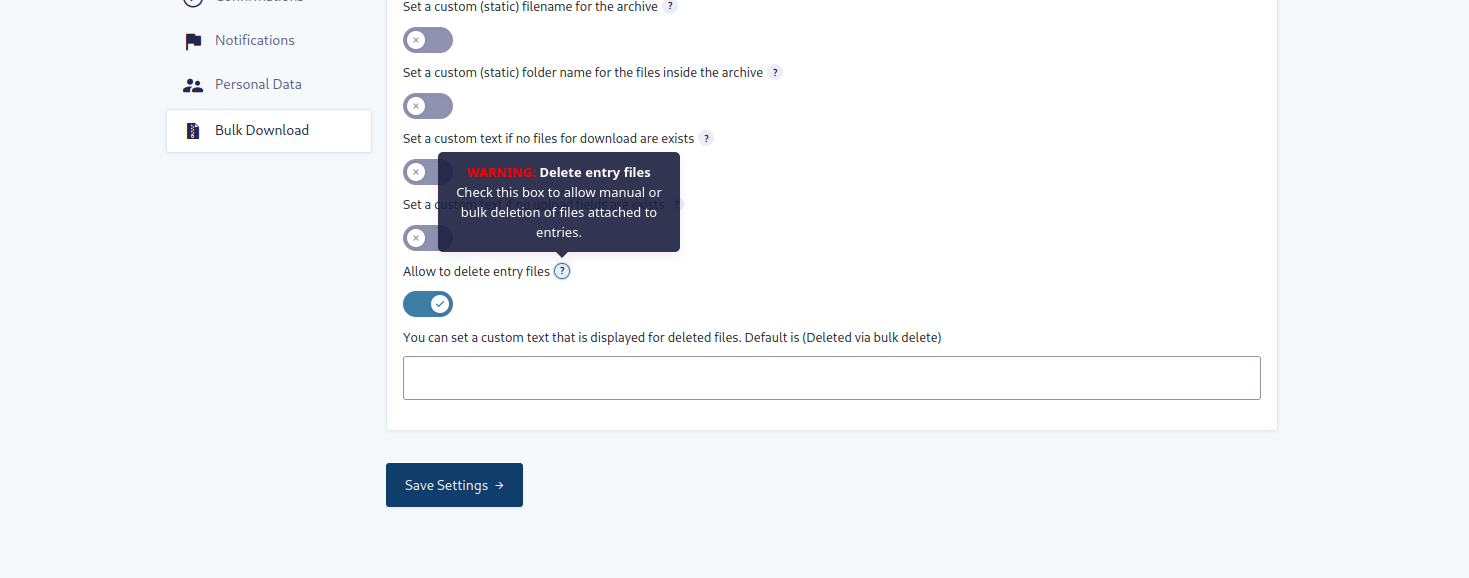
The new settings for bulk deleting entry files
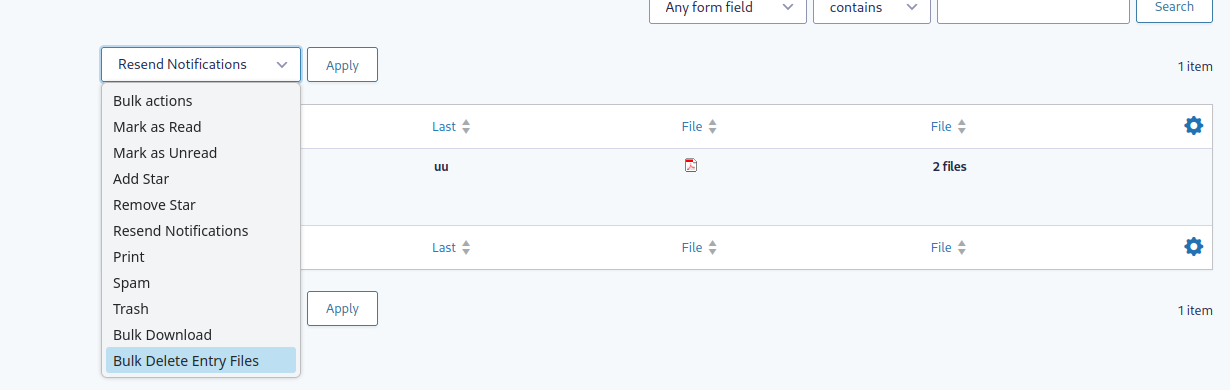
The new bulk action to delete all files from multiple entries in the list view

The Row action to delete all files from an entry in the entry details view

The deleted files are marked in the entries list view with custom text
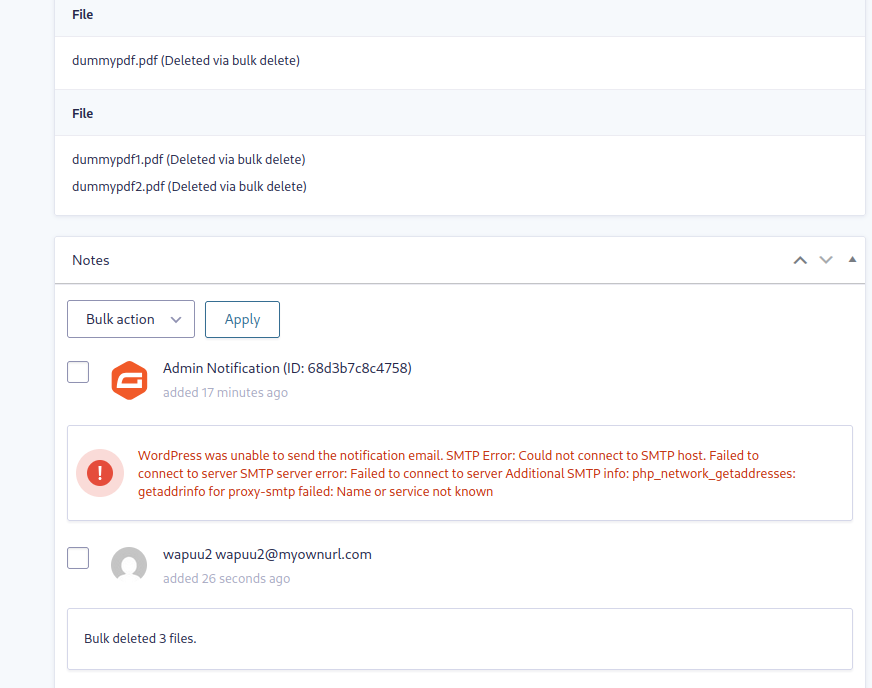
The notice in the entry details view showing who performed the bulk delete action and when and showing the deleted files with custom text
Faq
You can use the settings page from this option to overwrite the zip archive name. In this option you can also use merge tags from your form.
The plugin also offers a filter called bdfgf_download_filename which you can use to change the zip archive name.
You can find an example usage of this filter in a small plugin in a GIST.
You can use the settings page from this option to overwrite the folder name. In this option you can also use merge tags from your form.
The plugin also offers a filter called bdfgf_entry_filename which you can use to change the names.
You can find an example usage of this filter in a small plugin in a GIST.
Issues like these usually occur when your server has too low values for the memory_limit or max_execution_time.
The plugin provides the filters bdfgf_memory_limit and bdfgf_max_execution_time to change these values.
You can find example usage of the memory_limit filter and the max_execution_time filter in the two linked GISTs.
By default only logged in users with the gravityforms_view_entries capability are allowed to download files in bulk. You can use the bdfgf_download_permission filter to expand permission check.
The Plugin provides a filter bdfgf_single_entry_uploaded_files and an action bdfgf_after_uploaded_files to do this. You can add extra files to every single entry or to the whole zip archive beside the entries.
You can find example usage of the bdfgf_single_entry_uploaded_files filter and the bdfgf_after_uploaded_files action in the two linked GISTs.
Reviews
Works great!
By 
I installed this on a client's site and it works great. They were having to download 100+ image attachments individually and this saves tons of time. Very convenient and easy to use.
I did need to add the recommended memory and timeout hooks found in the FAQ section of the plugin page. But once those were added I had no timeouts.
Great Plugin
By 
So easy, so good
By 
Changelog
4.1.0
- Harden upload URL to file path resolution to ensure files are resolved only inside the WordPress uploads directory.
- Validate that selected entries belong to the requested form before download, delete, and AJAX validation.
- Improve AJAX request sanitization for bulk action validation.
- Sanitize ZIP archive names and internal ZIP file paths more strictly.
- Improve bulk delete notes to count only successfully deleted files.
- Improve temporary ZIP cleanup and download header handling.
4.0.0
- Implement new settings for bulk deleting entry files, including a new bulk action and row action
- Display deleted files in the entry details view and entries list view with custom text
- Add a notice in the entry details view showing who performed the bulk delete action and when
- Add validation before performing the bulk delete action to prevent accidental file deletion
- Add a check for the bulk delete action when no files are found for an entry
- Add a check for the bulk download action when no files are found for an entry
- Update some texts and labels
- General improvements
3.2.5
- Fix PHP Deprecation Warning on empty ZipArchive for PHP 8.2 and above
3.2.4
- Remove
Requires Pluginsfrom plugin header because premium plugins are not supported at the moment
3.2.3
- Fix Github actions
3.2.2
- Fix Github actions
- General improvements
3.2.1
- Adding
Requires Pluginsto plugin header for WP 6.5 and above
3.2.0
- Adding a filter
bdfgf_single_entry_uploaded_filesto include extra files to a single or every subfolder inside the zip archive. - Adding an action
bdfgf_after_uploaded_filesto add one or more files into the zip archive after the folder passthrough the merge tags. - Update some filter to the gf_apply_filter function.
- Update to min PHP Version 7.4
3.1.1
- Correct some wording
3.1.0
- Adding 2 new setting fields for the form, which now can customize error messages.
- Fixed errors that could be caused by an incorrectly send header for the zip archive. This sometimes meant that the zip file could not be opened.
- Adding filter for download permission to allow more fine grained permission management for other plugins.
- General improvements
- Fix error message not being triggered when entry id for single entry download is invalid.
- Show error when form not found.
- Do not create an invalid zip file when no files are found.
- Skip entries which could not be retrieved.
3.0.0
- Introducing a settings page per form.
- Adding a setting to overwrite the zip archive file name.
- Adding a setting to overwrite the entry folder names in the zip archive.
2.5.0
- Use the
gf_apply_filters()functions to allow filtering of values based on a form ID
2.4.1
- Restore the vendor folder in the build made by Github actions
2.4.0
- Replace nonce check with a capability check to allow downloads using the mail links in multiple notifications.
2.3.0
- Increase memory_limit to 512M and add filter
bdfgf_memory_limitto allow changes to the value. - Increase max_execution_time to 120 and add filter
bdfgf_max_execution_timeto allow changes to the value. - Add filter
bdfgf_download_filenameto allow changes to the zip archive file name. - Add filter
bdfgf_entry_filenameto allow changes to the entry folder names added to the zip archive.
2.2.0
- Adding a check if the ZIP extension is installed.
- Use shorter labels for download buttons.
2.1.0
- Adding support for the “Select all X entries” link for the bulk action.
- Fixing an issue where zip file was missing some uploaded files.
2.0.0
- Add a bulk action to allow bulk downloads for all files from multiple entries.
1.2.0
- Add custom Gravity Forms merge tag {bulk_download_link} to display a download link in notification mail.
- Also add a “link_text” attribute to the Gravity Form merge tag {bulk_download_link:link_text=”your link text”} to change the default link text.
1.1.0
- Prevent issues when files with empty paths are added to the ZIP file
- Use the sanitized form title for the download file name
1.0.1
- Remove function to load translation files from the plugin directory
1.0.0
- First stable version