Bulk Price Editor for WooCommerce
Bulk Price Editor for WooCommerce
Description
Increase, decrease, remove, or set new prices in one action for unlimited products!
Visit plugin website | Live demo | Documentation | Contact us
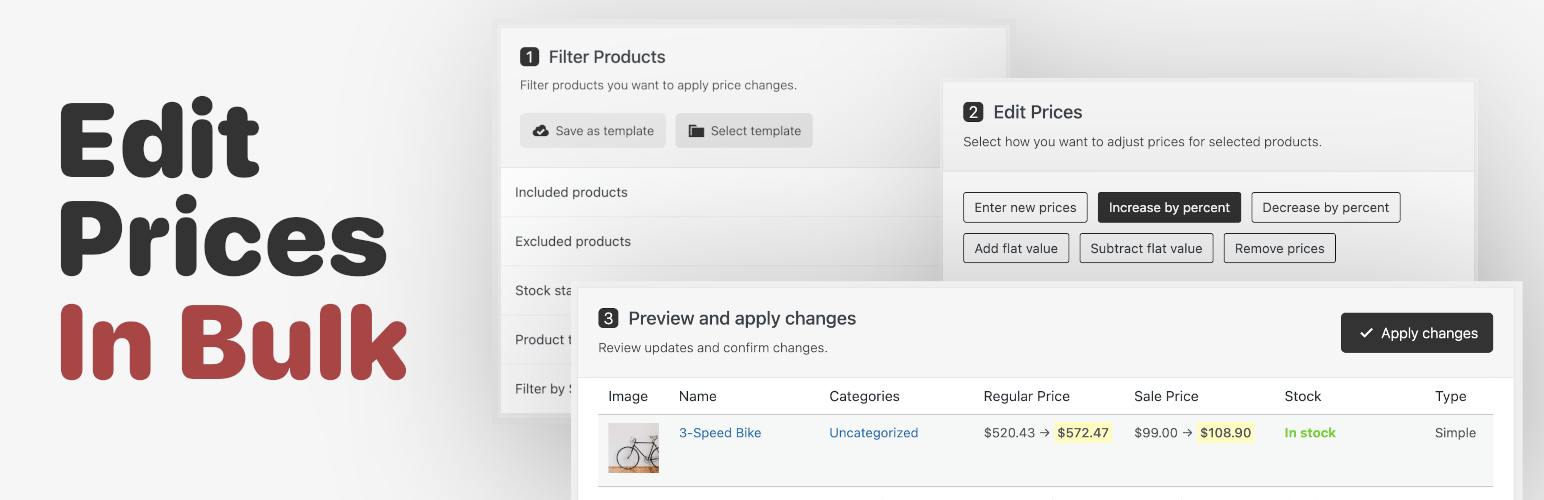
Changing product prices in WooCommerce takes time, especially for big stores. Bulk Price Editor makes it easy to update prices for hundreds or thousands of products at once: filter the right products, choose how to change their prices, preview every change, and apply — the update runs safely in the background.
Want to try it first? Open the live demo — a sandbox store where you can change prices, schedule updates and revert them without installing anything.
💡 Key features:
✅ Filter Products:
✔️ Include or exclude specific products and categories
✔️ Product type (simple, variable, variation, external)
✔️ Price range (regular or sale price between min and max)
✅ Multiple Price Changes:
✔️ Set new prices
✔️ Increase or decrease prices by percentage
✔️ Add or subtract fixed amounts
✔️ Remove prices
✔️ Rounding — decimals or price endings (.00, .90, .95, .99)
✅ See Price Changes Before Applying
The preview table shows every product’s current and new price side by side — nothing is saved until you confirm.
✅ Update Unlimited Products at Once
Updates are processed in the background in chunks via Action Scheduler, so there is no limit and no server overload.
✅ Reusable Filter Templates
Save any filter set as a template and re-apply it for recurring price updates in one click.
🚀 Go further with Premium:
✔️ Update by formula — calculate prices per product with {regular_price}, {sale_price}, {price}, and {cost} variables, e.g. {regular_price} * 0.8, with min()/max() for price floors and caps
✔️ Sale price adjustments by percentage or flat amount
✔️ Filter by SKU and product name
✔️ Filter by stock, sale, and featured status
✔️ Filter by brands, tags, and shipping classes
✔️ Filter by product attributes
✔️ Filter by date added or modified
🔌 Integrations: works with the Tiered Pricing Table plugin — create, update, or remove quantity discounts across the catalog in one action.
The plugin is fully compatible with HPOS, the block-based cart & checkout, and the new product editor. Every price change goes through the official WooCommerce API, so caches and lookup tables stay in sync.
Installation
- Upload the plugin files to the
/wp-content/plugins/bulk-price-editor-for-woocommercedirectory, or install the plugin directly through the WordPress plugins screen. - Activate the plugin through the ‘Plugins’ screen in WordPress. WooCommerce must be installed and active.
- Go to WooCommerce Bulk Price Editor to use the plugin.
Screenshots

The editor: filter the products and choose how to change their prices

Preview every change before applying — current and new prices side by side, with a CSV export of the preview

Advanced options: round results to price endings and set or clear WooCommerce sale dates in bulk (sale dates: premium)

Apply now or schedule the update for later, with an optional automatic revert (premium)

History: every update keeps a snapshot of the previous prices — download it as CSV or revert it in one click (revert: premium)

Scheduled updates with their start time and automatic revert (premium)

Price change tracking: who changed a product's price, when and from where, right on the product edit screen

Save the filters and the price change together as a reusable job template
Faq
Yes! Bulk Price Editor allows you to update prices for simple and variable products. You can target individual variations directly, or select a variable product and the plugin will update every variation automatically.
Yes — the premium “Update by formula” method calculates prices per product: entering {regular_price} * 0.8 in the sale price field gives each product a sale price at 80% of its own regular price, including products that had no sale price before.
No. The plugin works with chunks of 100 products, ensuring smooth performance and preventing server overload, even when updating thousands of products at once.
The plugin does not have an undo feature, but since you can preview price changes before confirming them, you can ensure everything looks right before applying updates. For large updates we recommend a quick database backup first.
There is no limit! Thanks to Action Scheduler, the plugin can process bulk updates for an unlimited number of products efficiently.
No. Only the regular and sale prices you target are updated (and tiered price rules, if you use the Tiered Pricing integration).
Reviews
Works Well
By 
Easy to use, works well and very fast
Changelog
2.5.1 [2026-10-11]
- Fix: The Product Attributes filter now matches product variations (a variation keeps its attribute value in meta rather than as a term, so it was never found)
2.5.0 [2026-09-01]
- New: Update history: every bulk update stores a snapshot of the previous prices, with a History tab, per-run CSV download and one-click revert (revert is premium)
- New: Schedule price updates for a future date and time, with optional automatic revert — run a sale that starts and ends on its own (premium)
- New: Set or clear WooCommerce sale dates in bulk on all price modifiers (premium)
- New: Price change tracking: every product price change — manual, import, API or bulk update — is recorded with its source and user, available from a “Price history” link next to the price fields on the product edit screen (can be turned off in the new Settings tab)
- New: Templates can store the price modification too, becoming complete reusable jobs
- New: Export the price preview as CSV (current vs. new prices)
- New: WP-CLI commands: wp bulk-price-editor run / revert / history / templates
- Update: Reworked background processing: chunks are stored in Action Scheduler, progress counts after the work is done, and interrupted chunks can no longer double-apply percentage changes
- Update: Notifications are per-admin; category filters now match variations of variable products; including products AND categories selects their union
- Fix: Product title search treats % and _ literally; values of 0 are accepted; assorted markup, translation and pagination fixes
2.4.0 [2026-09-01]
- New: “Update by formula” price modifier (premium): calculate prices with {regular_price}, {sale_price}, {price} and {cost} variables, arithmetic and min()/max() for price floors and caps
- New: Rounding option for all price modifiers: decimals or price endings (.00 / .90 / .95 / .99)
- New: Filter by price range (regular or sale price)
- New: Filter by tags and shipping classes (premium)
- New: Filter by sale status and featured products (premium)
- New: Filter by date added or date modified (premium)
- Update: Stock, sale and featured filters combined into one Product Status section
- Update: Minor UI improvements
- Update: WordPress compatibility
2.3.0 [2026-08-31]
- New: Filter products by brands
- New: WordPress admin notices are no longer shown on the editor page
- Fix: Bulk update with no matching products could affect all products
- Fix: Product variations were updated twice when scheduled together with their variable parent
- Fix: A second bulk update could be started while another one was still running
- Fix: Filter by product name
- Fix: Tiered Pricing integration form controls did not respond
- Update: Security hardening and multiple stability fixes
- Update: WordPress & WooCommerce compatibility
2.2.0 [2026-04-05]
- Fix: Saving a pricing template
- Fix: Filter: Excluding products
- Update: Freemius SDK to the latest version
- Update: WordPress & WooCommerce compatibility
2.1.0 [2025-12-04]
- New: Update integration with tiered pricing plugin allowing updating tiered prices by a percentage.
- Update: Freemius SDK to the latest version
- Update: WordPress & WooCommerce compatibility
2.0.0 [2025-05-12]
- New: Added premium version
- New: Added support for various filters
- New: Tiered pricing support
1.0.0 [2025-02-25]
- Initial Release